Development Workflow
BY SANKAR
1
What is Git & Why Git?
 Git is widely used distributed version control system in the world today
 Git is a mature, actively maintained open source project
 Git has been designed with performance, security and flexibility in mind.
 It’s distributed
 Branching and merging actions are extremely cheap and simple
 Enough about the tools, let’s head onto the development model
2
Structure of Repository
&
Work flow
3
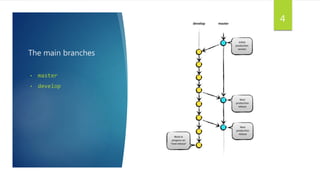
The main branches
• master
• develop
4
Master Branch
We consider origin/master to be the main branch where the source
code of HEAD always reflects a production-ready state.
5
Develop Branch
We consider origin/develop to be the main branch where the
source code of HEAD always reflects a state with the latest delivered
development changes for the next release. Also called "integration
branch“.
6
Supporting branches
The different types of branches we may use are:
 Feature branches
 Release branches
 Hotfix branches
7
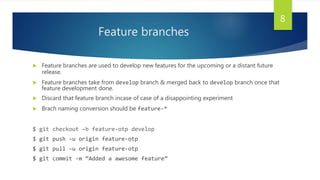
Feature branches
 Feature branches are used to develop new features for the upcoming or a distant future
release.
 Feature branches take from develop branch & merged back to develop branch once that
feature development done.
 Discard that feature branch incase of case of a disappointing experiment
 Brach naming conversion should be feature-*
$ git checkout -b feature-otp develop
$ git push –u origin feature-otp
$ git pull –u origin feature-otp
$ git commit -m “Added a awesome feature”
8
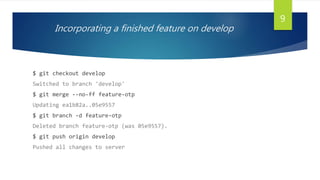
Incorporating a finished feature on develop
$ git checkout develop
Switched to branch 'develop'
$ git merge --no-ff feature-otp
Updating ea1b82a..05e9557
$ git branch -d feature-otp
Deleted branch feature-otp (was 05e9557).
$ git push origin develop
Pushed all changes to server
9
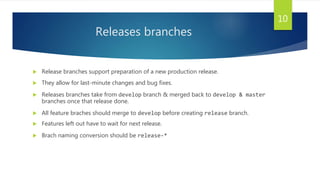
Releases branches
 Release branches support preparation of a new production release.
 They allow for last-minute changes and bug fixes.
 Releases branches take from develop branch & merged back to develop & master
branches once that release done.
 All feature braches should merge to develop before creating release branch.
 Features left out have to wait for next release.
 Brach naming conversion should be release-*
10
Workflow of release branch
$ git checkout -b release-1.2 develop
Switched to a new branch "release-1.2“
$ git commit –m “release changes done”
$ git checkout master
$ git merge --no-ff release-1.2
Merge made by recursive without fast-formard.
$ git tag -a 1.2
Tag the release
$ git push origin master
11
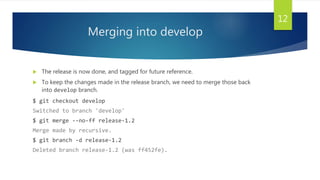
Merging into develop
 The release is now done, and tagged for future reference.
 To keep the changes made in the release branch, we need to merge those back
into develop branch.
$ git checkout develop
Switched to branch 'develop'
$ git merge --no-ff release-1.2
Merge made by recursive.
$ git branch -d release-1.2
Deleted branch release-1.2 (was ff452fe).
12
Hotfix branches
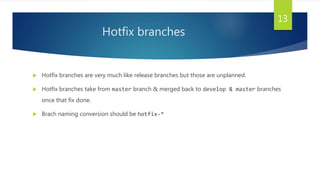
 Hotfix branches are very much like release branches but those are unplanned.
 Hotfix branches take from master branch & merged back to develop & master branches
once that fix done.
 Brach naming conversion should be hotfix-*
13
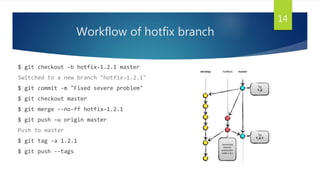
Workflow of hotfix branch
$ git checkout -b hotfix-1.2.1 master
Switched to a new branch "hotfix-1.2.1"
$ git commit -m "Fixed severe problem"
$ git checkout master
$ git merge --no-ff hotfix-1.2.1
$ git push –u origin master
Push to master
$ git tag -a 1.2.1
$ git push --tags
14
Merging to develop
Once fixes merged into master merge into develop to carry fixes to next release.
$ git checkout develop
Switched to branch 'develop'
$ git merge --no-ff hotfix-1.2.1
Merge made by recursive.
$ git push origin develop
$ git branch -d hotfix-1.2.1
15
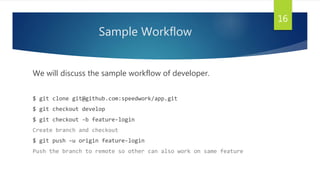
Sample Workflow
We will discuss the sample workflow of developer.
$ git clone git@github.com:speedwork/app.git
$ git checkout develop
$ git checkout -b feature-login
Create branch and checkout
$ git push –u origin feature-login
Push the branch to remote so other can also work on same feature
16
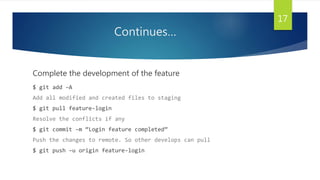
Continues…
Complete the development of the feature
$ git add –A
Add all modified and created files to staging
$ git pull feature-login
Resolve the conflicts if any
$ git commit –m “Login feature completed”
Push the changes to remote. So other develops can pull
$ git push –u origin feature-login
17
Continues…
Fix any bugs reported
$ git add –A
$ git pull feature-login
$ git commit –m “Fixed bug #20,24”
Push the finial changes to remote
$ git push –u origin feature-login
18
Continues…
Get it reviewed by the reviewed by reviewer
Reviewer will merge the commit to develop if every thing ok else fix the issues
$ git checkout develop
$ git pull –u origin develop
$ git branch –d feature-login
Delete the branch once merged by the reviewer, we no longer needed
19
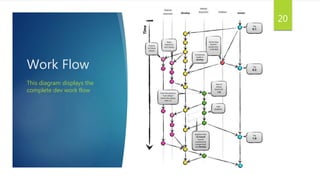
Work Flow
This diagram displays the
complete dev work flow
20
Thumb Rules
 Always use git pull before commit
 Git the git status to know the status of project
 Always check which branch you are in before making changes
 Don’t commit or make changes to master or develop branch
 Always send pull requests to develop branch for further review
21
Tools Required in workflow
 Git & TortoiseGit
 XAMPP/212/Vagrant
 Composer
 Node.js with bower
 Separate folder for you in Projects(246)/Local
 Separate domain for each project pointing your working directory
22
Thank you… QUESTIONS?
23

Git development workflow

  • 1.
  • 2.
    What is Git& Why Git?  Git is widely used distributed version control system in the world today  Git is a mature, actively maintained open source project  Git has been designed with performance, security and flexibility in mind.  It’s distributed  Branching and merging actions are extremely cheap and simple  Enough about the tools, let’s head onto the development model 2
  • 3.
  • 4.
    The main branches •master • develop 4
  • 5.
    Master Branch We considerorigin/master to be the main branch where the source code of HEAD always reflects a production-ready state. 5
  • 6.
    Develop Branch We considerorigin/develop to be the main branch where the source code of HEAD always reflects a state with the latest delivered development changes for the next release. Also called "integration branch“. 6
  • 7.
    Supporting branches The differenttypes of branches we may use are:  Feature branches  Release branches  Hotfix branches 7
  • 8.
    Feature branches  Featurebranches are used to develop new features for the upcoming or a distant future release.  Feature branches take from develop branch & merged back to develop branch once that feature development done.  Discard that feature branch incase of case of a disappointing experiment  Brach naming conversion should be feature-* $ git checkout -b feature-otp develop $ git push –u origin feature-otp $ git pull –u origin feature-otp $ git commit -m “Added a awesome feature” 8
  • 9.
    Incorporating a finishedfeature on develop $ git checkout develop Switched to branch 'develop' $ git merge --no-ff feature-otp Updating ea1b82a..05e9557 $ git branch -d feature-otp Deleted branch feature-otp (was 05e9557). $ git push origin develop Pushed all changes to server 9
  • 10.
    Releases branches  Releasebranches support preparation of a new production release.  They allow for last-minute changes and bug fixes.  Releases branches take from develop branch & merged back to develop & master branches once that release done.  All feature braches should merge to develop before creating release branch.  Features left out have to wait for next release.  Brach naming conversion should be release-* 10
  • 11.
    Workflow of releasebranch $ git checkout -b release-1.2 develop Switched to a new branch "release-1.2“ $ git commit –m “release changes done” $ git checkout master $ git merge --no-ff release-1.2 Merge made by recursive without fast-formard. $ git tag -a 1.2 Tag the release $ git push origin master 11
  • 12.
    Merging into develop The release is now done, and tagged for future reference.  To keep the changes made in the release branch, we need to merge those back into develop branch. $ git checkout develop Switched to branch 'develop' $ git merge --no-ff release-1.2 Merge made by recursive. $ git branch -d release-1.2 Deleted branch release-1.2 (was ff452fe). 12
  • 13.
    Hotfix branches  Hotfixbranches are very much like release branches but those are unplanned.  Hotfix branches take from master branch & merged back to develop & master branches once that fix done.  Brach naming conversion should be hotfix-* 13
  • 14.
    Workflow of hotfixbranch $ git checkout -b hotfix-1.2.1 master Switched to a new branch "hotfix-1.2.1" $ git commit -m "Fixed severe problem" $ git checkout master $ git merge --no-ff hotfix-1.2.1 $ git push –u origin master Push to master $ git tag -a 1.2.1 $ git push --tags 14
  • 15.
    Merging to develop Oncefixes merged into master merge into develop to carry fixes to next release. $ git checkout develop Switched to branch 'develop' $ git merge --no-ff hotfix-1.2.1 Merge made by recursive. $ git push origin develop $ git branch -d hotfix-1.2.1 15
  • 16.
    Sample Workflow We willdiscuss the sample workflow of developer. $ git clone git@github.com:speedwork/app.git $ git checkout develop $ git checkout -b feature-login Create branch and checkout $ git push –u origin feature-login Push the branch to remote so other can also work on same feature 16
  • 17.
    Continues… Complete the developmentof the feature $ git add –A Add all modified and created files to staging $ git pull feature-login Resolve the conflicts if any $ git commit –m “Login feature completed” Push the changes to remote. So other develops can pull $ git push –u origin feature-login 17
  • 18.
    Continues… Fix any bugsreported $ git add –A $ git pull feature-login $ git commit –m “Fixed bug #20,24” Push the finial changes to remote $ git push –u origin feature-login 18
  • 19.
    Continues… Get it reviewedby the reviewed by reviewer Reviewer will merge the commit to develop if every thing ok else fix the issues $ git checkout develop $ git pull –u origin develop $ git branch –d feature-login Delete the branch once merged by the reviewer, we no longer needed 19
  • 20.
    Work Flow This diagramdisplays the complete dev work flow 20
  • 21.
    Thumb Rules  Alwaysuse git pull before commit  Git the git status to know the status of project  Always check which branch you are in before making changes  Don’t commit or make changes to master or develop branch  Always send pull requests to develop branch for further review 21
  • 22.
    Tools Required inworkflow  Git & TortoiseGit  XAMPP/212/Vagrant  Composer  Node.js with bower  Separate folder for you in Projects(246)/Local  Separate domain for each project pointing your working directory 22
  • 23.