Become a Social Media
Expert in 60 Minutes
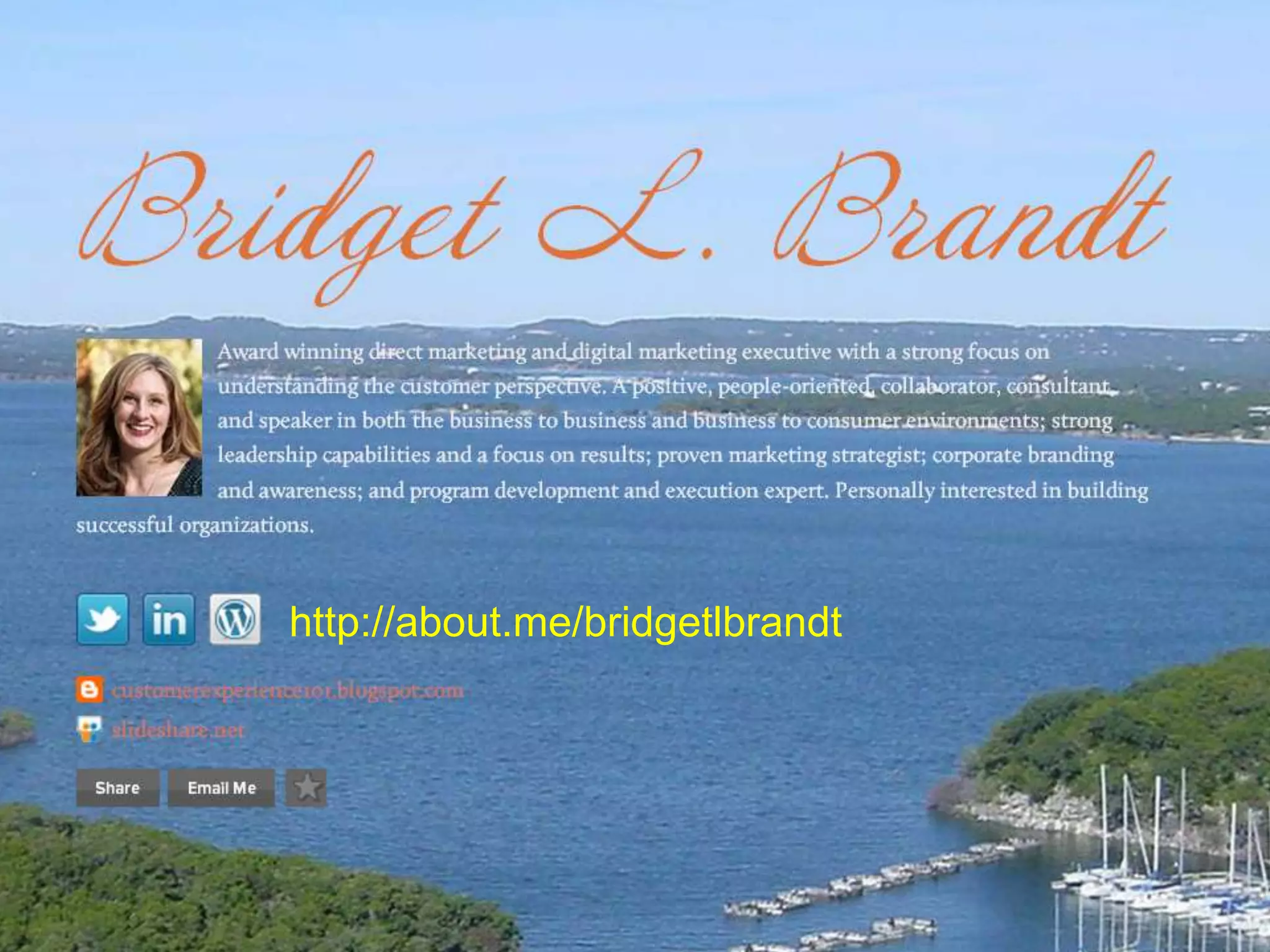
Bridget L. Brandt
Director of Marketing
http://about.me/bridgetlbrandt


                  2
Agenda
•   Goals For Social Media
•   Why We Do It
•   How to Be Social
•   Listening for Leads In Social Media
    –   Linked In
    –   Twitter
    –   Facebook
    –   Pintrest
    –   HootSuite
    –   Links
• Real World—Tips, Tricks, & Q/A

                             3
Goals
• Build social presence and community network online: increasing
  brand awareness.
• Research and learn more about our donors, potential donors,
  competitors, influencers, and other thought leaders.
• Listen to conversations and identify emerging trends.
• Generate positive word of mouth and monitor our reputation.
• Engage. Contributing and sparking conversations about your
  nonprofit, gaining donor confidence.
• Drive online audience to relevant, quality content: increasing
  visitor traffic, generating more leads and increasing donations.


                                 4
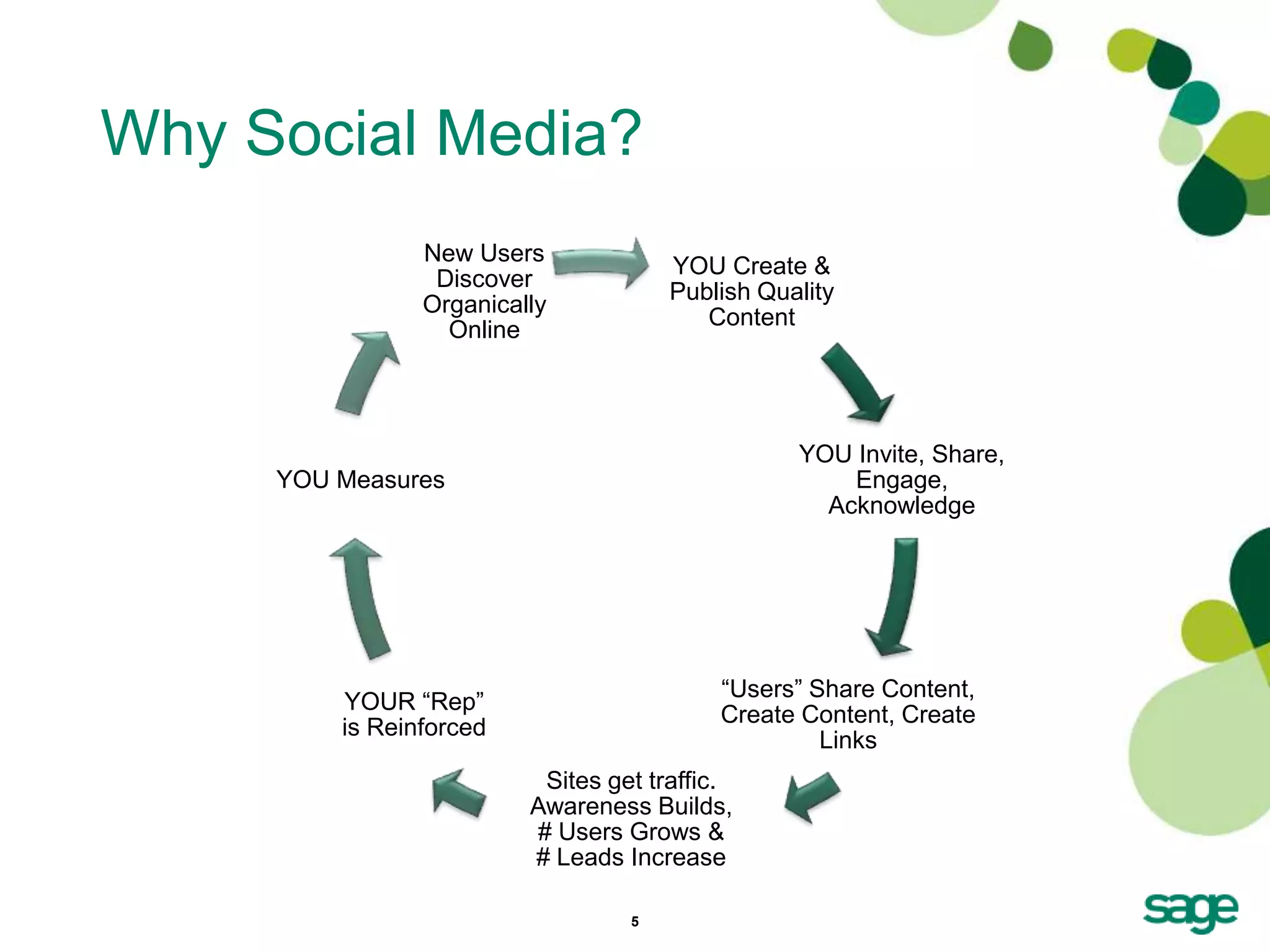
Why Social Media?
                New Users
                                      YOU Create &
                 Discover
                                      Publish Quality
                Organically
                                         Content
                  Online


                                                 YOU Invite, Share,
     YOU Measures                                    Engage,
                                                   Acknowledge


                                          ―Users‖ Share Content,
         YOUR ―Rep‖
                                          Create Content, Create
         is Reinforced
                                                   Links
                          Sites get traffic.
                         Awareness Builds,
                         # Users Grows &
                         # Leads Increase

                                  5
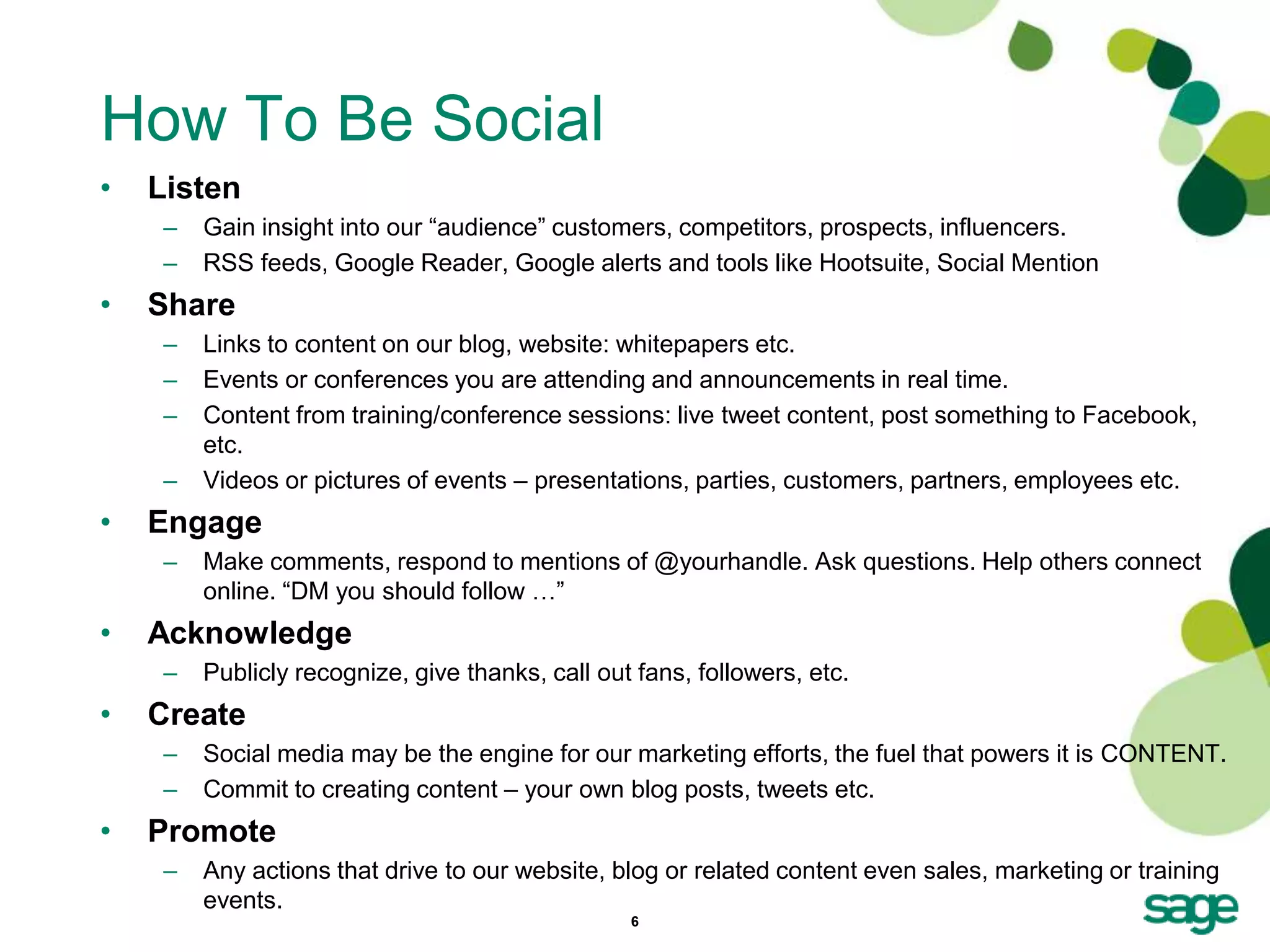
How To Be Social
•   Listen
     –   Gain insight into our ―audience‖ customers, competitors, prospects, influencers.
     –   RSS feeds, Google Reader, Google alerts and tools like Hootsuite, Social Mention
•   Share
     –   Links to content on our blog, website: whitepapers etc.
     –   Events or conferences you are attending and announcements in real time.
     –   Content from training/conference sessions: live tweet content, post something to Facebook,
         etc.
     –   Videos or pictures of events – presentations, parties, customers, partners, employees etc.
•   Engage
     –   Make comments, respond to mentions of @yourhandle. Ask questions. Help others connect
         online. ―DM you should follow …‖
•   Acknowledge
     –   Publicly recognize, give thanks, call out fans, followers, etc.
•   Create
     –   Social media may be the engine for our marketing efforts, the fuel that powers it is CONTENT.
     –   Commit to creating content – your own blog posts, tweets etc.
•   Promote
     –   Any actions that drive to our website, blog or related content even sales, marketing or training
         events.
                                                  6
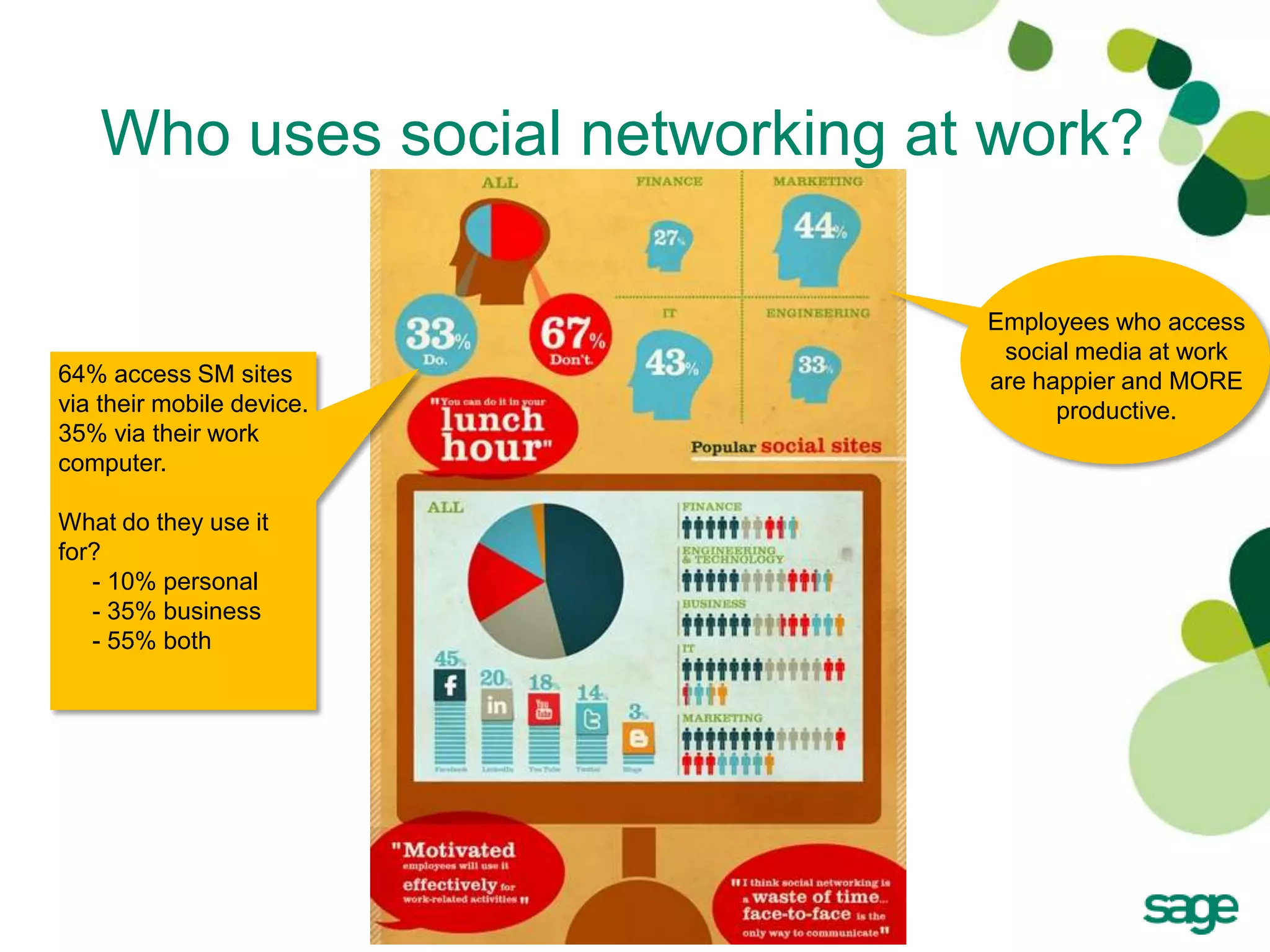
Who uses social networking at work?

                                 Employees who access
                                  social media at work
64% access SM sites              are happier and MORE
via their mobile device.               productive.
35% via their work
computer.

What do they use it
for?
   - 10% personal
   - 35% business
   - 55% both


                           7
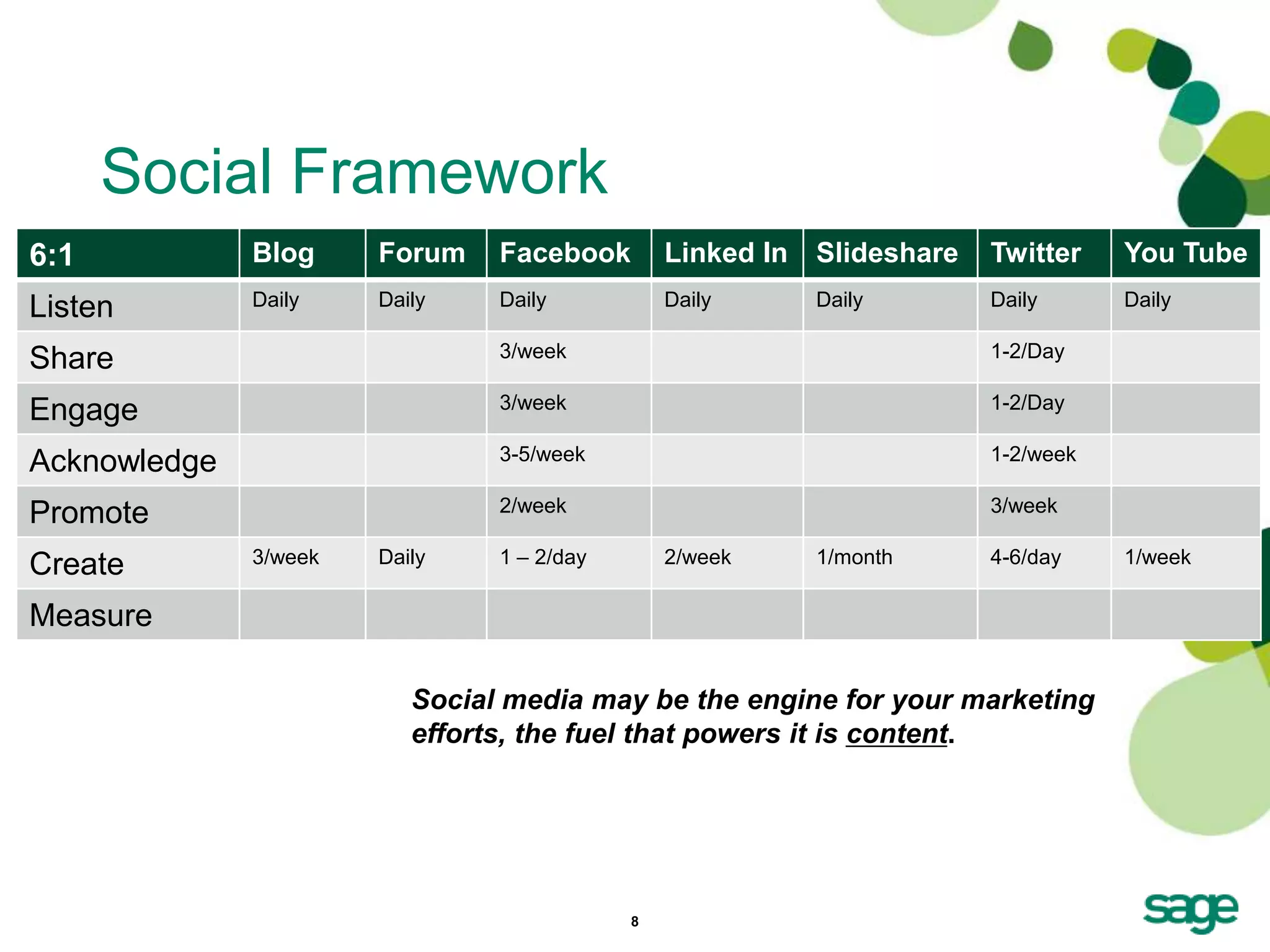
Social Framework
6:1           Blog     Forum    Facebook        Linked In   Slideshare   Twitter    You Tube
Listen        Daily    Daily    Daily           Daily       Daily        Daily      Daily

Share                           3/week                                   1-2/Day

Engage                          3/week                                   1-2/Day

Acknowledge                     3-5/week                                 1-2/week

Promote                         2/week                                   3/week

Create        3/week   Daily    1 – 2/day       2/week      1/month      4-6/day    1/week

Measure

                          Social media may be the engine for your marketing
                          efforts, the fuel that powers it is content.


                                            8
Nearly 2/3 of US Internet users

Be Consistent with naming                             regularly use a social network.
                                                      Source: Hubspot, 12/11


• Examples online.
   –   Like us on Facebook – www.facebook.com/SageNonprofit
   –   Join the discussion in our group on LinkedIn.
   –   Find content on www.slideshare.net/SageNonprofit
   –   Follow us on Twitter – www.twitter.com/SageNonprofit
   –   Watch and follow on You Tube - SageNonprofit
   –   Participate in the community forums and visit our blog
       http://www.SageWords.net.


          When you begin to build out your own social networks, a
          best practice is to be consistent with your user names.


                                    9
Linked In


            10
About Linked In
• Linked In promotes itself as the world’s largest
  professional network. You can use it to manage your
  professional identity, grow your professional network,
  tap into new insights and opportunities and learn by
  joining, listening and contributing to the discussions
  taking place on Linked In Groups.
• Before you join groups, be sure your profile is
  complete.


                            11
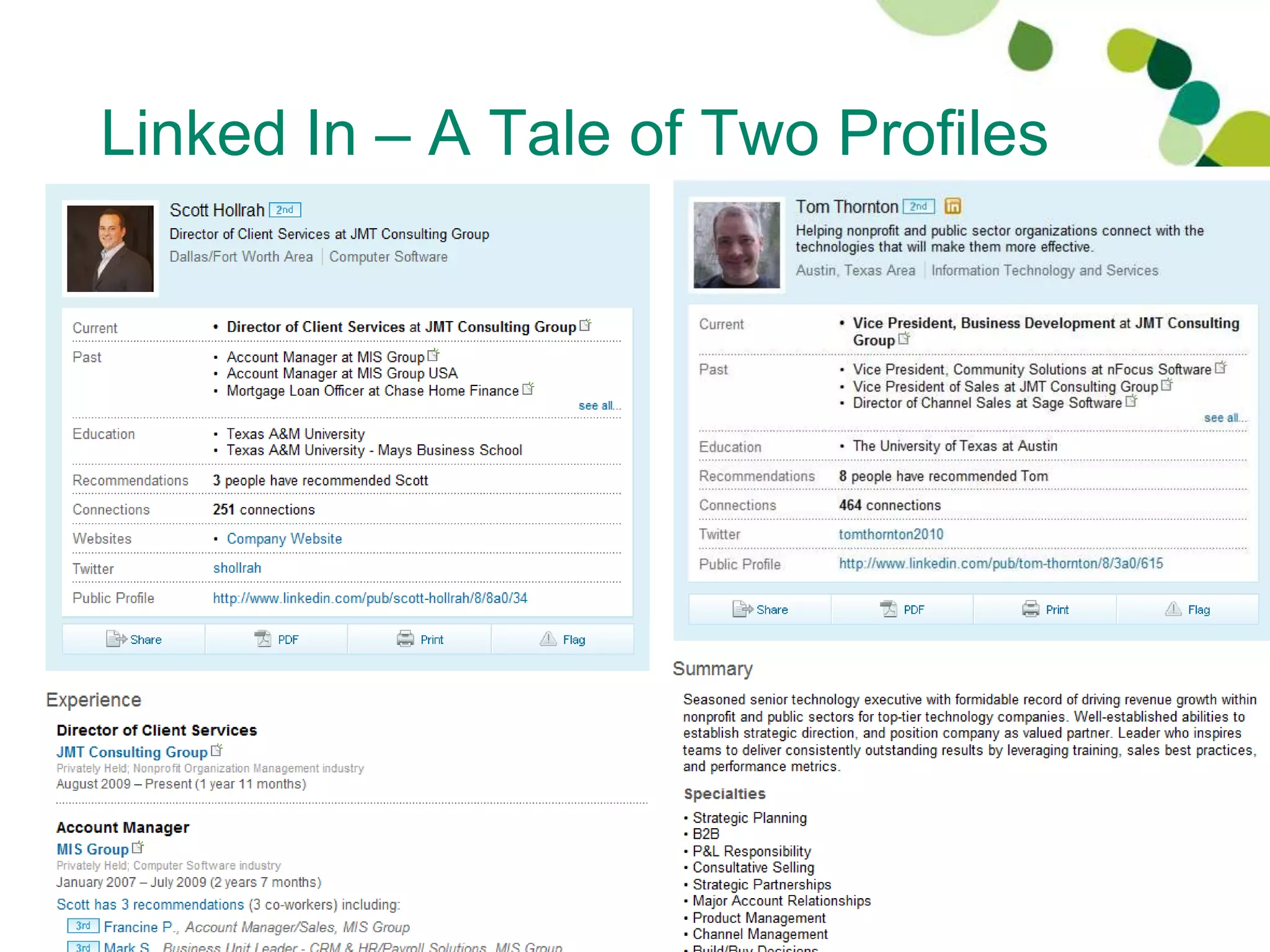
Linked In – A Tale of Two Profiles


                  12
Linked In Tips – Your Profile
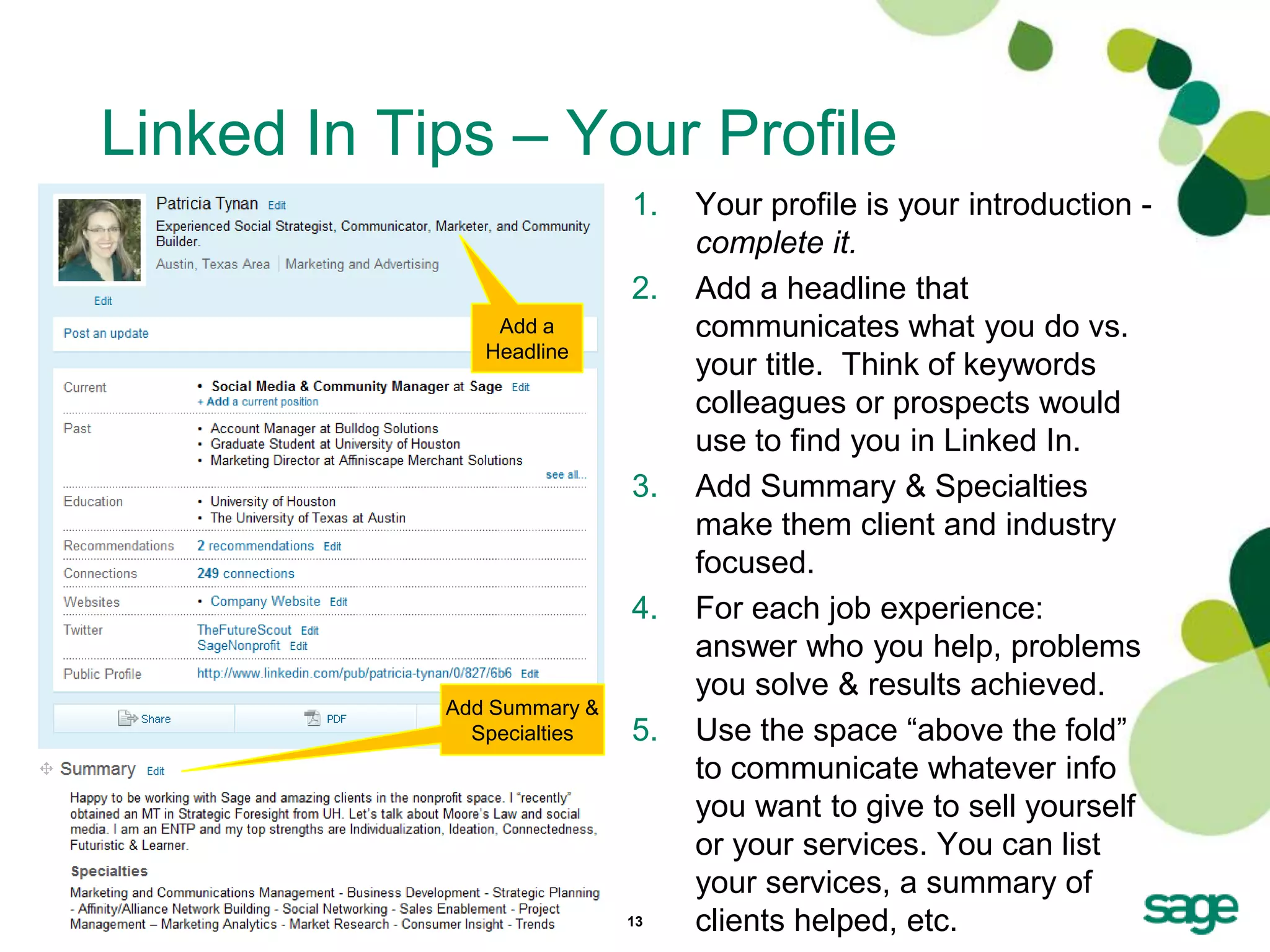
                            1.   Your profile is your introduction -
                                 complete it.
                            2.   Add a headline that
                Add a            communicates what you do vs.
               Headline
                                 your title. Think of keywords
                                 colleagues or prospects would
                                 use to find you in Linked In.
                            3.   Add Summary & Specialties
                                 make them client and industry
                                 focused.
                            4.   For each job experience:
                                 answer who you help, problems
                                 you solve & results achieved.
            Add Summary &
              Specialties   5.   Use the space ―above the fold‖
                                 to communicate whatever info
                                 you want to give to sell yourself
                                 or your services. You can list
                                 your services, a summary of
                            13   clients helped, etc.
Linked In Tips – Use Status Updates
• Just below your name and headline where it says
  ―Post an Update‖ enter in your status.
• Remind your contacts of what you do. Could be as
  simple as: ―Attending Summit conference this week.
  See you there!‖
• Listen and keep up with contacts. Read status
  updates to initiate contact. Linked In let’s you know if
  your contacts have changed jobs or if they are
  beginning a new adventure.
• Comment on status even if it’s as simple as
  ―Congratulations on your new job with Save the
  Snails, etc‖
                             14
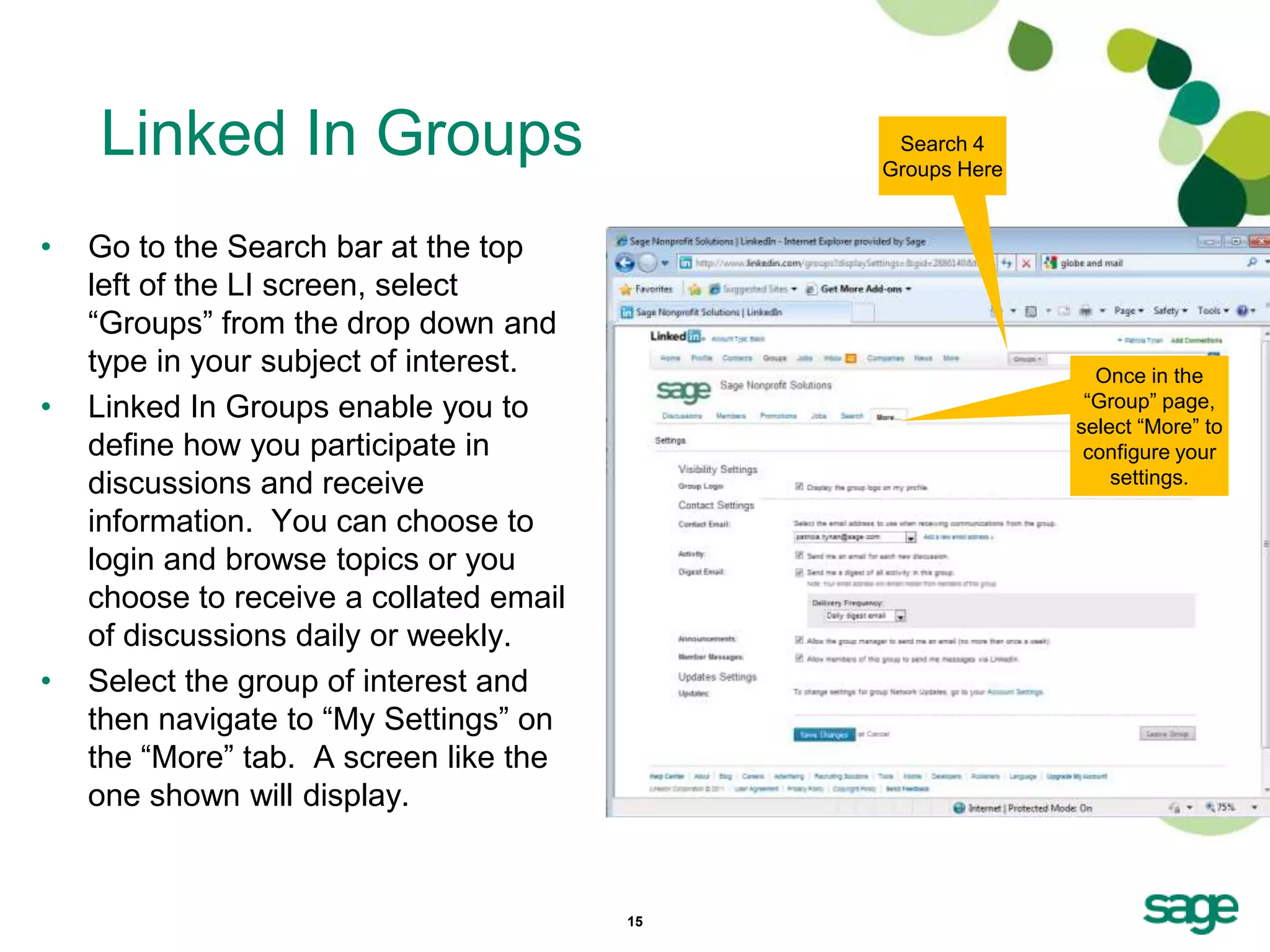
Linked In Groups                           Search 4
                                              Groups Here


•   Go to the Search bar at the top
    left of the LI screen, select
    ―Groups‖ from the drop down and
    type in your subject of interest.                         Once in the
•   Linked In Groups enable you to                           ―Group‖ page,
                                                            select ―More‖ to
    define how you participate in                            configure your
    discussions and receive                                     settings.

    information. You can choose to
    login and browse topics or you
    choose to receive a collated email
    of discussions daily or weekly.
•   Select the group of interest and
    then navigate to ―My Settings‖ on
    the ―More‖ tab. A screen like the
    one shown will display.


                                         15
Twitter


          16
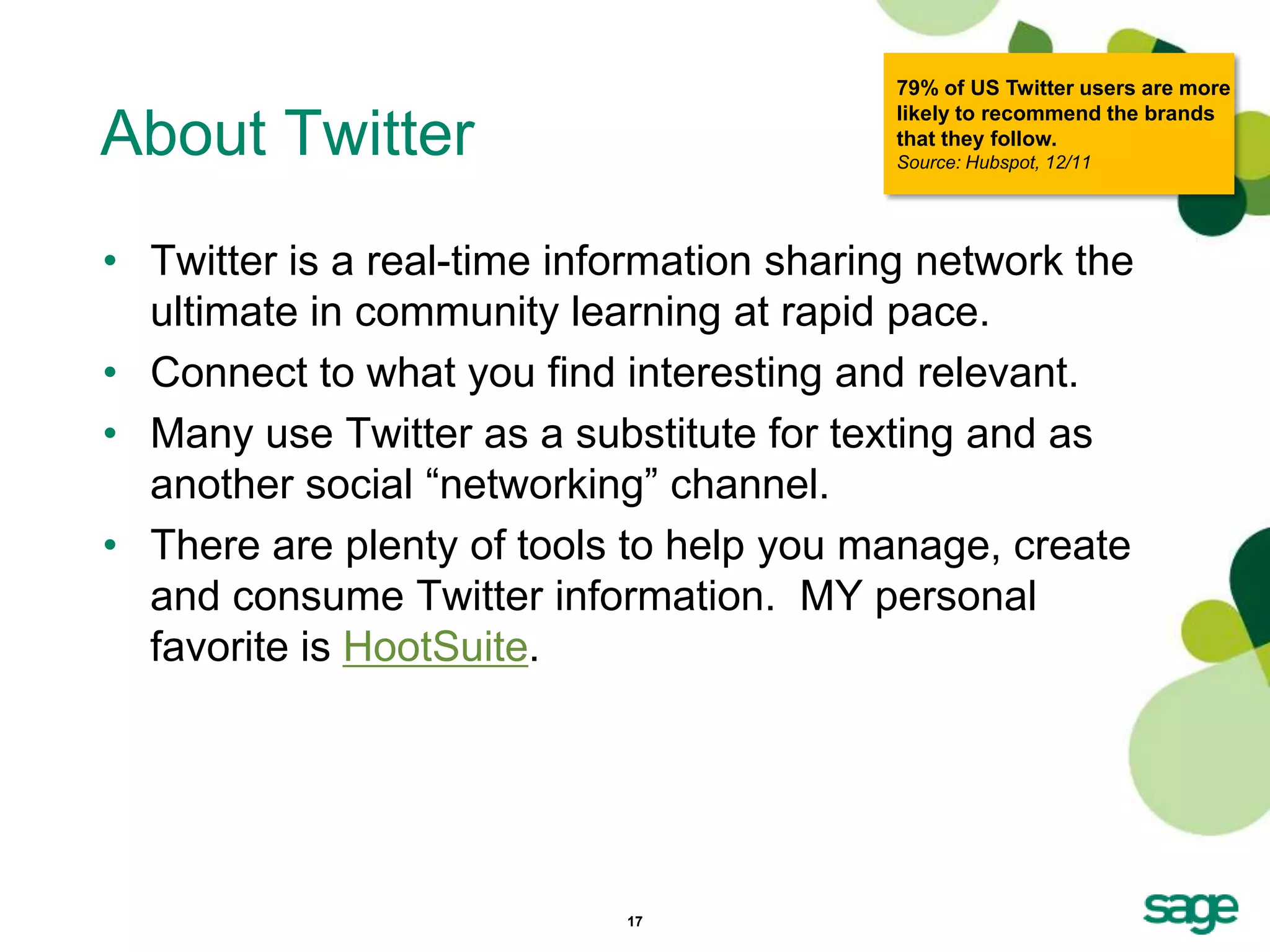
79% of US Twitter users are more
                                           likely to recommend the brands
About Twitter                              that they follow.
                                           Source: Hubspot, 12/11


• Twitter is a real-time information sharing network the
  ultimate in community learning at rapid pace.
• Connect to what you find interesting and relevant.
• Many use Twitter as a substitute for texting and as
  another social ―networking‖ channel.
• There are plenty of tools to help you manage, create
  and consume Twitter information. MY personal
  favorite is HootSuite.


                            17
More than 1/2 of active Twitter
                                                   users follow companies, brands,
Twitter Tips                                       or products on social networks.
                                                   Source: Hubspot, 12/11


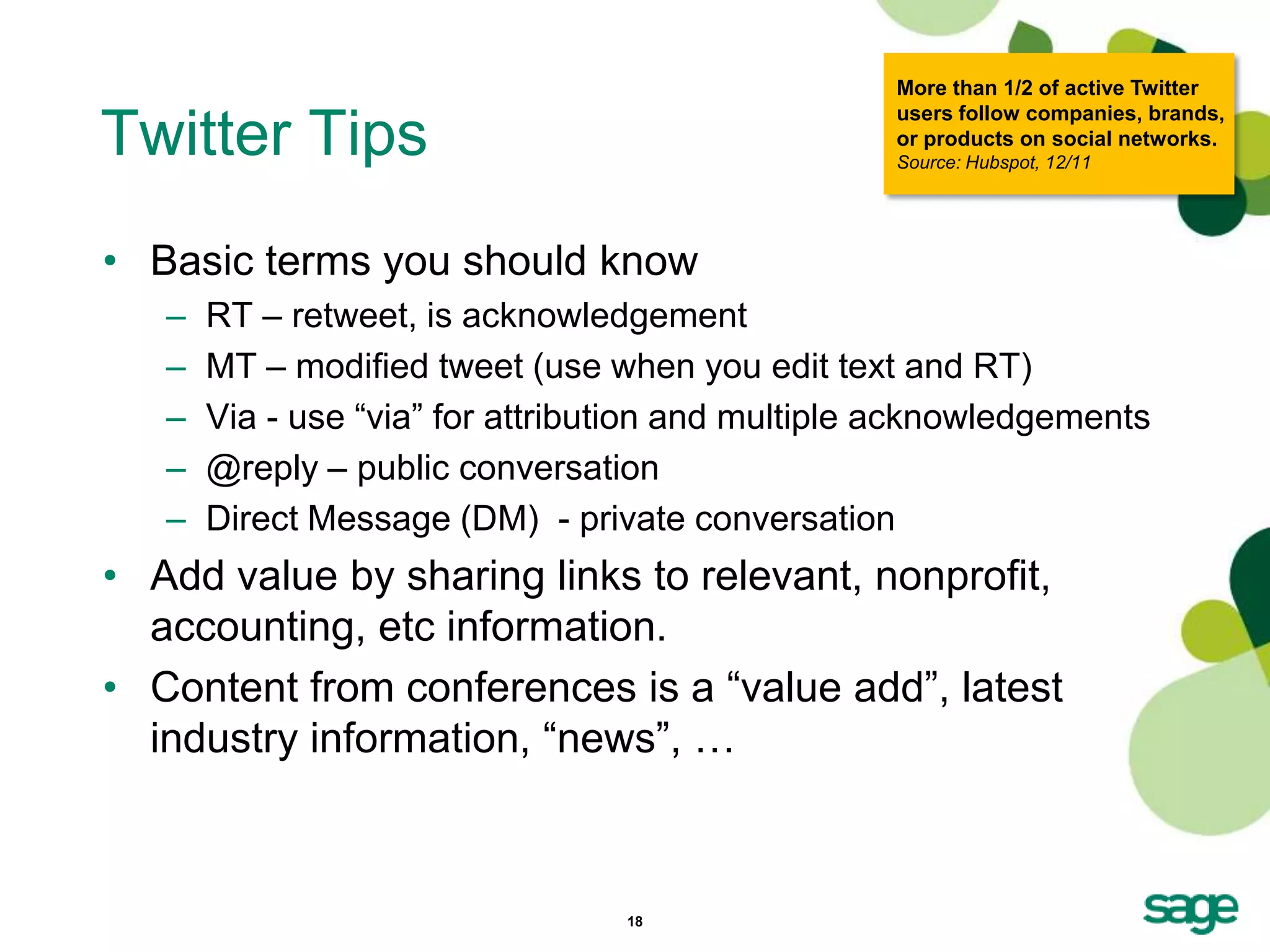
• Basic terms you should know
   –   RT – retweet, is acknowledgement
   –   MT – modified tweet (use when you edit text and RT)
   –   Via - use ―via‖ for attribution and multiple acknowledgements
   –   @reply – public conversation
   –   Direct Message (DM) - private conversation
• Add value by sharing links to relevant, nonprofit,
  accounting, etc information.
• Content from conferences is a ―value add‖, latest
  industry information, ―news‖, …


                                  18
39% of B2B companies using
                                    Twitter have acquired new
Twitter Tips                        customers from it.
                                    Source: Hubspot, 12/11


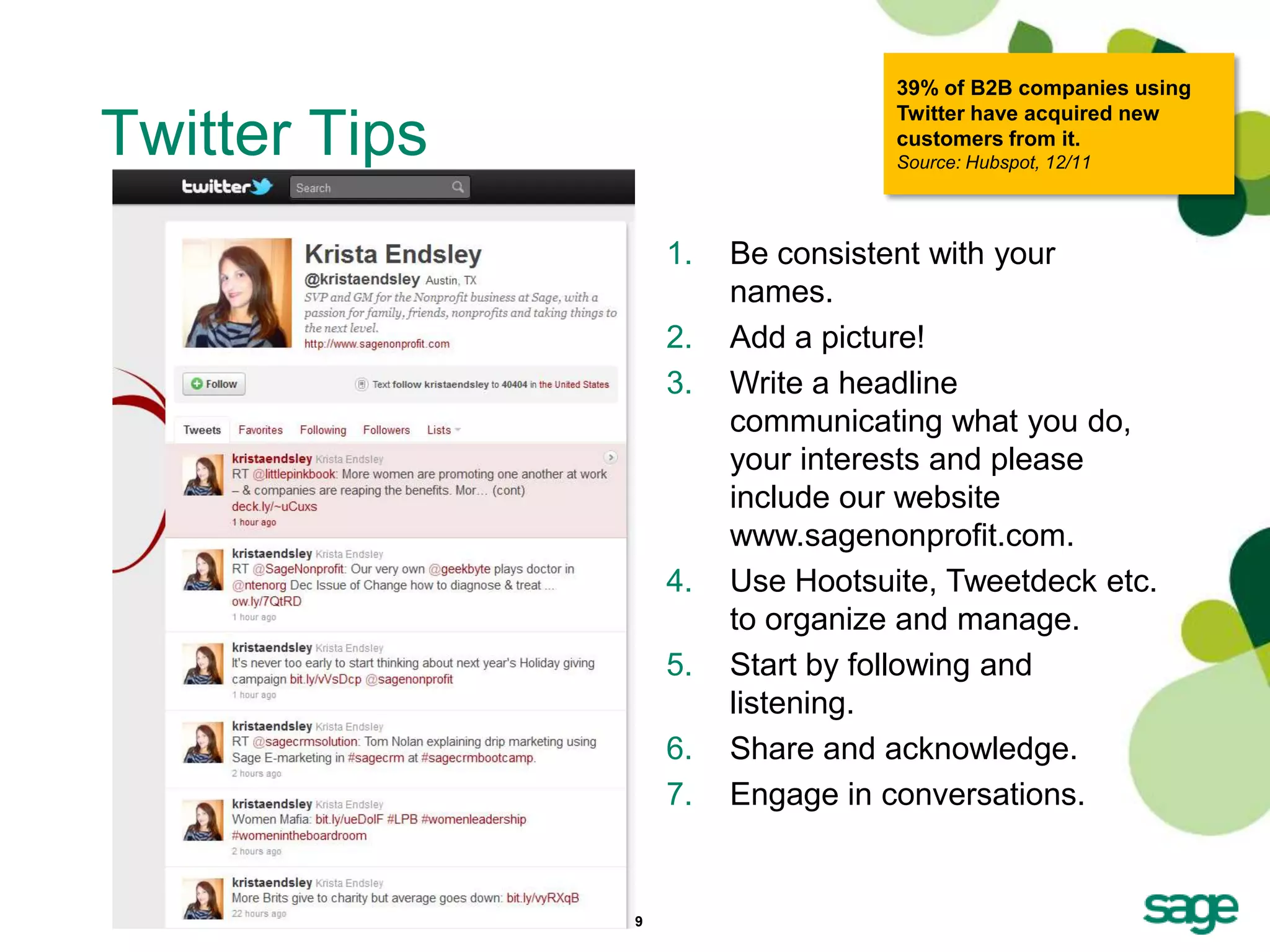
                    1.   Be consistent with your
                         names.
                    2.   Add a picture!
                    3.   Write a headline
                         communicating what you do,
                         your interests and please
                         include our website
                         www.sagenonprofit.com.
                    4.   Use Hootsuite, Tweetdeck etc.
                         to organize and manage.
                    5.   Start by following and
                         listening.
                    6.   Share and acknowledge.
                    7.   Engage in conversations.


               19
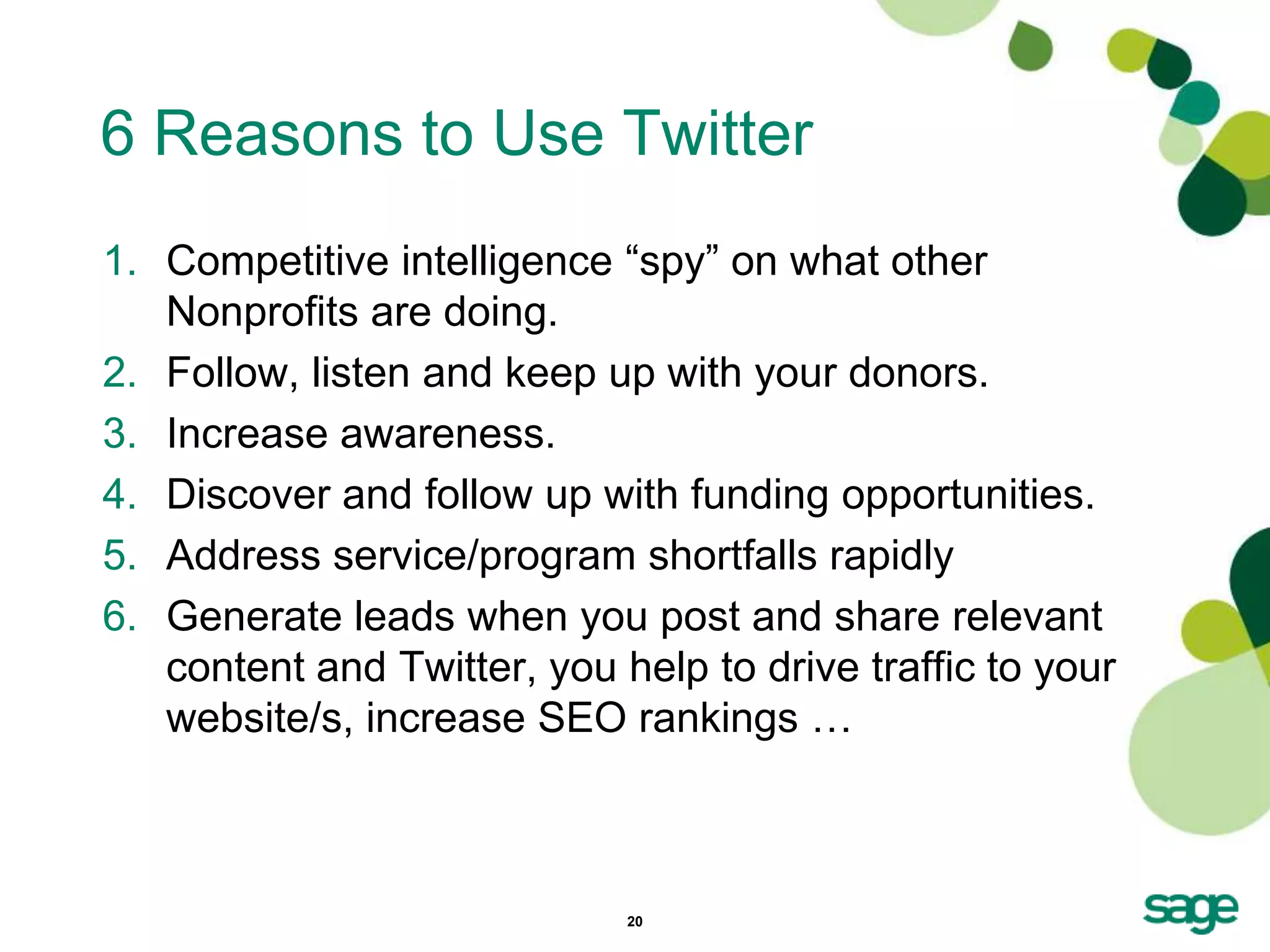
6 Reasons to Use Twitter
1. Competitive intelligence ―spy‖ on what other
   Nonprofits are doing.
2. Follow, listen and keep up with your donors.
3. Increase awareness.
4. Discover and follow up with funding opportunities.
5. Address service/program shortfalls rapidly
6. Generate leads when you post and share relevant
   content and Twitter, you help to drive traffic to your
   website/s, increase SEO rankings …


                             20
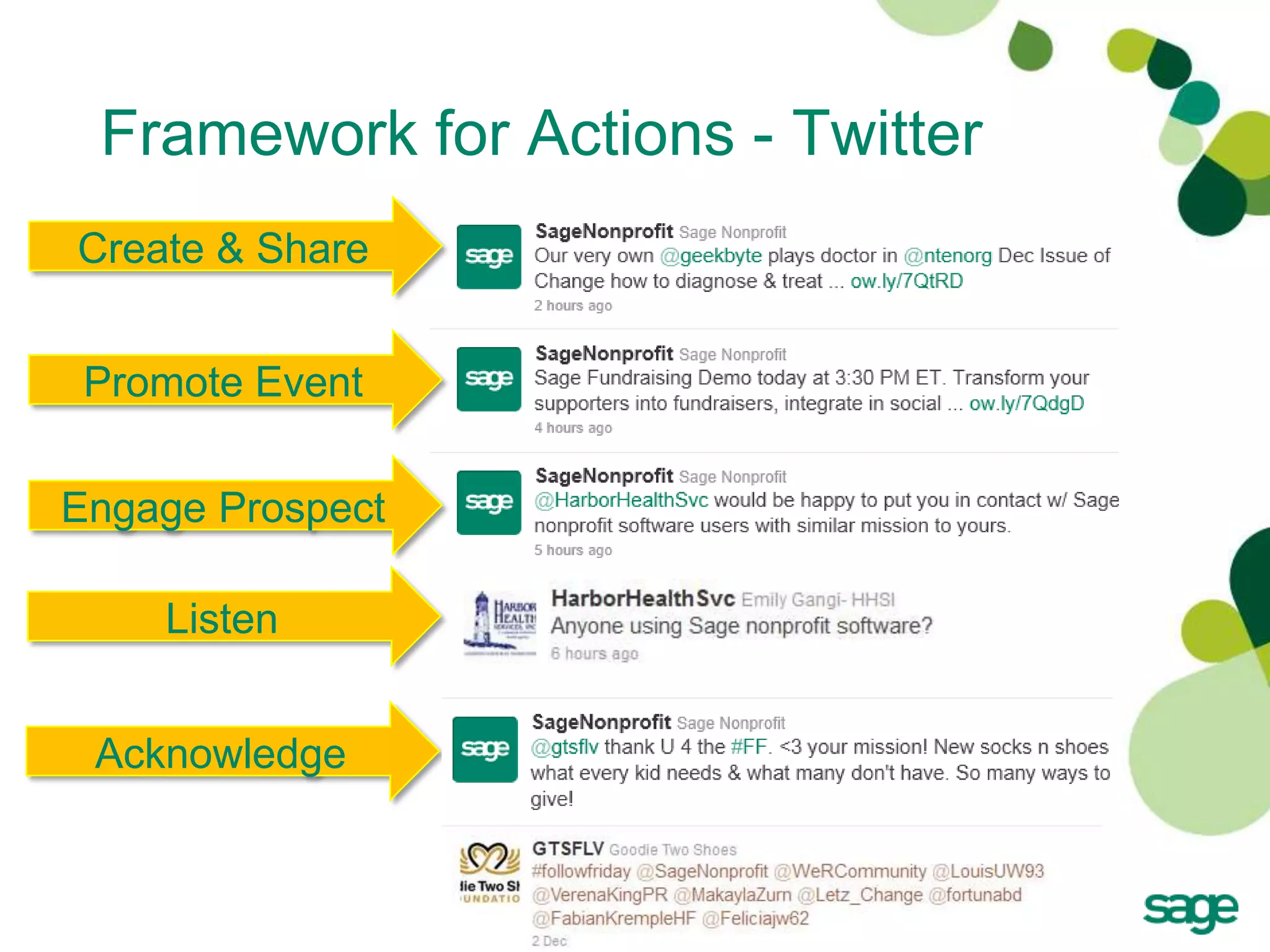
Framework for Actions - Twitter
Create & Share


 Promote Event

Engage Prospect

    Listen


 Acknowledge


                   21
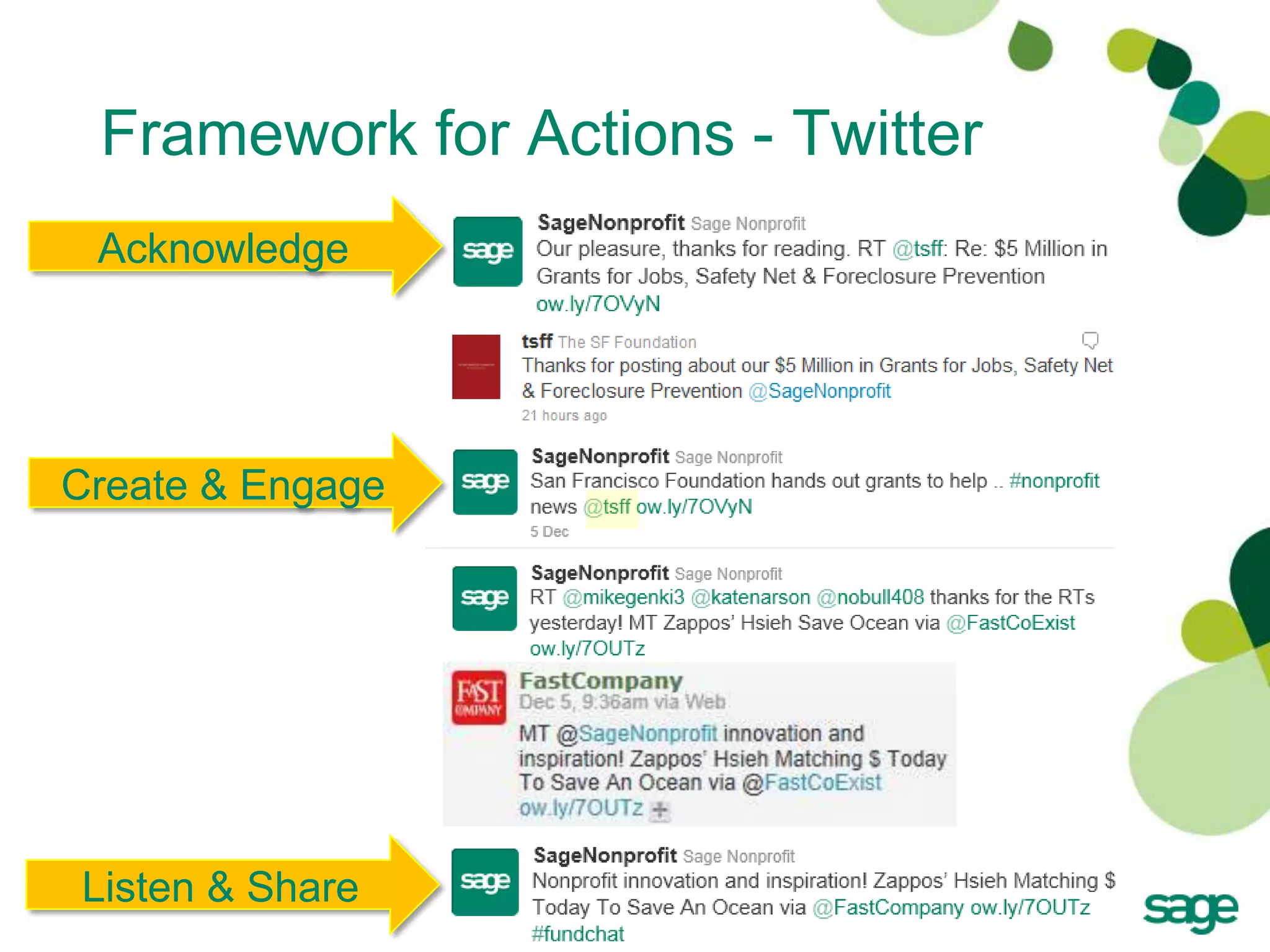
Framework for Actions - Twitter
 Acknowledge


Create & Engage


Listen & Share
                   22
Facebook


           23
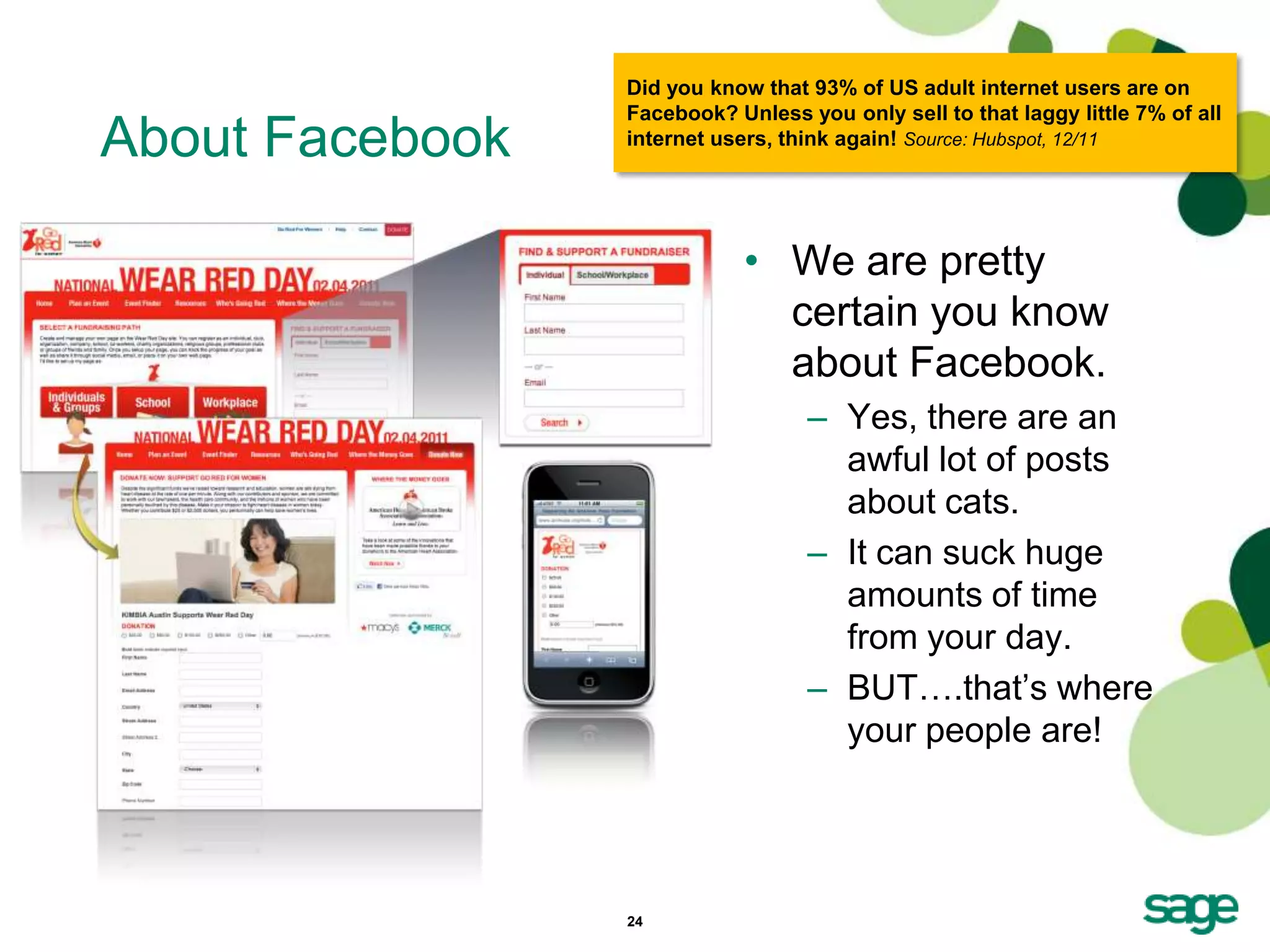
Did you know that 93% of US adult internet users are on
                 Facebook? Unless you only sell to that laggy little 7% of all
About Facebook   internet users, think again! Source: Hubspot, 12/11


                             • We are pretty
                               certain you know
                               about Facebook.
                                   – Yes, there are an
                                     awful lot of posts
                                     about cats.
                                   – It can suck huge
                                     amounts of time
                                     from your day.
                                   – BUT….that’s where
                                     your people are!


                 24
Facebook Tips
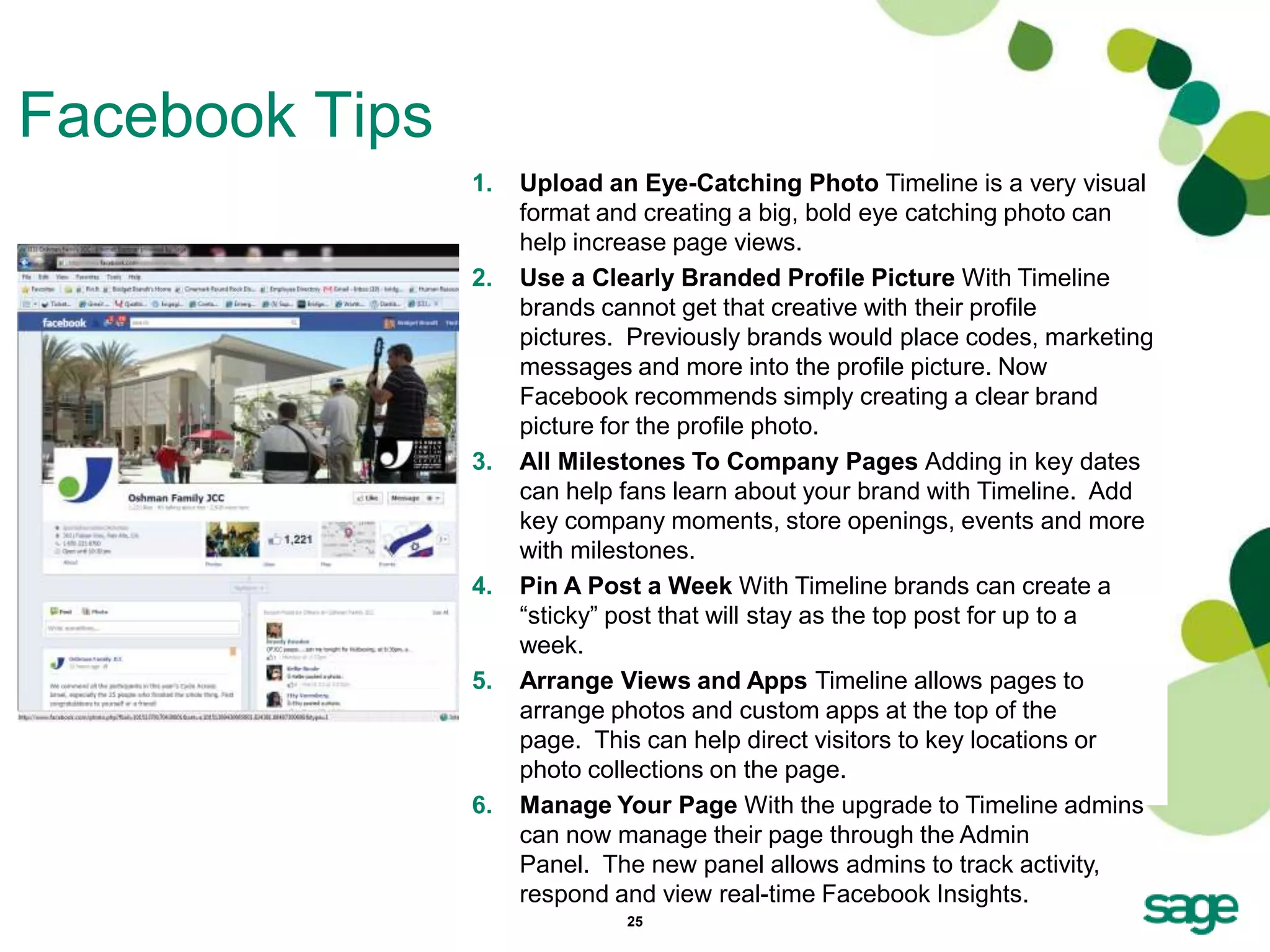
                1.   Upload an Eye-Catching Photo Timeline is a very visual
                     format and creating a big, bold eye catching photo can
                     help increase page views.
                2.   Use a Clearly Branded Profile Picture With Timeline
                     brands cannot get that creative with their profile
                     pictures. Previously brands would place codes, marketing
                     messages and more into the profile picture. Now
                     Facebook recommends simply creating a clear brand
                     picture for the profile photo.
                3.   All Milestones To Company Pages Adding in key dates
                     can help fans learn about your brand with Timeline. Add
                     key company moments, store openings, events and more
                     with milestones.
                4.   Pin A Post a Week With Timeline brands can create a
                     ―sticky‖ post that will stay as the top post for up to a
                     week.
                5.   Arrange Views and Apps Timeline allows pages to
                     arrange photos and custom apps at the top of the
                     page. This can help direct visitors to key locations or
                     photo collections on the page.
                6.   Manage Your Page With the upgrade to Timeline admins
                     can now manage their page through the Admin
                     Panel. The new panel allows admins to track activity,
                     respond and view real-time Facebook Insights.
                              25
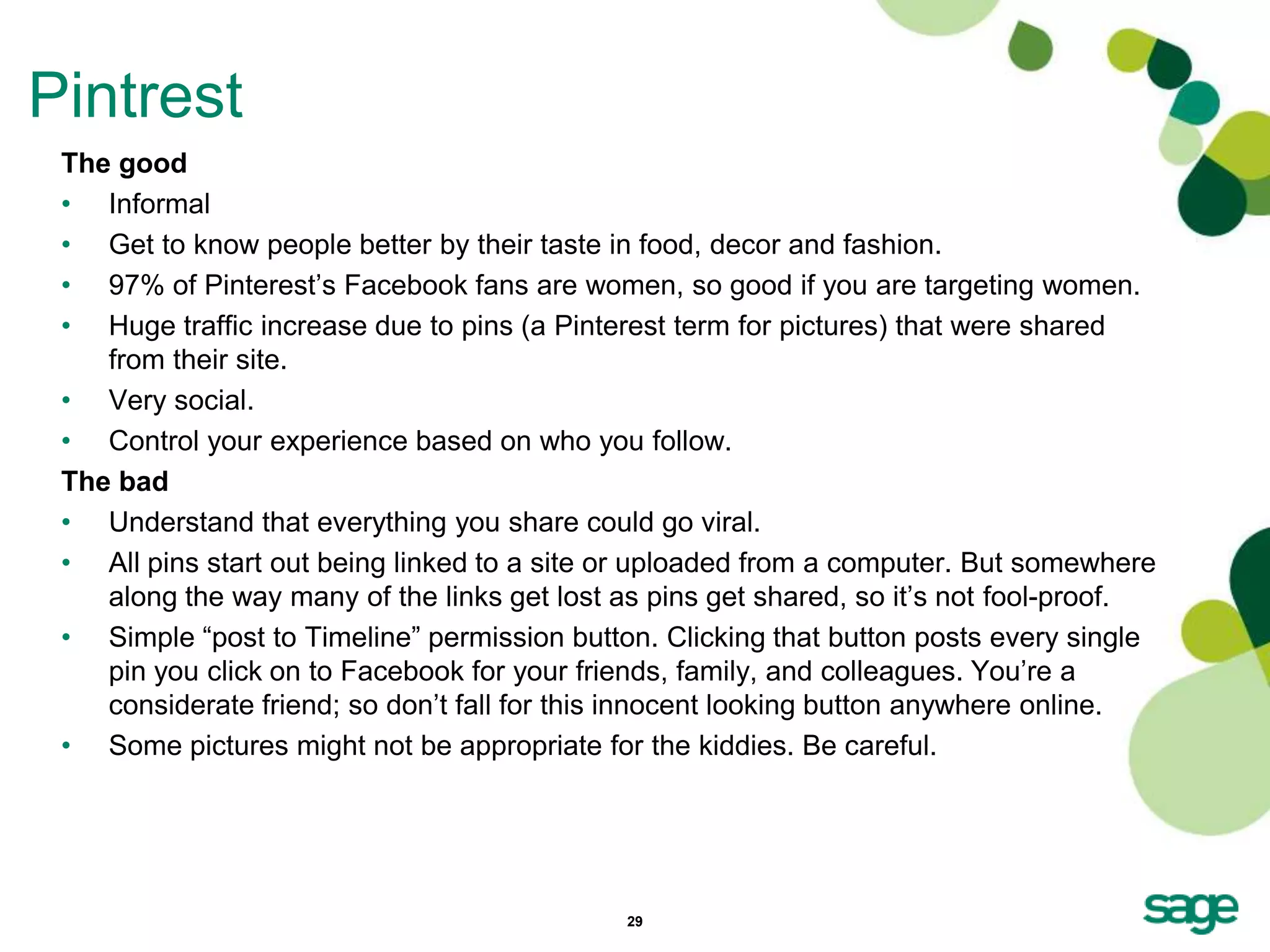
Pintrest


           26
27
About Pintrest
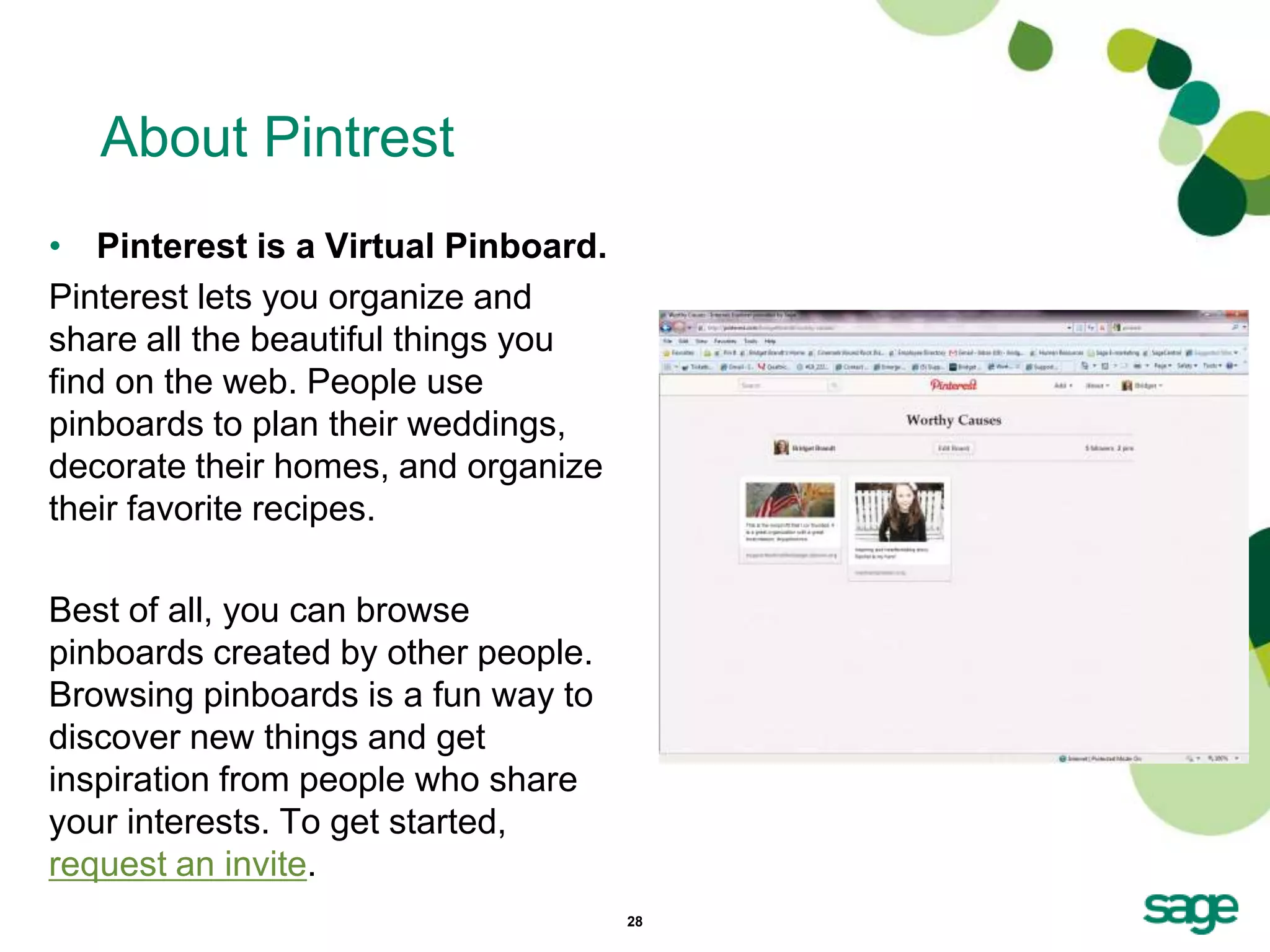
• Pinterest is a Virtual Pinboard.
Pinterest lets you organize and
share all the beautiful things you
find on the web. People use
pinboards to plan their weddings,
decorate their homes, and organize
their favorite recipes.

Best of all, you can browse
pinboards created by other people.
Browsing pinboards is a fun way to
discover new things and get
inspiration from people who share
your interests. To get started,
request an invite.
                                     28
Pintrest
 The good
 • Informal
 • Get to know people better by their taste in food, decor and fashion.
 • 97% of Pinterest’s Facebook fans are women, so good if you are targeting women.
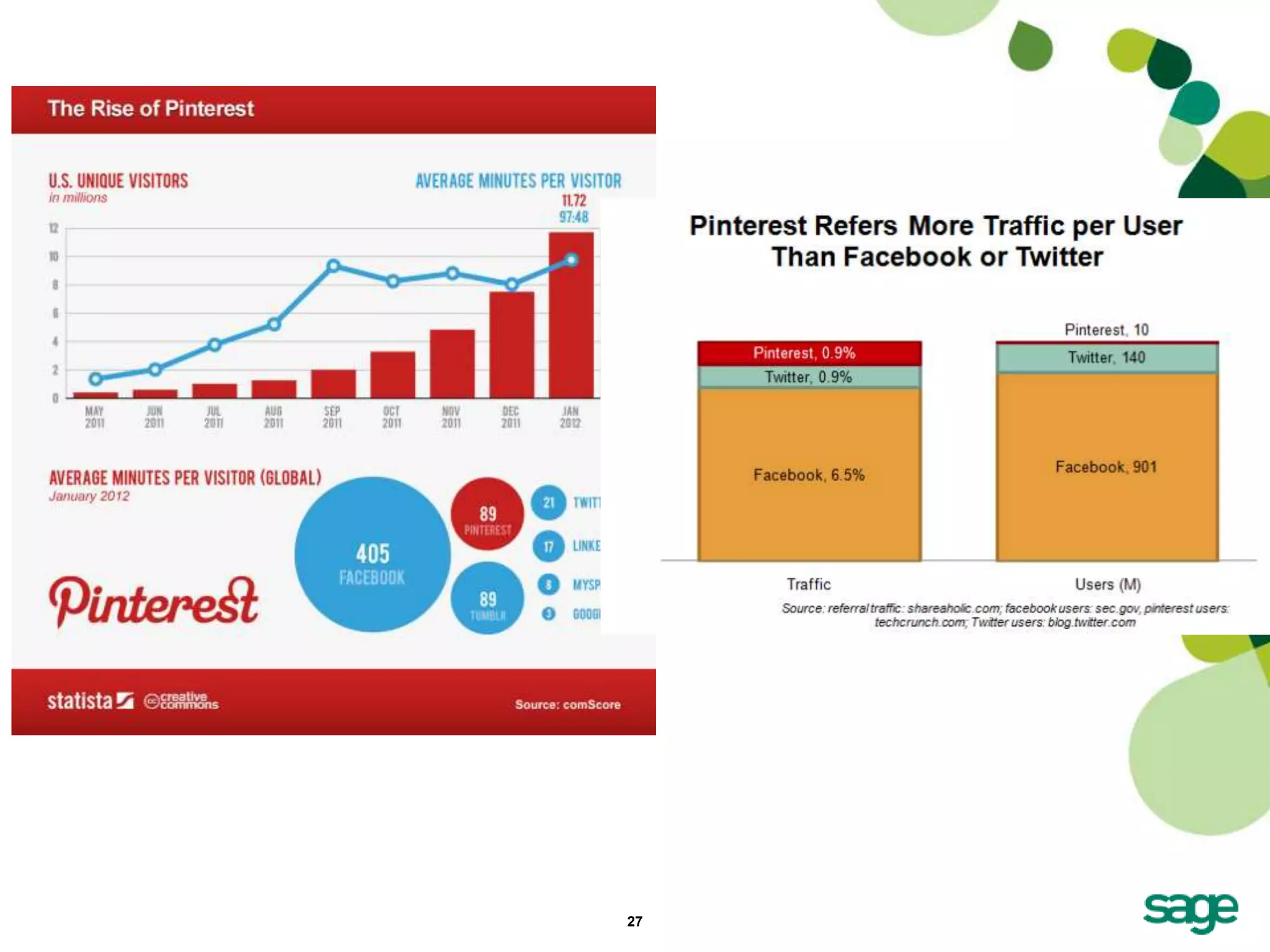
 • Huge traffic increase due to pins (a Pinterest term for pictures) that were shared
    from their site.
 • Very social.
 • Control your experience based on who you follow.
 The bad
 • Understand that everything you share could go viral.
 • All pins start out being linked to a site or uploaded from a computer. But somewhere
    along the way many of the links get lost as pins get shared, so it’s not fool-proof.
 • Simple ―post to Timeline‖ permission button. Clicking that button posts every single
    pin you click on to Facebook for your friends, family, and colleagues. You’re a
    considerate friend; so don’t fall for this innocent looking button anywhere online.
 • Some pictures might not be appropriate for the kiddies. Be careful.


                                             29
Hootsuite


            30
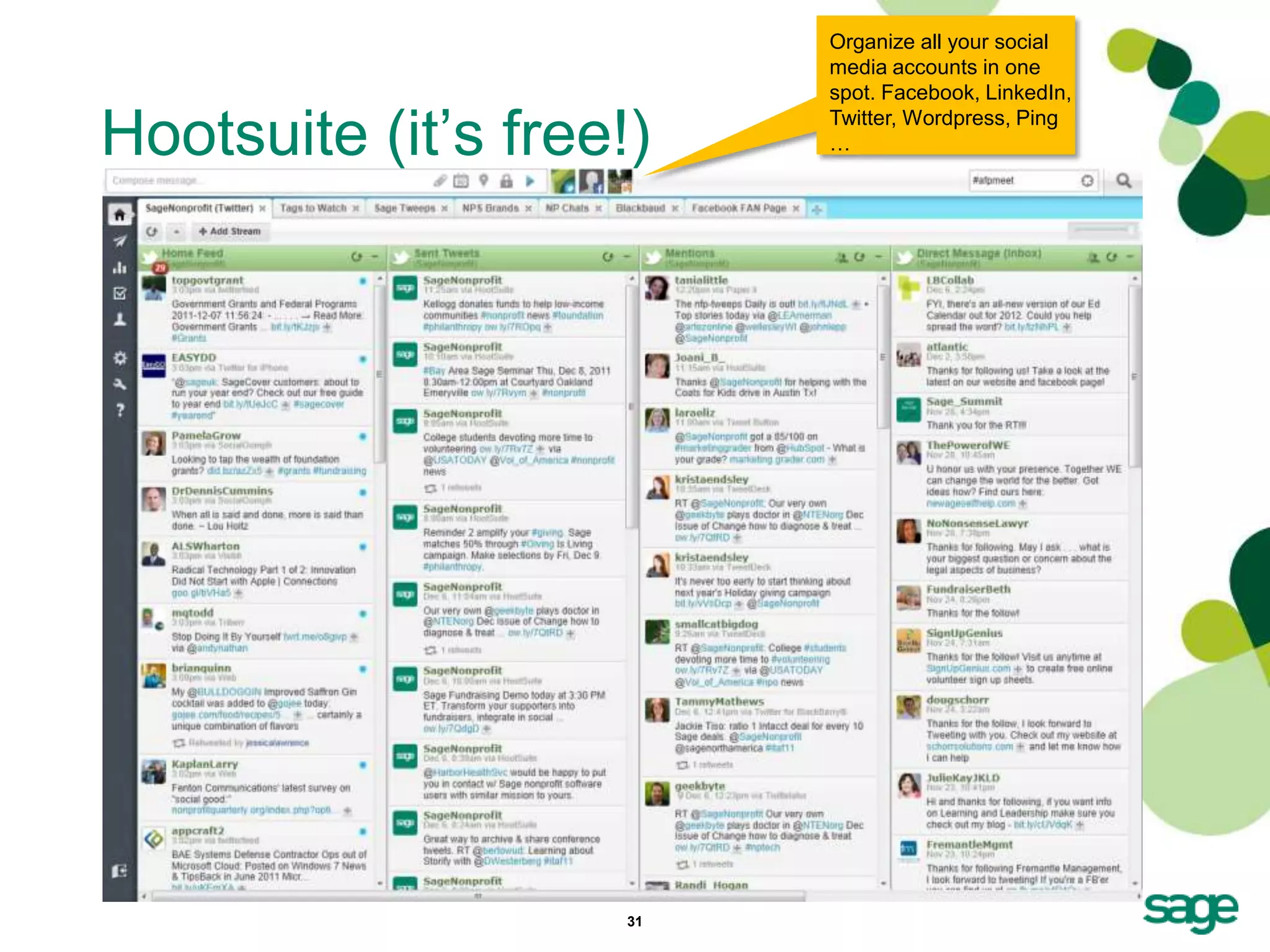
Organize all your social
                          media accounts in one
                          spot. Facebook, LinkedIn,

Hootsuite (it’s free!)    Twitter, Wordpress, Ping
                          …


                     31
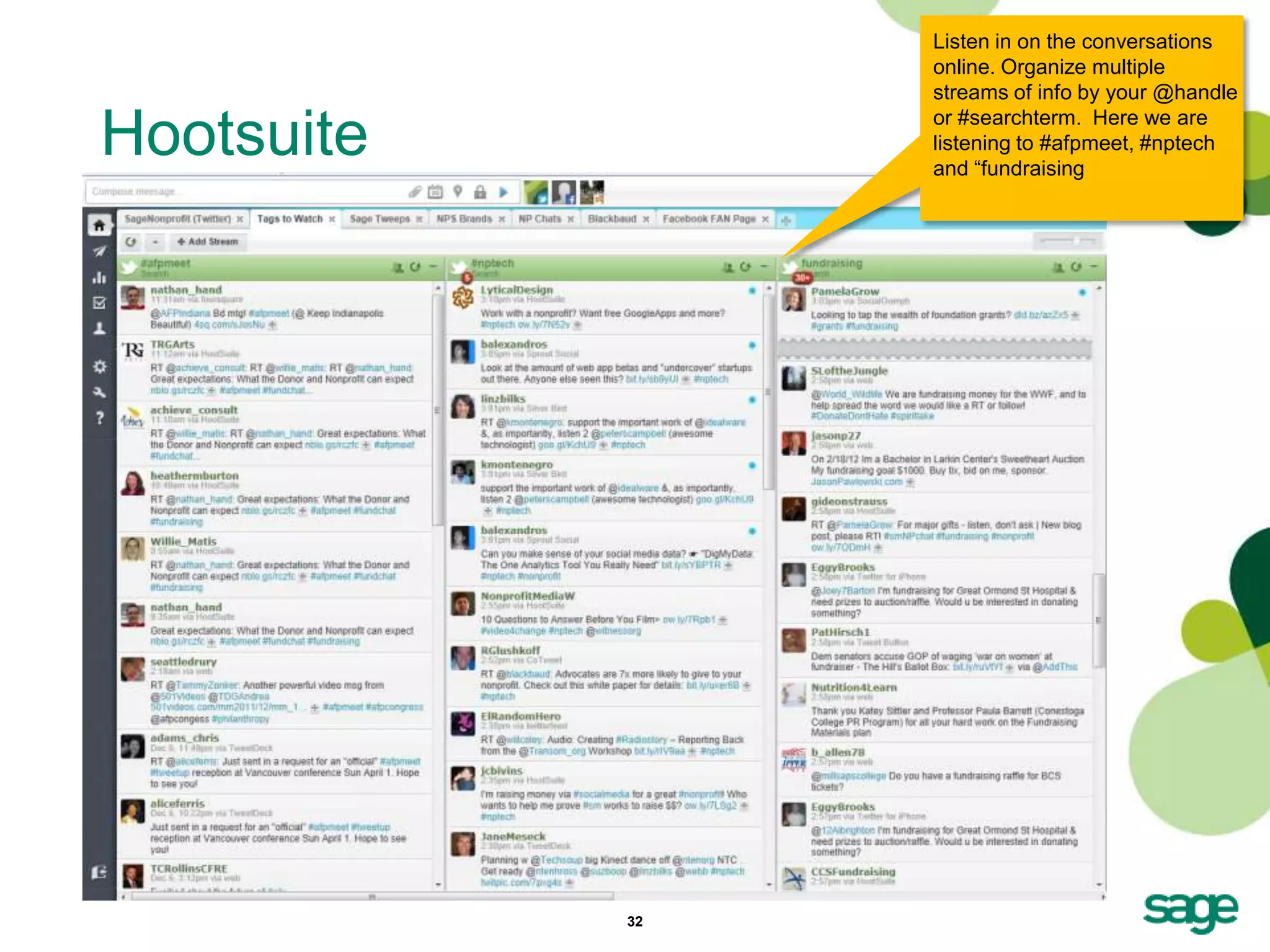
Listen in on the conversations
                 online. Organize multiple
                 streams of info by your @handle

Hootsuite        or #searchterm. Here we are
                 listening to #afpmeet, #nptech
                 and ―fundraising


            32
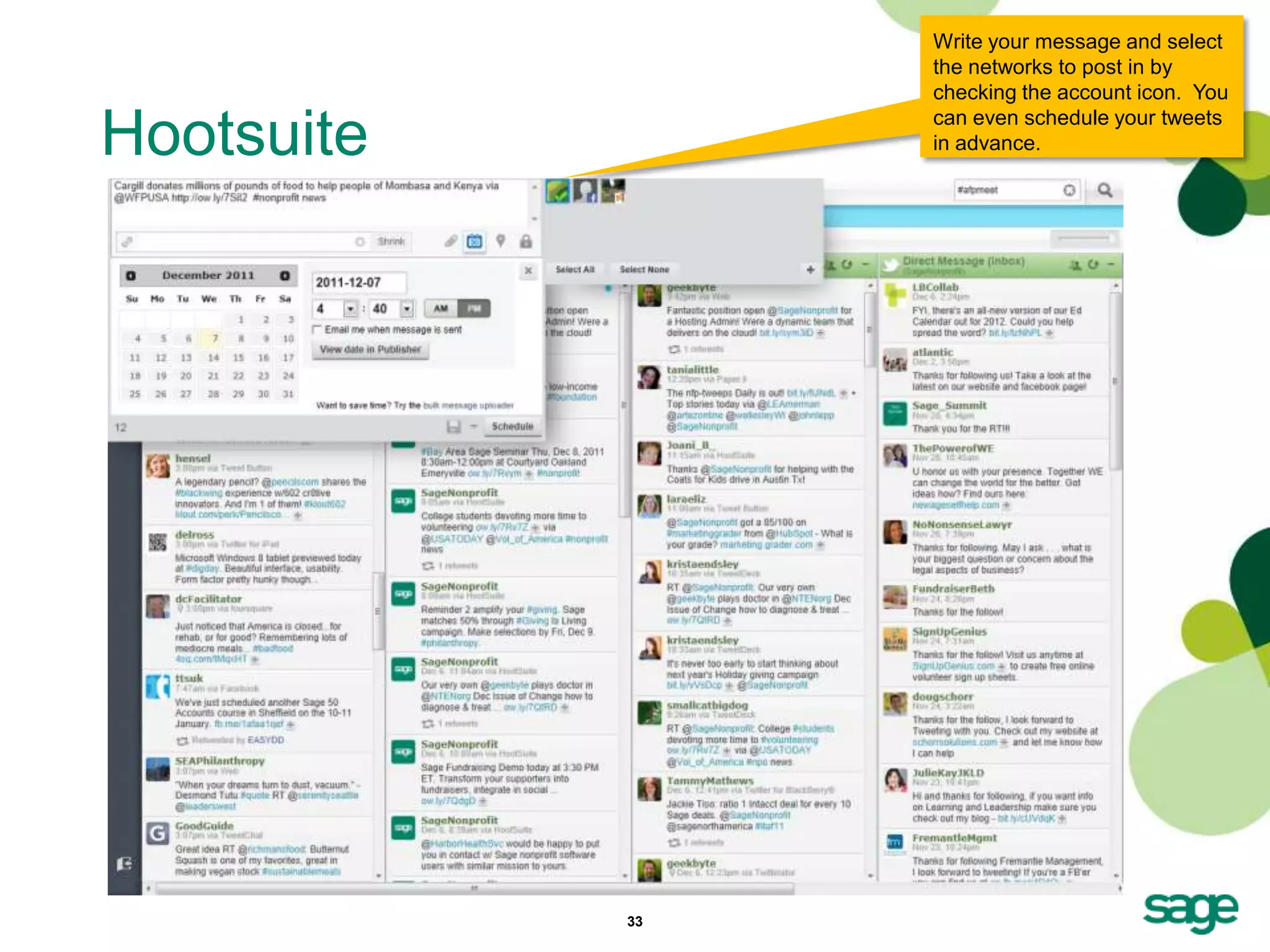
Write your message and select
                 the networks to post in by
                 checking the account icon. You

Hootsuite        can even schedule your tweets
                 in advance.


            33
More Links & Info

•   www.linkedin.com
•   www.facebook.com
•   www.twitter.com
•   www.hootsuite.com
•   www.tweetdeck.com


                        34
Exciting infographics:
• When to use social media
• How nonprofits are using social media


                          35
Q&A
Thank-you for joining me today:
• My blogs:
   • http://customerexperience101.blogspot.com
   • http://donorexperience101.wordpress.com
• Twitter: bridgetlbrandt
• Email: bridget.brandt@sage.com
• Slideshare: http://www.slideshare.net/bridgetlbrandt


                              36

Getting Started:Social Media for Nonprofits

  • 1.
    Become a SocialMedia Expert in 60 Minutes Bridget L. Brandt Director of Marketing
  • 2.
  • 3.
    Agenda • Goals For Social Media • Why We Do It • How to Be Social • Listening for Leads In Social Media – Linked In – Twitter – Facebook – Pintrest – HootSuite – Links • Real World—Tips, Tricks, & Q/A 3
  • 4.
    Goals • Build socialpresence and community network online: increasing brand awareness. • Research and learn more about our donors, potential donors, competitors, influencers, and other thought leaders. • Listen to conversations and identify emerging trends. • Generate positive word of mouth and monitor our reputation. • Engage. Contributing and sparking conversations about your nonprofit, gaining donor confidence. • Drive online audience to relevant, quality content: increasing visitor traffic, generating more leads and increasing donations. 4
  • 5.
    Why Social Media? New Users YOU Create & Discover Publish Quality Organically Content Online YOU Invite, Share, YOU Measures Engage, Acknowledge ―Users‖ Share Content, YOUR ―Rep‖ Create Content, Create is Reinforced Links Sites get traffic. Awareness Builds, # Users Grows & # Leads Increase 5
  • 6.
    How To BeSocial • Listen – Gain insight into our ―audience‖ customers, competitors, prospects, influencers. – RSS feeds, Google Reader, Google alerts and tools like Hootsuite, Social Mention • Share – Links to content on our blog, website: whitepapers etc. – Events or conferences you are attending and announcements in real time. – Content from training/conference sessions: live tweet content, post something to Facebook, etc. – Videos or pictures of events – presentations, parties, customers, partners, employees etc. • Engage – Make comments, respond to mentions of @yourhandle. Ask questions. Help others connect online. ―DM you should follow …‖ • Acknowledge – Publicly recognize, give thanks, call out fans, followers, etc. • Create – Social media may be the engine for our marketing efforts, the fuel that powers it is CONTENT. – Commit to creating content – your own blog posts, tweets etc. • Promote – Any actions that drive to our website, blog or related content even sales, marketing or training events. 6
  • 7.
    Who uses socialnetworking at work? Employees who access social media at work 64% access SM sites are happier and MORE via their mobile device. productive. 35% via their work computer. What do they use it for? - 10% personal - 35% business - 55% both 7
  • 8.
    Social Framework 6:1 Blog Forum Facebook Linked In Slideshare Twitter You Tube Listen Daily Daily Daily Daily Daily Daily Daily Share 3/week 1-2/Day Engage 3/week 1-2/Day Acknowledge 3-5/week 1-2/week Promote 2/week 3/week Create 3/week Daily 1 – 2/day 2/week 1/month 4-6/day 1/week Measure Social media may be the engine for your marketing efforts, the fuel that powers it is content. 8
  • 9.
    Nearly 2/3 ofUS Internet users Be Consistent with naming regularly use a social network. Source: Hubspot, 12/11 • Examples online. – Like us on Facebook – www.facebook.com/SageNonprofit – Join the discussion in our group on LinkedIn. – Find content on www.slideshare.net/SageNonprofit – Follow us on Twitter – www.twitter.com/SageNonprofit – Watch and follow on You Tube - SageNonprofit – Participate in the community forums and visit our blog http://www.SageWords.net. When you begin to build out your own social networks, a best practice is to be consistent with your user names. 9
  • 10.
  • 11.
    About Linked In •Linked In promotes itself as the world’s largest professional network. You can use it to manage your professional identity, grow your professional network, tap into new insights and opportunities and learn by joining, listening and contributing to the discussions taking place on Linked In Groups. • Before you join groups, be sure your profile is complete. 11
  • 12.
    Linked In –A Tale of Two Profiles 12
  • 13.
    Linked In Tips– Your Profile 1. Your profile is your introduction - complete it. 2. Add a headline that Add a communicates what you do vs. Headline your title. Think of keywords colleagues or prospects would use to find you in Linked In. 3. Add Summary & Specialties make them client and industry focused. 4. For each job experience: answer who you help, problems you solve & results achieved. Add Summary & Specialties 5. Use the space ―above the fold‖ to communicate whatever info you want to give to sell yourself or your services. You can list your services, a summary of 13 clients helped, etc.
  • 14.
    Linked In Tips– Use Status Updates • Just below your name and headline where it says ―Post an Update‖ enter in your status. • Remind your contacts of what you do. Could be as simple as: ―Attending Summit conference this week. See you there!‖ • Listen and keep up with contacts. Read status updates to initiate contact. Linked In let’s you know if your contacts have changed jobs or if they are beginning a new adventure. • Comment on status even if it’s as simple as ―Congratulations on your new job with Save the Snails, etc‖ 14
  • 15.
    Linked In Groups Search 4 Groups Here • Go to the Search bar at the top left of the LI screen, select ―Groups‖ from the drop down and type in your subject of interest. Once in the • Linked In Groups enable you to ―Group‖ page, select ―More‖ to define how you participate in configure your discussions and receive settings. information. You can choose to login and browse topics or you choose to receive a collated email of discussions daily or weekly. • Select the group of interest and then navigate to ―My Settings‖ on the ―More‖ tab. A screen like the one shown will display. 15
  • 16.
  • 17.
    79% of USTwitter users are more likely to recommend the brands About Twitter that they follow. Source: Hubspot, 12/11 • Twitter is a real-time information sharing network the ultimate in community learning at rapid pace. • Connect to what you find interesting and relevant. • Many use Twitter as a substitute for texting and as another social ―networking‖ channel. • There are plenty of tools to help you manage, create and consume Twitter information. MY personal favorite is HootSuite. 17
  • 18.
    More than 1/2of active Twitter users follow companies, brands, Twitter Tips or products on social networks. Source: Hubspot, 12/11 • Basic terms you should know – RT – retweet, is acknowledgement – MT – modified tweet (use when you edit text and RT) – Via - use ―via‖ for attribution and multiple acknowledgements – @reply – public conversation – Direct Message (DM) - private conversation • Add value by sharing links to relevant, nonprofit, accounting, etc information. • Content from conferences is a ―value add‖, latest industry information, ―news‖, … 18
  • 19.
    39% of B2Bcompanies using Twitter have acquired new Twitter Tips customers from it. Source: Hubspot, 12/11 1. Be consistent with your names. 2. Add a picture! 3. Write a headline communicating what you do, your interests and please include our website www.sagenonprofit.com. 4. Use Hootsuite, Tweetdeck etc. to organize and manage. 5. Start by following and listening. 6. Share and acknowledge. 7. Engage in conversations. 19
  • 20.
    6 Reasons toUse Twitter 1. Competitive intelligence ―spy‖ on what other Nonprofits are doing. 2. Follow, listen and keep up with your donors. 3. Increase awareness. 4. Discover and follow up with funding opportunities. 5. Address service/program shortfalls rapidly 6. Generate leads when you post and share relevant content and Twitter, you help to drive traffic to your website/s, increase SEO rankings … 20
  • 21.
    Framework for Actions- Twitter Create & Share Promote Event Engage Prospect Listen Acknowledge 21
  • 22.
    Framework for Actions- Twitter Acknowledge Create & Engage Listen & Share 22
  • 23.
  • 24.
    Did you knowthat 93% of US adult internet users are on Facebook? Unless you only sell to that laggy little 7% of all About Facebook internet users, think again! Source: Hubspot, 12/11 • We are pretty certain you know about Facebook. – Yes, there are an awful lot of posts about cats. – It can suck huge amounts of time from your day. – BUT….that’s where your people are! 24
  • 25.
    Facebook Tips 1. Upload an Eye-Catching Photo Timeline is a very visual format and creating a big, bold eye catching photo can help increase page views. 2. Use a Clearly Branded Profile Picture With Timeline brands cannot get that creative with their profile pictures. Previously brands would place codes, marketing messages and more into the profile picture. Now Facebook recommends simply creating a clear brand picture for the profile photo. 3. All Milestones To Company Pages Adding in key dates can help fans learn about your brand with Timeline. Add key company moments, store openings, events and more with milestones. 4. Pin A Post a Week With Timeline brands can create a ―sticky‖ post that will stay as the top post for up to a week. 5. Arrange Views and Apps Timeline allows pages to arrange photos and custom apps at the top of the page. This can help direct visitors to key locations or photo collections on the page. 6. Manage Your Page With the upgrade to Timeline admins can now manage their page through the Admin Panel. The new panel allows admins to track activity, respond and view real-time Facebook Insights. 25
  • 26.
  • 27.
  • 28.
    About Pintrest • Pinterestis a Virtual Pinboard. Pinterest lets you organize and share all the beautiful things you find on the web. People use pinboards to plan their weddings, decorate their homes, and organize their favorite recipes. Best of all, you can browse pinboards created by other people. Browsing pinboards is a fun way to discover new things and get inspiration from people who share your interests. To get started, request an invite. 28
  • 29.
    Pintrest The good • Informal • Get to know people better by their taste in food, decor and fashion. • 97% of Pinterest’s Facebook fans are women, so good if you are targeting women. • Huge traffic increase due to pins (a Pinterest term for pictures) that were shared from their site. • Very social. • Control your experience based on who you follow. The bad • Understand that everything you share could go viral. • All pins start out being linked to a site or uploaded from a computer. But somewhere along the way many of the links get lost as pins get shared, so it’s not fool-proof. • Simple ―post to Timeline‖ permission button. Clicking that button posts every single pin you click on to Facebook for your friends, family, and colleagues. You’re a considerate friend; so don’t fall for this innocent looking button anywhere online. • Some pictures might not be appropriate for the kiddies. Be careful. 29
  • 30.
  • 31.
    Organize all yoursocial media accounts in one spot. Facebook, LinkedIn, Hootsuite (it’s free!) Twitter, Wordpress, Ping … 31
  • 32.
    Listen in onthe conversations online. Organize multiple streams of info by your @handle Hootsuite or #searchterm. Here we are listening to #afpmeet, #nptech and ―fundraising 32
  • 33.
    Write your messageand select the networks to post in by checking the account icon. You Hootsuite can even schedule your tweets in advance. 33
  • 34.
    More Links &Info • www.linkedin.com • www.facebook.com • www.twitter.com • www.hootsuite.com • www.tweetdeck.com 34
  • 35.
    Exciting infographics: • Whento use social media • How nonprofits are using social media 35
  • 36.
    Q&A Thank-you for joiningme today: • My blogs: • http://customerexperience101.blogspot.com • http://donorexperience101.wordpress.com • Twitter: bridgetlbrandt • Email: bridget.brandt@sage.com • Slideshare: http://www.slideshare.net/bridgetlbrandt 36

Editor's Notes

  • #2 http://blog.hubspot.com/blog/tabid/6307/bid/29027/11-Ways-to-Totally-Screw-Up-Your-Inbound-Marketing.aspx
  • #8 http://socialtimes.com/employees-are-happier-when-accessing-social-media-at-work-infographic_b84052
  • #10 You can see the names we have claimed in the social space above. Connect with us online, friend and follow us. We will follow you back.We do have LinkedIn profile however, because we don’t have a distinct email domain e.g. sagenonprofit.com we can't create a Company Page for our business unit. Instead we have created a group. Go to groups and search on “Sage Nonprofit”Leverage our efforts as your own… RT @SageNonprofit to increase awareness, create new links, comments etc., link to our blog posts, participate in discussions in our LinkedIn group.
  • #13 Read the headline for the two partners above, do you hear a difference in how they are presenting themselves? If you are a nonprofit, who would you want to work with?Your profile is your introduction. Recommendations:Make your description client focused. Your profile summary is the thing that’s looked at more than any other and you can always change it. Try new descriptions.It will be looked at by potential clients who you meet and then who check you out online afterwards. It will be looked at by potential referrers who offer to connect you with prospects.