Session I:
              Beginning Social Media


Professional Certificate in Digital & Social Media
Instructor: Yadira Galindo    galindoyadira@gmail.com
                                                        1
Welcome!
• I’m Yadira Galindo, your tour guide
  through the wonderful world of Beginning
  Social Media.
• Former print reporter turned public relations
  specialist and now lecturer
• Email: galindoyadira@gmail.com
• Cell: 619-379-3977 (text okay)
• You can find me online!
   •   Facebook (yadira.galindo)
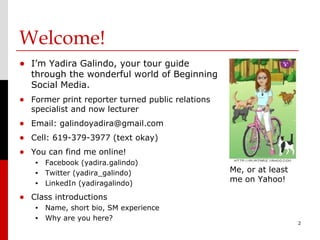
   •   Twitter (yadira_galindo)                   Me, or at least
   •   LinkedIn (yadiragalindo)
                                                  me on Yahoo!

• Class introductions
   •   Name, short bio, SM experience
   •   Why are you here?
                                                                    2
Agenda
• We have a lot to cover
  over the next four weeks.
  Fasten your seatbelts!
  •   Pass out syllabus
  •   Introduce BSM Online
       •   Online classroom for BSM
           on Facebook
       •   “Secret” group
       •   Post link to article, comment
           on two others weekly
       •   Ask questions! Engage!
                                           3
Requirements
• Weekly attendance
     Sign-in required! With only four weeks in the course,
      missing a class could adversely impact your grade!

• Completion of weekly reading & written
 assignments
     posted to BSM Online weekly

• Participation in class & on BSM Online
• Final project
     will be discussed in further detail in Session II & III

                                                                4
Course Overview
• According to the course description,
  we are going to be very busy!
• Introduction to web-based social media tools.
  Get a broad overview of applications such as
  Facebook, Twitter, LinkedIn, Pinterest and YouTube as
  media professionals’ tools. Class explores
  engagement, managing social networks and delivering
  quality content. Other topics include web branding
  and promoting a brand across platforms.
     Note: Social media is a constantly evolving topic of
      discussion. For that reason, the changing times could
      result in a change in the syllabus. Stay tuned!
                                                          5
Course Overview
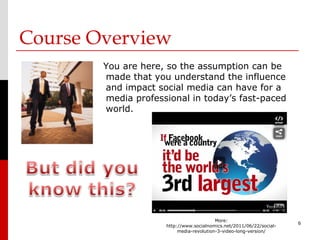
        You are here, so the assumption can be
        made that you understand the influence
        and impact social media can have for a
        media professional in today’s fast-paced
        world.


                                          More:
                                                                      6
                     http://www.socialnomics.net/2011/06/22/social-
                          media-revolution-3-video-long-version/
Course Overview


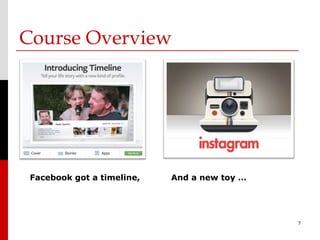
 Facebook got a timeline,   And a new toy …


                                              7
Course Overview


    More: Pinterest is Now the No. 3 Social Network in the U.S. [STUDY]   8
Course Overview
• Goals & Objectives
     The point isn’t to learn the ins and
      outs of every one of the latest social
      networking trends.
  Instead, it is to …
        understand the hows and the whys,
        use it to enhance your online brand and expand
       your reach as a media professional,
        and embrace the ability to adapt regardless of the
       tools.
                    Because they will change!
                                                              9
Let’s Get Started!


                     10
Social media literacy & citizenship
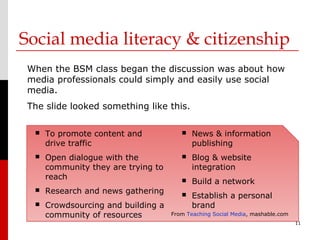
 When the BSM class began the discussion was about how
 media professionals could simply and easily use social
 media.
 The slide looked something like this.

     To promote content and               News & information
      drive traffic                         publishing
     Open dialogue with the               Blog & website
      community they are trying to          integration
      reach                                Build a network
     Research and news gathering          Establish a personal
     Crowdsourcing and building a          brand
      community of resources         From Teaching Social Media, mashable.com
                                                                                11
Social media literacy & citizenship
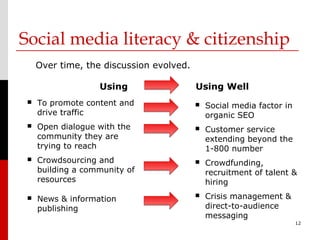
     Over time, the discussion evolved.

                   Using                  Using Well
    To promote content and                  Social media factor in
     drive traffic                            organic SEO
    Open dialogue with the                  Customer service
     community they are                       extending beyond the
     trying to reach                          1-800 number
    Crowdsourcing and                       Crowdfunding,
     building a community of                  recruitment of talent &
     resources                                hiring
    News & information                      Crisis management &
     publishing                               direct-to-audience
                                              messaging
                                                                       12
More than a wallflower:
Engagement & quality content
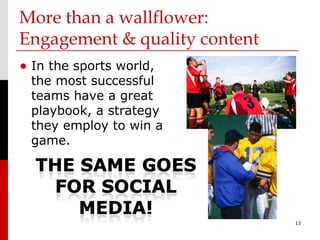
• In the sports world,
 the most successful
 teams have a great
 playbook, a strategy
 they employ to win a
 game.


                               13
More than a wallflower:
Engagement & quality content
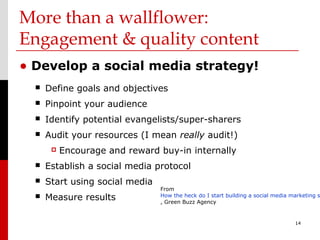
• Develop a social media strategy!
     Define goals and objectives
     Pinpoint your audience
     Identify potential evangelists/super-sharers
     Audit your resources (I mean really audit!)
          Encourage and reward buy-in internally
     Establish a social media protocol
     Start using social media
                                 From
     Measure results            How the heck do I start building a social media marketing s
                                 , Green Buzz Agency


                                                                                  14
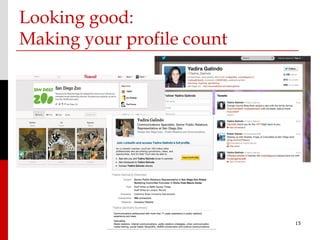
Looking good:
Making your profile count


                            15
Looking good:
Making your profile count
• Photos:
•   Do not settle for the egghead
    or the shadowman. Be you.
    Illustrate who your are. Be
    your brand.
•   Select a headshot that
    captures you as you really
    look.
•   Use the same photo across
    applications and save the
    image with your name. SEO!


                                    16
Looking good:
Making your profile count
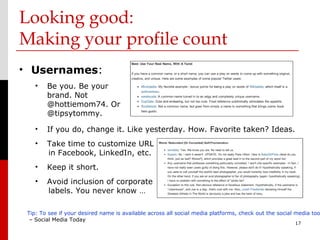
• Usernames:
    •   Be you. Be your
        brand. Not
        @hottiemom74. Or
        @tipsytommy.

    •   If you do, change it. Like yesterday. How. Favorite taken? Ideas.
    •   Take time to customize URL
        in Facebook, LinkedIn, etc.
    •   Keep it short.
    •   Avoid inclusion of corporate
        labels. You never know …

 Tip: To see if your desired name is available across all social media platforms, check out the social media too
  – Social Media Today
                                                                                                      17
Looking good:
Making your profile count
•                         Bio:
    •   No bio = less followers.
    •   Be you. Be your brand.
        Don’t be Bob Dylan song
        lyrics. Bleh.
    •   It’s only 160 characters.
        Use the space wisely.

    •Identify and include keywords that describe you, your business,
    your interests. Who you would follow. Birds of feather …
    •Do add a website URL. Help friends/fans/followers/connections.
    •Be consistent across applications.


                                                                       18
Social Media 101: Twitter, Part I
                       • Think of Twitter as a mini-blog. Or, to
                         be more exact, a micro-blog.

                       • Allows users to send text-based
                         updates called tweets, up to 140
                         characters long.

                       • Over 140 million active users as of
                         2012 generate over 340 millions
                         tweets daily.
Twitter was founded
in March 2006, but
                       • Service is public by default and it is
soared in popularity     far more accessed by mobile device
after 2007 SXSW.         than by desktop.
                       • Demographic is older, newer to social
More on Wikipedia.       media. Also, slightly more women.
                                                                   19
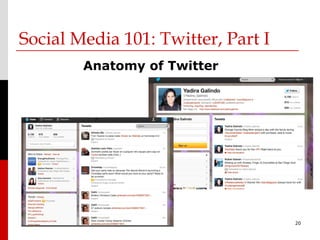
Social Media 101: Twitter, Part I
        Anatomy of Twitter


                                    20
Social Media 101: Twitter, Part I
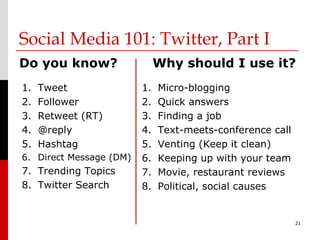
Do you know?                  Why should I use it?
1.   Tweet               1.   Micro-blogging
2.   Follower            2.   Quick answers
3.   Retweet (RT)        3.   Finding a job
4.   @reply              4.   Text-meets-conference call
5.   Hashtag             5.   Venting (Keep it clean)
6. Direct Message (DM)   6.   Keeping up with your team
7. Trending Topics       7.   Movie, restaurant reviews
8. Twitter Search        8.   Political, social causes


                                                           21
Social Media 101: Twitter, Part I
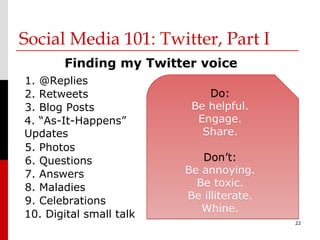
       Finding my Twitter voice
1. @Replies
2. Retweets                  Do:
3. Blog Posts             Be helpful.
4. “As-It-Happens”         Engage.
Updates                     Share.
5. Photos
6. Questions                Don’t:
7. Answers               Be annoying.
8. Maladies                Be toxic.
9. Celebrations          Be illiterate.
10. Digital small talk      Whine.
                                          22

Bsm wk i_su12

  • 1.
    Session I: Beginning Social Media Professional Certificate in Digital & Social Media Instructor: Yadira Galindo galindoyadira@gmail.com 1
  • 2.
    Welcome! • I’m YadiraGalindo, your tour guide through the wonderful world of Beginning Social Media. • Former print reporter turned public relations specialist and now lecturer • Email: galindoyadira@gmail.com • Cell: 619-379-3977 (text okay) • You can find me online! • Facebook (yadira.galindo) • Twitter (yadira_galindo) Me, or at least • LinkedIn (yadiragalindo) me on Yahoo! • Class introductions • Name, short bio, SM experience • Why are you here? 2
  • 3.
    Agenda • We havea lot to cover over the next four weeks. Fasten your seatbelts! • Pass out syllabus • Introduce BSM Online • Online classroom for BSM on Facebook • “Secret” group • Post link to article, comment on two others weekly • Ask questions! Engage! 3
  • 4.
    Requirements • Weekly attendance  Sign-in required! With only four weeks in the course, missing a class could adversely impact your grade! • Completion of weekly reading & written assignments  posted to BSM Online weekly • Participation in class & on BSM Online • Final project  will be discussed in further detail in Session II & III 4
  • 5.
    Course Overview • Accordingto the course description, we are going to be very busy! • Introduction to web-based social media tools. Get a broad overview of applications such as Facebook, Twitter, LinkedIn, Pinterest and YouTube as media professionals’ tools. Class explores engagement, managing social networks and delivering quality content. Other topics include web branding and promoting a brand across platforms.  Note: Social media is a constantly evolving topic of discussion. For that reason, the changing times could result in a change in the syllabus. Stay tuned! 5
  • 6.
    Course Overview You are here, so the assumption can be made that you understand the influence and impact social media can have for a media professional in today’s fast-paced world. More: 6 http://www.socialnomics.net/2011/06/22/social- media-revolution-3-video-long-version/
  • 7.
    Course Overview Facebookgot a timeline, And a new toy … 7
  • 8.
    Course Overview More: Pinterest is Now the No. 3 Social Network in the U.S. [STUDY] 8
  • 9.
    Course Overview • Goals& Objectives  The point isn’t to learn the ins and outs of every one of the latest social networking trends. Instead, it is to …  understand the hows and the whys,  use it to enhance your online brand and expand your reach as a media professional,  and embrace the ability to adapt regardless of the tools. Because they will change! 9
  • 10.
  • 11.
    Social media literacy& citizenship When the BSM class began the discussion was about how media professionals could simply and easily use social media. The slide looked something like this.  To promote content and  News & information drive traffic publishing  Open dialogue with the  Blog & website community they are trying to integration reach  Build a network  Research and news gathering  Establish a personal  Crowdsourcing and building a brand community of resources From Teaching Social Media, mashable.com 11
  • 12.
    Social media literacy& citizenship Over time, the discussion evolved. Using Using Well  To promote content and  Social media factor in drive traffic organic SEO  Open dialogue with the  Customer service community they are extending beyond the trying to reach 1-800 number  Crowdsourcing and  Crowdfunding, building a community of recruitment of talent & resources hiring  News & information  Crisis management & publishing direct-to-audience messaging 12
  • 13.
    More than awallflower: Engagement & quality content • In the sports world, the most successful teams have a great playbook, a strategy they employ to win a game. 13
  • 14.
    More than awallflower: Engagement & quality content • Develop a social media strategy!  Define goals and objectives  Pinpoint your audience  Identify potential evangelists/super-sharers  Audit your resources (I mean really audit!)  Encourage and reward buy-in internally  Establish a social media protocol  Start using social media From  Measure results How the heck do I start building a social media marketing s , Green Buzz Agency 14
  • 15.
    Looking good: Making yourprofile count 15
  • 16.
    Looking good: Making yourprofile count • Photos: • Do not settle for the egghead or the shadowman. Be you. Illustrate who your are. Be your brand. • Select a headshot that captures you as you really look. • Use the same photo across applications and save the image with your name. SEO! 16
  • 17.
    Looking good: Making yourprofile count • Usernames: • Be you. Be your brand. Not @hottiemom74. Or @tipsytommy. • If you do, change it. Like yesterday. How. Favorite taken? Ideas. • Take time to customize URL in Facebook, LinkedIn, etc. • Keep it short. • Avoid inclusion of corporate labels. You never know … Tip: To see if your desired name is available across all social media platforms, check out the social media too – Social Media Today 17
  • 18.
    Looking good: Making yourprofile count • Bio: • No bio = less followers. • Be you. Be your brand. Don’t be Bob Dylan song lyrics. Bleh. • It’s only 160 characters. Use the space wisely. •Identify and include keywords that describe you, your business, your interests. Who you would follow. Birds of feather … •Do add a website URL. Help friends/fans/followers/connections. •Be consistent across applications. 18
  • 19.
    Social Media 101:Twitter, Part I • Think of Twitter as a mini-blog. Or, to be more exact, a micro-blog. • Allows users to send text-based updates called tweets, up to 140 characters long. • Over 140 million active users as of 2012 generate over 340 millions tweets daily. Twitter was founded in March 2006, but • Service is public by default and it is soared in popularity far more accessed by mobile device after 2007 SXSW. than by desktop. • Demographic is older, newer to social More on Wikipedia. media. Also, slightly more women. 19
  • 20.
    Social Media 101:Twitter, Part I Anatomy of Twitter 20
  • 21.
    Social Media 101:Twitter, Part I Do you know? Why should I use it? 1. Tweet 1. Micro-blogging 2. Follower 2. Quick answers 3. Retweet (RT) 3. Finding a job 4. @reply 4. Text-meets-conference call 5. Hashtag 5. Venting (Keep it clean) 6. Direct Message (DM) 6. Keeping up with your team 7. Trending Topics 7. Movie, restaurant reviews 8. Twitter Search 8. Political, social causes 21
  • 22.
    Social Media 101:Twitter, Part I Finding my Twitter voice 1. @Replies 2. Retweets Do: 3. Blog Posts Be helpful. 4. “As-It-Happens” Engage. Updates Share. 5. Photos 6. Questions Don’t: 7. Answers Be annoying. 8. Maladies Be toxic. 9. Celebrations Be illiterate. 10. Digital small talk Whine. 22

Editor's Notes

  • #7 Social Media isn’t a fad, it’s a fundamental shift in the way we communicate.
  • #8 -Beginners guide to Instagram on Mashable: http://mashable.com/2012/05/29/instagram-for-beginners/?utm_source=feedburner&utm_medium=feed&utm_campaign=Feed:+Mashable+(Mashable)
  • #13 SEO= Search Engine Optimization ; SEO is the process of improving the visibility of a website in a search engine’s "natural," or un-paid (“organic" or "algorithmic"), search results. In general, the earlier (or higher ranked on the search results page), and more frequently a site appears in the search results list, the more visitors it will receive from the search engine's users.
  • #15 http://www.greenbuzzagency.com/how-the-heck-do-i-start-building-a-social-media-marketing-strategy
  • #16 First impressions. Do you accept friend requests from people you don’t know and don’t’ have any biographical information or photo to tell you about this person? Do you follow someone on Twitter simply because they follow you or do you look at them to see if you have interests in common?
  • #17 http://mashable.com/2012/07/27/look-good-on-video/
  • #21 -Discover: http://blog.hubspot.com/blog/tabid/6307/bid/32676/Twitter-Update-Makes-it-Easier-for-Users-to-Discover-Your-Marketing-Content.aspx/?utm_medium=social&utm_source=twitter -Hashtags are a community-driven convention for adding additional context and metadata to your tweets. They’re like tags on Flickr, only added inline to your post. You create a hashtag simply by prefixing a word with a hash symbol: #hashtag.