Recap and reflections

                                        Setting up a strategy

                        Expected and unexpected connections

                                         Our LinkedIn Group

                                        Preventing problems

                                           Finding out more

Social Media – part 2

Wendy Tagg
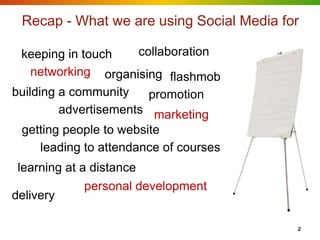
Recap - What we are using Social Media for

 keeping in touch     collaboration
    networking organising flashmob
building a community    promotion
         advertisements marketing
 getting people to website
    leading to attendance of courses
 learning at a distance
              personal development
delivery

                                          2
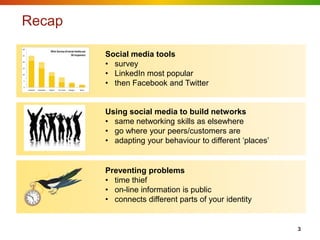
Recap
30
                              Mini-Survey of social media use
25                                              30 responses       Social media tools
20


15
                                                                   • survey
10                                                                 • LinkedIn most popular
5


0
                                                                   • then Facebook and Twitter
     Linked In   Facebook   Twitter   You Tube   Google +   None


                                                                   Using social media to build networks
                                                                   • same networking skills as elsewhere
                                                                   • go where your peers/customers are
                                                                   • adapting your behaviour to different „places‟


                                                                   Preventing problems
                                                                   • time thief
                                                                   • on-line information is public
                                                                   • connects different parts of your identity


                                                                                                                     3
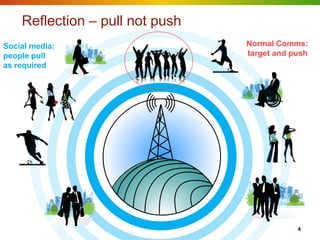
Reflection – pull not push
Social media:                    Normal Comms:
people pull                      target and push
as required


                                             4
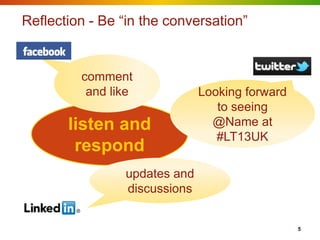
Reflection - Be “in the conversation”


         comment
          and like             Looking forward
                                  to seeing
       listen and                @Name at
                                  #LT13UK
        respond
                 updates and
                 discussions


                                                 5
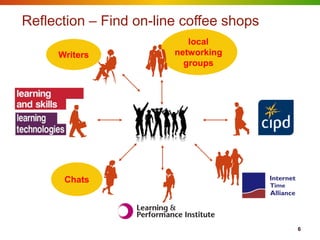
Reflection – Find on-line coffee shops
                           local
     Writers            networking
                          groups


      Chats


                                         6
Being alert


              7
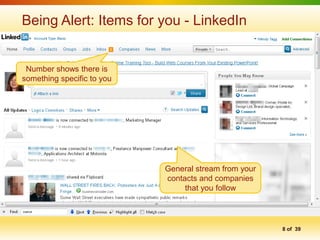
Being Alert: Items for you - LinkedIn


 Number shows there is
something specific to you


                            General stream from your
                            contacts and companies
                                 that you follow


                                                       8 of 39
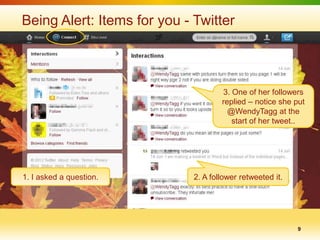
Being Alert: Items for you - Twitter


                                     3. One of her followers
                                     replied – notice she put
                                       @WendyTagg at the
                                        start of her tweet..


1. I asked a question.       2. A follower retweeted it.


                                                           9
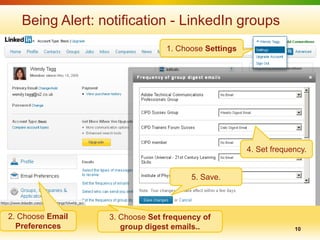
Being Alert: notification - LinkedIn groups
                                1. Choose Settings


                                                     4. Set frequency.


                                       5. Save.


2. Choose Email   3. Choose Set frequency of
  Preferences        group digest emails..                        10
Strategy - Getting on-line life sorted out


                                             13
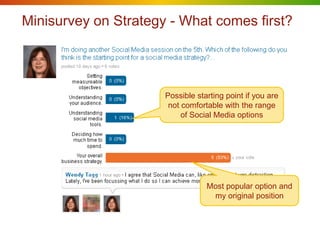
Minisurvey on Strategy - What comes first?


                      Possible starting point if you are
                       not comfortable with the range
                           of Social Media options


                                  Most popular option and
                                   my original position
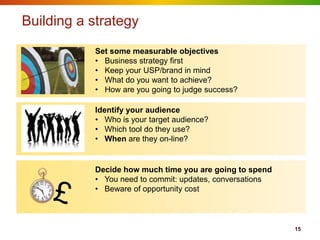
Building a strategy
           Set some measurable objectives
           • Business strategy first
           • Keep your USP/brand in mind
           • What do you want to achieve?
           • How are you going to judge success?

           Identify your audience
           • Who is your target audience?
           • Which tool do they use?
           • When are they on-line?


           Decide how much time you are going to spend
           • You need to commit: updates, conversations
           • Beware of opportunity cost


                                                          15
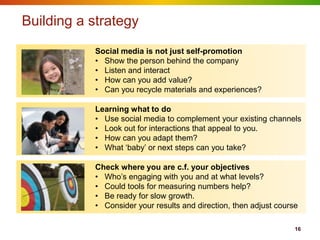
Building a strategy
           Social media is not just self-promotion
           • Show the person behind the company
           • Listen and interact
           • How can you add value?
           • Can you recycle materials and experiences?

           Learning what to do
           • Use social media to complement your existing channels
           • Look out for interactions that appeal to you.
           • How can you adapt them?
           • What „baby‟ or next steps can you take?

           Check where you are c.f. your objectives
           • Who‟s engaging with you and at what levels?
           • Could tools for measuring numbers help?
           • Be ready for slow growth.
           • Consider your results and direction, then adjust course

                                                                   16
Expected and Unexpected connections


                                      17
?
    What connects
different parts of your
      life on-line


                              18
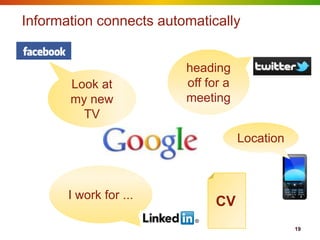
Information connects automatically


                         heading
       Look at           off for a
       my new            meeting
         TV
                                     Location


       I work for ...
                              CV
                                                19
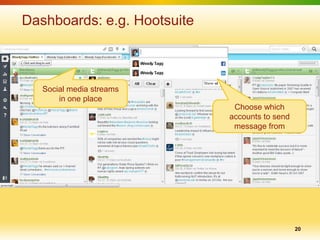
Dashboards: e.g. Hootsuite


   Social media streams
       in one place
                              Choose which
                             accounts to send
                              message from


                                                20
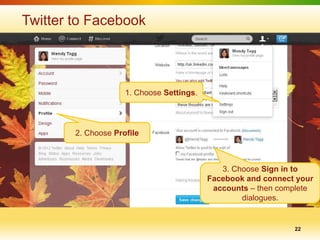
Twitter to Facebook


                     1. Choose Settings.


        2. Choose Profile


                                              3. Choose Sign in to
                                           Facebook and connect your
                                            accounts – then complete
                                                   dialogues.


                                                               22
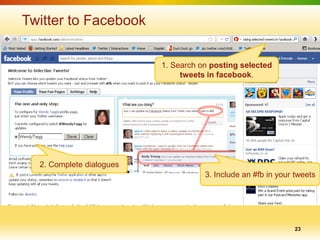
Twitter to Facebook


                          1. Search on posting selected
                               tweets in facebook.


  2. Complete dialogues
                                     3. Include an #fb in your tweets


                                                               23
Social Media and our forum


                             24
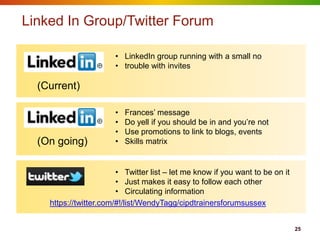
Linked In Group/Twitter Forum

                       • LinkedIn group running with a small no
                       • trouble with invites

  (Current)

                       •   Frances‟ message
                       •   Do yell if you should be in and you‟re not
                       •   Use promotions to link to blogs, events
  (On going)           •   Skills matrix


                        • Twitter list – let me know if you want to be on it
                        • Just makes it easy to follow each other
                        • Circulating information
    https://twitter.com/#!/list/WendyTagg/cipdtrainersforumsussex


                                                                               25
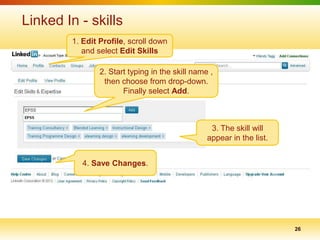
Linked In - skills
        1. Edit Profile, scroll down
           and select Edit Skills

                2. Start typing in the skill name ,
                 then choose from drop-down.
                       Finally select Add.


                                                  3. The skill will
                                                 appear in the list.


           4. Save Changes.


                                                                       26
Preventing problems


                      27
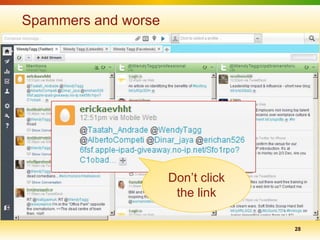
Spammers and worse


                     Don‟t click
                      the link

                                   28
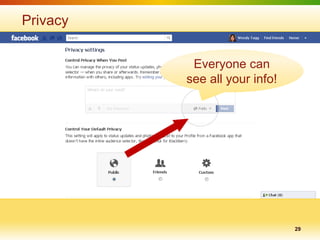
Privacy


           Everyone can
          see all your info!


                               29
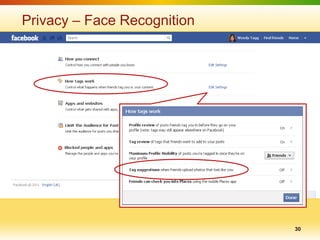
Privacy – Face Recognition


                             30
Trolls

•   People who try to upset others by posting nasty
    messages to get a reaction.

•   Usually cowardly and hidden behind fake id.

•   Don‟t feed them.


                                                  31
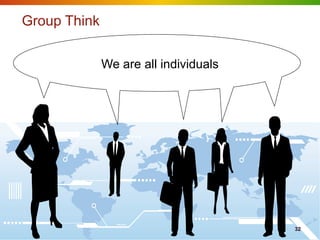
Group Think

              We are all individuals


                                       32
Finding out more


                   33
Tools, techniques and strategy

                              • Observe what others are doing
                              • Ask your social network
                              • Your social network is also a Personal
                                Learning Network.


                              • Collection of bookmarks for this presentation


http://www.diigo.com/list/wendytagg/cipd-trainers-forum-sussex-social-media


                              • All sorts of tech. news
                              • Articles about using social media
                              • News about changes to social tools
http://mashable.com/

                                                                              34
Keeping aware and out of trouble

                                            • Easily digestible
                                            • Twitter
                                            • Facebook

            http://blog.tweetsmarter.com/

                                            • Facebook
                                            • Alerts: on privacy,
                                              security and scams
        http://facecrooks.com/


                                            •   Straightforward
                                            •   All aspects of the web
                                            •   News
        http://www.knowthenet.org.uk/       •   Tests


                                                                     35

Socialmedia2012part2

  • 1.
    Recap and reflections Setting up a strategy Expected and unexpected connections Our LinkedIn Group Preventing problems Finding out more Social Media – part 2 Wendy Tagg
  • 2.
    Recap - Whatwe are using Social Media for keeping in touch collaboration networking organising flashmob building a community promotion advertisements marketing getting people to website leading to attendance of courses learning at a distance personal development delivery 2
  • 3.
    Recap 30 Mini-Survey of social media use 25 30 responses Social media tools 20 15 • survey 10 • LinkedIn most popular 5 0 • then Facebook and Twitter Linked In Facebook Twitter You Tube Google + None Using social media to build networks • same networking skills as elsewhere • go where your peers/customers are • adapting your behaviour to different „places‟ Preventing problems • time thief • on-line information is public • connects different parts of your identity 3
  • 4.
    Reflection – pullnot push Social media: Normal Comms: people pull target and push as required 4
  • 5.
    Reflection - Be“in the conversation” comment and like Looking forward to seeing listen and @Name at #LT13UK respond updates and discussions 5
  • 6.
    Reflection – Findon-line coffee shops local Writers networking groups Chats 6
  • 7.
  • 8.
    Being Alert: Itemsfor you - LinkedIn Number shows there is something specific to you General stream from your contacts and companies that you follow 8 of 39
  • 9.
    Being Alert: Itemsfor you - Twitter 3. One of her followers replied – notice she put @WendyTagg at the start of her tweet.. 1. I asked a question. 2. A follower retweeted it. 9
  • 10.
    Being Alert: notification- LinkedIn groups 1. Choose Settings 4. Set frequency. 5. Save. 2. Choose Email 3. Choose Set frequency of Preferences group digest emails.. 10
  • 11.
    Strategy - Gettingon-line life sorted out 13
  • 12.
    Minisurvey on Strategy- What comes first? Possible starting point if you are not comfortable with the range of Social Media options Most popular option and my original position
  • 13.
    Building a strategy Set some measurable objectives • Business strategy first • Keep your USP/brand in mind • What do you want to achieve? • How are you going to judge success? Identify your audience • Who is your target audience? • Which tool do they use? • When are they on-line? Decide how much time you are going to spend • You need to commit: updates, conversations • Beware of opportunity cost 15
  • 14.
    Building a strategy Social media is not just self-promotion • Show the person behind the company • Listen and interact • How can you add value? • Can you recycle materials and experiences? Learning what to do • Use social media to complement your existing channels • Look out for interactions that appeal to you. • How can you adapt them? • What „baby‟ or next steps can you take? Check where you are c.f. your objectives • Who‟s engaging with you and at what levels? • Could tools for measuring numbers help? • Be ready for slow growth. • Consider your results and direction, then adjust course 16
  • 15.
  • 16.
    ? What connects different parts of your life on-line 18
  • 17.
    Information connects automatically heading Look at off for a my new meeting TV Location I work for ... CV 19
  • 18.
    Dashboards: e.g. Hootsuite Social media streams in one place Choose which accounts to send message from 20
  • 19.
    Twitter to Facebook 1. Choose Settings. 2. Choose Profile 3. Choose Sign in to Facebook and connect your accounts – then complete dialogues. 22
  • 20.
    Twitter to Facebook 1. Search on posting selected tweets in facebook. 2. Complete dialogues 3. Include an #fb in your tweets 23
  • 21.
    Social Media andour forum 24
  • 22.
    Linked In Group/TwitterForum • LinkedIn group running with a small no • trouble with invites (Current) • Frances‟ message • Do yell if you should be in and you‟re not • Use promotions to link to blogs, events (On going) • Skills matrix • Twitter list – let me know if you want to be on it • Just makes it easy to follow each other • Circulating information https://twitter.com/#!/list/WendyTagg/cipdtrainersforumsussex 25
  • 23.
    Linked In -skills 1. Edit Profile, scroll down and select Edit Skills 2. Start typing in the skill name , then choose from drop-down. Finally select Add. 3. The skill will appear in the list. 4. Save Changes. 26
  • 24.
  • 25.
    Spammers and worse Don‟t click the link 28
  • 26.
    Privacy Everyone can see all your info! 29
  • 27.
    Privacy – FaceRecognition 30
  • 28.
    Trolls • People who try to upset others by posting nasty messages to get a reaction. • Usually cowardly and hidden behind fake id. • Don‟t feed them. 31
  • 29.
    Group Think We are all individuals 32
  • 30.
  • 31.
    Tools, techniques andstrategy • Observe what others are doing • Ask your social network • Your social network is also a Personal Learning Network. • Collection of bookmarks for this presentation http://www.diigo.com/list/wendytagg/cipd-trainers-forum-sussex-social-media • All sorts of tech. news • Articles about using social media • News about changes to social tools http://mashable.com/ 34
  • 32.
    Keeping aware andout of trouble • Easily digestible • Twitter • Facebook http://blog.tweetsmarter.com/ • Facebook • Alerts: on privacy, security and scams http://facecrooks.com/ • Straightforward • All aspects of the web • News http://www.knowthenet.org.uk/ • Tests 35

Editor's Notes

  • #2 My credentials are ...I am still unworthy!... but I am hoping to draw on the expertise in this room.This follows on from my previous session and I will start with a brief recap to jog memories + add some of the “I wish I’d said that” items.I am using the term social media rather than social networking because we can social network without special tools!
  • #4 Social media toolsI did a survey. We found that LinkedIn was the most popular, followed by Facebook and Twitter.A few on YouTube, Google+Others have mentioned Yammer, Four Square, blogs and websites.We touched briefly on preventing problems
  • #5 Reflection 1The thing to remember – social media is about letting people pull information rather than pushing it at them.
  • #6 ReflectionShare, mention and acknowledge.If you contribute people will find you.
  • #7 ReflectionLook out for well connected groups/peopleTend to gather round:Events – trade shows etc.Webinar – often have a #hashtag (twitter), facebook and/or linkedIn presence – so if you comment with the appropriate mentionsTwitter chat - #chat2lrn Thurs 16.00Blogs
  • #8 Social media allows you to follow a general stream with your contacts’ comments. People will also contact you directly through these media either as an individual or part of a group and you need to ‘listen’ to these channels.
  • #9 Numbers on the top row – show that there is something specifically for you. Similar in Facebook.
  • #10 No indicatorsI asked a question about making booklets in Word. This went to my 600 + followers. I’m guessing that about 5% (30) saw the tweet of which 3 responded. One response was a retweet, which means that it was seen by another user’s follows – say another 50 saw it. One of these gave a really good answer.Also – Direct messagesCan set up an alert on your mobile phone – good if you are a light user or if, like me, you are not good at remembering to check DMs
  • #12 Hidden
  • #13 Hidden
  • #14 Shortly, we are going to do an exercise in which you think about a strategy that might be useful to you. I’ll quickly run through a couple of slides then set you loose.Handout.I feel that we should not be talking about a social media strategy, rather it should be part of a business strategy – e.g. Comms or Marketing. That said, you need to have a reasonable awareness of the tools so you have some idea what is possible.
  • #15 S “my starting point for a strategy would still have to incorporate learning more and becoming more comfortable with the range of SM options, the likely impact (positive and negative) of each and the ways that will complement and not deflect from my current approach to marketing etc “
  • #16 ObjectivesRefer to Frances’ USP session.If baby steps – might want to think of one small thing:E.g. - Bringing people to your web site or blog; keeping up with developments; positioning myself in case job goes pear shaped.Understand your audienceIn reality you have multiple audiences – so think about a specific group for a single objectiveWhere is your target audienceIf you don’t know, askConversation might lead to how to add valueTimeThese tools are not free. Most of the people I’ve noticed succeeding are operating in specific time slots. They are likely to be scheduling contributions.
  • #17 Social media is not just self promotionAbout a quarter self promotion; rest made up of “industry info” and personal.You may wish to consider sharing samples etc. E.g I have put this presentation on Slideshare so others can see it. Do take care with copyright, people’s identities etc.Learning what to doIf you go to shows/conferences to network – you can amplify that by interacting via social media.Beware of ‘experts’ - Learn from what your peers are doing – benefit from their ‘learning out loud’.Some people are forming ‘circles’ that promote each others work – not slavishly – but to enough to make a bigger noise.Consider where you are c.f. your objectivesHave a check point every now and again to see if you are happy with your direction and think about how to build on it.
  • #20 Make sure you share consciously ...Don’t put anything in social media that belongs in a private channel – e.g. I don’t identify customers – 3 pieces of info can uniquely identify someone or something.Careful about revealing your location.If you switch on an app that makes automatic updates, make a deadline for checking you still want to do this
  • #21 Various tools : Hootsuite, tweetdeckPuts various social media streams in one placeYou Can send to more that one item at a time.Useful if you miss the Twitter-LinkedIn connection.
  • #22 Linked In - TwitterNow one-way (LinkedIn to Twitter) only
  • #23 Twitter to FacebookCan set up a connection between Twitter and FacebookYou will need to give your Facebook details and give permission for the connection.You probably won’t want to share all your tweets in facebook.
  • #24 If you want to selectively share your tweets – use the app shown here.General rule – if you want to achieve for something just Google it or ask your network.
  • #26 My ideasLinkedInTwitterI’ve set up a twitter list https://twitter.com/#!/list/WendyTagg/cipdtrainersforumsussex Makes it easy to follow each other
  • #27 ,I’ve used Frances’ spreadsheet as a guide when adding skills.To find people with a particular skill More > > Skills and expertise > Type/Pick whichever skill you need. Results show connections at top
  • #28 What could go wrong and how can we stop it happening?
  • #29 This is an example from twitter.How I knew it was spam.They want you to click the link – DON’TAt best an annoying advert. At worst they are trying to hijack accounts.It’s a good idea to check where links go by hovering over them – even if you know the person it came from. They might have been fooled by an intriguing message.If you can, report as spam. Also if a bot follows you, block it.LinkedIn and Facebook – be careful about what you like and/or log into.
  • #30 Check your settings regularly and stay aware of privacy and security recommendations.Tweetsmarter (beware it promotes apps.) and Facecrooks.
  • #31 Scroll down the pageTags – keywords, names that help group information together.Can be very helpful but personally I don’t want people tagging me in photos.Tags – face recognitionGoogle+ now had 'Find my face'- finds you in photos and gives you the option to tag.
  • #32 Useful article from lifehacker:http://lifehacker.com/5854053/how-to-stop-caring-about-trolls-and-get-on-with-your-lifeR__________ mentioned a related issue:“silliness and overblown egos in some postings” – newspaper comments tend to be like disgusted of Tunbridge Wells on acid.
  • #33 Refer to the groups session (Liz) we had a while back.Try and pick some people that are not like you. In my opinion one of the worst problems of social media is that it encourages ‘herding’ of like-minded people who end up thinking they are right-minded people because they don’t hear a diversity of views.