FIREWALL DMZ ZONE
INTRODUCTION
INTRODUCTION
• The De-Militarized Zone, or DMZ, is an expression that comes from
the Korean War. There, it meant a strip of land forcibly kept clear of
enemy soldiers. The idea was to accomplish this without risking
your own soldiers' lives, thus mines were scattered throughout the
DMZ like grated Romano on a plate of fettuccine. The term has
been assimilated into the networking world, without the cheese .
• Another meaning to the term DMZ Zone is a portion of your
network which, although under your control, is outside your
heaviest security. Compared to the rest of your network, machines
you place in the DMZ are less protected, or flat-out unprotected,
from the Internet.
• Once a machine has entered the DMZ, it should not be brought
back inside the network again. Assuming that it has been
compromised in some way, bringing it back into the network is a big
security hazard.
Use of the DMZ
• If you decide to build one, what do you do with it?
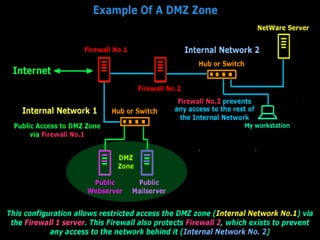
Machines placed in the DMZ usually offer services to the
general public, like Web services, domain name services
(DNS), mail relaying and FTP services. Proxy servers can
also go in the DMZ. If you decide to allow your users Web
access only via a proxy server, you can put the proxy in
the firewall and set your firewall rules to permit outgoing
access only to the proxy server.
• If you put a machine in the DMZ, it must be for a good reason.
Sometimes, companies will set up a few workstations with full
Internet access within the DMZ. Employees can use these machines
for games and other insecure activities. This is a good reason if the
internal machines have no Internet access, or extremely limited
access. If your policy is to let employees have moderate access from
their desktops, then creating workstations like this sends the wrong
message. Think about it: The only reason why they would use a DMZ
machine is if they were doing something inappropriate for the
workplace !
• It should be an isolated island, not a stepping stone. It must not be
directly connected to the internal network. Furthermore, it
shouldn't contain information that could help hackers compromise
other parts of the network. This includes user names, passwords,
network hardware configuration information etc.
• It must not contain anything you can't bear to lose. Any important
files placed on the DMZ should be read-only copies of originals
located within the network. Files created in the DMZ should not be
able to migrate into the network unless an administrator has
examined them. If you're running a news server and would like to
archive news, make sure the DMZ has its own archival system.
• What sort of things shouldn't you do? Example: If you're running an
FTP server in the DMZ, don't let users put confidential information
on there so they can get it from home later.
• It must be as secure a host as you can make it. Just because you're
assuming it's secure doesn't guarantee that it is. Don't make it any
easier for a hacker than absolutely necessary. A hacker may not be
able to compromise your internal network from your DMZ, but they
may decide to use it to compromise somebody else's network. Give
serious thought to not running Windows on your DMZ machines;
it's inherently insecure and many types of intrusions can't be
detected on Windows. Linux or openBSD can provide most, if not
all, the needed functionality along with a more secure environment.

Firewall DMZ Zone

  • 1.
  • 2.
    INTRODUCTION INTRODUCTION • The De-MilitarizedZone, or DMZ, is an expression that comes from the Korean War. There, it meant a strip of land forcibly kept clear of enemy soldiers. The idea was to accomplish this without risking your own soldiers' lives, thus mines were scattered throughout the DMZ like grated Romano on a plate of fettuccine. The term has been assimilated into the networking world, without the cheese . • Another meaning to the term DMZ Zone is a portion of your network which, although under your control, is outside your heaviest security. Compared to the rest of your network, machines you place in the DMZ are less protected, or flat-out unprotected, from the Internet. • Once a machine has entered the DMZ, it should not be brought back inside the network again. Assuming that it has been compromised in some way, bringing it back into the network is a big security hazard.
  • 3.
    Use of theDMZ • If you decide to build one, what do you do with it? Machines placed in the DMZ usually offer services to the general public, like Web services, domain name services (DNS), mail relaying and FTP services. Proxy servers can also go in the DMZ. If you decide to allow your users Web access only via a proxy server, you can put the proxy in the firewall and set your firewall rules to permit outgoing access only to the proxy server.
  • 5.
    • If youput a machine in the DMZ, it must be for a good reason. Sometimes, companies will set up a few workstations with full Internet access within the DMZ. Employees can use these machines for games and other insecure activities. This is a good reason if the internal machines have no Internet access, or extremely limited access. If your policy is to let employees have moderate access from their desktops, then creating workstations like this sends the wrong message. Think about it: The only reason why they would use a DMZ machine is if they were doing something inappropriate for the workplace ! • It should be an isolated island, not a stepping stone. It must not be directly connected to the internal network. Furthermore, it shouldn't contain information that could help hackers compromise other parts of the network. This includes user names, passwords, network hardware configuration information etc.
  • 6.
    • It mustnot contain anything you can't bear to lose. Any important files placed on the DMZ should be read-only copies of originals located within the network. Files created in the DMZ should not be able to migrate into the network unless an administrator has examined them. If you're running a news server and would like to archive news, make sure the DMZ has its own archival system. • What sort of things shouldn't you do? Example: If you're running an FTP server in the DMZ, don't let users put confidential information on there so they can get it from home later. • It must be as secure a host as you can make it. Just because you're assuming it's secure doesn't guarantee that it is. Don't make it any easier for a hacker than absolutely necessary. A hacker may not be able to compromise your internal network from your DMZ, but they may decide to use it to compromise somebody else's network. Give serious thought to not running Windows on your DMZ machines; it's inherently insecure and many types of intrusions can't be detected on Windows. Linux or openBSD can provide most, if not all, the needed functionality along with a more secure environment.