AGENDA
Overview of
MITRE ATT&CK
Operationalizin
MITRE ATT&CK
MITRE ATT&CK
vs Use Case in
Organization
2
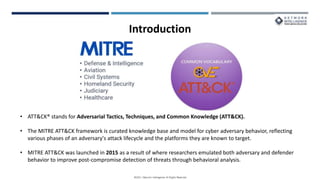
• ATT&CK® stands for Adversarial Tactics, Techniques, and Common Knowledge (ATT&CK).
• The MITRE ATT&CK framework is curated knowledge base and model for cyber adversary behavior, reflecting
various phases of an adversary's attack lifecycle and the platforms they are known to target.
• MITRE ATT&CK was launched in 2015 as a result of where researchers emulated both adversary and defender
behavior to improve post-compromise detection of threats through behavioral analysis.
Introduction
History
ATT&CK TTPs
RECONNAISSANCE
 The adversary is trying to gather information they can use to plan future operations.
 Use case
• IPS-In-Reconnaissance Activity Observed from External IP
 Recommendation steps:
1. Check if the IP is from a trusted vendor or Application Security/VAPT team.
2. If not, block the IP on the perimeter devices.
3. If the signature not in block mode, change it to block mode.
10
RESOURCE DEVELOPMENT
 The adversary is trying to establish resources they can use to support operations.
 Use case
• OS-MS-New Account Created by Non-Admin
 Recommendation steps:
1. Check if it is planned and approved or Genuine activity.
2. If No, then investigate the reason for activity.
11
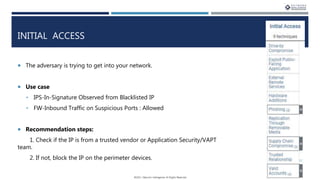
INITIAL ACCESS
 The adversary is trying to get into your network.
 Use case
• IPS-In-Signature Observed from Blacklisted IP
• FW-Inbound Traffic on Suspicious Ports : Allowed
 Recommendation steps:
1. Check if the IP is from a trusted vendor or Application Security/VAPT
team.
2. If not, block the IP on the perimeter devices. 12
EXECUTION
 The adversary is trying to run malicious code.
 Use case
• AV-SCCM-Virus Outbreak Observed
 Recommendation steps:
1. Anti-Virus
2. Patches
3. Unwanted files / software
13
PERSISTENCE
 The adversary is trying to maintain their foothold.
 Use case
• OS-MS-User Account Created during Non-Business Hour
 Recommendation steps:
Kindly validate the account created is valid or not.
1. If Yes, check if the account creation is authorized or not during non-business
hours.
2. If not, audit all the activities performed from/on the new account created.
14
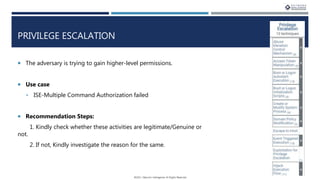
PRIVILEGE ESCALATION
 The adversary is trying to gain higher-level permissions.
 Use case
• ISE-Multiple Command Authorization failed
 Recommendation Steps:
1. Kindly check whether these activities are legitimate/Genuine or
not.
2. If not, Kindly investigate the reason for the same.
15
DEFENSE EVASION
 The adversary is trying to avoid being detected.
 Use case
• Forcepoint-Proxy Avoidance Observed-Allowed
 Recommendation steps:
1. Investigate the reason for requests towards the domain through Proxy Avoidance.
2. Check with user reason for accessing websites through Proxy Avoidance.
3. Block the External Domain and External IP on the Security devices if not associated
with business purpose. 16
CREDENTIAL ACCESS
 The adversary is trying to steal account names and passwords.
 Use case
• OS-MS-Windows Multiple login failures Attempts
 Recommendation Steps:
1. Unwanted files/passwords
2. Anti-Virus
3. Patches
17
DISCOVERY
 The adversary is trying to figure out your environment.
 Use case
• FW-Internal to Internal Network Scan Detected
 Recommendation Steps:
1. Kindly check whether the traffic observed on respective ports is genuine or not.
2. Investigate reason for Network Scan observed
3. A misconfigured application might be connecting to an old IP configured
internally, check with the asset owner for more details and update the IP address or
remove the application if no longer in use. 18
LATERAL MOVEMENT
 The adversary is trying to move through your environment.
 Use case
• Remote Access Tools Observed-Blocked
 Recommendation Steps:
1. Investigate the reason for Remote Access Tools Observed.
2. Check if the user has required approvals or not.
3. If not then, a. Uninstall the application b. Check if the user install the software without
privileges or approval.
4. Restrict user from accessing unauthorized applications.
19
COLLECTION
 The adversary is trying to gather data of interest to their goal.
 Use case
• Mimecast-Huge amount of mail Observed from Single Mail ID – Outbound
 Recommendation steps:
Kindly check whether these activities are legitimate/Genuine or not.
If not, Kindly investigate the reason for the same.
Check if activity performed by authorized user, change password in case of unauthorized
user.
20
COMMAND AND CONTROL
 The adversary is trying to communicate with compromised systems to control
them.
 Use case
• FW- XFORCE Out-Connection Observed Towards Blacklisted URL
• Traffic to Known C2 Servers
 Recommendation steps:
1. Block the malicious URL/IP on Proxy if there is no business relevance.
2. Check for Anti-Virus.
3. Check for Patches.
21
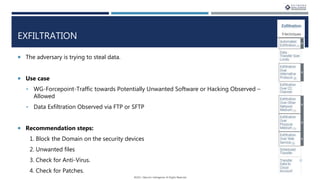
EXFILTRATION
 The adversary is trying to steal data.
 Use case
• WG-Forcepoint-Traffic towards Potentially Unwanted Software or Hacking Observed –
Allowed
• Data Exfiltration Observed via FTP or SFTP
 Recommendation steps:
1. Block the Domain on the security devices
2. Unwanted files
3. Check for Anti-Virus.
4. Check for Patches.
22
IMPACT
 The adversary is trying to manipulate, interrupt, or destroy your systems and data.
 Use case
• OS-MS-Windows Server ShutdownReboot Observed
• FW-Palo Alto-HA status Change
 Recommendation steps:
1. Check if it is planned activity.
2. If yes, please provide CR/SR for the same.
3. If No, then investigate the reason for the same. 23
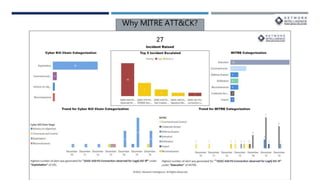
Why MITRE ATT&CK?
PURPLE TEAMING
25
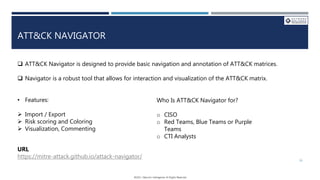
 ATT&CK Navigator is designed to provide basic navigation and annotation of ATT&CK matrices.
 Navigator is a robust tool that allows for interaction and visualization of the ATT&CK matrix.
• Features:
 Import / Export
 Risk scoring and Coloring
 Visualization, Commenting
Who Is ATT&CK Navigator for?
o CISO
o Red Teams, Blue Teams or Purple
Teams
o CTI Analysts
ATT&CK NAVIGATOR
URL
https://mitre-attack.github.io/attack-navigator/ 26
Demo
Links
Training
https://attack.mitre.org/resources/training/cti/
https://academy.attackiq.com/learn
https://app.cybrary.it/browse/course
Blogs:
https://medium.com/mitre-attack
Q & A
MITRE ATT&CK framework

MITRE ATT&CK framework

  • 2.
    AGENDA Overview of MITRE ATT&CK Operationalizin MITREATT&CK MITRE ATT&CK vs Use Case in Organization 2
  • 3.
    • ATT&CK® standsfor Adversarial Tactics, Techniques, and Common Knowledge (ATT&CK). • The MITRE ATT&CK framework is curated knowledge base and model for cyber adversary behavior, reflecting various phases of an adversary's attack lifecycle and the platforms they are known to target. • MITRE ATT&CK was launched in 2015 as a result of where researchers emulated both adversary and defender behavior to improve post-compromise detection of threats through behavioral analysis. Introduction
  • 4.
  • 6.
  • 10.
    RECONNAISSANCE  The adversaryis trying to gather information they can use to plan future operations.  Use case • IPS-In-Reconnaissance Activity Observed from External IP  Recommendation steps: 1. Check if the IP is from a trusted vendor or Application Security/VAPT team. 2. If not, block the IP on the perimeter devices. 3. If the signature not in block mode, change it to block mode. 10
  • 11.
    RESOURCE DEVELOPMENT  Theadversary is trying to establish resources they can use to support operations.  Use case • OS-MS-New Account Created by Non-Admin  Recommendation steps: 1. Check if it is planned and approved or Genuine activity. 2. If No, then investigate the reason for activity. 11
  • 12.
    INITIAL ACCESS  Theadversary is trying to get into your network.  Use case • IPS-In-Signature Observed from Blacklisted IP • FW-Inbound Traffic on Suspicious Ports : Allowed  Recommendation steps: 1. Check if the IP is from a trusted vendor or Application Security/VAPT team. 2. If not, block the IP on the perimeter devices. 12
  • 13.
    EXECUTION  The adversaryis trying to run malicious code.  Use case • AV-SCCM-Virus Outbreak Observed  Recommendation steps: 1. Anti-Virus 2. Patches 3. Unwanted files / software 13
  • 14.
    PERSISTENCE  The adversaryis trying to maintain their foothold.  Use case • OS-MS-User Account Created during Non-Business Hour  Recommendation steps: Kindly validate the account created is valid or not. 1. If Yes, check if the account creation is authorized or not during non-business hours. 2. If not, audit all the activities performed from/on the new account created. 14
  • 15.
    PRIVILEGE ESCALATION  Theadversary is trying to gain higher-level permissions.  Use case • ISE-Multiple Command Authorization failed  Recommendation Steps: 1. Kindly check whether these activities are legitimate/Genuine or not. 2. If not, Kindly investigate the reason for the same. 15
  • 16.
    DEFENSE EVASION  Theadversary is trying to avoid being detected.  Use case • Forcepoint-Proxy Avoidance Observed-Allowed  Recommendation steps: 1. Investigate the reason for requests towards the domain through Proxy Avoidance. 2. Check with user reason for accessing websites through Proxy Avoidance. 3. Block the External Domain and External IP on the Security devices if not associated with business purpose. 16
  • 17.
    CREDENTIAL ACCESS  Theadversary is trying to steal account names and passwords.  Use case • OS-MS-Windows Multiple login failures Attempts  Recommendation Steps: 1. Unwanted files/passwords 2. Anti-Virus 3. Patches 17
  • 18.
    DISCOVERY  The adversaryis trying to figure out your environment.  Use case • FW-Internal to Internal Network Scan Detected  Recommendation Steps: 1. Kindly check whether the traffic observed on respective ports is genuine or not. 2. Investigate reason for Network Scan observed 3. A misconfigured application might be connecting to an old IP configured internally, check with the asset owner for more details and update the IP address or remove the application if no longer in use. 18
  • 19.
    LATERAL MOVEMENT  Theadversary is trying to move through your environment.  Use case • Remote Access Tools Observed-Blocked  Recommendation Steps: 1. Investigate the reason for Remote Access Tools Observed. 2. Check if the user has required approvals or not. 3. If not then, a. Uninstall the application b. Check if the user install the software without privileges or approval. 4. Restrict user from accessing unauthorized applications. 19
  • 20.
    COLLECTION  The adversaryis trying to gather data of interest to their goal.  Use case • Mimecast-Huge amount of mail Observed from Single Mail ID – Outbound  Recommendation steps: Kindly check whether these activities are legitimate/Genuine or not. If not, Kindly investigate the reason for the same. Check if activity performed by authorized user, change password in case of unauthorized user. 20
  • 21.
    COMMAND AND CONTROL The adversary is trying to communicate with compromised systems to control them.  Use case • FW- XFORCE Out-Connection Observed Towards Blacklisted URL • Traffic to Known C2 Servers  Recommendation steps: 1. Block the malicious URL/IP on Proxy if there is no business relevance. 2. Check for Anti-Virus. 3. Check for Patches. 21
  • 22.
    EXFILTRATION  The adversaryis trying to steal data.  Use case • WG-Forcepoint-Traffic towards Potentially Unwanted Software or Hacking Observed – Allowed • Data Exfiltration Observed via FTP or SFTP  Recommendation steps: 1. Block the Domain on the security devices 2. Unwanted files 3. Check for Anti-Virus. 4. Check for Patches. 22
  • 23.
    IMPACT  The adversaryis trying to manipulate, interrupt, or destroy your systems and data.  Use case • OS-MS-Windows Server ShutdownReboot Observed • FW-Palo Alto-HA status Change  Recommendation steps: 1. Check if it is planned activity. 2. If yes, please provide CR/SR for the same. 3. If No, then investigate the reason for the same. 23
  • 24.
  • 25.
  • 26.
     ATT&CK Navigatoris designed to provide basic navigation and annotation of ATT&CK matrices.  Navigator is a robust tool that allows for interaction and visualization of the ATT&CK matrix. • Features:  Import / Export  Risk scoring and Coloring  Visualization, Commenting Who Is ATT&CK Navigator for? o CISO o Red Teams, Blue Teams or Purple Teams o CTI Analysts ATT&CK NAVIGATOR URL https://mitre-attack.github.io/attack-navigator/ 26
  • 27.
  • 28.
  • 29.