Firewalls
Introduction
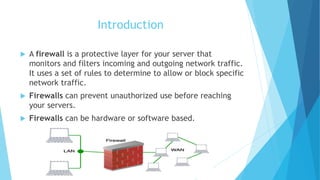
 A firewall is a protective layer for your server that
monitors and filters incoming and outgoing network traffic.
It uses a set of rules to determine to allow or block specific
network traffic.
 Firewalls can prevent unauthorized use before reaching
your servers.
 Firewalls can be hardware or software based.
Why need of Firewalls
 To protect confidential information from those who do not explicitly need to
access it.
 To protect our network & its resources from malicious users & accidents that
originate outside of our network.
 A firewall keeps destructive and disruptive forces out, and controls the
incoming and outgoing network traffic based on security parameters that you
can control and refine.
Types Of Firewalls
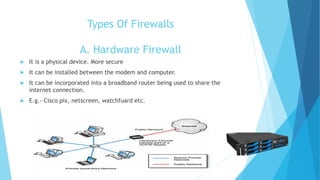
A. Hardware Firewall
 It is a physical device. More secure
 It can be installed between the modem and computer.
 It can be incorporated into a broadband router being used to share the
internet connection.
 E.g.- Cisco pix, netscreen, watchfuard etc.
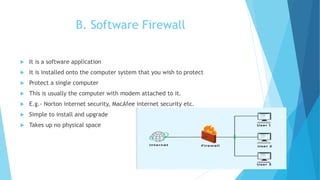
B. Software Firewall
 It is a software application
 It is installed onto the computer system that you wish to protect
 Protect a single computer
 This is usually the computer with modem attached to it.
 E.g.- Norton internet security, MacAfee internet security etc.
 Simple to install and upgrade
 Takes up no physical space
Access Control List
(ACL)
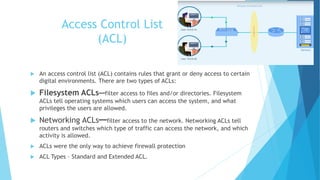
 An access control list (ACL) contains rules that grant or deny access to certain
digital environments. There are two types of ACLs:
 Filesystem ACLs━filter access to files and/or directories. Filesystem
ACLs tell operating systems which users can access the system, and what
privileges the users are allowed.
 Networking ACLs━filter access to the network. Networking ACLs tell
routers and switches which type of traffic can access the network, and which
activity is allowed.
 ACLs were the only way to achieve firewall protection
 ACL Types – Standard and Extended ACL.
Packet Filtering
 Packet filtering is a firewall technique used to control network access by
monitoring outgoing and incoming packets and allowing them to pass or halt
based on the source and destination Internet Protocol (IP) addresses,
protocols and ports
 Packet filtering is fairly effective & transparent to users, but it is difficult to
configure.
 Packet-filtering firewalls operate at the network layer (Layer 3) of the OSI
model. Packet-filtering firewalls make processing decisions based on network
addresses, ports, or protocols.
 Packet filtering checks source and destination IP addresses. If both IP
addresses match, the packet is considered secure and verified
DEMILITARIZED ZONE
(DMZ)
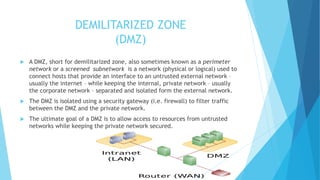
 A DMZ, short for demilitarized zone, also sometimes known as a perimeter
network or a screened subnetwork is a network (physical or logical) used to
connect hosts that provide an interface to an untrusted external network –
usually the internet – while keeping the internal, private network – usually
the corporate network – separated and isolated form the external network.
 The DMZ is isolated using a security gateway (i.e. firewall) to filter traffic
between the DMZ and the private network.
 The ultimate goal of a DMZ is to allow access to resources from untrusted
networks while keeping the private network secured.
Alerts and Audit Trials
 A firewall alert pop-up appears on your computer screen when
the firewall detects suspicious network traffic on your computer.
 Firewall Analyzer lets you to administer the triggered alerts, so that the
network administrators take care of the triggered alerts and carry out
remediation if required.
 Audit trails are the manual or electronic records that chronologically catalog
events or procedures to provide support documentation and history that is
used to authenticate security and operational actions, or mitigate challenges
 Audit trails can also identify areas of non-compliance by providing
information for audit investigations.
 Audit trail records will contain details that include date, time, and user
information associated with the transaction
THANK YOU

Fire walls

  • 1.
  • 2.
    Introduction  A firewallis a protective layer for your server that monitors and filters incoming and outgoing network traffic. It uses a set of rules to determine to allow or block specific network traffic.  Firewalls can prevent unauthorized use before reaching your servers.  Firewalls can be hardware or software based.
  • 3.
    Why need ofFirewalls  To protect confidential information from those who do not explicitly need to access it.  To protect our network & its resources from malicious users & accidents that originate outside of our network.  A firewall keeps destructive and disruptive forces out, and controls the incoming and outgoing network traffic based on security parameters that you can control and refine.
  • 4.
    Types Of Firewalls A.Hardware Firewall  It is a physical device. More secure  It can be installed between the modem and computer.  It can be incorporated into a broadband router being used to share the internet connection.  E.g.- Cisco pix, netscreen, watchfuard etc.
  • 5.
    B. Software Firewall It is a software application  It is installed onto the computer system that you wish to protect  Protect a single computer  This is usually the computer with modem attached to it.  E.g.- Norton internet security, MacAfee internet security etc.  Simple to install and upgrade  Takes up no physical space
  • 6.
    Access Control List (ACL) An access control list (ACL) contains rules that grant or deny access to certain digital environments. There are two types of ACLs:  Filesystem ACLs━filter access to files and/or directories. Filesystem ACLs tell operating systems which users can access the system, and what privileges the users are allowed.  Networking ACLs━filter access to the network. Networking ACLs tell routers and switches which type of traffic can access the network, and which activity is allowed.  ACLs were the only way to achieve firewall protection  ACL Types – Standard and Extended ACL.
  • 7.
    Packet Filtering  Packetfiltering is a firewall technique used to control network access by monitoring outgoing and incoming packets and allowing them to pass or halt based on the source and destination Internet Protocol (IP) addresses, protocols and ports  Packet filtering is fairly effective & transparent to users, but it is difficult to configure.  Packet-filtering firewalls operate at the network layer (Layer 3) of the OSI model. Packet-filtering firewalls make processing decisions based on network addresses, ports, or protocols.  Packet filtering checks source and destination IP addresses. If both IP addresses match, the packet is considered secure and verified
  • 8.
    DEMILITARIZED ZONE (DMZ)  ADMZ, short for demilitarized zone, also sometimes known as a perimeter network or a screened subnetwork is a network (physical or logical) used to connect hosts that provide an interface to an untrusted external network – usually the internet – while keeping the internal, private network – usually the corporate network – separated and isolated form the external network.  The DMZ is isolated using a security gateway (i.e. firewall) to filter traffic between the DMZ and the private network.  The ultimate goal of a DMZ is to allow access to resources from untrusted networks while keeping the private network secured.
  • 9.
    Alerts and AuditTrials  A firewall alert pop-up appears on your computer screen when the firewall detects suspicious network traffic on your computer.  Firewall Analyzer lets you to administer the triggered alerts, so that the network administrators take care of the triggered alerts and carry out remediation if required.  Audit trails are the manual or electronic records that chronologically catalog events or procedures to provide support documentation and history that is used to authenticate security and operational actions, or mitigate challenges  Audit trails can also identify areas of non-compliance by providing information for audit investigations.  Audit trail records will contain details that include date, time, and user information associated with the transaction
  • 10.