Financial Functions in MS Excel
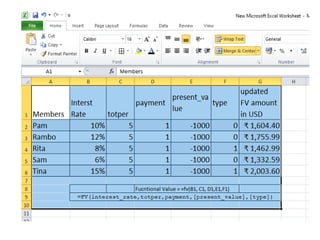
1. Future Value (FV) function
• FV, one of the financial functions, calculates the future value of an
investment based on a constant interest rate.
• You can use FV with either periodic, constant payments, or a single lump
sum payment.
• Syntax
• FV(rate,nper,pmt,[pv],[type])
• The FV function syntax has the following arguments:
• Rate Required. The interest rate per period.
• Nper Required. The total number of payment periods in an annuity.
• Pmt Required. The payment made each period; it cannot change over
the life of the annuity. Typically, pmt contains principal and interest but no
other fees or taxes. If pmt is omitted, you must include the pv argument.
• Pv Optional. The present value, or the lump-sum amount that a series of
future payments is worth right now. If pv is omitted, it is assumed to be 0
(zero), and you must include the pmt argument.
• Type Optional. The number 0 or 1 and indicates when payments are due.
If type is omitted, it is assumed to be 0.
Set type equal to If payments are due
0 At the end of the period
1 At the beginning of the period
2. ACCRINT (accrued interest ) function
• ACCRINT helps users calculate the accrued interest on a security, such as a bond, when
that security is sold or is transferred to a new owner on a date other than the issue
date or on a date that is an interest payment date. The function will calculate the
accrued interest for a security that pays interest on a periodic basis.
• Formula =ACCRINT(issue, first_interest, settlement, rate, par, frequency, [basis],
[calc_method])
• The ACCRINT function uses the following arguments:
• Issue (required argument) – This is the security’s issue date.
• First_interest (required argument) – This is the first interest date of the security.
• Settlement (required argument) – The security’s settlement date. It is the date after
the issue date when the security is traded to the buyer.
• Rate (required argument) – The security’s annual coupon rate.
• Par (required argument) – The security’s par value. If omitted by the user, the function
will take the par value as $1,000.
• Frequency (required argument) – This is the number of coupons payments per year.
The function will take for annual payments, frequency = 1; for semiannual, frequency =
2; for quarterly, frequency = 4.
• Basis (optional argument) – This is the kind of day count that is used for calculating the
interest on a given security. If we omit the argument, the basis is set to 0.
• Calc_method (optional argument) – It is either 0 (calculates the accrued interest
from first_interest_date to settlement_date) or 1 (calculates the accrued interest from
issue_date to settlement_date).
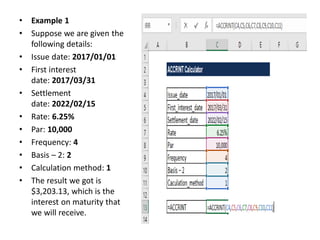
• Example 1
• Suppose we are given the
following details:
• Issue date: 2017/01/01
• First interest
date: 2017/03/31
• Settlement
date: 2022/02/15
• Rate: 6.25%
• Par: 10,000
• Frequency: 4
• Basis – 2: 2
• Calculation method: 1
• The result we got is
$3,203.13, which is the
interest on maturity that
we will receive.
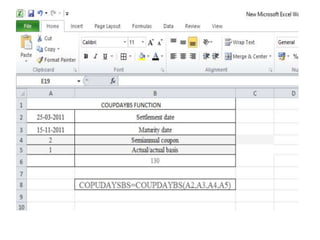
3. COUPDAYBS function
• Description
• The COUPDAYBS function returns the number of days from the
beginning of a coupon period until its settlement date.
• Syntax
• COUPDAYBS(settlement, maturity, frequency, [basis])
• The COUPDAYBS function syntax has the following arguments:
• Settlement Required. The security's settlement date. The security
settlement date is the date after the issue date when the security is
traded to the buyer.
• Maturity Required. The security's maturity date. The maturity
date is the date when the security expires.
• Frequency Required. The number of coupon payments per year.
For annual payments, frequency = 1; for semiannual, frequency = 2;
for quarterly, frequency = 4.
• Basis Optional. The type of day count basis to use.
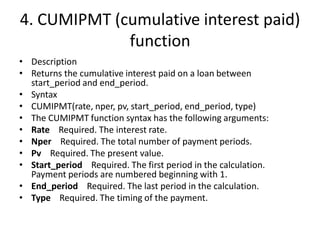
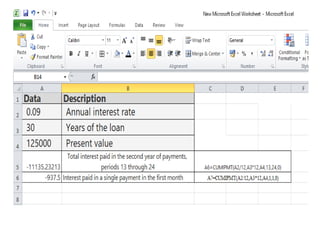
4. CUMIPMT (cumulative interest paid)
function
• Description
• Returns the cumulative interest paid on a loan between
start_period and end_period.
• Syntax
• CUMIPMT(rate, nper, pv, start_period, end_period, type)
• The CUMIPMT function syntax has the following arguments:
• Rate Required. The interest rate.
• Nper Required. The total number of payment periods.
• Pv Required. The present value.
• Start_period Required. The first period in the calculation.
Payment periods are numbered beginning with 1.
• End_period Required. The last period in the calculation.
• Type Required. The timing of the payment.
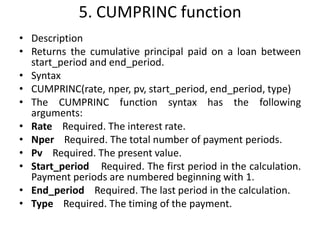
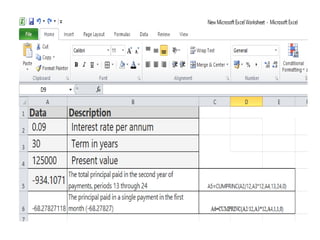
5. CUMPRINC function
• Description
• Returns the cumulative principal paid on a loan between
start_period and end_period.
• Syntax
• CUMPRINC(rate, nper, pv, start_period, end_period, type)
• The CUMPRINC function syntax has the following
arguments:
• Rate Required. The interest rate.
• Nper Required. The total number of payment periods.
• Pv Required. The present value.
• Start_period Required. The first period in the calculation.
Payment periods are numbered beginning with 1.
• End_period Required. The last period in the calculation.
• Type Required. The timing of the payment.
6. DB function
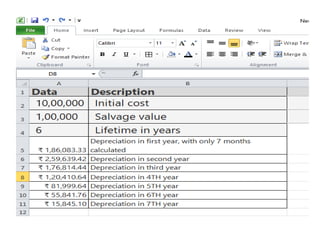
• Description
• Returns the depreciation of an asset for a specified period using the
fixed-declining balance method.
• Syntax
• DB(cost, salvage, life, period, [month])
• The DB function syntax has the following arguments:
• Cost Required. The initial cost of the asset.
• Salvage Required. The value at the end of the depreciation
(sometimes called the salvage value of the asset).
• Life Required. The number of periods over which the asset is
being depreciated (sometimes called the useful life of the asset).
• Period Required. The period for which you want to calculate the
depreciation. Period must use the same units as life.
• Month Optional. The number of months in the first year. If month
is omitted, it is assumed to be 12.
7. DDB function
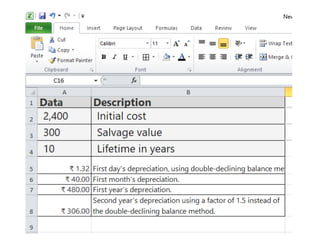
• Description
• Returns the depreciation of an asset for a specified period using the
double-declining balance method or some other method you specify.
• Syntax
• DDB(cost, salvage, life, period, [factor])
• The DDB function syntax has the following arguments:
• Cost Required. The initial cost of the asset.
• Salvage Required. The value at the end of the depreciation (sometimes
called the salvage value of the asset). This value can be 0.
• Life Required. The number of periods over which the asset is being
depreciated (sometimes called the useful life of the asset).
• Period Required. The period for which you want to calculate the
depreciation. Period must use the same units as life.
• Factor Optional. The rate at which the balance declines. If factor is
omitted, it is assumed to be 2 (the double-declining balance method).
8. DISC function
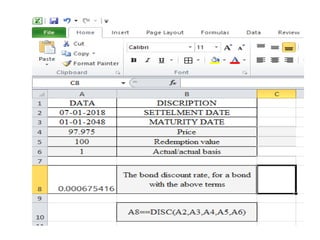
• Description
• Returns the discount rate for a security.
• Syntax
• DISC(settlement, maturity, pr, redemption, [basis])
• The DISC function syntax has the following arguments:
• Settlement Required. The security's settlement date.
The security settlement date is the date after the issue
date when the security is traded to the buyer.
• Maturity Required. The security's maturity date. The
maturity date is the date when the security expires.
• Pr Required. The security's price per $100 face value.
• Redemption Required. The security's redemption
value per $100 face value.
• Basis Optional. The type of day count basis to use
9. DURATION function
• The DURATION function, one of the Financial functions, returns the Macauley
duration for an assumed par value of $100. Duration is defined as the weighted
average of the present value of cash flows, and is used as a measure of a bond
price's response to changes in yield.
• Syntax
• DURATION(settlement, maturity, coupon, yld, frequency, [basis])
• Important: Dates should be entered by using the DATE function, or as results of
other formulas or functions. For example, use DATE(2018,5,23) for the 23rd day of
May, 2018. Problems can occur if dates are entered as text.
• The DURATION function syntax has the following arguments:
• Settlement Required. The security's settlement date. The security settlement
date is the date after the issue date when the security is traded to the buyer.
• Maturity Required. The security's maturity date. The maturity date is the date
when the security expires.
• Coupon Required. The security's annual coupon rate.
• Yld Required. The security's annual yield.
• Frequency Required. The number of coupon payments per year. For annual
payments, frequency = 1; for semiannual, frequency = 2; for quarterly, frequency =
4.
• Basis Optional. The type of day count basis to use.
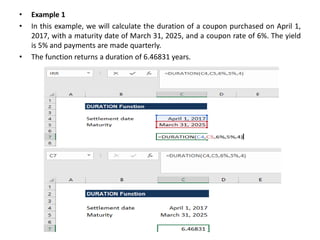
• Example 1
• In this example, we will calculate the duration of a coupon purchased on April 1,
2017, with a maturity date of March 31, 2025, and a coupon rate of 6%. The yield
is 5% and payments are made quarterly.
• The function returns a duration of 6.46831 years.
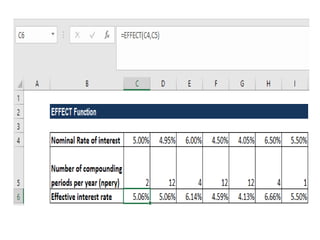
10. EFFECT function
• Description
• Returns the effective annual interest rate, given the
nominal annual interest rate and the number of
compounding periods per year.
• Syntax
• EFFECT(nominal_rate, npery)
• The EFFECT function syntax has the following
arguments:
• Nominal_rate Required. The nominal interest rate.
• Npery Required. The number of compounding
periods per year.
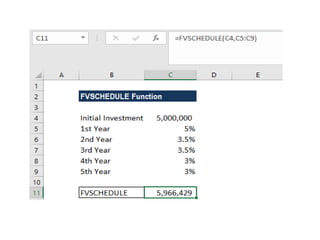
11. FVSCHEDULE function
• Description
• Returns the future value of an initial principal after
applying a series of compound interest rates. Use
FVSCHEDULE to calculate the future value of an
investment with a variable or adjustable rate.
• Syntax
• FVSCHEDULE(principal, schedule)
• The FVSCHEDULE function syntax has the following
arguments:
• Principal Required. The present value.
• Schedule Required. An array of interest rates to
apply.
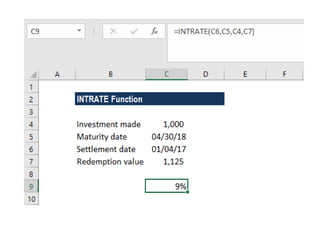
12. INTRATE function
• Description
• Returns the interest rate for a fully invested security.
• Syntax
• INTRATE(settlement, maturity, investment, redemption, [basis])
• The INTRATE function syntax has the following arguments:
• Settlement Required. The security's settlement date. The security
settlement date is the date after the issue date when the security is
traded to the buyer.
• Maturity Required. The security's maturity date. The maturity
date is the date when the security expires.
• Investment Required. The amount invested in the security.
• Redemption Required. The amount to be received at maturity.
• Basis Optional. The type of day count basis to use.
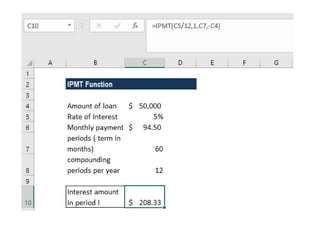
13. IPMT function
• Description
• Returns the interest payment for a given period for an investment based
on periodic, constant payments and a constant interest rate.
• Syntax
• IPMT(rate, per, nper, pv, [fv], [type])
• The IPMT function syntax has the following arguments:
• Rate Required. The interest rate per period.
• Per Required. The period for which you want to find the interest and
must be in the range 1 to nper.
• Nper Required. The total number of payment periods in an annuity.
• Pv Required. The present value, or the lump-sum amount that a series of
future payments is worth right now.
• Fv Optional. The future value, or a cash balance you want to attain after
the last payment is made. If fv is omitted, it is assumed to be 0 (the future
value of a loan, for example, is 0).
• Type Optional. The number 0 or 1 and indicates when payments are due.
If type is omitted, it is assumed to be 0.
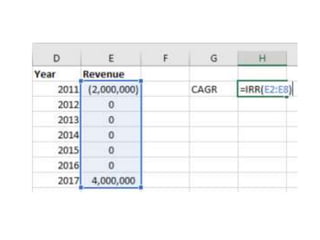
14. IRR function
• Description
• Returns the internal rate of return for a series of cash flows
represented by the numbers in values.
• These cash flows do not have to be even, as they would be for an
annuity.
• However, the cash flows must occur at regular intervals, such as
monthly or annually.
• The internal rate of return is the interest rate received for an
investment consisting of payments (negative values) and income
(positive values) that occur at regular periods.
• Syntax
• IRR(values, [guess])
• The IRR function syntax has the following arguments:
• Values Required. An array or a reference to cells that contain
numbers for which you want to calculate the internal rate of return.
• Guess Optional. A number that you guess is close to the result of
IRR.
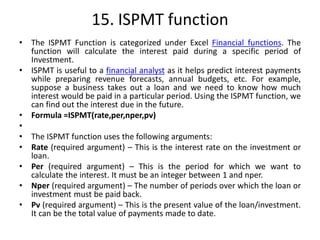
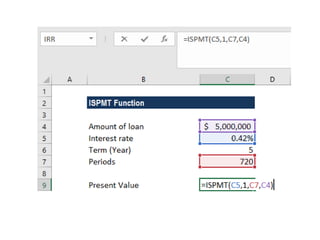
15. ISPMT function
• The ISPMT Function is categorized under Excel Financial functions. The
function will calculate the interest paid during a specific period of
Investment.
• ISPMT is useful to a financial analyst as it helps predict interest payments
while preparing revenue forecasts, annual budgets, etc. For example,
suppose a business takes out a loan and we need to know how much
interest would be paid in a particular period. Using the ISPMT function, we
can find out the interest due in the future.
• Formula =ISPMT(rate,per,nper,pv)
•
• The ISPMT function uses the following arguments:
• Rate (required argument) – This is the interest rate on the investment or
loan.
• Per (required argument) – This is the period for which we want to
calculate the interest. It must be an integer between 1 and nper.
• Nper (required argument) – The number of periods over which the loan or
investment must be paid back.
• Pv (required argument) – This is the present value of the loan/investment.
It can be the total value of payments made to date.
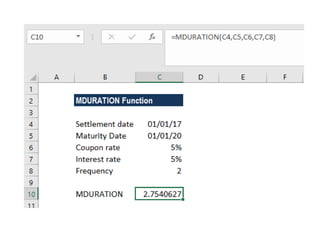
16. MDURATION Function
• The MDURATION Function is categorized under Excel Financial functions. It will calculate the duration
of a security using the Modified Macauley method.
• In financial analysis, we often evaluate a bond and develop a strategy that will match the duration of
assets and liabilities. This is done to minimize the impact of interest rates on the net worth of a
business. The MDURATION function helps us formulate a similar strategy.
• MDURATION is very similar to the DURATION function. The MDURATION function returns the annual
duration of a security with periodic interest payments, but it calculates the duration if the yield were
to increase 1%.
• The Macaulay duration is calculated for an assumed par value of $100. Both duration and modified
duration allow bonds of different maturities and coupon rates to be compared directly. It can be useful
to use DURATION in conjunction with MDURATION.
• Formula
• =MDURATION(settlement, maturity, coupon, yld, frequency, [basis])
• The MDURATION function uses the following arguments:
• Settlement (required argument) – This is the settlement date of the security after the issue date when
the security is traded to the buyer.
• Maturity (required argument) – This is the maturity date of the security or the date when the security
expires.
• Coupon (required argument) – The annual coupon rate.
• Yld (required argument) – This is the annual yield of the security.
• Frequency (required argument) – This is the number of coupon payments per year. The frequency is 1
for annual payments, 2 for semi-annual, and 4 for quarterly payments.
• Basis (optional argument) – This is the type of day count basis to use.
•
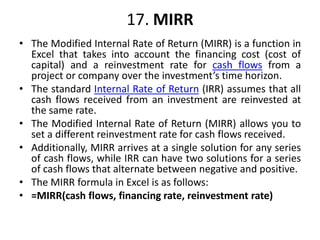
17. MIRR
• The Modified Internal Rate of Return (MIRR) is a function in
Excel that takes into account the financing cost (cost of
capital) and a reinvestment rate for cash flows from a
project or company over the investment’s time horizon.
• The standard Internal Rate of Return (IRR) assumes that all
cash flows received from an investment are reinvested at
the same rate.
• The Modified Internal Rate of Return (MIRR) allows you to
set a different reinvestment rate for cash flows received.
• Additionally, MIRR arrives at a single solution for any series
of cash flows, while IRR can have two solutions for a series
of cash flows that alternate between negative and positive.
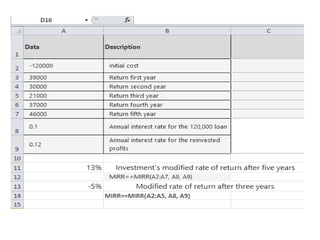
• The MIRR formula in Excel is as follows:
• =MIRR(cash flows, financing rate, reinvestment rate)
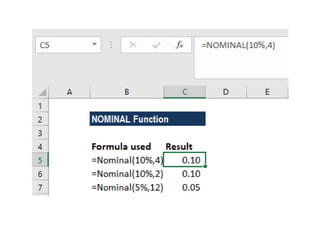
18. NOMINAL Function
• The NOMINAL function is categorized under Excel Financial functions. The
function will return the nominal annual interest rate when the effective
rate and number of compounding years are given.
• In financial analysis, we often evaluate more than one bond and hence are
interested in knowing the net return offered by each. If two bonds are to
be compared, one advertising a real interest rate while the other a
nominal rate, the NOMINAL function can be helpful.
•
• Formula
• =NOMINAL(effect_rate, npery)
•
• The NOMINAL function uses the following arguments:
• Effect_rate (required argument) – This is the effective interest rate.
• Npery (required argument) – This is the number of compounding periods.
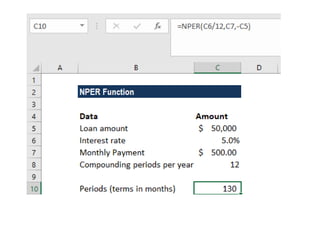
19. NPER Function
• The NPER function is categorized under Excel Financial functions. The function
helps calculate the number of periods that are required to pay off a loan or reach
an investment goal through regular periodic payments and at a fixed interest rate.
• In financial analysis, we often wish to build a corporate fund. The NPER function
will help us know the number of periods required to reach our target amount. It
can also be used to get the number of payment periods for a loan that we wish to
take.
•
• Formula
• =NPER(rate,pmt,pv,[fv],[type])
•
• The NPER function uses the following arguments:
• Rate (required argument) – This is the interest rate per period.
• Pmt (required argument) – The payment made each period. Generally, it contains
principal and interest but no other fees and taxes.
• Pv (required argument) – The present value, or the lump-sum amount that a series
of future payments is worth right now.
• Fv (optional argument) – This is the future vale or the cash balance which we want
at the end after the last payment is made. When omitted, it takes the value as
zero.
• Type (optional argument) – Indicates when payments are due. If type is set to 0 or
omitted, then payments are due at the end of the period. If set to 0, payments are
due at the start of the period.
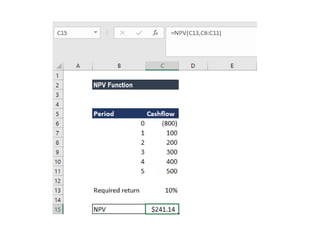
20. NPV Function
• The NPV Function is an Excel Financial function that will calculate the Net
Present Value (NPV) for a series of cash flows and a given discount rate. It
is important to understand the Time Value of Money, which is a
foundational building block of various Financial Valuation methods.
• In financial modeling, the NPV function is useful in determining the value
of an investment or understanding the feasibility of a project. It should be
noted that it’s usually more appropriate for analysts to use the XNPV
function instead of the regular NPV function.
•
• Formula
• =NPV(rate,value1,[value2],…)
• The NPV function uses the following arguments:
• Rate (required argument) – This is the rate of discount over the length of
the period.
• Value1, Value2 – Value1 is a required option. They are numeric values that
represent a series of payments and income where:
– Negative payments represent outgoing payments.
– Positive payments represent incoming payments.
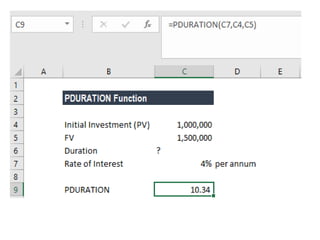
21. PDURATION Function
• The PDURATION function is an Excel Financial function. It helps the
user calculate the time or the specific number of periods required
for an investment made to reach a particular value.
• In simple terms, it will answer the question: Suppose we invested
$1,000,000 at 4% per annum – how long will it take for our
investment to reach $1,500,000?
• The PDURATION function was introduced in MS Excel 2013 and is
unavailable in earlier versions.
•
• Formula
• =PDURATION (rate, pv,fv)
•
• The PDURATION function uses the following arguments:
• Rate (required argument) – This is the interest period per year.
• Pv (required argument) – The present value of the investment.
• Fv (required argument) – This is the future value of the investment.
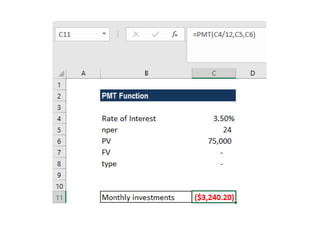
22. PMT Function
• The PMT function is categorized under financial Excel functions. The function helps
calculate the total payment (principal and interest) required to settle a loan or an
investment with a fixed interest rate over a specific time period.
•
• Formula
• =PMT(rate, nper, pv, [fv], [type])
•
• The PMT function uses the following arguments:
• Rate (required argument) – The interest rate of the loan.
• Nper (required argument) – Total number of payments for the loan taken.
• Pv (required argument) – The present value or total amount that a series of future
payments is worth now. It is also termed as the principal of a loan.
• Fv (optional argument) – This is the future value or a cash balance we want to
attain after the last payment is made. If Fv is omitted, it is assumed to be 0 (zero),
that is, the future value of a loan is 0.
• Type (optional argument) – The type of day count basis to use.
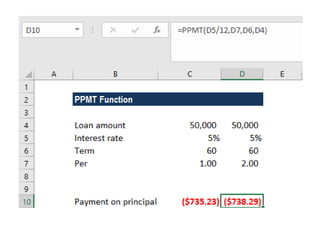
24. PPMT Function
• The PPMT Function is categorized under Excel Financial functions. The function will
calculate the payment on the principal for a loan or an investment based on
periodic, constant payments and a fixed interest rate for a given period of time.
• In financial analysis, the PPMT function is useful in understanding the primary
components of the total payments made for a loan taken.
•
• Formula
• =PPMT( rate, per, nper, pv, [fv], [type] )
•
• The PPMT function uses the following arguments:
• Rate (required argument) – This is the interest rate per period.
• Per (required argument) – A bond’s maturity date, that is, the date when bond
expires.
• Nper (required argument) – The total number of payment periods.
• Pv (required argument) – This is the present value of the loan/investment. It is the
total amount that a series of future payments is worth now.
• Fv (optional argument) – Specifies the future value of the loan/investment at the
end of nper payments. If omitted, [fv] takes on the default value of 0.
• Type (optional argument) – This specifies whether the payment is made at the
start or the end of the period. It can assume a value of 0 or 1. If it is 0, it means the
payment is made at the end of the period, and if 1, the payment is made at the
start. If we omit the [type] argument, it will take on the default value of 0,
denoting payments made at the end of the period.
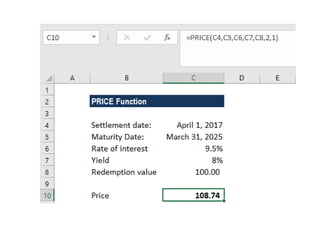
25. PRICE Function
• The PRICE Function is categorized under Excel FINANCIAL functions. It will
calculate the price of a bond per $100 face value that pays a periodic
interest rate.
• In financial analysis, the PRICE function can be useful when we wish to
borrow money by selling bonds instead of stocks. If we know the
parameters of the bond to be issued, we can calculate the breakeven price
of a bond using this function.
•
• Formula
• =PRICE(settlement, maturity, rate, yld, redemption, frequency, [basis])
•
• The PRICE function uses the following arguments:
• Settlement (required argument) – The bond’s settlement date or the date
that the coupon is purchased. The bond’s settlement date should be after
the issue date.
• Maturity (required argument) – This is the bond’s maturity date or the
date when the bond expires.
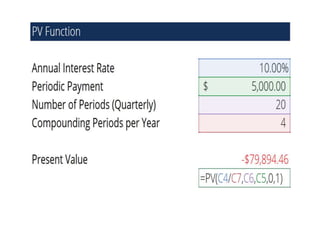
26. PV Function
• The PV function is a widely used financial function in Microsoft Excel. It calculates the
present value of a loan or an investment.
• In financial statement analysis, PV is used to calculate the dollar value of future
payments in the present time. For multiple payments, we assume periodic, fixed
payments and a fixed interest rate. Alternatively, the function can also be used to
calculate the present value of a single future value.
•
• Formula
• =PV(rate, nper, pmt, [fv], [type])
•
• The PV function uses the following arguments:
• rate (required argument) – The interest rate per compounding period. A loan with a
12% annual interest rate and monthly required payments would have a monthly
interest rate of 12%/12 or 1%. Therefore, the rate would be 1%.
• nper (required argument) – The number of payment periods. For example, a 3 year
loan with monthly payments would have 36 periods. Therefore, nper would be 36
months.
• pmt (required argument) – The fixed payment per period.
• fv (optional argument) – An investment’s future value at the end of all payment
periods (nper). If there is no input for fv, Excel will assume the input is 0.
• type (optional argument) – Type indicates when payments are issued. There are only
two inputs, 0 and 1. If type is omitted or 0 is the input, payments are made at period
end. If set to 1, payments are made at period beginning.
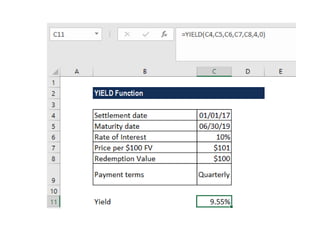
27. YIELD Function
• The YIELD Function is categorized under Excel Financial functions. It will calculate the
yield on a security that pays periodic interest. The function is generally used to calculate
bond yield.
• As a financial analyst, we often calculate the yield on a bond to determine the income
that would be generated in a year. Yield is different from the rate of return, as the
return is the gain already earned, while yield is the prospective return.
•
• Formula
• = YIELD(settlement, maturity, rate, pr, redemption, frequency, [basis])
• This function uses the following arguments:
• Settlement (required argument) – This is the settlement date of the security. It is a date
after the security is traded to the buyer that is after the issue date.
• Maturity (required argument) – This is the maturity date of the security. It is the date
when the security expires.
• Rate (required argument) – The annual coupon rate.
• Pr (required argument) – The price of the security per $100 face value.
• Redemption (required argument) – This is the redemption value per $100 face value.
• Frequency (required argument) – The number of coupon payments per year. It must be
one of the following: 1 – Annually, 2 – Semi-annually, 4 – Quarterly
• [basis] (optional argument) – Specifies the financial day count basis that is used by the
security.
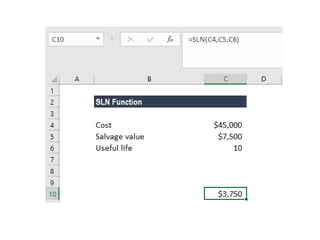
28. SLN Function (Straight Line)
• The SLN function will calculate the depreciation of an asset on a
straight-line basis for one period. In financial modeling, the SLN
function helps calculate the straight line depreciation of a fixed
asset when building a budget.
• Learn more about various types of depreciation methods.
•
• Formula
• =SLN(cost, salvage, life)
•
• The SLN function uses the following arguments:
• Cost (required argument) – This is the initial cost of the asset.
• Salvage (required argument) – The value at the end of the
depreciation (sometimes called the salvage value of the asset).
• Life (required argument) – This is the number of periods over which
the asset is depreciated (sometimes called the useful life of the
asset).
THANK YOU

Financial fucntions in ms e xcel

  • 1.
  • 2.
    1. Future Value(FV) function • FV, one of the financial functions, calculates the future value of an investment based on a constant interest rate. • You can use FV with either periodic, constant payments, or a single lump sum payment. • Syntax • FV(rate,nper,pmt,[pv],[type]) • The FV function syntax has the following arguments: • Rate Required. The interest rate per period. • Nper Required. The total number of payment periods in an annuity. • Pmt Required. The payment made each period; it cannot change over the life of the annuity. Typically, pmt contains principal and interest but no other fees or taxes. If pmt is omitted, you must include the pv argument. • Pv Optional. The present value, or the lump-sum amount that a series of future payments is worth right now. If pv is omitted, it is assumed to be 0 (zero), and you must include the pmt argument. • Type Optional. The number 0 or 1 and indicates when payments are due. If type is omitted, it is assumed to be 0. Set type equal to If payments are due 0 At the end of the period 1 At the beginning of the period
  • 4.
    2. ACCRINT (accruedinterest ) function • ACCRINT helps users calculate the accrued interest on a security, such as a bond, when that security is sold or is transferred to a new owner on a date other than the issue date or on a date that is an interest payment date. The function will calculate the accrued interest for a security that pays interest on a periodic basis. • Formula =ACCRINT(issue, first_interest, settlement, rate, par, frequency, [basis], [calc_method]) • The ACCRINT function uses the following arguments: • Issue (required argument) – This is the security’s issue date. • First_interest (required argument) – This is the first interest date of the security. • Settlement (required argument) – The security’s settlement date. It is the date after the issue date when the security is traded to the buyer. • Rate (required argument) – The security’s annual coupon rate. • Par (required argument) – The security’s par value. If omitted by the user, the function will take the par value as $1,000. • Frequency (required argument) – This is the number of coupons payments per year. The function will take for annual payments, frequency = 1; for semiannual, frequency = 2; for quarterly, frequency = 4. • Basis (optional argument) – This is the kind of day count that is used for calculating the interest on a given security. If we omit the argument, the basis is set to 0. • Calc_method (optional argument) – It is either 0 (calculates the accrued interest from first_interest_date to settlement_date) or 1 (calculates the accrued interest from issue_date to settlement_date).
  • 5.
    • Example 1 •Suppose we are given the following details: • Issue date: 2017/01/01 • First interest date: 2017/03/31 • Settlement date: 2022/02/15 • Rate: 6.25% • Par: 10,000 • Frequency: 4 • Basis – 2: 2 • Calculation method: 1 • The result we got is $3,203.13, which is the interest on maturity that we will receive.
  • 6.
    3. COUPDAYBS function •Description • The COUPDAYBS function returns the number of days from the beginning of a coupon period until its settlement date. • Syntax • COUPDAYBS(settlement, maturity, frequency, [basis]) • The COUPDAYBS function syntax has the following arguments: • Settlement Required. The security's settlement date. The security settlement date is the date after the issue date when the security is traded to the buyer. • Maturity Required. The security's maturity date. The maturity date is the date when the security expires. • Frequency Required. The number of coupon payments per year. For annual payments, frequency = 1; for semiannual, frequency = 2; for quarterly, frequency = 4. • Basis Optional. The type of day count basis to use.
  • 8.
    4. CUMIPMT (cumulativeinterest paid) function • Description • Returns the cumulative interest paid on a loan between start_period and end_period. • Syntax • CUMIPMT(rate, nper, pv, start_period, end_period, type) • The CUMIPMT function syntax has the following arguments: • Rate Required. The interest rate. • Nper Required. The total number of payment periods. • Pv Required. The present value. • Start_period Required. The first period in the calculation. Payment periods are numbered beginning with 1. • End_period Required. The last period in the calculation. • Type Required. The timing of the payment.
  • 10.
    5. CUMPRINC function •Description • Returns the cumulative principal paid on a loan between start_period and end_period. • Syntax • CUMPRINC(rate, nper, pv, start_period, end_period, type) • The CUMPRINC function syntax has the following arguments: • Rate Required. The interest rate. • Nper Required. The total number of payment periods. • Pv Required. The present value. • Start_period Required. The first period in the calculation. Payment periods are numbered beginning with 1. • End_period Required. The last period in the calculation. • Type Required. The timing of the payment.
  • 12.
    6. DB function •Description • Returns the depreciation of an asset for a specified period using the fixed-declining balance method. • Syntax • DB(cost, salvage, life, period, [month]) • The DB function syntax has the following arguments: • Cost Required. The initial cost of the asset. • Salvage Required. The value at the end of the depreciation (sometimes called the salvage value of the asset). • Life Required. The number of periods over which the asset is being depreciated (sometimes called the useful life of the asset). • Period Required. The period for which you want to calculate the depreciation. Period must use the same units as life. • Month Optional. The number of months in the first year. If month is omitted, it is assumed to be 12.
  • 14.
    7. DDB function •Description • Returns the depreciation of an asset for a specified period using the double-declining balance method or some other method you specify. • Syntax • DDB(cost, salvage, life, period, [factor]) • The DDB function syntax has the following arguments: • Cost Required. The initial cost of the asset. • Salvage Required. The value at the end of the depreciation (sometimes called the salvage value of the asset). This value can be 0. • Life Required. The number of periods over which the asset is being depreciated (sometimes called the useful life of the asset). • Period Required. The period for which you want to calculate the depreciation. Period must use the same units as life. • Factor Optional. The rate at which the balance declines. If factor is omitted, it is assumed to be 2 (the double-declining balance method).
  • 16.
    8. DISC function •Description • Returns the discount rate for a security. • Syntax • DISC(settlement, maturity, pr, redemption, [basis]) • The DISC function syntax has the following arguments: • Settlement Required. The security's settlement date. The security settlement date is the date after the issue date when the security is traded to the buyer. • Maturity Required. The security's maturity date. The maturity date is the date when the security expires. • Pr Required. The security's price per $100 face value. • Redemption Required. The security's redemption value per $100 face value. • Basis Optional. The type of day count basis to use
  • 18.
    9. DURATION function •The DURATION function, one of the Financial functions, returns the Macauley duration for an assumed par value of $100. Duration is defined as the weighted average of the present value of cash flows, and is used as a measure of a bond price's response to changes in yield. • Syntax • DURATION(settlement, maturity, coupon, yld, frequency, [basis]) • Important: Dates should be entered by using the DATE function, or as results of other formulas or functions. For example, use DATE(2018,5,23) for the 23rd day of May, 2018. Problems can occur if dates are entered as text. • The DURATION function syntax has the following arguments: • Settlement Required. The security's settlement date. The security settlement date is the date after the issue date when the security is traded to the buyer. • Maturity Required. The security's maturity date. The maturity date is the date when the security expires. • Coupon Required. The security's annual coupon rate. • Yld Required. The security's annual yield. • Frequency Required. The number of coupon payments per year. For annual payments, frequency = 1; for semiannual, frequency = 2; for quarterly, frequency = 4. • Basis Optional. The type of day count basis to use.
  • 19.
    • Example 1 •In this example, we will calculate the duration of a coupon purchased on April 1, 2017, with a maturity date of March 31, 2025, and a coupon rate of 6%. The yield is 5% and payments are made quarterly. • The function returns a duration of 6.46831 years.
  • 20.
    10. EFFECT function •Description • Returns the effective annual interest rate, given the nominal annual interest rate and the number of compounding periods per year. • Syntax • EFFECT(nominal_rate, npery) • The EFFECT function syntax has the following arguments: • Nominal_rate Required. The nominal interest rate. • Npery Required. The number of compounding periods per year.
  • 22.
    11. FVSCHEDULE function •Description • Returns the future value of an initial principal after applying a series of compound interest rates. Use FVSCHEDULE to calculate the future value of an investment with a variable or adjustable rate. • Syntax • FVSCHEDULE(principal, schedule) • The FVSCHEDULE function syntax has the following arguments: • Principal Required. The present value. • Schedule Required. An array of interest rates to apply.
  • 24.
    12. INTRATE function •Description • Returns the interest rate for a fully invested security. • Syntax • INTRATE(settlement, maturity, investment, redemption, [basis]) • The INTRATE function syntax has the following arguments: • Settlement Required. The security's settlement date. The security settlement date is the date after the issue date when the security is traded to the buyer. • Maturity Required. The security's maturity date. The maturity date is the date when the security expires. • Investment Required. The amount invested in the security. • Redemption Required. The amount to be received at maturity. • Basis Optional. The type of day count basis to use.
  • 26.
    13. IPMT function •Description • Returns the interest payment for a given period for an investment based on periodic, constant payments and a constant interest rate. • Syntax • IPMT(rate, per, nper, pv, [fv], [type]) • The IPMT function syntax has the following arguments: • Rate Required. The interest rate per period. • Per Required. The period for which you want to find the interest and must be in the range 1 to nper. • Nper Required. The total number of payment periods in an annuity. • Pv Required. The present value, or the lump-sum amount that a series of future payments is worth right now. • Fv Optional. The future value, or a cash balance you want to attain after the last payment is made. If fv is omitted, it is assumed to be 0 (the future value of a loan, for example, is 0). • Type Optional. The number 0 or 1 and indicates when payments are due. If type is omitted, it is assumed to be 0.
  • 28.
    14. IRR function •Description • Returns the internal rate of return for a series of cash flows represented by the numbers in values. • These cash flows do not have to be even, as they would be for an annuity. • However, the cash flows must occur at regular intervals, such as monthly or annually. • The internal rate of return is the interest rate received for an investment consisting of payments (negative values) and income (positive values) that occur at regular periods. • Syntax • IRR(values, [guess]) • The IRR function syntax has the following arguments: • Values Required. An array or a reference to cells that contain numbers for which you want to calculate the internal rate of return. • Guess Optional. A number that you guess is close to the result of IRR.
  • 30.
    15. ISPMT function •The ISPMT Function is categorized under Excel Financial functions. The function will calculate the interest paid during a specific period of Investment. • ISPMT is useful to a financial analyst as it helps predict interest payments while preparing revenue forecasts, annual budgets, etc. For example, suppose a business takes out a loan and we need to know how much interest would be paid in a particular period. Using the ISPMT function, we can find out the interest due in the future. • Formula =ISPMT(rate,per,nper,pv) • • The ISPMT function uses the following arguments: • Rate (required argument) – This is the interest rate on the investment or loan. • Per (required argument) – This is the period for which we want to calculate the interest. It must be an integer between 1 and nper. • Nper (required argument) – The number of periods over which the loan or investment must be paid back. • Pv (required argument) – This is the present value of the loan/investment. It can be the total value of payments made to date.
  • 32.
    16. MDURATION Function •The MDURATION Function is categorized under Excel Financial functions. It will calculate the duration of a security using the Modified Macauley method. • In financial analysis, we often evaluate a bond and develop a strategy that will match the duration of assets and liabilities. This is done to minimize the impact of interest rates on the net worth of a business. The MDURATION function helps us formulate a similar strategy. • MDURATION is very similar to the DURATION function. The MDURATION function returns the annual duration of a security with periodic interest payments, but it calculates the duration if the yield were to increase 1%. • The Macaulay duration is calculated for an assumed par value of $100. Both duration and modified duration allow bonds of different maturities and coupon rates to be compared directly. It can be useful to use DURATION in conjunction with MDURATION. • Formula • =MDURATION(settlement, maturity, coupon, yld, frequency, [basis]) • The MDURATION function uses the following arguments: • Settlement (required argument) – This is the settlement date of the security after the issue date when the security is traded to the buyer. • Maturity (required argument) – This is the maturity date of the security or the date when the security expires. • Coupon (required argument) – The annual coupon rate. • Yld (required argument) – This is the annual yield of the security. • Frequency (required argument) – This is the number of coupon payments per year. The frequency is 1 for annual payments, 2 for semi-annual, and 4 for quarterly payments. • Basis (optional argument) – This is the type of day count basis to use. •
  • 34.
    17. MIRR • TheModified Internal Rate of Return (MIRR) is a function in Excel that takes into account the financing cost (cost of capital) and a reinvestment rate for cash flows from a project or company over the investment’s time horizon. • The standard Internal Rate of Return (IRR) assumes that all cash flows received from an investment are reinvested at the same rate. • The Modified Internal Rate of Return (MIRR) allows you to set a different reinvestment rate for cash flows received. • Additionally, MIRR arrives at a single solution for any series of cash flows, while IRR can have two solutions for a series of cash flows that alternate between negative and positive. • The MIRR formula in Excel is as follows: • =MIRR(cash flows, financing rate, reinvestment rate)
  • 36.
    18. NOMINAL Function •The NOMINAL function is categorized under Excel Financial functions. The function will return the nominal annual interest rate when the effective rate and number of compounding years are given. • In financial analysis, we often evaluate more than one bond and hence are interested in knowing the net return offered by each. If two bonds are to be compared, one advertising a real interest rate while the other a nominal rate, the NOMINAL function can be helpful. • • Formula • =NOMINAL(effect_rate, npery) • • The NOMINAL function uses the following arguments: • Effect_rate (required argument) – This is the effective interest rate. • Npery (required argument) – This is the number of compounding periods.
  • 38.
    19. NPER Function •The NPER function is categorized under Excel Financial functions. The function helps calculate the number of periods that are required to pay off a loan or reach an investment goal through regular periodic payments and at a fixed interest rate. • In financial analysis, we often wish to build a corporate fund. The NPER function will help us know the number of periods required to reach our target amount. It can also be used to get the number of payment periods for a loan that we wish to take. • • Formula • =NPER(rate,pmt,pv,[fv],[type]) • • The NPER function uses the following arguments: • Rate (required argument) – This is the interest rate per period. • Pmt (required argument) – The payment made each period. Generally, it contains principal and interest but no other fees and taxes. • Pv (required argument) – The present value, or the lump-sum amount that a series of future payments is worth right now. • Fv (optional argument) – This is the future vale or the cash balance which we want at the end after the last payment is made. When omitted, it takes the value as zero. • Type (optional argument) – Indicates when payments are due. If type is set to 0 or omitted, then payments are due at the end of the period. If set to 0, payments are due at the start of the period.
  • 40.
    20. NPV Function •The NPV Function is an Excel Financial function that will calculate the Net Present Value (NPV) for a series of cash flows and a given discount rate. It is important to understand the Time Value of Money, which is a foundational building block of various Financial Valuation methods. • In financial modeling, the NPV function is useful in determining the value of an investment or understanding the feasibility of a project. It should be noted that it’s usually more appropriate for analysts to use the XNPV function instead of the regular NPV function. • • Formula • =NPV(rate,value1,[value2],…) • The NPV function uses the following arguments: • Rate (required argument) – This is the rate of discount over the length of the period. • Value1, Value2 – Value1 is a required option. They are numeric values that represent a series of payments and income where: – Negative payments represent outgoing payments. – Positive payments represent incoming payments.
  • 42.
    21. PDURATION Function •The PDURATION function is an Excel Financial function. It helps the user calculate the time or the specific number of periods required for an investment made to reach a particular value. • In simple terms, it will answer the question: Suppose we invested $1,000,000 at 4% per annum – how long will it take for our investment to reach $1,500,000? • The PDURATION function was introduced in MS Excel 2013 and is unavailable in earlier versions. • • Formula • =PDURATION (rate, pv,fv) • • The PDURATION function uses the following arguments: • Rate (required argument) – This is the interest period per year. • Pv (required argument) – The present value of the investment. • Fv (required argument) – This is the future value of the investment.
  • 44.
    22. PMT Function •The PMT function is categorized under financial Excel functions. The function helps calculate the total payment (principal and interest) required to settle a loan or an investment with a fixed interest rate over a specific time period. • • Formula • =PMT(rate, nper, pv, [fv], [type]) • • The PMT function uses the following arguments: • Rate (required argument) – The interest rate of the loan. • Nper (required argument) – Total number of payments for the loan taken. • Pv (required argument) – The present value or total amount that a series of future payments is worth now. It is also termed as the principal of a loan. • Fv (optional argument) – This is the future value or a cash balance we want to attain after the last payment is made. If Fv is omitted, it is assumed to be 0 (zero), that is, the future value of a loan is 0. • Type (optional argument) – The type of day count basis to use.
  • 46.
    24. PPMT Function •The PPMT Function is categorized under Excel Financial functions. The function will calculate the payment on the principal for a loan or an investment based on periodic, constant payments and a fixed interest rate for a given period of time. • In financial analysis, the PPMT function is useful in understanding the primary components of the total payments made for a loan taken. • • Formula • =PPMT( rate, per, nper, pv, [fv], [type] ) • • The PPMT function uses the following arguments: • Rate (required argument) – This is the interest rate per period. • Per (required argument) – A bond’s maturity date, that is, the date when bond expires. • Nper (required argument) – The total number of payment periods. • Pv (required argument) – This is the present value of the loan/investment. It is the total amount that a series of future payments is worth now. • Fv (optional argument) – Specifies the future value of the loan/investment at the end of nper payments. If omitted, [fv] takes on the default value of 0. • Type (optional argument) – This specifies whether the payment is made at the start or the end of the period. It can assume a value of 0 or 1. If it is 0, it means the payment is made at the end of the period, and if 1, the payment is made at the start. If we omit the [type] argument, it will take on the default value of 0, denoting payments made at the end of the period.
  • 48.
    25. PRICE Function •The PRICE Function is categorized under Excel FINANCIAL functions. It will calculate the price of a bond per $100 face value that pays a periodic interest rate. • In financial analysis, the PRICE function can be useful when we wish to borrow money by selling bonds instead of stocks. If we know the parameters of the bond to be issued, we can calculate the breakeven price of a bond using this function. • • Formula • =PRICE(settlement, maturity, rate, yld, redemption, frequency, [basis]) • • The PRICE function uses the following arguments: • Settlement (required argument) – The bond’s settlement date or the date that the coupon is purchased. The bond’s settlement date should be after the issue date. • Maturity (required argument) – This is the bond’s maturity date or the date when the bond expires.
  • 50.
    26. PV Function •The PV function is a widely used financial function in Microsoft Excel. It calculates the present value of a loan or an investment. • In financial statement analysis, PV is used to calculate the dollar value of future payments in the present time. For multiple payments, we assume periodic, fixed payments and a fixed interest rate. Alternatively, the function can also be used to calculate the present value of a single future value. • • Formula • =PV(rate, nper, pmt, [fv], [type]) • • The PV function uses the following arguments: • rate (required argument) – The interest rate per compounding period. A loan with a 12% annual interest rate and monthly required payments would have a monthly interest rate of 12%/12 or 1%. Therefore, the rate would be 1%. • nper (required argument) – The number of payment periods. For example, a 3 year loan with monthly payments would have 36 periods. Therefore, nper would be 36 months. • pmt (required argument) – The fixed payment per period. • fv (optional argument) – An investment’s future value at the end of all payment periods (nper). If there is no input for fv, Excel will assume the input is 0. • type (optional argument) – Type indicates when payments are issued. There are only two inputs, 0 and 1. If type is omitted or 0 is the input, payments are made at period end. If set to 1, payments are made at period beginning.
  • 52.
    27. YIELD Function •The YIELD Function is categorized under Excel Financial functions. It will calculate the yield on a security that pays periodic interest. The function is generally used to calculate bond yield. • As a financial analyst, we often calculate the yield on a bond to determine the income that would be generated in a year. Yield is different from the rate of return, as the return is the gain already earned, while yield is the prospective return. • • Formula • = YIELD(settlement, maturity, rate, pr, redemption, frequency, [basis]) • This function uses the following arguments: • Settlement (required argument) – This is the settlement date of the security. It is a date after the security is traded to the buyer that is after the issue date. • Maturity (required argument) – This is the maturity date of the security. It is the date when the security expires. • Rate (required argument) – The annual coupon rate. • Pr (required argument) – The price of the security per $100 face value. • Redemption (required argument) – This is the redemption value per $100 face value. • Frequency (required argument) – The number of coupon payments per year. It must be one of the following: 1 – Annually, 2 – Semi-annually, 4 – Quarterly • [basis] (optional argument) – Specifies the financial day count basis that is used by the security.
  • 54.
    28. SLN Function(Straight Line) • The SLN function will calculate the depreciation of an asset on a straight-line basis for one period. In financial modeling, the SLN function helps calculate the straight line depreciation of a fixed asset when building a budget. • Learn more about various types of depreciation methods. • • Formula • =SLN(cost, salvage, life) • • The SLN function uses the following arguments: • Cost (required argument) – This is the initial cost of the asset. • Salvage (required argument) – The value at the end of the depreciation (sometimes called the salvage value of the asset). • Life (required argument) – This is the number of periods over which the asset is depreciated (sometimes called the useful life of the asset).
  • 56.