How to add, use and remove
Subtotals in Excel
How to add, use and remove Subtotals
in Excel
• Worksheets with a lot of data can often look
cluttered and difficult to comprehend.
• Luckily, Microsoft Excel provides a powerful
Subtotal feature that lets you quickly
summarize different groups of data and create
an outline for your worksheets.
What is Subtotal in Excel?
• Generally speaking, subtotal is the sum of a set of numbers, which is then added
to another set(s) of numbers to make the grand total.
• In Microsoft Excel, the Subtotal feature is not limited to only totaling subsets of
values within a data set.
• It allows you to group and summarize your data using SUM, COUNT, AVERAGE,
MIN, MAX and other functions.
• Additionally, it creates a hierarchy of groups, known as an outline, which lets you
display or hide the details for each subtotal, or view just a summary of the
subtotals and grand totals.
• For example, this is how your Excel subtotals can look like:
How to insert subtotals in Excel
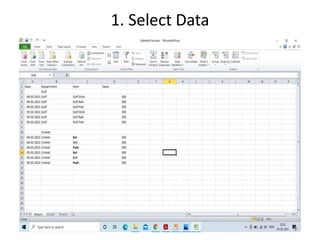
1. Select Data
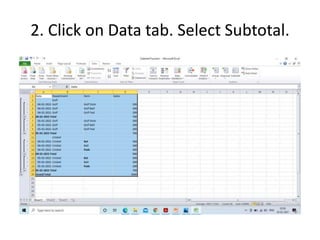
2. Click on Data tab. Select Subtotal.
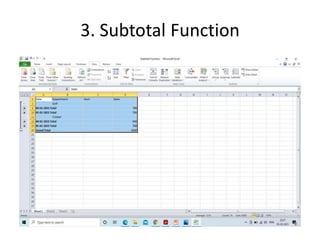
3. Subtotal Function

3. subtotal function in excel

  • 1.
    How to add,use and remove Subtotals in Excel
  • 2.
    How to add,use and remove Subtotals in Excel • Worksheets with a lot of data can often look cluttered and difficult to comprehend. • Luckily, Microsoft Excel provides a powerful Subtotal feature that lets you quickly summarize different groups of data and create an outline for your worksheets.
  • 3.
    What is Subtotalin Excel? • Generally speaking, subtotal is the sum of a set of numbers, which is then added to another set(s) of numbers to make the grand total. • In Microsoft Excel, the Subtotal feature is not limited to only totaling subsets of values within a data set. • It allows you to group and summarize your data using SUM, COUNT, AVERAGE, MIN, MAX and other functions. • Additionally, it creates a hierarchy of groups, known as an outline, which lets you display or hide the details for each subtotal, or view just a summary of the subtotals and grand totals. • For example, this is how your Excel subtotals can look like:
  • 4.
    How to insertsubtotals in Excel
  • 5.
  • 6.
    2. Click onData tab. Select Subtotal.
  • 7.