1
FINANCIAL FUNCTIONS
IN
Prepared By:- Rutvik Poshiya
Submitted to:- THE ICAI, Rajkot
Financial Functions
• The Financial Functions performs many of
the common Financial calculations, such
as calculation of Yield, Interest rate,
Duration, valuation and Asset
depreciation.
2Prepared By:- Rutvik Poshiya
Some useful Financial
Functions
 NPV (Net Present Value)
 FV (Future Value)
 PMT (Payment)
 SLN (Straight-line depreciation)
 IRR (Internal Rate of Return)
3Prepared By:- Rutvik Poshiya
NPV FUNCTION
Net Present Value
4Prepared By:- Rutvik Poshiya
NPV
• NPV stands for Net Present Value.
• NPV calculates the net present value of an
Investment based on discount rate and a series
of future payments and income.
5Prepared By:- Rutvik Poshiya
Formula of NPV
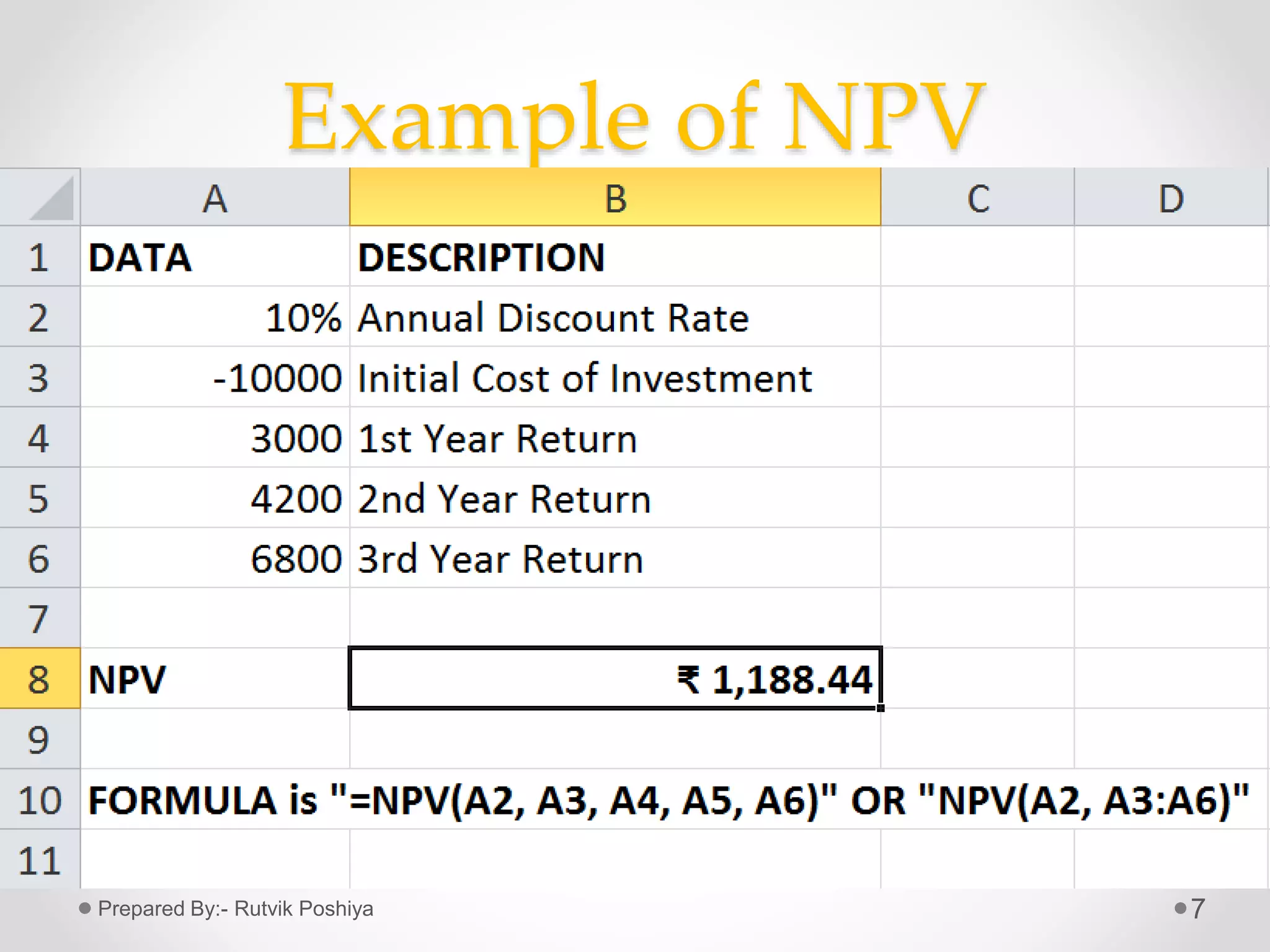
• =NPV(rate, value 1, [value 2],….)
where,
• Rate= Rate of discount
• Value 1= Initial cost of investment
• Value 2, 3,….= Future Payments
6Prepared By:- Rutvik Poshiya
Example of NPV
7Prepared By:- Rutvik Poshiya
FV FUNCTION
Future Value
8Prepared By:- Rutvik Poshiya
FV(Future Value)
9
• FV calculates Future Value of Investment with periodic
constant payments and a constant interest rate.
• For all the arguments, cash paid out, such as deposits to
savings, is represented by negative numbers.
• Whereas, cash received, such as dividend cheques, is
represented by positive numbers.
Prepared By:- Rutvik Poshiya
Formula of FV Function
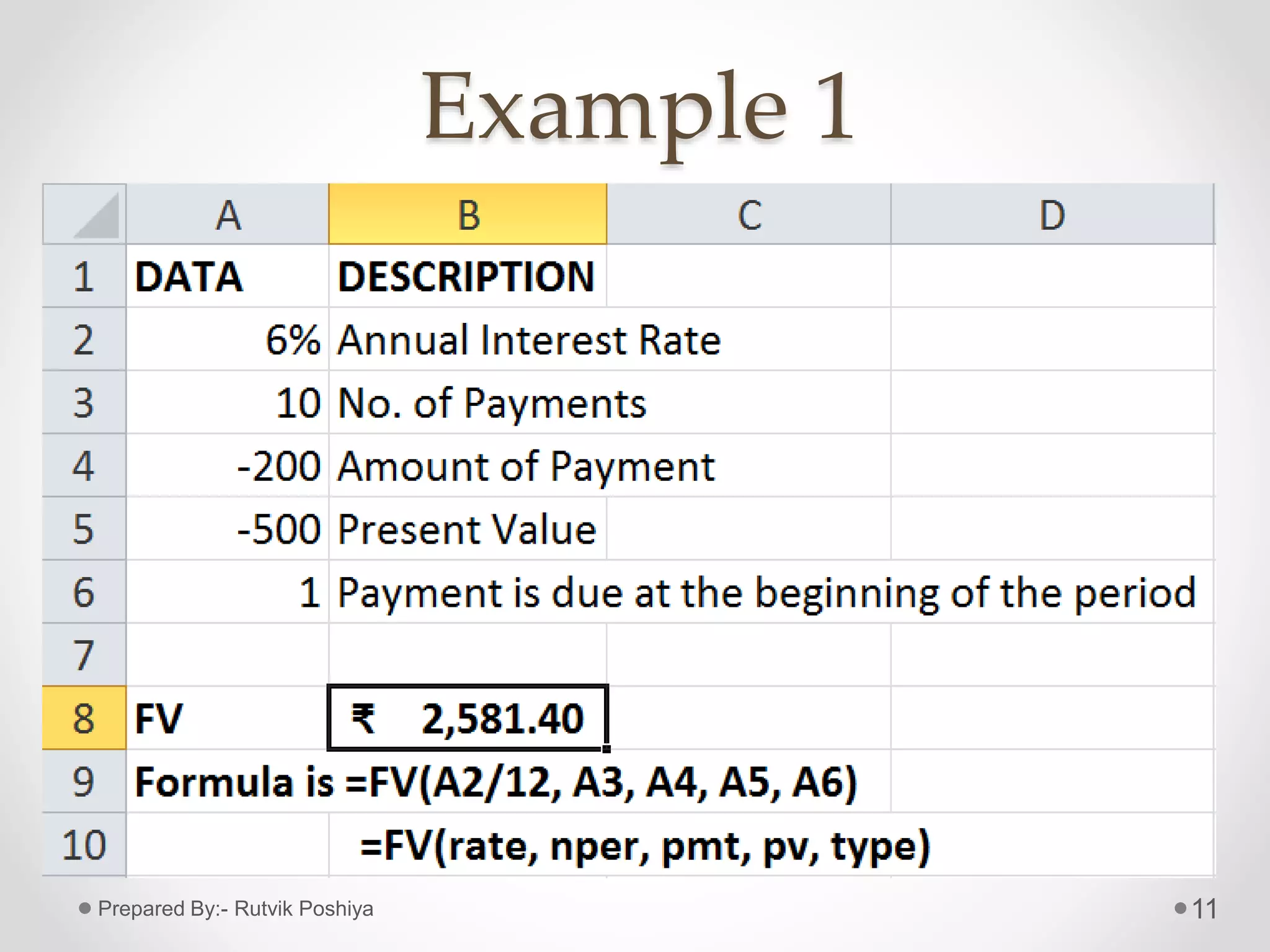
• Formula:- =FV(rate, nper, pmt, [pv], [type])
• Where,
• Rate= Interest rate per period
• Nper= Total no. of payment periods in an Annuity
• Pmt= Payment made in each period
• Pv= Present value of future payments
• Type= It indicates when payments are due. (it can
take values 0 or 1, if type is omitted, it is
assumed to be 0)
10Prepared By:- Rutvik Poshiya
Example 1
11Prepared By:- Rutvik Poshiya
Example 2
12Prepared By:- Rutvik Poshiya
PMT FUNCTION
Payment of Loan
13Prepared By:- Rutvik Poshiya
PMT Function
• It calculates the payment for a
loan (installment) based on
constant payments and a
constant interest rate.
14Prepared By:- Rutvik Poshiya
Formula of PMT
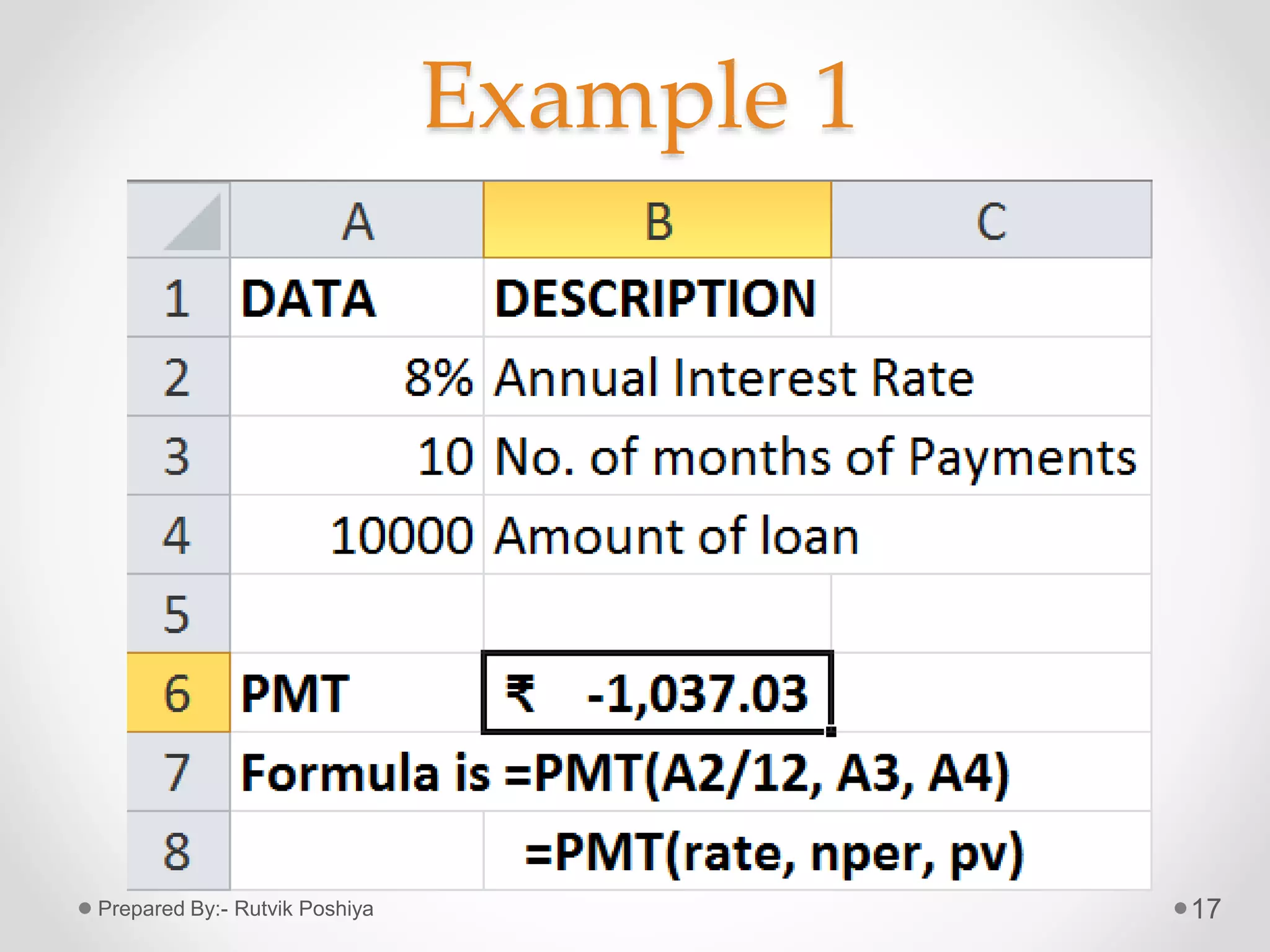
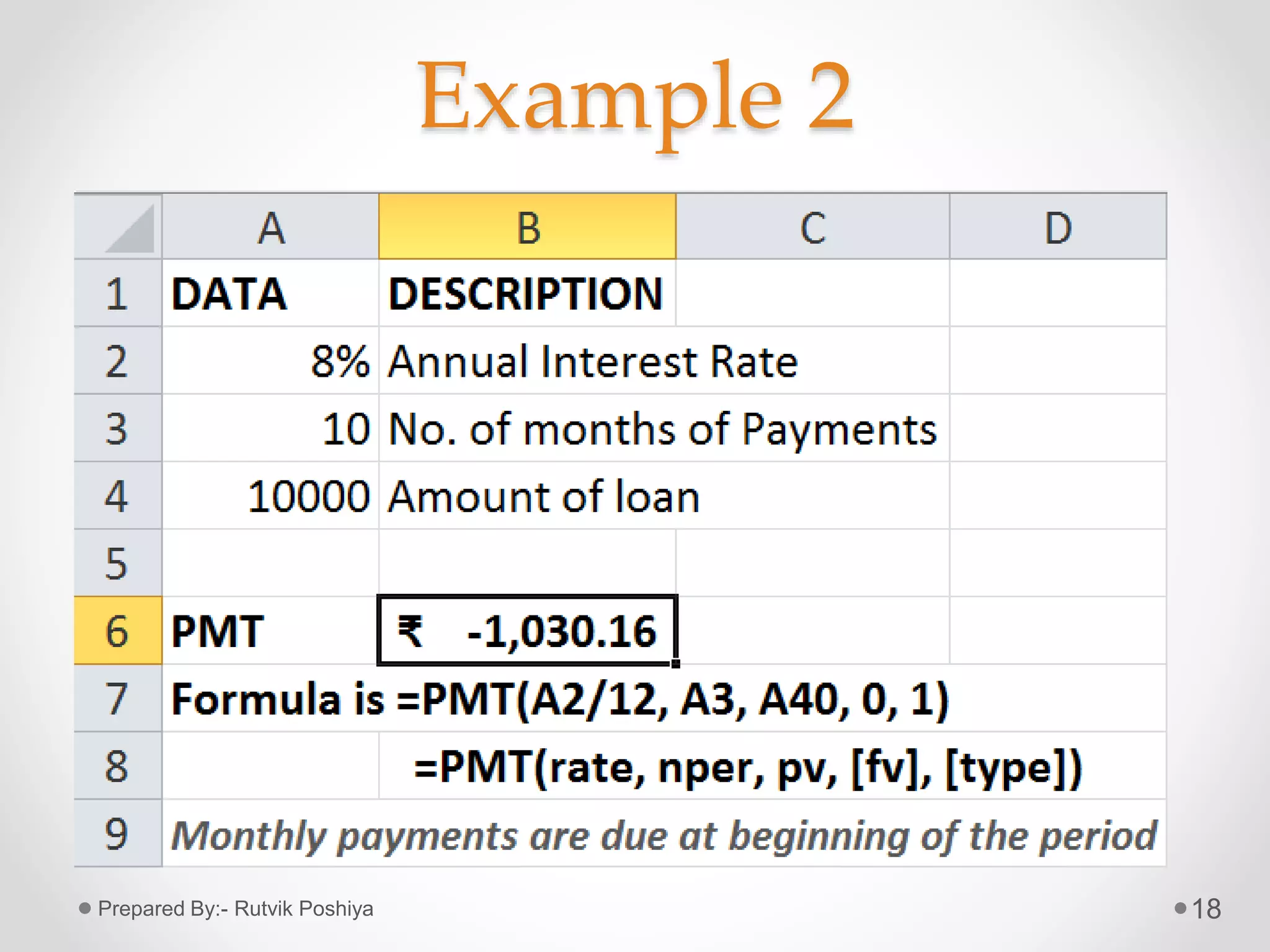
• =PMT(rate, nper, pv, [fv], [type])
• Where,
• Rate= Interest rate per period for the loan.
• Nper= Total no. of payments for the loan.
• Pv= Present value of future payments; also
known as The Principal.
• Fv= Future value or cash balance to be attained
after the last payment is made.
• Type= It indicates when payments are due.
15Prepared By:- Rutvik Poshiya
NOTE:
• In the formula,
• =PMT(rate, nper, pv, [fv], [type])
• ,
16
Set type equal to If payments are due
0 At the end of the period
1 At the beginning of the period
Prepared By:- Rutvik Poshiya
Example 1
17Prepared By:- Rutvik Poshiya
Example 2
18Prepared By:- Rutvik Poshiya
SLN FUNCTION
Straight Line
19Prepared By:- Rutvik Poshiya
SLN Function
• It returns the Straight-line depreciation of
an asset for one period.
• SLN method provides the depreciation
allowance for each year.
20Prepared By:- Rutvik Poshiya
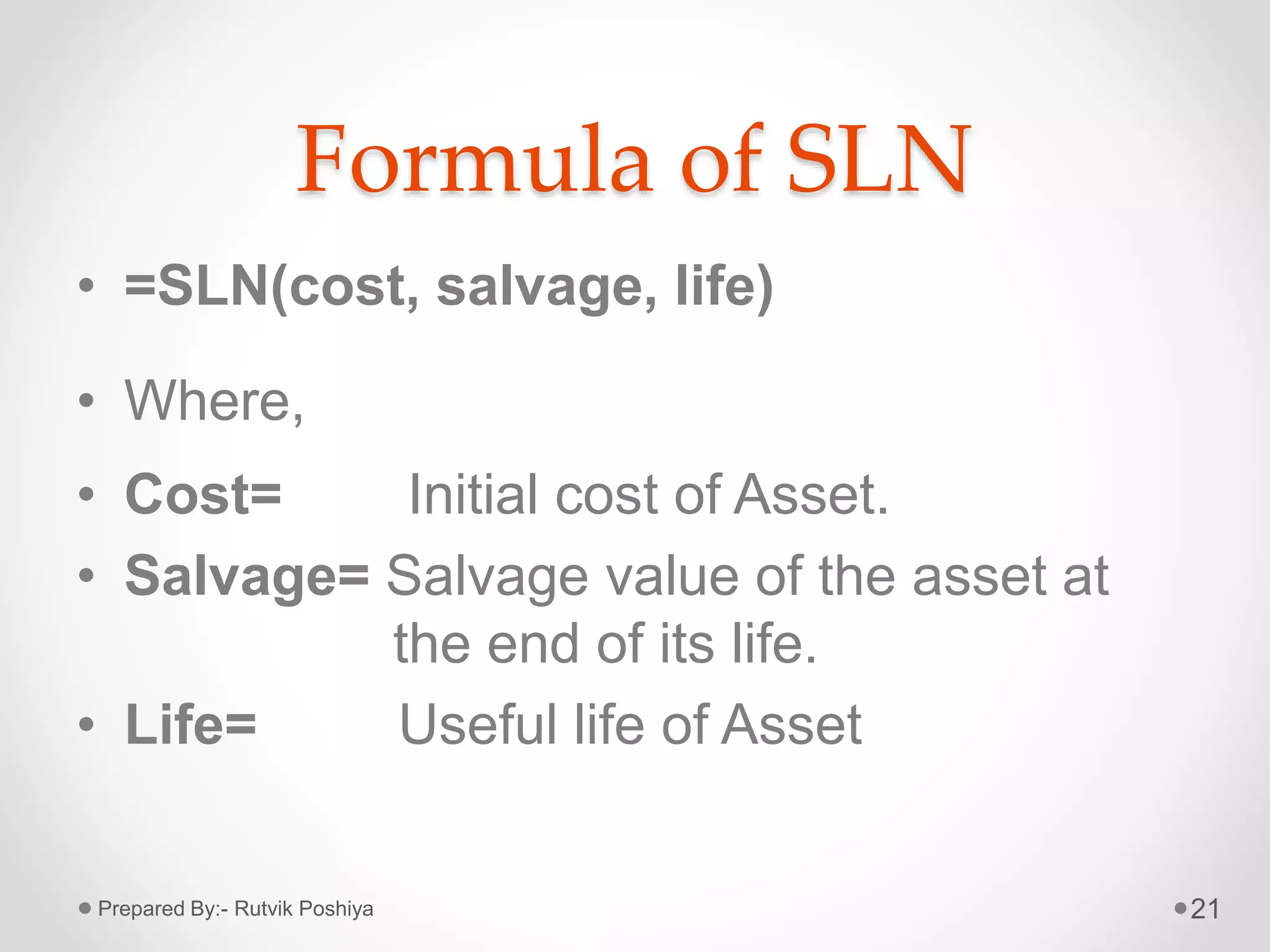
Formula of SLN
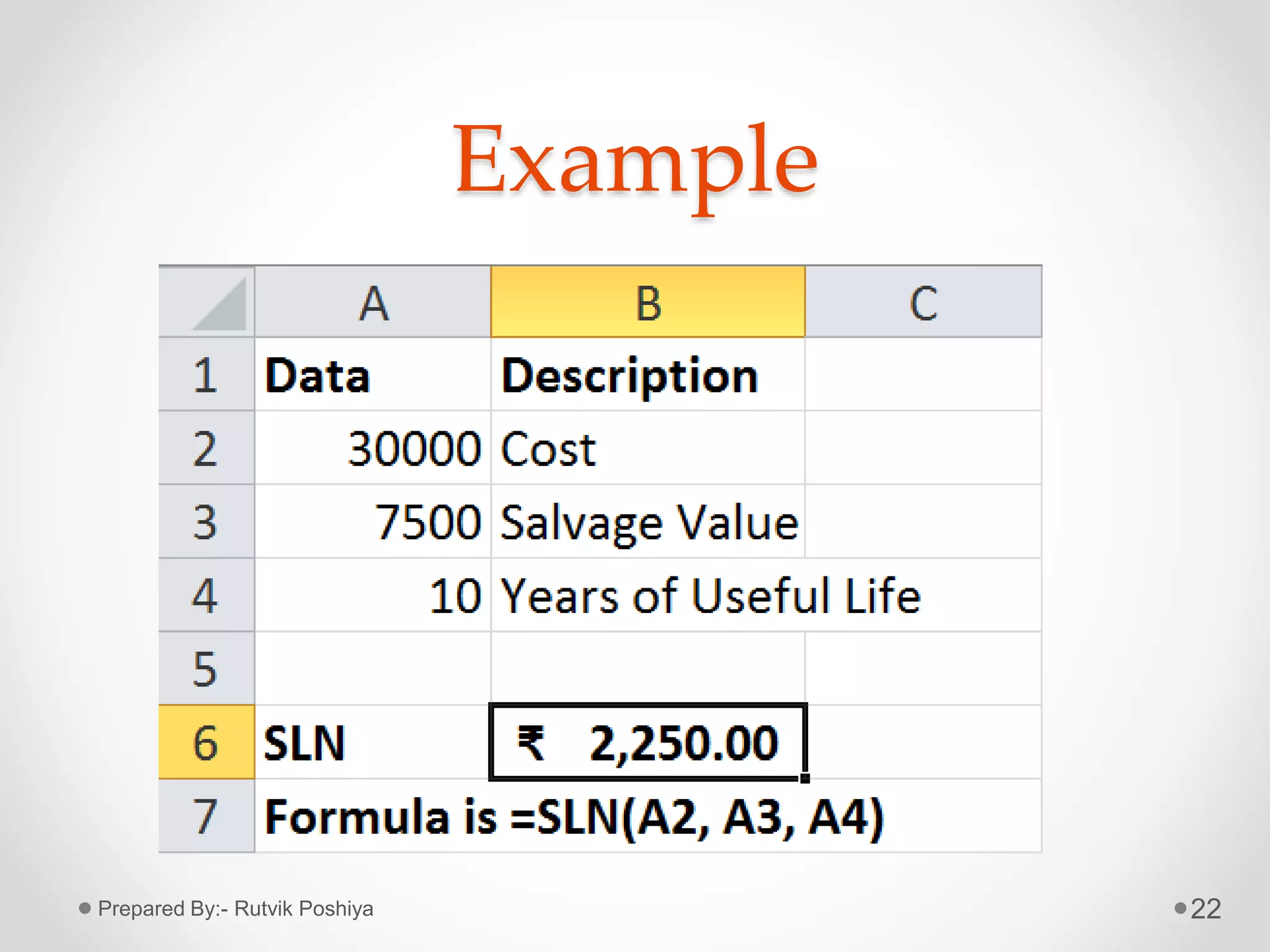
• =SLN(cost, salvage, life)
• Where,
• Cost= Initial cost of Asset.
• Salvage= Salvage value of the asset at
the end of its life.
• Life= Useful life of Asset
21Prepared By:- Rutvik Poshiya
Example
22Prepared By:- Rutvik Poshiya
IRR FUNCTION
Internal Rate of Return
23Prepared By:- Rutvik Poshiya
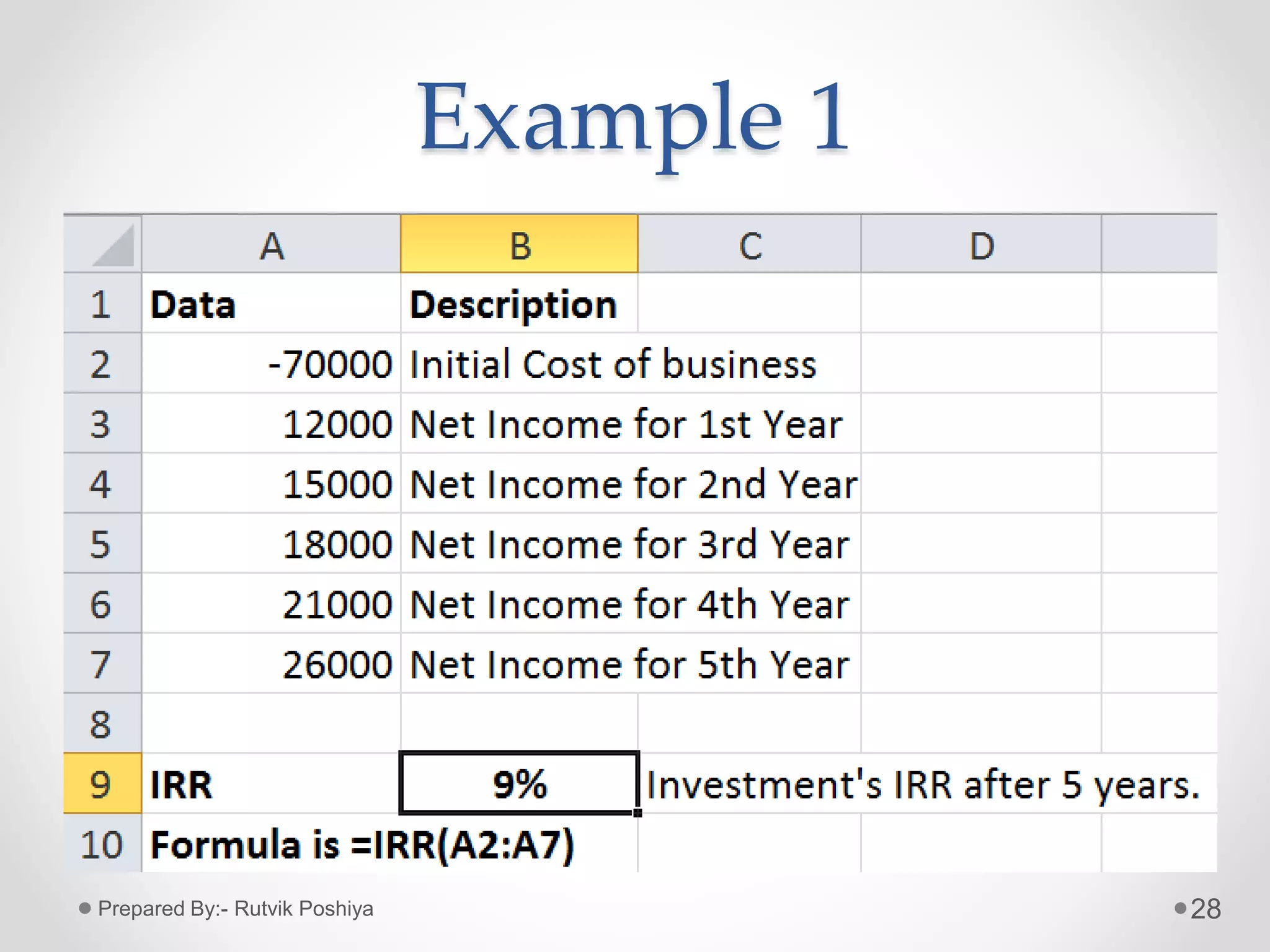
IRR Function
• It returns the Internal rate of return for a series of cash
flows represented by the numbers in values.
• These cash flows do not have to be even, as they would
be for an annuity.
• However, the cash flows must occur at regular intervals,
such as monthly or annually.
24Prepared By:- Rutvik Poshiya
IRR Function
• The Internal Rate of Return is the interest
rate received for an investment consisting
of payments(negative values) and
income(positive values) that occur at
regular periods.
25Prepared By:- Rutvik Poshiya
Formula of IRR Function
• =IRR(values, [guess])
• Where,
• Value= a reference to cells that contains series of
cash flows (Investment and Net Income
values); and it must contain one positive and
one negative value.
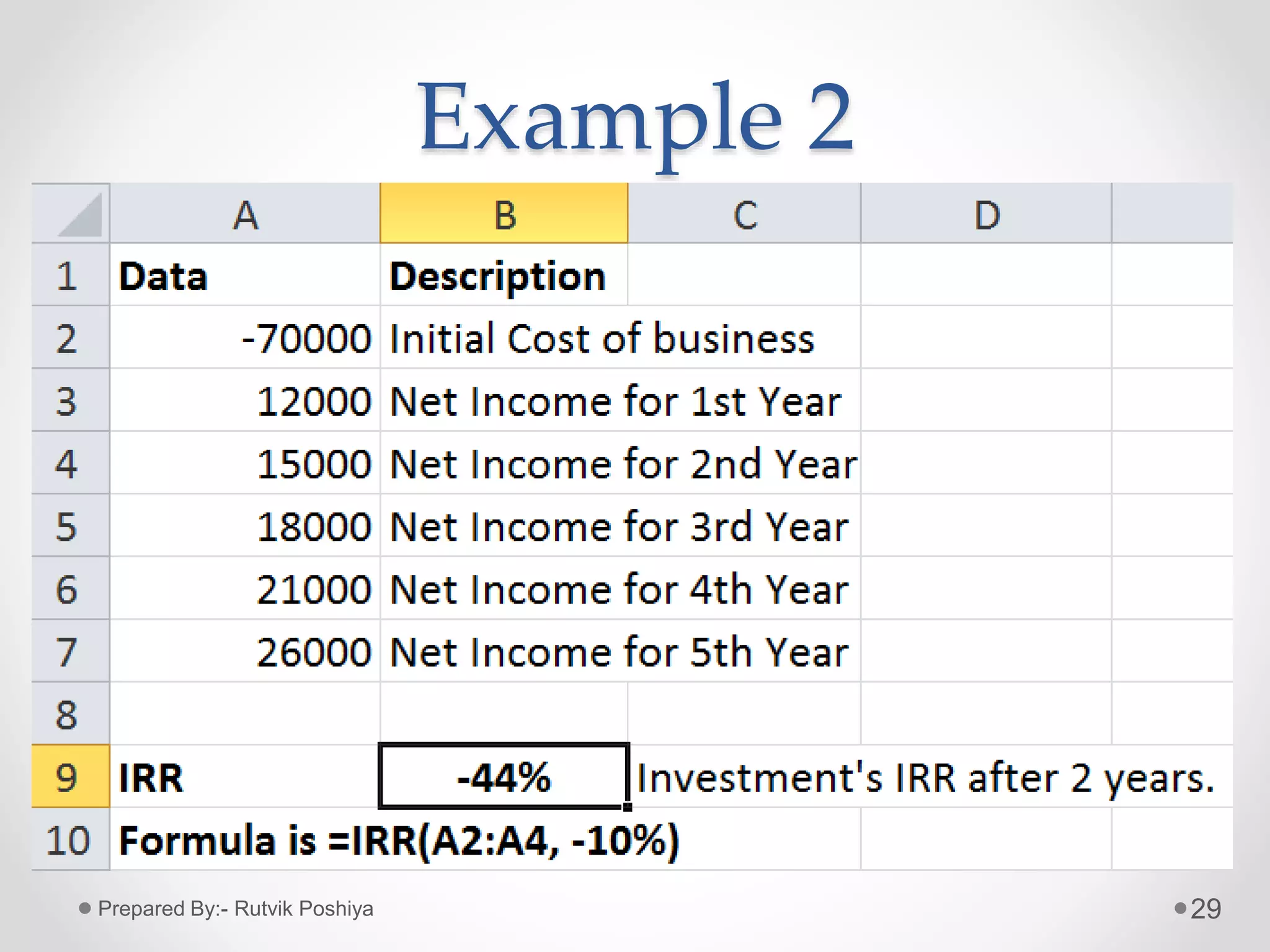
• Guess= An initial guess at what the user think the
IRR might be. This is an optional argument, which,
if omitted, takes on the default value of 0.1 (10%)
26Prepared By:- Rutvik Poshiya
Note:
• If IRR gives the #NUM! error value, or
if the result is not close to what is
expected, try again with a different
value for guess.
27Prepared By:- Rutvik Poshiya
Example 1
28Prepared By:- Rutvik Poshiya
Example 2
29Prepared By:- Rutvik Poshiya
30Prepared By:- Rutvik Poshiya

Financial functions in MS Excel

  • 1.
    1 FINANCIAL FUNCTIONS IN Prepared By:-Rutvik Poshiya Submitted to:- THE ICAI, Rajkot
  • 2.
    Financial Functions • TheFinancial Functions performs many of the common Financial calculations, such as calculation of Yield, Interest rate, Duration, valuation and Asset depreciation. 2Prepared By:- Rutvik Poshiya
  • 3.
    Some useful Financial Functions NPV (Net Present Value)  FV (Future Value)  PMT (Payment)  SLN (Straight-line depreciation)  IRR (Internal Rate of Return) 3Prepared By:- Rutvik Poshiya
  • 4.
    NPV FUNCTION Net PresentValue 4Prepared By:- Rutvik Poshiya
  • 5.
    NPV • NPV standsfor Net Present Value. • NPV calculates the net present value of an Investment based on discount rate and a series of future payments and income. 5Prepared By:- Rutvik Poshiya
  • 6.
    Formula of NPV •=NPV(rate, value 1, [value 2],….) where, • Rate= Rate of discount • Value 1= Initial cost of investment • Value 2, 3,….= Future Payments 6Prepared By:- Rutvik Poshiya
  • 7.
    Example of NPV 7PreparedBy:- Rutvik Poshiya
  • 8.
  • 9.
    FV(Future Value) 9 • FVcalculates Future Value of Investment with periodic constant payments and a constant interest rate. • For all the arguments, cash paid out, such as deposits to savings, is represented by negative numbers. • Whereas, cash received, such as dividend cheques, is represented by positive numbers. Prepared By:- Rutvik Poshiya
  • 10.
    Formula of FVFunction • Formula:- =FV(rate, nper, pmt, [pv], [type]) • Where, • Rate= Interest rate per period • Nper= Total no. of payment periods in an Annuity • Pmt= Payment made in each period • Pv= Present value of future payments • Type= It indicates when payments are due. (it can take values 0 or 1, if type is omitted, it is assumed to be 0) 10Prepared By:- Rutvik Poshiya
  • 11.
  • 12.
  • 13.
    PMT FUNCTION Payment ofLoan 13Prepared By:- Rutvik Poshiya
  • 14.
    PMT Function • Itcalculates the payment for a loan (installment) based on constant payments and a constant interest rate. 14Prepared By:- Rutvik Poshiya
  • 15.
    Formula of PMT •=PMT(rate, nper, pv, [fv], [type]) • Where, • Rate= Interest rate per period for the loan. • Nper= Total no. of payments for the loan. • Pv= Present value of future payments; also known as The Principal. • Fv= Future value or cash balance to be attained after the last payment is made. • Type= It indicates when payments are due. 15Prepared By:- Rutvik Poshiya
  • 16.
    NOTE: • In theformula, • =PMT(rate, nper, pv, [fv], [type]) • , 16 Set type equal to If payments are due 0 At the end of the period 1 At the beginning of the period Prepared By:- Rutvik Poshiya
  • 17.
  • 18.
  • 19.
  • 20.
    SLN Function • Itreturns the Straight-line depreciation of an asset for one period. • SLN method provides the depreciation allowance for each year. 20Prepared By:- Rutvik Poshiya
  • 21.
    Formula of SLN •=SLN(cost, salvage, life) • Where, • Cost= Initial cost of Asset. • Salvage= Salvage value of the asset at the end of its life. • Life= Useful life of Asset 21Prepared By:- Rutvik Poshiya
  • 22.
  • 23.
    IRR FUNCTION Internal Rateof Return 23Prepared By:- Rutvik Poshiya
  • 24.
    IRR Function • Itreturns the Internal rate of return for a series of cash flows represented by the numbers in values. • These cash flows do not have to be even, as they would be for an annuity. • However, the cash flows must occur at regular intervals, such as monthly or annually. 24Prepared By:- Rutvik Poshiya
  • 25.
    IRR Function • TheInternal Rate of Return is the interest rate received for an investment consisting of payments(negative values) and income(positive values) that occur at regular periods. 25Prepared By:- Rutvik Poshiya
  • 26.
    Formula of IRRFunction • =IRR(values, [guess]) • Where, • Value= a reference to cells that contains series of cash flows (Investment and Net Income values); and it must contain one positive and one negative value. • Guess= An initial guess at what the user think the IRR might be. This is an optional argument, which, if omitted, takes on the default value of 0.1 (10%) 26Prepared By:- Rutvik Poshiya
  • 27.
    Note: • If IRRgives the #NUM! error value, or if the result is not close to what is expected, try again with a different value for guess. 27Prepared By:- Rutvik Poshiya
  • 28.
  • 29.
  • 30.