Statistical Functions
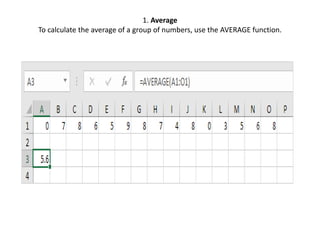
1. Average
To calculate the average of a group of numbers, use the AVERAGE function.
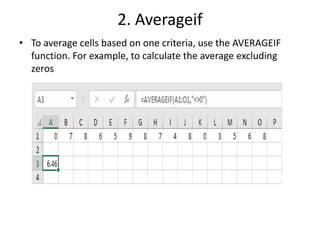
2. Averageif
• To average cells based on one criteria, use the AVERAGEIF
function. For example, to calculate the average excluding
zeros
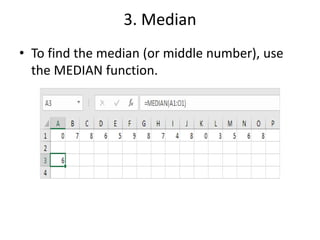
3. Median
• To find the median (or middle number), use
the MEDIAN function.
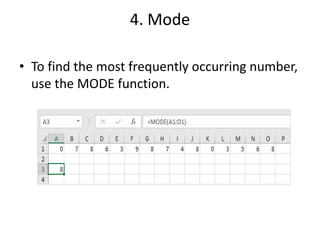
4. Mode
• To find the most frequently occurring number,
use the MODE function.
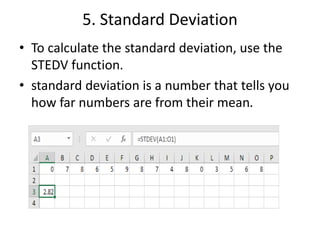
5. Standard Deviation
• To calculate the standard deviation, use the
STEDV function.
• standard deviation is a number that tells you
how far numbers are from their mean.
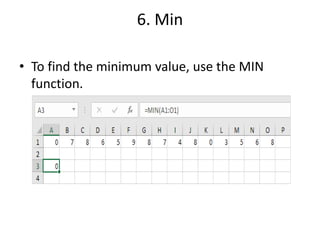
6. Min
• To find the minimum value, use the MIN
function.
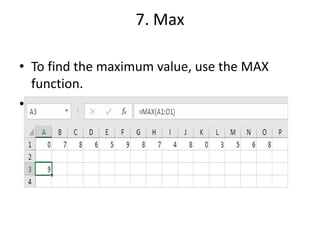
7. Max
• To find the maximum value, use the MAX
function.
•
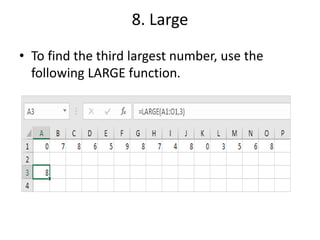
8. Large
• To find the third largest number, use the
following LARGE function.
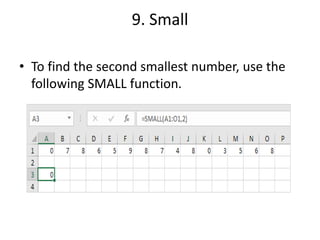
9. Small
• To find the second smallest number, use the
following SMALL function.
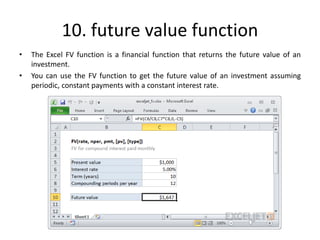
10. future value function
• The Excel FV function is a financial function that returns the future value of an
investment.
• You can use the FV function to get the future value of an investment assuming
periodic, constant payments with a constant interest rate.
11. Count Function
• We use the count function when we need to count the number of cells containing
a number. Remember ONLY NUMBERS! Let’s see the function:
• COUNT(value1, [value2], …)
Thank you

1. statistical functions in excel

  • 1.
  • 2.
    1. Average To calculatethe average of a group of numbers, use the AVERAGE function.
  • 3.
    2. Averageif • Toaverage cells based on one criteria, use the AVERAGEIF function. For example, to calculate the average excluding zeros
  • 4.
    3. Median • Tofind the median (or middle number), use the MEDIAN function.
  • 5.
    4. Mode • Tofind the most frequently occurring number, use the MODE function.
  • 6.
    5. Standard Deviation •To calculate the standard deviation, use the STEDV function. • standard deviation is a number that tells you how far numbers are from their mean.
  • 7.
    6. Min • Tofind the minimum value, use the MIN function.
  • 8.
    7. Max • Tofind the maximum value, use the MAX function. •
  • 9.
    8. Large • Tofind the third largest number, use the following LARGE function.
  • 10.
    9. Small • Tofind the second smallest number, use the following SMALL function.
  • 11.
    10. future valuefunction • The Excel FV function is a financial function that returns the future value of an investment. • You can use the FV function to get the future value of an investment assuming periodic, constant payments with a constant interest rate.
  • 12.
    11. Count Function •We use the count function when we need to count the number of cells containing a number. Remember ONLY NUMBERS! Let’s see the function: • COUNT(value1, [value2], …)
  • 13.