Digital Graphics 
File Formats 
Katy Fleetham
Raster Graphics 
Raster graphics are made up of bitmaps. Bitmaps 
are made up of pixels of a fixed resolution (such 
as 300dpi which is often used for Photoshop 
documents). Resizing raster graphics can cause 
distortion of the images.
Vector Graphics 
Vector graphics are made up of vectors (or 
paths/strokes). They are defined by a start and 
end point with curves, points and angles. Unlike 
raster graphics, vectors can be scaled with no 
loss in definition which makes them ideal for 
company logos as they can be used on business 
cards and scaled large enough to fit a billboard 
without losing image quality.
Raster Graphics
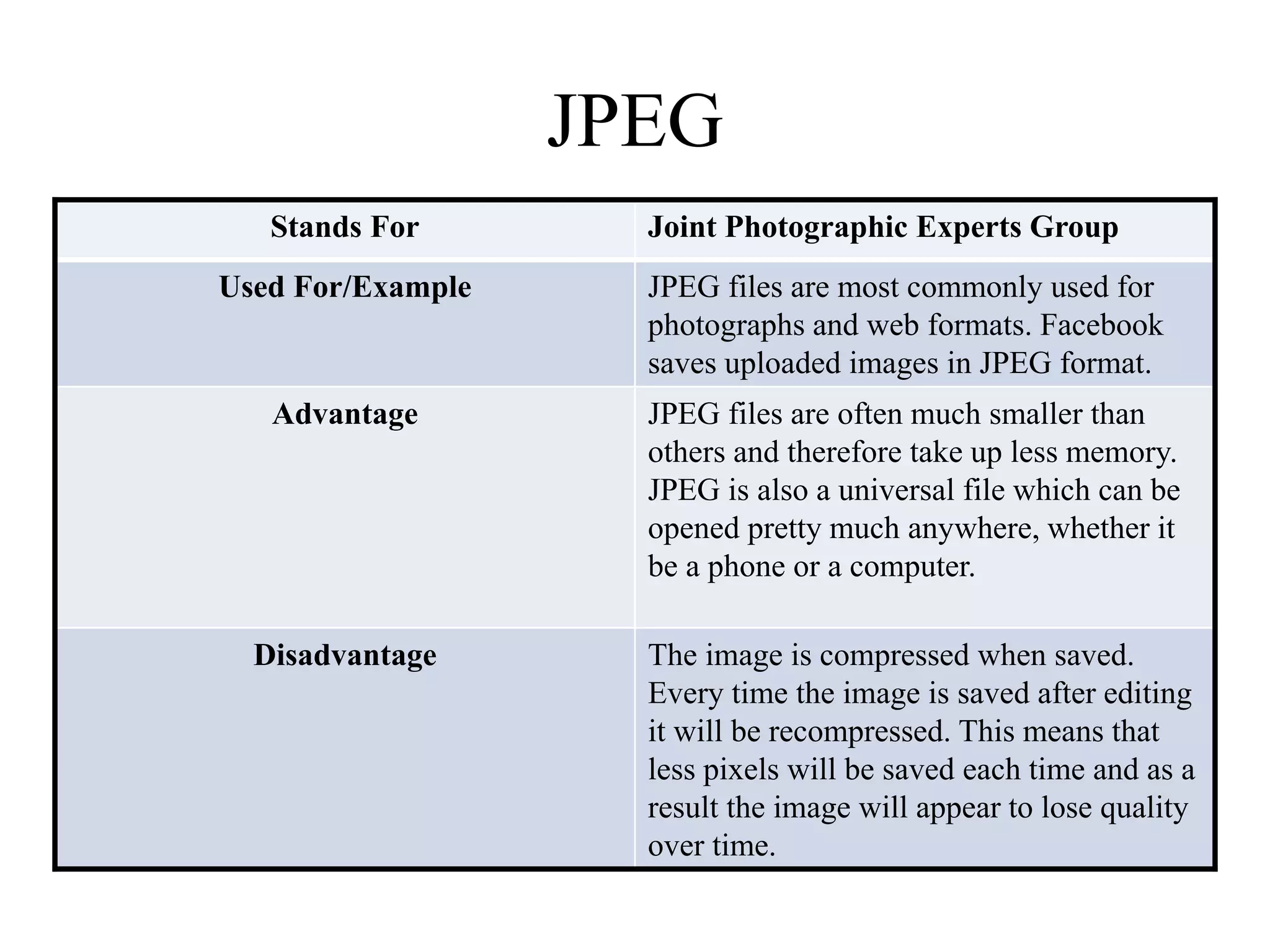
JPEG 
Stands For Joint Photographic Experts Group 
Used For/Example JPEG files are most commonly used for 
photographs and web formats. Facebook 
saves uploaded images in JPEG format. 
Advantage JPEG files are often much smaller than 
others and therefore take up less memory. 
JPEG is also a universal file which can be 
opened pretty much anywhere, whether it 
be a phone or a computer. 
Disadvantage The image is compressed when saved. 
Every time the image is saved after editing 
it will be recompressed. This means that 
less pixels will be saved each time and as a 
result the image will appear to lose quality 
over time.
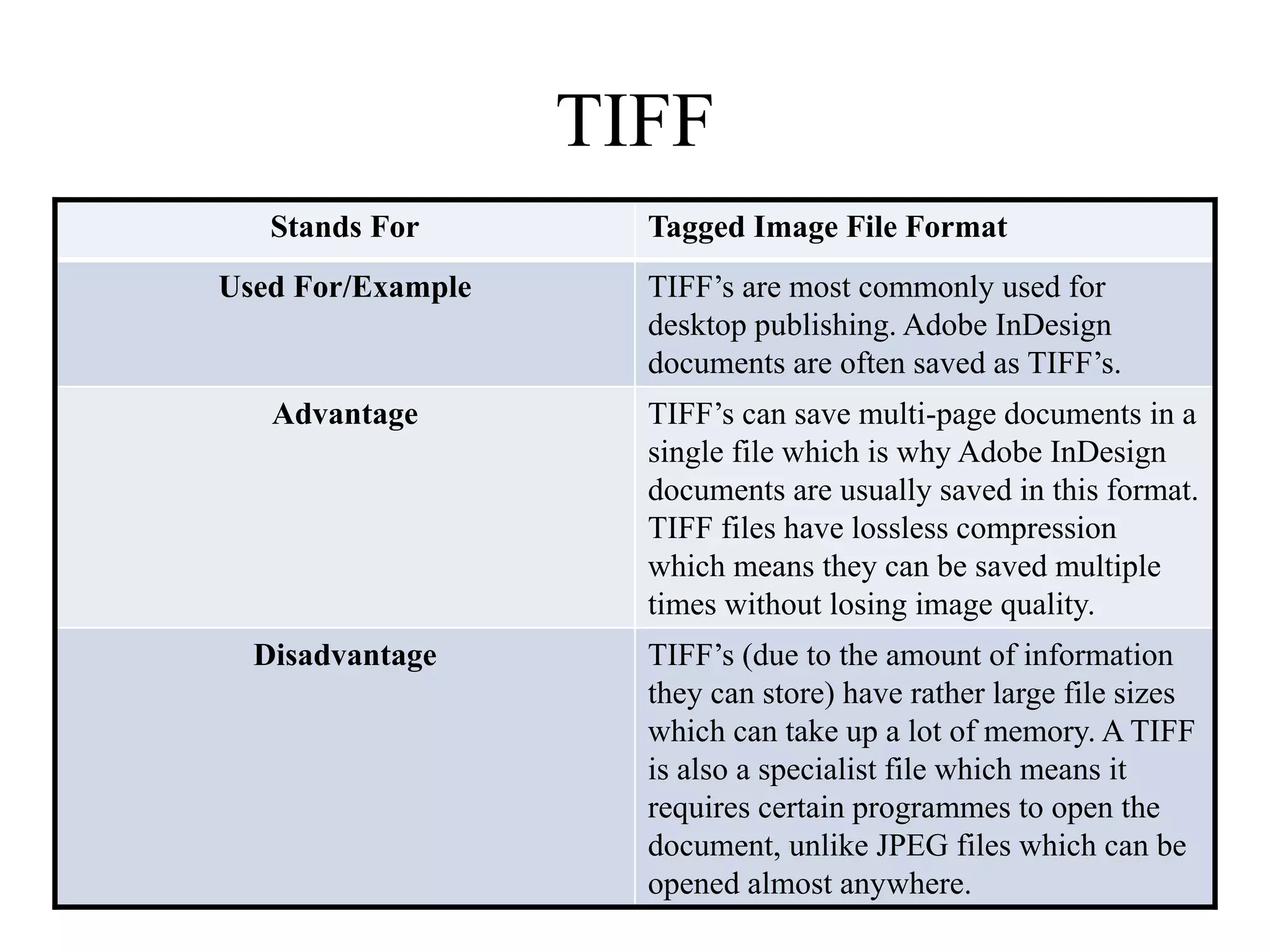
TIFF 
Stands For Tagged Image File Format 
Used For/Example TIFF’s are most commonly used for 
desktop publishing. Adobe InDesign 
documents are often saved as TIFF’s. 
Advantage TIFF’s can save multi-page documents in a 
single file which is why Adobe InDesign 
documents are usually saved in this format. 
TIFF files have lossless compression 
which means they can be saved multiple 
times without losing image quality. 
Disadvantage TIFF’s (due to the amount of information 
they can store) have rather large file sizes 
which can take up a lot of memory. A TIFF 
is also a specialist file which means it 
requires certain programmes to open the 
document, unlike JPEG files which can be 
opened almost anywhere.
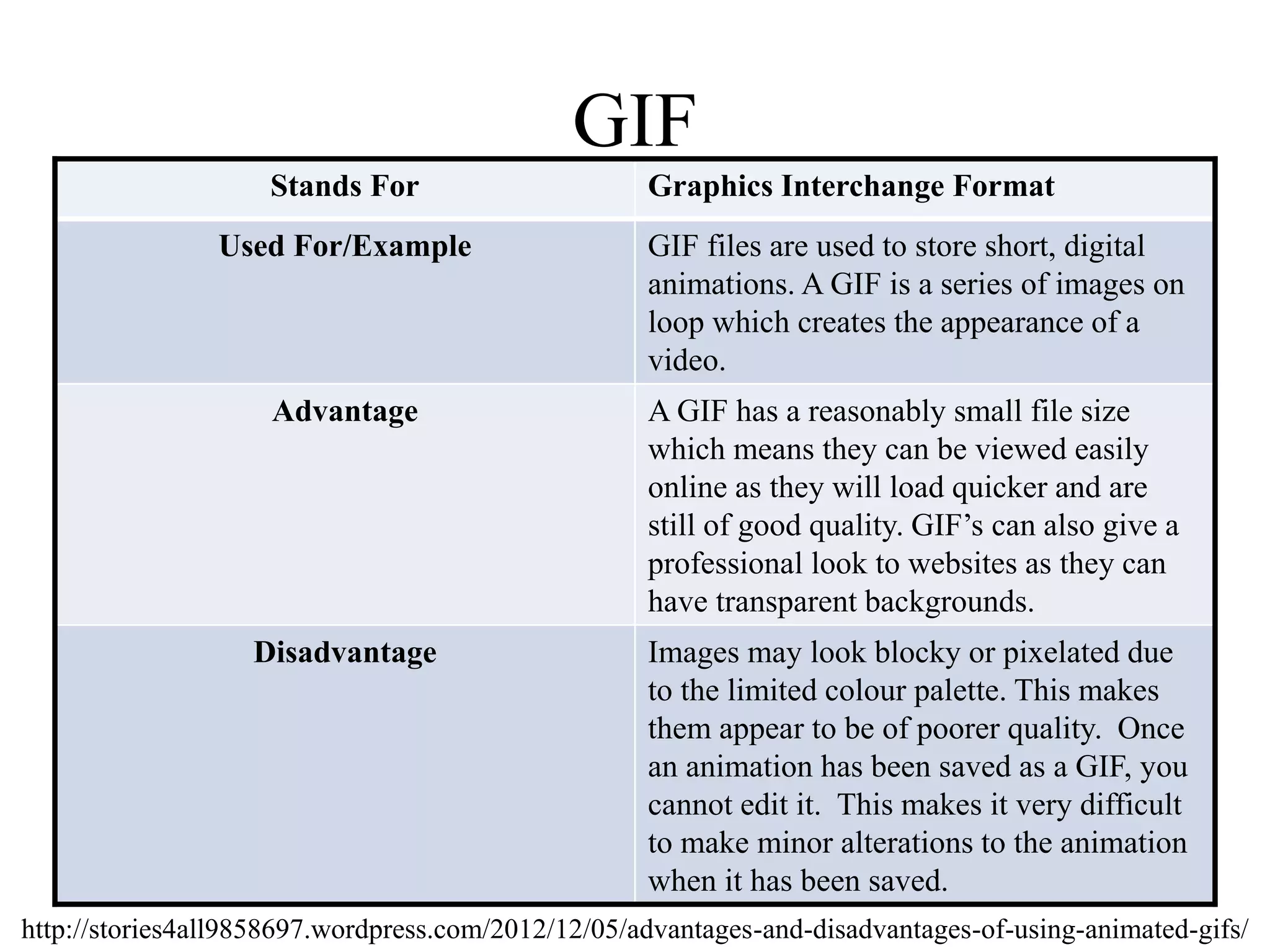
GIF 
Stands For Graphics Interchange Format 
Used For/Example GIF files are used to store short, digital 
animations. A GIF is a series of images on 
loop which creates the appearance of a 
video. 
Advantage A GIF has a reasonably small file size 
which means they can be viewed easily 
online as they will load quicker and are 
still of good quality. GIF’s can also give a 
professional look to websites as they can 
have transparent backgrounds. 
Disadvantage Images may look blocky or pixelated due 
to the limited colour palette. This makes 
them appear to be of poorer quality. Once 
an animation has been saved as a GIF, you 
cannot edit it. This makes it very difficult 
to make minor alterations to the animation 
when it has been saved. 
http://stories4all9858697.wordpress.com/2012/12/05/advantages-and-disadvantages-of-using-animated-gifs/
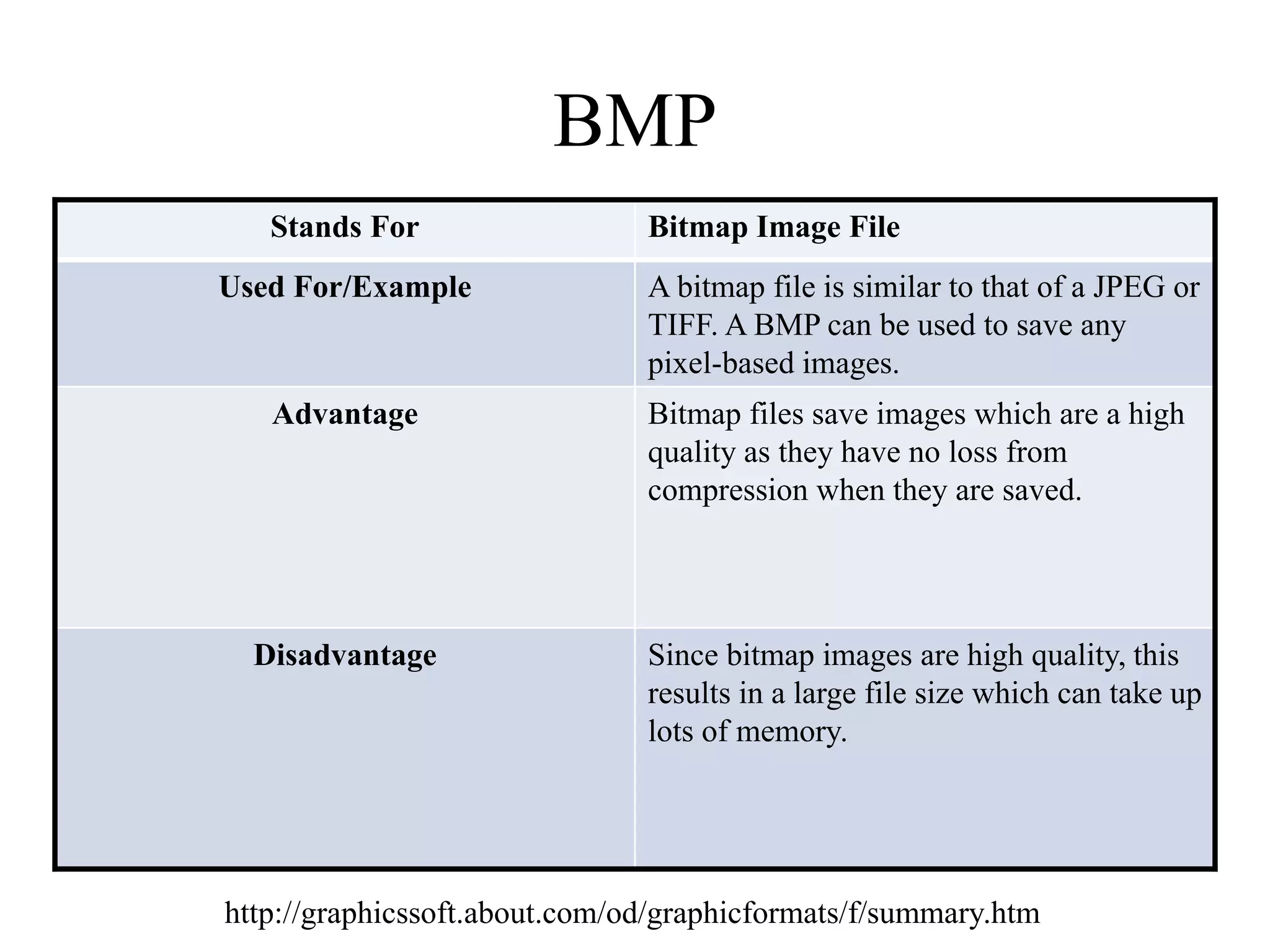
BMP 
Stands For Bitmap Image File 
Used For/Example A bitmap file is similar to that of a JPEG or 
TIFF. A BMP can be used to save any 
pixel-based images. 
Advantage Bitmap files save images which are a high 
quality as they have no loss from 
compression when they are saved. 
Disadvantage Since bitmap images are high quality, this 
results in a large file size which can take up 
lots of memory. 
http://graphicssoft.about.com/od/graphicformats/f/summary.htm
Vector Graphics
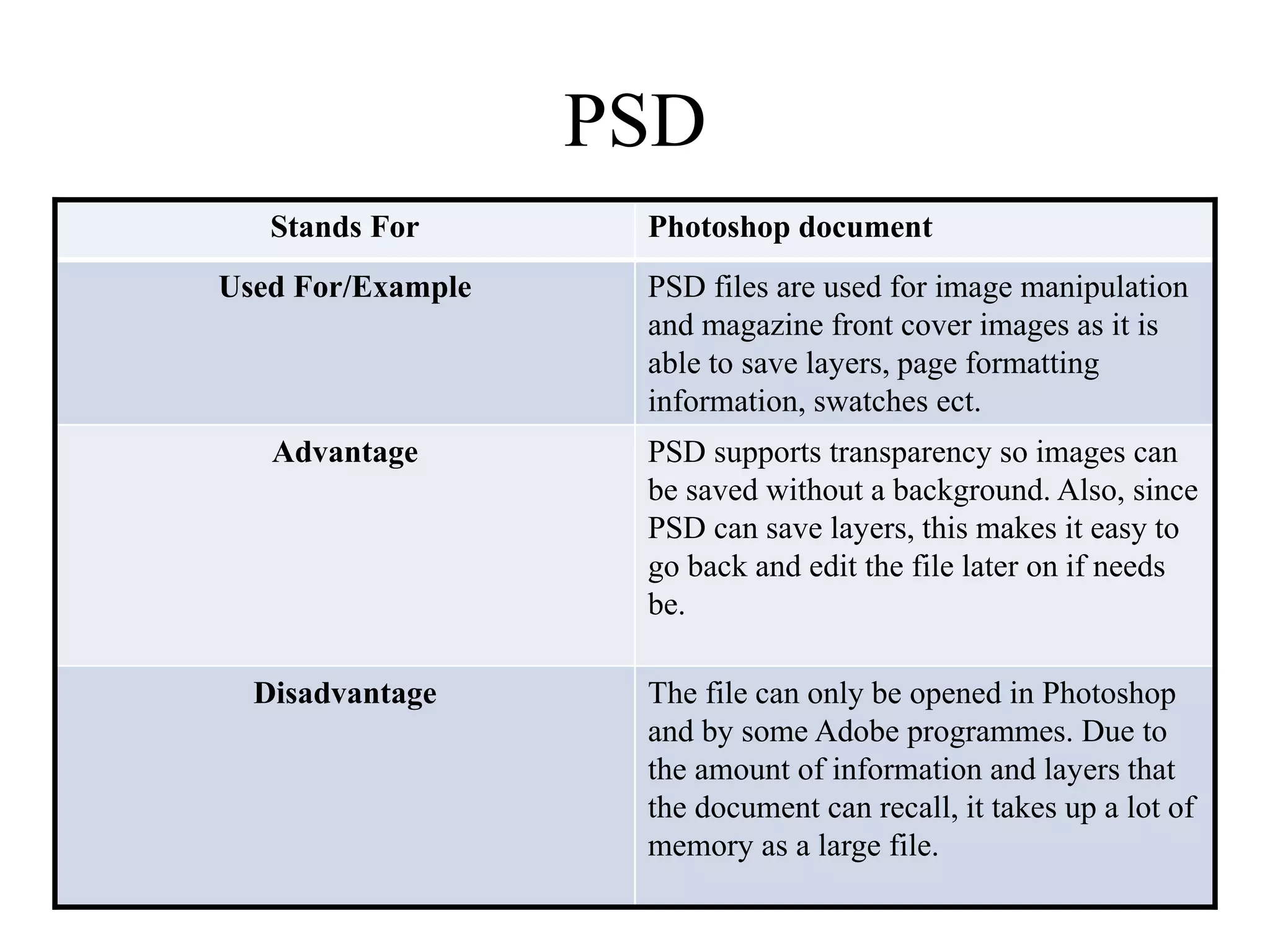
PSD 
Stands For Photoshop document 
Used For/Example PSD files are used for image manipulation 
and magazine front cover images as it is 
able to save layers, page formatting 
information, swatches ect. 
Advantage PSD supports transparency so images can 
be saved without a background. Also, since 
PSD can save layers, this makes it easy to 
go back and edit the file later on if needs 
be. 
Disadvantage The file can only be opened in Photoshop 
and by some Adobe programmes. Due to 
the amount of information and layers that 
the document can recall, it takes up a lot of 
memory as a large file.
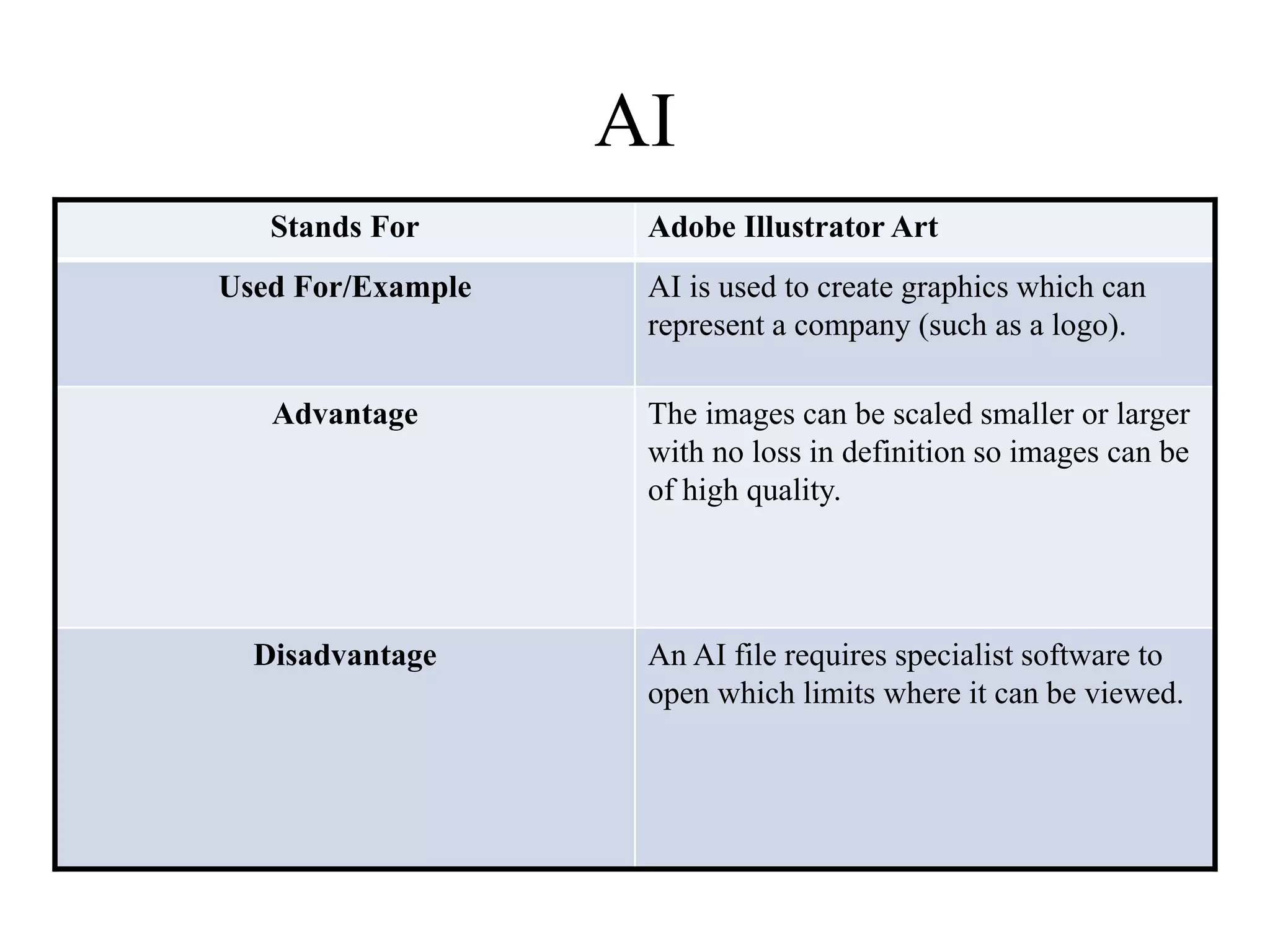
AI 
Stands For Adobe Illustrator Art 
Used For/Example AI is used to create graphics which can 
represent a company (such as a logo). 
Advantage The images can be scaled smaller or larger 
with no loss in definition so images can be 
of high quality. 
Disadvantage An AI file requires specialist software to 
open which limits where it can be viewed.
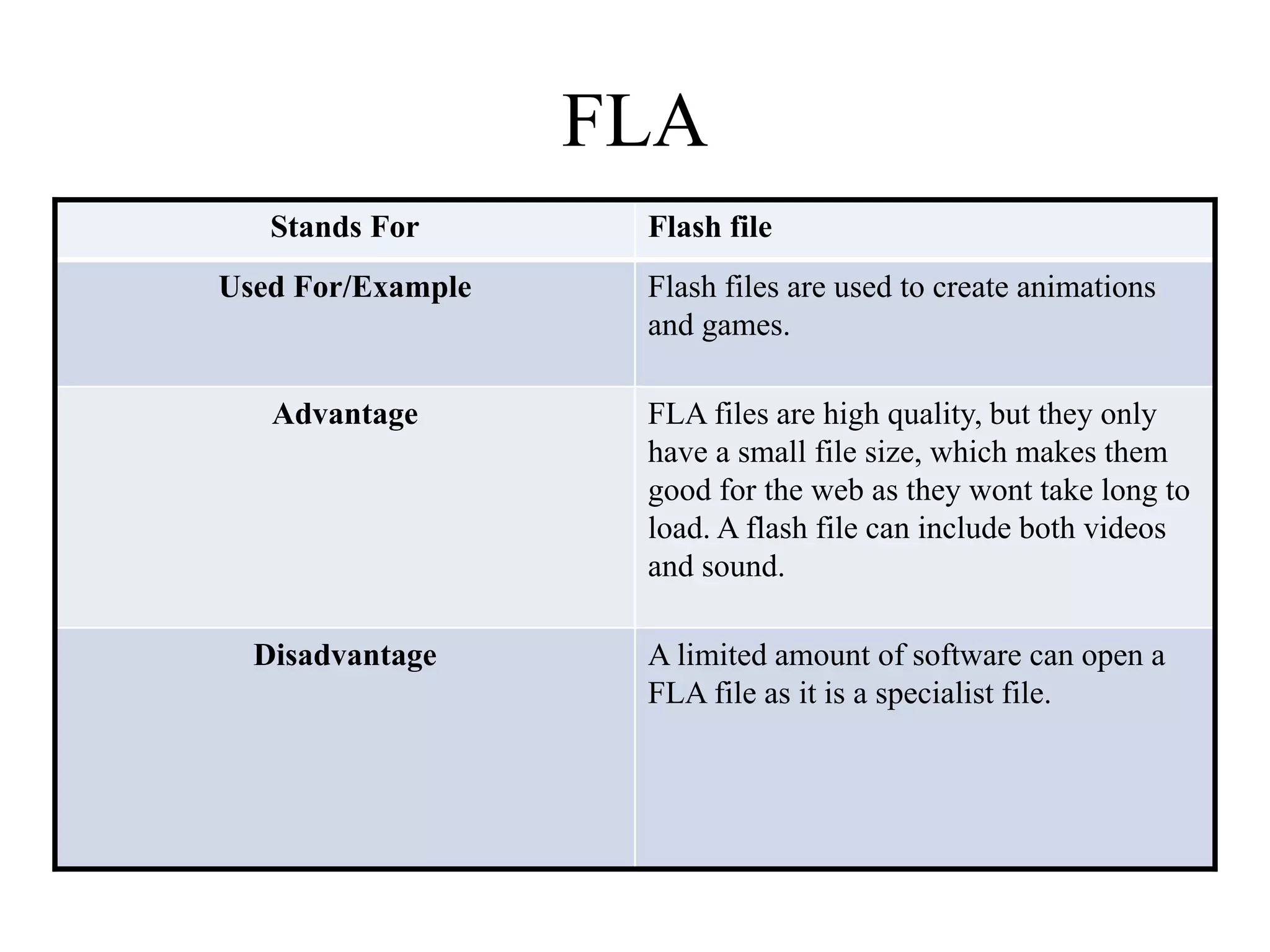
FLA 
Stands For Flash file 
Used For/Example Flash files are used to create animations 
and games. 
Advantage FLA files are high quality, but they only 
have a small file size, which makes them 
good for the web as they wont take long to 
load. A flash file can include both videos 
and sound. 
Disadvantage A limited amount of software can open a 
FLA file as it is a specialist file.
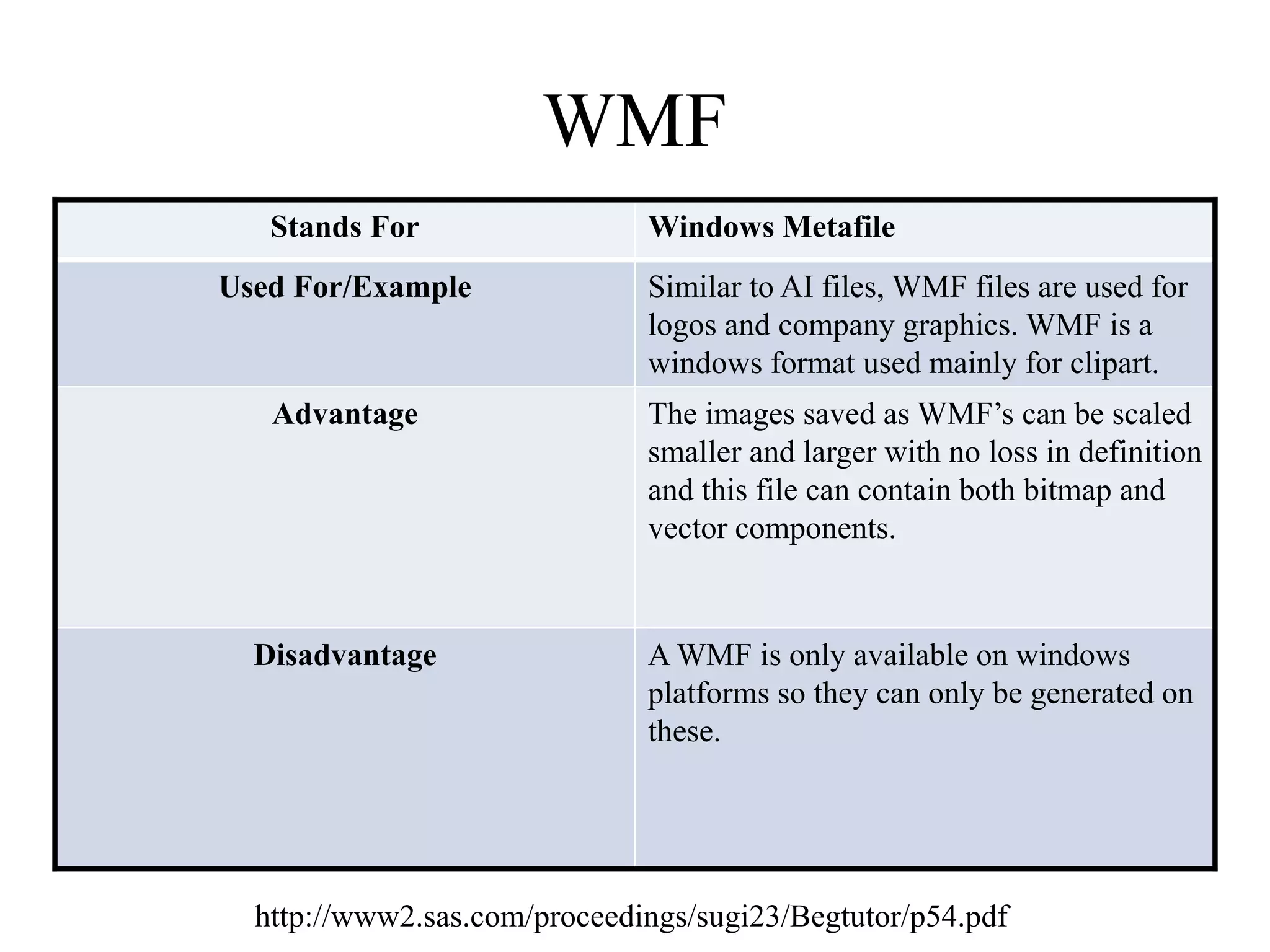
WMF 
Stands For Windows Metafile 
Used For/Example Similar to AI files, WMF files are used for 
logos and company graphics. WMF is a 
windows format used mainly for clipart. 
Advantage The images saved as WMF’s can be scaled 
smaller and larger with no loss in definition 
and this file can contain both bitmap and 
vector components. 
Disadvantage A WMF is only available on windows 
platforms so they can only be generated on 
these. 
http://www2.sas.com/proceedings/sugi23/Begtutor/p54.pdf
File Format 
Capture and 
Optimising
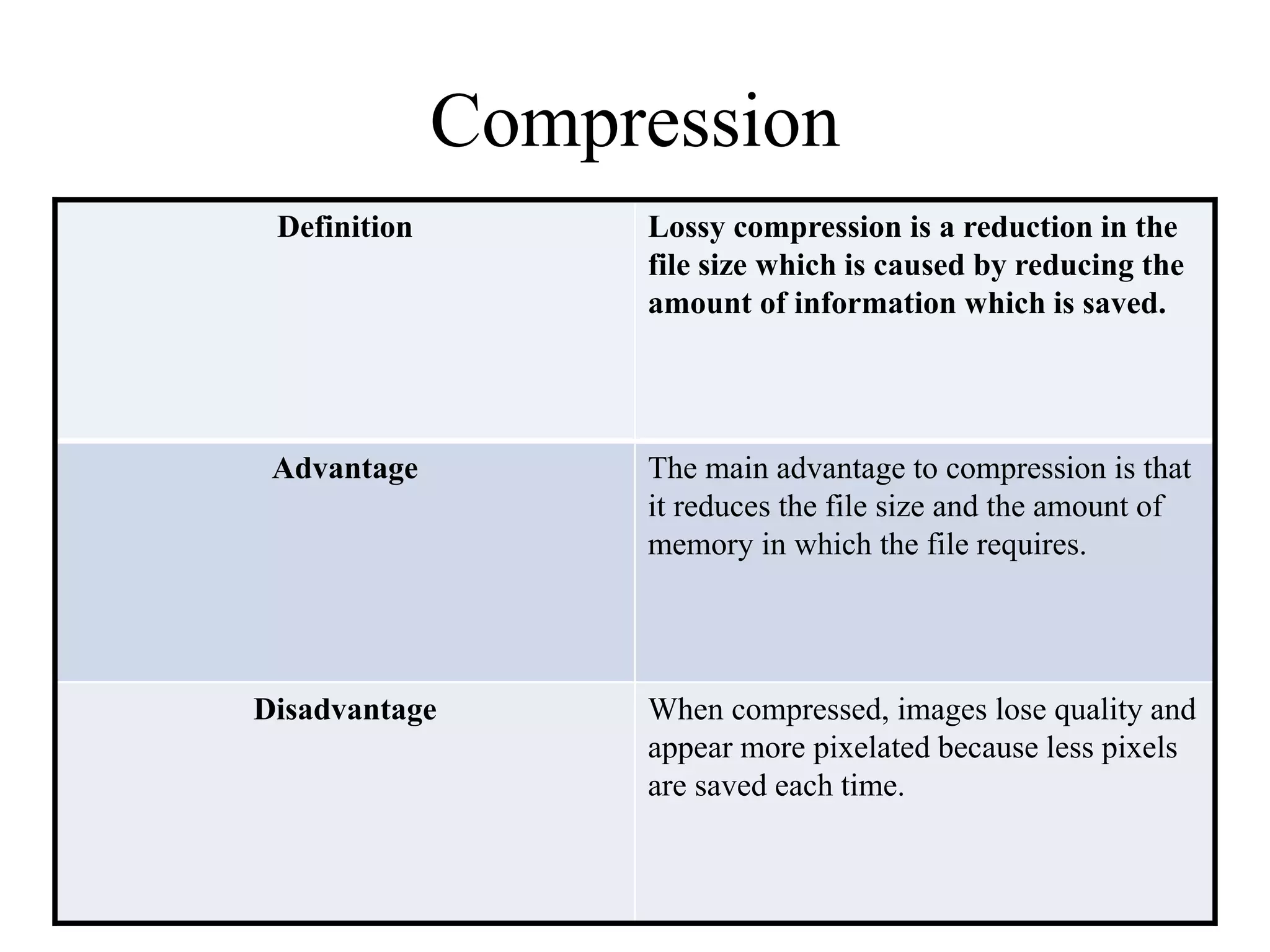
Compression 
Definition Lossy compression is a reduction in the 
file size which is caused by reducing the 
amount of information which is saved. 
Advantage The main advantage to compression is that 
it reduces the file size and the amount of 
memory in which the file requires. 
Disadvantage When compressed, images lose quality and 
appear more pixelated because less pixels 
are saved each time.
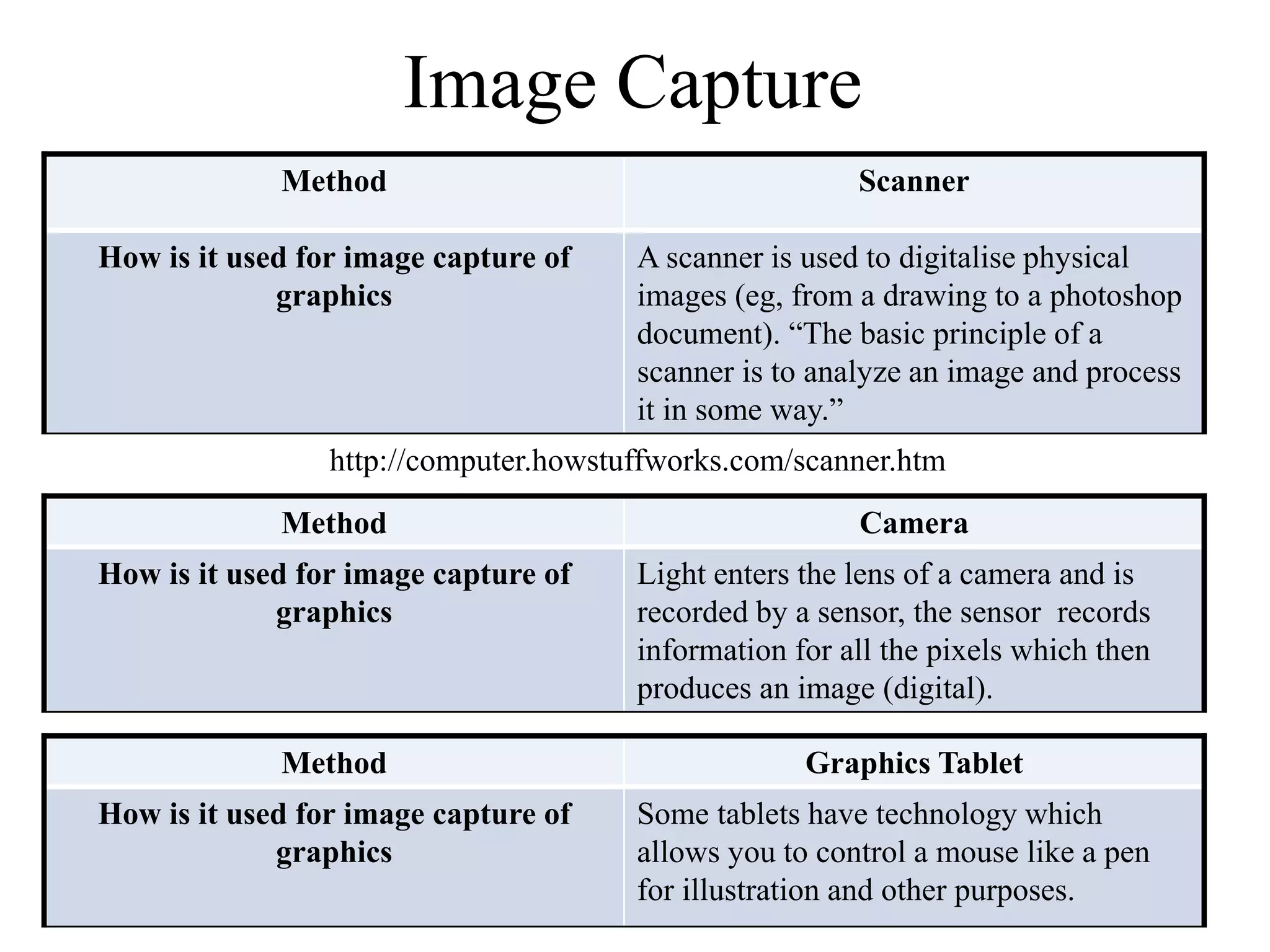
Image Capture 
Method Scanner 
How is it used for image capture of 
graphics 
A scanner is used to digitalise physical 
images (eg, from a drawing to a photoshop 
document). “The basic principle of a 
scanner is to analyze an image and process 
it in some way.” 
http://computer.howstuffworks.com/scanner.htm 
Method Camera 
How is it used for image capture of 
graphics 
Light enters the lens of a camera and is 
recorded by a sensor, the sensor records 
information for all the pixels which then 
produces an image (digital). 
Method Graphics Tablet 
How is it used for image capture of 
graphics 
Some tablets have technology which 
allows you to control a mouse like a pen 
for illustration and other purposes.
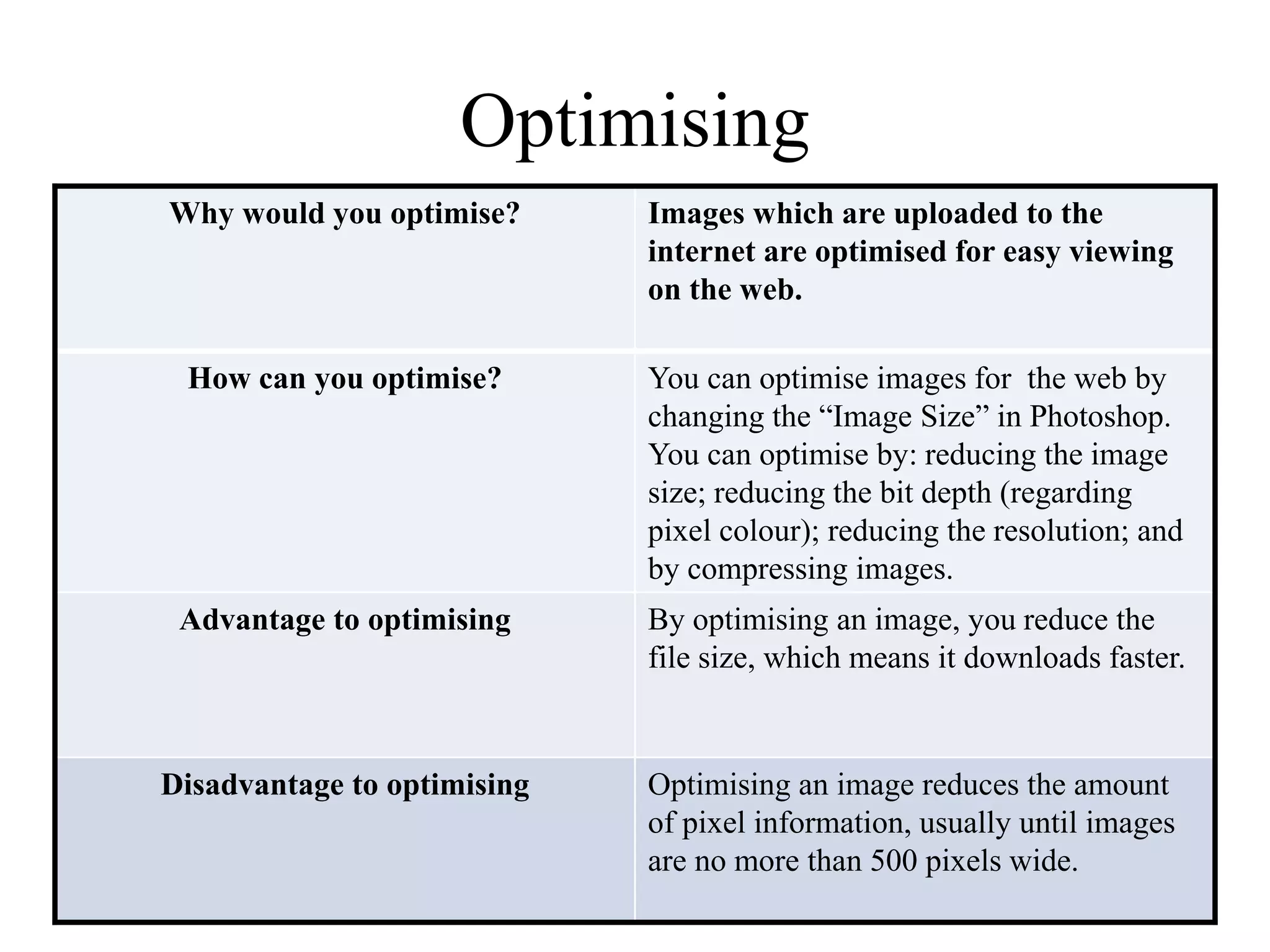
Optimising 
Why would you optimise? Images which are uploaded to the 
internet are optimised for easy viewing 
on the web. 
How can you optimise? You can optimise images for the web by 
changing the “Image Size” in Photoshop. 
You can optimise by: reducing the image 
size; reducing the bit depth (regarding 
pixel colour); reducing the resolution; and 
by compressing images. 
Advantage to optimising By optimising an image, you reduce the 
file size, which means it downloads faster. 
Disadvantage to optimising Optimising an image reduces the amount 
of pixel information, usually until images 
are no more than 500 pixels wide.

Digital Graphics- File Formats

  • 1.
    Digital Graphics FileFormats Katy Fleetham
  • 2.
    Raster Graphics Rastergraphics are made up of bitmaps. Bitmaps are made up of pixels of a fixed resolution (such as 300dpi which is often used for Photoshop documents). Resizing raster graphics can cause distortion of the images.
  • 3.
    Vector Graphics Vectorgraphics are made up of vectors (or paths/strokes). They are defined by a start and end point with curves, points and angles. Unlike raster graphics, vectors can be scaled with no loss in definition which makes them ideal for company logos as they can be used on business cards and scaled large enough to fit a billboard without losing image quality.
  • 4.
  • 5.
    JPEG Stands ForJoint Photographic Experts Group Used For/Example JPEG files are most commonly used for photographs and web formats. Facebook saves uploaded images in JPEG format. Advantage JPEG files are often much smaller than others and therefore take up less memory. JPEG is also a universal file which can be opened pretty much anywhere, whether it be a phone or a computer. Disadvantage The image is compressed when saved. Every time the image is saved after editing it will be recompressed. This means that less pixels will be saved each time and as a result the image will appear to lose quality over time.
  • 6.
    TIFF Stands ForTagged Image File Format Used For/Example TIFF’s are most commonly used for desktop publishing. Adobe InDesign documents are often saved as TIFF’s. Advantage TIFF’s can save multi-page documents in a single file which is why Adobe InDesign documents are usually saved in this format. TIFF files have lossless compression which means they can be saved multiple times without losing image quality. Disadvantage TIFF’s (due to the amount of information they can store) have rather large file sizes which can take up a lot of memory. A TIFF is also a specialist file which means it requires certain programmes to open the document, unlike JPEG files which can be opened almost anywhere.
  • 7.
    GIF Stands ForGraphics Interchange Format Used For/Example GIF files are used to store short, digital animations. A GIF is a series of images on loop which creates the appearance of a video. Advantage A GIF has a reasonably small file size which means they can be viewed easily online as they will load quicker and are still of good quality. GIF’s can also give a professional look to websites as they can have transparent backgrounds. Disadvantage Images may look blocky or pixelated due to the limited colour palette. This makes them appear to be of poorer quality. Once an animation has been saved as a GIF, you cannot edit it. This makes it very difficult to make minor alterations to the animation when it has been saved. http://stories4all9858697.wordpress.com/2012/12/05/advantages-and-disadvantages-of-using-animated-gifs/
  • 8.
    BMP Stands ForBitmap Image File Used For/Example A bitmap file is similar to that of a JPEG or TIFF. A BMP can be used to save any pixel-based images. Advantage Bitmap files save images which are a high quality as they have no loss from compression when they are saved. Disadvantage Since bitmap images are high quality, this results in a large file size which can take up lots of memory. http://graphicssoft.about.com/od/graphicformats/f/summary.htm
  • 9.
  • 10.
    PSD Stands ForPhotoshop document Used For/Example PSD files are used for image manipulation and magazine front cover images as it is able to save layers, page formatting information, swatches ect. Advantage PSD supports transparency so images can be saved without a background. Also, since PSD can save layers, this makes it easy to go back and edit the file later on if needs be. Disadvantage The file can only be opened in Photoshop and by some Adobe programmes. Due to the amount of information and layers that the document can recall, it takes up a lot of memory as a large file.
  • 11.
    AI Stands ForAdobe Illustrator Art Used For/Example AI is used to create graphics which can represent a company (such as a logo). Advantage The images can be scaled smaller or larger with no loss in definition so images can be of high quality. Disadvantage An AI file requires specialist software to open which limits where it can be viewed.
  • 12.
    FLA Stands ForFlash file Used For/Example Flash files are used to create animations and games. Advantage FLA files are high quality, but they only have a small file size, which makes them good for the web as they wont take long to load. A flash file can include both videos and sound. Disadvantage A limited amount of software can open a FLA file as it is a specialist file.
  • 13.
    WMF Stands ForWindows Metafile Used For/Example Similar to AI files, WMF files are used for logos and company graphics. WMF is a windows format used mainly for clipart. Advantage The images saved as WMF’s can be scaled smaller and larger with no loss in definition and this file can contain both bitmap and vector components. Disadvantage A WMF is only available on windows platforms so they can only be generated on these. http://www2.sas.com/proceedings/sugi23/Begtutor/p54.pdf
  • 14.
    File Format Captureand Optimising
  • 15.
    Compression Definition Lossycompression is a reduction in the file size which is caused by reducing the amount of information which is saved. Advantage The main advantage to compression is that it reduces the file size and the amount of memory in which the file requires. Disadvantage When compressed, images lose quality and appear more pixelated because less pixels are saved each time.
  • 16.
    Image Capture MethodScanner How is it used for image capture of graphics A scanner is used to digitalise physical images (eg, from a drawing to a photoshop document). “The basic principle of a scanner is to analyze an image and process it in some way.” http://computer.howstuffworks.com/scanner.htm Method Camera How is it used for image capture of graphics Light enters the lens of a camera and is recorded by a sensor, the sensor records information for all the pixels which then produces an image (digital). Method Graphics Tablet How is it used for image capture of graphics Some tablets have technology which allows you to control a mouse like a pen for illustration and other purposes.
  • 17.
    Optimising Why wouldyou optimise? Images which are uploaded to the internet are optimised for easy viewing on the web. How can you optimise? You can optimise images for the web by changing the “Image Size” in Photoshop. You can optimise by: reducing the image size; reducing the bit depth (regarding pixel colour); reducing the resolution; and by compressing images. Advantage to optimising By optimising an image, you reduce the file size, which means it downloads faster. Disadvantage to optimising Optimising an image reduces the amount of pixel information, usually until images are no more than 500 pixels wide.