Course Instructor :Muhammad Mujeeb Riaz
What is Photoshop?
Photo retouching, image editing, andcolor
painting program; graphic design tool
• Create high-quality digital images
• Tools & special effects capabilities
• Manipulate scanned images, slides, & original
artwork
• Isolate parts of an image for experimentation &
individual editing
• And lots more…..
Uses of Photoshop
• Photo Editing
• Design
File Formats
• JPEG – Joint Photographic Experts Group
• GIF – Graphics Interchange Format
• PNG – Portable Network Graphics
Advantages of Photoshop
• Photo Restoration
• Product Retouch
• To add Watermark or remove
• Photo Masking
• Clipping Path
• Photo Editing
• Logo Design
• Enhancing
• Photo Composition
• Color Correction
• Banner Design
T-Shirt Design
UI Design
iPhone Apps Design
Flyer Design
Website Header Design
Website Mockup
Business Card Design
Image background removal
eBook cover page design
Some facts about the Adobe
Photoshop Demand and Supply
• You can provide Photo Editing Services Offline
• Start a YouTube Channel
• Sell your designs on your own website
• Apply for online jobs and projects
• Apply for jobs offline
• You can sell your design on online marketplaces
• Design images for Social Media Marketing
• You can create image for your blog
Disadvantages of Photoshop
• Not For Beginners
Adobe Photoshop is relatively simple to use but it is not a program designed for the beginners , It is primarily
a photo-editing program for the professionals that plan on editing many photos on a regular basis ,
There are many different tools that do very different things , so , You will take long time to learn how to
use each one correctly .
• Knowledge of Software
Most beginners will not begin to touch the functionality of this program and they could get what they need from
another program , Many people who are unfamiliar with editing the photos in Adobe Photoshop , The advanced
functionality will be useless for them .
• Well-equipped computer
Adobe Photoshop requires a well-equipped computer , It is a heavyweight program and many of the tools are
computationally intensive , It takes up a large space of room on your computer as well as RAM memory .
Difference Between Illustrator and
Photoshop
• Photoshop can work with the picture pixel by pixel and
supports the .PSD, .PNG and .JPG formats.
• Illustrator is called a vector editor.
Photoshop is a raster graphics application, meaning that the alterations that are made to an
image affect the actual pixels that the image is made up of. This is used to alter the image in
virtually any imaginable manner from retouching colors and textures, adding borders,
applying different types of effects or giving the image a more polished, professional look and
feel.
• Adobe Illustrator is a vector-based graphics program. When using Illustrator, a line is
created by connecting two dots via a computer algorithm. These dots can be relocated
and modified at will and the end result is a sharp and clear image that can be used
virtually anywhere.
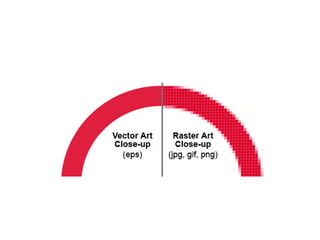
• Images that are created using Illustrator can be resized without the fear of blurring or
pixilation and it is, therefore, perfect to use on logos, text or repeating graphics of
different sizes. It is essentially a tool for the creation, rather than the alteration of
graphics and images.
• The critical difference between the Illustrator and Photoshop is about the way they approach the
editing of the graphics.
• Photoshop can work with the picture pixel by pixel and supports the .PSD, .PNG and .JPG formats.
• All the graphics created or edited in the Adobe Photoshop consist of the colored blocks called
pixels. Unfortunately, when you try to change the image size, you cannot do that without lowering
the picture quality. That’s because the picture begins to pixelate and become blurred and screwed
up.
• This type of editor is called the raster editor.
• On the other hand, the Illustrator is called a vector editor. These two editors use two completely
different techniques while working with the images, so they are like two brothers that look alike yet
everyone has its own individuality.
• Unlike Photoshop Adobe Illustrator uses the mathematics formulas while shaping the picture or an
object on the image. It means that every logo or shape you design in the Illustrator can be shrunk
or resized to any size you want without losing the quality.
• That’s why Illustrator is very popular among those who work with the logos and branding design
because they have to create the media materials that can be resized any time.
• In the Illustrator you can work with the formats like .AI, .EPS, .SVG, and .PDF.
• You can create the Illustrator vector-based graphics.
Which one is more useful?
• So at this point, your question should be: which one is
more useful for me? Well, it depends on the tasks you deal
with.
• For example, if you are a photographer, your choice will
undoubtedly be the Photoshop. The photo editing doesn’t
require the vector editor.
• If you are a web-designer, then I would recommend you
going with both Photoshop and Illustrator. I know a few
guys who deal only with Photoshop, but it stops them from
evolving into a more skillful designer. Illustrator is a must
for those who want to succeed in web-design, not only
design layouts and web templates. Because after all,
graphic designers and web designers should know how to
design a vector logo
Adobe Photoshop
Adobe Photoshop

Adobe Photoshop

  • 1.
  • 2.
    What is Photoshop? Photoretouching, image editing, andcolor painting program; graphic design tool • Create high-quality digital images • Tools & special effects capabilities • Manipulate scanned images, slides, & original artwork • Isolate parts of an image for experimentation & individual editing • And lots more…..
  • 3.
    Uses of Photoshop •Photo Editing • Design
  • 4.
    File Formats • JPEG– Joint Photographic Experts Group • GIF – Graphics Interchange Format • PNG – Portable Network Graphics
  • 5.
    Advantages of Photoshop •Photo Restoration • Product Retouch • To add Watermark or remove • Photo Masking • Clipping Path • Photo Editing • Logo Design • Enhancing • Photo Composition • Color Correction • Banner Design T-Shirt Design UI Design iPhone Apps Design Flyer Design Website Header Design Website Mockup Business Card Design Image background removal eBook cover page design
  • 6.
    Some facts aboutthe Adobe Photoshop Demand and Supply • You can provide Photo Editing Services Offline • Start a YouTube Channel • Sell your designs on your own website • Apply for online jobs and projects • Apply for jobs offline • You can sell your design on online marketplaces • Design images for Social Media Marketing • You can create image for your blog
  • 7.
    Disadvantages of Photoshop •Not For Beginners Adobe Photoshop is relatively simple to use but it is not a program designed for the beginners , It is primarily a photo-editing program for the professionals that plan on editing many photos on a regular basis , There are many different tools that do very different things , so , You will take long time to learn how to use each one correctly . • Knowledge of Software Most beginners will not begin to touch the functionality of this program and they could get what they need from another program , Many people who are unfamiliar with editing the photos in Adobe Photoshop , The advanced functionality will be useless for them . • Well-equipped computer Adobe Photoshop requires a well-equipped computer , It is a heavyweight program and many of the tools are computationally intensive , It takes up a large space of room on your computer as well as RAM memory .
  • 8.
    Difference Between Illustratorand Photoshop • Photoshop can work with the picture pixel by pixel and supports the .PSD, .PNG and .JPG formats. • Illustrator is called a vector editor. Photoshop is a raster graphics application, meaning that the alterations that are made to an image affect the actual pixels that the image is made up of. This is used to alter the image in virtually any imaginable manner from retouching colors and textures, adding borders, applying different types of effects or giving the image a more polished, professional look and feel. • Adobe Illustrator is a vector-based graphics program. When using Illustrator, a line is created by connecting two dots via a computer algorithm. These dots can be relocated and modified at will and the end result is a sharp and clear image that can be used virtually anywhere. • Images that are created using Illustrator can be resized without the fear of blurring or pixilation and it is, therefore, perfect to use on logos, text or repeating graphics of different sizes. It is essentially a tool for the creation, rather than the alteration of graphics and images.
  • 9.
    • The criticaldifference between the Illustrator and Photoshop is about the way they approach the editing of the graphics. • Photoshop can work with the picture pixel by pixel and supports the .PSD, .PNG and .JPG formats. • All the graphics created or edited in the Adobe Photoshop consist of the colored blocks called pixels. Unfortunately, when you try to change the image size, you cannot do that without lowering the picture quality. That’s because the picture begins to pixelate and become blurred and screwed up. • This type of editor is called the raster editor. • On the other hand, the Illustrator is called a vector editor. These two editors use two completely different techniques while working with the images, so they are like two brothers that look alike yet everyone has its own individuality. • Unlike Photoshop Adobe Illustrator uses the mathematics formulas while shaping the picture or an object on the image. It means that every logo or shape you design in the Illustrator can be shrunk or resized to any size you want without losing the quality. • That’s why Illustrator is very popular among those who work with the logos and branding design because they have to create the media materials that can be resized any time. • In the Illustrator you can work with the formats like .AI, .EPS, .SVG, and .PDF. • You can create the Illustrator vector-based graphics.
  • 11.
    Which one ismore useful? • So at this point, your question should be: which one is more useful for me? Well, it depends on the tasks you deal with. • For example, if you are a photographer, your choice will undoubtedly be the Photoshop. The photo editing doesn’t require the vector editor. • If you are a web-designer, then I would recommend you going with both Photoshop and Illustrator. I know a few guys who deal only with Photoshop, but it stops them from evolving into a more skillful designer. Illustrator is a must for those who want to succeed in web-design, not only design layouts and web templates. Because after all, graphic designers and web designers should know how to design a vector logo