Fatih Özlü
Image File Formats
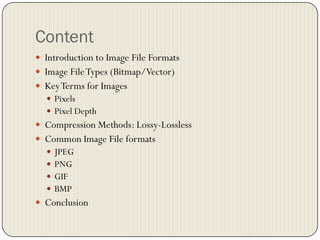
Content
 Introduction to Image File Formats
 Image FileTypes (Bitmap/Vector)
 KeyTerms for Images
 Pixels
 Pixel Depth
 Compression Methods: Lossy-Lossless
 Common Image File formats
 JPEG
 PNG
 GIF
 BMP
 Conclusion
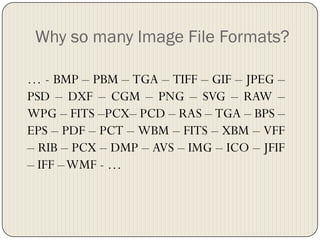
Why so many Image File Formats?
… - BMP – PBM – TGA – TIFF – GIF – JPEG –
PSD – DXF – CGM – PNG – SVG – RAW –
WPG – FITS –PCX– PCD – RAS – TGA – BPS –
EPS – PDF – PCT – WBM – FITS – XBM – VFF
– RIB – PCX – DMP – AVS – IMG – ICO – JFIF
– IFF –WMF - …
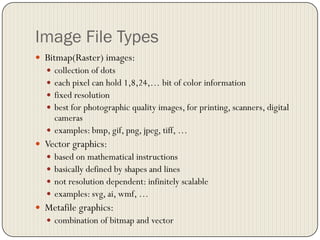
Image File Types
 Bitmap(Raster) images:
 collection of dots
 each pixel can hold 1,8,24,… bit of color information
 fixed resolution
 best for photographic quality images, for printing, scanners, digital
cameras
 examples: bmp, gif, png, jpeg, tiff, …
 Vector graphics:
 based on mathematical instructions
 basically defined by shapes and lines
 not resolution dependent: infinitely scalable
 examples: svg, ai, wmf, …
 Metafile graphics:
 combination of bitmap and vector
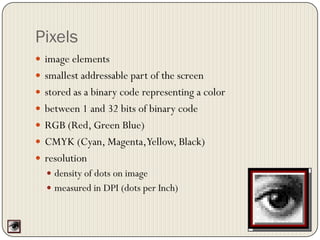
Pixels
 image elements
 smallest addressable part of the screen
 stored as a binary code representing a color
 between 1 and 32 bits of binary code
 RGB (Red, Green Blue)
 CMYK (Cyan, Magenta,Yellow, Black)
 resolution
 density of dots on image
 measured in DPI (dots per Inch)
Pixel Depth
Images retrieved from http://en.wikipedia.org/
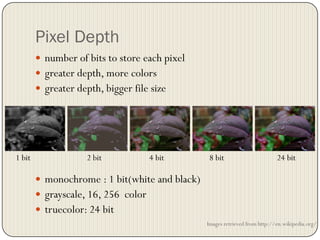
 number of bits to store each pixel
 greater depth, more colors
 greater depth, bigger file size
 monochrome : 1 bit(white and black)
 grayscale, 16, 256 color
 truecolor: 24 bit
1 bit 2 bit 4 bit 8 bit 24 bit
Compression
 large amount of data
 lossy/lossless
 quality
 Some algorithms
 LZW(Lemple-Zif –Welch)Algorithm
 RLEAlgorithm
 ZIP Compression
 JPEG Compression -> lossy
 Deflation – used in PNG, MNG, andTIFF
JPEG (Joint Photographic Experts
Group)
 most applications and browsers, digital cameras
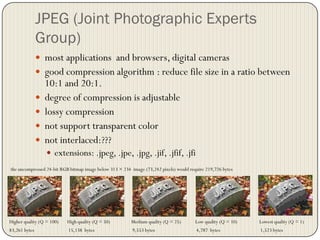
 good compression algorithm : reduce file size in a ratio between
10:1 and 20:1.
 degree of compression is adjustable
 lossy compression
 not support transparent color
 not interlaced:???
 extensions: .jpeg, .jpe, .jpg, .jif, .jfif, .jfi
Higher quality (Q = 100) High quality (Q = 50) Medium quality (Q = 25) Low quality (Q = 10) Lowest quality (Q = 1)
83,261 bytes 15,138 bytes 9,553 bytes 4,787 bytes 1,523 bytes
the uncompressed 24-bit RGB bitmap image below 313 × 234 image (73,242 pixels) would require 219,726 bytes
GIF (Graphics Interchange Format)
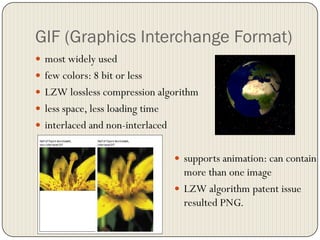
 most widely used
 few colors: 8 bit or less
 LZW lossless compression algorithm
 less space, less loading time
 interlaced and non-interlaced
 supports animation: can contain
more than one image
 LZW algorithm patent issue
resulted PNG.
PNG (Portable Network Graphics)
 developed due to legal problems with compression algorithm
 PNG's Not GIF
 new format targeted for Internet use, becoming common
 lossless compression (more than GIF, less than JPEG)
 24-bit RGB, 32-bit RGBA or up to 48 bit color
 transparency (A:Alpha channel)
 no animation support
 better interlacing: Adam7 algorithm
Illustration of the 7 passes of the Adam7 algorithm,
running over a 16×16 image
BMP (Bitmap Image File)
 Microsoft native image format
 Windows,OS/2, no MAC compatibility.
 backgrounds, graphics, wallpaper
 1(monochrome), 4, 8, 24-bit RGB
 generally uncompressed, too large size
 lossless RLE compression
Conclusion
 compression
 larger file, larger storage and slower download
 few color, smaller file, worse quality
 There is really no reason to ever use this format BMP
 GIF and JPG are the formats used for nearly all web images. PNG
is supported by most of the latest generation browsers.
 But Microsoft Internet Explorer does not support PNG
transparency.
 PNG does everything GIF does, and better, so expect to see PNG
replace GIF in the future. PNG will not replace JPG, since JPG is
capable of much greater compression of photographic images,
even when set for quite minimal loss of quality
Thanks
 Questions?

Commonly Used Image File Formats

  • 1.
  • 2.
    Content  Introduction toImage File Formats  Image FileTypes (Bitmap/Vector)  KeyTerms for Images  Pixels  Pixel Depth  Compression Methods: Lossy-Lossless  Common Image File formats  JPEG  PNG  GIF  BMP  Conclusion
  • 3.
    Why so manyImage File Formats? … - BMP – PBM – TGA – TIFF – GIF – JPEG – PSD – DXF – CGM – PNG – SVG – RAW – WPG – FITS –PCX– PCD – RAS – TGA – BPS – EPS – PDF – PCT – WBM – FITS – XBM – VFF – RIB – PCX – DMP – AVS – IMG – ICO – JFIF – IFF –WMF - …
  • 4.
    Image File Types Bitmap(Raster) images:  collection of dots  each pixel can hold 1,8,24,… bit of color information  fixed resolution  best for photographic quality images, for printing, scanners, digital cameras  examples: bmp, gif, png, jpeg, tiff, …  Vector graphics:  based on mathematical instructions  basically defined by shapes and lines  not resolution dependent: infinitely scalable  examples: svg, ai, wmf, …  Metafile graphics:  combination of bitmap and vector
  • 5.
    Pixels  image elements smallest addressable part of the screen  stored as a binary code representing a color  between 1 and 32 bits of binary code  RGB (Red, Green Blue)  CMYK (Cyan, Magenta,Yellow, Black)  resolution  density of dots on image  measured in DPI (dots per Inch)
  • 6.
    Pixel Depth Images retrievedfrom http://en.wikipedia.org/  number of bits to store each pixel  greater depth, more colors  greater depth, bigger file size  monochrome : 1 bit(white and black)  grayscale, 16, 256 color  truecolor: 24 bit 1 bit 2 bit 4 bit 8 bit 24 bit
  • 7.
    Compression  large amountof data  lossy/lossless  quality  Some algorithms  LZW(Lemple-Zif –Welch)Algorithm  RLEAlgorithm  ZIP Compression  JPEG Compression -> lossy  Deflation – used in PNG, MNG, andTIFF
  • 8.
    JPEG (Joint PhotographicExperts Group)  most applications and browsers, digital cameras  good compression algorithm : reduce file size in a ratio between 10:1 and 20:1.  degree of compression is adjustable  lossy compression  not support transparent color  not interlaced:???  extensions: .jpeg, .jpe, .jpg, .jif, .jfif, .jfi Higher quality (Q = 100) High quality (Q = 50) Medium quality (Q = 25) Low quality (Q = 10) Lowest quality (Q = 1) 83,261 bytes 15,138 bytes 9,553 bytes 4,787 bytes 1,523 bytes the uncompressed 24-bit RGB bitmap image below 313 × 234 image (73,242 pixels) would require 219,726 bytes
  • 9.
    GIF (Graphics InterchangeFormat)  most widely used  few colors: 8 bit or less  LZW lossless compression algorithm  less space, less loading time  interlaced and non-interlaced  supports animation: can contain more than one image  LZW algorithm patent issue resulted PNG.
  • 10.
    PNG (Portable NetworkGraphics)  developed due to legal problems with compression algorithm  PNG's Not GIF  new format targeted for Internet use, becoming common  lossless compression (more than GIF, less than JPEG)  24-bit RGB, 32-bit RGBA or up to 48 bit color  transparency (A:Alpha channel)  no animation support  better interlacing: Adam7 algorithm Illustration of the 7 passes of the Adam7 algorithm, running over a 16×16 image
  • 11.
    BMP (Bitmap ImageFile)  Microsoft native image format  Windows,OS/2, no MAC compatibility.  backgrounds, graphics, wallpaper  1(monochrome), 4, 8, 24-bit RGB  generally uncompressed, too large size  lossless RLE compression
  • 12.
    Conclusion  compression  largerfile, larger storage and slower download  few color, smaller file, worse quality  There is really no reason to ever use this format BMP  GIF and JPG are the formats used for nearly all web images. PNG is supported by most of the latest generation browsers.  But Microsoft Internet Explorer does not support PNG transparency.  PNG does everything GIF does, and better, so expect to see PNG replace GIF in the future. PNG will not replace JPG, since JPG is capable of much greater compression of photographic images, even when set for quite minimal loss of quality
  • 13.