Digital Graphics
File Formats
Ruby Hooper
Raster Graphics
Raster graphics are made up of bitmaps and
pixels. Bitmapped images have a fixed
resolution so when resized, the image
becomes pixelated and loses detail and
definition. The most common raster image is a
photograph. Programs like Adobe Photoshop
use raster photographs to create an image.
Vector Graphics
Vector graphics are made out of paths, dots and
strokes. They have a start point and an end
point with curves between them. You can
scale a vector to your desired size without
losing definition and detail. Programs like
Adobe Illustrator use Vector Images because
then can change and warp the image.
Raster Graphics
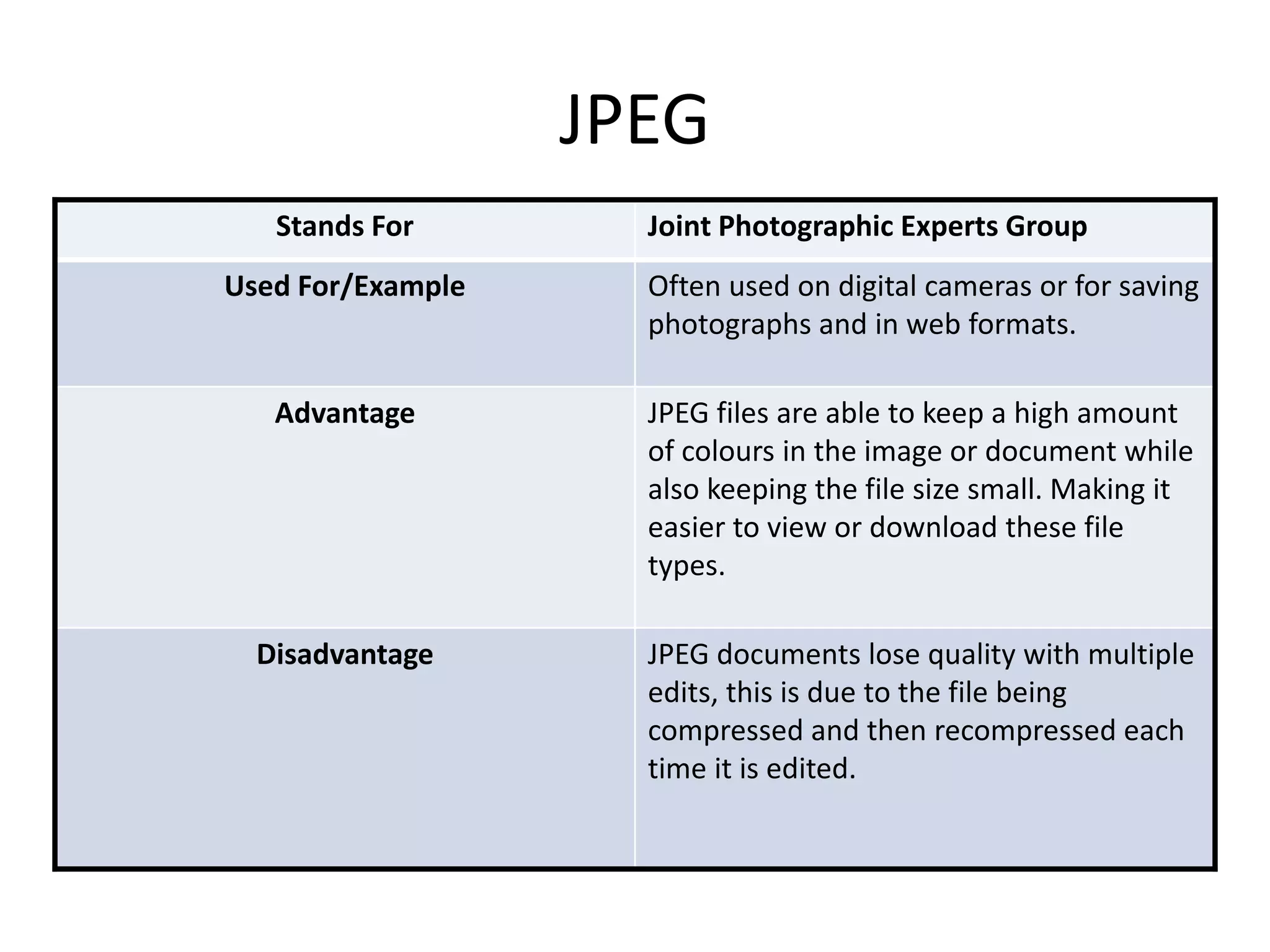
JPEG
Stands For Joint Photographic Experts Group
Used For/Example Often used on digital cameras or for saving
photographs and in web formats.
Advantage JPEG files are able to keep a high amount
of colours in the image or document while
also keeping the file size small. Making it
easier to view or download these file
types.
Disadvantage JPEG documents lose quality with multiple
edits, this is due to the file being
compressed and then recompressed each
time it is edited.
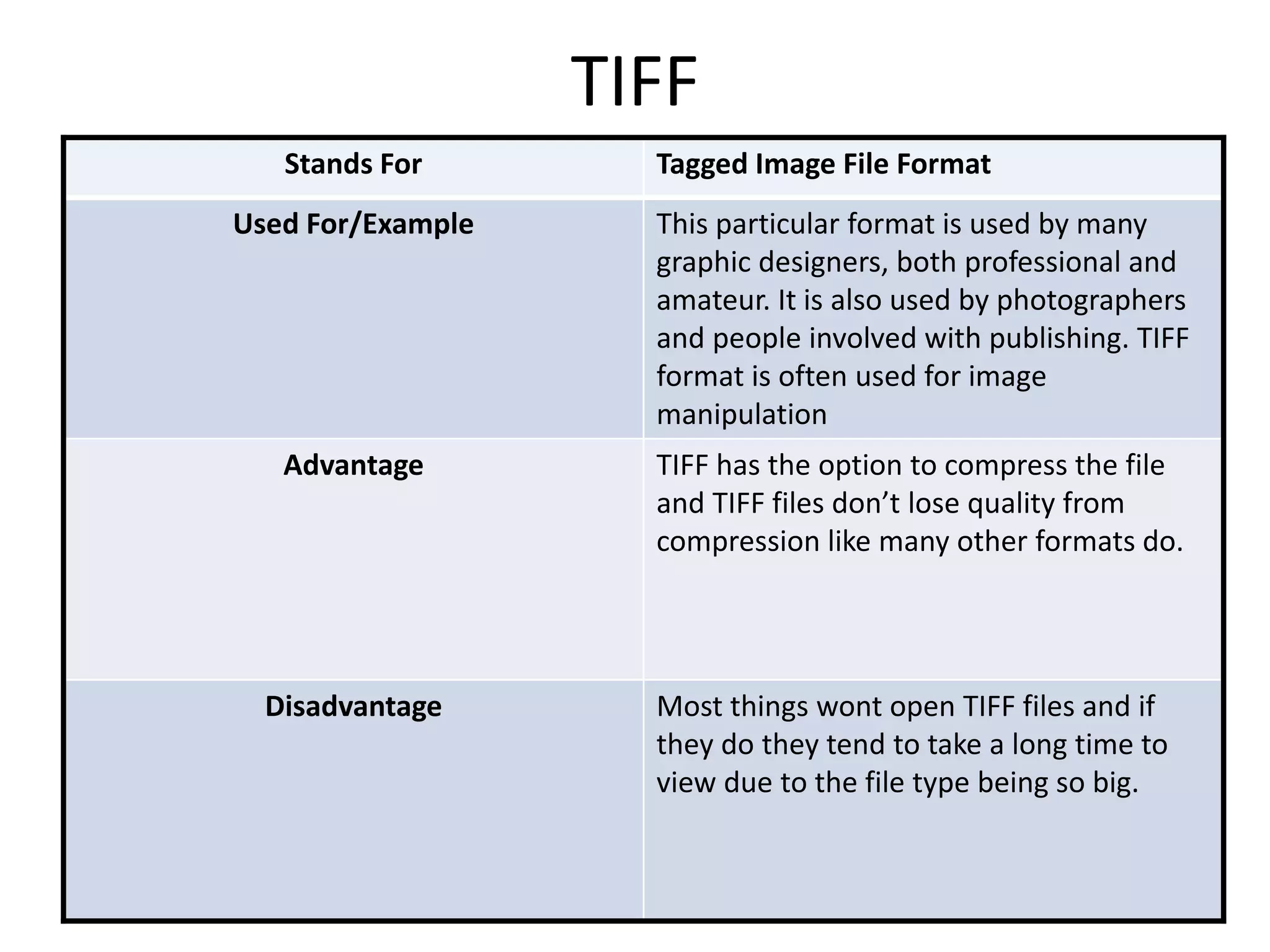
TIFF
Stands For Tagged Image File Format
Used For/Example This particular format is used by many
graphic designers, both professional and
amateur. It is also used by photographers
and people involved with publishing. TIFF
format is often used for image
manipulation
Advantage TIFF has the option to compress the file
and TIFF files don’t lose quality from
compression like many other formats do.
Disadvantage Most things wont open TIFF files and if
they do they tend to take a long time to
view due to the file type being so big.
GIF
Stands For Graphics Interchange Format
Used For/Example GIF file types are used for short digital
animations. They are a series of images
that give the illusion of a video. Social
media sites use this regularly and so do
business sites for companies.
Advantage GIF files have a small file size so they can
be used online and they load quickly. They
can also support translucent backgrounds
so can look professional.
Disadvantage They have a colour palette of 256 colours
so the quality can often look poorer than
some images, some GIF files have ‘blocky’
colours causing the file to look pixelated
and distorted.
BMP
Stands For Bitmap Image File
Used For/Example BMP files are similar to TIFF and JPEG files.
BMP files support bitmap digital images.
Advantage These files are easy to open and edit, they
also do not lose quality when repeatedly
edited.
Disadvantage As all the other raster graphics, BMP files
are difficult to resize without loss of detail.
BMP files are also very large files so take a
long time to open and work on.
Vector Graphics
PSD
Stands For PhotoShop Document
Used For/Example Allows the user to work on a piece layer by
layer instead of working on the image as a
whole. PSD files are popular for creations
like front covers of magazines.
Advantage PSD files support transparency, colours
and text, layers are also easy to
manipulate. This file type in particular is
good for designers as they can save the
document into separate pieces.
Disadvantage Very few softwares will open a PSD file and
once the file has been saved as anything
but a PSD the image is compressed into
one single layer so you can no longer revist
the piece and edit layers.
AI
Stands For Adobe Illustrator
Used For/Example Often used by companies to create logos
in both print and digital form. AI is also
used to create cartoons of real
photographs, charts, graphs and also
diagrams.
Advantage The pieces created using AI can be sized to
any size required and it does not lose
definition.
Disadvantage Adobe Illustrator is difficult to use at first
and takes a lot of practise. This file type
also rarely opens in any other software
that is not Adobe.
FLA
Stands For Flash File
Used For/Example Used to create animation and games, FLA
files can combine video, images and sound
into one to create an aesthetically pleasing
piece of work.
Advantage Flash files produce a high quality piece of
work that have a small file size so they are
quick to view and fast to download. Flash
files can make a website look more
professional and get a message across
quickly and easily.
Disadvantage FLA files don’t work on iPhones or iPads
which are very popular. Heavy amounts of
flash files embedded in a website causes it
to run very slowly.
WMF
Stands For Windows Metafile
Used For/Example WMF files are similar to AI files, they are
used to create logos, cartoons, diagrams
etc. Windows Metafile can contain both
vector and bitmap components.
Advantage WMF files can be scaled to the size desired
and they can also be compressed and
revisited without losing any quality.
Disadvantage Many applications will not allowing
viewing or downloading of WMF files
other than Microsoft, when saving WMF
files suggested options to allow viewing
are shown and they are to save it as a TIFF,
JPEG, GIF and a couple of others.
File Format Capture
and Optimising
Compression
Definition Lossy compression is the way a file is
sized and how they are reduced by
lowering the amount of information that
is saved. The more an image is
compressed the more pixelated it
becomes.
Advantage Compression makes data smaller so it
opens quickly and it is easy to move and
email from one place to another because
there is less data to transfer.
Disadvantage Many data types are not compressible,
this includes images, videos, songs or any
data that has already been compressed.
Image Capture
Method Scanner
How is it used for image capture of
graphics
You can digitalise a physical image like
sketches of a photograph.
Method Camera
How is it used for image capture of
graphics
You can accurately and successfully create
a memorable image of what is in front of
you.
Method Graphics Tablet
How is it used for image capture of
graphics
You can control the mouse like you would
a pen, allowing the user total freedom in
their work.
Optimising
Why would you optimise? People optimise a file because it makes
the file size smaller which therefore
means it is quicker and easier to view.
How can you optimise? You can optimise by reducing the file size
or reducing the bit depth (which is
changing the amount of pixels used in the
image)
Advantage to optimising Optimising a file allows easier viewing and
transferring. Optimised images also take
less time to download.
Disadvantage to optimising A downfall to optimising is the image may
not be as good quality as it would be if it
had not been optimised.

File types pro forma

  • 1.
  • 2.
    Raster Graphics Raster graphicsare made up of bitmaps and pixels. Bitmapped images have a fixed resolution so when resized, the image becomes pixelated and loses detail and definition. The most common raster image is a photograph. Programs like Adobe Photoshop use raster photographs to create an image.
  • 3.
    Vector Graphics Vector graphicsare made out of paths, dots and strokes. They have a start point and an end point with curves between them. You can scale a vector to your desired size without losing definition and detail. Programs like Adobe Illustrator use Vector Images because then can change and warp the image.
  • 4.
  • 5.
    JPEG Stands For JointPhotographic Experts Group Used For/Example Often used on digital cameras or for saving photographs and in web formats. Advantage JPEG files are able to keep a high amount of colours in the image or document while also keeping the file size small. Making it easier to view or download these file types. Disadvantage JPEG documents lose quality with multiple edits, this is due to the file being compressed and then recompressed each time it is edited.
  • 6.
    TIFF Stands For TaggedImage File Format Used For/Example This particular format is used by many graphic designers, both professional and amateur. It is also used by photographers and people involved with publishing. TIFF format is often used for image manipulation Advantage TIFF has the option to compress the file and TIFF files don’t lose quality from compression like many other formats do. Disadvantage Most things wont open TIFF files and if they do they tend to take a long time to view due to the file type being so big.
  • 7.
    GIF Stands For GraphicsInterchange Format Used For/Example GIF file types are used for short digital animations. They are a series of images that give the illusion of a video. Social media sites use this regularly and so do business sites for companies. Advantage GIF files have a small file size so they can be used online and they load quickly. They can also support translucent backgrounds so can look professional. Disadvantage They have a colour palette of 256 colours so the quality can often look poorer than some images, some GIF files have ‘blocky’ colours causing the file to look pixelated and distorted.
  • 8.
    BMP Stands For BitmapImage File Used For/Example BMP files are similar to TIFF and JPEG files. BMP files support bitmap digital images. Advantage These files are easy to open and edit, they also do not lose quality when repeatedly edited. Disadvantage As all the other raster graphics, BMP files are difficult to resize without loss of detail. BMP files are also very large files so take a long time to open and work on.
  • 9.
  • 10.
    PSD Stands For PhotoShopDocument Used For/Example Allows the user to work on a piece layer by layer instead of working on the image as a whole. PSD files are popular for creations like front covers of magazines. Advantage PSD files support transparency, colours and text, layers are also easy to manipulate. This file type in particular is good for designers as they can save the document into separate pieces. Disadvantage Very few softwares will open a PSD file and once the file has been saved as anything but a PSD the image is compressed into one single layer so you can no longer revist the piece and edit layers.
  • 11.
    AI Stands For AdobeIllustrator Used For/Example Often used by companies to create logos in both print and digital form. AI is also used to create cartoons of real photographs, charts, graphs and also diagrams. Advantage The pieces created using AI can be sized to any size required and it does not lose definition. Disadvantage Adobe Illustrator is difficult to use at first and takes a lot of practise. This file type also rarely opens in any other software that is not Adobe.
  • 12.
    FLA Stands For FlashFile Used For/Example Used to create animation and games, FLA files can combine video, images and sound into one to create an aesthetically pleasing piece of work. Advantage Flash files produce a high quality piece of work that have a small file size so they are quick to view and fast to download. Flash files can make a website look more professional and get a message across quickly and easily. Disadvantage FLA files don’t work on iPhones or iPads which are very popular. Heavy amounts of flash files embedded in a website causes it to run very slowly.
  • 13.
    WMF Stands For WindowsMetafile Used For/Example WMF files are similar to AI files, they are used to create logos, cartoons, diagrams etc. Windows Metafile can contain both vector and bitmap components. Advantage WMF files can be scaled to the size desired and they can also be compressed and revisited without losing any quality. Disadvantage Many applications will not allowing viewing or downloading of WMF files other than Microsoft, when saving WMF files suggested options to allow viewing are shown and they are to save it as a TIFF, JPEG, GIF and a couple of others.
  • 14.
  • 15.
    Compression Definition Lossy compressionis the way a file is sized and how they are reduced by lowering the amount of information that is saved. The more an image is compressed the more pixelated it becomes. Advantage Compression makes data smaller so it opens quickly and it is easy to move and email from one place to another because there is less data to transfer. Disadvantage Many data types are not compressible, this includes images, videos, songs or any data that has already been compressed.
  • 16.
    Image Capture Method Scanner Howis it used for image capture of graphics You can digitalise a physical image like sketches of a photograph. Method Camera How is it used for image capture of graphics You can accurately and successfully create a memorable image of what is in front of you. Method Graphics Tablet How is it used for image capture of graphics You can control the mouse like you would a pen, allowing the user total freedom in their work.
  • 17.
    Optimising Why would youoptimise? People optimise a file because it makes the file size smaller which therefore means it is quicker and easier to view. How can you optimise? You can optimise by reducing the file size or reducing the bit depth (which is changing the amount of pixels used in the image) Advantage to optimising Optimising a file allows easier viewing and transferring. Optimised images also take less time to download. Disadvantage to optimising A downfall to optimising is the image may not be as good quality as it would be if it had not been optimised.