Increasing the width of the data bus
Memory
Data
Register
Processor Main Memory
10010010
Address
00000000
00000001
00000010
00000011
00000100
00000101
00000110
00000111
00001000
00001001
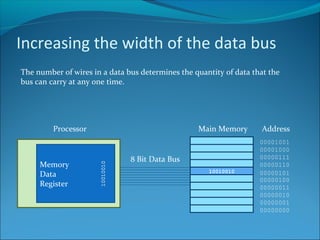
8 Bit Data Bus
The number of wires in a data bus determines the quantity of data that the
bus can carry at any one time.
Increasing the width of the data bus
Memory
Data
Register
Processor Main Memory
10010010 00011000
Address
00000000
00000001
00000010
00000011
00000100
00000101
00000110
00000111
00001000
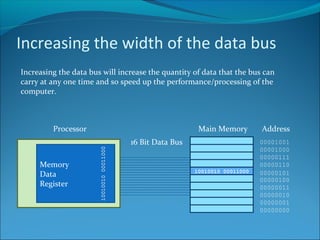
0000100116 Bit Data Bus
Increasing the data bus will increase the quantity of data that the bus can
carry at any one time and so speed up the performance/processing of the
computer.
Increasing the width of the data bus
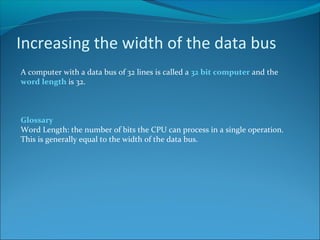
A computer with a data bus of 32 lines is called a 32 bit computer and the
word length is 32.
Glossary
Word Length: the number of bits the CPU can process in a single operation.
This is generally equal to the width of the data bus.
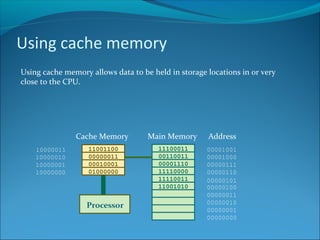
Using cache memory
Using cache memory allows data to be held in storage locations in or very
close to the CPU.
Main Memory Address
00000000
00000001
00000010
00000011
00000100
00000101
00000110
00000111
00001000
0000100111100011
00110011
00001110
11110000
11110011
11001010
11001100
00000011
00010001
01000000
Cache Memory
10000000
10000001
10000010
10000011
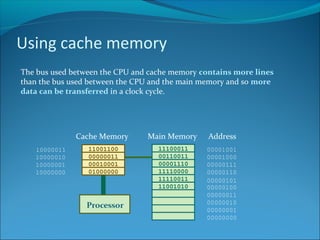
Using cache memory
The bus used between the CPU and cache memory contains more lines
than the bus used between the CPU and the main memory and so more
data can be transferred in a clock cycle.
Main Memory Address
00000000
00000001
00000010
00000011
00000100
00000101
00000110
00000111
00001000
0000100111100011
00110011
00001110
11110000
11110011
11001010
11001100
00000011
00010001
01000000
Cache Memory
10000000
10000001
10000010
10000011
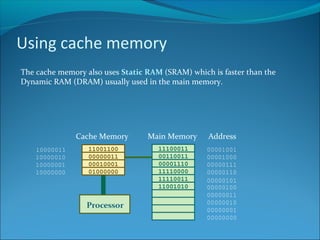
Using cache memory
The cache memory also uses Static RAM (SRAM) which is faster than the
Dynamic RAM (DRAM) usually used in the main memory.
Main Memory Address
00000000
00000001
00000010
00000011
00000100
00000101
00000110
00000111
00001000
0000100111100011
00110011
00001110
11110000
11110011
11001010
11001100
00000011
00010001
01000000
Cache Memory
10000000
10000001
10000010
10000011
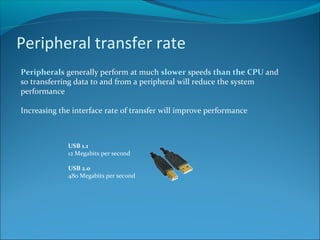
Peripheral transfer rate
Peripherals generally perform at much slower speeds than the CPU and
so transferring data to and from a peripheral will reduce the system
performance
Increasing the interface rate of transfer will improve performance
USB 1.1
12 Megabits per second
USB 2.0
480 Megabits per second
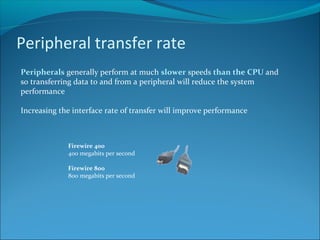
Peripheral transfer rate
Peripherals generally perform at much slower speeds than the CPU and
so transferring data to and from a peripheral will reduce the system
performance
Increasing the interface rate of transfer will improve performance
Firewire 400
400 megabits per second
Firewire 800
800 megabits per second
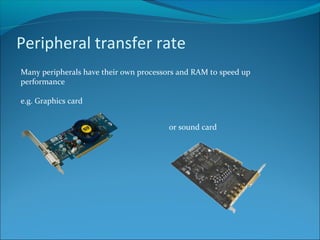
Peripheral transfer rate
Many peripherals have their own processors and RAM to speed up
performance
e.g. Graphics card
or sound card
Credits
Higher Computing – Computer Structure – Factors affecting performance
Produced by P. Greene for the City of Edinburgh Council 2004
Adapted by M. Cunningham 2010
All images licenced under Creative Commons 3.0
• Dismantling an old computer by fdecomite
• S3 Graphics chrome 530 GT card by Via Gallery (viagallery.com)
• Creative X-Fi XtremeGamer Sound Card by gcg2009 on Flickr

Factors affecting system performance

  • 2.
    Increasing the widthof the data bus Memory Data Register Processor Main Memory 10010010 Address 00000000 00000001 00000010 00000011 00000100 00000101 00000110 00000111 00001000 00001001 8 Bit Data Bus The number of wires in a data bus determines the quantity of data that the bus can carry at any one time.
  • 3.
    Increasing the widthof the data bus Memory Data Register Processor Main Memory 10010010 00011000 Address 00000000 00000001 00000010 00000011 00000100 00000101 00000110 00000111 00001000 0000100116 Bit Data Bus Increasing the data bus will increase the quantity of data that the bus can carry at any one time and so speed up the performance/processing of the computer.
  • 4.
    Increasing the widthof the data bus A computer with a data bus of 32 lines is called a 32 bit computer and the word length is 32. Glossary Word Length: the number of bits the CPU can process in a single operation. This is generally equal to the width of the data bus.
  • 5.
    Using cache memory Usingcache memory allows data to be held in storage locations in or very close to the CPU. Main Memory Address 00000000 00000001 00000010 00000011 00000100 00000101 00000110 00000111 00001000 0000100111100011 00110011 00001110 11110000 11110011 11001010 11001100 00000011 00010001 01000000 Cache Memory 10000000 10000001 10000010 10000011
  • 6.
    Using cache memory Thebus used between the CPU and cache memory contains more lines than the bus used between the CPU and the main memory and so more data can be transferred in a clock cycle. Main Memory Address 00000000 00000001 00000010 00000011 00000100 00000101 00000110 00000111 00001000 0000100111100011 00110011 00001110 11110000 11110011 11001010 11001100 00000011 00010001 01000000 Cache Memory 10000000 10000001 10000010 10000011
  • 7.
    Using cache memory Thecache memory also uses Static RAM (SRAM) which is faster than the Dynamic RAM (DRAM) usually used in the main memory. Main Memory Address 00000000 00000001 00000010 00000011 00000100 00000101 00000110 00000111 00001000 0000100111100011 00110011 00001110 11110000 11110011 11001010 11001100 00000011 00010001 01000000 Cache Memory 10000000 10000001 10000010 10000011
  • 8.
    Peripheral transfer rate Peripheralsgenerally perform at much slower speeds than the CPU and so transferring data to and from a peripheral will reduce the system performance Increasing the interface rate of transfer will improve performance USB 1.1 12 Megabits per second USB 2.0 480 Megabits per second
  • 9.
    Peripheral transfer rate Peripheralsgenerally perform at much slower speeds than the CPU and so transferring data to and from a peripheral will reduce the system performance Increasing the interface rate of transfer will improve performance Firewire 400 400 megabits per second Firewire 800 800 megabits per second
  • 10.
    Peripheral transfer rate Manyperipherals have their own processors and RAM to speed up performance e.g. Graphics card or sound card
  • 11.
    Credits Higher Computing –Computer Structure – Factors affecting performance Produced by P. Greene for the City of Edinburgh Council 2004 Adapted by M. Cunningham 2010 All images licenced under Creative Commons 3.0 • Dismantling an old computer by fdecomite • S3 Graphics chrome 530 GT card by Via Gallery (viagallery.com) • Creative X-Fi XtremeGamer Sound Card by gcg2009 on Flickr