SQL
Higher Computing Science
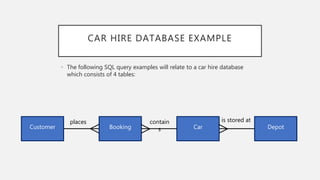
CAR HIRE DATABASE EXAMPLE
• The following SQL query examples will relate to a car hire database
which consists of 4 tables:
Customer Booking Car Depot
places contain
s
is stored at
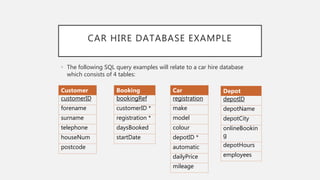
CAR HIRE DATABASE EXAMPLE
• The following SQL query examples will relate to a car hire database
which consists of 4 tables:
Customer
customerID
forename
surname
telephone
houseNum
postcode
Booking
bookingRef
customerID *
registration *
daysBooked
startDate
Car
registration
make
model
colour
depotID *
automatic
dailyPrice
mileage
Depot
depotID
depotName
depotCity
onlineBookin
g
depotHours
employees
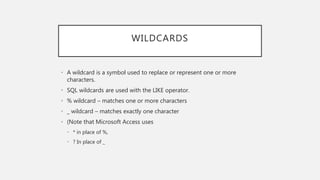
WILDCARDS
• A wildcard is a symbol used to replace or represent one or more
characters.
• SQL wildcards are used with the LIKE operator.
• % wildcard – matches one or more characters
• _ wildcard – matches exactly one character
• (Note that Microsoft Access uses
• * in place of %,
• ? In place of _
WILDCARDS EXAMPLE 1
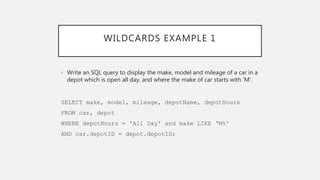
• Write an SQL query to display the make, model and mileage of a car in a
depot which is open all day, and where the make of car starts with ‘M’.
SELECT make, model, mileage, depotName, depotHours
FROM car, depot
WHERE depotHours = 'All Day' and make LIKE ‘M%'
AND car.depotID = depot.depotID;
WILDCARDS EXAMPLE 1
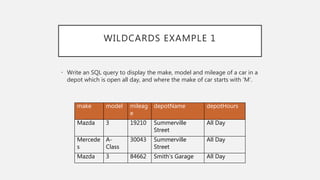
• Write an SQL query to display the make, model and mileage of a car in a
depot which is open all day, and where the make of car starts with ‘M’.
make model mileag
e
depotName depotHours
Mazda 3 19210 Summerville
Street
All Day
Mercede
s
A-
Class
30043 Summerville
Street
All Day
Mazda 3 84662 Smith’s Garage All Day
WILDCARDS EXAMPLE 2
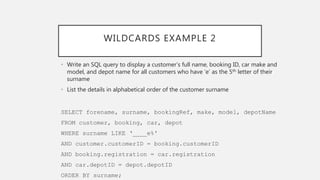
• Write an SQL query to display a customer’s full name, booking ID, car make and
model, and depot name for all customers who have ‘e’ as the 5th letter of their
surname
• List the details in alphabetical order of the customer surname
SELECT forename, surname, bookingRef, make, model, depotName
FROM customer, booking, car, depot
WHERE surname LIKE ‘____e%'
AND customer.customerID = booking.customerID
AND booking.registration = car.registration
AND car.depotID = depot.depotID
ORDER BY surname;
WILDCARDS EXAMPLE 2
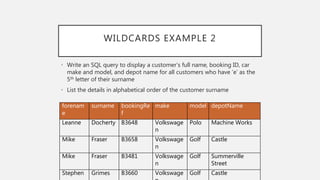
• Write an SQL query to display a customer’s full name, booking ID, car
make and model, and depot name for all customers who have ‘e’ as the
5th letter of their surname
• List the details in alphabetical order of the customer surname
forenam
e
surname bookingRe
f
make model depotName
Leanne Docherty B3648 Volkswage
n
Polo Machine Works
Mike Fraser B3658 Volkswage
n
Golf Castle
Mike Fraser B3481 Volkswage
n
Golf Summerville
Street
Stephen Grimes B3660 Volkswage Golf Castle
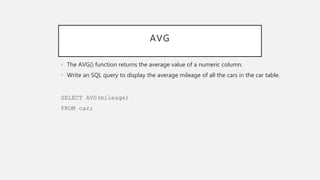
AVG
• The AVG() function returns the average value of a numeric column.
• Write an SQL query to display the average mileage of all the cars in the car table.
SELECT AVG(mileage)
FROM car;
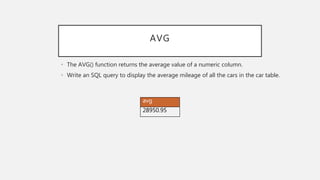
AVG
avg
28950.95
• The AVG() function returns the average value of a numeric column.
• Write an SQL query to display the average mileage of all the cars in the car table.
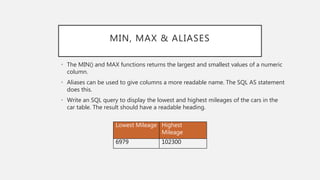
MIN, MAX & ALIASES
• The MIN() and MAX functions returns the largest and smallest values of a numeric
column.
• Aliases can be used to give columns a more readable name. The SQL AS statement
does this.
• Write an SQL query to display the lowest and highest mileages of the cars in the
car table. The result should have a readable heading.
SELECT MIN(mileage) AS [Lowest Mileage], MAX(mileage) AS
[Highest Mileage]
FROM car;
MIN, MAX & ALIASES
• The MIN() and MAX functions returns the largest and smallest values of a numeric
column.
• Aliases can be used to give columns a more readable name. The SQL AS statement
does this.
• Write an SQL query to display the lowest and highest mileages of the cars in the
car table. The result should have a readable heading.
Lowest Mileage Highest
Mileage
6979 102300
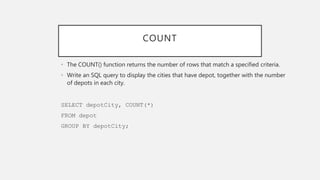
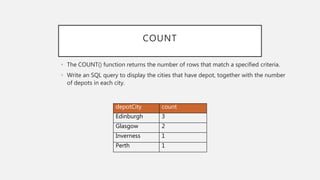
COUNT
• The COUNT() function returns the number of rows that match a specified criteria.
• Write an SQL query to display the cities that have depot, together with the number
of depots in each city.
SELECT depotCity, COUNT(*)
FROM depot
GROUP BY depotCity;
depotCity count
Edinburgh 3
Glasgow 2
Inverness 1
Perth 1
COUNT
• The COUNT() function returns the number of rows that match a specified criteria.
• Write an SQL query to display the cities that have depot, together with the number
of depots in each city.
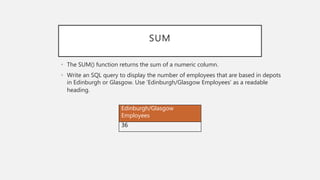
SUM
• The SUM() function returns the sum of a numeric column.
• Write an SQL query to display the number of employees that are based in depots
in Edinburgh or Glasgow. Use ‘Edinburgh/Glasgow Employees’ as a readable
heading.
SELECT SUM(employees) AS [Edinburgh/Glasgow Employees]
FROM depot
WHERE depotCity = 'Edinburgh'
OR depotCity = 'Glasgow';
SUM
• The SUM() function returns the sum of a numeric column.
• Write an SQL query to display the number of employees that are based in depots
in Edinburgh or Glasgow. Use ‘Edinburgh/Glasgow Employees’ as a readable
heading.
Edinburgh/Glasgow
Employees
36
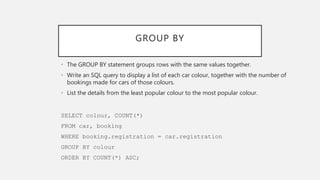
GROUP BY
• The GROUP BY statement groups rows with the same values together.
• Write an SQL query to display a list of each car colour, together with the number of
bookings made for cars of those colours.
• List the details from the least popular colour to the most popular colour.
SELECT colour, COUNT(*)
FROM car, booking
WHERE booking.registration = car.registration
GROUP BY colour
ORDER BY COUNT(*) ASC;
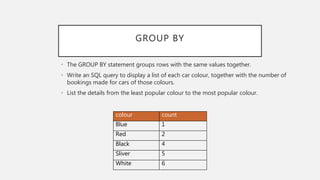
GROUP BY
• The GROUP BY statement groups rows with the same values together.
• Write an SQL query to display a list of each car colour, together with the number of
bookings made for cars of those colours.
• List the details from the least popular colour to the most popular colour.
colour count
Blue 1
Red 2
Black 4
Sliver 5
White 6
UPDATE
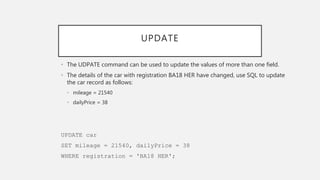
• The UDPATE command can be used to update the values of more than one field.
• The details of the car with registration BA18 HER have changed, use SQL to update
the car record as follows:
• mileage = 21540
• dailyPrice = 38
UPDATE car
SET mileage = 21540, dailyPrice = 38
WHERE registration = 'BA18 HER';
UPDATE
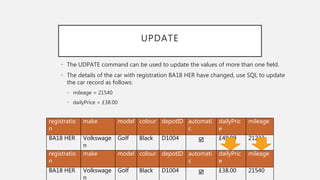
• The UDPATE command can be used to update the values of more than one field.
• The details of the car with registration BA18 HER have changed, use SQL to update
the car record as follows:
• mileage = 21540
• dailyPrice = £38.00
registratio
n
make model colour depotID automati
c
dailyPric
e
mileage
BA18 HER Volkswage
n
Golf Black D1004  £40.00 21233
registratio
n
make model colour depotID automati
c
dailyPric
e
mileage
BA18 HER Volkswage
n
Golf Black D1004  £38.00 21540
COMPUTED VALUES
• A computed value is a calculation within a SELECT statement.
• Write an SQL query to display the surname, booking reference, number of days
booked, daily price, and a calculated total cost of each booking (with a readable
column heading).
• Display the most expensive booking first.
SELECT surname, bookingRef, daysBooked, dailyPrice,
daysBooked * dailyPrice AS [Total Cost]
FROM customer, booking, car
WHERE customer.customerID = booking.customerID
AND booking.registration = car.registration
ORDER BY daysBooked * dailyPrice DESC;
COMPUTED VALUES
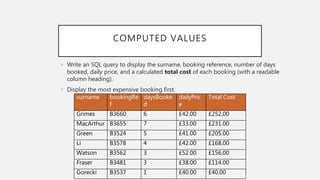
• Write an SQL query to display the surname, booking reference, number of days
booked, daily price, and a calculated total cost of each booking (with a readable
column heading).
• Display the most expensive booking first.
surname bookingRe
f
daysBooke
d
dailyPric
e
Total Cost
Grimes B3660 6 £42.00 £252.00
MacArthur B3655 7 £33.00 £231.00
Green B3524 5 £41.00 £205.00
Li B3578 4 £42.00 £168.00
Watson B3562 3 £52.00 £156.00
Fraser B3481 3 £38.00 £114.00
Gorecki B3537 1 £40.00 £40.00
USING THE RESULT OF A QUERY
• The result of a query can be used as a table in a second query.
• Write an SQL query to display the name of depots that have cars with the cheapest
daily price together with the price (use a readable heading to display the cheapest
price).
• This solution will require two separate queries:
• Query 1: a simple query to generate a single value (the cheapest daily price)
• Query 2: uses Query 1 to find the depots with the cheapest daily price
USING THE RESULT OF A QUERY
• Write an SQL query to display the name of depots that have cars with the cheapest
daily price together with the price (use a readable heading to display the cheapest
price).
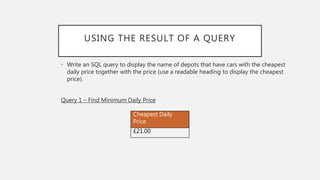
Query 1 – Find Minimum Daily Price
SELECT MIN(dailyPrice) AS [Cheapest Daily Price]
FROM car;
USING THE RESULT OF A QUERY
• Write an SQL query to display the name of depots that have cars with the cheapest
daily price together with the price (use a readable heading to display the cheapest
price).
Query 1 – Find Minimum Daily Price
Cheapest Daily
Price
£21.00
USING THE RESULT OF A QUERY
• Write an SQL query to display the name of depots that have cars with the cheapest
daily price together with the price (use a readable heading to display the cheapest
price).
Query 2 – Display names of depots with cars at cheapest daily price
SELECT depotName, [Cheapest Daily Price]
FROM car, depot, [Find Minimum Daily Price]
WHERE dailyPrice = [Cheapest Daily Price]
AND car.depotID = depot.depotID;
USING THE RESULT OF A QUERY
• Write an SQL query to display the name of depots that have cars with the cheapest
daily price together with the price (use a readable heading to display the cheapest
price).
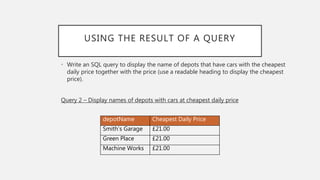
Query 2 – Display names of depots with cars at cheapest daily price
depotName Cheapest Daily Price
Smith’s Garage £21.00
Green Place £21.00
Machine Works £21.00
USING THE RESULT OF A QUERY
Second Example:
• Write an SQL query to display the details of any automatic car with a daily price
that is above the average daily price. The query should display the car make,
model, colour, automatic and daily price.
• The most expensive cars should be listed first.
• This solution requires two separate queries.
• Query 1: a simple query to generate a single value (the average daily price)
• Query 2: uses Query 1 to find the automatic cars that are above the average daily price
USING THE RESULT OF A QUERY
Second Example:
• Write an SQL query to display the details of any automatic car with a daily price
that is above the average daily price. The query should display the car make,
model, colour, automatic and daily price. The most expensive cars should be listed
first.
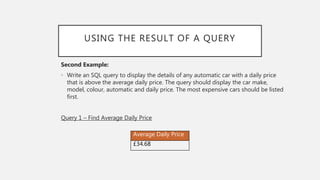
Query 1 – Find Average Daily Price
SELECT AVG(dailyPrice) AS [Average Daily Price]
FROM car;
USING THE RESULT OF A QUERY
Second Example:
• Write an SQL query to display the details of any automatic car with a daily price
that is above the average daily price. The query should display the car make,
model, colour, automatic and daily price. The most expensive cars should be listed
first.
Query 1 – Find Average Daily Price
Average Daily Price
£34.68
USING THE RESULT OF A QUERY
Second Example:
• Write an SQL query to display the details of any automatic car with a daily price
that is above the average daily price. The query should display the car make,
model, colour, automatic and daily price. The most expensive cars should be listed
first.
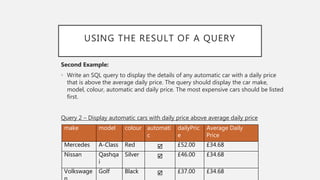
Query 2 – Display automatic cars with daily price above average daily price
SELECT make, model, colour, automatic, dailyPrice, [Average
Daily Price]
FROM car, [Find Average Daily Price]
WHERE dailyPrice > [Average Daily Price]
AND automatic = TRUE
USING THE RESULT OF A QUERY
Second Example:
• Write an SQL query to display the details of any automatic car with a daily price
that is above the average daily price. The query should display the car make,
model, colour, automatic and daily price. The most expensive cars should be listed
first.
Query 2 – Display automatic cars with daily price above average daily price
make model colour automati
c
dailyPric
e
Average Daily
Price
Mercedes A-Class Red  £52.00 £34.68
Nissan Qashqa
i
Silver  £46.00 £34.68
Volkswage Golf Black  £37.00 £34.68

SQL

  • 1.
  • 2.
    CAR HIRE DATABASEEXAMPLE • The following SQL query examples will relate to a car hire database which consists of 4 tables: Customer Booking Car Depot places contain s is stored at
  • 3.
    CAR HIRE DATABASEEXAMPLE • The following SQL query examples will relate to a car hire database which consists of 4 tables: Customer customerID forename surname telephone houseNum postcode Booking bookingRef customerID * registration * daysBooked startDate Car registration make model colour depotID * automatic dailyPrice mileage Depot depotID depotName depotCity onlineBookin g depotHours employees
  • 4.
    WILDCARDS • A wildcardis a symbol used to replace or represent one or more characters. • SQL wildcards are used with the LIKE operator. • % wildcard – matches one or more characters • _ wildcard – matches exactly one character • (Note that Microsoft Access uses • * in place of %, • ? In place of _
  • 5.
    WILDCARDS EXAMPLE 1 •Write an SQL query to display the make, model and mileage of a car in a depot which is open all day, and where the make of car starts with ‘M’. SELECT make, model, mileage, depotName, depotHours FROM car, depot WHERE depotHours = 'All Day' and make LIKE ‘M%' AND car.depotID = depot.depotID;
  • 6.
    WILDCARDS EXAMPLE 1 •Write an SQL query to display the make, model and mileage of a car in a depot which is open all day, and where the make of car starts with ‘M’. make model mileag e depotName depotHours Mazda 3 19210 Summerville Street All Day Mercede s A- Class 30043 Summerville Street All Day Mazda 3 84662 Smith’s Garage All Day
  • 7.
    WILDCARDS EXAMPLE 2 •Write an SQL query to display a customer’s full name, booking ID, car make and model, and depot name for all customers who have ‘e’ as the 5th letter of their surname • List the details in alphabetical order of the customer surname SELECT forename, surname, bookingRef, make, model, depotName FROM customer, booking, car, depot WHERE surname LIKE ‘____e%' AND customer.customerID = booking.customerID AND booking.registration = car.registration AND car.depotID = depot.depotID ORDER BY surname;
  • 8.
    WILDCARDS EXAMPLE 2 •Write an SQL query to display a customer’s full name, booking ID, car make and model, and depot name for all customers who have ‘e’ as the 5th letter of their surname • List the details in alphabetical order of the customer surname forenam e surname bookingRe f make model depotName Leanne Docherty B3648 Volkswage n Polo Machine Works Mike Fraser B3658 Volkswage n Golf Castle Mike Fraser B3481 Volkswage n Golf Summerville Street Stephen Grimes B3660 Volkswage Golf Castle
  • 9.
    AVG • The AVG()function returns the average value of a numeric column. • Write an SQL query to display the average mileage of all the cars in the car table. SELECT AVG(mileage) FROM car;
  • 10.
    AVG avg 28950.95 • The AVG()function returns the average value of a numeric column. • Write an SQL query to display the average mileage of all the cars in the car table.
  • 11.
    MIN, MAX &ALIASES • The MIN() and MAX functions returns the largest and smallest values of a numeric column. • Aliases can be used to give columns a more readable name. The SQL AS statement does this. • Write an SQL query to display the lowest and highest mileages of the cars in the car table. The result should have a readable heading. SELECT MIN(mileage) AS [Lowest Mileage], MAX(mileage) AS [Highest Mileage] FROM car;
  • 12.
    MIN, MAX &ALIASES • The MIN() and MAX functions returns the largest and smallest values of a numeric column. • Aliases can be used to give columns a more readable name. The SQL AS statement does this. • Write an SQL query to display the lowest and highest mileages of the cars in the car table. The result should have a readable heading. Lowest Mileage Highest Mileage 6979 102300
  • 13.
    COUNT • The COUNT()function returns the number of rows that match a specified criteria. • Write an SQL query to display the cities that have depot, together with the number of depots in each city. SELECT depotCity, COUNT(*) FROM depot GROUP BY depotCity;
  • 14.
    depotCity count Edinburgh 3 Glasgow2 Inverness 1 Perth 1 COUNT • The COUNT() function returns the number of rows that match a specified criteria. • Write an SQL query to display the cities that have depot, together with the number of depots in each city.
  • 15.
    SUM • The SUM()function returns the sum of a numeric column. • Write an SQL query to display the number of employees that are based in depots in Edinburgh or Glasgow. Use ‘Edinburgh/Glasgow Employees’ as a readable heading. SELECT SUM(employees) AS [Edinburgh/Glasgow Employees] FROM depot WHERE depotCity = 'Edinburgh' OR depotCity = 'Glasgow';
  • 16.
    SUM • The SUM()function returns the sum of a numeric column. • Write an SQL query to display the number of employees that are based in depots in Edinburgh or Glasgow. Use ‘Edinburgh/Glasgow Employees’ as a readable heading. Edinburgh/Glasgow Employees 36
  • 17.
    GROUP BY • TheGROUP BY statement groups rows with the same values together. • Write an SQL query to display a list of each car colour, together with the number of bookings made for cars of those colours. • List the details from the least popular colour to the most popular colour. SELECT colour, COUNT(*) FROM car, booking WHERE booking.registration = car.registration GROUP BY colour ORDER BY COUNT(*) ASC;
  • 18.
    GROUP BY • TheGROUP BY statement groups rows with the same values together. • Write an SQL query to display a list of each car colour, together with the number of bookings made for cars of those colours. • List the details from the least popular colour to the most popular colour. colour count Blue 1 Red 2 Black 4 Sliver 5 White 6
  • 19.
    UPDATE • The UDPATEcommand can be used to update the values of more than one field. • The details of the car with registration BA18 HER have changed, use SQL to update the car record as follows: • mileage = 21540 • dailyPrice = 38 UPDATE car SET mileage = 21540, dailyPrice = 38 WHERE registration = 'BA18 HER';
  • 20.
    UPDATE • The UDPATEcommand can be used to update the values of more than one field. • The details of the car with registration BA18 HER have changed, use SQL to update the car record as follows: • mileage = 21540 • dailyPrice = £38.00 registratio n make model colour depotID automati c dailyPric e mileage BA18 HER Volkswage n Golf Black D1004  £40.00 21233 registratio n make model colour depotID automati c dailyPric e mileage BA18 HER Volkswage n Golf Black D1004  £38.00 21540
  • 21.
    COMPUTED VALUES • Acomputed value is a calculation within a SELECT statement. • Write an SQL query to display the surname, booking reference, number of days booked, daily price, and a calculated total cost of each booking (with a readable column heading). • Display the most expensive booking first. SELECT surname, bookingRef, daysBooked, dailyPrice, daysBooked * dailyPrice AS [Total Cost] FROM customer, booking, car WHERE customer.customerID = booking.customerID AND booking.registration = car.registration ORDER BY daysBooked * dailyPrice DESC;
  • 22.
    COMPUTED VALUES • Writean SQL query to display the surname, booking reference, number of days booked, daily price, and a calculated total cost of each booking (with a readable column heading). • Display the most expensive booking first. surname bookingRe f daysBooke d dailyPric e Total Cost Grimes B3660 6 £42.00 £252.00 MacArthur B3655 7 £33.00 £231.00 Green B3524 5 £41.00 £205.00 Li B3578 4 £42.00 £168.00 Watson B3562 3 £52.00 £156.00 Fraser B3481 3 £38.00 £114.00 Gorecki B3537 1 £40.00 £40.00
  • 23.
    USING THE RESULTOF A QUERY • The result of a query can be used as a table in a second query. • Write an SQL query to display the name of depots that have cars with the cheapest daily price together with the price (use a readable heading to display the cheapest price). • This solution will require two separate queries: • Query 1: a simple query to generate a single value (the cheapest daily price) • Query 2: uses Query 1 to find the depots with the cheapest daily price
  • 24.
    USING THE RESULTOF A QUERY • Write an SQL query to display the name of depots that have cars with the cheapest daily price together with the price (use a readable heading to display the cheapest price). Query 1 – Find Minimum Daily Price SELECT MIN(dailyPrice) AS [Cheapest Daily Price] FROM car;
  • 25.
    USING THE RESULTOF A QUERY • Write an SQL query to display the name of depots that have cars with the cheapest daily price together with the price (use a readable heading to display the cheapest price). Query 1 – Find Minimum Daily Price Cheapest Daily Price £21.00
  • 26.
    USING THE RESULTOF A QUERY • Write an SQL query to display the name of depots that have cars with the cheapest daily price together with the price (use a readable heading to display the cheapest price). Query 2 – Display names of depots with cars at cheapest daily price SELECT depotName, [Cheapest Daily Price] FROM car, depot, [Find Minimum Daily Price] WHERE dailyPrice = [Cheapest Daily Price] AND car.depotID = depot.depotID;
  • 27.
    USING THE RESULTOF A QUERY • Write an SQL query to display the name of depots that have cars with the cheapest daily price together with the price (use a readable heading to display the cheapest price). Query 2 – Display names of depots with cars at cheapest daily price depotName Cheapest Daily Price Smith’s Garage £21.00 Green Place £21.00 Machine Works £21.00
  • 28.
    USING THE RESULTOF A QUERY Second Example: • Write an SQL query to display the details of any automatic car with a daily price that is above the average daily price. The query should display the car make, model, colour, automatic and daily price. • The most expensive cars should be listed first. • This solution requires two separate queries. • Query 1: a simple query to generate a single value (the average daily price) • Query 2: uses Query 1 to find the automatic cars that are above the average daily price
  • 29.
    USING THE RESULTOF A QUERY Second Example: • Write an SQL query to display the details of any automatic car with a daily price that is above the average daily price. The query should display the car make, model, colour, automatic and daily price. The most expensive cars should be listed first. Query 1 – Find Average Daily Price SELECT AVG(dailyPrice) AS [Average Daily Price] FROM car;
  • 30.
    USING THE RESULTOF A QUERY Second Example: • Write an SQL query to display the details of any automatic car with a daily price that is above the average daily price. The query should display the car make, model, colour, automatic and daily price. The most expensive cars should be listed first. Query 1 – Find Average Daily Price Average Daily Price £34.68
  • 31.
    USING THE RESULTOF A QUERY Second Example: • Write an SQL query to display the details of any automatic car with a daily price that is above the average daily price. The query should display the car make, model, colour, automatic and daily price. The most expensive cars should be listed first. Query 2 – Display automatic cars with daily price above average daily price SELECT make, model, colour, automatic, dailyPrice, [Average Daily Price] FROM car, [Find Average Daily Price] WHERE dailyPrice > [Average Daily Price] AND automatic = TRUE
  • 32.
    USING THE RESULTOF A QUERY Second Example: • Write an SQL query to display the details of any automatic car with a daily price that is above the average daily price. The query should display the car make, model, colour, automatic and daily price. The most expensive cars should be listed first. Query 2 – Display automatic cars with daily price above average daily price make model colour automati c dailyPric e Average Daily Price Mercedes A-Class Red  £52.00 £34.68 Nissan Qashqa i Silver  £46.00 £34.68 Volkswage Golf Black  £37.00 £34.68