SYSTEM COMPONENTS
• From the architect’s viewpoint, a computer system consists of
three main components: a processor or central processing unit
(CPU), a memory unit and the input and output unit (I/O devices).
• An interconnection network facilitates communication among
these three components.
• System bus is the set of physical connection in between cables
and printed circuits. It is shared by different hardware
components. It is an electronic pathway that the processor uses to
communicate with the Internal and External devices of a
computer system.
• Bus transfers data within the computer sub-systems and also
sends instructions and commands of the processor to various
devices.
• The purpose of buses is to reduce the number of
‘pathways’ needed for communication between the
components by carrying out all communications over
a single data channel, synchronization between
components, high speed transfer between
CPU/CPU/MEMORY.
• If you look at the bottom of a motherboard, you will
see a whole network of lines or electronic pathways
that join the various components together. This
network of wires or electronic pathways are called
BUSES.
• You can think of a bus as the highway through which data
travels within a computer when it is been used (data highway).
It is called a bus because the operations of the computer’s
motherboard are carried on it like passengers on a bus.
• Early computers use electrical wire to connect between
components, today, bus in a computer system is parallel and
bit connection.
• Bus can be characterized by the amount of information it can
transfer in a certain period of time. This is expressed in a bit. A
32 wire ribbon cable can transmit 32 bit in parallel. Width is
used to define transfer rate. It is also defined by frequency
that is the number of packets sent or received per second.
• Internal bus carries information from one component to
another within the motherboard while External bus carries
information to peripheral devices and other devices attached to
the motherboard.
• An internal bus is a connector making it possible to insert
peripheral electronic boards. Internal bus connects all the
internal components of the computer such as the CPU, memory
and motherboard. It is also referred to as local bus because they
are very much involved in local device, very fast and
independent from the rest of the system. Its main purpose is to
allow processor to communicate with the RAM.
• External bus connects a computer to peripheral devices.
Example: USB (Universal Serial Bus) the IEEE1394.
COMPONENTS OF THE SYSTEM BUS
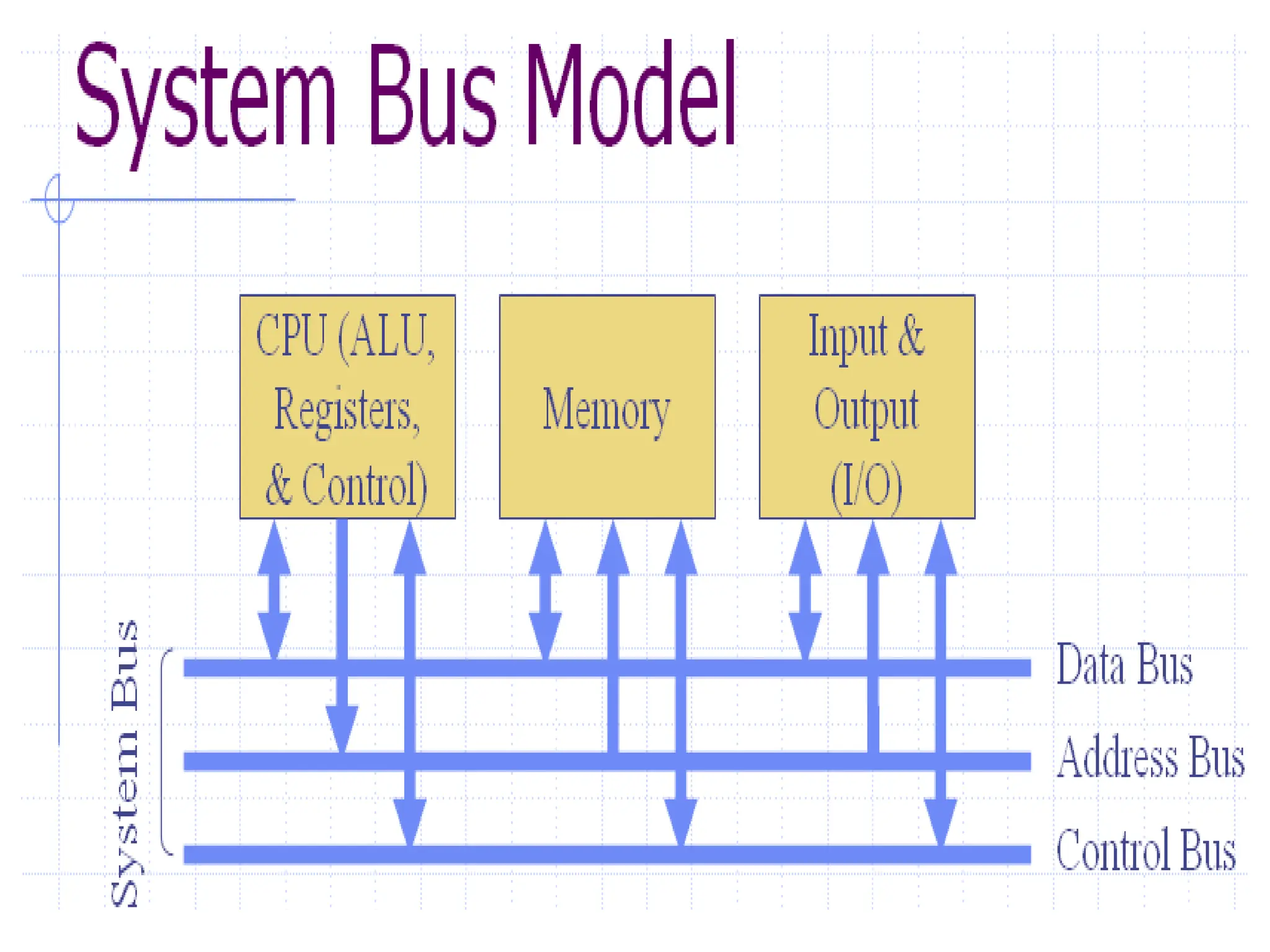
• The system bus consists of three major components. Each
bus generally constitute of 50 to 100 distinct physical lines
divided into three types: address bus, data bus and control
bus. There are other buses also, these are universal serial
bus, peripheral buses etc.
• Bus combines the functions of a data bus to carry
information, an address bus to determine where it should
be sent and a control bus to determine its operations.
• The purpose of buses is to reduce the number of pathways
needed for communication between the components by
carrying out all communications over a single data channel.
• DATA BUS: a collection of wires through which data is
transmitted from one part of a computer to another. Data
bus can be thought of as a highway on which data travels
within a computer.
• Data bus is used for exchange of data between the
processor, memory and peripherals and it is bi-directional
so that it allows data to flow in both directions along the
wires that is, data or electronic signals can transfer in both
sides.
• The number of wires used in the data bus (width) differs.
Each wire is used for the transfer of signals corresponding
to a bit of binary data. As such, a greater width allows
greater amounts of data to be transferred at the same time.
• The width of a bus determines how much data can be
transmitted at one time.
• A greater width allows greater amounts of data to be
transfer at one time.
• A 16-bit bus can transmit 16-bits of data at a time and
a 32-bit bus can transmit 32-bits of data at a time.
• Every bus has a clock speed measured in MHZ. a fast
bus allows data to be transferred faster which makes
applications run faster. Generally, data bus contain
8,16,32 or 64 bit.
• ADDRESS BUS: the data bus transfers actual data whereas the
address bus transfers Information about where the data should go.
The data that have to be carried over by data bus picked up from
certain address location of memory or from some device.
• A collection of wires used to identify particular location in memory
is called address bus it is also called memory bus. It is a collection
of wires connecting CPU with main memory use to identify
particular locations (addresses) in main memory. The information
used to describe the memory locations travels along the address
bus. It transfer the memory address to the processor in which the
CPU want to access. The address bus is a unidirectional bus.
• In summary, address bus contains the connection between
microprocessor and memory that carry signals relating to the
address which the CPU is processing at that time such as the
locations that the CPU is reading from or writing to.
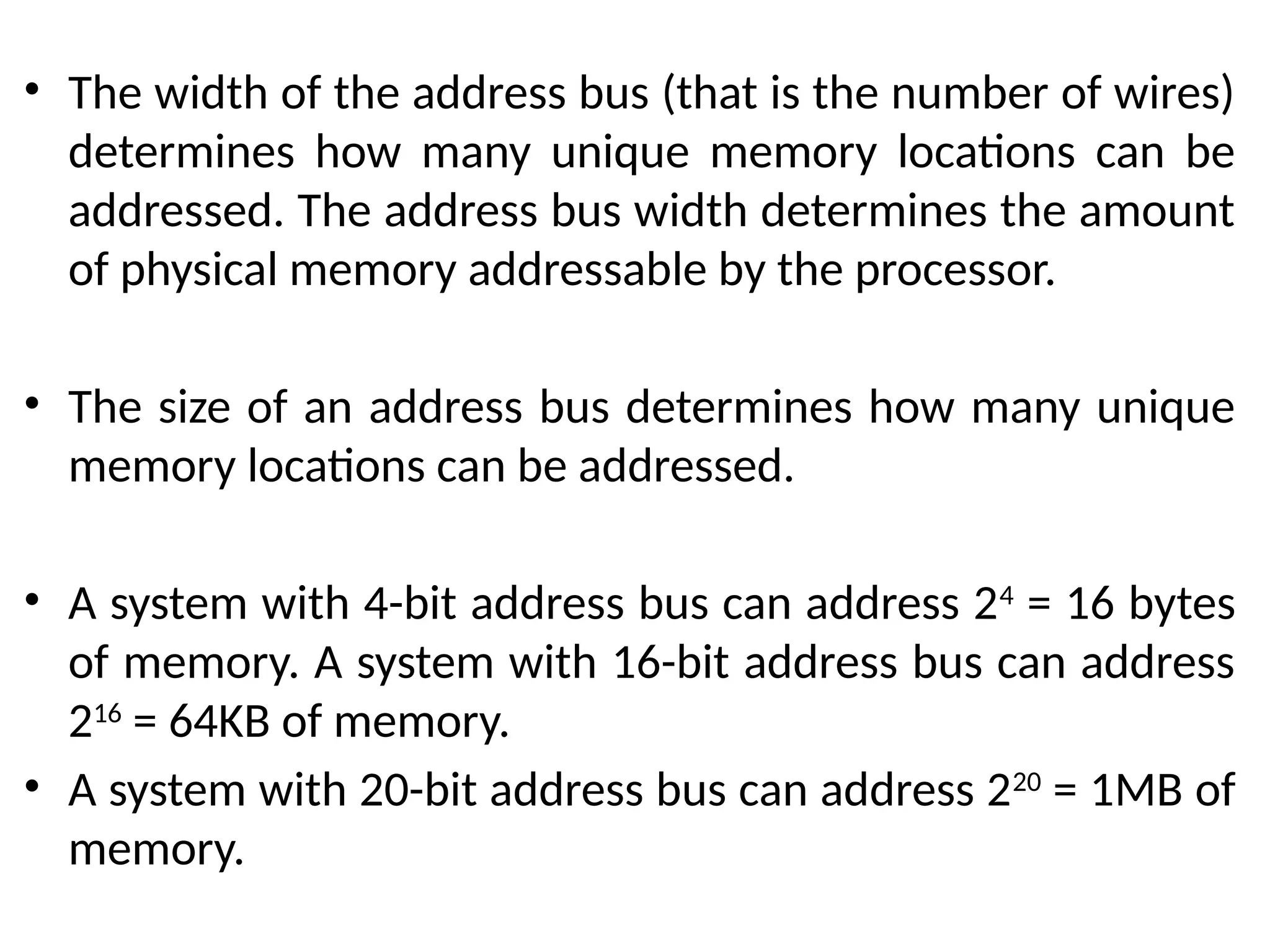
• The width of the address bus (that is the number of wires)
determines how many unique memory locations can be
addressed. The address bus width determines the amount
of physical memory addressable by the processor.
• The size of an address bus determines how many unique
memory locations can be addressed.
• A system with 4-bit address bus can address 24
= 16 bytes
of memory. A system with 16-bit address bus can address
216
= 64KB of memory.
• A system with 20-bit address bus can address 220
= 1MB of
memory.
• CONTROL BUS: it is also called the command bus. the connections that
carry control information between the CPU and other devices within the
computer.
• Control bus carries signals that report the status of various devices. This
bus is used to indicate whether the CPU is reading from memory or
writing to memory. So control bus is a collection of signals that control
how the processor communicates with rest of the system.
• Control bus carries the signals relating to the control and co-ordination
of the various activities across the computer which can be sent from the
control unit within the CPU. It transport command and synchronization
signal those coming from control unit and going towards hardware
components. This bus is a bi-directional bus.
• Different architectures result in different number of lines of wires within
the control bus, as each line is used to perform a specific task. For
instance, different lines are used for each of read, write and reset
requests.
• Note: a device on a bus not only receives information, it
can also reply it. If it replies over some different wires
than the ones where it receives, then both set of wires
make up a bus.
• If the information comes from single source and all
other devices are simply passive listeners with no way
to reply then, that’s not a bus.
• A bus receives and replies
• Wire; single signal
• Bus: collection of signals/wire
• CHIPSET: it is a component that routes data
between different buses. It is composed of large
number of electronic chip. It has two main
components: Northbridge which transfers control
between processor and RAM and Southbridge
which handles communication between
peripheral devices.
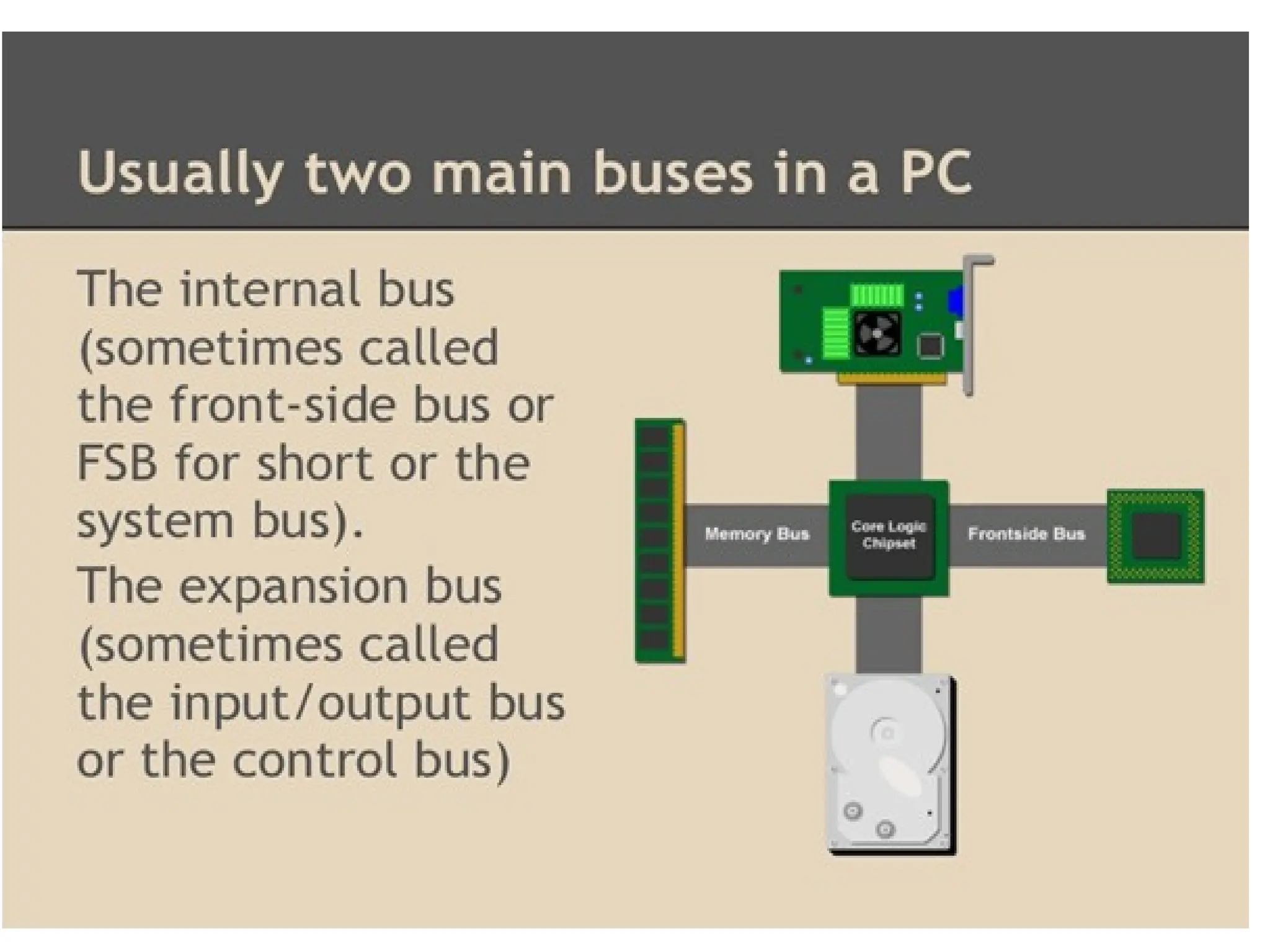
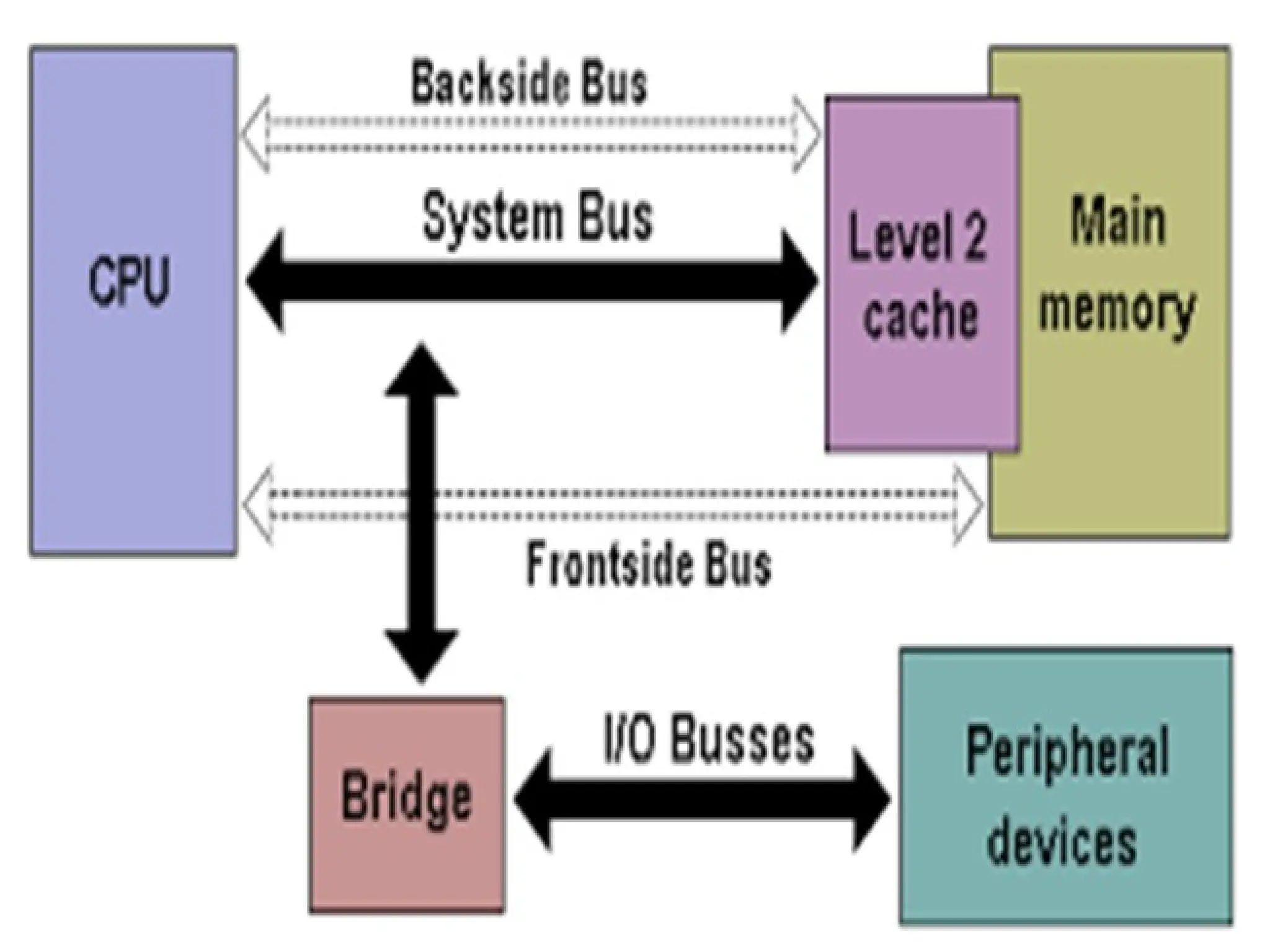
• The internal bus is (sometimes called the front-side bus or
FSB for short or the system bus). The expansion bus is
sometimes called the input/output bus or the control bus.
• Expansion bus is used to add additional expansion cards to
the CPU, it comes in Internal and External. It allows the
processor to communicate with peripherals.
• Common Internal buses are: PCI, PCI express and SATA.
• Common external buses are USB, CAN and IEEE1394 (Fire
wire)
• A backside bus (BSB) connects the processor to the cache.
• All computing devices, from smartphones to
supercomputers, pass data back and forth along
electronic channels called ‘buses’. The number and
type of buses used strongly affect the machine’s
overall speed.
• Simple computer designs move data on a single bus;
multiple buses however, vastly improve performance.
In a multiple-bus architecture, each pathway is suited
to handle a particular kind of information.
• In a single-bus architecture, all components including
the CPU, memory and peripherals share a common
bus.
• When many device need the bus at the same time,
this creates a state of conflict called bus contention;
some wait for the bus while another has control of it.
• The waiting wastes time, slowing the computer
down.
• Multiple buses permit several devices to work
simultaneously, reducing time spent waiting and
improving the computer’s speed. Performance
improvements are the main reason for having
multiple buses in a computer design.
• The faster a computer’s bus speed, the faster it will
operate to a point.
• Data lines-passes data back and forth
• Number of lines represents width
• Width of address bus specifies maximum
memory capacity
Bus Structure-Control Lines
• Because multiple devices communicate on a line, control is
needed:
• Timing
Typical lines include:
• Memory Read or Write
• I/O Read or Write
• Transfer ACK
• Bus request
• Bus grant
• Interrupt request
• Interrupt acknowledgement
• Clock
• reset
Physical implementations
• Parallel lines on circuit boards (ISA or PCI)
• Ribbon cables (IDE)
• Strip connectors on motherboard (PCI 104)
• External cabling (USB or Fire wire)
• Note the wider the bus the better the data
transfer rate or the wider the addressable
memory space
• Interrupt: the term Interrupt is defined loosely to any exceptional
event that causes CPU to temporarily transfer its control from
currently executing program to a different program which provides
service to the exceptional event.
• A signal to the processor emitted by hardware or software indicating
an event that needs immediate attention. An interrupt alerts the
processor to a high-priority condition requiring the interruption of
the current code the processor is executing (the current thread).
The processor responds by suspending its current activities and
saving its state and executes a small program called an Interrupt
Handler or Interrupt Service Routine (ISR) to deal with the event.
• This interruption is usually temporary and after the interrupt
handler finishes, the processor resumes execution of the previous
thread.
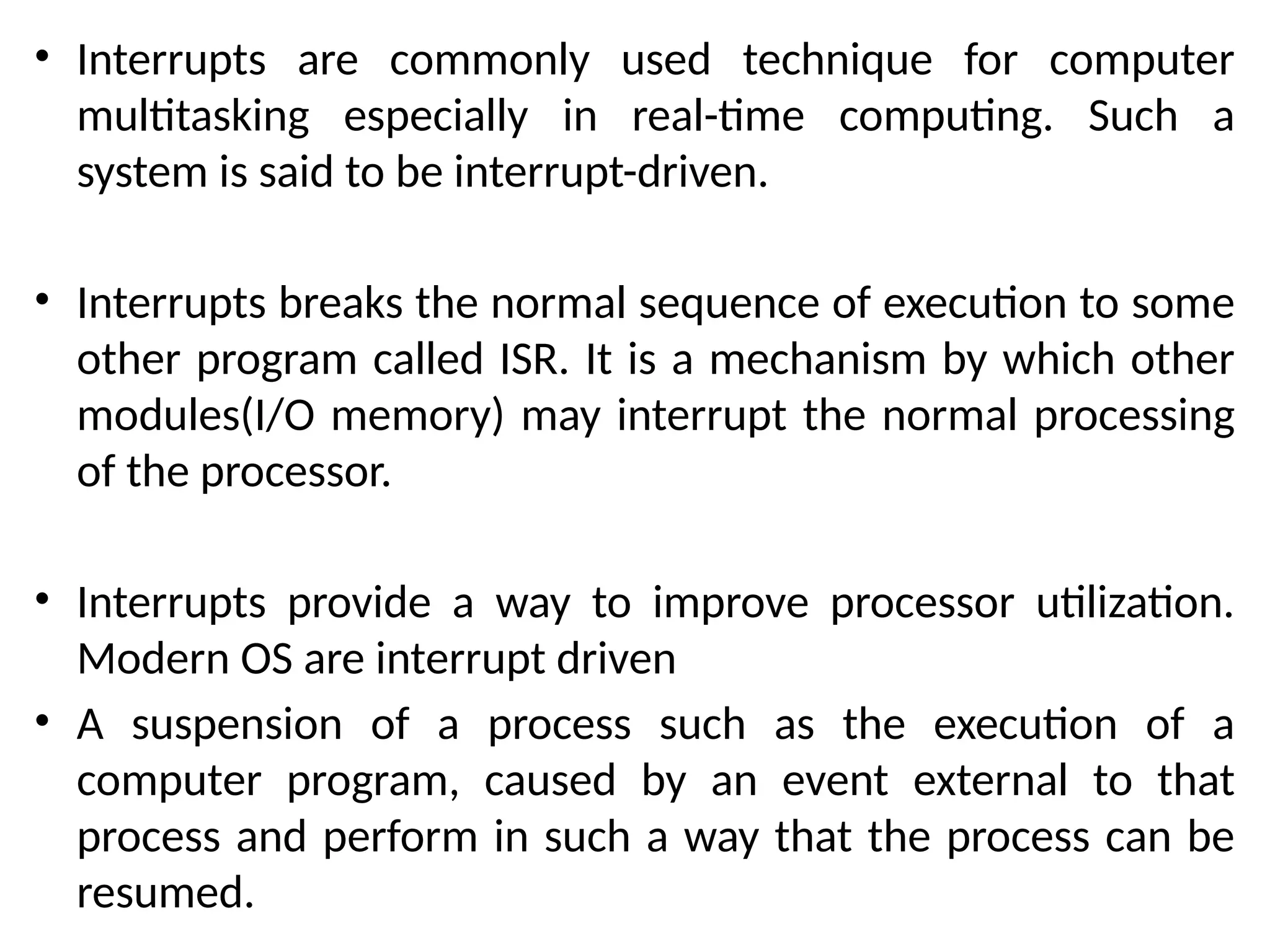
• Interrupts are commonly used technique for computer
multitasking especially in real-time computing. Such a
system is said to be interrupt-driven.
• Interrupts breaks the normal sequence of execution to some
other program called ISR. It is a mechanism by which other
modules(I/O memory) may interrupt the normal processing
of the processor.
• Interrupts provide a way to improve processor utilization.
Modern OS are interrupt driven
• A suspension of a process such as the execution of a
computer program, caused by an event external to that
process and perform in such a way that the process can be
resumed.
TYPES OF INTERRUPTS
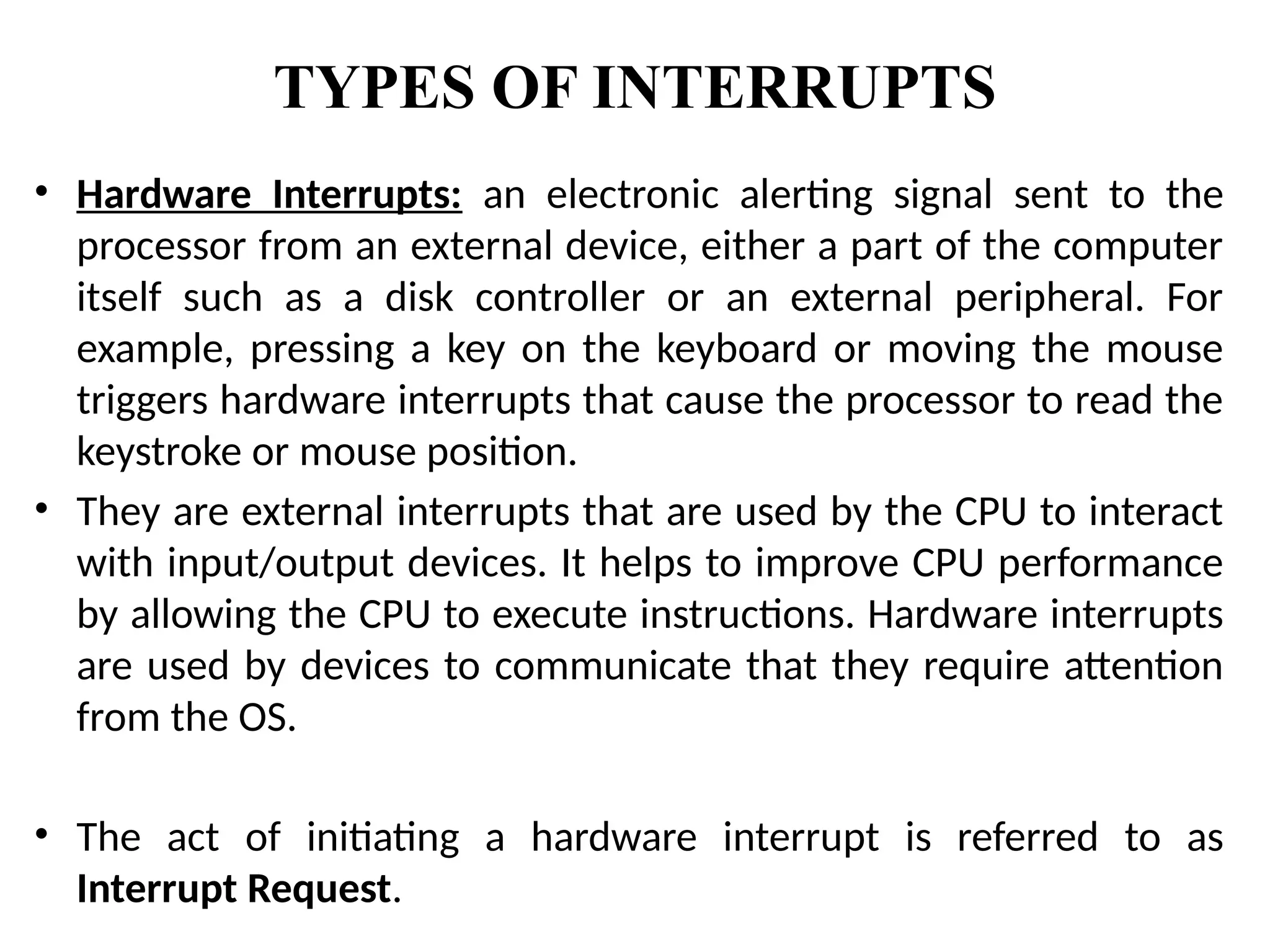
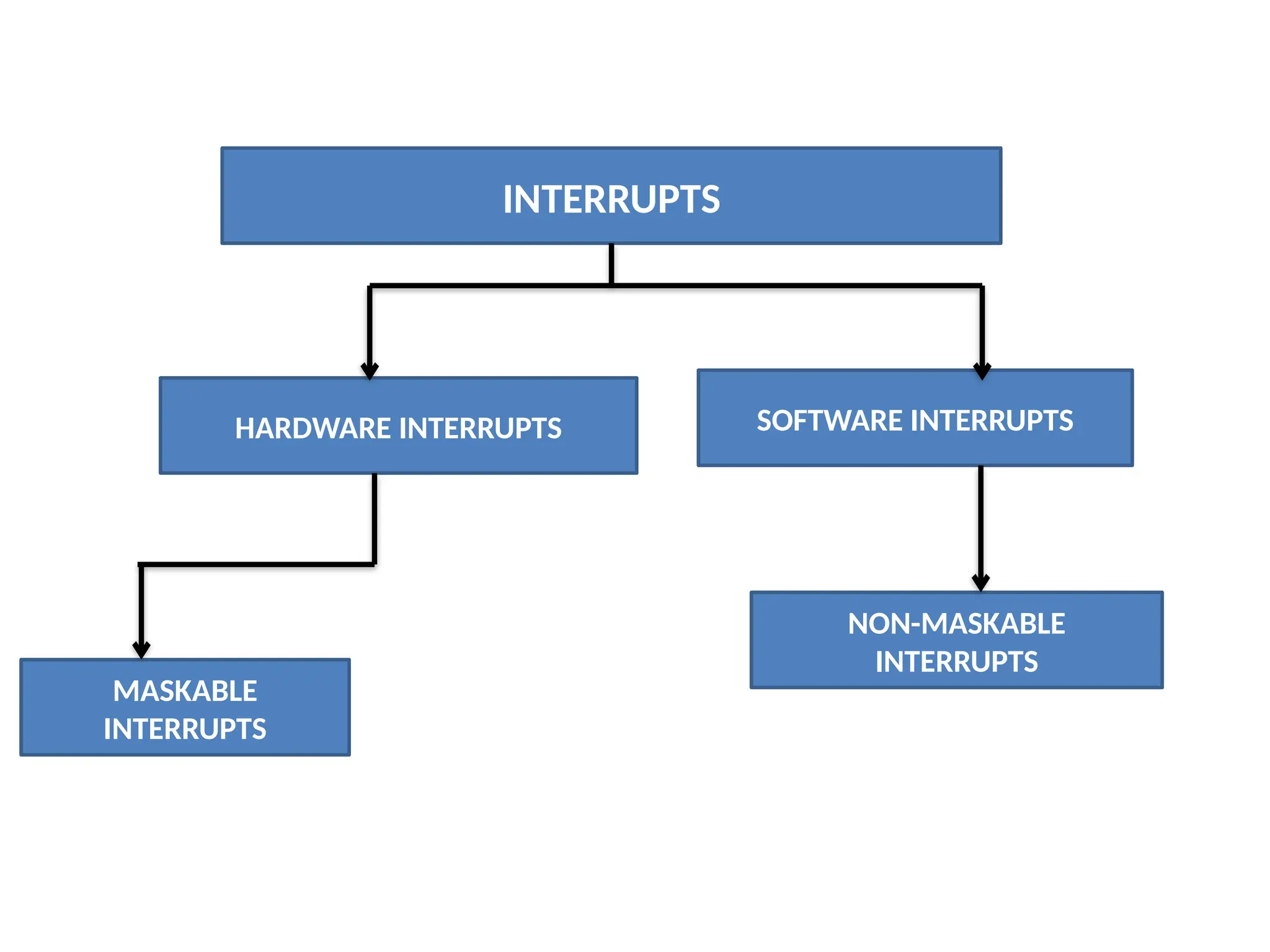
• Hardware Interrupts: an electronic alerting signal sent to the
processor from an external device, either a part of the computer
itself such as a disk controller or an external peripheral. For
example, pressing a key on the keyboard or moving the mouse
triggers hardware interrupts that cause the processor to read the
keystroke or mouse position.
• They are external interrupts that are used by the CPU to interact
with input/output devices. It helps to improve CPU performance
by allowing the CPU to execute instructions. Hardware interrupts
are used by devices to communicate that they require attention
from the OS.
• The act of initiating a hardware interrupt is referred to as
Interrupt Request.
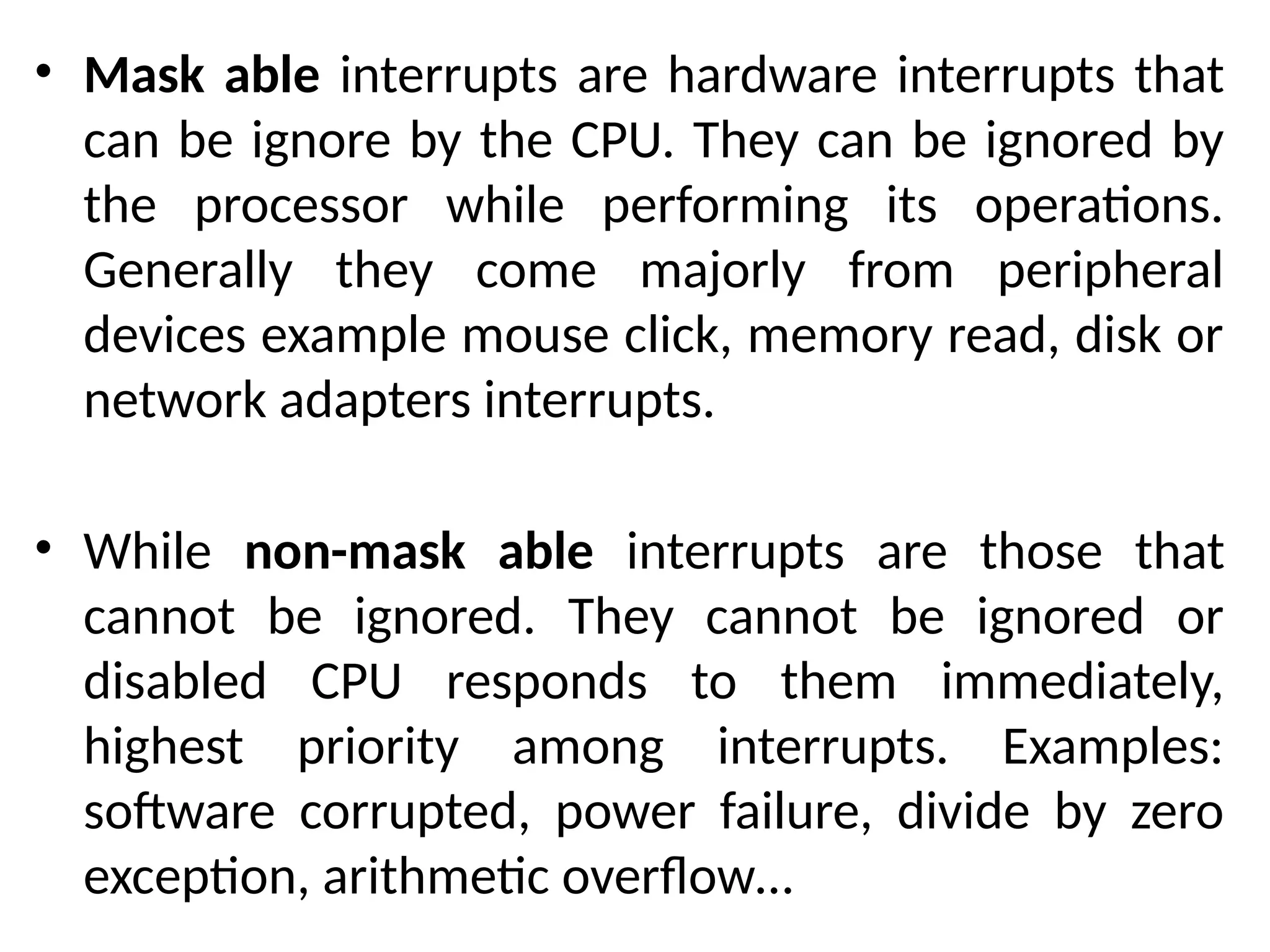
• Mask able interrupts are hardware interrupts that
can be ignore by the CPU. They can be ignored by
the processor while performing its operations.
Generally they come majorly from peripheral
devices example mouse click, memory read, disk or
network adapters interrupts.
• While non-mask able interrupts are those that
cannot be ignored. They cannot be ignored or
disabled CPU responds to them immediately,
highest priority among interrupts. Examples:
software corrupted, power failure, divide by zero
exception, arithmetic overflow…
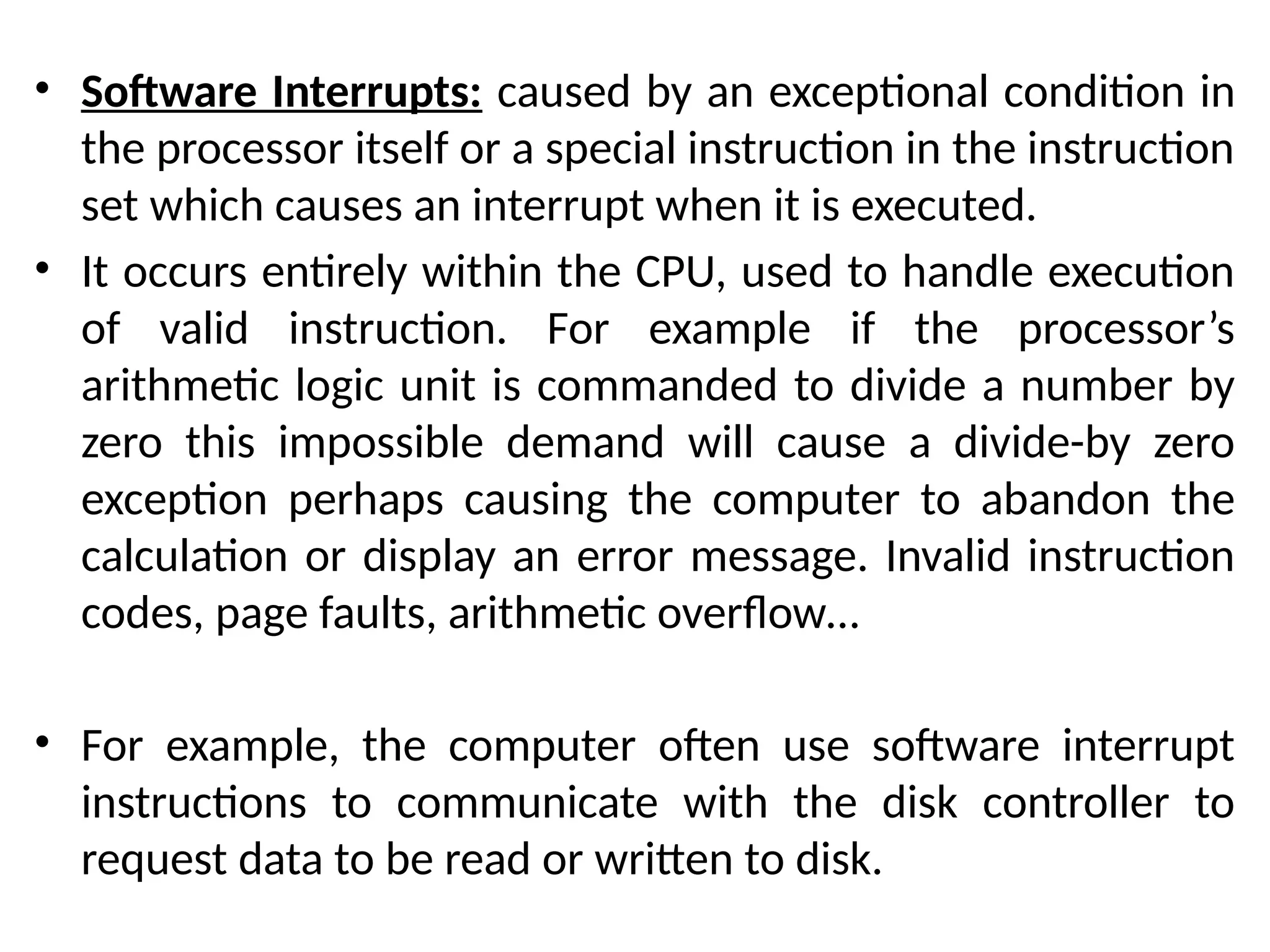
• Software Interrupts: caused by an exceptional condition in
the processor itself or a special instruction in the instruction
set which causes an interrupt when it is executed.
• It occurs entirely within the CPU, used to handle execution
of valid instruction. For example if the processor’s
arithmetic logic unit is commanded to divide a number by
zero this impossible demand will cause a divide-by zero
exception perhaps causing the computer to abandon the
calculation or display an error message. Invalid instruction
codes, page faults, arithmetic overflow…
• For example, the computer often use software interrupt
instructions to communicate with the disk controller to
request data to be read or written to disk.
INTERRUPTS
HARDWARE INTERRUPTS SOFTWARE INTERRUPTS
MASKABLE
INTERRUPTS
NON-MASKABLE
INTERRUPTS
Interrupts can be used in the following areas:
• Input and output data transfers for peripheral
devices
• Event driven programs
• Emergency situations for example power down
• Real time response application and in multitasking
systems
• Input signals to be used for timing purpose
• Emergency situation for example: power down.
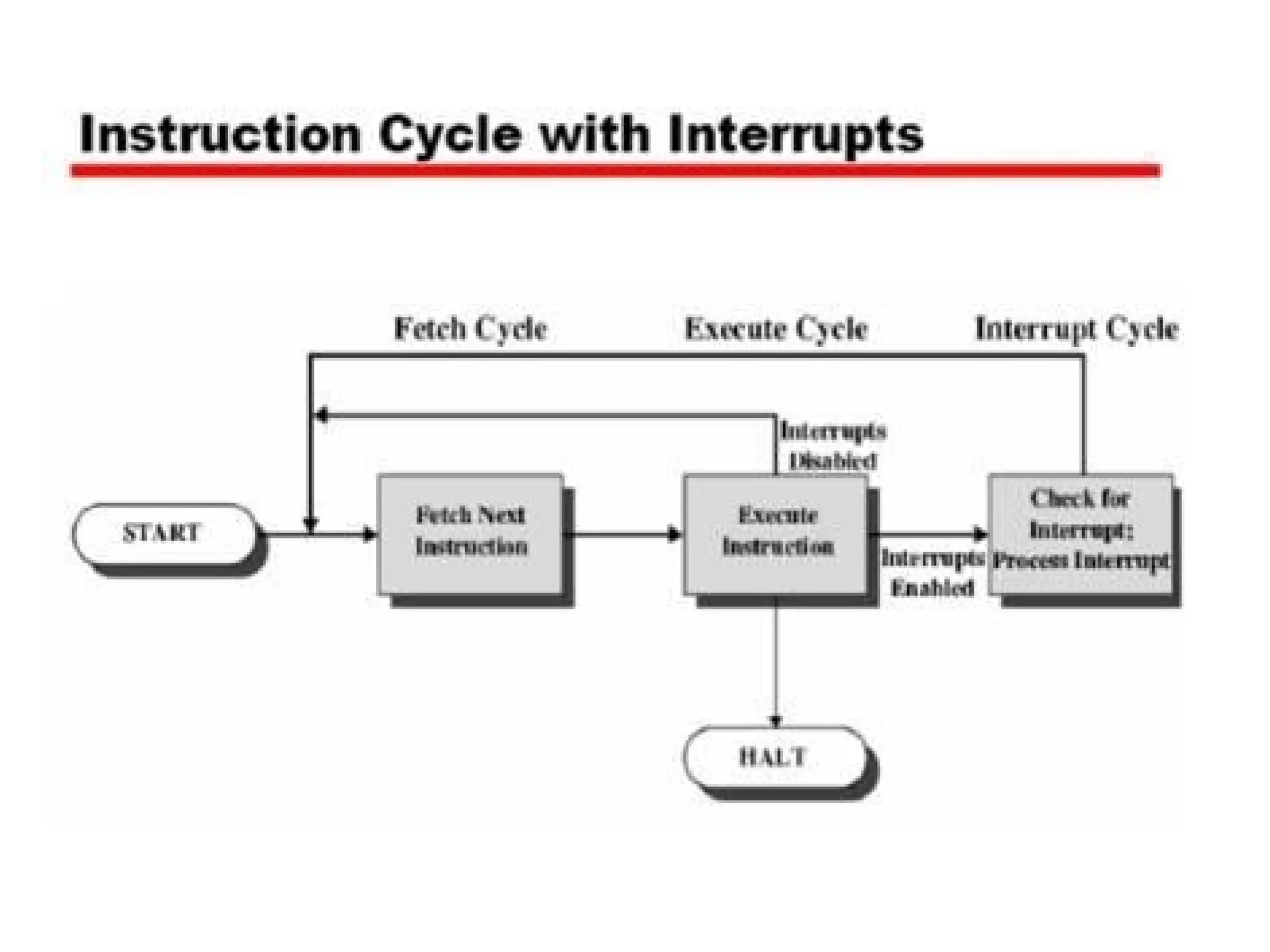
• Interrupt Cycle:
• In the interrupt cycle, the processor checks to see if any
interrupt has occurred indicated by the presence of an
interrupt signal.
• If no interrupts are pending, the processor proceeds to the
fetch cycle and fetches the next instruction of the current
program.
• If interrupt is pending the processor suspends execution of
the current program being executed and saves its context
sets the program counter to the starting address of an
interrupt handler routine.
• The processor now proceeds to the fetch cycle and fetches
the first instruction in the interrupt handler program which
service the interrupt.
CLASSES OF INTERRUPTS
• i. Program Interrupts: or traps are generated by some
conditions that occurs as a result of an instruction execution
such as: arithmetic overflow, division by zero, attempt to
execute illegal machine instruction. Etc.
• ii. Timer Interrupts: are generated by timer within the
processor. This allows the operating system to perform
certain functions on a regular basis. It helps OS to keep track
of time.
• iii. Input / Output Interrupts: are generated by an I/O
controller to signal normal completion of an operation or to
signal a variety of error conditions.
• iv. Hardware Failure: are Interrupts generated by a failure
such as power failure or memory failure or memory parity
errors
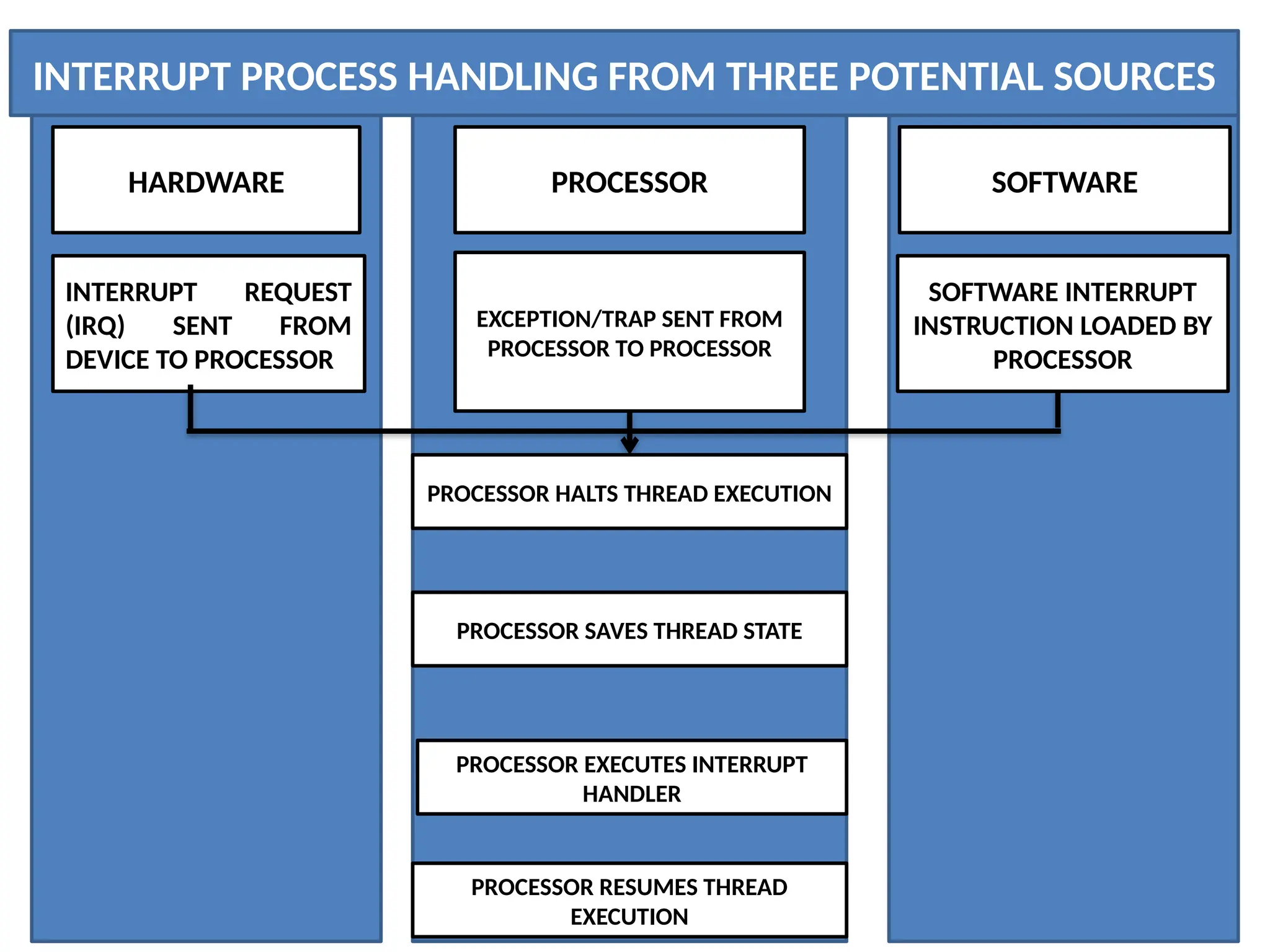
INTERRUPT PROCESS HANDLING FROM THREE POTENTIAL SOURCES
HARDWARE SOFTWARE
PROCESSOR
SOFTWARE INTERRUPT
INSTRUCTION LOADED BY
PROCESSOR
INTERRUPT REQUEST
(IRQ) SENT FROM
DEVICE TO PROCESSOR
EXCEPTION/TRAP SENT FROM
PROCESSOR TO PROCESSOR
PROCESSOR HALTS THREAD EXECUTION
PROCESSOR SAVES THREAD STATE
PROCESSOR EXECUTES INTERRUPT
HANDLER
PROCESSOR RESUMES THREAD
EXECUTION
• INTERRUPT SOURCES AND PROCESS HANDLING
• Different routines handle different interrupts-called (ISR).
• When CPU is interrupted, it stops what it is doing and context
is saved. A generic routine called interrupt handling routine is
run which examines the nature of interrupt call the
corresponding ISR stored in lower part of memory.
• After servicing the interrupt, the saved address is loaded
again to PC to resume the process again.
• The CPU executes other program as soon as a key is pressed,
the keyboard generates an interrupt. The CPU will respond to
the interrupt-read the data, after that, returns to the original
program.
• So by proper use of interrupt, the CPU can serve many
devices at the same time.
Note:
• Interrupts are caused by hardware devices: I/O
devices etc.
• Exceptions are caused by software executing
instructions e.g a page fault.
• An expected exception is a ‘trap’, unexpected is a
‘fault’
• Page fault: a type of interrupt called trap.
• Interrupts open doors for USB, allows for direct
memory access (DMA) and high speed I/O, ensure
good services response to events
Parallel Computing
• Parallel Computing: is the ability to carry out multiple operations or
tasks simultaneously. In its simplest form, it is the simultaneous use of
multiple compute resources to solve computational problems.
• It is a form of computation in which many calculations are carried out
simultaneously operating on the principle that large problems can often
be divided into smaller ones, which are solved concurrently (in parallel).
• An evolution of serial computing that attempts to emulate what has
always been the state of affairs in the natural world. The use of two or
more processors in combination to solve a single problem. In parallel
computing, processors access data through shared memory.
• It is the simultaneous use of more than one CPU or processor core to
execute a program or multiple computational threads.
• Parallel computing is better for modeling, simulating and understanding
complex real world phenomena because it gives systems the ability to
carry out multiple operations or tasks simultaneously.
• Compare to serial computing it is much better suited for complex real
world phenomena as it is being used around the world in a wide variety
of applications, in projects that require complex computations, in
science and engineering, highly complicated scientific problems that are
difficult to solve and for tasks that involve a large number of
calculations with time constraints by dividing them into a number of
smaller tasks.
• The computer resources can include a single computer with multiple
processors or a number of computers connected by a network or a
combination of both.
• It involves the use of two or more processor (cores, computers) in
combination to solve a single problem.
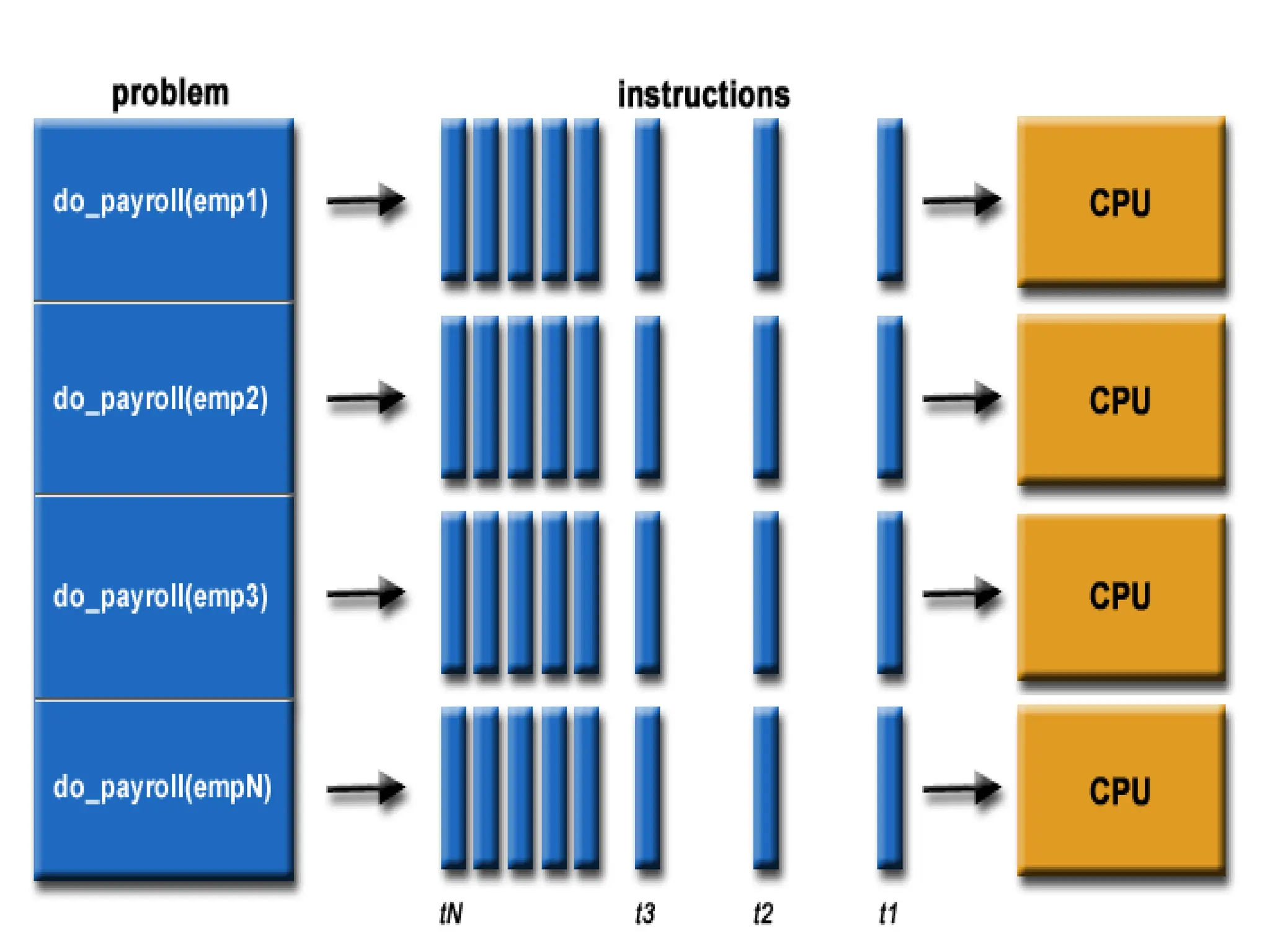
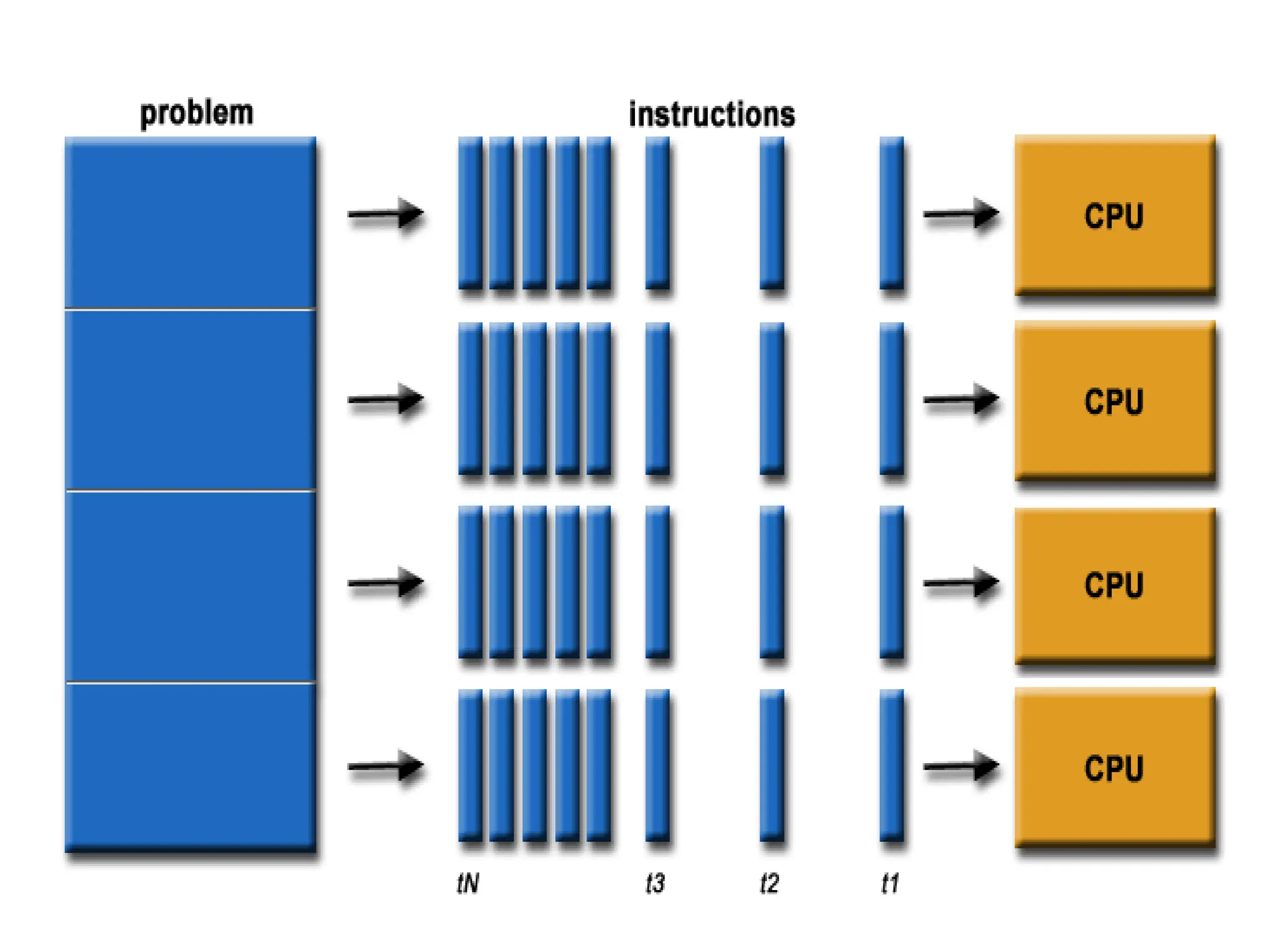
• In the simplest form, parallel computing is the
simultaneous use of multiple compute resources to solve
a computational problem.
• To be run using multiple CPUs
• A problem is broken into discrete parts that can be
solved concurrently.
• Each part is further broken down to series of instructions
• Instructions from each part execute simultaneously on
different CPUs
• An overall control/coordination mechanism is employed.
• The computational problem should be able to:
– Be broken apart into discrete pieces of work that can be
solved simultaneously;
– Execute multiple program instructions at any moment
in time;
– Be solved in less time with multiple compute resources
than with a single compute resource.
• The compute resources might be:
– A single computer with multiple processors
– An arbitrary number of computers connected by a
network
– A combination of both
• In parallel processing, processors access data
through shared memory. With single CPU, it is
possible to perform parallel processing by
connecting the computers in a network.
• However, this type of parallel processing requires
very sophisticated software called distributed
processing software.
• Parallel processing is also called parallel
computing or multiprocessing.
• Multiprocessing is the use of two or more CPUs
within a single computer system.
• The term also refers to the ability of a system to
support more than one processor and or the
ability to allocate tasks between them.
• They are computers having more than one
processor with common main memory and single
address space. Two or more processors shared
the work to be done.
Need for Parallel Computing
• To refine physical models such as those of complex molecules
and crystals, to verify new theories and to solve newer
problems of science we need computers which can perform
several billions of arithmetic calculations per second. This
requires parallel computers (or supercomputers).
• To model global weather forecasts, we need large sets of non-
linear partial differential equations. Hundreds of mega-
flops’speed and large memory size have been found essential to
solve such real-time weather forecast equations. (megaflops: a
machine that is capable of performing one floating point
operation every 10n sec has a speed of 1/10-8) = 100 mega
flops i.e 100 million (mega) floating-point operations per
second.
• To model interaction between atoms and understand
micro behaviour of materials, quantum and structural
chemists need high speed computing.
• Parallel computing is better for modeling, simulating
and understanding complex real world phenomena
because of its ability to carry out multiple operations
or tasks simultaneously.
• Molecular biologists require to model very complex
genetic structures and need interactive three
dimensional graphics facilities to aid their
understanding.
• To create realistic graphic images to display results
of simulation of aircraft landing and spacecraft
docking, requires very high speed computation.
• Time and cost-time is saved as parallel computing
is very fast. Cost is saved as multiple cheap
computing resources can also be used.
• To provide concurrency (to do multiple things at
the same time) i.e parallel execution of tasks.
USES OF PARALLEL COMPUTING
• Science: historically, parallel computing has been considered to be "the
high end of computing", and has been used to model difficult problems
in many areas of science and engineering. Highly complicated scientific
problems that are otherwise extremely difficult to solve can be solved
effectively with parallel computing.
• Atmosphere, Earth, Environment
• Physics - applied, nuclear, particle, condensed matter, high pressure,
fusion, photonics
• Bioscience, Biotechnology, Genetics
• Chemistry, Molecular Sciences
• Geology, Seismology (study of earthquakes)
• Mechanical engineering-from prosthetics(custom fitting of artificial
limbs) to spacecraft
• Electronic engineering-circuit design, micro-electronics
• Computer science and Mathematics
• Industry: today, commercial applications provide an equal or
greater driving force in the development of faster computers.
These applications require the processing of large amounts of
data in sophisticated ways. For example:
• Databases, data mining
• Oil exploration
• Web search engines, web based business services
• Medical imaging and diagnosis
• Pharmaceutical designs
• Financial and economic modeling
• Management of national and multinational corporations
• Networked video and multimedia technologies
• Collaborative work environments
• Advanced graphics and virtual reality particularly in the
entertainment industry.
• Compared to serial computing, parallel computing is
much better suited for modeling, simulating and
understanding complex real world phenomena. It is now
being used extensively around the world in a wide variety
of applications.
• A number of computations can be performed at once, it is
useful in projects that require complex computations such
as weather modeling and digital special effects.
• Parallel computing can be effectively used for tasks that
involve a large number of calculations, have time
constraints and can be divided into a number of smaller
tasks.
Advantages of Parallel Computing
• Save time and money: In theory, throwing more resources at a task will shorten it’s time
of completion, with potential cost savings. Parallel computers can be built from cheap,
commodity components
•
• Solve larger problems: Many problems are so large and complex that it is impractical or
impossible to solve them on a single computer, especially given limited computer
memory e.g web search engines or database processing millions of transactions per
second.
• Provide concurrency: A single compute resource can only do one thing at a time.
Multiple computing resources can be doing many things simultaneously. For example,
the Access Grid (www.accessgrid.org) provides a global collaboration network where
people from around the world can meet and conduct work "virtually".
• Transmission speeds: the speed of a serial computer is directly dependent upon how
fast data can move through hardware. Parallel computers are very fast.
• Economic limitations: it is increasingly expensive to make a single processor faster. Using
a larger number of moderately fast commodity processors to achieve the same (or
better) performance is less expensive
• The applications of parallel computing is no longer
limited to scientific computing.
• Mobile search engine architecture is based on
parallel computing by combining parallel
computing technology with mobile search engine
so that it will ease the pressure from suddenly
increasing system load and improves the system
performance.
• Two classes of computer system sometimes used
as parallel computers are:
• LAN: in which computers in close proximity (e.g
building) are connected to a network.
• WAN in which geographically distributed
computers are connected.
ASSIGNMENTS
• Branch Prediction: the processor looks ahead in
the instruction code fetched from memory and
predicts which branches or groups of instructions
are likely to be processed next.
• If the processor guesses right most of the times, it
can pre fetch the correct instructions and buffer
them so that the processor is kept busy. Thus
branch prediction increases the amount of work
available for the processor to execute.
• Data Flow Analysis: the processor analyzes which
instructions are dependent on each other’s results
or data to create an optimized schedule of
instructions.
• Infact, instructions are schedule to be executed
when ready independent of the original program
order. This prevents unnecessary delay.
• Speculative Execution: using branch prediction
and data flow analysis, some processors
speculatively execute instructions ahead of their
actual appearance in the program execution,
holding the results in temporary locations.
• This enables the processor to keep its execution
engines as busy as possible by executing
instructions that are likely to be needed.
BUS Organisation in computers and different types of buses.pptx

  • 1.
    SYSTEM COMPONENTS • Fromthe architect’s viewpoint, a computer system consists of three main components: a processor or central processing unit (CPU), a memory unit and the input and output unit (I/O devices). • An interconnection network facilitates communication among these three components. • System bus is the set of physical connection in between cables and printed circuits. It is shared by different hardware components. It is an electronic pathway that the processor uses to communicate with the Internal and External devices of a computer system. • Bus transfers data within the computer sub-systems and also sends instructions and commands of the processor to various devices.
  • 2.
    • The purposeof buses is to reduce the number of ‘pathways’ needed for communication between the components by carrying out all communications over a single data channel, synchronization between components, high speed transfer between components, high speed transfer between CPU/CPU/MEMORY. • If you look at the bottom of a motherboard, you will see a whole network of lines or electronic pathways that join the various components together. This network of wires or electronic pathways are called BUSES.
  • 3.
    • You canthink of a bus as the highway through which data travels within a computer when it is been used (data highway). It is called a bus because the operations of the computer’s motherboard are carried on it like passengers on a bus. • Early computers use electrical wire to connect between components, today, bus in a computer system is parallel and bit connection. • Bus can be characterized by the amount of information it can transfer in a certain period of time. This is expressed in a bit. A 32 wire ribbon cable can transmit 32 bit in parallel. Width is used to define transfer rate. It is also defined by frequency that is the number of packets sent or received per second.
  • 4.
    • Internal buscarries information from one component to another within the motherboard while External bus carries information to peripheral devices and other devices attached to the motherboard. • An internal bus is a connector making it possible to insert peripheral electronic boards. Internal bus connects all the internal components of the computer such as the CPU, memory and motherboard. It is also referred to as local bus because they are very much involved in local device, very fast and independent from the rest of the system. Its main purpose is to allow processor to communicate with the RAM. • External bus connects a computer to peripheral devices. Example: USB (Universal Serial Bus) the IEEE1394.
  • 5.
    COMPONENTS OF THESYSTEM BUS • The system bus consists of three major components. Each bus generally constitute of 50 to 100 distinct physical lines divided into three types: address bus, data bus and control bus. There are other buses also, these are universal serial bus, peripheral buses etc. • Bus combines the functions of a data bus to carry information, an address bus to determine where it should be sent and a control bus to determine its operations. • The purpose of buses is to reduce the number of pathways needed for communication between the components by carrying out all communications over a single data channel.
  • 6.
    • DATA BUS:a collection of wires through which data is transmitted from one part of a computer to another. Data bus can be thought of as a highway on which data travels within a computer. • Data bus is used for exchange of data between the processor, memory and peripherals and it is bi-directional so that it allows data to flow in both directions along the wires that is, data or electronic signals can transfer in both sides. • The number of wires used in the data bus (width) differs. Each wire is used for the transfer of signals corresponding to a bit of binary data. As such, a greater width allows greater amounts of data to be transferred at the same time.
  • 7.
    • The widthof a bus determines how much data can be transmitted at one time. • A greater width allows greater amounts of data to be transfer at one time. • A 16-bit bus can transmit 16-bits of data at a time and a 32-bit bus can transmit 32-bits of data at a time. • Every bus has a clock speed measured in MHZ. a fast bus allows data to be transferred faster which makes applications run faster. Generally, data bus contain 8,16,32 or 64 bit.
  • 8.
    • ADDRESS BUS:the data bus transfers actual data whereas the address bus transfers Information about where the data should go. The data that have to be carried over by data bus picked up from certain address location of memory or from some device. • A collection of wires used to identify particular location in memory is called address bus it is also called memory bus. It is a collection of wires connecting CPU with main memory use to identify particular locations (addresses) in main memory. The information used to describe the memory locations travels along the address bus. It transfer the memory address to the processor in which the CPU want to access. The address bus is a unidirectional bus. • In summary, address bus contains the connection between microprocessor and memory that carry signals relating to the address which the CPU is processing at that time such as the locations that the CPU is reading from or writing to.
  • 9.
    • The widthof the address bus (that is the number of wires) determines how many unique memory locations can be addressed. The address bus width determines the amount of physical memory addressable by the processor. • The size of an address bus determines how many unique memory locations can be addressed. • A system with 4-bit address bus can address 24 = 16 bytes of memory. A system with 16-bit address bus can address 216 = 64KB of memory. • A system with 20-bit address bus can address 220 = 1MB of memory.
  • 10.
    • CONTROL BUS:it is also called the command bus. the connections that carry control information between the CPU and other devices within the computer. • Control bus carries signals that report the status of various devices. This bus is used to indicate whether the CPU is reading from memory or writing to memory. So control bus is a collection of signals that control how the processor communicates with rest of the system. • Control bus carries the signals relating to the control and co-ordination of the various activities across the computer which can be sent from the control unit within the CPU. It transport command and synchronization signal those coming from control unit and going towards hardware components. This bus is a bi-directional bus. • Different architectures result in different number of lines of wires within the control bus, as each line is used to perform a specific task. For instance, different lines are used for each of read, write and reset requests.
  • 12.
    • Note: adevice on a bus not only receives information, it can also reply it. If it replies over some different wires than the ones where it receives, then both set of wires make up a bus. • If the information comes from single source and all other devices are simply passive listeners with no way to reply then, that’s not a bus. • A bus receives and replies • Wire; single signal • Bus: collection of signals/wire
  • 13.
    • CHIPSET: itis a component that routes data between different buses. It is composed of large number of electronic chip. It has two main components: Northbridge which transfers control between processor and RAM and Southbridge which handles communication between peripheral devices.
  • 15.
    • The internalbus is (sometimes called the front-side bus or FSB for short or the system bus). The expansion bus is sometimes called the input/output bus or the control bus. • Expansion bus is used to add additional expansion cards to the CPU, it comes in Internal and External. It allows the processor to communicate with peripherals. • Common Internal buses are: PCI, PCI express and SATA. • Common external buses are USB, CAN and IEEE1394 (Fire wire) • A backside bus (BSB) connects the processor to the cache.
  • 17.
    • All computingdevices, from smartphones to supercomputers, pass data back and forth along electronic channels called ‘buses’. The number and type of buses used strongly affect the machine’s overall speed. • Simple computer designs move data on a single bus; multiple buses however, vastly improve performance. In a multiple-bus architecture, each pathway is suited to handle a particular kind of information. • In a single-bus architecture, all components including the CPU, memory and peripherals share a common bus.
  • 18.
    • When manydevice need the bus at the same time, this creates a state of conflict called bus contention; some wait for the bus while another has control of it. • The waiting wastes time, slowing the computer down. • Multiple buses permit several devices to work simultaneously, reducing time spent waiting and improving the computer’s speed. Performance improvements are the main reason for having multiple buses in a computer design. • The faster a computer’s bus speed, the faster it will operate to a point.
  • 19.
    • Data lines-passesdata back and forth • Number of lines represents width • Width of address bus specifies maximum memory capacity
  • 20.
    Bus Structure-Control Lines •Because multiple devices communicate on a line, control is needed: • Timing Typical lines include: • Memory Read or Write • I/O Read or Write • Transfer ACK • Bus request • Bus grant • Interrupt request • Interrupt acknowledgement • Clock • reset
  • 21.
    Physical implementations • Parallellines on circuit boards (ISA or PCI) • Ribbon cables (IDE) • Strip connectors on motherboard (PCI 104) • External cabling (USB or Fire wire) • Note the wider the bus the better the data transfer rate or the wider the addressable memory space
  • 22.
    • Interrupt: theterm Interrupt is defined loosely to any exceptional event that causes CPU to temporarily transfer its control from currently executing program to a different program which provides service to the exceptional event. • A signal to the processor emitted by hardware or software indicating an event that needs immediate attention. An interrupt alerts the processor to a high-priority condition requiring the interruption of the current code the processor is executing (the current thread). The processor responds by suspending its current activities and saving its state and executes a small program called an Interrupt Handler or Interrupt Service Routine (ISR) to deal with the event. • This interruption is usually temporary and after the interrupt handler finishes, the processor resumes execution of the previous thread.
  • 23.
    • Interrupts arecommonly used technique for computer multitasking especially in real-time computing. Such a system is said to be interrupt-driven. • Interrupts breaks the normal sequence of execution to some other program called ISR. It is a mechanism by which other modules(I/O memory) may interrupt the normal processing of the processor. • Interrupts provide a way to improve processor utilization. Modern OS are interrupt driven • A suspension of a process such as the execution of a computer program, caused by an event external to that process and perform in such a way that the process can be resumed.
  • 24.
    TYPES OF INTERRUPTS •Hardware Interrupts: an electronic alerting signal sent to the processor from an external device, either a part of the computer itself such as a disk controller or an external peripheral. For example, pressing a key on the keyboard or moving the mouse triggers hardware interrupts that cause the processor to read the keystroke or mouse position. • They are external interrupts that are used by the CPU to interact with input/output devices. It helps to improve CPU performance by allowing the CPU to execute instructions. Hardware interrupts are used by devices to communicate that they require attention from the OS. • The act of initiating a hardware interrupt is referred to as Interrupt Request.
  • 25.
    • Mask ableinterrupts are hardware interrupts that can be ignore by the CPU. They can be ignored by the processor while performing its operations. Generally they come majorly from peripheral devices example mouse click, memory read, disk or network adapters interrupts. • While non-mask able interrupts are those that cannot be ignored. They cannot be ignored or disabled CPU responds to them immediately, highest priority among interrupts. Examples: software corrupted, power failure, divide by zero exception, arithmetic overflow…
  • 26.
    • Software Interrupts:caused by an exceptional condition in the processor itself or a special instruction in the instruction set which causes an interrupt when it is executed. • It occurs entirely within the CPU, used to handle execution of valid instruction. For example if the processor’s arithmetic logic unit is commanded to divide a number by zero this impossible demand will cause a divide-by zero exception perhaps causing the computer to abandon the calculation or display an error message. Invalid instruction codes, page faults, arithmetic overflow… • For example, the computer often use software interrupt instructions to communicate with the disk controller to request data to be read or written to disk.
  • 27.
    INTERRUPTS HARDWARE INTERRUPTS SOFTWAREINTERRUPTS MASKABLE INTERRUPTS NON-MASKABLE INTERRUPTS
  • 28.
    Interrupts can beused in the following areas: • Input and output data transfers for peripheral devices • Event driven programs • Emergency situations for example power down • Real time response application and in multitasking systems • Input signals to be used for timing purpose • Emergency situation for example: power down.
  • 29.
    • Interrupt Cycle: •In the interrupt cycle, the processor checks to see if any interrupt has occurred indicated by the presence of an interrupt signal. • If no interrupts are pending, the processor proceeds to the fetch cycle and fetches the next instruction of the current program. • If interrupt is pending the processor suspends execution of the current program being executed and saves its context sets the program counter to the starting address of an interrupt handler routine. • The processor now proceeds to the fetch cycle and fetches the first instruction in the interrupt handler program which service the interrupt.
  • 31.
    CLASSES OF INTERRUPTS •i. Program Interrupts: or traps are generated by some conditions that occurs as a result of an instruction execution such as: arithmetic overflow, division by zero, attempt to execute illegal machine instruction. Etc. • ii. Timer Interrupts: are generated by timer within the processor. This allows the operating system to perform certain functions on a regular basis. It helps OS to keep track of time. • iii. Input / Output Interrupts: are generated by an I/O controller to signal normal completion of an operation or to signal a variety of error conditions. • iv. Hardware Failure: are Interrupts generated by a failure such as power failure or memory failure or memory parity errors
  • 32.
    INTERRUPT PROCESS HANDLINGFROM THREE POTENTIAL SOURCES HARDWARE SOFTWARE PROCESSOR SOFTWARE INTERRUPT INSTRUCTION LOADED BY PROCESSOR INTERRUPT REQUEST (IRQ) SENT FROM DEVICE TO PROCESSOR EXCEPTION/TRAP SENT FROM PROCESSOR TO PROCESSOR PROCESSOR HALTS THREAD EXECUTION PROCESSOR SAVES THREAD STATE PROCESSOR EXECUTES INTERRUPT HANDLER PROCESSOR RESUMES THREAD EXECUTION
  • 33.
    • INTERRUPT SOURCESAND PROCESS HANDLING • Different routines handle different interrupts-called (ISR). • When CPU is interrupted, it stops what it is doing and context is saved. A generic routine called interrupt handling routine is run which examines the nature of interrupt call the corresponding ISR stored in lower part of memory. • After servicing the interrupt, the saved address is loaded again to PC to resume the process again. • The CPU executes other program as soon as a key is pressed, the keyboard generates an interrupt. The CPU will respond to the interrupt-read the data, after that, returns to the original program. • So by proper use of interrupt, the CPU can serve many devices at the same time.
  • 34.
    Note: • Interrupts arecaused by hardware devices: I/O devices etc. • Exceptions are caused by software executing instructions e.g a page fault. • An expected exception is a ‘trap’, unexpected is a ‘fault’ • Page fault: a type of interrupt called trap. • Interrupts open doors for USB, allows for direct memory access (DMA) and high speed I/O, ensure good services response to events
  • 35.
    Parallel Computing • ParallelComputing: is the ability to carry out multiple operations or tasks simultaneously. In its simplest form, it is the simultaneous use of multiple compute resources to solve computational problems. • It is a form of computation in which many calculations are carried out simultaneously operating on the principle that large problems can often be divided into smaller ones, which are solved concurrently (in parallel). • An evolution of serial computing that attempts to emulate what has always been the state of affairs in the natural world. The use of two or more processors in combination to solve a single problem. In parallel computing, processors access data through shared memory. • It is the simultaneous use of more than one CPU or processor core to execute a program or multiple computational threads.
  • 36.
    • Parallel computingis better for modeling, simulating and understanding complex real world phenomena because it gives systems the ability to carry out multiple operations or tasks simultaneously. • Compare to serial computing it is much better suited for complex real world phenomena as it is being used around the world in a wide variety of applications, in projects that require complex computations, in science and engineering, highly complicated scientific problems that are difficult to solve and for tasks that involve a large number of calculations with time constraints by dividing them into a number of smaller tasks. • The computer resources can include a single computer with multiple processors or a number of computers connected by a network or a combination of both. • It involves the use of two or more processor (cores, computers) in combination to solve a single problem.
  • 37.
    • In thesimplest form, parallel computing is the simultaneous use of multiple compute resources to solve a computational problem. • To be run using multiple CPUs • A problem is broken into discrete parts that can be solved concurrently. • Each part is further broken down to series of instructions • Instructions from each part execute simultaneously on different CPUs • An overall control/coordination mechanism is employed.
  • 39.
    • The computationalproblem should be able to: – Be broken apart into discrete pieces of work that can be solved simultaneously; – Execute multiple program instructions at any moment in time; – Be solved in less time with multiple compute resources than with a single compute resource. • The compute resources might be: – A single computer with multiple processors – An arbitrary number of computers connected by a network – A combination of both
  • 41.
    • In parallelprocessing, processors access data through shared memory. With single CPU, it is possible to perform parallel processing by connecting the computers in a network. • However, this type of parallel processing requires very sophisticated software called distributed processing software. • Parallel processing is also called parallel computing or multiprocessing.
  • 42.
    • Multiprocessing isthe use of two or more CPUs within a single computer system. • The term also refers to the ability of a system to support more than one processor and or the ability to allocate tasks between them. • They are computers having more than one processor with common main memory and single address space. Two or more processors shared the work to be done.
  • 43.
    Need for ParallelComputing • To refine physical models such as those of complex molecules and crystals, to verify new theories and to solve newer problems of science we need computers which can perform several billions of arithmetic calculations per second. This requires parallel computers (or supercomputers). • To model global weather forecasts, we need large sets of non- linear partial differential equations. Hundreds of mega- flops’speed and large memory size have been found essential to solve such real-time weather forecast equations. (megaflops: a machine that is capable of performing one floating point operation every 10n sec has a speed of 1/10-8) = 100 mega flops i.e 100 million (mega) floating-point operations per second.
  • 44.
    • To modelinteraction between atoms and understand micro behaviour of materials, quantum and structural chemists need high speed computing. • Parallel computing is better for modeling, simulating and understanding complex real world phenomena because of its ability to carry out multiple operations or tasks simultaneously. • Molecular biologists require to model very complex genetic structures and need interactive three dimensional graphics facilities to aid their understanding.
  • 45.
    • To createrealistic graphic images to display results of simulation of aircraft landing and spacecraft docking, requires very high speed computation. • Time and cost-time is saved as parallel computing is very fast. Cost is saved as multiple cheap computing resources can also be used. • To provide concurrency (to do multiple things at the same time) i.e parallel execution of tasks.
  • 46.
    USES OF PARALLELCOMPUTING • Science: historically, parallel computing has been considered to be "the high end of computing", and has been used to model difficult problems in many areas of science and engineering. Highly complicated scientific problems that are otherwise extremely difficult to solve can be solved effectively with parallel computing. • Atmosphere, Earth, Environment • Physics - applied, nuclear, particle, condensed matter, high pressure, fusion, photonics • Bioscience, Biotechnology, Genetics • Chemistry, Molecular Sciences • Geology, Seismology (study of earthquakes) • Mechanical engineering-from prosthetics(custom fitting of artificial limbs) to spacecraft • Electronic engineering-circuit design, micro-electronics • Computer science and Mathematics
  • 47.
    • Industry: today,commercial applications provide an equal or greater driving force in the development of faster computers. These applications require the processing of large amounts of data in sophisticated ways. For example: • Databases, data mining • Oil exploration • Web search engines, web based business services • Medical imaging and diagnosis • Pharmaceutical designs • Financial and economic modeling • Management of national and multinational corporations • Networked video and multimedia technologies • Collaborative work environments • Advanced graphics and virtual reality particularly in the entertainment industry.
  • 48.
    • Compared toserial computing, parallel computing is much better suited for modeling, simulating and understanding complex real world phenomena. It is now being used extensively around the world in a wide variety of applications. • A number of computations can be performed at once, it is useful in projects that require complex computations such as weather modeling and digital special effects. • Parallel computing can be effectively used for tasks that involve a large number of calculations, have time constraints and can be divided into a number of smaller tasks.
  • 49.
    Advantages of ParallelComputing • Save time and money: In theory, throwing more resources at a task will shorten it’s time of completion, with potential cost savings. Parallel computers can be built from cheap, commodity components • • Solve larger problems: Many problems are so large and complex that it is impractical or impossible to solve them on a single computer, especially given limited computer memory e.g web search engines or database processing millions of transactions per second. • Provide concurrency: A single compute resource can only do one thing at a time. Multiple computing resources can be doing many things simultaneously. For example, the Access Grid (www.accessgrid.org) provides a global collaboration network where people from around the world can meet and conduct work "virtually". • Transmission speeds: the speed of a serial computer is directly dependent upon how fast data can move through hardware. Parallel computers are very fast. • Economic limitations: it is increasingly expensive to make a single processor faster. Using a larger number of moderately fast commodity processors to achieve the same (or better) performance is less expensive
  • 51.
    • The applicationsof parallel computing is no longer limited to scientific computing. • Mobile search engine architecture is based on parallel computing by combining parallel computing technology with mobile search engine so that it will ease the pressure from suddenly increasing system load and improves the system performance.
  • 52.
    • Two classesof computer system sometimes used as parallel computers are: • LAN: in which computers in close proximity (e.g building) are connected to a network. • WAN in which geographically distributed computers are connected.
  • 53.
    ASSIGNMENTS • Branch Prediction:the processor looks ahead in the instruction code fetched from memory and predicts which branches or groups of instructions are likely to be processed next. • If the processor guesses right most of the times, it can pre fetch the correct instructions and buffer them so that the processor is kept busy. Thus branch prediction increases the amount of work available for the processor to execute.
  • 54.
    • Data FlowAnalysis: the processor analyzes which instructions are dependent on each other’s results or data to create an optimized schedule of instructions. • Infact, instructions are schedule to be executed when ready independent of the original program order. This prevents unnecessary delay.
  • 55.
    • Speculative Execution:using branch prediction and data flow analysis, some processors speculatively execute instructions ahead of their actual appearance in the program execution, holding the results in temporary locations. • This enables the processor to keep its execution engines as busy as possible by executing instructions that are likely to be needed.