Tushar B Kute, Department of Information Technology, Sandip Institute of Technology and Research Centre, Nashik Internal Components of PC
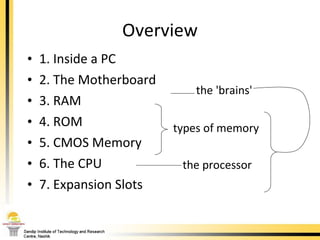
Overview 1. Inside a PC 2. The Motherboard 3. RAM 4. ROM 5. CMOS Memory 6. The CPU 7. Expansion Slots types of memory the 'brains' the processor
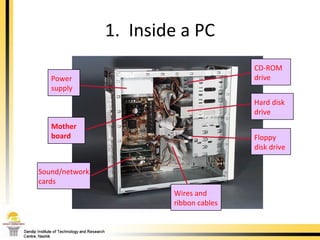
1.  Inside a PC Power supply CD-ROM  drive Floppy disk drive Hard disk  drive Wires and ribbon cables Sound/network cards Mother board
The most important part of a PC is the  motherboard . It holds: the processor chip memory chips chips that handle input/output (I/O) the expansion slots for connecting peripherals Some chips are soldered onto the motherboard(permanent), and some are removable (so they can be upgraded). 2.  The Motherboard
Motherboard Determines: CPU type and speed Chipset Secondary cache type Types of slots Number of slots Type of memory Number of memory sockets and maximum memory Type of case  ROM Plug & Play compatibility Type of keyboard
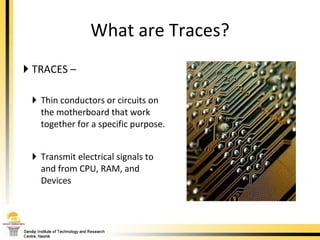
TRACES –  Thin conductors or circuits on the motherboard that work together for a specific purpose. Transmit electrical signals to and from CPU, RAM, and Devices What are Traces?
Form Factors Form factor means the size and shape of the actual motherboard 3 most common Form Factor classifications: Baby AT ATX  Slimline NLX
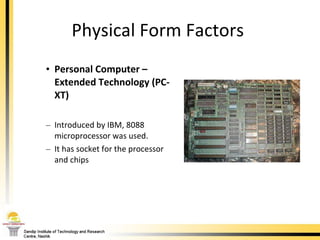
Physical Form Factors  Personal Computer – Extended Technology (PC-XT) Introduced by IBM, 8088 microprocessor was used. It has socket for the processor and chips
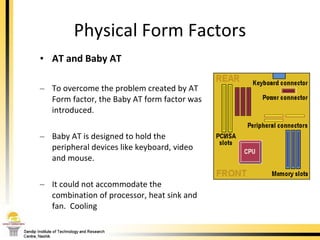
Physical Form Factors AT and Baby AT To overcome the problem created by AT Form factor, the Baby AT form factor was introduced. Baby AT is designed to hold the peripheral devices like keyboard, video and mouse.  It could not accommodate the combination of processor, heat sink and fan.  Cooling
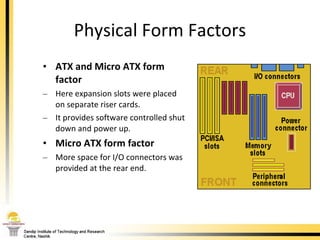
Physical Form Factors ATX and Micro ATX form factor Here expansion slots were placed on separate riser cards. It provides software controlled shut down and power up.  Micro ATX form factor   More space for I/O connectors was provided at the rear end.
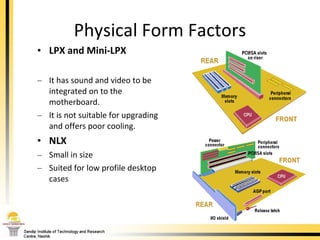
Physical Form Factors LPX and Mini-LPX   It has sound and video to be integrated on to the motherboard.  It is not suitable for upgrading and offers poor cooling. NLX Small in size Suited for low profile desktop cases
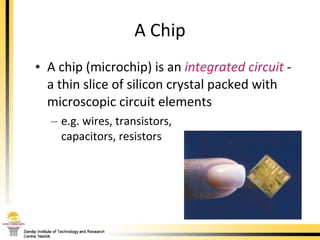
A chip (microchip) is an  integrated circuit   - a thin slice of silicon crystal packed with microscopic circuit elements e.g. wires, transistors,  capacitors, resistors A Chip
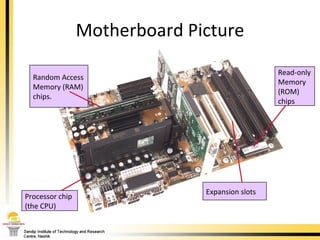
Motherboard Picture Random Access Memory (RAM) chips. Expansion slots Read-only Memory  (ROM) chips Processor chip (the CPU)
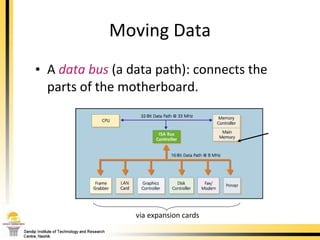
A  data   bus  (a data path): connects the parts of the motherboard. Moving Data RAM via expansion cards
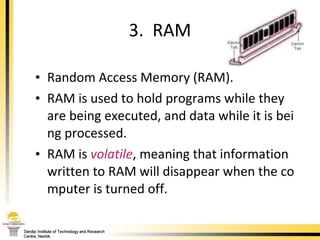
Random Access Memory (RAM). RAM is used to hold programs while they are being executed, and data while it is being processed.  RAM is  volatile , meaning that information written to RAM will disappear when the computer is turned off. 3.  RAM
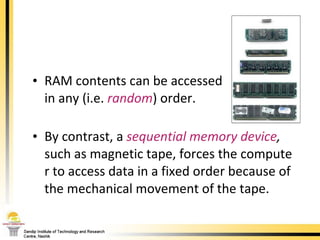
RAM contents can be accessed  in any (i.e.  random ) order.  By contrast, a  sequential memory device ,  such as magnetic tape, forces the computer to access data in a fixed order because of the mechanical movement of the tape.
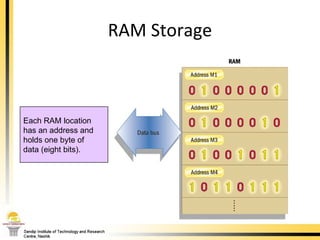
RAM Storage Each RAM location has an address and  holds one byte of  data (eight bits).
Computers typically have between 64 and 512 Mb (mega bytes ) of RAM. RAM access speeds can be as fast as 8 nanoseconds (8 billionth of a second). The right amount of RAM depends on the software you are using. You can install extra RAM. How much RAM is Enough?
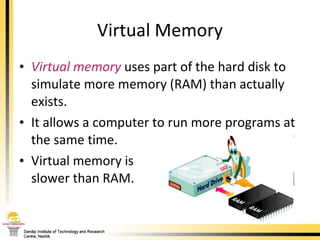
Virtual memory  uses part of the hard disk to simulate more memory (RAM) than actually exists.  It allows a computer to run more programs at the same time.  Virtual memory is  slower than RAM. Virtual Memory
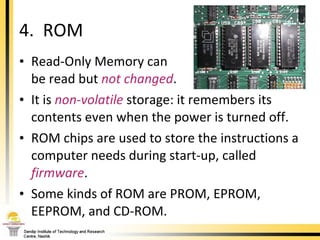
Read-Only Memory can  be read but  not changed .  It is  non-volatile  storage: it remembers its contents even when the power is turned off.  ROM chips are used to store the instructions a computer needs during start-up, called  firmware .  Some kinds of ROM are PROM, EPROM, EEPROM, and CD-ROM. 4.  ROM
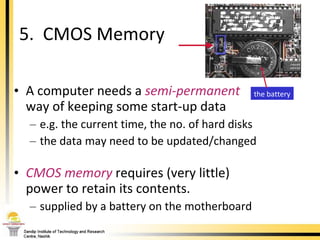
A computer needs a  semi-permanent   way of keeping some start-up data e.g. the current time, the no. of hard disks the data may need to be updated/changed CMOS   memory   requires (very little) power to retain its contents. supplied by a battery on the motherboard 5.  CMOS Memory the battery
6.  The CPU The Central Processing Unit (CPU) is the chip on the motherboard that acts as the " computer's brain "  it does calculations, and coordinates the other motherboard components CPU examples: the Pentium, the PowerPC chip The CPU is also known as the  processor  or  microprocessor . 000-209 Intro to CS. 5/Mother
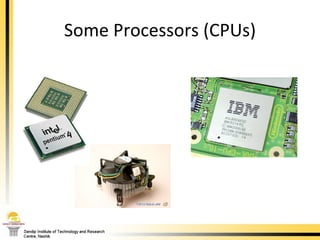
Some Processors (CPUs) PowerPC Chip Chip Fan Pentium Chip
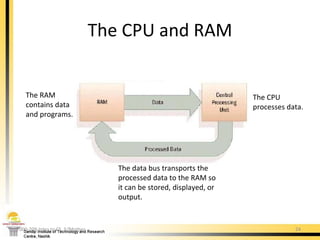
The CPU and RAM 000-209 Intro to CS. 5/Mother The CPU processes data. The RAM contains data and programs. The data bus transports the processed data to the RAM so it can be stored, displayed, or output.
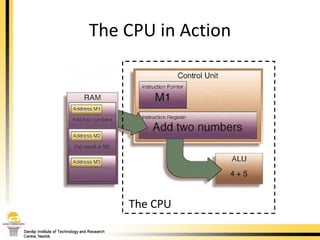
The CPU in Action The CPU
The  instruction   pointer  in the CPU's control unit  stores the location of the next program instruction to be executed. The  instruction  is loaded into the  instruction register  to be carried out. registers are local memory on the CPU 000-209 Intro to CS. 5/Mother continued
The  ALU  (arithmetic logic unit) executes the instruction. The result is placed in the  accumulator  (another register), then stored back in RAM or used in other CPU operations. 000-209 Intro to CS. 5/Mother
The  system   clock  sends out 'ticks' to control the timing of all the motherboard tasks e.g. it controls the speed of the data bus and the instruction cycle. The time it takes to complete an instruction cycle is measured in  megahertz  (MHz). 1 MHz = one million cycles per second The System Clock 000-209 Intro to CS. 5/Mother
Word   size : the number of bytes the CPU can process at once. depends on the number of registers in the CPU; depends on the size of the data bus Cache size : the cache is high-speed memory on the CPU that stores data which is needed often. Two Measures of CPU Size 000-209 Intro to CS. 5/Mother
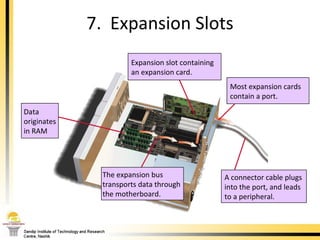
7.  Expansion Slots The expansion bus  transports data through  the motherboard. Most expansion cards contain a port. A connector cable plugs into the port, and leads  to a peripheral. Data  originates in RAM Expansion slot containing  an expansion card.
Common expansion cards:  graphics   card  (for connecting to a monitor) network card  (for transmitting data over a network) sound   card  (for connecting to a microphone and speakers) Most PCs offer 4-8 expansion slots. 000-209 Intro to CS. 5/Mother
There are several different types of expansion slot: ISA : older technology, for modems and slow devices PCI : for graphics, sound, video, modem or network cards AGP :   for graphics cards Expansion Slot Types 000-209 Intro to CS. 5/Mother
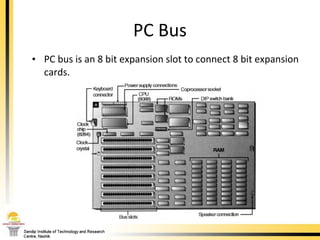
PC Bus PC bus is an 8 bit expansion slot to connect 8 bit expansion cards.
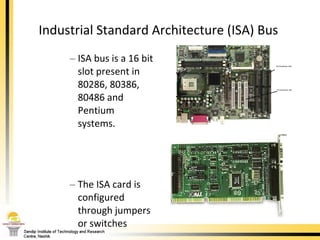
Industrial Standard Architecture (ISA) Bus  ISA bus is a 16 bit slot present in 80286, 80386, 80486 and Pentium systems.  The ISA card is configured through jumpers or switches
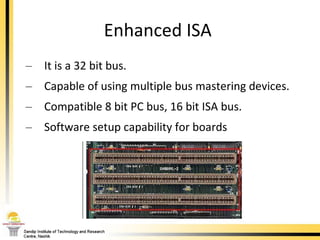
Enhanced ISA  It is a 32 bit bus. Capable of using multiple bus mastering devices.  Compatible 8 bit PC bus, 16 bit ISA bus.  Software setup capability for boards
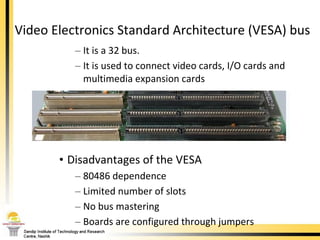
Video Electronics Standard Architecture (VESA) bus  It is a 32 bus.  It is used to connect video cards, I/O cards and multimedia expansion cards Disadvantages of the VESA 80486 dependence  Limited number of slots  No bus mastering Boards are configured through jumpers
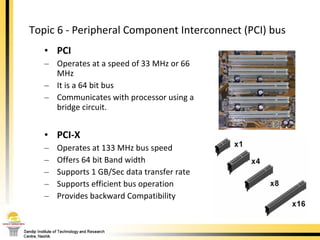
Topic 6 - Peripheral Component Interconnect (PCI) bus  PCI Operates at a speed of 33 MHz or 66 MHz It is a 64 bit bus  Communicates with processor using a bridge circuit.  PCI-X Operates at 133 MHz bus speed Offers 64 bit Band width Supports 1 GB/Sec data transfer rate Supports efficient bus operation Provides backward Compatibility
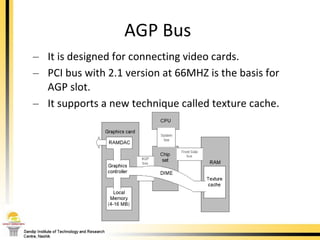
AGP Bus  It is designed for connecting video cards.  PCI bus with 2.1 version at 66MHZ is the basis for AGP slot.  It supports a new technique called texture cache.
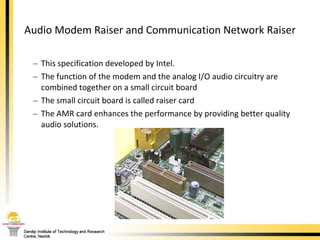
Audio Modem Raiser and Communication Network Raiser This specification developed by Intel.  The function of the modem and the analog I/O audio circuitry are combined together on a small circuit board  The small circuit board is called raiser card  The AMR card enhances the performance by providing better quality audio solutions.
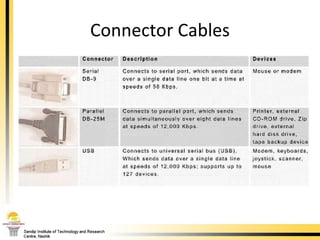
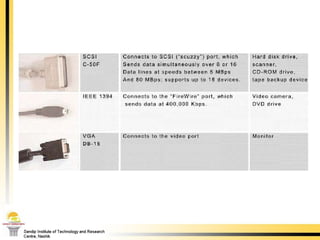
Connector Cables
 
References “ Microprocessors and Interfacing” by Douglas Hall, Tata McGraw Hill Publishing.

Internal components of PC

  • 1.
    Tushar B Kute,Department of Information Technology, Sandip Institute of Technology and Research Centre, Nashik Internal Components of PC
  • 2.
    Overview 1. Insidea PC 2. The Motherboard 3. RAM 4. ROM 5. CMOS Memory 6. The CPU 7. Expansion Slots types of memory the 'brains' the processor
  • 3.
    1. Insidea PC Power supply CD-ROM drive Floppy disk drive Hard disk drive Wires and ribbon cables Sound/network cards Mother board
  • 4.
    The most importantpart of a PC is the motherboard . It holds: the processor chip memory chips chips that handle input/output (I/O) the expansion slots for connecting peripherals Some chips are soldered onto the motherboard(permanent), and some are removable (so they can be upgraded). 2. The Motherboard
  • 5.
    Motherboard Determines: CPUtype and speed Chipset Secondary cache type Types of slots Number of slots Type of memory Number of memory sockets and maximum memory Type of case ROM Plug & Play compatibility Type of keyboard
  • 6.
    TRACES – Thin conductors or circuits on the motherboard that work together for a specific purpose. Transmit electrical signals to and from CPU, RAM, and Devices What are Traces?
  • 7.
    Form Factors Formfactor means the size and shape of the actual motherboard 3 most common Form Factor classifications: Baby AT ATX Slimline NLX
  • 8.
    Physical Form Factors Personal Computer – Extended Technology (PC-XT) Introduced by IBM, 8088 microprocessor was used. It has socket for the processor and chips
  • 9.
    Physical Form FactorsAT and Baby AT To overcome the problem created by AT Form factor, the Baby AT form factor was introduced. Baby AT is designed to hold the peripheral devices like keyboard, video and mouse. It could not accommodate the combination of processor, heat sink and fan. Cooling
  • 10.
    Physical Form FactorsATX and Micro ATX form factor Here expansion slots were placed on separate riser cards. It provides software controlled shut down and power up. Micro ATX form factor More space for I/O connectors was provided at the rear end.
  • 11.
    Physical Form FactorsLPX and Mini-LPX It has sound and video to be integrated on to the motherboard. It is not suitable for upgrading and offers poor cooling. NLX Small in size Suited for low profile desktop cases
  • 12.
    A chip (microchip)is an integrated circuit - a thin slice of silicon crystal packed with microscopic circuit elements e.g. wires, transistors, capacitors, resistors A Chip
  • 13.
    Motherboard Picture RandomAccess Memory (RAM) chips. Expansion slots Read-only Memory (ROM) chips Processor chip (the CPU)
  • 14.
    A data bus (a data path): connects the parts of the motherboard. Moving Data RAM via expansion cards
  • 15.
    Random Access Memory(RAM). RAM is used to hold programs while they are being executed, and data while it is being processed. RAM is volatile , meaning that information written to RAM will disappear when the computer is turned off. 3. RAM
  • 16.
    RAM contents canbe accessed in any (i.e. random ) order. By contrast, a sequential memory device , such as magnetic tape, forces the computer to access data in a fixed order because of the mechanical movement of the tape.
  • 17.
    RAM Storage EachRAM location has an address and holds one byte of data (eight bits).
  • 18.
    Computers typically havebetween 64 and 512 Mb (mega bytes ) of RAM. RAM access speeds can be as fast as 8 nanoseconds (8 billionth of a second). The right amount of RAM depends on the software you are using. You can install extra RAM. How much RAM is Enough?
  • 19.
    Virtual memory uses part of the hard disk to simulate more memory (RAM) than actually exists. It allows a computer to run more programs at the same time. Virtual memory is slower than RAM. Virtual Memory
  • 20.
    Read-Only Memory can be read but not changed . It is non-volatile storage: it remembers its contents even when the power is turned off. ROM chips are used to store the instructions a computer needs during start-up, called firmware . Some kinds of ROM are PROM, EPROM, EEPROM, and CD-ROM. 4. ROM
  • 21.
    A computer needsa semi-permanent way of keeping some start-up data e.g. the current time, the no. of hard disks the data may need to be updated/changed CMOS memory requires (very little) power to retain its contents. supplied by a battery on the motherboard 5. CMOS Memory the battery
  • 22.
    6. TheCPU The Central Processing Unit (CPU) is the chip on the motherboard that acts as the " computer's brain " it does calculations, and coordinates the other motherboard components CPU examples: the Pentium, the PowerPC chip The CPU is also known as the processor or microprocessor . 000-209 Intro to CS. 5/Mother
  • 23.
    Some Processors (CPUs)PowerPC Chip Chip Fan Pentium Chip
  • 24.
    The CPU andRAM 000-209 Intro to CS. 5/Mother The CPU processes data. The RAM contains data and programs. The data bus transports the processed data to the RAM so it can be stored, displayed, or output.
  • 25.
    The CPU inAction The CPU
  • 26.
    The instruction pointer in the CPU's control unit stores the location of the next program instruction to be executed. The instruction is loaded into the instruction register to be carried out. registers are local memory on the CPU 000-209 Intro to CS. 5/Mother continued
  • 27.
    The ALU (arithmetic logic unit) executes the instruction. The result is placed in the accumulator (another register), then stored back in RAM or used in other CPU operations. 000-209 Intro to CS. 5/Mother
  • 28.
    The system clock sends out 'ticks' to control the timing of all the motherboard tasks e.g. it controls the speed of the data bus and the instruction cycle. The time it takes to complete an instruction cycle is measured in megahertz (MHz). 1 MHz = one million cycles per second The System Clock 000-209 Intro to CS. 5/Mother
  • 29.
    Word size : the number of bytes the CPU can process at once. depends on the number of registers in the CPU; depends on the size of the data bus Cache size : the cache is high-speed memory on the CPU that stores data which is needed often. Two Measures of CPU Size 000-209 Intro to CS. 5/Mother
  • 30.
    7. ExpansionSlots The expansion bus transports data through the motherboard. Most expansion cards contain a port. A connector cable plugs into the port, and leads to a peripheral. Data originates in RAM Expansion slot containing an expansion card.
  • 31.
    Common expansion cards: graphics card (for connecting to a monitor) network card (for transmitting data over a network) sound card (for connecting to a microphone and speakers) Most PCs offer 4-8 expansion slots. 000-209 Intro to CS. 5/Mother
  • 32.
    There are severaldifferent types of expansion slot: ISA : older technology, for modems and slow devices PCI : for graphics, sound, video, modem or network cards AGP : for graphics cards Expansion Slot Types 000-209 Intro to CS. 5/Mother
  • 33.
    PC Bus PCbus is an 8 bit expansion slot to connect 8 bit expansion cards.
  • 34.
    Industrial Standard Architecture(ISA) Bus ISA bus is a 16 bit slot present in 80286, 80386, 80486 and Pentium systems. The ISA card is configured through jumpers or switches
  • 35.
    Enhanced ISA It is a 32 bit bus. Capable of using multiple bus mastering devices. Compatible 8 bit PC bus, 16 bit ISA bus. Software setup capability for boards
  • 36.
    Video Electronics StandardArchitecture (VESA) bus It is a 32 bus. It is used to connect video cards, I/O cards and multimedia expansion cards Disadvantages of the VESA 80486 dependence Limited number of slots No bus mastering Boards are configured through jumpers
  • 37.
    Topic 6 -Peripheral Component Interconnect (PCI) bus PCI Operates at a speed of 33 MHz or 66 MHz It is a 64 bit bus Communicates with processor using a bridge circuit. PCI-X Operates at 133 MHz bus speed Offers 64 bit Band width Supports 1 GB/Sec data transfer rate Supports efficient bus operation Provides backward Compatibility
  • 38.
    AGP Bus It is designed for connecting video cards. PCI bus with 2.1 version at 66MHZ is the basis for AGP slot. It supports a new technique called texture cache.
  • 39.
    Audio Modem Raiserand Communication Network Raiser This specification developed by Intel. The function of the modem and the analog I/O audio circuitry are combined together on a small circuit board The small circuit board is called raiser card The AMR card enhances the performance by providing better quality audio solutions.
  • 40.
  • 41.
  • 42.
    References “ Microprocessorsand Interfacing” by Douglas Hall, Tata McGraw Hill Publishing.