EVALUATION
Higher Computing Science
WHY EVALUATE
It is important to evaluate a software solution to ensure that it is:
• Fit for purpose
• Uses efficient coding constructs
• Usable
• Maintainable
• Robust
FITNESS FOR PURPOSE
• A program can be deemed fit for purpose if it meets and matches the
specification as set out during analysis
• The functional requirements will have been agreed with the client as part
of the analysis. During the evaluation phase the program will be tested
to check that the functional requirements have been met.
FITNESS FOR PURPOSE
Example:
• A program should ask the user to enter 10 test scores (0-100). It should
display the highest, lowest and mean test score.
Evaluation:
• Does the program ask the user for 10 test scores?
• Does it only accept values 0-100?
• Does it calculate the highest, lowest and mean scores correctly?
• Does it display the highest, lowest and mean scores?
EFFICIENT CODING CONSTRUCTS
All program code should make efficient use of available hardware
resources, in particular:
• Processor
• Main memory
It is also important for programmers to write code in a way that makes an
efficient use of their development time
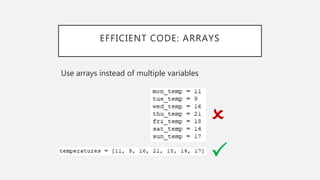
EFFICIENT CODE: ARRAYS
Use arrays instead of multiple variables
P
O
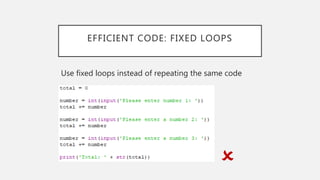
EFFICIENT CODE: FIXED LOOPS
Use fixed loops instead of repeating the same code
O
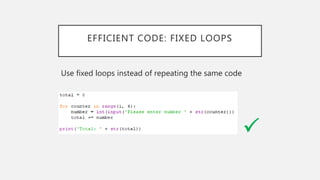
EFFICIENT CODE: FIXED LOOPS
Use fixed loops instead of repeating the same code
P
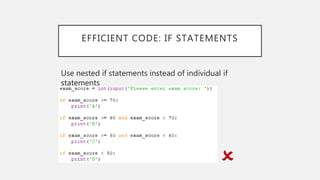
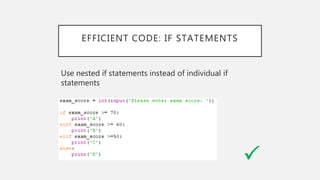
EFFICIENT CODE: IF STATEMENTS
Use nested if statements instead of individual if
statements
O
EFFICIENT CODE: IF STATEMENTS
Use nested if statements instead of individual if
statements
P
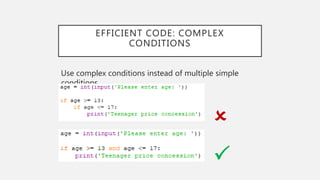
EFFICIENT CODE: COMPLEX
CONDITIONS
Use complex conditions instead of multiple simple
conditions
O
P
USABILITY
• Usability is a measure of how easily a user can achieve what they want to
do with the program
• A program should be designed to be as easy to use as possible
• Developers should make software that is easy to learn to use. This can
be supported by:
• Online help
• Video tutorials
• Frequently Asked Questions (FAQs)
• Users should be able to achieve their goals in as few steps as possible.
USABILITY
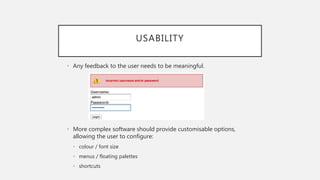
• Any feedback to the user needs to be meaningful.
• More complex software should provide customisable options,
allowing the user to configure:
• colour / font size
• menus / floating palettes
• shortcuts
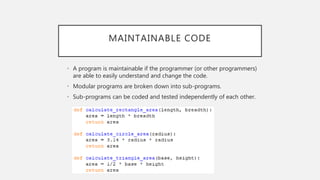
MAINTAINABLE CODE
• A program is maintainable if the programmer (or other programmers)
are able to easily understand and change the code.
• Modular programs are broken down into sub-programs.
• Sub-programs can be coded and tested independently of each other.
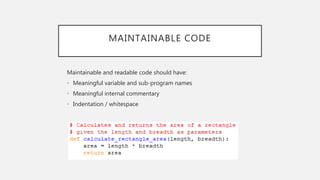
MAINTAINABLE CODE
Maintainable and readable code should have:
• Meaningful variable and sub-program names
• Meaningful internal commentary
• Indentation / whitespace
ROBUST PROGRAMS
Programs are considered to be robust if they do not crash unexpectedly.
They should:
• Cope with unexpected inputs
• Provide the user with meaningful error feedback

Software Evaluation

  • 1.
  • 2.
    WHY EVALUATE It isimportant to evaluate a software solution to ensure that it is: • Fit for purpose • Uses efficient coding constructs • Usable • Maintainable • Robust
  • 3.
    FITNESS FOR PURPOSE •A program can be deemed fit for purpose if it meets and matches the specification as set out during analysis • The functional requirements will have been agreed with the client as part of the analysis. During the evaluation phase the program will be tested to check that the functional requirements have been met.
  • 4.
    FITNESS FOR PURPOSE Example: •A program should ask the user to enter 10 test scores (0-100). It should display the highest, lowest and mean test score. Evaluation: • Does the program ask the user for 10 test scores? • Does it only accept values 0-100? • Does it calculate the highest, lowest and mean scores correctly? • Does it display the highest, lowest and mean scores?
  • 5.
    EFFICIENT CODING CONSTRUCTS Allprogram code should make efficient use of available hardware resources, in particular: • Processor • Main memory It is also important for programmers to write code in a way that makes an efficient use of their development time
  • 6.
    EFFICIENT CODE: ARRAYS Usearrays instead of multiple variables P O
  • 7.
    EFFICIENT CODE: FIXEDLOOPS Use fixed loops instead of repeating the same code O
  • 8.
    EFFICIENT CODE: FIXEDLOOPS Use fixed loops instead of repeating the same code P
  • 9.
    EFFICIENT CODE: IFSTATEMENTS Use nested if statements instead of individual if statements O
  • 10.
    EFFICIENT CODE: IFSTATEMENTS Use nested if statements instead of individual if statements P
  • 11.
    EFFICIENT CODE: COMPLEX CONDITIONS Usecomplex conditions instead of multiple simple conditions O P
  • 12.
    USABILITY • Usability isa measure of how easily a user can achieve what they want to do with the program • A program should be designed to be as easy to use as possible • Developers should make software that is easy to learn to use. This can be supported by: • Online help • Video tutorials • Frequently Asked Questions (FAQs) • Users should be able to achieve their goals in as few steps as possible.
  • 13.
    USABILITY • Any feedbackto the user needs to be meaningful. • More complex software should provide customisable options, allowing the user to configure: • colour / font size • menus / floating palettes • shortcuts
  • 14.
    MAINTAINABLE CODE • Aprogram is maintainable if the programmer (or other programmers) are able to easily understand and change the code. • Modular programs are broken down into sub-programs. • Sub-programs can be coded and tested independently of each other.
  • 15.
    MAINTAINABLE CODE Maintainable andreadable code should have: • Meaningful variable and sub-program names • Meaningful internal commentary • Indentation / whitespace
  • 16.
    ROBUST PROGRAMS Programs areconsidered to be robust if they do not crash unexpectedly. They should: • Cope with unexpected inputs • Provide the user with meaningful error feedback