


EXTENDED ACCESS LISTS
www.netprotocolxpert.in
 Extended Access lists give us extra features in
comparison with standard ACLs.
 They check packet for source address, destination
address, protocol and port number. Like Standard ACLs,
Extended Access Lists can be numbered or named.
 Ranges used by numbered extended ACLs are from 100
to 199 and from 2000 to 2699.
NUMBERED EXTENDED ACCESS
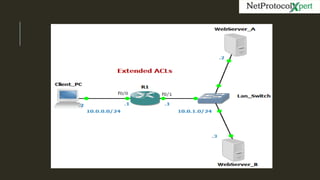
LISTIn the topology we have a Client PC that probably will try to
connect to those webservers. Our task is to deny Client_PC to
access WebServer_A. To achieve this, all we have to do is to add
on Router R1 an extended access list, wich will filter PCs http
requests to WebServer_A. Check below the configuration on R1.
R1
access-list 100 deny tcp host 10.0.0.2 host 10.0.1.2 eq www
access-list 100 permit ip any any
interface fastEthernet 0/0
ip access-group 100 in
 In example above, ACL blocks http requests by “deny”
statement. Instead of “host” we could use subnet address
and wildcard mask.
 With keyword “eq” access list will match port number
specified further or port name (in this case “www”).
 At the end of this extended access list we added a permit
any statement to allow any other traffic to pass.
 This ACL was applied to interface fa0/0 to act on inbound
traffic. So, all traffic that use port 80 (www), which come
from Client PC and goes to WebServer A (10.0.1.2) will be
denied.
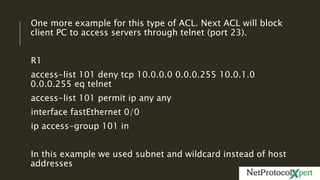
One more example for this type of ACL. Next ACL will block
client PC to access servers through telnet (port 23).
R1
access-list 101 deny tcp 10.0.0.0 0.0.0.255 10.0.1.0
0.0.0.255 eq telnet
access-list 101 permit ip any any
interface fastEthernet 0/0
ip access-group 101 in
In this example we used subnet and wildcard instead of host
addresses
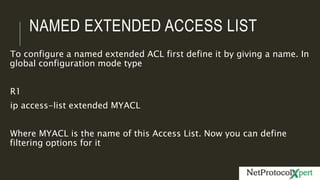
NAMED EXTENDED ACCESS LIST
To configure a named extended ACL first define it by giving a name. In
global configuration mode type
R1
ip access-list extended MYACL
Where MYACL is the name of this Access List. Now you can define
filtering options for it
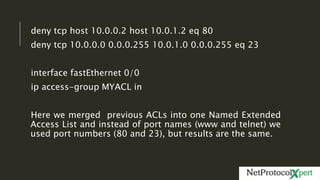
deny tcp host 10.0.0.2 host 10.0.1.2 eq 80
deny tcp 10.0.0.0 0.0.0.255 10.0.1.0 0.0.0.255 eq 23
interface fastEthernet 0/0
ip access-group MYACL in
Here we merged previous ACLs into one Named Extended
Access List and instead of port names (www and telnet) we
used port numbers (80 and 23), but results are the same.
FOLLOW US ON
https://www.facebook.co
m/NetProtocolXpert/
https://www.linkedin.co
m/company/netprotocol-
xpert
https://plus.google.com
/u/0/collection/AYQ-EB
https://www.instagram.c
om/netprotocol_xpert/
https://twitter.com/NPX_ci
sco
https://branded.me/netp
rotocolxpert

Extended Access Lists

  • 1.
  • 2.
     Extended Accesslists give us extra features in comparison with standard ACLs.  They check packet for source address, destination address, protocol and port number. Like Standard ACLs, Extended Access Lists can be numbered or named.  Ranges used by numbered extended ACLs are from 100 to 199 and from 2000 to 2699.
  • 4.
    NUMBERED EXTENDED ACCESS LISTInthe topology we have a Client PC that probably will try to connect to those webservers. Our task is to deny Client_PC to access WebServer_A. To achieve this, all we have to do is to add on Router R1 an extended access list, wich will filter PCs http requests to WebServer_A. Check below the configuration on R1. R1 access-list 100 deny tcp host 10.0.0.2 host 10.0.1.2 eq www access-list 100 permit ip any any interface fastEthernet 0/0 ip access-group 100 in
  • 5.
     In exampleabove, ACL blocks http requests by “deny” statement. Instead of “host” we could use subnet address and wildcard mask.  With keyword “eq” access list will match port number specified further or port name (in this case “www”).  At the end of this extended access list we added a permit any statement to allow any other traffic to pass.  This ACL was applied to interface fa0/0 to act on inbound traffic. So, all traffic that use port 80 (www), which come from Client PC and goes to WebServer A (10.0.1.2) will be denied.
  • 6.
    One more examplefor this type of ACL. Next ACL will block client PC to access servers through telnet (port 23). R1 access-list 101 deny tcp 10.0.0.0 0.0.0.255 10.0.1.0 0.0.0.255 eq telnet access-list 101 permit ip any any interface fastEthernet 0/0 ip access-group 101 in In this example we used subnet and wildcard instead of host addresses
  • 7.
    NAMED EXTENDED ACCESSLIST To configure a named extended ACL first define it by giving a name. In global configuration mode type R1 ip access-list extended MYACL Where MYACL is the name of this Access List. Now you can define filtering options for it
  • 8.
    deny tcp host10.0.0.2 host 10.0.1.2 eq 80 deny tcp 10.0.0.0 0.0.0.255 10.0.1.0 0.0.0.255 eq 23 interface fastEthernet 0/0 ip access-group MYACL in Here we merged previous ACLs into one Named Extended Access List and instead of port names (www and telnet) we used port numbers (80 and 23), but results are the same.
  • 9.