Access Control List (ACL)
1
Muhammad Zen Samsono Hadi ST MScMuhammad Zen Samsono Hadi, ST. MSc.
Lab. Komunikasi Digital
G d D4 Lt 1Gedung D4 Lt. 1
EEPIS-ITS
Overview
2
 Network administrators must figure out how to deny unwanted access
to the network while allowing internal users appropriate access to
inecessary services.
 Although security tools, such as passwords, callback equipment, and
physical security devices are helpful, they often lack the flexibility of
b i t ffi filt i d th ifi t l t d i i t tbasic traffic filtering and the specific controls most administrators
prefer.
 For example, a network administrator may want to allow users access to
th I t t b t t it t l t l t i t th LANthe Internet, but not permit external users telnet access into the LAN.
 Routers provide basic traffic filtering capabilities, such as blocking
Internet traffic, with access control lists (ACLs).
 An ACL is a sequential list of permit or deny statements that apply to
addresses or upper-layer protocols.
 This module will introduce standard and extended ACLs as a means
to control network traffic, and how ACLs are used as part of a security
solution.
What are ACLs?
3
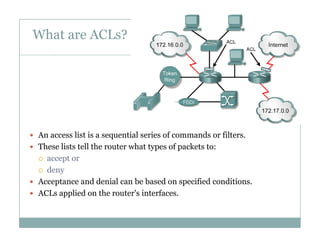
 An access list is a sequential series of commands or filters.q
 These lists tell the router what types of packets to:
 accept or
 deny deny
 Acceptance and denial can be based on specified conditions.
 ACLs applied on the router's interfaces.
What are ACLs?
4
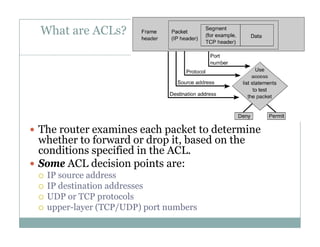
 The router examines each packet to determine
whether to forward or drop it based on thewhether to forward or drop it, based on the
conditions specified in the ACL.
 Some ACL decision points are:
 IP source address
 IP destination addresses
 UDP or TCP protocolsp
 upper-layer (TCP/UDP) port numbers
What are ACLs?
5
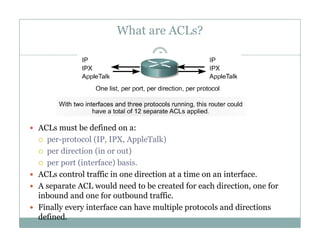
 ACLs must be defined on a:
 per protocol (IP IPX AppleTalk) per-protocol (IP, IPX, AppleTalk)
 per direction (in or out)
 per port (interface) basis.
 ACLs control traffic in one direction at a time on an interface.
 A separate ACL would need to be created for each direction, one for
inbound and one for outbound traffic.
 Finally every interface can have multiple protocols and directions
defined.
How ACLs work
6
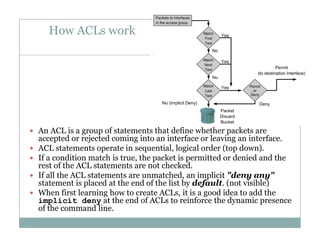
 An ACL is a group of statements that define whether packets are
accepted or rejected coming into an interface or leaving an interfaceaccepted or rejected coming into an interface or leaving an interface.
 ACL statements operate in sequential, logical order (top down).
 If a condition match is true, the packet is permitted or denied and the
rest of the ACL statements are not checked.
 If all the ACL statements are unmatched, an implicit "deny any"
statement is placed at the end of the list by default. (not visible)
 When first learning how to create ACLs, it is a good idea to add the
implicit deny at the end of ACLs to reinforce the dynamic presenceimplicit deny at the end of ACLs to reinforce the dynamic presence
of the command line.
Two types of ACLs
7
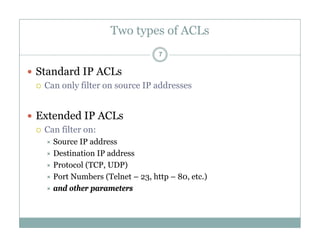
 Standard IP ACLs
 Can only filter on source IP addresses
 Extended IP ACLs
 Can filter on:
S IP dd Source IP address
 Destination IP address
 Protocol (TCP, UDP)
 Port Numbers (Telnet – 23, http – 80, etc.)
 and other parameters
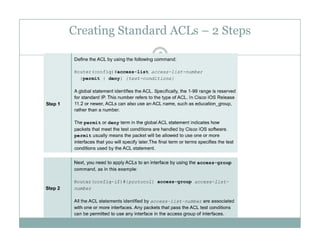
Creating Standard ACLs – 2 Steps
8
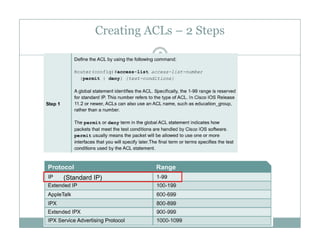
Creating ACLs – 2 Steps
9
(Standard IP)
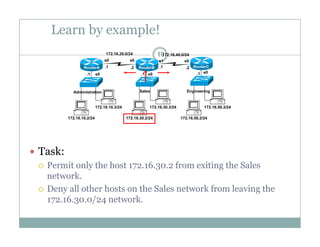
Learn by example!
10172.16.20.0/24 172.16.40.0/24
e0 e0 e0.1 .1 .1
.1 .1.2 .2
s0 s0 s1 s0
RouterA RouterB RouterC
172 16 10 3/24 172 16 30 3/24 172 16 50 3/24
Administration Sales Engineering
172.16.10.2/24
172.16.10.3/24
172.16.30.2/24
172.16.30.3/24
172.16.50.2/24
172.16.50.3/24
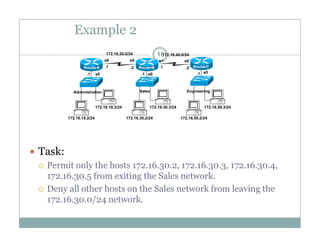
 Task:
 Permit only the host 172.16.30.2 from exiting the Sales
network.
 Deny all other hosts on the Sales network from leaving the
172.16.30.0/24 network.172.16.30.0/24 network.
Learn by example!
11172.16.20.0/24 172.16.40.0/24
e0 e0 e0.1 .1 .1
.1 .1.2 .2
s0 s0 s1 s0
RouterA RouterB RouterC
172 16 10 3/24 172 16 30 3/24 172 16 50 3/24
Administration Sales Engineering
172.16.10.2/24
172.16.10.3/24
172.16.30.2/24
172.16.30.3/24
172.16.50.2/24
172.16.50.3/24
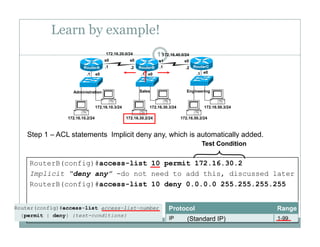
Step 1 – ACL statements Implicit deny any, which is automatically added.
RouterB(config)#access-list 10 permit 172.16.30.2
Test Condition
Implicit “deny any” -do not need to add this, discussed later
RouterB(config)#access-list 10 deny 0.0.0.0 255.255.255.255
(Standard IP)
From Cisco Web Site
12172.16.20.0/24 172.16.40.0/24
e0 e0 e0.1 .1 .1
.1 .1.2 .2
s0 s0 s1 s0
RouterA RouterB RouterC
172 16 10 3/24 172 16 30 3/24 172 16 50 3/24
Administration Sales Engineering
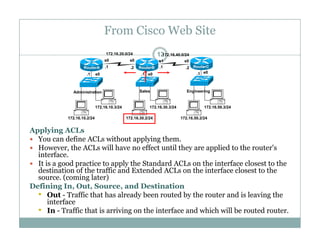
Applying ACLs
 You can define ACLs without applying them
172.16.10.2/24
172.16.10.3/24
172.16.30.2/24
172.16.30.3/24
172.16.50.2/24
172.16.50.3/24
 You can define ACLs without applying them.
 However, the ACLs will have no effect until they are applied to the router's
interface.
 It is a good practice to apply the Standard ACLs on the interface closest to the
destination of the traffic and Extended ACLs on the interface closest to thedestination of the traffic and Extended ACLs on the interface closest to the
source. (coming later)
Defining In, Out, Source, and Destination
• Out - Traffic that has already been routed by the router and is leaving the
interfaceinterface
• In - Traffic that is arriving on the interface and which will be routed router.
Learn by example!
13172.16.20.0/24 172.16.40.0/24
e0 e0 e0.1 .1 .1
.1 .1.2 .2
s0 s0 s1 s0
RouterA RouterB RouterC
172 16 10 3/24 172 16 30 3/24 172 16 50 3/24
Administration Sales Engineering
172.16.10.2/24
172.16.10.3/24
172.16.30.2/24
172.16.30.3/24
172.16.50.2/24
172.16.50.3/24
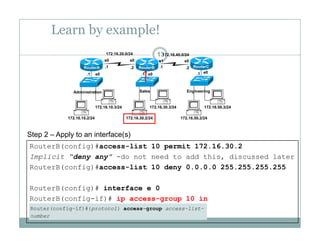
Step 2 – Apply to an interface(s)
RouterB(config)#access-list 10 permit 172.16.30.2
Implicit “deny any” -do not need to add this, discussed later
RouterB(config)#access-list 10 deny 0.0.0.0 255.255.255.255( g) y
RouterB(config)# interface e 0
RouterB(config-if)# ip access-group 10 in( g ) p g p
Learn by example!
14172.16.20.0/24 172.16.40.0/24
e0 e0 e0.1 .1 .1
.1 .1.2 .2
s0 s0 s1 s0
RouterA RouterB RouterC
172 16 10 3/24 172 16 30 3/24 172 16 50 3/24
Administration Sales Engineering
172.16.10.2/24
172.16.10.3/24
172.16.30.2/24
172.16.30.3/24
172.16.50.2/24
172.16.50.3/24
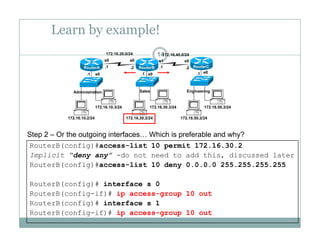
Step 2 – Or the outgoing interfaces… Which is preferable and why?
RouterB(config)#access-list 10 permit 172.16.30.2
Implicit “deny any” -do not need to add this, discussed later
RouterB(config)#access-list 10 deny 0.0.0.0 255.255.255.255
RouterB(config)# interface s 0
RouterB(config-if)# ip access-group 10 out
R t B( fi )# i t f 1RouterB(config)# interface s 1
RouterB(config-if)# ip access-group 10 out
Learn by example!
15172.16.20.0/24 172.16.40.0/24
e0 e0 e0.1 .1 .1
.1 .1.2 .2
s0 s0 s1 s0
RouterA RouterB RouterC
172 16 10 3/24 172 16 30 3/24 172 16 50 3/24
Administration Sales Engineering
172.16.10.2/24
172.16.10.3/24
172.16.30.2/24
172.16.30.3/24
172.16.50.2/24
172.16.50.3/24
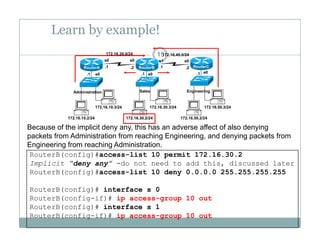
Because of the implicit deny any, this has an adverse affect of also denying
packets from Administration from reaching Engineering, and denying packets from
RouterB(config)#access-list 10 permit 172.16.30.2
Implicit “deny any” -do not need to add this, discussed later
R t B( fi )# li t 10 d 0 0 0 0 255 255 255 255
p g g g, y g p
Engineering from reaching Administration.
RouterB(config)#access-list 10 deny 0.0.0.0 255.255.255.255
RouterB(config)# interface s 0
RouterB(config-if)# ip access-group 10 outg p g p
RouterB(config)# interface s 1
RouterB(config-if)# ip access-group 10 out
Example 2
16172.16.20.0/24 172.16.40.0/24
e0 e0 e0.1 .1 .1
.1 .1.2 .2
s0 s0 s1 s0
RouterA RouterB RouterC
172 16 10 3/24 172 16 30 3/24 172 16 50 3/24
Administration Sales Engineering
172.16.10.2/24
172.16.10.3/24
172.16.30.2/24
172.16.30.3/24
172.16.50.2/24
172.16.50.3/24
 Task:
 Permit only the hosts 172.16.30.2, 172.16.30.3, 172.16.30.4,
172.16.30.5 from exiting the Sales network.
 Deny all other hosts on the Sales network from leaving the
172.16.30.0/24 network.172.16.30.0/24 network.
Example 2
17172.16.20.0/24 172.16.40.0/24
e0 e0 e0.1 .1 .1
.1 .1.2 .2
s0 s0 s1 s0
RouterA RouterB RouterC
172 16 10 3/24 172 16 30 3/24 172 16 50 3/24
Administration Sales Engineering
172.16.10.2/24
172.16.10.3/24
172.16.30.2/24
172.16.30.3/24
172.16.50.2/24
172.16.50.3/24
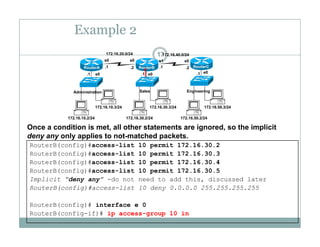
Once a condition is met, all other statements are ignored, so the implicit
deny any only applies to not-matched packets.
RouterB(config)#access-list 10 permit 172.16.30.2
RouterB(config)#access-list 10 permit 172.16.30.3
RouterB(config)#access-list 10 permit 172.16.30.4
RouterB(config)#access list 10 permit 172 16 30 5
y y y pp p
RouterB(config)#access-list 10 permit 172.16.30.5
Implicit “deny any” -do not need to add this, discussed later
RouterB(config)#access-list 10 deny 0.0.0.0 255.255.255.255
RouterB(config)# interface e 0
RouterB(config-if)# ip access-group 10 in
Example 2
18172.16.20.0/24 172.16.40.0/24
e0 e0 e0.1 .1 .1
.1 .1.2 .2
s0 s0 s1 s0
RouterA RouterB RouterC
172 16 10 3/24 172 16 30 3/24 172 16 50 3/24
Administration Sales Engineering
172.16.10.2/24
172.16.10.3/24
172.16.30.2/24
172.16.30.3/24
172.16.50.2/24
172.16.50.3/24
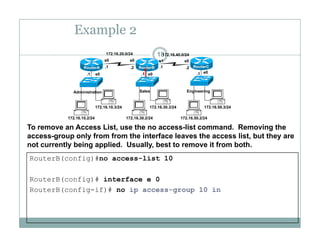
To remove an Access List, use the no access-list command. Removing the
access-group only from from the interface leaves the access list, but they are
RouterB(config)#no access-list 10
g p y , y
not currently being applied. Usually, best to remove it from both.
RouterB(config)# interface e 0
RouterB(config-if)# no ip access-group 10 in
Example 3
19172.16.20.0/24 172.16.40.0/24
e0 e0 e0.1 .1 .1
.1 .1.2 .2
s0 s0 s1 s0
RouterA RouterB RouterC
172 16 10 3/24 172 16 30 3/24 172 16 50 3/24
Administration Sales Engineering
172.16.10.2/24
172.16.10.3/24
172.16.30.2/24
172.16.30.3/24
172.16.50.2/24
172.16.50.3/24
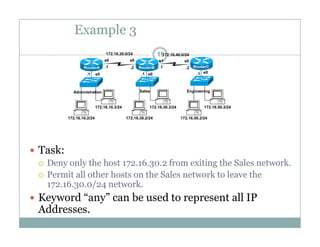
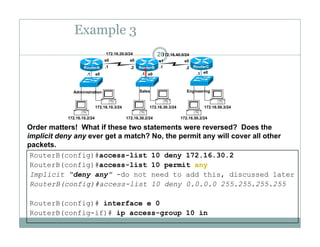
 Task:
 Deny only the host 172.16.30.2 from exiting the Sales network.
 Permit all other hosts on the Sales network to leave the
172.16.30.0/24 network.
 Keyword “any” can be used to represent all IPy y b p
Addresses.
Example 3
20172.16.20.0/24 172.16.40.0/24
e0 e0 e0.1 .1 .1
.1 .1.2 .2
s0 s0 s1 s0
RouterA RouterB RouterC
172 16 10 3/24 172 16 30 3/24 172 16 50 3/24
Administration Sales Engineering
172.16.10.2/24
172.16.10.3/24
172.16.30.2/24
172.16.30.3/24
172.16.50.2/24
172.16.50.3/24
Order matters! What if these two statements were reversed? Does the
implicit deny any ever get a match? No, the permit any will cover all other
RouterB(config)#access-list 10 deny 172.16.30.2
RouterB(config)#access-list 10 permit any
p y y g , p y
packets.
Implicit “deny any” -do not need to add this, discussed later
RouterB(config)#access-list 10 deny 0.0.0.0 255.255.255.255
R t B( fi )# i t f 0RouterB(config)# interface e 0
RouterB(config-if)# ip access-group 10 in
Notes from www.cisco.com
21
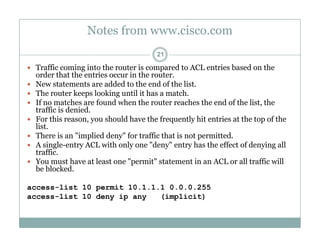
 Traffic coming into the router is compared to ACL entries based on the
order that the entries occur in the router.order that the entries occur in the router.
 New statements are added to the end of the list.
 The router keeps looking until it has a match.
 If no matches are found when the router reaches the end of the list, the
t ffi i d i dtraffic is denied.
 For this reason, you should have the frequently hit entries at the top of the
list.
 There is an "implied deny" for traffic that is not permitted.p y p
 A single-entry ACL with only one "deny" entry has the effect of denying all
traffic.
 You must have at least one "permit" statement in an ACL or all traffic will
be blockedbe blocked.
access-list 10 permit 10.1.1.1 0.0.0.255
access-list 10 deny ip any (implicit)
Time for Wildcard Masks!
22
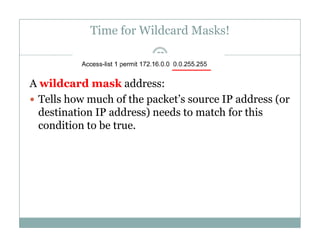
A wildcard mask address:
 Tells how much of the packet’s source IP address (or
d i i dd ) d h f hidestination IP address) needs to match for this
condition to be true.
Wildcard Masks!
Test Condition
23
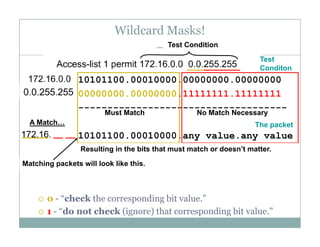
10101100 00010000 00000000 00000000
Test Condition
Test
Conditon
10101100.00010000.00000000.00000000
00000000.00000000.11111111.11111111
------------------------------------------------------------------------
10101100.00010000.any value.any value
A Match…
Must Match No Match Necessary
The packet
y y
Resulting in the bits that must match or doesn’t matter.
Matching packets will look like this.
 0 - “check the corresponding bit value.” 0 check the corresponding bit value.
 1 - “do not check (ignore) that corresponding bit value.”
Example 4 – Using Wildcard Masks
24172.16.20.0/24 172.16.40.0/24
e0 e0 e0.1 .1 .1
.1 .1.2 .2
s0 s0 s1 s0
RouterA RouterB RouterC
172 16 10 3/24 172 16 30 3/24 172 16 50 3/24
Administration Sales Engineering
172.16.10.2/24
172.16.10.3/24
172.16.30.2/24
172.16.30.3/24
172.16.50.2/24
172.16.50.3/24
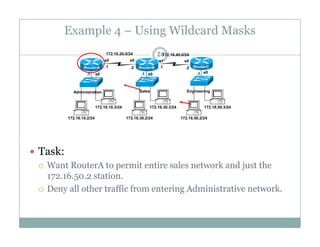
 Task:
 Want RouterA to permit entire sales network and just the
172.16.50.2 station.
 Deny all other traffic from entering Administrative network.
Example 4 – Using Wildcard Masks
25172.16.20.0/24 172.16.40.0/24
e0 e0 e0.1 .1 .1
.1 .1.2 .2
s0 s0 s1 s0
RouterA RouterB RouterC
172 16 10 3/24 172 16 30 3/24 172 16 50 3/24
Administration Sales Engineering
172.16.10.2/24
172.16.10.3/24
172.16.30.2/24
172.16.30.3/24
172.16.50.2/24
172.16.50.3/24
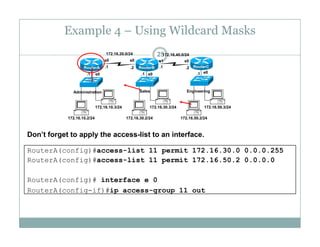
Don’t forget to apply the access-list to an interface.
RouterA(config)#access-list 11 permit 172.16.30.0 0.0.0.255
RouterA(config)#access-list 11 permit 172.16.50.2 0.0.0.0
RouterA(config)# interface e 0
RouterA(config-if)#ip access-group 11 out
Practice
26
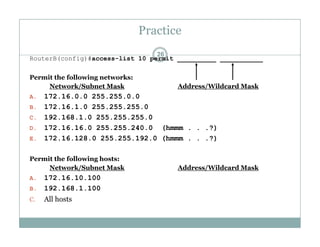
RouterB(config)#access-list 10 permit __________ ___________
Permit the following networks:Permit the following networks:
Network/Subnet Mask Address/Wildcard Mask
A. 172.16.0.0 255.255.0.0
B 172 16 1 0 255 255 255 0B. 172.16.1.0 255.255.255.0
C. 192.168.1.0 255.255.255.0
D. 172.16.16.0 255.255.240.0 (hmmm . . .?)
E 172 16 128 0 255 255 192 0 (hmmm ?)E. 172.16.128.0 255.255.192.0 (hmmm . . .?)
Permit the following hosts:
Network/Subnet Mask Address/Wildcard Mask/ /
A. 172.16.10.100
B. 192.168.1.100
C. All hostsC. All hosts
Practice – Do you see a relationship?
27
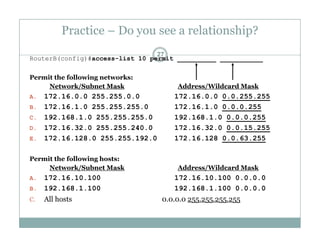
RouterB(config)#access-list 10 permit __________ ___________
Permit the following networks:Permit the following networks:
Network/Subnet Mask Address/Wildcard Mask
A. 172.16.0.0 255.255.0.0 172.16.0.0 0.0.255.255
B 172 16 1 0 255 255 255 0 172 16 1 0 0 0 0 255B. 172.16.1.0 255.255.255.0 172.16.1.0 0.0.0.255
C. 192.168.1.0 255.255.255.0 192.168.1.0 0.0.0.255
D. 172.16.32.0 255.255.240.0 172.16.32.0 0.0.15.255
E 172 16 128 0 255 255 192 0 172 16 128 0 0 63 255E. 172.16.128.0 255.255.192.0 172.16.128 0.0.63.255
Permit the following hosts:
Network/Subnet Mask Address/Wildcard Mask/ /
A. 172.16.10.100 172.16.10.100 0.0.0.0
B. 192.168.1.100 192.168.1.100 0.0.0.0
C. All hosts 0.0.0.0 255.255.255.255C. All hosts 0.0.0.0 255.255.255.255
255.255.255.255 – Subnet = Wildcard
28
RouterB(config)#access-list 10 permit __________ ___________
Permit the following networks:Permit the following networks:
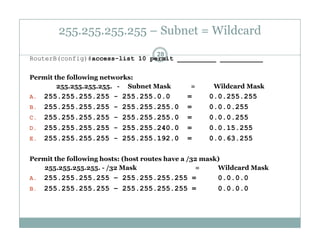
255.255.255.255. - Subnet Mask = Wildcard Mask
A. 255.255.255.255 - 255.255.0.0 = 0.0.255.255
B 255 255 255 255 - 255 255 255 0 = 0 0 0 255B. 255.255.255.255 255.255.255.0 = 0.0.0.255
C. 255.255.255.255 - 255.255.255.0 = 0.0.0.255
D. 255.255.255.255 - 255.255.240.0 = 0.0.15.255
E 255 255 255 255 - 255 255 192 0 = 0 0 63 255E. 255.255.255.255 255.255.192.0 = 0.0.63.255
Permit the following hosts: (host routes have a /32 mask)
255.255.255.255. - /32 Mask = Wildcard Mask55 55 55 55 /3
A. 255.255.255.255 – 255.255.255.255 = 0.0.0.0
B. 255.255.255.255 – 255.255.255.255 = 0.0.0.0
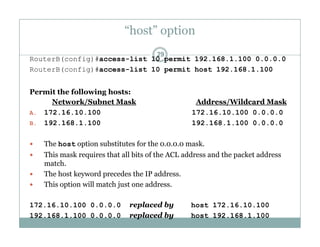
“host” option
29
RouterB(config)#access-list 10 permit 192.168.1.100 0.0.0.0
RouterB(config)#access-list 10 permit host 192.168.1.100
Permit the following hosts:
Network/Subnet Mask Address/Wildcard Mask
A. 172.16.10.100 172.16.10.100 0.0.0.0
B. 192.168.1.100 192.168.1.100 0.0.0.0
 The host option substitutes for the 0.0.0.0 mask.
 This mask requires that all bits of the ACL address and the packet address
match.
 The host keyword precedes the IP address.
 This option will match just one address.
172.16.10.100 0.0.0.0 replaced by host 172.16.10.100
192.168.1.100 0.0.0.0 replaced by host 192.168.1.100
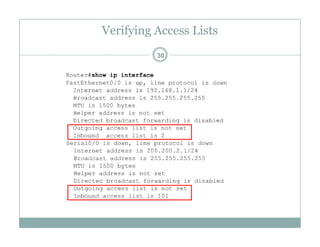
Verifying Access Lists
30
Verifying Access Lists
31
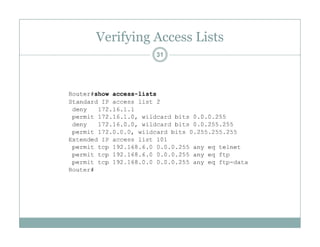
Verifying Access Lists
32
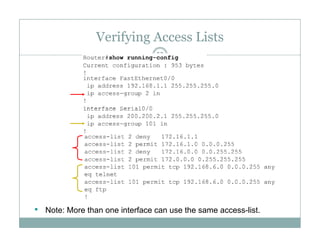
• Note: More than one interface can use the same access-list.
Standard ACL
33
W ill h i
The full syntax of the standard ACL command is:
Router(config)#access-list access-list-number {deny |
We will see why in a moment.
Router(config)#access list access list number {deny |
permit} source [source-wildcard ] [log]
The no form of this command is used to remove a standard ACL. This is
h ( l i AC !)the syntax: (Deletes entire ACL!)
Router(config)#no access-list access-list-number
Extended Access Lists
34
Extended Access Lists
35
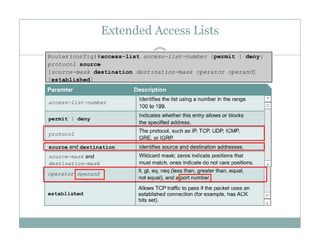
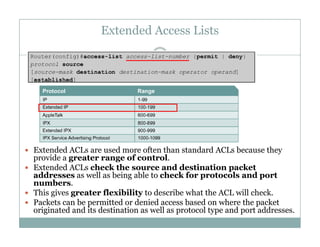
 Extended ACLs are used more often than standard ACLs because they
provide a greater range of control.
 Extended ACLs check the source and destination packette ded C s c ec t e sou ce a d dest at o pac et
addresses as well as being able to check for protocols and port
numbers.
 This gives greater flexibility to describe what the ACL will check.
 Packets can be permitted or denied access based on where the packet Packets can be permitted or denied access based on where the packet
originated and its destination as well as protocol type and port addresses.
Extended Access Lists
36
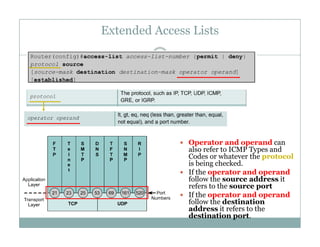
 Operator and operand can
also refer to ICMP Types and
Codes or whatever the protocol
is being checked.
If th t d d If the operator and operand
follow the source address it
refers to the source port
 If the operator and operand
follow the destinationfollow the destination
address it refers to the
destination port.
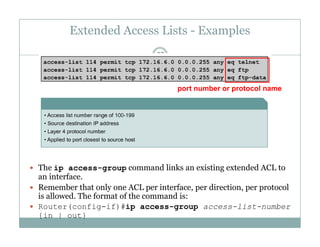
Extended Access Lists - Examples
37
port number or protocol name
 The ip access-group command links an existing extended ACL toThe ip access group command links an existing extended ACL to
an interface.
 Remember that only one ACL per interface, per direction, per protocol
is allowed. The format of the command is:
 Router(config-if)#ip access-group access-list-number
{in | out}
Example 1
38172.16.20.0/24 172.16.40.0/24
e0 e0 e0.1 .1 .1
.1 .1.2 .2
s0 s0 s1 s0
RouterA RouterB RouterC
172 16 10 3/24 172 16 30 3/24 172 16 50 3/24
Administration Sales Engineering
Task
172.16.10.2/24
172.16.10.3/24
172.16.30.2/24
172.16.30.3/24
172.16.50.2/24
172.16.50.3/24
Port
80
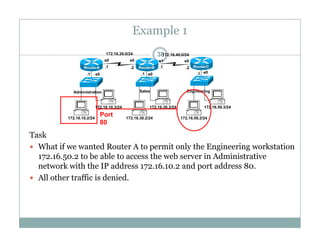
 What if we wanted Router A to permit only the Engineering workstation
172.16.50.2 to be able to access the web server in Administrative
network with the IP address 172.16.10.2 and port address 80.p
 All other traffic is denied.
Example 1
39172.16.20.0/24 172.16.40.0/24
e0 e0 e0.1 .1 .1
.1 .1.2 .2
s0 s0 s1 s0
RouterA RouterB RouterC
172 16 10 3/24 172 16 30 3/24 172 16 50 3/24
Administration Sales Engineering
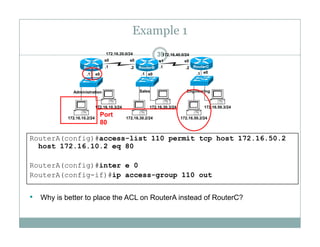
RouterA(config)#access-list 110 permit tcp host 172 16 50 2
172.16.10.2/24
172.16.10.3/24
172.16.30.2/24
172.16.30.3/24
172.16.50.2/24
172.16.50.3/24
Port
80
RouterA(config)#access list 110 permit tcp host 172.16.50.2
host 172.16.10.2 eq 80
RouterA(config)#inter e 0
RouterA(config-if)#ip access-group 110 out
• Why is better to place the ACL on RouterA instead of RouterC?y p
Notes from www.cisco.com
40
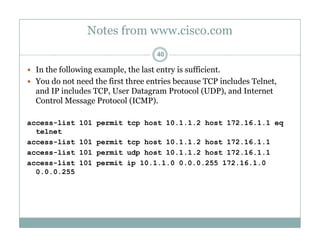
 In the following example, the last entry is sufficient.
 You do not need the first three entries because TCP includes Telnet,
and IP includes TCP, User Datagram Protocol (UDP), and Internet
Control Message Protocol (ICMP).
access-list 101 permit tcp host 10.1.1.2 host 172.16.1.1 eq
telnet
access-list 101 permit tcp host 10.1.1.2 host 172.16.1.1
access-list 101 permit udp host 10.1.1.2 host 172.16.1.1
access-list 101 permit ip 10.1.1.0 0.0.0.255 172.16.1.0
0 0 0 2550.0.0.255
Placing ACLs
41
SSource
10.0.0.0/8
Destination 172.16.0.0/16
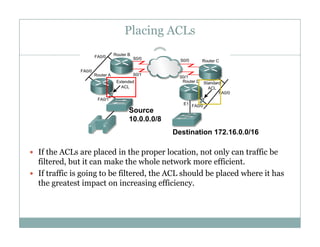
The general rule:g
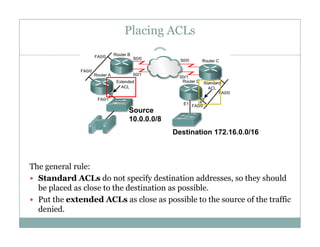
 Standard ACLs do not specify destination addresses, so they should
be placed as close to the destination as possible.
 Put the extended ACLs as close as possible to the source of the trafficPut the extended ACLs as close as possible to the source of the traffic
denied.
Placing ACLs
42
SSource
10.0.0.0/8
Destination 172.16.0.0/16
 If the ACLs are placed in the proper location, not only can traffic be
filtered, but it can make the whole network more efficient.
f ffi i i b fil d h h ld b l d h i h If traffic is going to be filtered, the ACL should be placed where it has
the greatest impact on increasing efficiency.
Placing ACLs – Extended Example
43
deny telnet
deny ftp
permit any
S
permit any
Source
10.0.0.0/8
Destination 172.16.0.0/16
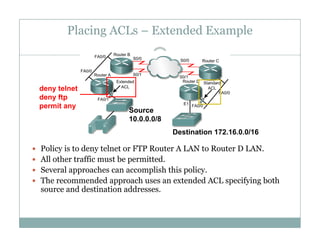
 Policy is to deny telnet or FTP Router A LAN to Router D LAN.
 All other traffic must be permitted.
 Several approaches can accomplish this policy Several approaches can accomplish this policy.
 The recommended approach uses an extended ACL specifying both
source and destination addresses.
Placing ACLs – Extended Example
44
deny telnet
deny ftp
permit any
S
permit any
RouterA
Source
10.0.0.0/8
Destination 172.16.0.0/16
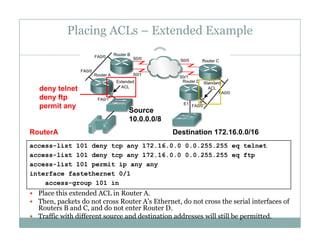
access-list 101 deny tcp any 172.16.0.0 0.0.255.255 eq telnet
access-list 101 deny tcp any 172.16.0.0 0.0.255.255 eq ftp
access-list 101 permit ip any any
 Place this extended ACL in Router A.
 Then packets do not cross Router A's Ethernet do not cross the serial interfaces of
interface fastethernet 0/1
access-group 101 in
 Then, packets do not cross Router A s Ethernet, do not cross the serial interfaces of
Routers B and C, and do not enter Router D.
 Traffic with different source and destination addresses will still be permitted.
Placing ACLs – Standard Example
45
S
deny 10.0.0.0
permit anSource
10.0.0.0/8
Destination 172.16.0.0/16
permit any
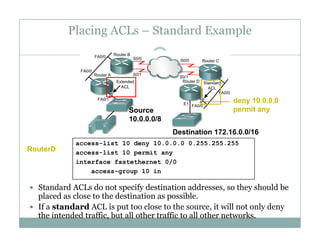
access-list 10 deny 10.0.0.0 0.255.255.255
access-list 10 permit any
interface fastethernet 0/0
g 10 i
RouterD
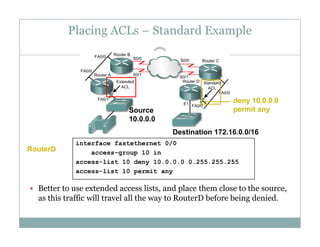
 Standard ACLs do not specify destination addresses, so they should be
placed as close to the destination as possible.
access-group 10 in
 If a standard ACL is put too close to the source, it will not only deny
the intended traffic, but all other traffic to all other networks.
Placing ACLs – Standard Example
46
S
deny 10.0.0.0
permit anSource
10.0.0.0
permit any
Destination 172.16.0.0/16
interface fastethernet 0/0
access-group 10 in
access-list 10 deny 10.0.0.0 0.255.255.255
li t 10 mit
RouterD
 Better to use extended access lists, and place them close to the source,
as this traffic will travel all the way to RouterD before being denied.
access-list 10 permit any
y g
Firewalls
47
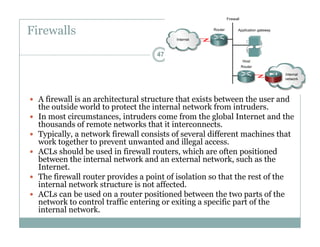
 A firewall is an architectural structure that exists between the user and
the outside world to protect the internal network from intrudersthe outside world to protect the internal network from intruders.
 In most circumstances, intruders come from the global Internet and the
thousands of remote networks that it interconnects.
 Typically, a network firewall consists of several different machines that
k h d d ill lwork together to prevent unwanted and illegal access.
 ACLs should be used in firewall routers, which are often positioned
between the internal network and an external network, such as the
Internet.
 The firewall router provides a point of isolation so that the rest of the
internal network structure is not affected.
 ACLs can be used on a router positioned between the two parts of the
network to control traffic entering or exiting a specific part of thenetwork to control traffic entering or exiting a specific part of the
internal network.
Firewalls
48
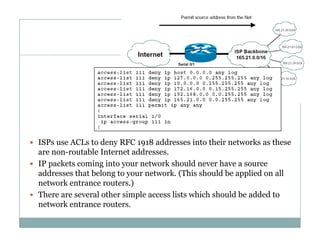
d dd i h i k h ISPs use ACLs to deny RFC 1918 addresses into their networks as these
are non-routable Internet addresses.
 IP packets coming into your network should never have a source
dd h b l k ( hi h ld b li d lladdresses that belong to your network. (This should be applied on all
network entrance routers.)
 There are several other simple access lists which should be added to
knetwork entrance routers.

Modul 5 access control list

  • 1.
    Access Control List(ACL) 1 Muhammad Zen Samsono Hadi ST MScMuhammad Zen Samsono Hadi, ST. MSc. Lab. Komunikasi Digital G d D4 Lt 1Gedung D4 Lt. 1 EEPIS-ITS
  • 2.
    Overview 2  Network administratorsmust figure out how to deny unwanted access to the network while allowing internal users appropriate access to inecessary services.  Although security tools, such as passwords, callback equipment, and physical security devices are helpful, they often lack the flexibility of b i t ffi filt i d th ifi t l t d i i t tbasic traffic filtering and the specific controls most administrators prefer.  For example, a network administrator may want to allow users access to th I t t b t t it t l t l t i t th LANthe Internet, but not permit external users telnet access into the LAN.  Routers provide basic traffic filtering capabilities, such as blocking Internet traffic, with access control lists (ACLs).  An ACL is a sequential list of permit or deny statements that apply to addresses or upper-layer protocols.  This module will introduce standard and extended ACLs as a means to control network traffic, and how ACLs are used as part of a security solution.
  • 3.
    What are ACLs? 3 An access list is a sequential series of commands or filters.q  These lists tell the router what types of packets to:  accept or  deny deny  Acceptance and denial can be based on specified conditions.  ACLs applied on the router's interfaces.
  • 4.
    What are ACLs? 4 The router examines each packet to determine whether to forward or drop it based on thewhether to forward or drop it, based on the conditions specified in the ACL.  Some ACL decision points are:  IP source address  IP destination addresses  UDP or TCP protocolsp  upper-layer (TCP/UDP) port numbers
  • 5.
    What are ACLs? 5 ACLs must be defined on a:  per protocol (IP IPX AppleTalk) per-protocol (IP, IPX, AppleTalk)  per direction (in or out)  per port (interface) basis.  ACLs control traffic in one direction at a time on an interface.  A separate ACL would need to be created for each direction, one for inbound and one for outbound traffic.  Finally every interface can have multiple protocols and directions defined.
  • 6.
    How ACLs work 6 An ACL is a group of statements that define whether packets are accepted or rejected coming into an interface or leaving an interfaceaccepted or rejected coming into an interface or leaving an interface.  ACL statements operate in sequential, logical order (top down).  If a condition match is true, the packet is permitted or denied and the rest of the ACL statements are not checked.  If all the ACL statements are unmatched, an implicit "deny any" statement is placed at the end of the list by default. (not visible)  When first learning how to create ACLs, it is a good idea to add the implicit deny at the end of ACLs to reinforce the dynamic presenceimplicit deny at the end of ACLs to reinforce the dynamic presence of the command line.
  • 7.
    Two types ofACLs 7  Standard IP ACLs  Can only filter on source IP addresses  Extended IP ACLs  Can filter on: S IP dd Source IP address  Destination IP address  Protocol (TCP, UDP)  Port Numbers (Telnet – 23, http – 80, etc.)  and other parameters
  • 8.
  • 9.
    Creating ACLs –2 Steps 9 (Standard IP)
  • 10.
    Learn by example! 10172.16.20.0/24172.16.40.0/24 e0 e0 e0.1 .1 .1 .1 .1.2 .2 s0 s0 s1 s0 RouterA RouterB RouterC 172 16 10 3/24 172 16 30 3/24 172 16 50 3/24 Administration Sales Engineering 172.16.10.2/24 172.16.10.3/24 172.16.30.2/24 172.16.30.3/24 172.16.50.2/24 172.16.50.3/24  Task:  Permit only the host 172.16.30.2 from exiting the Sales network.  Deny all other hosts on the Sales network from leaving the 172.16.30.0/24 network.172.16.30.0/24 network.
  • 11.
    Learn by example! 11172.16.20.0/24172.16.40.0/24 e0 e0 e0.1 .1 .1 .1 .1.2 .2 s0 s0 s1 s0 RouterA RouterB RouterC 172 16 10 3/24 172 16 30 3/24 172 16 50 3/24 Administration Sales Engineering 172.16.10.2/24 172.16.10.3/24 172.16.30.2/24 172.16.30.3/24 172.16.50.2/24 172.16.50.3/24 Step 1 – ACL statements Implicit deny any, which is automatically added. RouterB(config)#access-list 10 permit 172.16.30.2 Test Condition Implicit “deny any” -do not need to add this, discussed later RouterB(config)#access-list 10 deny 0.0.0.0 255.255.255.255 (Standard IP)
  • 12.
    From Cisco WebSite 12172.16.20.0/24 172.16.40.0/24 e0 e0 e0.1 .1 .1 .1 .1.2 .2 s0 s0 s1 s0 RouterA RouterB RouterC 172 16 10 3/24 172 16 30 3/24 172 16 50 3/24 Administration Sales Engineering Applying ACLs  You can define ACLs without applying them 172.16.10.2/24 172.16.10.3/24 172.16.30.2/24 172.16.30.3/24 172.16.50.2/24 172.16.50.3/24  You can define ACLs without applying them.  However, the ACLs will have no effect until they are applied to the router's interface.  It is a good practice to apply the Standard ACLs on the interface closest to the destination of the traffic and Extended ACLs on the interface closest to thedestination of the traffic and Extended ACLs on the interface closest to the source. (coming later) Defining In, Out, Source, and Destination • Out - Traffic that has already been routed by the router and is leaving the interfaceinterface • In - Traffic that is arriving on the interface and which will be routed router.
  • 13.
    Learn by example! 13172.16.20.0/24172.16.40.0/24 e0 e0 e0.1 .1 .1 .1 .1.2 .2 s0 s0 s1 s0 RouterA RouterB RouterC 172 16 10 3/24 172 16 30 3/24 172 16 50 3/24 Administration Sales Engineering 172.16.10.2/24 172.16.10.3/24 172.16.30.2/24 172.16.30.3/24 172.16.50.2/24 172.16.50.3/24 Step 2 – Apply to an interface(s) RouterB(config)#access-list 10 permit 172.16.30.2 Implicit “deny any” -do not need to add this, discussed later RouterB(config)#access-list 10 deny 0.0.0.0 255.255.255.255( g) y RouterB(config)# interface e 0 RouterB(config-if)# ip access-group 10 in( g ) p g p
  • 14.
    Learn by example! 14172.16.20.0/24172.16.40.0/24 e0 e0 e0.1 .1 .1 .1 .1.2 .2 s0 s0 s1 s0 RouterA RouterB RouterC 172 16 10 3/24 172 16 30 3/24 172 16 50 3/24 Administration Sales Engineering 172.16.10.2/24 172.16.10.3/24 172.16.30.2/24 172.16.30.3/24 172.16.50.2/24 172.16.50.3/24 Step 2 – Or the outgoing interfaces… Which is preferable and why? RouterB(config)#access-list 10 permit 172.16.30.2 Implicit “deny any” -do not need to add this, discussed later RouterB(config)#access-list 10 deny 0.0.0.0 255.255.255.255 RouterB(config)# interface s 0 RouterB(config-if)# ip access-group 10 out R t B( fi )# i t f 1RouterB(config)# interface s 1 RouterB(config-if)# ip access-group 10 out
  • 15.
    Learn by example! 15172.16.20.0/24172.16.40.0/24 e0 e0 e0.1 .1 .1 .1 .1.2 .2 s0 s0 s1 s0 RouterA RouterB RouterC 172 16 10 3/24 172 16 30 3/24 172 16 50 3/24 Administration Sales Engineering 172.16.10.2/24 172.16.10.3/24 172.16.30.2/24 172.16.30.3/24 172.16.50.2/24 172.16.50.3/24 Because of the implicit deny any, this has an adverse affect of also denying packets from Administration from reaching Engineering, and denying packets from RouterB(config)#access-list 10 permit 172.16.30.2 Implicit “deny any” -do not need to add this, discussed later R t B( fi )# li t 10 d 0 0 0 0 255 255 255 255 p g g g, y g p Engineering from reaching Administration. RouterB(config)#access-list 10 deny 0.0.0.0 255.255.255.255 RouterB(config)# interface s 0 RouterB(config-if)# ip access-group 10 outg p g p RouterB(config)# interface s 1 RouterB(config-if)# ip access-group 10 out
  • 16.
    Example 2 16172.16.20.0/24 172.16.40.0/24 e0e0 e0.1 .1 .1 .1 .1.2 .2 s0 s0 s1 s0 RouterA RouterB RouterC 172 16 10 3/24 172 16 30 3/24 172 16 50 3/24 Administration Sales Engineering 172.16.10.2/24 172.16.10.3/24 172.16.30.2/24 172.16.30.3/24 172.16.50.2/24 172.16.50.3/24  Task:  Permit only the hosts 172.16.30.2, 172.16.30.3, 172.16.30.4, 172.16.30.5 from exiting the Sales network.  Deny all other hosts on the Sales network from leaving the 172.16.30.0/24 network.172.16.30.0/24 network.
  • 17.
    Example 2 17172.16.20.0/24 172.16.40.0/24 e0e0 e0.1 .1 .1 .1 .1.2 .2 s0 s0 s1 s0 RouterA RouterB RouterC 172 16 10 3/24 172 16 30 3/24 172 16 50 3/24 Administration Sales Engineering 172.16.10.2/24 172.16.10.3/24 172.16.30.2/24 172.16.30.3/24 172.16.50.2/24 172.16.50.3/24 Once a condition is met, all other statements are ignored, so the implicit deny any only applies to not-matched packets. RouterB(config)#access-list 10 permit 172.16.30.2 RouterB(config)#access-list 10 permit 172.16.30.3 RouterB(config)#access-list 10 permit 172.16.30.4 RouterB(config)#access list 10 permit 172 16 30 5 y y y pp p RouterB(config)#access-list 10 permit 172.16.30.5 Implicit “deny any” -do not need to add this, discussed later RouterB(config)#access-list 10 deny 0.0.0.0 255.255.255.255 RouterB(config)# interface e 0 RouterB(config-if)# ip access-group 10 in
  • 18.
    Example 2 18172.16.20.0/24 172.16.40.0/24 e0e0 e0.1 .1 .1 .1 .1.2 .2 s0 s0 s1 s0 RouterA RouterB RouterC 172 16 10 3/24 172 16 30 3/24 172 16 50 3/24 Administration Sales Engineering 172.16.10.2/24 172.16.10.3/24 172.16.30.2/24 172.16.30.3/24 172.16.50.2/24 172.16.50.3/24 To remove an Access List, use the no access-list command. Removing the access-group only from from the interface leaves the access list, but they are RouterB(config)#no access-list 10 g p y , y not currently being applied. Usually, best to remove it from both. RouterB(config)# interface e 0 RouterB(config-if)# no ip access-group 10 in
  • 19.
    Example 3 19172.16.20.0/24 172.16.40.0/24 e0e0 e0.1 .1 .1 .1 .1.2 .2 s0 s0 s1 s0 RouterA RouterB RouterC 172 16 10 3/24 172 16 30 3/24 172 16 50 3/24 Administration Sales Engineering 172.16.10.2/24 172.16.10.3/24 172.16.30.2/24 172.16.30.3/24 172.16.50.2/24 172.16.50.3/24  Task:  Deny only the host 172.16.30.2 from exiting the Sales network.  Permit all other hosts on the Sales network to leave the 172.16.30.0/24 network.  Keyword “any” can be used to represent all IPy y b p Addresses.
  • 20.
    Example 3 20172.16.20.0/24 172.16.40.0/24 e0e0 e0.1 .1 .1 .1 .1.2 .2 s0 s0 s1 s0 RouterA RouterB RouterC 172 16 10 3/24 172 16 30 3/24 172 16 50 3/24 Administration Sales Engineering 172.16.10.2/24 172.16.10.3/24 172.16.30.2/24 172.16.30.3/24 172.16.50.2/24 172.16.50.3/24 Order matters! What if these two statements were reversed? Does the implicit deny any ever get a match? No, the permit any will cover all other RouterB(config)#access-list 10 deny 172.16.30.2 RouterB(config)#access-list 10 permit any p y y g , p y packets. Implicit “deny any” -do not need to add this, discussed later RouterB(config)#access-list 10 deny 0.0.0.0 255.255.255.255 R t B( fi )# i t f 0RouterB(config)# interface e 0 RouterB(config-if)# ip access-group 10 in
  • 21.
    Notes from www.cisco.com 21 Traffic coming into the router is compared to ACL entries based on the order that the entries occur in the router.order that the entries occur in the router.  New statements are added to the end of the list.  The router keeps looking until it has a match.  If no matches are found when the router reaches the end of the list, the t ffi i d i dtraffic is denied.  For this reason, you should have the frequently hit entries at the top of the list.  There is an "implied deny" for traffic that is not permitted.p y p  A single-entry ACL with only one "deny" entry has the effect of denying all traffic.  You must have at least one "permit" statement in an ACL or all traffic will be blockedbe blocked. access-list 10 permit 10.1.1.1 0.0.0.255 access-list 10 deny ip any (implicit)
  • 22.
    Time for WildcardMasks! 22 A wildcard mask address:  Tells how much of the packet’s source IP address (or d i i dd ) d h f hidestination IP address) needs to match for this condition to be true.
  • 23.
    Wildcard Masks! Test Condition 23 1010110000010000 00000000 00000000 Test Condition Test Conditon 10101100.00010000.00000000.00000000 00000000.00000000.11111111.11111111 ------------------------------------------------------------------------ 10101100.00010000.any value.any value A Match… Must Match No Match Necessary The packet y y Resulting in the bits that must match or doesn’t matter. Matching packets will look like this.  0 - “check the corresponding bit value.” 0 check the corresponding bit value.  1 - “do not check (ignore) that corresponding bit value.”
  • 24.
    Example 4 –Using Wildcard Masks 24172.16.20.0/24 172.16.40.0/24 e0 e0 e0.1 .1 .1 .1 .1.2 .2 s0 s0 s1 s0 RouterA RouterB RouterC 172 16 10 3/24 172 16 30 3/24 172 16 50 3/24 Administration Sales Engineering 172.16.10.2/24 172.16.10.3/24 172.16.30.2/24 172.16.30.3/24 172.16.50.2/24 172.16.50.3/24  Task:  Want RouterA to permit entire sales network and just the 172.16.50.2 station.  Deny all other traffic from entering Administrative network.
  • 25.
    Example 4 –Using Wildcard Masks 25172.16.20.0/24 172.16.40.0/24 e0 e0 e0.1 .1 .1 .1 .1.2 .2 s0 s0 s1 s0 RouterA RouterB RouterC 172 16 10 3/24 172 16 30 3/24 172 16 50 3/24 Administration Sales Engineering 172.16.10.2/24 172.16.10.3/24 172.16.30.2/24 172.16.30.3/24 172.16.50.2/24 172.16.50.3/24 Don’t forget to apply the access-list to an interface. RouterA(config)#access-list 11 permit 172.16.30.0 0.0.0.255 RouterA(config)#access-list 11 permit 172.16.50.2 0.0.0.0 RouterA(config)# interface e 0 RouterA(config-if)#ip access-group 11 out
  • 26.
    Practice 26 RouterB(config)#access-list 10 permit__________ ___________ Permit the following networks:Permit the following networks: Network/Subnet Mask Address/Wildcard Mask A. 172.16.0.0 255.255.0.0 B 172 16 1 0 255 255 255 0B. 172.16.1.0 255.255.255.0 C. 192.168.1.0 255.255.255.0 D. 172.16.16.0 255.255.240.0 (hmmm . . .?) E 172 16 128 0 255 255 192 0 (hmmm ?)E. 172.16.128.0 255.255.192.0 (hmmm . . .?) Permit the following hosts: Network/Subnet Mask Address/Wildcard Mask/ / A. 172.16.10.100 B. 192.168.1.100 C. All hostsC. All hosts
  • 27.
    Practice – Doyou see a relationship? 27 RouterB(config)#access-list 10 permit __________ ___________ Permit the following networks:Permit the following networks: Network/Subnet Mask Address/Wildcard Mask A. 172.16.0.0 255.255.0.0 172.16.0.0 0.0.255.255 B 172 16 1 0 255 255 255 0 172 16 1 0 0 0 0 255B. 172.16.1.0 255.255.255.0 172.16.1.0 0.0.0.255 C. 192.168.1.0 255.255.255.0 192.168.1.0 0.0.0.255 D. 172.16.32.0 255.255.240.0 172.16.32.0 0.0.15.255 E 172 16 128 0 255 255 192 0 172 16 128 0 0 63 255E. 172.16.128.0 255.255.192.0 172.16.128 0.0.63.255 Permit the following hosts: Network/Subnet Mask Address/Wildcard Mask/ / A. 172.16.10.100 172.16.10.100 0.0.0.0 B. 192.168.1.100 192.168.1.100 0.0.0.0 C. All hosts 0.0.0.0 255.255.255.255C. All hosts 0.0.0.0 255.255.255.255
  • 28.
    255.255.255.255 – Subnet= Wildcard 28 RouterB(config)#access-list 10 permit __________ ___________ Permit the following networks:Permit the following networks: 255.255.255.255. - Subnet Mask = Wildcard Mask A. 255.255.255.255 - 255.255.0.0 = 0.0.255.255 B 255 255 255 255 - 255 255 255 0 = 0 0 0 255B. 255.255.255.255 255.255.255.0 = 0.0.0.255 C. 255.255.255.255 - 255.255.255.0 = 0.0.0.255 D. 255.255.255.255 - 255.255.240.0 = 0.0.15.255 E 255 255 255 255 - 255 255 192 0 = 0 0 63 255E. 255.255.255.255 255.255.192.0 = 0.0.63.255 Permit the following hosts: (host routes have a /32 mask) 255.255.255.255. - /32 Mask = Wildcard Mask55 55 55 55 /3 A. 255.255.255.255 – 255.255.255.255 = 0.0.0.0 B. 255.255.255.255 – 255.255.255.255 = 0.0.0.0
  • 29.
    “host” option 29 RouterB(config)#access-list 10permit 192.168.1.100 0.0.0.0 RouterB(config)#access-list 10 permit host 192.168.1.100 Permit the following hosts: Network/Subnet Mask Address/Wildcard Mask A. 172.16.10.100 172.16.10.100 0.0.0.0 B. 192.168.1.100 192.168.1.100 0.0.0.0  The host option substitutes for the 0.0.0.0 mask.  This mask requires that all bits of the ACL address and the packet address match.  The host keyword precedes the IP address.  This option will match just one address. 172.16.10.100 0.0.0.0 replaced by host 172.16.10.100 192.168.1.100 0.0.0.0 replaced by host 192.168.1.100
  • 30.
  • 31.
  • 32.
    Verifying Access Lists 32 •Note: More than one interface can use the same access-list.
  • 33.
    Standard ACL 33 W illh i The full syntax of the standard ACL command is: Router(config)#access-list access-list-number {deny | We will see why in a moment. Router(config)#access list access list number {deny | permit} source [source-wildcard ] [log] The no form of this command is used to remove a standard ACL. This is h ( l i AC !)the syntax: (Deletes entire ACL!) Router(config)#no access-list access-list-number
  • 34.
  • 35.
    Extended Access Lists 35 Extended ACLs are used more often than standard ACLs because they provide a greater range of control.  Extended ACLs check the source and destination packette ded C s c ec t e sou ce a d dest at o pac et addresses as well as being able to check for protocols and port numbers.  This gives greater flexibility to describe what the ACL will check.  Packets can be permitted or denied access based on where the packet Packets can be permitted or denied access based on where the packet originated and its destination as well as protocol type and port addresses.
  • 36.
    Extended Access Lists 36 Operator and operand can also refer to ICMP Types and Codes or whatever the protocol is being checked. If th t d d If the operator and operand follow the source address it refers to the source port  If the operator and operand follow the destinationfollow the destination address it refers to the destination port.
  • 37.
    Extended Access Lists- Examples 37 port number or protocol name  The ip access-group command links an existing extended ACL toThe ip access group command links an existing extended ACL to an interface.  Remember that only one ACL per interface, per direction, per protocol is allowed. The format of the command is:  Router(config-if)#ip access-group access-list-number {in | out}
  • 38.
    Example 1 38172.16.20.0/24 172.16.40.0/24 e0e0 e0.1 .1 .1 .1 .1.2 .2 s0 s0 s1 s0 RouterA RouterB RouterC 172 16 10 3/24 172 16 30 3/24 172 16 50 3/24 Administration Sales Engineering Task 172.16.10.2/24 172.16.10.3/24 172.16.30.2/24 172.16.30.3/24 172.16.50.2/24 172.16.50.3/24 Port 80  What if we wanted Router A to permit only the Engineering workstation 172.16.50.2 to be able to access the web server in Administrative network with the IP address 172.16.10.2 and port address 80.p  All other traffic is denied.
  • 39.
    Example 1 39172.16.20.0/24 172.16.40.0/24 e0e0 e0.1 .1 .1 .1 .1.2 .2 s0 s0 s1 s0 RouterA RouterB RouterC 172 16 10 3/24 172 16 30 3/24 172 16 50 3/24 Administration Sales Engineering RouterA(config)#access-list 110 permit tcp host 172 16 50 2 172.16.10.2/24 172.16.10.3/24 172.16.30.2/24 172.16.30.3/24 172.16.50.2/24 172.16.50.3/24 Port 80 RouterA(config)#access list 110 permit tcp host 172.16.50.2 host 172.16.10.2 eq 80 RouterA(config)#inter e 0 RouterA(config-if)#ip access-group 110 out • Why is better to place the ACL on RouterA instead of RouterC?y p
  • 40.
    Notes from www.cisco.com 40 In the following example, the last entry is sufficient.  You do not need the first three entries because TCP includes Telnet, and IP includes TCP, User Datagram Protocol (UDP), and Internet Control Message Protocol (ICMP). access-list 101 permit tcp host 10.1.1.2 host 172.16.1.1 eq telnet access-list 101 permit tcp host 10.1.1.2 host 172.16.1.1 access-list 101 permit udp host 10.1.1.2 host 172.16.1.1 access-list 101 permit ip 10.1.1.0 0.0.0.255 172.16.1.0 0 0 0 2550.0.0.255
  • 41.
    Placing ACLs 41 SSource 10.0.0.0/8 Destination 172.16.0.0/16 Thegeneral rule:g  Standard ACLs do not specify destination addresses, so they should be placed as close to the destination as possible.  Put the extended ACLs as close as possible to the source of the trafficPut the extended ACLs as close as possible to the source of the traffic denied.
  • 42.
    Placing ACLs 42 SSource 10.0.0.0/8 Destination 172.16.0.0/16 If the ACLs are placed in the proper location, not only can traffic be filtered, but it can make the whole network more efficient. f ffi i i b fil d h h ld b l d h i h If traffic is going to be filtered, the ACL should be placed where it has the greatest impact on increasing efficiency.
  • 43.
    Placing ACLs –Extended Example 43 deny telnet deny ftp permit any S permit any Source 10.0.0.0/8 Destination 172.16.0.0/16  Policy is to deny telnet or FTP Router A LAN to Router D LAN.  All other traffic must be permitted.  Several approaches can accomplish this policy Several approaches can accomplish this policy.  The recommended approach uses an extended ACL specifying both source and destination addresses.
  • 44.
    Placing ACLs –Extended Example 44 deny telnet deny ftp permit any S permit any RouterA Source 10.0.0.0/8 Destination 172.16.0.0/16 access-list 101 deny tcp any 172.16.0.0 0.0.255.255 eq telnet access-list 101 deny tcp any 172.16.0.0 0.0.255.255 eq ftp access-list 101 permit ip any any  Place this extended ACL in Router A.  Then packets do not cross Router A's Ethernet do not cross the serial interfaces of interface fastethernet 0/1 access-group 101 in  Then, packets do not cross Router A s Ethernet, do not cross the serial interfaces of Routers B and C, and do not enter Router D.  Traffic with different source and destination addresses will still be permitted.
  • 45.
    Placing ACLs –Standard Example 45 S deny 10.0.0.0 permit anSource 10.0.0.0/8 Destination 172.16.0.0/16 permit any access-list 10 deny 10.0.0.0 0.255.255.255 access-list 10 permit any interface fastethernet 0/0 g 10 i RouterD  Standard ACLs do not specify destination addresses, so they should be placed as close to the destination as possible. access-group 10 in  If a standard ACL is put too close to the source, it will not only deny the intended traffic, but all other traffic to all other networks.
  • 46.
    Placing ACLs –Standard Example 46 S deny 10.0.0.0 permit anSource 10.0.0.0 permit any Destination 172.16.0.0/16 interface fastethernet 0/0 access-group 10 in access-list 10 deny 10.0.0.0 0.255.255.255 li t 10 mit RouterD  Better to use extended access lists, and place them close to the source, as this traffic will travel all the way to RouterD before being denied. access-list 10 permit any y g
  • 47.
    Firewalls 47  A firewallis an architectural structure that exists between the user and the outside world to protect the internal network from intrudersthe outside world to protect the internal network from intruders.  In most circumstances, intruders come from the global Internet and the thousands of remote networks that it interconnects.  Typically, a network firewall consists of several different machines that k h d d ill lwork together to prevent unwanted and illegal access.  ACLs should be used in firewall routers, which are often positioned between the internal network and an external network, such as the Internet.  The firewall router provides a point of isolation so that the rest of the internal network structure is not affected.  ACLs can be used on a router positioned between the two parts of the network to control traffic entering or exiting a specific part of thenetwork to control traffic entering or exiting a specific part of the internal network.
  • 48.
    Firewalls 48 d dd ih i k h ISPs use ACLs to deny RFC 1918 addresses into their networks as these are non-routable Internet addresses.  IP packets coming into your network should never have a source dd h b l k ( hi h ld b li d lladdresses that belong to your network. (This should be applied on all network entrance routers.)  There are several other simple access lists which should be added to knetwork entrance routers.