Evaluation
By Haseeb Patel
Before Draft
 I have decided to start my poster with a nice soothing
background which looks similar to a Nigerian flag. I had
decided to take this decision at first as it was very
simple and looked good for the reggae theme, I had then
decided to choose the colour dark green. I have found
this colour as I had researched the hex code for the
specific colour. I had also used white as I wanted to keep
the design plain and simple for people to understand and
interpret.
 I have then decided to include my title for my poster. I
have included the text which included bubble writing. I
wanted to get this typography at first as it made the
title stand out more and also it was very easy and simple
for people to read.
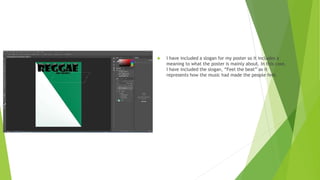
 I have included a slogan for my poster so it includes a
meaning to what the poster is mainly about. In this case,
I have included the slogan, “Feel the beat” as it
represents how the music had made the people feel.
 I had then included an instrument to describe what type
of instruments are being played inside the reggae theme
of music. These instrument include things likes drums as
well as the guitar. In my opinion I had chosen the guitar
as it looks better for design purposes. I have made the
two sets of images in an opposite way as it looked good
for the design.
 I have also added musical notes inside my first draft of a
poster as I wanted to include as many images as I
possibly could. However this was not meant to be the
case as I had copied and pasted all these images without
cutting the edges out or designing it in a way to make it
more bald and easier to clear. I did not play around with
the image when I was meant to, to make it the poster
stand out.
 Lastly for my first draft attempt of work, I have included
a picture of a lion as many reggae music's and themes
tend to have a lion in some sort of way. Some also say
that the lion is the king animal of the reggae theme
hence why I have chosen it. I was going to choose Bob
Marley as the image instead but thinking again was
making it to simple. I had to think of a way to make mhy
poster unique.
After Draft
 This is my after draft. I had got feedback from the entire
class and the main thing they have said about my poster
was that it was too bland. I have then decided to make
some arrangements starting with the background colour.
I have made it in a way so it looks like the Cameroon flag
I have also picked these sets of colours as I had
researched many posters and have recognised that these
sets of colours were included in their poster.
 I decided to then take away the music notes at the
bottom of my poster. I had done this as it did not match
with the new background of the image. I had then got
the same image of the lion and blended it in with the
background, this was done to mainly set the eye
catching piece of the poster. However my poster did
look a bit plain so I had to include something else. I had
also changed the text as I had felt that the bubble
writing did not suit the reggae theme as one student has
said to advise me.
 I had then found a different set of an image to cover up
the bottom part of my poster. I have included the
different volume size of the poster. I had changed the
colour from black and white to mixed colours to blend it
slightly with the background. I believe that with all
these different sets of images shown, I have shown a
vast majority of examples that I have shown different
sets of tools within Photoshop itself.
 This is my final product, as you can see I have missed out
on the last screenshot where I simply included a
background image and trans parented the image so that
the background that I have chosen is still shown with a
slight vast of extra detail shown.

Evaluation (1)

  • 1.
  • 2.
    Before Draft  Ihave decided to start my poster with a nice soothing background which looks similar to a Nigerian flag. I had decided to take this decision at first as it was very simple and looked good for the reggae theme, I had then decided to choose the colour dark green. I have found this colour as I had researched the hex code for the specific colour. I had also used white as I wanted to keep the design plain and simple for people to understand and interpret.
  • 3.
     I havethen decided to include my title for my poster. I have included the text which included bubble writing. I wanted to get this typography at first as it made the title stand out more and also it was very easy and simple for people to read.
  • 4.
     I haveincluded a slogan for my poster so it includes a meaning to what the poster is mainly about. In this case, I have included the slogan, “Feel the beat” as it represents how the music had made the people feel.
  • 5.
     I hadthen included an instrument to describe what type of instruments are being played inside the reggae theme of music. These instrument include things likes drums as well as the guitar. In my opinion I had chosen the guitar as it looks better for design purposes. I have made the two sets of images in an opposite way as it looked good for the design.
  • 6.
     I havealso added musical notes inside my first draft of a poster as I wanted to include as many images as I possibly could. However this was not meant to be the case as I had copied and pasted all these images without cutting the edges out or designing it in a way to make it more bald and easier to clear. I did not play around with the image when I was meant to, to make it the poster stand out.
  • 7.
     Lastly formy first draft attempt of work, I have included a picture of a lion as many reggae music's and themes tend to have a lion in some sort of way. Some also say that the lion is the king animal of the reggae theme hence why I have chosen it. I was going to choose Bob Marley as the image instead but thinking again was making it to simple. I had to think of a way to make mhy poster unique.
  • 8.
    After Draft  Thisis my after draft. I had got feedback from the entire class and the main thing they have said about my poster was that it was too bland. I have then decided to make some arrangements starting with the background colour. I have made it in a way so it looks like the Cameroon flag I have also picked these sets of colours as I had researched many posters and have recognised that these sets of colours were included in their poster.
  • 9.
     I decidedto then take away the music notes at the bottom of my poster. I had done this as it did not match with the new background of the image. I had then got the same image of the lion and blended it in with the background, this was done to mainly set the eye catching piece of the poster. However my poster did look a bit plain so I had to include something else. I had also changed the text as I had felt that the bubble writing did not suit the reggae theme as one student has said to advise me.
  • 10.
     I hadthen found a different set of an image to cover up the bottom part of my poster. I have included the different volume size of the poster. I had changed the colour from black and white to mixed colours to blend it slightly with the background. I believe that with all these different sets of images shown, I have shown a vast majority of examples that I have shown different sets of tools within Photoshop itself.
  • 11.
     This ismy final product, as you can see I have missed out on the last screenshot where I simply included a background image and trans parented the image so that the background that I have chosen is still shown with a slight vast of extra detail shown.