INDEX
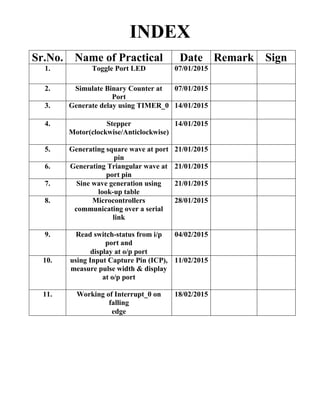
Sr.No. Name of Practical Date Remark Sign
1. Toggle Port LED 07/01/2015
2. Simulate Binary Counter at
Port
07/01/2015
3. Generate delay using TIMER_0 14/01/2015
4. Stepper
Motor(clockwise/Anticlockwise)
14/01/2015
5. Generating square wave at port
pin
21/01/2015
6. Generating Triangular wave at
port pin
21/01/2015
7. Sine wave generation using
look-up table
21/01/2015
8. Microcontrollers
communicating over a serial
link
28/01/2015
9. Read switch-status from i/p
port and
display at o/p port
04/02/2015
10. using Input Capture Pin (ICP),
measure pulse width & display
at o/p port
11/02/2015
11. Working of Interrupt_0 on
falling
edge
18/02/2015
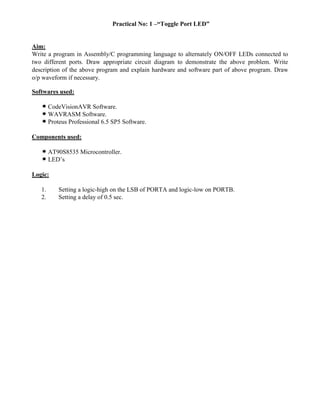
Practical No: 1 –“Toggle Port LED”
Aim:
Write a program in Assembly/C programming language to alternately ON/OFF LEDs connected to
two different ports. Draw appropriate circuit diagram to demonstrate the above problem. Write
description of the above program and explain hardware and software part of above program. Draw
o/p waveform if necessary.
Softwares used:
CodeVisionAVR Software.
WAVRASM Software.
Proteus Professional 6.5 SP5 Software.
Components used:
AT90S8535 Microcontroller.
LED’s
Logic:
1. Setting a logic-high on the LSB of PORTA and logic-low on PORTB.
2. Setting a delay of 0.5 sec.
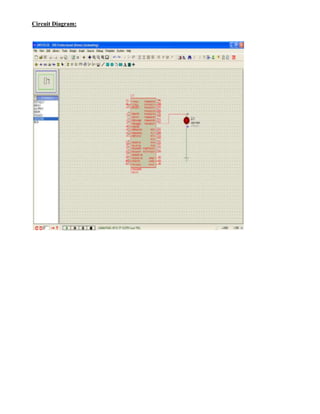
Circuit Diagram:
Program:
#include <90s8535.h>
#include <delay.h>
// Declare your global variables here
void main(void)
{
PORTA=0xff;
DDRA=0xff;
PORTB=0xff;
DDRB=0xff;
while (1)
{
PORTA=PORTA^PORTB;
PORTB=PORTB^PORTA;
};
}
Conclusion:
By using the delay function provided by the program we can turn off and on the leds on any ports of
our choice.
Practical No.2- “Simulate Binary Counter at Port”
Aim:
Write a program in Assembly/C programming language to simulate binary counter (8 bit) on LEDs
use one of the four ports of Mc of output interface to 8 LEDs (LEDs should glow one – by – one) .
Explain hardware and software part of above program.
Draw o/p waveform if necessary.
Softwares used:
CodeVisionAVR Software.
WAVRASM Software.
Proteus Professional 6.5 SP5 Software.
Components used:
AT90S8535 Microcontroller.
LED’s
Logic:
Setting a delay of 0.5 sec.
Circuit Diagram:
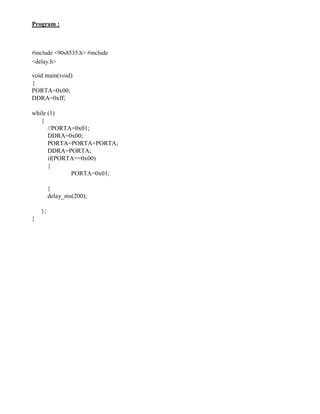
Program :
#include <90s8535.h> #include
<delay.h>
void main(void)
{
PORTA=0x00;
DDRA=0xff;
while (1)
{
//PORTA=0x01;
DDRA=0x00;
PORTA=PORTA+PORTA;
DDRA=PORTA;
if(PORTA==0x00)
{
PORTA=0x01;
}
delay_ms(200);
};
}
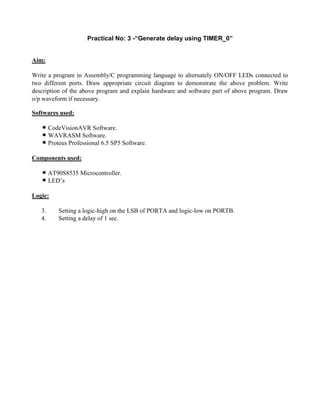
Practical No: 3 -“Generate delay using TIMER_0”
Aim:
Write a program in Assembly/C programming language to alternately ON/OFF LEDs connected to
two different ports. Draw appropriate circuit diagram to demonstrate the above problem. Write
description of the above program and explain hardware and software part of above program. Draw
o/p waveform if necessary.
Softwares used:
CodeVisionAVR Software.
WAVRASM Software.
Proteus Professional 6.5 SP5 Software.
Components used:
AT90S8535 Microcontroller.
LED’s
Logic:
3. Setting a logic-high on the LSB of PORTA and logic-low on PORTB.
4. Setting a delay of 1 sec.
Circuit Diagram:
Program:
#include <90s8535.h>
unsigned int timecount=0;
interrupt [TIM0_OVF] void time0_ovf_isr(void)
{
TCNT0=6;
if(++timecount==2)
{
PORTA=PORTA^0x80;
timecount=0;
}
}
void main(void)
{
DDRA=0x80;
TCCR0=0x02;
TCNT0=0x00;
TIMSK=0x01;
#asm("sei");
while (1)
{
};
}
Practical No: 4 “Stepper Motor” (clockwise/Anticlockwise)
Aim:
Write a program in Assembly/C programming language to alternately ON/OFF LEDs connected to
two different ports. Draw appropriate circuit diagram to demonstrate the above problem. Write
description of the above program and explain hardware and software part of above program. Draw
o/p waveform if necessary.
Softwares used:
CodeVisionAVR Software.
WAVRASM Software.
Proteus Professional 6.5 SP5 Software.
Components used:
AT90S8535 Microcontroller.
LED’s
Logic:
5. Setting a logic-high on the LSB of PORTA and logic-low on PORTB.
6. Setting a delay of 1 sec.
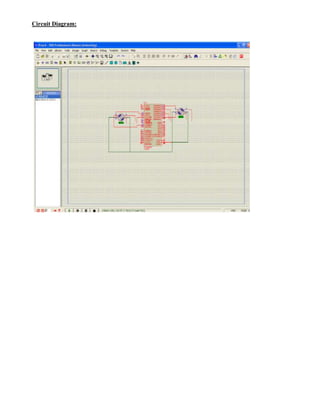
Circuit Diagram:
Program:
#include <90s8535.h> #include
<delay.h>
int count1, count2 ;
void main(void)
{
PORTA=0x01;
DDRA=0xFF;
PORTB=0x01;
DDRB=0xFF;
count1 = 0 ; count2
= 0 ;
while (1)
{
delay_ms(200) ;
PORTA = PORTA + PORTA ;
count1++ ;
if(count1 == 7)
{
count1 = 0 ;
delay_ms(200) ; PORTA
= 0x01 ;
}
delay_ms(200) ;
PORTB = PORTB + PORTB ;
count2++ ;
if(count2 == 7)
{
count2 = 0 ;
delay_ms(200) ; PORTB
= 0x01 ;
}
}
}
Practical No: 5 “Generating square wave at port pin”
Aim:
Write a program in Assembly/C programming language to alternately ON/OFF LEDs connected to
two different ports. Draw appropriate circuit diagram to demonstrate the above problem. Write
description of the above program and explain hardware and software part of above program. Draw
o/p waveform if necessary.
Softwares used:
CodeVisionAVR Software.
WAVRASM Software.
Proteus Professional 6.5 SP5 Software.
Components used:
AT90S8535 Microcontroller.
LED’s
Logic:
7. Setting a logic-high on the LSB of PORTA and logic-low on PORTB.
8. Setting a delay of 1 sec.
Circuit Diagram:
Program:
#include <90s8535.h>
unsigned int timecount=0;
interrupt[TIM0_OVF] void timeo_ovf_isr(void)
{
TCNT0 = 6;
if(++timecount==2)
{
PORTA=PORTA^0x80;
timecount=0;
}
}
void main(void)
{
DDRA = 0x80;
TCCR0 = 0x02;
TCNT0 = 0x00;
TIMSK = 0x01;
#asm("sei");
while (1)
{
};
}
Practical No: 6 “/2015”
Aim:
Write a program in Assembly/C programming language to alternately ON/OFF LEDs connected to
two different ports. Draw appropriate circuit diagram to demonstrate the above problem. Write
description of the above program and explain hardware and software part of above program. Draw
o/p waveform if necessary.
Softwares used:
CodeVisionAVR Software.
WAVRASM Software.
Proteus Professional 6.5 SP5 Software.
Components used:
AT90S8535 Microcontroller.
LED’s
Logic:
9. Setting a logic-high on the LSB of PORTA and logic-low on PORTB.
10. Setting a delay of 1 sec.
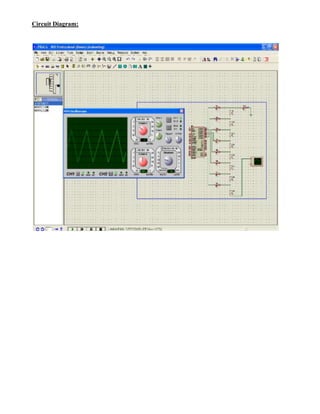
Circuit Diagram:
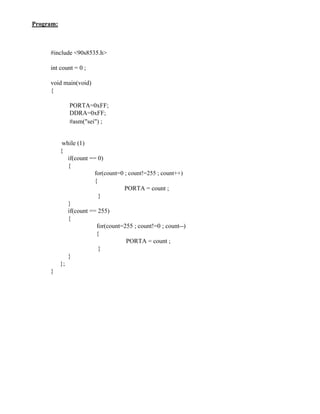
Program:
#include <90s8535.h>
int count = 0 ;
void main(void)
{
PORTA=0xFF;
DDRA=0xFF;
#asm("sei") ;
while (1)
{
if(count == 0)
{
for(count=0 ; count!=255 ; count++)
{
PORTA = count ;
}
}
if(count == 255)
{
for(count=255 ; count!=0 ; count--)
{
PORTA = count ;
}
}
};
}
Practical No: 7 “Sine wave generation using look-up table”
Aim:
Write a program in Assembly/C programming language to alternately ON/OFF LEDs connected to
two different ports. Draw appropriate circuit diagram to demonstrate the above problem. Write
description of the above program and explain hardware and software part of above program. Draw
o/p waveform if necessary.
Softwares used:
CodeVisionAVR Software.
WAVRASM Software.
Proteus Professional 6.5 SP5 Software.
Components used:
AT90S8535 Microcontroller.
LED’s
Logic:
11. Setting a logic-high on the LSB of PORTA and logic-low on PORTB.
12. Setting a delay of 1 sec.
Circuit Diagram:
Program:
#include <90s8535.h>
int count = 9, i ;
int arrValuesHigh[] = {245, 245, 246, 246, 247, 247, 248, 248, 249, 249, 250, 250, 251, 251,
252, 252, 253, 253, 254, 254, 255, 255} ;
int arrValuesLow[] = {0, 0, 0, 0, 1, 1, 2, 2, 3, 3, 4, 4, 5, 5, 6, 6, 7, 7, 8, 8, 9, 9} ;
void main(void)
{
PORTA=0xFF;
DDRA=0xFF;
while (1)
{
if(count == 9)
{
for(i=0 ; i<22 ; i++)
{
PORTA = arrValuesLow[i] ;
}
for(count=9 ; count!=245 ; count++)
{
PORTA = count ;
}
for(i=0 ; i<22 ; i++)
{
PORTA = arrValuesHigh[i] ;
}
}
if(count == 245)
{
for(i=21 ; i>=0 ; i--)
{
PORTA = arrValuesHigh[i] ;
}
for(count=245 ; count!=9 ; count--)
{
PORTA = count ;
}
for(i=21 ; i>=0 ; i--)
{
PORTA = arrValuesLow[i] ;
}
}
};}
Practical No: 8 - “Microcontrollers communicating over a serial link”
Aim:
Write a program in Assembly/C programming language to alternately ON/OFF LEDs connected to
two different ports. Draw appropriate circuit diagram to demonstrate the above problem. Write
description of the above program and explain hardware and software part of above program. Draw
o/p waveform if necessary.
Software’s used:
CodeVisionAVR Software.
WAVRASM Software.
Proteus Professional 6.5 SP5 Software.
Components used:
AT90S8535 Microcontroller.
LED’s
Logic:
13. Setting a logic-high on the LSB of PORTA and logic-low on PORTB.
14. Setting a delay of 1 sec.
Circuit Diagram:
Program:
//SENDER
#include <90s8535.h>
#include<delay.h>
unsigned int chout = 0x00;
void main(void)
{
PORTA=0x00;
DDRA=0xFF;
UBRR=0x33;
UCR=0x58;
while (1)
{
UDR = chout;
chout++;
if(chout==0xff)
chout=0x00;
delay_ms(100);
};
}
//RECEIVER
#include <90s8535.h>
#include<delay.h>
void main(void)
{
PORTA=0x00;
DDRA=0xff;
UCR=0x58;
UBRR=0x33;
while (1)
{
PORTA=UDR;
delay_ms(100);
};
}
Practical No: 9 “Read switch-status from i/p port and
display at o/p port”
Aim:
Write a program in Assembly/C programming language to alternately ON/OFF LEDs connected to
two different ports. Draw appropriate circuit diagram to demonstrate the above problem. Write
description of the above program and explain hardware and software part of above program. Draw
o/p waveform if necessary.
Software’s used:
CodeVisionAVR Software.
WAVRASM Software.
Proteus Professional 6.5 SP5 Software.
Components used:
AT90S8535 Microcontroller.
LED’s
Logic:
15. Setting a logic-high on the LSB of PORTA and logic-low on PORTB.
16. Setting a delay of 1 sec.
Circuit Diagram:
Program:
#include <90s8535.h>
#include<delay.h>
void main(void)
{
PORTA=0x00;
DDRA=0xff;
PORTD=0x00;
DDRD=0xff;
PORTB=0x00;
DDRB=0x00;
while (1)
{
PORTD = 0xff;
PORTA=PINB;
};
}
Practical No: 10 “using Input Capture Pin (ICP), measure pulse
width & display at o/p port”
Aim:
Write a program in Assembly/C programming language to alternately ON/OFF LEDs connected to
two different ports. Draw appropriate circuit diagram to demonstrate the above problem. Write
description of the above program and explain hardware and software part of above program. Draw
o/p waveform if necessary.
Software’s used:
CodeVisionAVR Software.
WAVRASM Software.
Proteus Professional 6.5 SP5 Software.
Components used:
AT90S8535 Microcontroller.
LED’s
Logic:
17. Setting a logic-high on the LSB of PORTA and logic-low on PORTB.
18. Setting a delay of 1 sec.
Circuit Diagram:
Program:
#include <90s8535.h>
#define pulse_out PORTC
#define ICP PIND.6
unsigned char ov_counter;
unsigned int rising_edge,falling_edge;
unsigned long pulse_clocks;
interrupt [TIM1_OVF]timer1_ovf_isr(void)
{
ov_counter++;
}
interrupt [TIM1_CAPT] void timer1_capt_isr(void)
{
if(ICP)
{
rising_edge=ICR1;
TCCR1B=TCCR1B &
0xBF; ov_counter=0;
}
else
{
falling_edge=ICR1;
TCCR1B=TCCR1B | 0x40;
pulse_clocks=(unsigned long)falling_edge-(unsigned
long)rising_edge+(unsigned long)ov_counter *100000;
pulse_out=pulse_clocks;
}
}
void main(void)
{
PORTA=0x00;
DDRA=0x00;
PORTB=0x00;
DDRB=0x00;
DDRC=0xff;
TCCR1B=0xc2;
TIMSK=0x24;
#asm("sei");
while (1)
{
};
}
Practical No: 11 “Working of Interrupt_0 on falling
edge”
Aim:
Write a program in Assembly/C programming language to alternately ON/OFF LEDs connected to
two different ports. Draw appropriate circuit diagram to demonstrate the above problem. Write
description of the above program and explain hardware and software part of above program. Draw
o/p waveform if necessary.
Software’s used:
CodeVisionAVR Software.
WAVRASM Software.
Proteus Professional 6.5 SP5 Software.
Components used:
AT90S8535 Microcontroller.
LED’s
Logic:
19. Setting a logic-high on the LSB of PORTA and logic-low on PORTB.
20. Setting a delay of 1 sec.
Circuit Diagram:
Program:
#include <90s8535.h>
interrupt [EXT_INT0] void ext_int0_isr(void)
{
PORTA=PORTA ^ 0x01;
}
void main(void)
{
PORTB=0x01;
DDRB=0x01;
DDRA=0x01;
GIMSK=0x40;
MCUCR=0x02;
#asm("sei");
while (1)
{
};
}

Embedded System Practical manual (1)

  • 1.
    INDEX Sr.No. Name ofPractical Date Remark Sign 1. Toggle Port LED 07/01/2015 2. Simulate Binary Counter at Port 07/01/2015 3. Generate delay using TIMER_0 14/01/2015 4. Stepper Motor(clockwise/Anticlockwise) 14/01/2015 5. Generating square wave at port pin 21/01/2015 6. Generating Triangular wave at port pin 21/01/2015 7. Sine wave generation using look-up table 21/01/2015 8. Microcontrollers communicating over a serial link 28/01/2015 9. Read switch-status from i/p port and display at o/p port 04/02/2015 10. using Input Capture Pin (ICP), measure pulse width & display at o/p port 11/02/2015 11. Working of Interrupt_0 on falling edge 18/02/2015
  • 2.
    Practical No: 1–“Toggle Port LED” Aim: Write a program in Assembly/C programming language to alternately ON/OFF LEDs connected to two different ports. Draw appropriate circuit diagram to demonstrate the above problem. Write description of the above program and explain hardware and software part of above program. Draw o/p waveform if necessary. Softwares used: CodeVisionAVR Software. WAVRASM Software. Proteus Professional 6.5 SP5 Software. Components used: AT90S8535 Microcontroller. LED’s Logic: 1. Setting a logic-high on the LSB of PORTA and logic-low on PORTB. 2. Setting a delay of 0.5 sec.
  • 3.
  • 4.
    Program: #include <90s8535.h> #include <delay.h> //Declare your global variables here void main(void) { PORTA=0xff; DDRA=0xff; PORTB=0xff; DDRB=0xff; while (1) { PORTA=PORTA^PORTB; PORTB=PORTB^PORTA; }; } Conclusion: By using the delay function provided by the program we can turn off and on the leds on any ports of our choice.
  • 5.
    Practical No.2- “SimulateBinary Counter at Port” Aim: Write a program in Assembly/C programming language to simulate binary counter (8 bit) on LEDs use one of the four ports of Mc of output interface to 8 LEDs (LEDs should glow one – by – one) . Explain hardware and software part of above program. Draw o/p waveform if necessary. Softwares used: CodeVisionAVR Software. WAVRASM Software. Proteus Professional 6.5 SP5 Software. Components used: AT90S8535 Microcontroller. LED’s Logic: Setting a delay of 0.5 sec.
  • 6.
  • 7.
    Program : #include <90s8535.h>#include <delay.h> void main(void) { PORTA=0x00; DDRA=0xff; while (1) { //PORTA=0x01; DDRA=0x00; PORTA=PORTA+PORTA; DDRA=PORTA; if(PORTA==0x00) { PORTA=0x01; } delay_ms(200); }; }
  • 8.
    Practical No: 3-“Generate delay using TIMER_0” Aim: Write a program in Assembly/C programming language to alternately ON/OFF LEDs connected to two different ports. Draw appropriate circuit diagram to demonstrate the above problem. Write description of the above program and explain hardware and software part of above program. Draw o/p waveform if necessary. Softwares used: CodeVisionAVR Software. WAVRASM Software. Proteus Professional 6.5 SP5 Software. Components used: AT90S8535 Microcontroller. LED’s Logic: 3. Setting a logic-high on the LSB of PORTA and logic-low on PORTB. 4. Setting a delay of 1 sec.
  • 9.
  • 10.
    Program: #include <90s8535.h> unsigned inttimecount=0; interrupt [TIM0_OVF] void time0_ovf_isr(void) { TCNT0=6; if(++timecount==2) { PORTA=PORTA^0x80; timecount=0; } } void main(void) { DDRA=0x80; TCCR0=0x02; TCNT0=0x00; TIMSK=0x01; #asm("sei"); while (1) { }; }
  • 11.
    Practical No: 4“Stepper Motor” (clockwise/Anticlockwise) Aim: Write a program in Assembly/C programming language to alternately ON/OFF LEDs connected to two different ports. Draw appropriate circuit diagram to demonstrate the above problem. Write description of the above program and explain hardware and software part of above program. Draw o/p waveform if necessary. Softwares used: CodeVisionAVR Software. WAVRASM Software. Proteus Professional 6.5 SP5 Software. Components used: AT90S8535 Microcontroller. LED’s Logic: 5. Setting a logic-high on the LSB of PORTA and logic-low on PORTB. 6. Setting a delay of 1 sec.
  • 12.
  • 13.
    Program: #include <90s8535.h> #include <delay.h> intcount1, count2 ; void main(void) { PORTA=0x01; DDRA=0xFF; PORTB=0x01; DDRB=0xFF; count1 = 0 ; count2 = 0 ; while (1) { delay_ms(200) ; PORTA = PORTA + PORTA ; count1++ ; if(count1 == 7) { count1 = 0 ; delay_ms(200) ; PORTA = 0x01 ; } delay_ms(200) ; PORTB = PORTB + PORTB ; count2++ ; if(count2 == 7) { count2 = 0 ; delay_ms(200) ; PORTB = 0x01 ; } } }
  • 14.
    Practical No: 5“Generating square wave at port pin” Aim: Write a program in Assembly/C programming language to alternately ON/OFF LEDs connected to two different ports. Draw appropriate circuit diagram to demonstrate the above problem. Write description of the above program and explain hardware and software part of above program. Draw o/p waveform if necessary. Softwares used: CodeVisionAVR Software. WAVRASM Software. Proteus Professional 6.5 SP5 Software. Components used: AT90S8535 Microcontroller. LED’s Logic: 7. Setting a logic-high on the LSB of PORTA and logic-low on PORTB. 8. Setting a delay of 1 sec.
  • 15.
  • 16.
    Program: #include <90s8535.h> unsigned inttimecount=0; interrupt[TIM0_OVF] void timeo_ovf_isr(void) { TCNT0 = 6; if(++timecount==2) { PORTA=PORTA^0x80; timecount=0; } } void main(void) { DDRA = 0x80; TCCR0 = 0x02; TCNT0 = 0x00; TIMSK = 0x01; #asm("sei"); while (1) { }; }
  • 17.
    Practical No: 6“/2015” Aim: Write a program in Assembly/C programming language to alternately ON/OFF LEDs connected to two different ports. Draw appropriate circuit diagram to demonstrate the above problem. Write description of the above program and explain hardware and software part of above program. Draw o/p waveform if necessary. Softwares used: CodeVisionAVR Software. WAVRASM Software. Proteus Professional 6.5 SP5 Software. Components used: AT90S8535 Microcontroller. LED’s Logic: 9. Setting a logic-high on the LSB of PORTA and logic-low on PORTB. 10. Setting a delay of 1 sec.
  • 18.
  • 20.
    Program: #include <90s8535.h> int count= 0 ; void main(void) { PORTA=0xFF; DDRA=0xFF; #asm("sei") ; while (1) { if(count == 0) { for(count=0 ; count!=255 ; count++) { PORTA = count ; } } if(count == 255) { for(count=255 ; count!=0 ; count--) { PORTA = count ; } } }; }
  • 21.
    Practical No: 7“Sine wave generation using look-up table” Aim: Write a program in Assembly/C programming language to alternately ON/OFF LEDs connected to two different ports. Draw appropriate circuit diagram to demonstrate the above problem. Write description of the above program and explain hardware and software part of above program. Draw o/p waveform if necessary. Softwares used: CodeVisionAVR Software. WAVRASM Software. Proteus Professional 6.5 SP5 Software. Components used: AT90S8535 Microcontroller. LED’s Logic: 11. Setting a logic-high on the LSB of PORTA and logic-low on PORTB. 12. Setting a delay of 1 sec.
  • 22.
  • 23.
    Program: #include <90s8535.h> int count= 9, i ; int arrValuesHigh[] = {245, 245, 246, 246, 247, 247, 248, 248, 249, 249, 250, 250, 251, 251, 252, 252, 253, 253, 254, 254, 255, 255} ; int arrValuesLow[] = {0, 0, 0, 0, 1, 1, 2, 2, 3, 3, 4, 4, 5, 5, 6, 6, 7, 7, 8, 8, 9, 9} ; void main(void) { PORTA=0xFF; DDRA=0xFF; while (1) { if(count == 9) { for(i=0 ; i<22 ; i++) { PORTA = arrValuesLow[i] ; } for(count=9 ; count!=245 ; count++) { PORTA = count ; } for(i=0 ; i<22 ; i++) { PORTA = arrValuesHigh[i] ; } } if(count == 245) { for(i=21 ; i>=0 ; i--) { PORTA = arrValuesHigh[i] ; } for(count=245 ; count!=9 ; count--) { PORTA = count ; } for(i=21 ; i>=0 ; i--) { PORTA = arrValuesLow[i] ; } } };}
  • 24.
    Practical No: 8- “Microcontrollers communicating over a serial link” Aim: Write a program in Assembly/C programming language to alternately ON/OFF LEDs connected to two different ports. Draw appropriate circuit diagram to demonstrate the above problem. Write description of the above program and explain hardware and software part of above program. Draw o/p waveform if necessary. Software’s used: CodeVisionAVR Software. WAVRASM Software. Proteus Professional 6.5 SP5 Software. Components used: AT90S8535 Microcontroller. LED’s Logic: 13. Setting a logic-high on the LSB of PORTA and logic-low on PORTB. 14. Setting a delay of 1 sec.
  • 25.
  • 27.
    Program: //SENDER #include <90s8535.h> #include<delay.h> unsigned intchout = 0x00; void main(void) { PORTA=0x00; DDRA=0xFF; UBRR=0x33; UCR=0x58; while (1) { UDR = chout; chout++; if(chout==0xff) chout=0x00; delay_ms(100); }; } //RECEIVER #include <90s8535.h> #include<delay.h> void main(void) {
  • 28.
  • 29.
    Practical No: 9“Read switch-status from i/p port and display at o/p port” Aim: Write a program in Assembly/C programming language to alternately ON/OFF LEDs connected to two different ports. Draw appropriate circuit diagram to demonstrate the above problem. Write description of the above program and explain hardware and software part of above program. Draw o/p waveform if necessary. Software’s used: CodeVisionAVR Software. WAVRASM Software. Proteus Professional 6.5 SP5 Software. Components used: AT90S8535 Microcontroller. LED’s Logic: 15. Setting a logic-high on the LSB of PORTA and logic-low on PORTB. 16. Setting a delay of 1 sec.
  • 30.
  • 31.
  • 32.
    Practical No: 10“using Input Capture Pin (ICP), measure pulse width & display at o/p port” Aim: Write a program in Assembly/C programming language to alternately ON/OFF LEDs connected to two different ports. Draw appropriate circuit diagram to demonstrate the above problem. Write description of the above program and explain hardware and software part of above program. Draw o/p waveform if necessary. Software’s used: CodeVisionAVR Software. WAVRASM Software. Proteus Professional 6.5 SP5 Software. Components used: AT90S8535 Microcontroller. LED’s Logic: 17. Setting a logic-high on the LSB of PORTA and logic-low on PORTB. 18. Setting a delay of 1 sec.
  • 33.
  • 34.
    Program: #include <90s8535.h> #define pulse_outPORTC #define ICP PIND.6 unsigned char ov_counter; unsigned int rising_edge,falling_edge; unsigned long pulse_clocks; interrupt [TIM1_OVF]timer1_ovf_isr(void) { ov_counter++; } interrupt [TIM1_CAPT] void timer1_capt_isr(void) { if(ICP) { rising_edge=ICR1; TCCR1B=TCCR1B & 0xBF; ov_counter=0; } else { falling_edge=ICR1; TCCR1B=TCCR1B | 0x40; pulse_clocks=(unsigned long)falling_edge-(unsigned long)rising_edge+(unsigned long)ov_counter *100000; pulse_out=pulse_clocks; } } void main(void) { PORTA=0x00; DDRA=0x00; PORTB=0x00; DDRB=0x00; DDRC=0xff; TCCR1B=0xc2;
  • 35.
  • 36.
    Practical No: 11“Working of Interrupt_0 on falling edge” Aim: Write a program in Assembly/C programming language to alternately ON/OFF LEDs connected to two different ports. Draw appropriate circuit diagram to demonstrate the above problem. Write description of the above program and explain hardware and software part of above program. Draw o/p waveform if necessary. Software’s used: CodeVisionAVR Software. WAVRASM Software. Proteus Professional 6.5 SP5 Software. Components used: AT90S8535 Microcontroller. LED’s Logic: 19. Setting a logic-high on the LSB of PORTA and logic-low on PORTB. 20. Setting a delay of 1 sec.
  • 37.
  • 38.
    Program: #include <90s8535.h> interrupt [EXT_INT0]void ext_int0_isr(void) { PORTA=PORTA ^ 0x01; } void main(void) { PORTB=0x01; DDRB=0x01; DDRA=0x01; GIMSK=0x40; MCUCR=0x02; #asm("sei"); while (1) { }; }