DHT11
www.researchdesignlab.com Page 1
DIGITAL OUTPUT TEMPERATURE
AND HUMIDITY SENSOR
DHT11
www.researchdesignlab.com Page 2
Table of Contents
OVERVIEW.....................................................................................................................................................3
FEATURES......................................................................................................................................................3
Timing diagram .............................................................................................................................................5
TECHNICAL SPECIFICATION...........................................................................................................................7
OPERATING SPECIFICATION:.........................................................................................................................7
ELECTRICAL CHARACTERISTIC .......................................................................................................................8
INTERFACE.....................................................................................................................................................8
1. WITH ARDUINO.................................................................................................................................8
Related products.........................................................................................................................................14
DHT11
www.researchdesignlab.com Page 3
OVERVIEW
The DHT11 Temperature & Humidity Sensor features a temperature & humidity sensor complex
with calibrated digital signal output. By using the exclusive digital-signal-acquisition technique and
temperature & humidity sensing technology, it ensures high reliability and excellent long term stability.
This sensor include a resistive type humidity measurement component and a NTC temperature
measurement component, and connect to a high performance 8-bit microcontroller, offering excellent
quality, fast response, anti-interface ability and cost effectiveness.
It’s of small size, low power consumption and up-to 20 meter signal transmission makes it a best
choice for various applications.
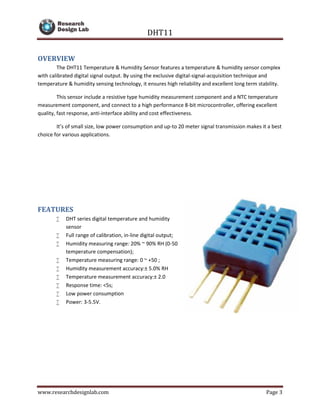
FEATURES
 DHT series digital temperature and humidity
sensor
 Full range of calibration, in-line digital output;
 Humidity measuring range: 20% ~ 90% RH (0-50
temperature compensation);
 Temperature measuring range: 0 ~ +50 ;
 Humidity measurement accuracy:± 5.0% RH
 Temperature measurement accuracy:± 2.0
 Response time: <5s;
 Low power consumption
 Power: 3-5.5V.
DHT11
www.researchdesignlab.com Page 4
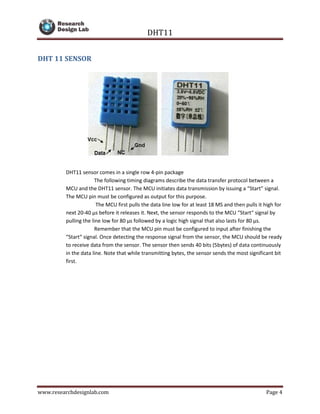
DHT 11 SENSOR
DHT11 sensor comes in a single row 4-pin package
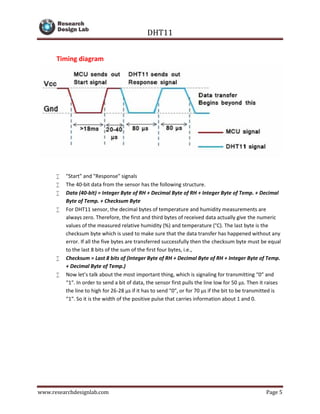
The following timing diagrams describe the data transfer protocol between a
MCU and the DHT11 sensor. The MCU initiates data transmission by issuing a “Start” signal.
The MCU pin must be configured as output for this purpose.
The MCU first pulls the data line low for at least 18 MS and then pulls it high for
next 20-40 μs before it releases it. Next, the sensor responds to the MCU “Start“ signal by
pulling the line low for 80 μs followed by a logic high signal that also lasts for 80 μs.
Remember that the MCU pin must be configured to input after finishing the
“Start“ signal. Once detecting the response signal from the sensor, the MCU should be ready
to receive data from the sensor. The sensor then sends 40 bits (5bytes) of data continuously
in the data line. Note that while transmitting bytes, the sensor sends the most significant bit
first.
DHT11
www.researchdesignlab.com Page 5
Timing diagram
 "Start" and "Response" signals
 The 40-bit data from the sensor has the following structure.
 Data (40-bit) = Integer Byte of RH + Decimal Byte of RH + Integer Byte of Temp. + Decimal
Byte of Temp. + Checksum Byte
 For DHT11 sensor, the decimal bytes of temperature and humidity measurements are
always zero. Therefore, the first and third bytes of received data actually give the numeric
values of the measured relative humidity (%) and temperature (°C). The last byte is the
checksum byte which is used to make sure that the data transfer has happened without any
error. If all the five bytes are transferred successfully then the checksum byte must be equal
to the last 8 bits of the sum of the first four bytes, i.e.,
 Checksum = Last 8 bits of (Integer Byte of RH + Decimal Byte of RH + Integer Byte of Temp.
+ Decimal Byte of Temp.)
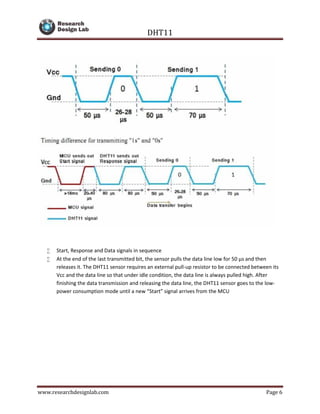
 Now let’s talk about the most important thing, which is signaling for transmitting “0″ and
“1″. In order to send a bit of data, the sensor first pulls the line low for 50 μs. Then it raises
the line to high for 26-28 μs if it has to send “0″, or for 70 μs if the bit to be transmitted is
“1″. So it is the width of the positive pulse that carries information about 1 and 0.
DHT11
www.researchdesignlab.com Page 6
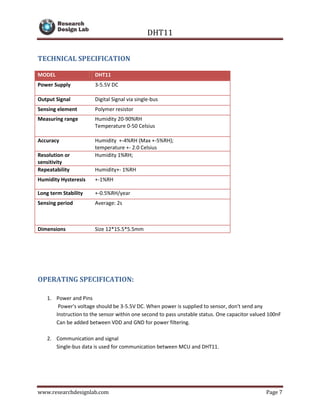
 Start, Response and Data signals in sequence
 At the end of the last transmitted bit, the sensor pulls the data line low for 50 μs and then
releases it. The DHT11 sensor requires an external pull-up resistor to be connected between its
Vcc and the data line so that under idle condition, the data line is always pulled high. After
finishing the data transmission and releasing the data line, the DHT11 sensor goes to the low-
power consumption mode until a new “Start” signal arrives from the MCU
DHT11
www.researchdesignlab.com Page 7
TECHNICAL SPECIFICATION
OPERATING SPECIFICATION:
1. Power and Pins
Power's voltage should be 3-5.5V DC. When power is supplied to sensor, don't send any
Instruction to the sensor within one second to pass unstable status. One capacitor valued 100nF
Can be added between VDD and GND for power filtering.
2. Communication and signal
Single-bus data is used for communication between MCU and DHT11.
MODEL DHT11
Power Supply 3-5.5V DC
Output Signal Digital Signal via single-bus
Sensing element Polymer resistor
Measuring range Humidity 20-90%RH
Temperature 0-50 Celsius
Accuracy Humidity +-4%RH (Max +-5%RH);
temperature +- 2.0 Celsius
Resolution or
sensitivity
Humidity 1%RH;
Repeatability Humidity+- 1%RH
Humidity Hysteresis +-1%RH
Long term Stability +-0.5%RH/year
Sensing period Average: 2s
Dimensions Size 12*15.5*5.5mm
DHT11
www.researchdesignlab.com Page 8
ELECTRICAL CHARACTERISTIC
item condition min typical max unit
power supply DC 3 5 5.5 v
current supply measuring 0.5 2.5 mA
stand-by 100 NULL 150 uA
Average 0.2 NULL 1 mA
INTERFACE
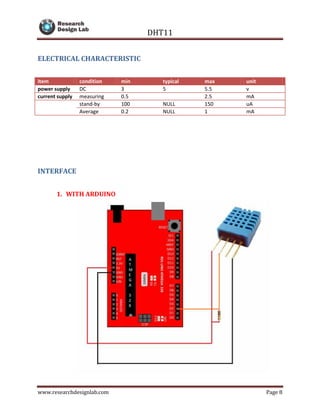
1. WITH ARDUINO
DHT11
www.researchdesignlab.com Page 9
CODE
/* DHT library
*/
#include "DHT.h"
DHT::DHT(uint8_t pin, uint8_t type) {
_pin = pin;
_type = type;
firstreading = true;
}
void DHT::begin(void) {
// set up the pins!
pinMode(_pin, INPUT);
digitalWrite(_pin, HIGH);
_lastreadtime = 0;
}
//boolean S == Scale. True == Farenheit; False == Celcius
float DHT::readTemperature(bool S) {
float f;
if (read()) {
switch (_type) {
case DHT11:
f = data[2];
if(S)
f = convertCtoF(f);
return f;
case DHT22:
case DHT21:
f = data[2] & 0x7F;
f *= 256;
f += data[3];
f /= 10;
if (data[2] & 0x80)
f *= -1;
if(S)
f = convertCtoF(f);
return f;
}
}
DHT11
www.researchdesignlab.com Page 10
Serial.print("Read fail");
return NAN;
}
float DHT::convertCtoF(float c) {
return c * 9 / 5 + 32;
}
float DHT::readHumidity(void) {
float f;
if (read()) {
switch (_type) {
case DHT11:
f = data[0];
return f;
case DHT22:
case DHT21:
f = data[0];
f *= 256;
f += data[1];
f /= 10;
return f;
}
}
Serial.print("Read fail");
return NAN;
}
boolean DHT::read(void) {
uint8_t laststate = HIGH;
uint8_t counter = 0;
uint8_t j = 0, i;
unsigned long currenttime;
// pull the pin high and wait 250 milliseconds
digitalWrite(_pin, HIGH);
delay(250);
currenttime = millis();
if (currenttime < _lastreadtime) {
// ie there was a rollover
_lastreadtime = 0;
}
if (!firstreading && ((currenttime - _lastreadtime) < 2000)) {
return true; // return last correct measurement
//delay(2000 - (currenttime - _lastreadtime));
}
firstreading = false;
DHT11
www.researchdesignlab.com Page 11
/*
Serial.print("Currtime: "); Serial.print(currenttime);
Serial.print(" Lasttime: "); Serial.print(_lastreadtime);
*/
_lastreadtime = millis();
data[0] = data[1] = data[2] = data[3] = data[4] = 0;
// now pull it low for ~20 milliseconds
pinMode(_pin, OUTPUT);
digitalWrite(_pin, LOW);
delay(20);
cli();
digitalWrite(_pin, HIGH);
delayMicroseconds(40);
pinMode(_pin, INPUT);
// read in timings
for ( i=0; i< MAXTIMINGS; i++) {
counter = 0;
while (digitalRead(_pin) == laststate) {
counter++;
delayMicroseconds(1);
if (counter == 255) {
break;
}
}
laststate = digitalRead(_pin);
if (counter == 255) break;
// ignore first 3 transitions
if ((i >= 4) && (i%2 == 0)) {
// shove each bit into the storage bytes
data[j/8] <<= 1;
if (counter > 6)
data[j/8] |= 1;
j++;
}
}
sei();
/*
Serial.println(j, DEC);
Serial.print(data[0], HEX); Serial.print(", ");
Serial.print(data[1], HEX); Serial.print(", ");
Serial.print(data[2], HEX); Serial.print(", ");
DHT11
www.researchdesignlab.com Page 12
Serial.print(data[3], HEX); Serial.print(", ");
Serial.print(data[4], HEX); Serial.print(" =? ");
Serial.println(data[0] + data[1] + data[2] + data[3], HEX);
*/
// check we read 40 bits and that the checksum matches
if ((j >= 40) &&
(data[4] == ((data[0] + data[1] + data[2] + data[3]) & 0xFF)) )
{
return true;
}
return false;
}
LIBRARY
This is the library function that need to be added to the library
#if ARDUINO >= 100
#include "Arduino.h"
#else
#include "WProgram.h"
#endif
/* DHT library
*/
// how many timing transitions we need to keep track of. 2 * number
bits + extra
#define MAXTIMINGS 85
#define DHT11 11
#define DHT22 22
#define DHT21 21
#define AM2301 21
class DHT {
private:
uint8_t data[6];
uint8_t _pin, _type;
boolean read(void);
unsigned long _lastreadtime;
boolean firstreading;
DHT11
www.researchdesignlab.com Page 13
public:
DHT(uint8_t pin, uint8_t type);
void begin(void);
float readTemperature(bool S=false);
float convertCtoF(float);
float readHumidity(void);
};
DHT11
www.researchdesignlab.com Page 14
Related products
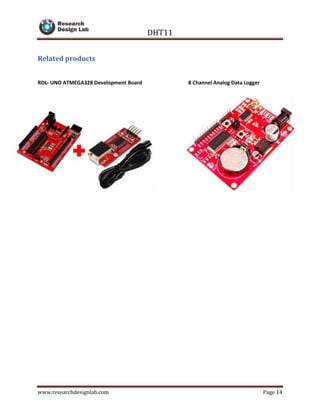
RDL- UNO ATMEGA328 Development Board 8 Channel Analog Data Logger

DHT11 Digital Temperature and Humidity Sensor

  • 1.
    DHT11 www.researchdesignlab.com Page 1 DIGITALOUTPUT TEMPERATURE AND HUMIDITY SENSOR
  • 2.
    DHT11 www.researchdesignlab.com Page 2 Tableof Contents OVERVIEW.....................................................................................................................................................3 FEATURES......................................................................................................................................................3 Timing diagram .............................................................................................................................................5 TECHNICAL SPECIFICATION...........................................................................................................................7 OPERATING SPECIFICATION:.........................................................................................................................7 ELECTRICAL CHARACTERISTIC .......................................................................................................................8 INTERFACE.....................................................................................................................................................8 1. WITH ARDUINO.................................................................................................................................8 Related products.........................................................................................................................................14
  • 3.
    DHT11 www.researchdesignlab.com Page 3 OVERVIEW TheDHT11 Temperature & Humidity Sensor features a temperature & humidity sensor complex with calibrated digital signal output. By using the exclusive digital-signal-acquisition technique and temperature & humidity sensing technology, it ensures high reliability and excellent long term stability. This sensor include a resistive type humidity measurement component and a NTC temperature measurement component, and connect to a high performance 8-bit microcontroller, offering excellent quality, fast response, anti-interface ability and cost effectiveness. It’s of small size, low power consumption and up-to 20 meter signal transmission makes it a best choice for various applications. FEATURES  DHT series digital temperature and humidity sensor  Full range of calibration, in-line digital output;  Humidity measuring range: 20% ~ 90% RH (0-50 temperature compensation);  Temperature measuring range: 0 ~ +50 ;  Humidity measurement accuracy:± 5.0% RH  Temperature measurement accuracy:± 2.0  Response time: <5s;  Low power consumption  Power: 3-5.5V.
  • 4.
    DHT11 www.researchdesignlab.com Page 4 DHT11 SENSOR DHT11 sensor comes in a single row 4-pin package The following timing diagrams describe the data transfer protocol between a MCU and the DHT11 sensor. The MCU initiates data transmission by issuing a “Start” signal. The MCU pin must be configured as output for this purpose. The MCU first pulls the data line low for at least 18 MS and then pulls it high for next 20-40 μs before it releases it. Next, the sensor responds to the MCU “Start“ signal by pulling the line low for 80 μs followed by a logic high signal that also lasts for 80 μs. Remember that the MCU pin must be configured to input after finishing the “Start“ signal. Once detecting the response signal from the sensor, the MCU should be ready to receive data from the sensor. The sensor then sends 40 bits (5bytes) of data continuously in the data line. Note that while transmitting bytes, the sensor sends the most significant bit first.
  • 5.
    DHT11 www.researchdesignlab.com Page 5 Timingdiagram  "Start" and "Response" signals  The 40-bit data from the sensor has the following structure.  Data (40-bit) = Integer Byte of RH + Decimal Byte of RH + Integer Byte of Temp. + Decimal Byte of Temp. + Checksum Byte  For DHT11 sensor, the decimal bytes of temperature and humidity measurements are always zero. Therefore, the first and third bytes of received data actually give the numeric values of the measured relative humidity (%) and temperature (°C). The last byte is the checksum byte which is used to make sure that the data transfer has happened without any error. If all the five bytes are transferred successfully then the checksum byte must be equal to the last 8 bits of the sum of the first four bytes, i.e.,  Checksum = Last 8 bits of (Integer Byte of RH + Decimal Byte of RH + Integer Byte of Temp. + Decimal Byte of Temp.)  Now let’s talk about the most important thing, which is signaling for transmitting “0″ and “1″. In order to send a bit of data, the sensor first pulls the line low for 50 μs. Then it raises the line to high for 26-28 μs if it has to send “0″, or for 70 μs if the bit to be transmitted is “1″. So it is the width of the positive pulse that carries information about 1 and 0.
  • 6.
    DHT11 www.researchdesignlab.com Page 6 Start, Response and Data signals in sequence  At the end of the last transmitted bit, the sensor pulls the data line low for 50 μs and then releases it. The DHT11 sensor requires an external pull-up resistor to be connected between its Vcc and the data line so that under idle condition, the data line is always pulled high. After finishing the data transmission and releasing the data line, the DHT11 sensor goes to the low- power consumption mode until a new “Start” signal arrives from the MCU
  • 7.
    DHT11 www.researchdesignlab.com Page 7 TECHNICALSPECIFICATION OPERATING SPECIFICATION: 1. Power and Pins Power's voltage should be 3-5.5V DC. When power is supplied to sensor, don't send any Instruction to the sensor within one second to pass unstable status. One capacitor valued 100nF Can be added between VDD and GND for power filtering. 2. Communication and signal Single-bus data is used for communication between MCU and DHT11. MODEL DHT11 Power Supply 3-5.5V DC Output Signal Digital Signal via single-bus Sensing element Polymer resistor Measuring range Humidity 20-90%RH Temperature 0-50 Celsius Accuracy Humidity +-4%RH (Max +-5%RH); temperature +- 2.0 Celsius Resolution or sensitivity Humidity 1%RH; Repeatability Humidity+- 1%RH Humidity Hysteresis +-1%RH Long term Stability +-0.5%RH/year Sensing period Average: 2s Dimensions Size 12*15.5*5.5mm
  • 8.
    DHT11 www.researchdesignlab.com Page 8 ELECTRICALCHARACTERISTIC item condition min typical max unit power supply DC 3 5 5.5 v current supply measuring 0.5 2.5 mA stand-by 100 NULL 150 uA Average 0.2 NULL 1 mA INTERFACE 1. WITH ARDUINO
  • 9.
    DHT11 www.researchdesignlab.com Page 9 CODE /*DHT library */ #include "DHT.h" DHT::DHT(uint8_t pin, uint8_t type) { _pin = pin; _type = type; firstreading = true; } void DHT::begin(void) { // set up the pins! pinMode(_pin, INPUT); digitalWrite(_pin, HIGH); _lastreadtime = 0; } //boolean S == Scale. True == Farenheit; False == Celcius float DHT::readTemperature(bool S) { float f; if (read()) { switch (_type) { case DHT11: f = data[2]; if(S) f = convertCtoF(f); return f; case DHT22: case DHT21: f = data[2] & 0x7F; f *= 256; f += data[3]; f /= 10; if (data[2] & 0x80) f *= -1; if(S) f = convertCtoF(f); return f; } }
  • 10.
    DHT11 www.researchdesignlab.com Page 10 Serial.print("Readfail"); return NAN; } float DHT::convertCtoF(float c) { return c * 9 / 5 + 32; } float DHT::readHumidity(void) { float f; if (read()) { switch (_type) { case DHT11: f = data[0]; return f; case DHT22: case DHT21: f = data[0]; f *= 256; f += data[1]; f /= 10; return f; } } Serial.print("Read fail"); return NAN; } boolean DHT::read(void) { uint8_t laststate = HIGH; uint8_t counter = 0; uint8_t j = 0, i; unsigned long currenttime; // pull the pin high and wait 250 milliseconds digitalWrite(_pin, HIGH); delay(250); currenttime = millis(); if (currenttime < _lastreadtime) { // ie there was a rollover _lastreadtime = 0; } if (!firstreading && ((currenttime - _lastreadtime) < 2000)) { return true; // return last correct measurement //delay(2000 - (currenttime - _lastreadtime)); } firstreading = false;
  • 11.
    DHT11 www.researchdesignlab.com Page 11 /* Serial.print("Currtime:"); Serial.print(currenttime); Serial.print(" Lasttime: "); Serial.print(_lastreadtime); */ _lastreadtime = millis(); data[0] = data[1] = data[2] = data[3] = data[4] = 0; // now pull it low for ~20 milliseconds pinMode(_pin, OUTPUT); digitalWrite(_pin, LOW); delay(20); cli(); digitalWrite(_pin, HIGH); delayMicroseconds(40); pinMode(_pin, INPUT); // read in timings for ( i=0; i< MAXTIMINGS; i++) { counter = 0; while (digitalRead(_pin) == laststate) { counter++; delayMicroseconds(1); if (counter == 255) { break; } } laststate = digitalRead(_pin); if (counter == 255) break; // ignore first 3 transitions if ((i >= 4) && (i%2 == 0)) { // shove each bit into the storage bytes data[j/8] <<= 1; if (counter > 6) data[j/8] |= 1; j++; } } sei(); /* Serial.println(j, DEC); Serial.print(data[0], HEX); Serial.print(", "); Serial.print(data[1], HEX); Serial.print(", "); Serial.print(data[2], HEX); Serial.print(", ");
  • 12.
    DHT11 www.researchdesignlab.com Page 12 Serial.print(data[3],HEX); Serial.print(", "); Serial.print(data[4], HEX); Serial.print(" =? "); Serial.println(data[0] + data[1] + data[2] + data[3], HEX); */ // check we read 40 bits and that the checksum matches if ((j >= 40) && (data[4] == ((data[0] + data[1] + data[2] + data[3]) & 0xFF)) ) { return true; } return false; } LIBRARY This is the library function that need to be added to the library #if ARDUINO >= 100 #include "Arduino.h" #else #include "WProgram.h" #endif /* DHT library */ // how many timing transitions we need to keep track of. 2 * number bits + extra #define MAXTIMINGS 85 #define DHT11 11 #define DHT22 22 #define DHT21 21 #define AM2301 21 class DHT { private: uint8_t data[6]; uint8_t _pin, _type; boolean read(void); unsigned long _lastreadtime; boolean firstreading;
  • 13.
    DHT11 www.researchdesignlab.com Page 13 public: DHT(uint8_tpin, uint8_t type); void begin(void); float readTemperature(bool S=false); float convertCtoF(float); float readHumidity(void); };
  • 14.
    DHT11 www.researchdesignlab.com Page 14 Relatedproducts RDL- UNO ATMEGA328 Development Board 8 Channel Analog Data Logger