Interfacing keypad
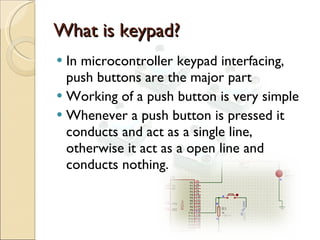
What is keypad? In microcontroller keypad interfacing, push buttons are the major part Working of a push button is very simple Whenever a push button is pressed it conducts and act as a single line, otherwise it act as a open line and conducts nothing.
Scanning of a keypad There are lot of ways in scanning the key pad But in all ways the keypad will be consider as a matrix only. Rows and columns will be separated and accessed individually.
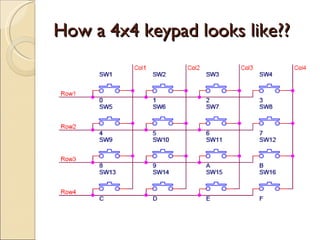
How a 4x4 keypad looks like??
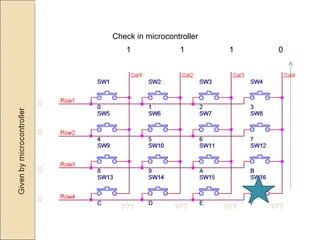
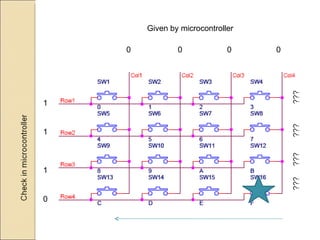
Scanning concept 1 Ground all column pins by microcontroller programming Check the row pins for which row the button is pressed Now invert the above operation Ground all row pins and check the columns for which column the button is pressed  Since we have both row and column location it is easy to pin point the location of the key pressed.
0 0 0 0 Check in microcontroller ???  ???  ???  ??? 1  1  1  0
1 1 1 0 Given by microcontroller 0  0  0  0
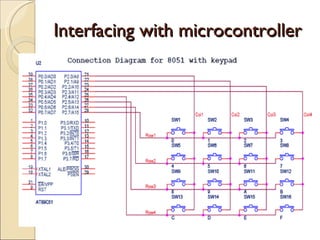
Interfacing with microcontroller
Scanning concept 2 Consider a port and connect all the pins to keypad Similar to the concept 1 in this concept also the keypad is going to be in rows and columns  But unlike grounding all pins in rows and columns, here we are going to ground single pin in row and check every column pin to zero It is a lengthy concept but simple one compare to the previous concept..
Assignments  Display the key pressed in LCD Define a calculator which can do addition and subtraction operation

Interfacing keypad

  • 1.
  • 2.
    What is keypad?In microcontroller keypad interfacing, push buttons are the major part Working of a push button is very simple Whenever a push button is pressed it conducts and act as a single line, otherwise it act as a open line and conducts nothing.
  • 3.
    Scanning of akeypad There are lot of ways in scanning the key pad But in all ways the keypad will be consider as a matrix only. Rows and columns will be separated and accessed individually.
  • 4.
    How a 4x4keypad looks like??
  • 5.
    Scanning concept 1Ground all column pins by microcontroller programming Check the row pins for which row the button is pressed Now invert the above operation Ground all row pins and check the columns for which column the button is pressed Since we have both row and column location it is easy to pin point the location of the key pressed.
  • 6.
    0 0 00 Check in microcontroller ??? ??? ??? ??? 1 1 1 0
  • 7.
    1 1 10 Given by microcontroller 0 0 0 0
  • 8.
  • 9.
    Scanning concept 2Consider a port and connect all the pins to keypad Similar to the concept 1 in this concept also the keypad is going to be in rows and columns But unlike grounding all pins in rows and columns, here we are going to ground single pin in row and check every column pin to zero It is a lengthy concept but simple one compare to the previous concept..
  • 10.
    Assignments Displaythe key pressed in LCD Define a calculator which can do addition and subtraction operation