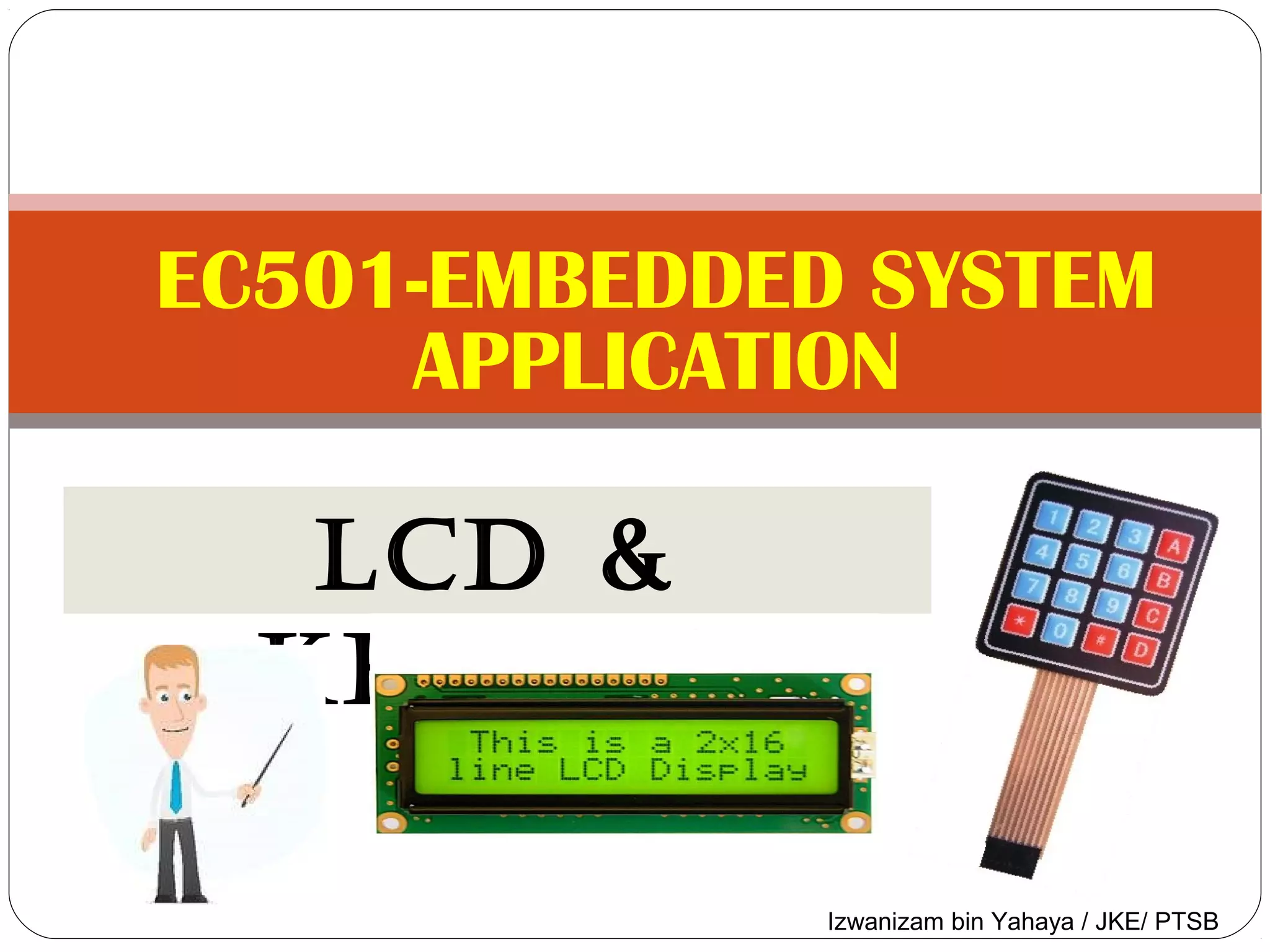
EC501-EMBEDDED SYSTEM 
APPLICATION 
LCD & 
KEYPAD 
Izwanizam bin Yahaya / JKE/ PTSB
OBJECTIVES 
1. Describe LCDs mode of operation and to interface 
with PIC Microcontroller 
2. Construct a program code to send commands and 
data to LCD 
3. Describe 4 x 4 Matrix keypad basic of operation 
4. Illustrate key press detection and key identification 
mechanism 
5. Apply program code to Write keypad and display to 
LCD in C programming
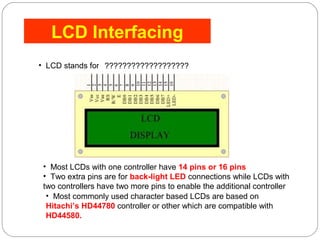
LCD Interfacing 
• LCD stands for Liquid Crystal Display 
??????????????????? 
• Most LCDs with one controller have 14 pins or 16 pins 
• Two extra pins are for back-light LED connections while LCDs with 
two controllers have two more pins to enable the additional controller 
• Most commonly used character based LCDs are based on 
Hitachi’s HD44780 controller or other which are compatible with 
HD44580.
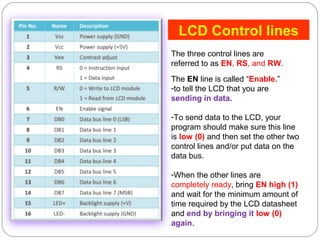
LCD Control lines 
The three control lines are 
referred to as EN, RS, and RW. 
The EN line is called “Enable.” 
-to tell the LCD that you are 
sending in data. 
-To send data to the LCD, your 
program should make sure this line 
is low (0) and then set the other two 
control lines and/or put data on the 
data bus. 
-When the other lines are 
completely ready, bring EN high (1) 
and wait for the minimum amount of 
time required by the LCD datasheet 
and end by bringing it low (0) 
again.
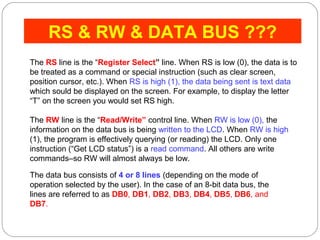
RS & RW & DATA BUS ??? 
The RS line is the “Register Select” line. When RS is low (0), the data is to 
be treated as a command or special instruction (such as clear screen, 
position cursor, etc.). When RS is high (1), the data being sent is text data 
which sould be displayed on the screen. For example, to display the letter 
“T” on the screen you would set RS high. 
The RW line is the “Read/Write” control line. When RW is low (0), the 
information on the data bus is being written to the LCD. When RW is high 
(1), the program is effectively querying (or reading) the LCD. Only one 
instruction (“Get LCD status”) is a read command. All others are write 
commands–so RW will almost always be low. 
The data bus consists of 4 or 8 lines (depending on the mode of 
operation selected by the user). In the case of an 8-bit data bus, the 
lines are referred to as DB0, DB1, DB2, DB3, DB4, DB5, DB6, and 
DB7.
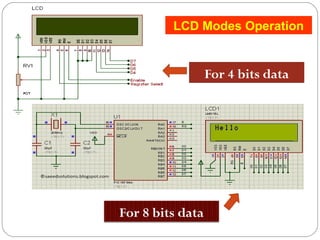
LCD Modes Operation 
For 4 bits data 
For 8 bits data
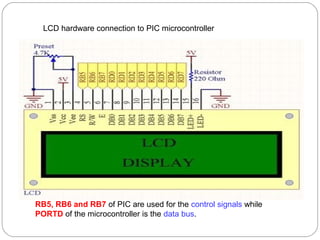
LCD hardware connection to PIC microcontroller 
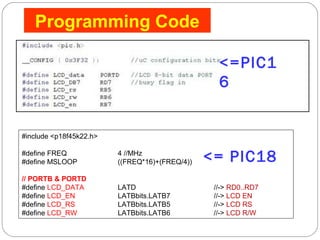
RB5, RB6 and RB7 of PIC are used for the control signals while 
PORTD of the microcontroller is the data bus.
<=PIC1 
6 
#include <p18f45k22.h> 
#define FREQ 4 //MHz 
#define MSLOOP ((FREQ*16)+(FREQ/4)) 
// PORTB & PORTD 
#define LCD_DATA LATD //-> RD0..RD7 
#define LCD_EN LATBbits.LATB7 //-> LCD EN 
#define LCD_RS LATBbits.LATB5 //-> LCD RS 
#define LCD_RW LATBbits.LATB6 //-> LCD R/W 
<= PIC18 
Programming Code
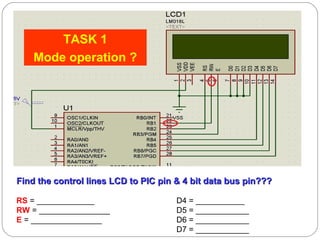
Find the control lines LCD to PIC pin && 44 bbiitt ddaattaa bbuuss ppiinn?????? 
RS = _____________ D4 = ___________ 
RW = ________________ D5 = ____________ 
E = ________________ D6 = ____________ 
D7 = ____________ 
TASK 1 
Mode operation ?
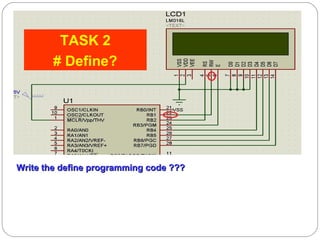
TASK 2 
# Define? 
Write the ddeeffiinnee pprrooggrraammmmiinngg ccooddee ?????? 
#define LCD_DATA LATB //-> RB4..RB7 
#define LCD_EN LATBbits.LATB3 //-> LCD EN 
#define LCD_RS LATBbits.LATB2 //-> LCD RS 
#define LCD_RW LATBbits.LATB1 //-> LCD R/W
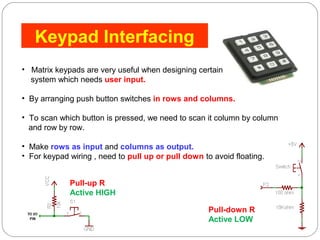
Keypad Interfacing 
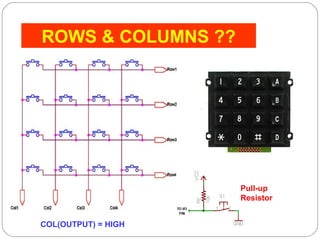
• Matrix keypads are very useful when designing certain 
system which needs user input. 
• By arranging push button switches in rows and columns. 
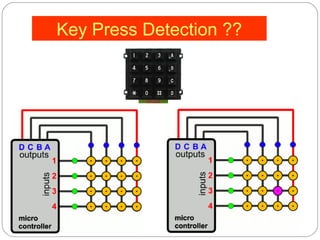
• To scan which button is pressed, we need to scan it column by column 
and row by row. 
• Make rows as input and columns as output. 
• For keypad wiring , need to pull up or pull down to avoid floating. 
Pull-up R 
Active HIGH 
Pull-down R 
Active LOW
ROWS & COLUMNS ?? 
Pull-up 
Resistor 
COL(OUTPUT) = HIGH
Key Press Detection ??
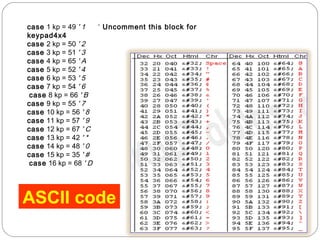
case 1 kp = 49 ' 1 ‘ Uncomment this block for 
keypad4x4 
case 2 kp = 50 ' 2 
case 3 kp = 51 ' 3 
case 4 kp = 65 ' A 
case 5 kp = 52 ' 4 
case 6 kp = 53 ' 5 
case 7 kp = 54 ' 6 
case 8 kp = 66 ' B 
case 9 kp = 55 ' 7 
case 10 kp = 56 ' 8 
case 11 kp = 57 ' 9 
case 12 kp = 67 ' C 
case 13 kp = 42 ' * 
case 14 kp = 48 ' 0 
case 15 kp = 35 ' # 
case 16 kp = 68 ' D 
ASCII code
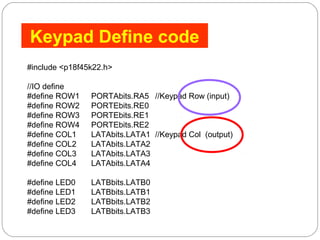
Keypad Define code 
#include <p18f45k22.h> 
//IO define 
#define ROW1 PORTAbits.RA5 //Keypad Row (input) 
#define ROW2 PORTEbits.RE0 
#define ROW3 PORTEbits.RE1 
#define ROW4 PORTEbits.RE2 
#define COL1 LATAbits.LATA1 //Keypad Col (output) 
#define COL2 LATAbits.LATA2 
#define COL3 LATAbits.LATA3 
#define COL4 LATAbits.LATA4 
#define LED0 LATBbits.LATB0 
#define LED1 LATBbits.LATB1 
#define LED2 LATBbits.LATB2 
#define LED3 LATBbits.LATB3
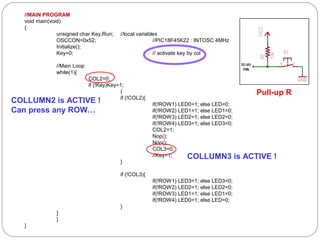
//MAIN PROGRAM 
void main(void) 
{ 
unsigned char Key,Run; //local variables 
OSCCON=0x52; //PIC18F45K22 : INTOSC 4MHz 
Initialize(); 
Key=0; // activate key by col 
//Main Loop 
while(1){ 
COL2=0; 
if (!Key)Key=1; 
{ if (!COL2){ 
if(!ROW1) LED0=1; else LED=0; 
if(!ROW2) LED1=1; else LED1=0; 
if(!ROW3) LED2=1; else LED2=0; 
if(!ROW4) LED3=1; else LED3=0; 
COL2=1; 
Nop(); 
Nop(); 
COL3=0; 
//Key=1; 
} 
if (!COL3){ 
if(!ROW1) LED3=1; else LED3=0; 
if(!ROW2) LED2=1; else LED2=0; 
if(!ROW3) LED1=1; else LED1=0; 
if(!ROW4) LED0=1; else LED=0; 
} 
}} 
} 
Pull-up R 
COLLUMN2 is ACTIVE ! 
Can press any ROW… 
COLLUMN3 is ACTIVE !
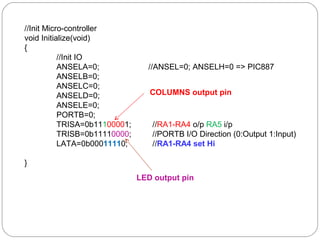
//Init Micro-controller 
void Initialize(void) 
{ 
//Init IO 
ANSELA=0; //ANSEL=0; ANSELH=0 => PIC887 
ANSELB=0; 
ANSELC=0; 
ANSELD=0; 
ANSELE=0; 
PORTB=0; 
TRISA=0b11100001; //RA1-RA4 o/p RA5 i/p 
TRISB=0b11110000; //PORTB I/O Direction (0:Output 1:Input) 
LATA=0b00011110; //RA1-RA4 set Hi 
} 
COLUMNS output pin 
LED output pin
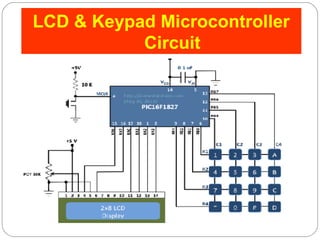
LCD & Keypad Microcontroller 
Circuit
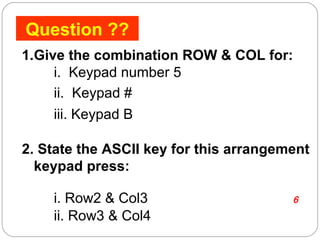
Question ?? 
1.Give the combination ROW & COL for: 
i. Keypad number 5 ROW2 & COL2 
ii. Keypad # ROW4 & COL3 
iii. Keypad B ROW2 & COL4 
2. State the ASCII key for this arrangement 
keypad press: 
i. Row2 & Col3 case ASCII code= 54 // => 6 
ii. Row3 & Col4 case ASCII code= 67 // => C

Lcd & keypad

  • 1.
    EC501-EMBEDDED SYSTEM APPLICATION LCD & KEYPAD Izwanizam bin Yahaya / JKE/ PTSB
  • 2.
    OBJECTIVES 1. DescribeLCDs mode of operation and to interface with PIC Microcontroller 2. Construct a program code to send commands and data to LCD 3. Describe 4 x 4 Matrix keypad basic of operation 4. Illustrate key press detection and key identification mechanism 5. Apply program code to Write keypad and display to LCD in C programming
  • 3.
    LCD Interfacing •LCD stands for Liquid Crystal Display ??????????????????? • Most LCDs with one controller have 14 pins or 16 pins • Two extra pins are for back-light LED connections while LCDs with two controllers have two more pins to enable the additional controller • Most commonly used character based LCDs are based on Hitachi’s HD44780 controller or other which are compatible with HD44580.
  • 4.
    LCD Control lines The three control lines are referred to as EN, RS, and RW. The EN line is called “Enable.” -to tell the LCD that you are sending in data. -To send data to the LCD, your program should make sure this line is low (0) and then set the other two control lines and/or put data on the data bus. -When the other lines are completely ready, bring EN high (1) and wait for the minimum amount of time required by the LCD datasheet and end by bringing it low (0) again.
  • 5.
    RS & RW& DATA BUS ??? The RS line is the “Register Select” line. When RS is low (0), the data is to be treated as a command or special instruction (such as clear screen, position cursor, etc.). When RS is high (1), the data being sent is text data which sould be displayed on the screen. For example, to display the letter “T” on the screen you would set RS high. The RW line is the “Read/Write” control line. When RW is low (0), the information on the data bus is being written to the LCD. When RW is high (1), the program is effectively querying (or reading) the LCD. Only one instruction (“Get LCD status”) is a read command. All others are write commands–so RW will almost always be low. The data bus consists of 4 or 8 lines (depending on the mode of operation selected by the user). In the case of an 8-bit data bus, the lines are referred to as DB0, DB1, DB2, DB3, DB4, DB5, DB6, and DB7.
  • 6.
    LCD Modes Operation For 4 bits data For 8 bits data
  • 7.
    LCD hardware connectionto PIC microcontroller RB5, RB6 and RB7 of PIC are used for the control signals while PORTD of the microcontroller is the data bus.
  • 8.
    <=PIC1 6 #include<p18f45k22.h> #define FREQ 4 //MHz #define MSLOOP ((FREQ*16)+(FREQ/4)) // PORTB & PORTD #define LCD_DATA LATD //-> RD0..RD7 #define LCD_EN LATBbits.LATB7 //-> LCD EN #define LCD_RS LATBbits.LATB5 //-> LCD RS #define LCD_RW LATBbits.LATB6 //-> LCD R/W <= PIC18 Programming Code
  • 9.
    Find the controllines LCD to PIC pin && 44 bbiitt ddaattaa bbuuss ppiinn?????? RS = _____________ D4 = ___________ RW = ________________ D5 = ____________ E = ________________ D6 = ____________ D7 = ____________ TASK 1 Mode operation ?
  • 10.
    TASK 2 #Define? Write the ddeeffiinnee pprrooggrraammmmiinngg ccooddee ?????? #define LCD_DATA LATB //-> RB4..RB7 #define LCD_EN LATBbits.LATB3 //-> LCD EN #define LCD_RS LATBbits.LATB2 //-> LCD RS #define LCD_RW LATBbits.LATB1 //-> LCD R/W
  • 11.
    Keypad Interfacing •Matrix keypads are very useful when designing certain system which needs user input. • By arranging push button switches in rows and columns. • To scan which button is pressed, we need to scan it column by column and row by row. • Make rows as input and columns as output. • For keypad wiring , need to pull up or pull down to avoid floating. Pull-up R Active HIGH Pull-down R Active LOW
  • 12.
    ROWS & COLUMNS?? Pull-up Resistor COL(OUTPUT) = HIGH
  • 13.
  • 14.
    case 1 kp= 49 ' 1 ‘ Uncomment this block for keypad4x4 case 2 kp = 50 ' 2 case 3 kp = 51 ' 3 case 4 kp = 65 ' A case 5 kp = 52 ' 4 case 6 kp = 53 ' 5 case 7 kp = 54 ' 6 case 8 kp = 66 ' B case 9 kp = 55 ' 7 case 10 kp = 56 ' 8 case 11 kp = 57 ' 9 case 12 kp = 67 ' C case 13 kp = 42 ' * case 14 kp = 48 ' 0 case 15 kp = 35 ' # case 16 kp = 68 ' D ASCII code
  • 15.
    Keypad Define code #include <p18f45k22.h> //IO define #define ROW1 PORTAbits.RA5 //Keypad Row (input) #define ROW2 PORTEbits.RE0 #define ROW3 PORTEbits.RE1 #define ROW4 PORTEbits.RE2 #define COL1 LATAbits.LATA1 //Keypad Col (output) #define COL2 LATAbits.LATA2 #define COL3 LATAbits.LATA3 #define COL4 LATAbits.LATA4 #define LED0 LATBbits.LATB0 #define LED1 LATBbits.LATB1 #define LED2 LATBbits.LATB2 #define LED3 LATBbits.LATB3
  • 16.
    //MAIN PROGRAM voidmain(void) { unsigned char Key,Run; //local variables OSCCON=0x52; //PIC18F45K22 : INTOSC 4MHz Initialize(); Key=0; // activate key by col //Main Loop while(1){ COL2=0; if (!Key)Key=1; { if (!COL2){ if(!ROW1) LED0=1; else LED=0; if(!ROW2) LED1=1; else LED1=0; if(!ROW3) LED2=1; else LED2=0; if(!ROW4) LED3=1; else LED3=0; COL2=1; Nop(); Nop(); COL3=0; //Key=1; } if (!COL3){ if(!ROW1) LED3=1; else LED3=0; if(!ROW2) LED2=1; else LED2=0; if(!ROW3) LED1=1; else LED1=0; if(!ROW4) LED0=1; else LED=0; } }} } Pull-up R COLLUMN2 is ACTIVE ! Can press any ROW… COLLUMN3 is ACTIVE !
  • 17.
    //Init Micro-controller voidInitialize(void) { //Init IO ANSELA=0; //ANSEL=0; ANSELH=0 => PIC887 ANSELB=0; ANSELC=0; ANSELD=0; ANSELE=0; PORTB=0; TRISA=0b11100001; //RA1-RA4 o/p RA5 i/p TRISB=0b11110000; //PORTB I/O Direction (0:Output 1:Input) LATA=0b00011110; //RA1-RA4 set Hi } COLUMNS output pin LED output pin
  • 18.
    LCD & KeypadMicrocontroller Circuit
  • 19.
    Question ?? 1.Givethe combination ROW & COL for: i. Keypad number 5 ROW2 & COL2 ii. Keypad # ROW4 & COL3 iii. Keypad B ROW2 & COL4 2. State the ASCII key for this arrangement keypad press: i. Row2 & Col3 case ASCII code= 54 // => 6 ii. Row3 & Col4 case ASCII code= 67 // => C