Differential equation &
LAPLACE TRANSFORmation
with MATLAB
RAVI JINDAL
Joint Masters, SEGE (M1) Second semester
B.K. Birla institute of Engineering & Technology, Pilani
Differential Equations with
MATLAB
 MATLAB has some powerful features for
solving differential equations of all types. We
will explore some of these features for the
Constant Coefficient Linear Ordinary
Differential Equation forms.
 The approach here will be that of the Symbolic
Math Toolbox. The result will be the form of
the function and it may be readily plotted with
MATLAB.
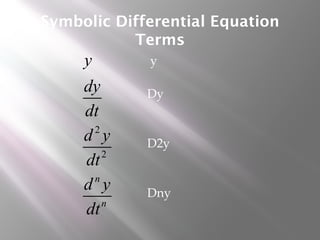
Symbolic Differential Equation
Terms
2
2
n
n
y
dy
dt
d y
dt
d y
dt
y
Dy
D2y
Dny
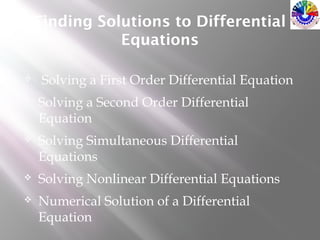
Finding Solutions to Differential
Equations
 Solving a First Order Differential Equation
 Solving a Second Order Differential
Equation
 Solving Simultaneous Differential
Equations
 Solving Nonlinear Differential Equations
 Numerical Solution of a Differential
Equation
Solving a 1st Order DE
 Consider the differential
equation:
122 =+ y
dt
dy
The general solution is given by:
The Matlab command used to solve differential
equations is dsolve .
Verify the solution using dsolve command
Solving a Differential
Equation in Matlab
C1 is a constant which is specified by way of the
initial condition
Dy means dy/dt and D2y means d2y/dt2 etc
» syms y t
» ys=dsolve('Dy+2*y=12')
ys =6+exp(-2*t)*C1
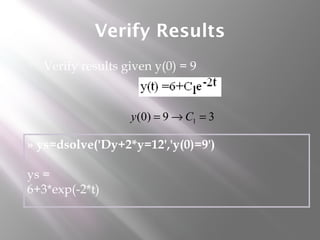
Verify Results
 Verify results given y(0) = 9
» ys=dsolve('Dy+2*y=12','y(0)=9')
ys =
6+3*exp(-2*t)
39)0( 1 =→= Cy
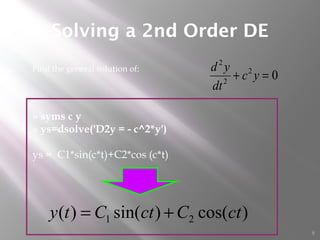
Solving a 2nd Order DE
8
 Find the general solution of:
02
2
2
=+ yc
dt
yd
)cos()sin()( 21 ctCctCty +=
» syms c y
» ys=dsolve('D2y = - c^2*y')
ys = C1*sin(c*t)+C2*cos (c*t)
9
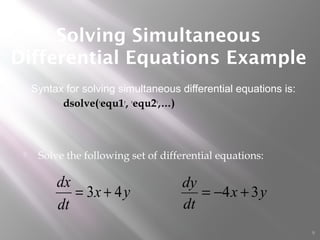
 Solve the following set of differential equations:
Solving Simultaneous
Differential Equations Example
yx
dt
dx
43 += yx
dt
dy
34 +−=
Syntax for solving simultaneous differential equations is:
dsolve('equ1', 'equ2',…)
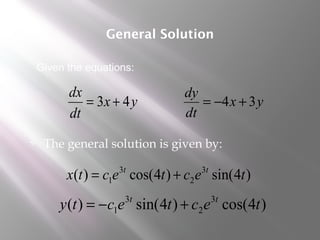
 The general solution is given by:
General Solution
)4sin()4cos()( 3
2
3
1 tectectx tt
+=
)4cos()4sin()( 3
2
3
1 tectecty tt
+−=
yx
dt
dx
43 += yx
dt
dy
34 +−=
Given the equations:
Matlab Verification
» syms x y t
» [x,y]=dsolve('Dx=3*x+4*y','Dy=-4*x+3*y')
x = exp(3*t)*(cos(4*t)*C1+sin(4*t)*C2)
y = -exp(3*t)*(sin(4*t)*C1-cos(4*t)*C2)
yx
dt
dx
43 += yx
dt
dy
34 +−=
Given the
equations:
 General
solution is:
)4sin()4cos()( 3
2
3
1 tectectx tt
+=
)4cos()4sin()( 3
2
3
1 tectecty tt
+−=
 Solve the previous system with the initial conditions:
Initial Conditions
0)0( =x 1)0( =y
» [x,y]=dsolve('Dx=3*x+4*y','Dy=-4*x+3*y',
'y(0)=1','x(0)=0')
x = exp(3*t)*sin(4*t)
y = exp(3*t)*cos(4*t) )4cos(
)4sin(
3
3
tey
tex
t
t
=
=
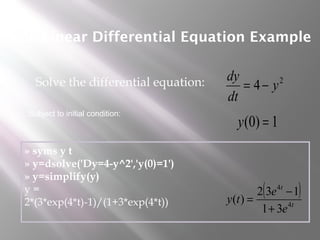
Non-Linear Differential Equation Example
 Solve the differential equation: 2
4 y
dt
dy
−=
Subject to initial condition:
1)0( =y
» syms y t
» y=dsolve('Dy=4-y^2','y(0)=1')
» y=simplify(y)
y =
2*(3*exp(4*t)-1)/(1+3*exp(4*t))
( )
t
t
e
e
ty 4
4
31
132
)(
+
−
=
 If another independent variable, other than t, is used, it must
be introduced in the dsolve command
Specifying the Independent Parameter of a
Differential Equation
122 =+ y
dx
dy
» y=dsolve('Dy+2*y=12','x')
y = 6+exp(-2*x)*C1
Solve the differential equation:
x
eCxy 2
16)( −
+=
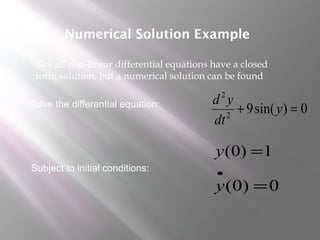
Numerical Solution Example
 Not all non-linear differential equations have a closed
form solution, but a numerical solution can be found
Solve the differential equation:
Subject to initial conditions:
0)sin(92
2
=+ y
dt
yd
1)0( =y
0)0( =
•
y
16
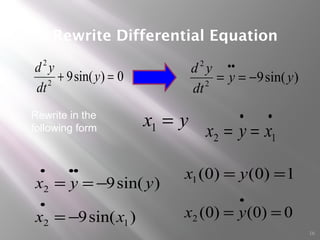
Rewrite Differential Equation
yx =1
••
== 12 xyx
)sin(9
)sin(9
12
2
xx
yyx
−=
−==
•
•••
0)sin(92
2
=+ y
dt
yd
1)0()0(1 == yx
0)0()0(2 ==
•
yx
Rewrite in the
following form
)sin(92
2
yy
dt
yd
−==
••
17
Solve DE with MATLAB.
>> y = dsolve ('D2y + 3*Dy + 2*y = 24',
'y(0)=10', 'Dy(0)=0')
y = 12+2*exp(-2*t)-4*exp(-t)
>> ezplot(y, [0 6])
2
2
3 2 24
d y dy
y
dt dt
+ + =
(0) 10y = '(0) 0y =
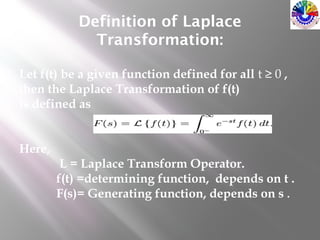
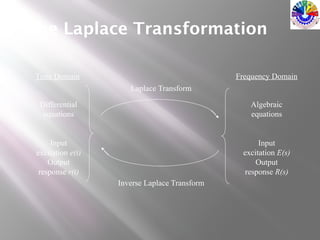
Definition of Laplace
Transformation:
Let f(t) be a given function defined for all t ≥ 0 ,
then the Laplace Transformation of f(t)
is defined as
Here,
L = Laplace Transform Operator.
f(t) =determining function, depends on t .
F(s)= Generating function, depends on s .
Differential
equations
Input
excitation e(t)
Output
response r(t)
Time Domain Frequency Domain
Algebraic
equations
Input
excitation E(s)
Output
response R(s)
Laplace Transform
Inverse Laplace Transform
The Laplace Transformation
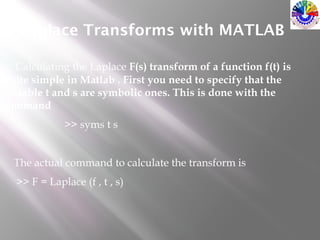
Laplace Transforms with MATLAB
Calculating the Laplace F(s) transform of a function f(t) is
quite simple in Matlab . First you need to specify that the
variable t and s are symbolic ones. This is done with the
command
>> syms t s
The actual command to calculate the transform is
>> F = Laplace (f , t , s)
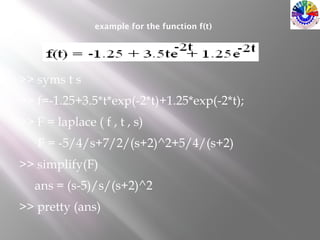
example for the function f(t)
>> syms t s
>> f=-1.25+3.5*t*exp(-2*t)+1.25*exp(-2*t);
>> F = laplace ( f , t , s)
F = -5/4/s+7/2/(s+2)^2+5/4/(s+2)
>> simplify(F)
ans = (s-5)/s/(s+2)^2
>> pretty (ans)
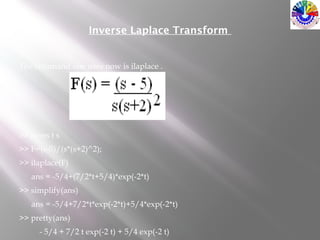
Inverse Laplace Transform
The command one uses now is ilaplace .
>> syms t s
>> F=(s-5)/(s*(s+2)^2);
>> ilaplace(F)
ans = -5/4+(7/2*t+5/4)*exp(-2*t)
>> simplify(ans)
ans = -5/4+7/2*t*exp(-2*t)+5/4*exp(-2*t)
>> pretty(ans)
- 5/4 + 7/2 t exp(-2 t) + 5/4 exp(-2 t)
Reference
 http://www.mathworks.in/help/symbolic/simpli
 https://www.google.co.in/#q=laplace+transform+
Thank You 

Differential equation & laplace transformation with matlab

  • 1.
    Differential equation & LAPLACETRANSFORmation with MATLAB RAVI JINDAL Joint Masters, SEGE (M1) Second semester B.K. Birla institute of Engineering & Technology, Pilani
  • 2.
    Differential Equations with MATLAB MATLAB has some powerful features for solving differential equations of all types. We will explore some of these features for the Constant Coefficient Linear Ordinary Differential Equation forms.  The approach here will be that of the Symbolic Math Toolbox. The result will be the form of the function and it may be readily plotted with MATLAB.
  • 3.
  • 4.
    Finding Solutions toDifferential Equations  Solving a First Order Differential Equation  Solving a Second Order Differential Equation  Solving Simultaneous Differential Equations  Solving Nonlinear Differential Equations  Numerical Solution of a Differential Equation
  • 5.
    Solving a 1stOrder DE  Consider the differential equation: 122 =+ y dt dy The general solution is given by: The Matlab command used to solve differential equations is dsolve . Verify the solution using dsolve command
  • 6.
    Solving a Differential Equationin Matlab C1 is a constant which is specified by way of the initial condition Dy means dy/dt and D2y means d2y/dt2 etc » syms y t » ys=dsolve('Dy+2*y=12') ys =6+exp(-2*t)*C1
  • 7.
    Verify Results  Verifyresults given y(0) = 9 » ys=dsolve('Dy+2*y=12','y(0)=9') ys = 6+3*exp(-2*t) 39)0( 1 =→= Cy
  • 8.
    Solving a 2ndOrder DE 8  Find the general solution of: 02 2 2 =+ yc dt yd )cos()sin()( 21 ctCctCty += » syms c y » ys=dsolve('D2y = - c^2*y') ys = C1*sin(c*t)+C2*cos (c*t)
  • 9.
    9  Solve thefollowing set of differential equations: Solving Simultaneous Differential Equations Example yx dt dx 43 += yx dt dy 34 +−= Syntax for solving simultaneous differential equations is: dsolve('equ1', 'equ2',…)
  • 10.
     The generalsolution is given by: General Solution )4sin()4cos()( 3 2 3 1 tectectx tt += )4cos()4sin()( 3 2 3 1 tectecty tt +−= yx dt dx 43 += yx dt dy 34 +−= Given the equations:
  • 11.
    Matlab Verification » symsx y t » [x,y]=dsolve('Dx=3*x+4*y','Dy=-4*x+3*y') x = exp(3*t)*(cos(4*t)*C1+sin(4*t)*C2) y = -exp(3*t)*(sin(4*t)*C1-cos(4*t)*C2) yx dt dx 43 += yx dt dy 34 +−= Given the equations:  General solution is: )4sin()4cos()( 3 2 3 1 tectectx tt += )4cos()4sin()( 3 2 3 1 tectecty tt +−=
  • 12.
     Solve theprevious system with the initial conditions: Initial Conditions 0)0( =x 1)0( =y » [x,y]=dsolve('Dx=3*x+4*y','Dy=-4*x+3*y', 'y(0)=1','x(0)=0') x = exp(3*t)*sin(4*t) y = exp(3*t)*cos(4*t) )4cos( )4sin( 3 3 tey tex t t = =
  • 13.
    Non-Linear Differential EquationExample  Solve the differential equation: 2 4 y dt dy −= Subject to initial condition: 1)0( =y » syms y t » y=dsolve('Dy=4-y^2','y(0)=1') » y=simplify(y) y = 2*(3*exp(4*t)-1)/(1+3*exp(4*t)) ( ) t t e e ty 4 4 31 132 )( + − =
  • 14.
     If anotherindependent variable, other than t, is used, it must be introduced in the dsolve command Specifying the Independent Parameter of a Differential Equation 122 =+ y dx dy » y=dsolve('Dy+2*y=12','x') y = 6+exp(-2*x)*C1 Solve the differential equation: x eCxy 2 16)( − +=
  • 15.
    Numerical Solution Example Not all non-linear differential equations have a closed form solution, but a numerical solution can be found Solve the differential equation: Subject to initial conditions: 0)sin(92 2 =+ y dt yd 1)0( =y 0)0( = • y
  • 16.
    16 Rewrite Differential Equation yx=1 •• == 12 xyx )sin(9 )sin(9 12 2 xx yyx −= −== • ••• 0)sin(92 2 =+ y dt yd 1)0()0(1 == yx 0)0()0(2 == • yx Rewrite in the following form )sin(92 2 yy dt yd −== ••
  • 17.
    17 Solve DE withMATLAB. >> y = dsolve ('D2y + 3*Dy + 2*y = 24', 'y(0)=10', 'Dy(0)=0') y = 12+2*exp(-2*t)-4*exp(-t) >> ezplot(y, [0 6]) 2 2 3 2 24 d y dy y dt dt + + = (0) 10y = '(0) 0y =
  • 19.
    Definition of Laplace Transformation: Letf(t) be a given function defined for all t ≥ 0 , then the Laplace Transformation of f(t) is defined as Here, L = Laplace Transform Operator. f(t) =determining function, depends on t . F(s)= Generating function, depends on s .
  • 20.
    Differential equations Input excitation e(t) Output response r(t) TimeDomain Frequency Domain Algebraic equations Input excitation E(s) Output response R(s) Laplace Transform Inverse Laplace Transform The Laplace Transformation
  • 21.
    Laplace Transforms withMATLAB Calculating the Laplace F(s) transform of a function f(t) is quite simple in Matlab . First you need to specify that the variable t and s are symbolic ones. This is done with the command >> syms t s The actual command to calculate the transform is >> F = Laplace (f , t , s)
  • 22.
    example for thefunction f(t) >> syms t s >> f=-1.25+3.5*t*exp(-2*t)+1.25*exp(-2*t); >> F = laplace ( f , t , s) F = -5/4/s+7/2/(s+2)^2+5/4/(s+2) >> simplify(F) ans = (s-5)/s/(s+2)^2 >> pretty (ans)
  • 23.
    Inverse Laplace Transform Thecommand one uses now is ilaplace . >> syms t s >> F=(s-5)/(s*(s+2)^2); >> ilaplace(F) ans = -5/4+(7/2*t+5/4)*exp(-2*t) >> simplify(ans) ans = -5/4+7/2*t*exp(-2*t)+5/4*exp(-2*t) >> pretty(ans) - 5/4 + 7/2 t exp(-2 t) + 5/4 exp(-2 t)
  • 24.
  • 25.

Editor's Notes

  • #7 <number>