Ask a Malware Archaeologist, Blue
Team Ninja and Logoholic how we
do it better than IR firms
Michael Gough – Founder
MalwareArchaeology.com
Who am I
• Blue Team Defender Ninja, Malware Archaeologist,
Logoholic
• I love logs – they tell us Who, What, Where, When and
hopefully How
• Creator of the “Windows Logging Cheat Sheet”
• Creator of the “Malware Management Framework”
• @HackerHurricane also my Blog
Goal
• Interaction – Don’t be a Ding Dong and NOT
ask a question… you WILL be rewarded
• Learn how us Ninja’s do it so you can too
• We gave an infected VM to one of the Big IR
Firms… They came back “Yup.. It’s clean” #Fail
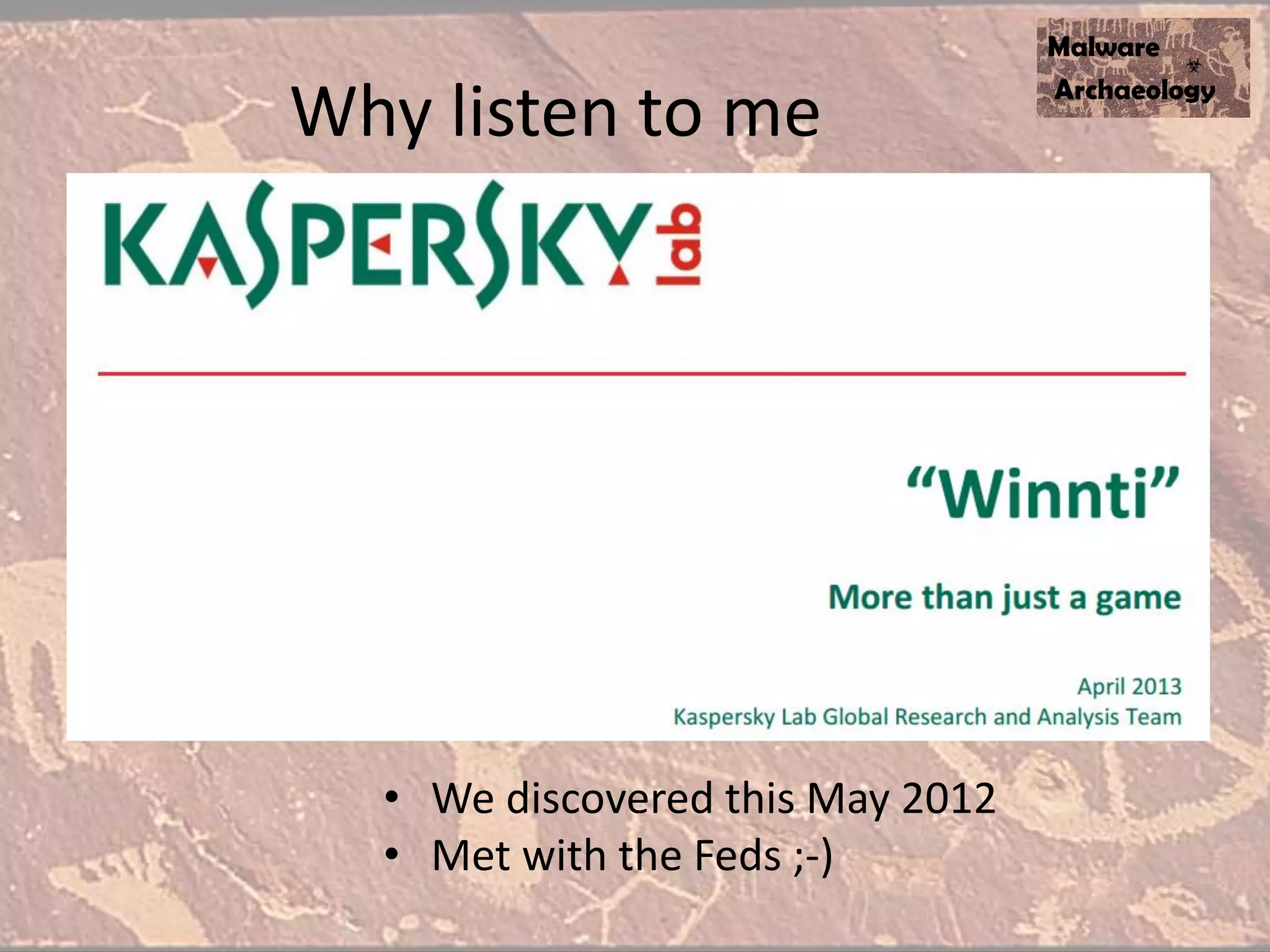
• We discovered this May 2012
• Met with the Feds ;-)
Why listen to me
Last year
• They updated their approach
• MUCH more complex
• This is NOT your typical P0wnage
• This really was “sophisticated malware”
• Boy did we catch them in the act
• I am sharing so you can learn how!
Step 1
READ !!!!
Read the malware reports
• Read (daily/weekly/monthly) review of virus
descriptions, malware analysis and Advanced
Persistent Threat (APT) reports for malware
bits that you can look for or monitor for in
your environment
• Watch HackerHurricane.com for reviews and
write ups of various published malware
• Read Malware Archaeology for a list of reports
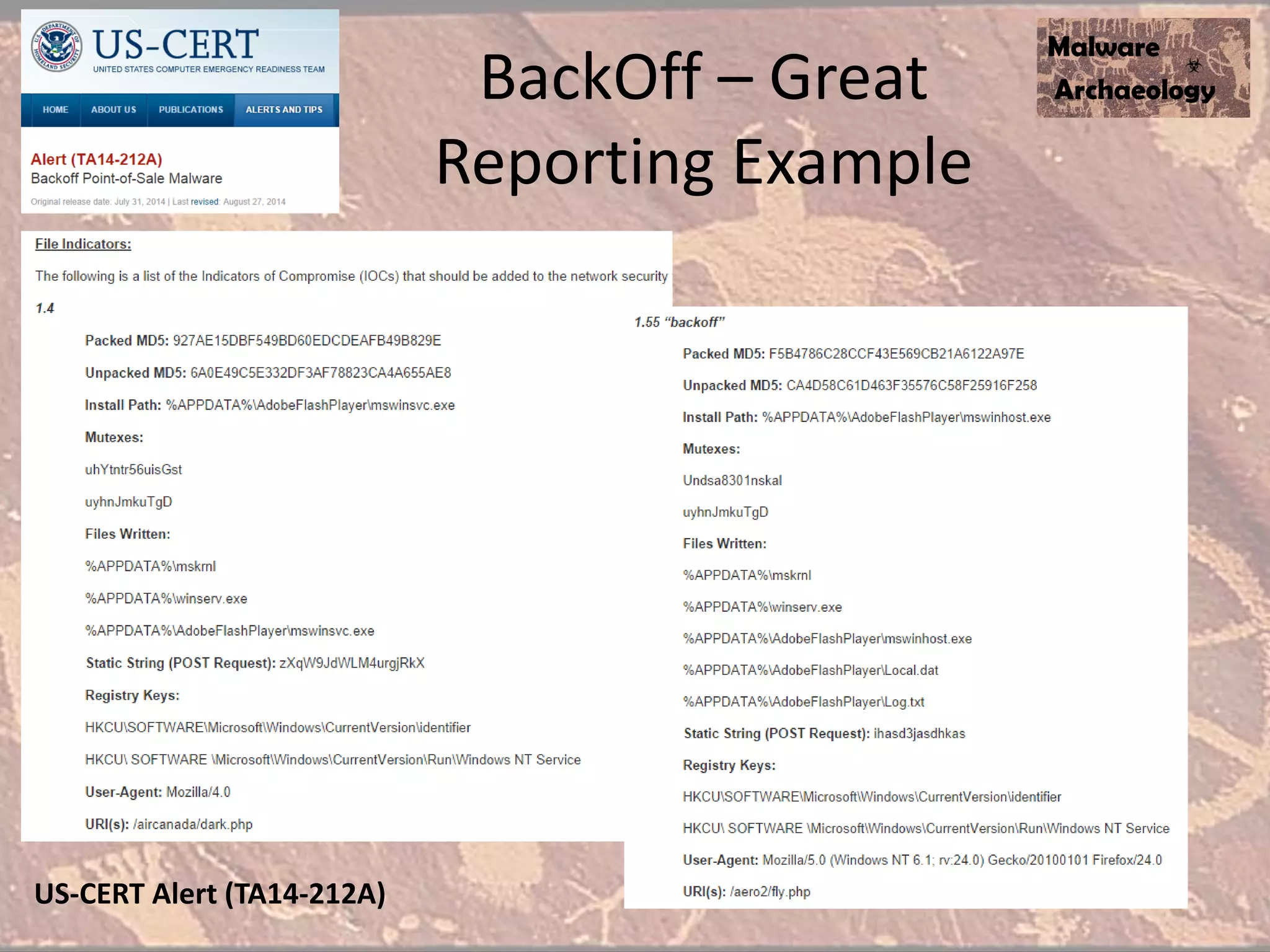
BackOff – Great
Reporting Example
US-CERT Alert (TA14-212A)
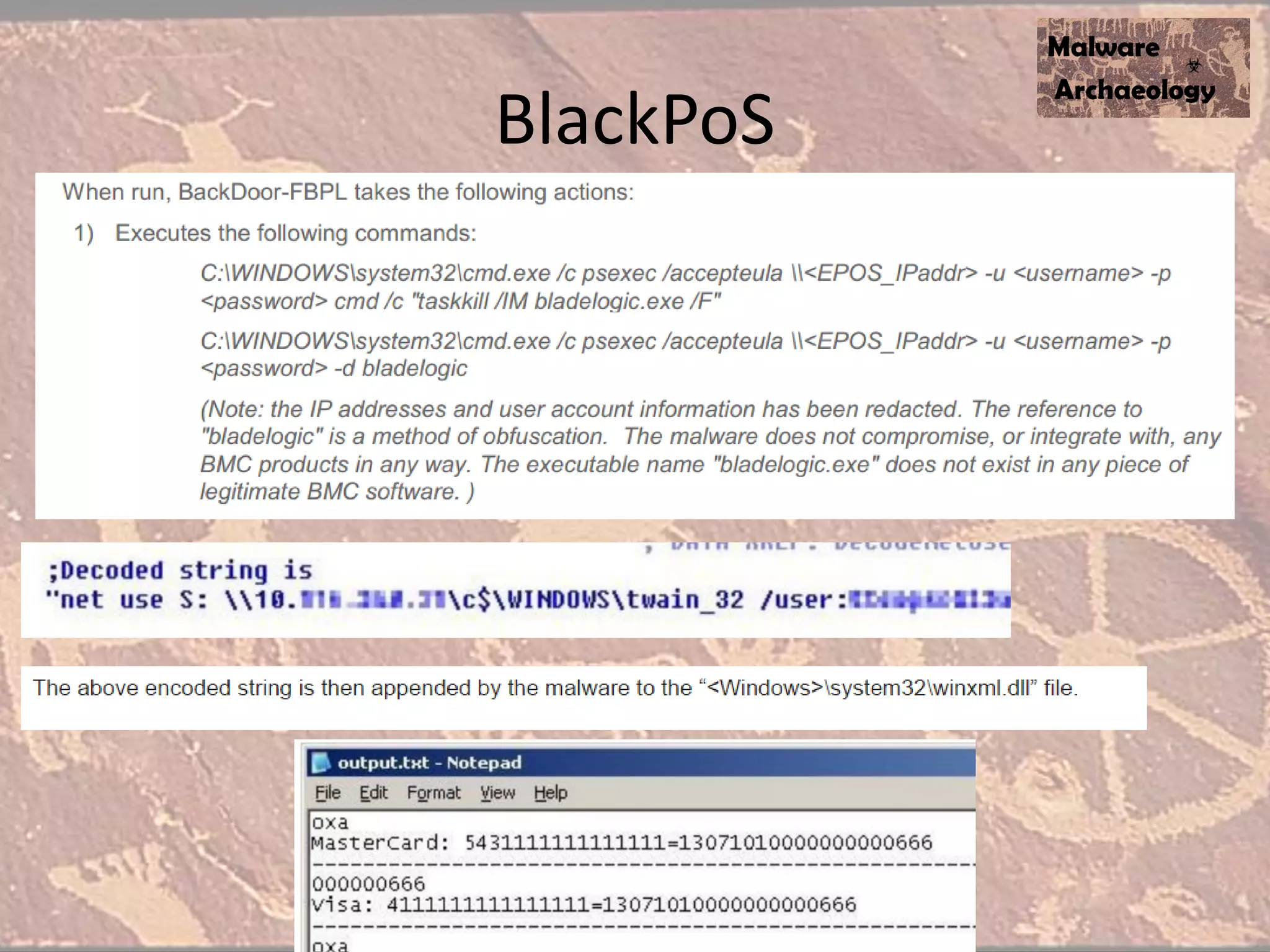
BlackPoS
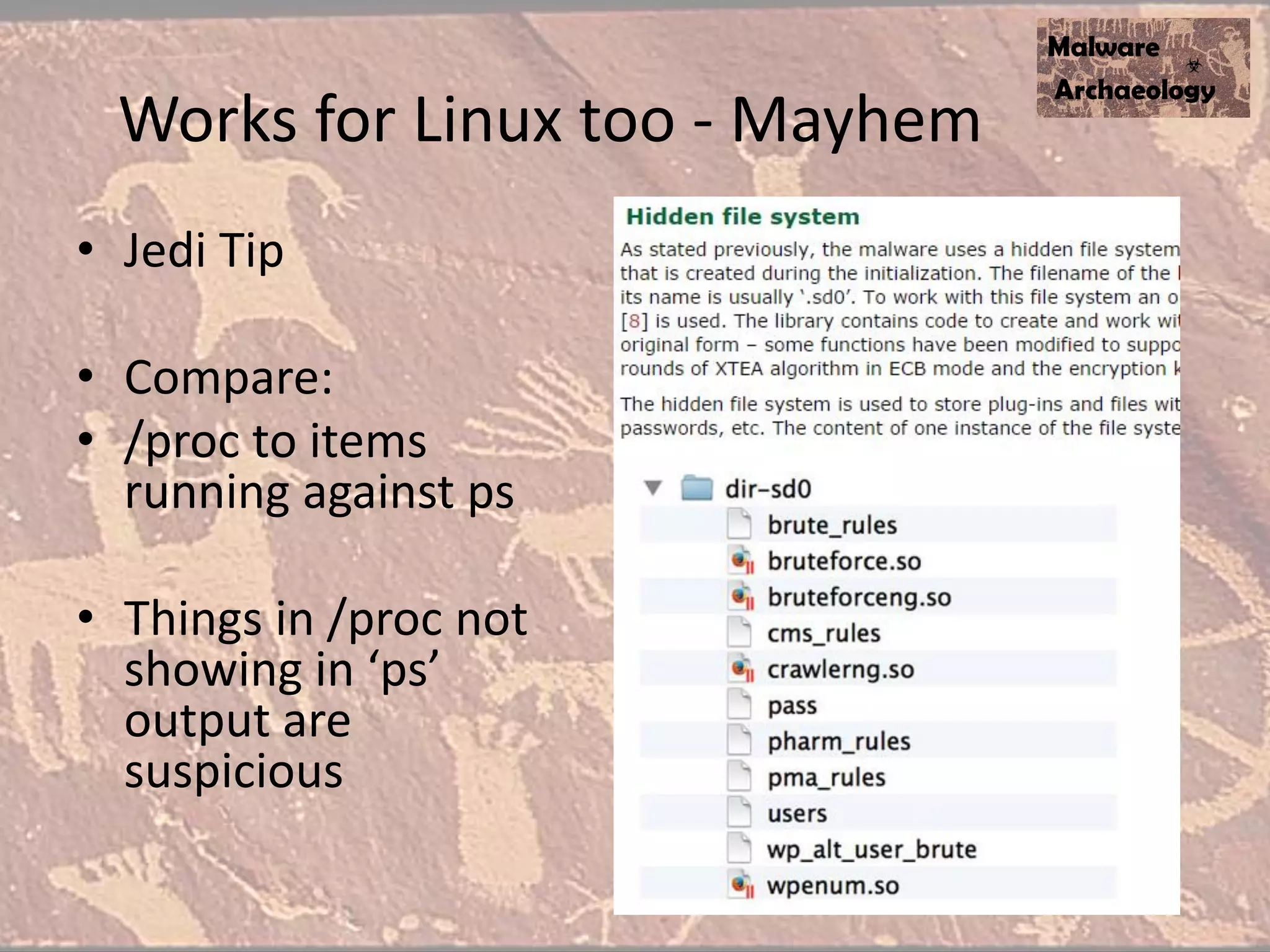
Works for Linux too - Mayhem
• Jedi Tip
• Compare:
• /proc to items
running against ps
• Things in /proc not
showing in ‘ps’
output are
suspicious
Malware Management
• You will see patterns
• %AppData%
• %Temp%
• Windows, WindowsSystem32,
WindowsSystem32WBEM
• Reg Keys, Domains, IP’s, etc.
• Many other indicators
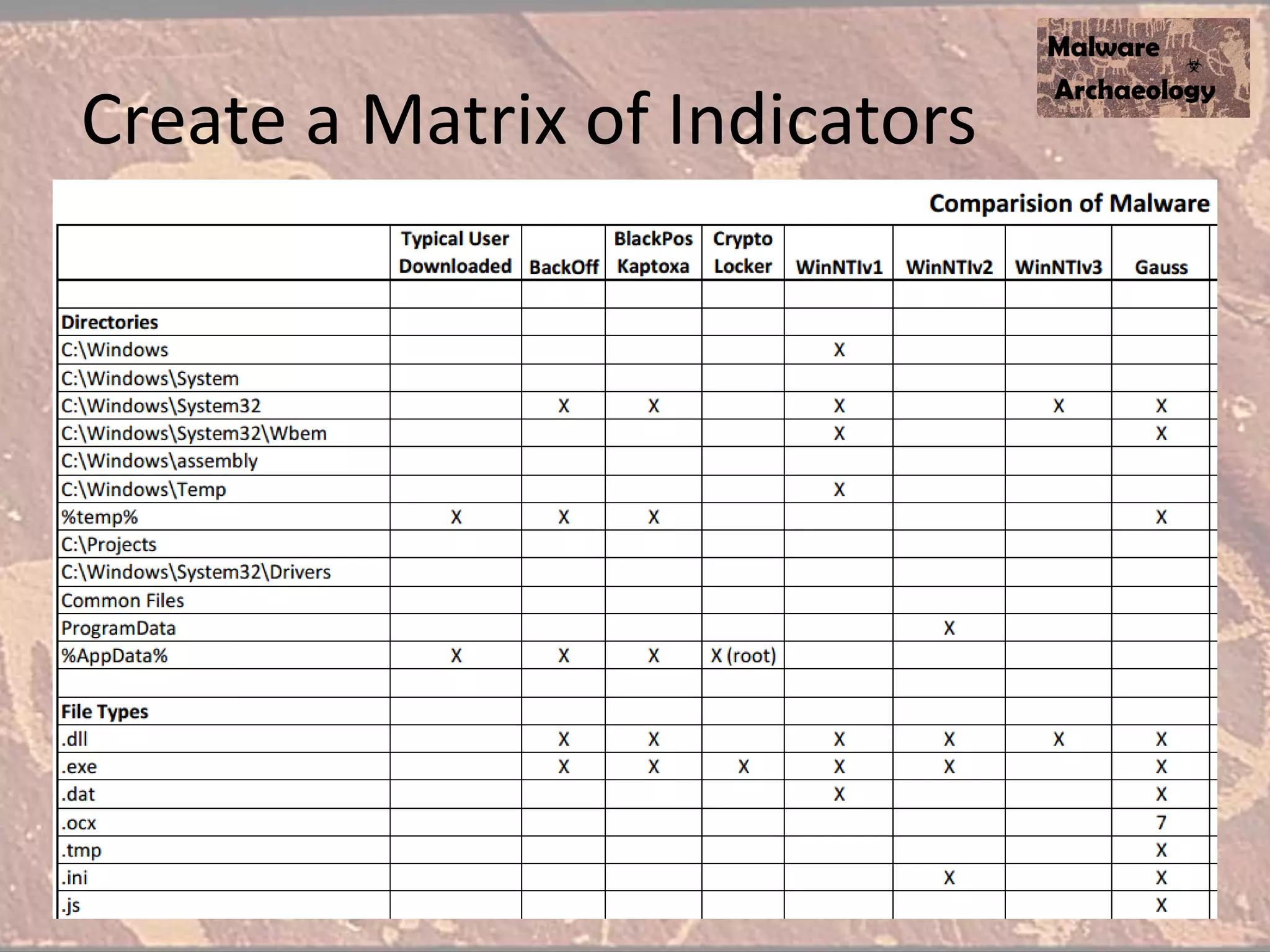
• Build a Malware Matrix
• Tweak your tools or scripts… or pick 1 or 10
systems and do it manually!
Create a Matrix of Indicators
Step 2
The Lab !!!!
Lab for Malware Research
• Barebones!
• VM is secondary, Malware looks for you
analyzing
• 2 - SSD’s – Smaller is better
– 1 is your Master Image
– dd your Master to the Lab drive
– Lather, rinse, repeat
• Not connected to Corp net
Lab for Malware Research
• Load up your Master with all your tools
• You harvest Malware and explode it here
• No.. Not in a Sandbox ;-/
• Ninja Tip
– :Gotchya
– Copy *.* /y Captured
– Goto Gotchya
• Process Monitor running when you explode malware will
show you what directories to capture files from (Filter for
- WriteFile)
Step 3
Log It !!!!
Why are logs important?
• Have you ever had an Incident and called a
consultancy?
• What is one of the first, if not the first thing they do?
• It is referenced in every DBIR report…
• LOGS!
• Details of what happened, where, how and by whom
• Command Line logging is the BEST thing since
computers were invented! The SINGLE most important
take away of this talk !!
Yes, Logs ARE SEXY!
• SEXY - because logs tell you what a particular malware did or the
malwarian (aka Bad Actor) did on your system(s)
• SEXY – Because they are the one way that you can get the details
you need to know what happened
• SEXY – Because this preso is going to show you how for Windows
systems
• SEXY – Because if Target, Neiman Marcus, Michael’s, Home Depot…
did this… I wouldn’t have a presentation
• NOT SEXY – Because most logs are not enabled or configured
properly
• And because….
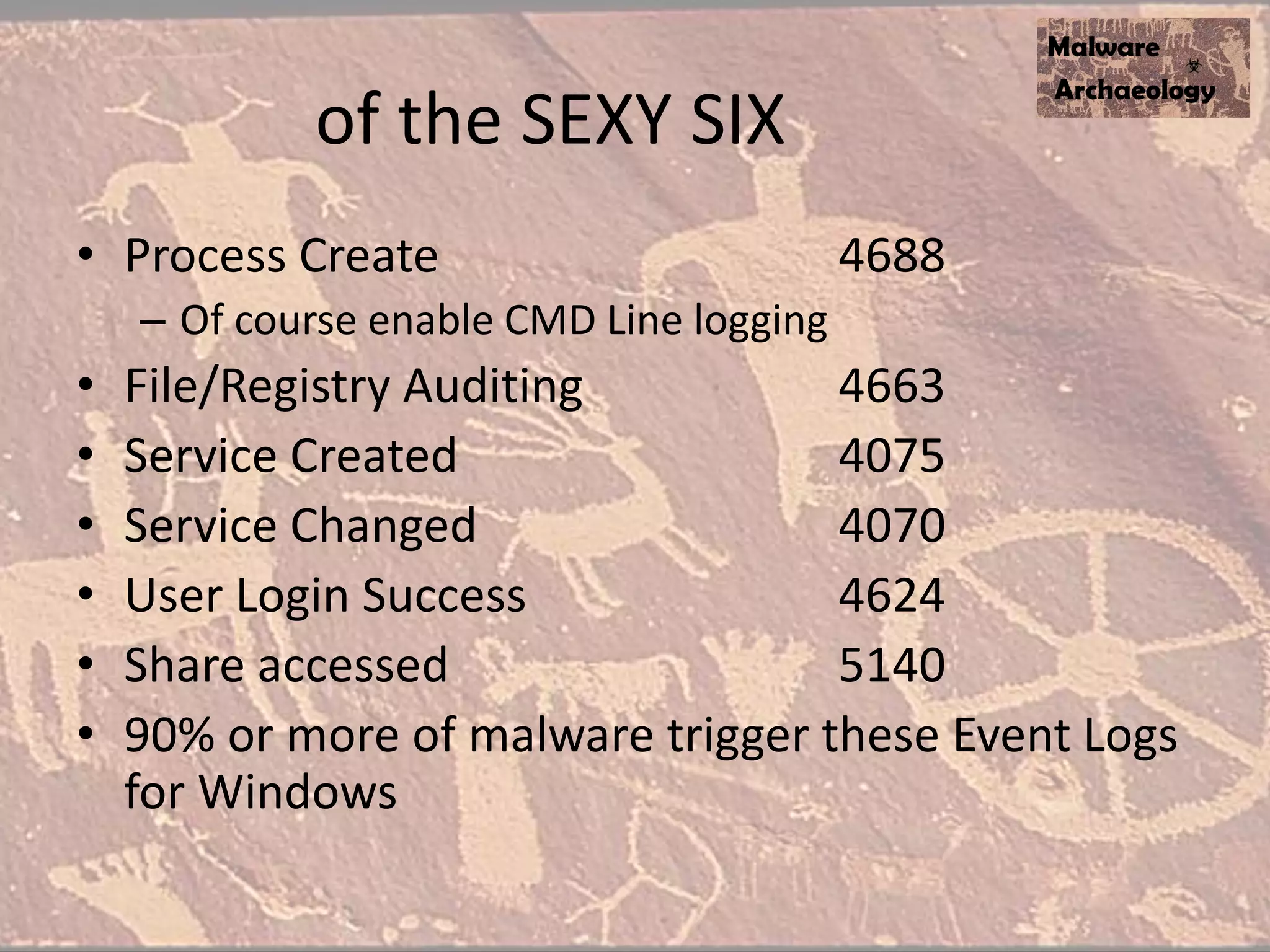
of the SEXY SIX
• Process Create 4688
– Of course enable CMD Line logging
• File/Registry Auditing 4663
• Service Created 4075
• Service Changed 4070
• User Login Success 4624
• Share accessed 5140
• 90% or more of malware trigger these Event Logs
for Windows
Step 4
Get the
Cheat Sheet !!!!
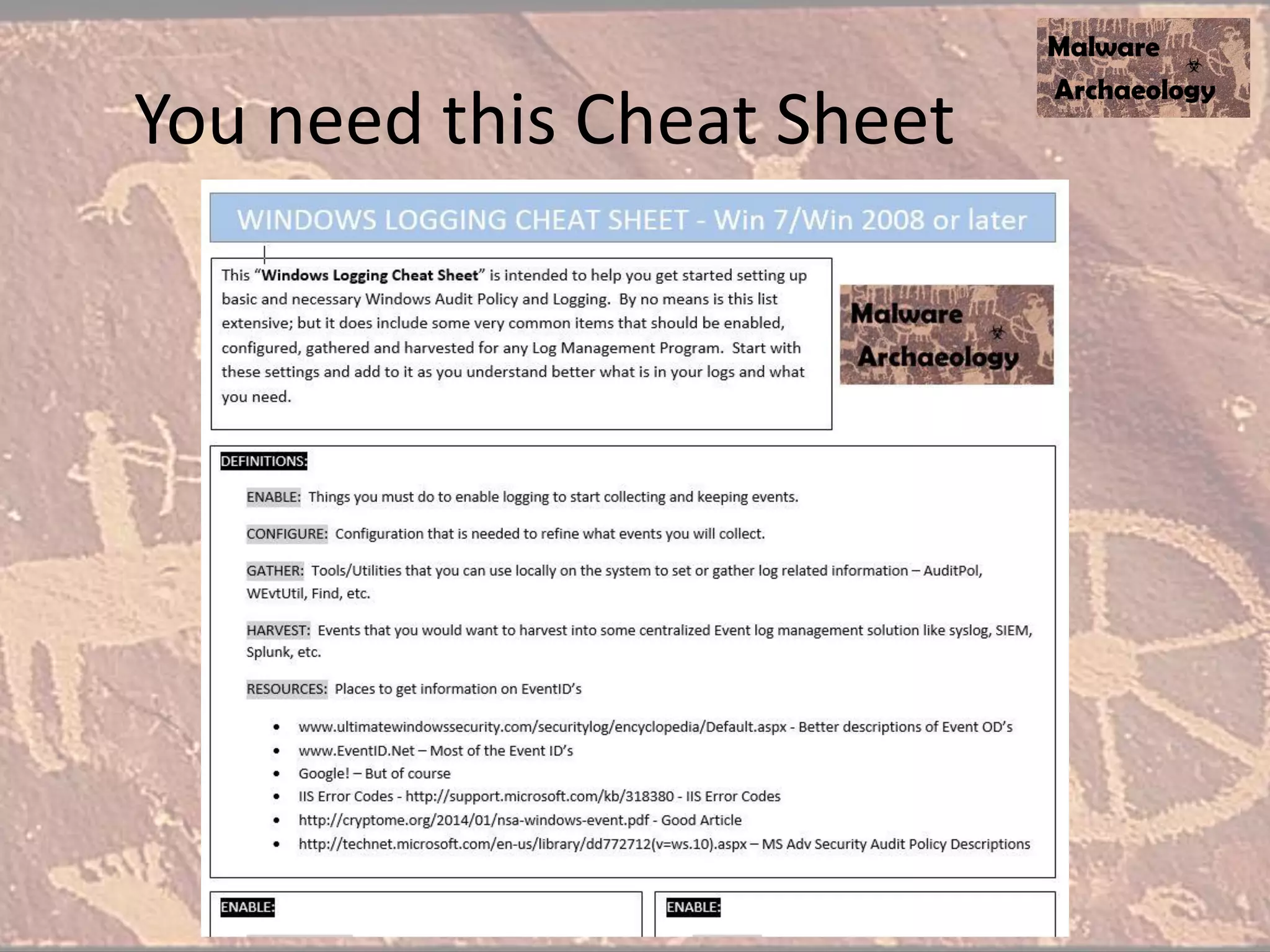
You need this Cheat Sheet
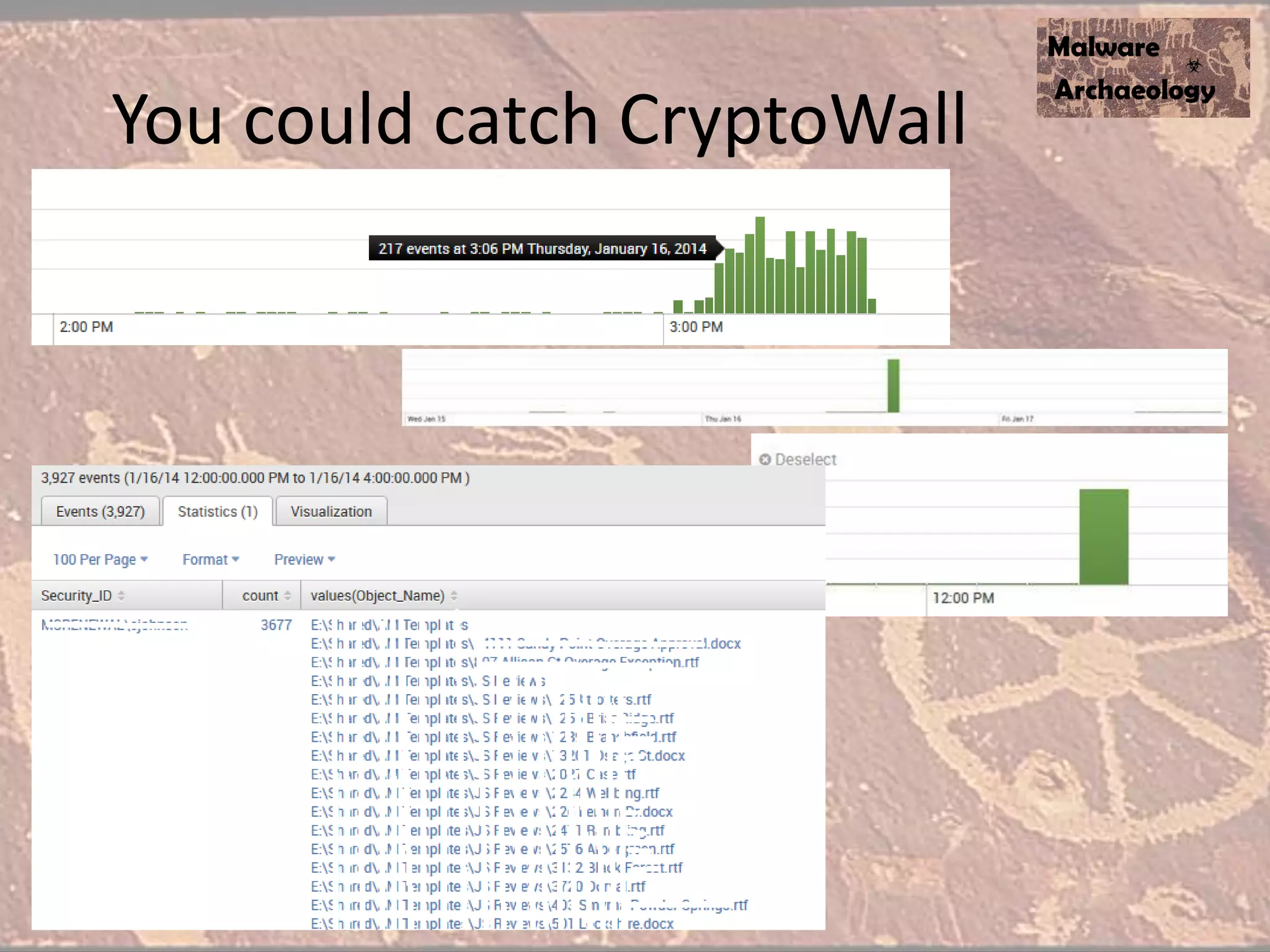
You could catch CryptoWall
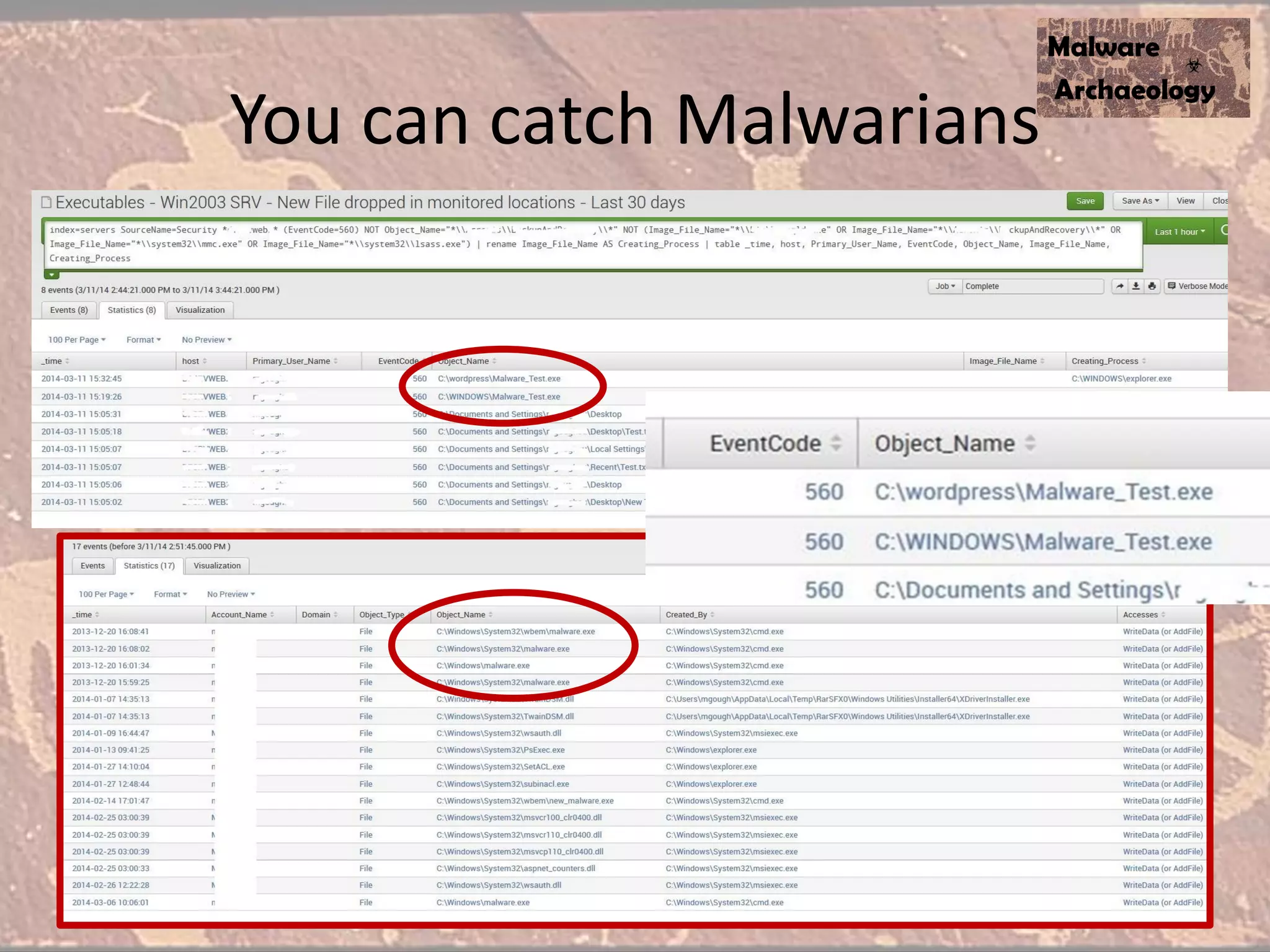
You can catch Malwarians
Step 5
Enable Command
Line Logging !!!!
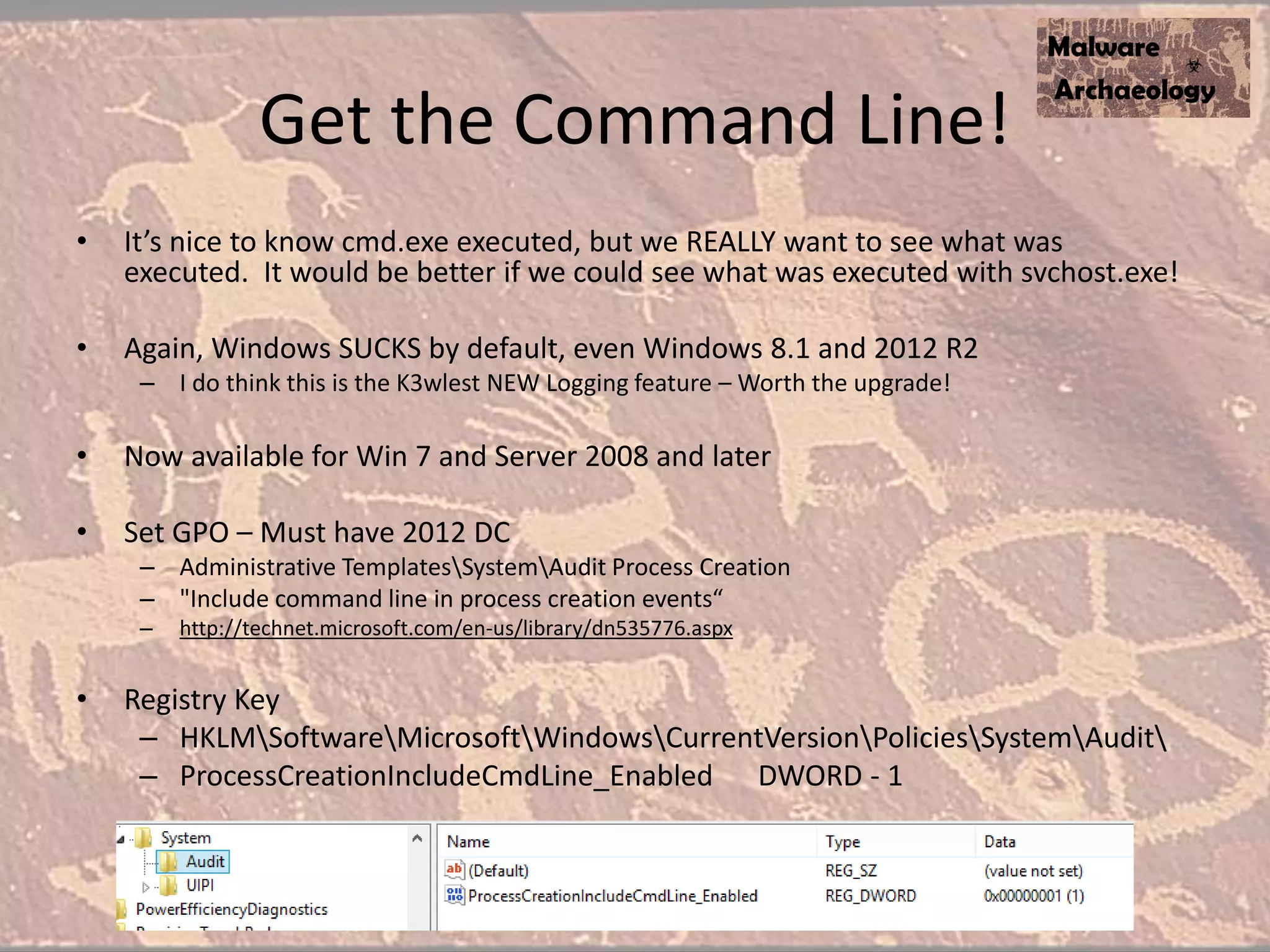
Get the Command Line!
• It’s nice to know cmd.exe executed, but we REALLY want to see what was
executed. It would be better if we could see what was executed with svchost.exe!
• Again, Windows SUCKS by default, even Windows 8.1 and 2012 R2
– I do think this is the K3wlest NEW Logging feature – Worth the upgrade!
• Now available for Win 7 and Server 2008 and later
• Set GPO – Must have 2012 DC
– Administrative TemplatesSystemAudit Process Creation
– "Include command line in process creation events“
– http://technet.microsoft.com/en-us/library/dn535776.aspx
• Registry Key
– HKLMSoftwareMicrosoftWindowsCurrentVersionPoliciesSystemAudit
– ProcessCreationIncludeCmdLine_Enabled DWORD - 1
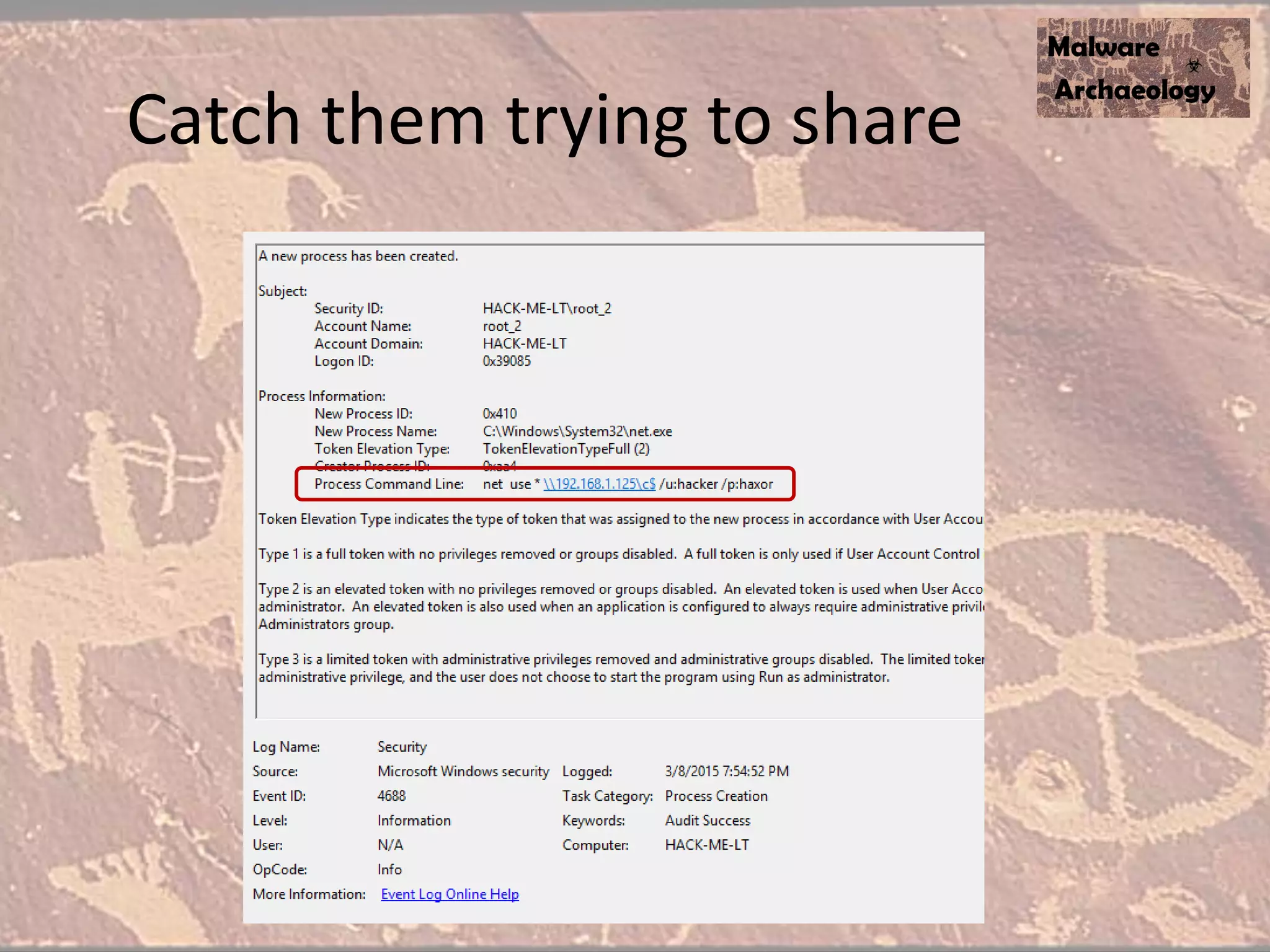
Catch them trying to share
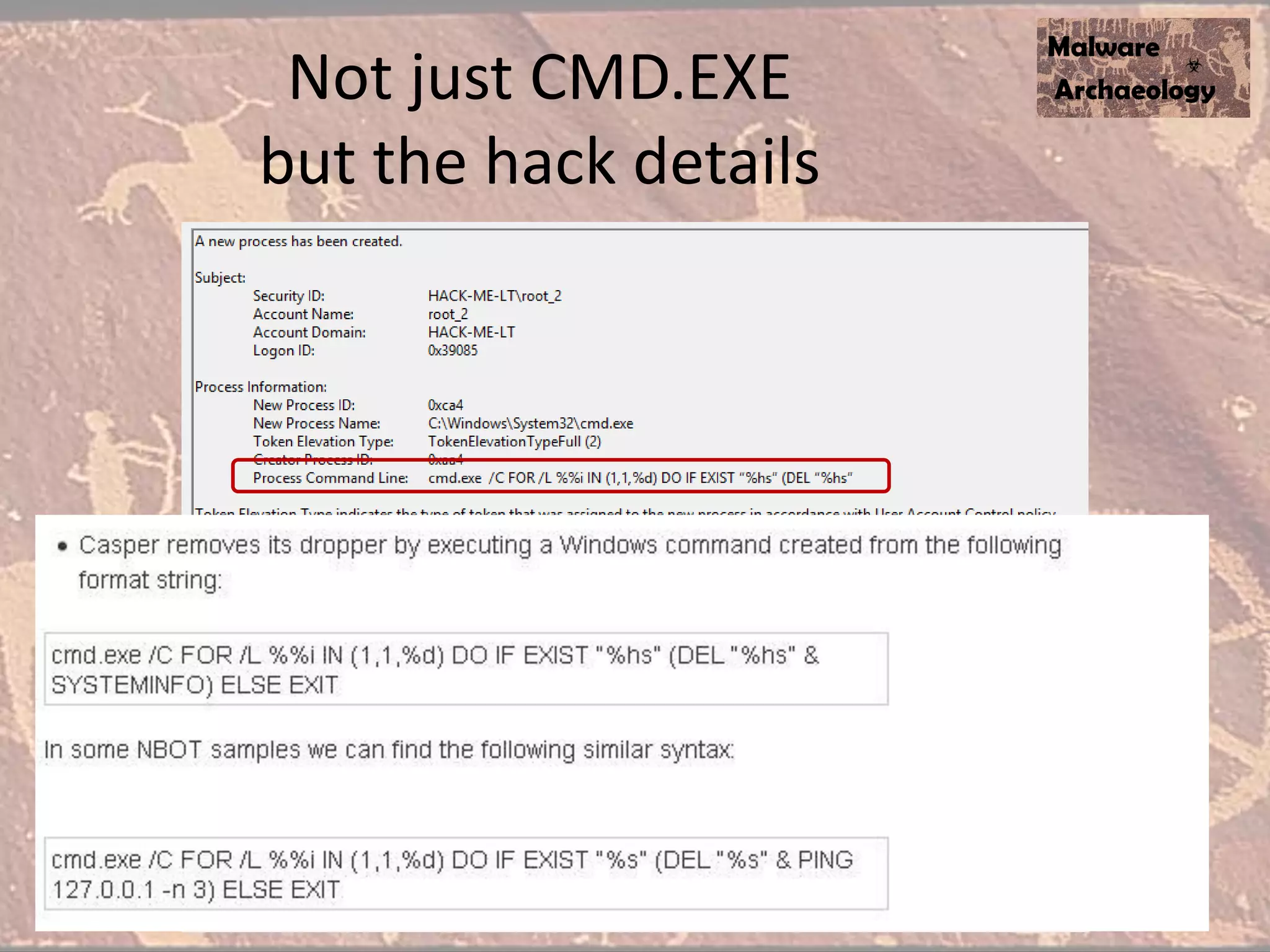
Not just CMD.EXE
but the hack details
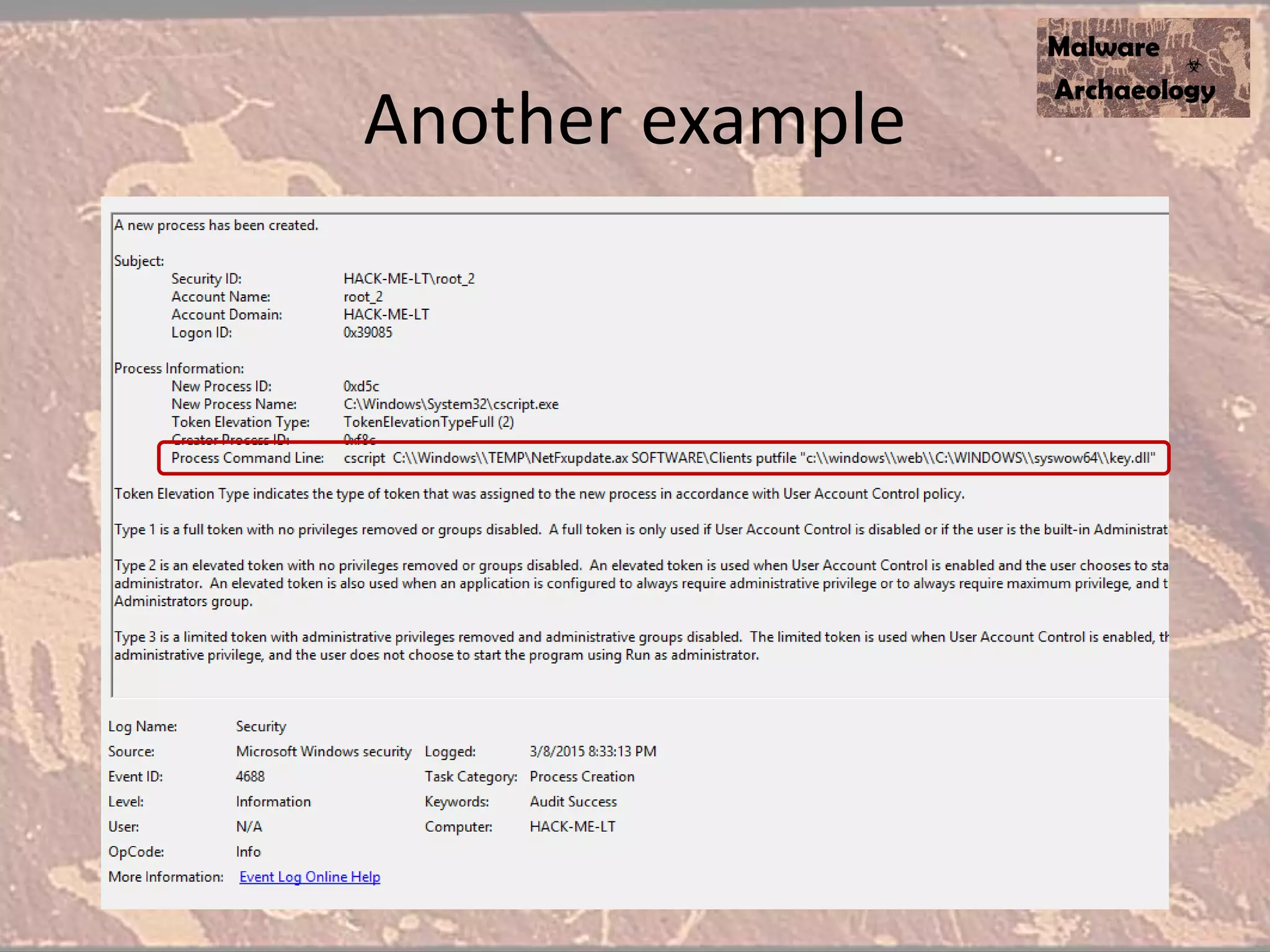
Another example
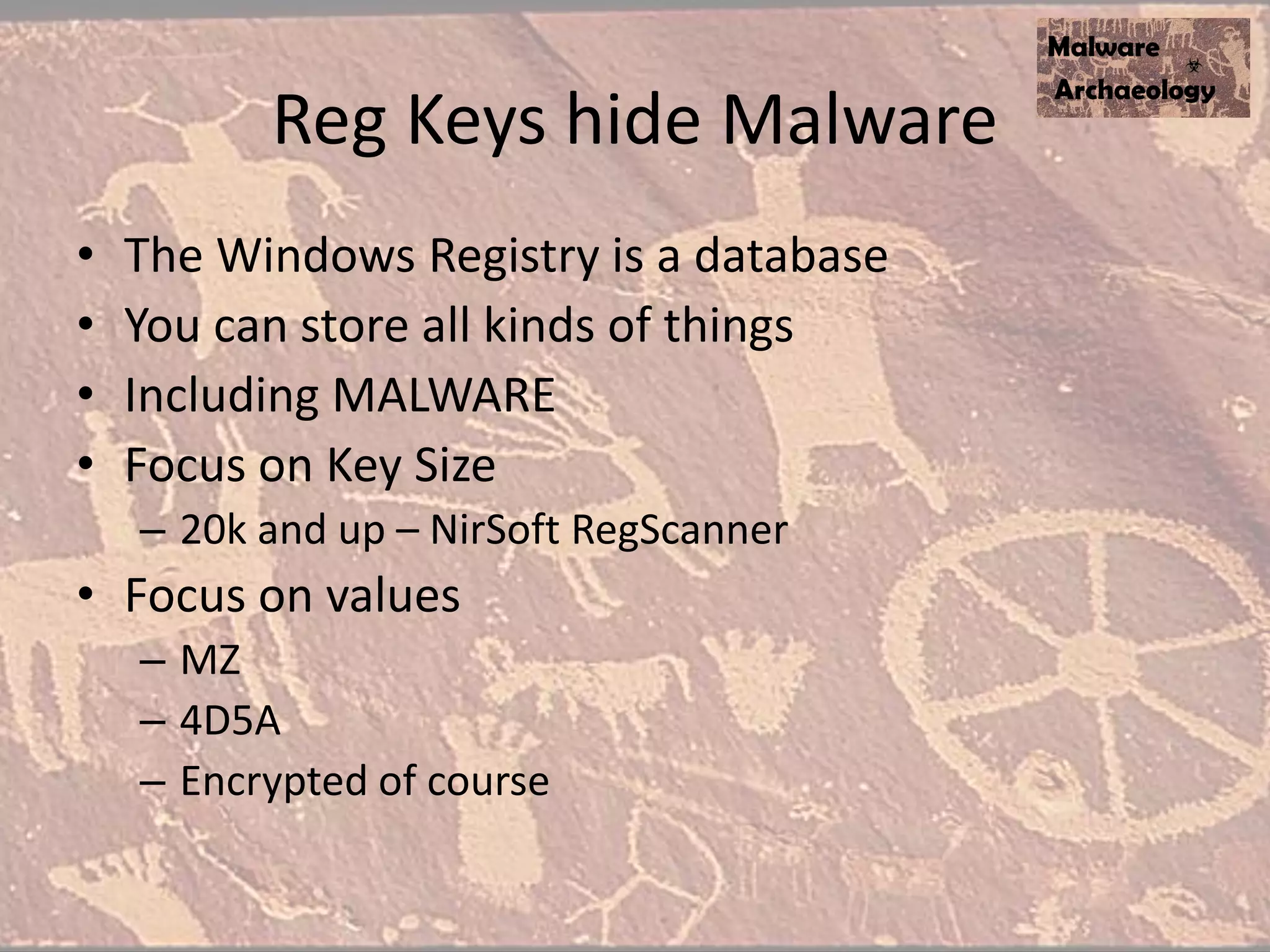
Reg Keys hide Malware
• The Windows Registry is a database
• You can store all kinds of things
• Including MALWARE
• Focus on Key Size
– 20k and up – NirSoft RegScanner
• Focus on values
– MZ
– 4D5A
– Encrypted of course
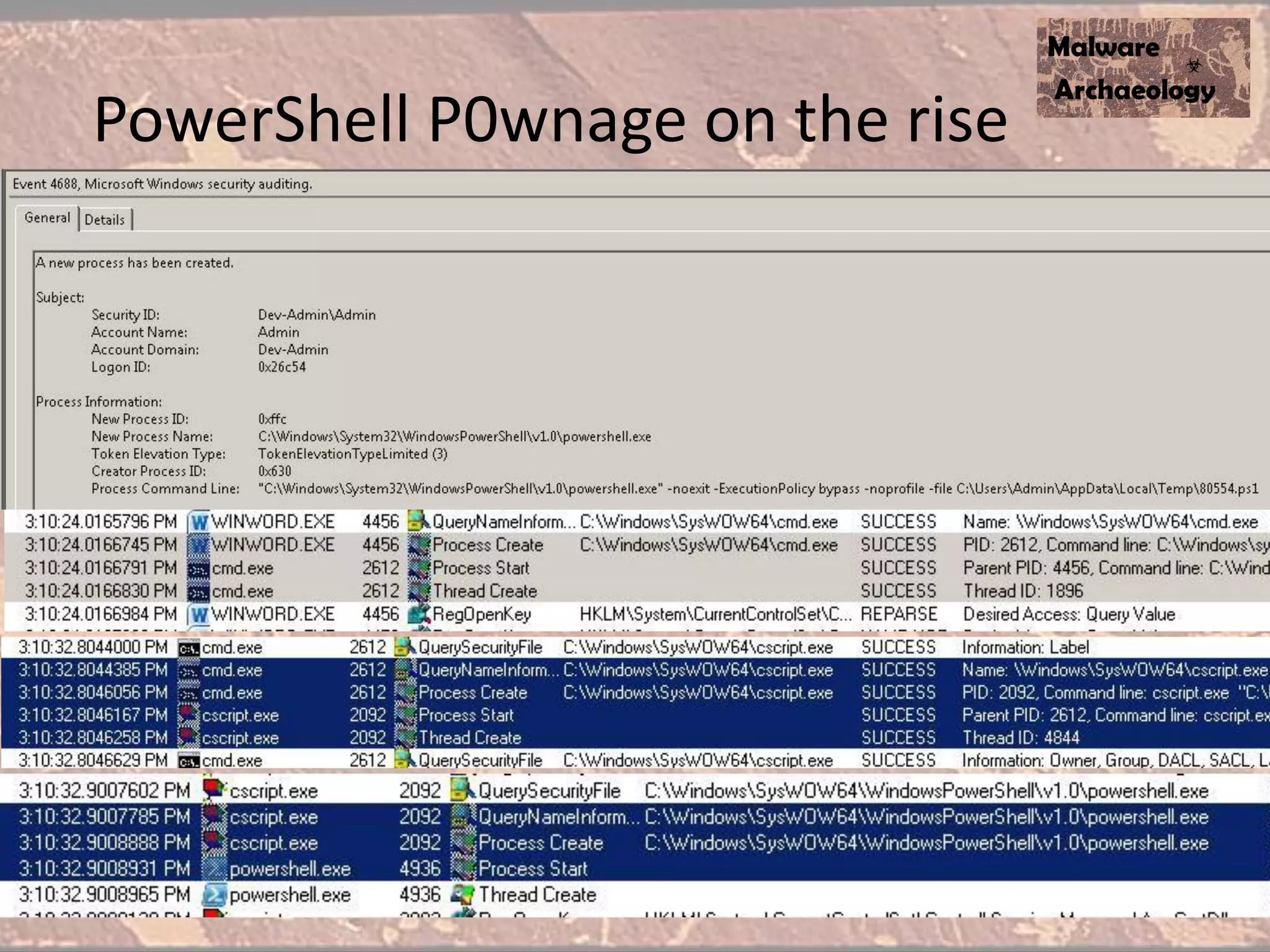
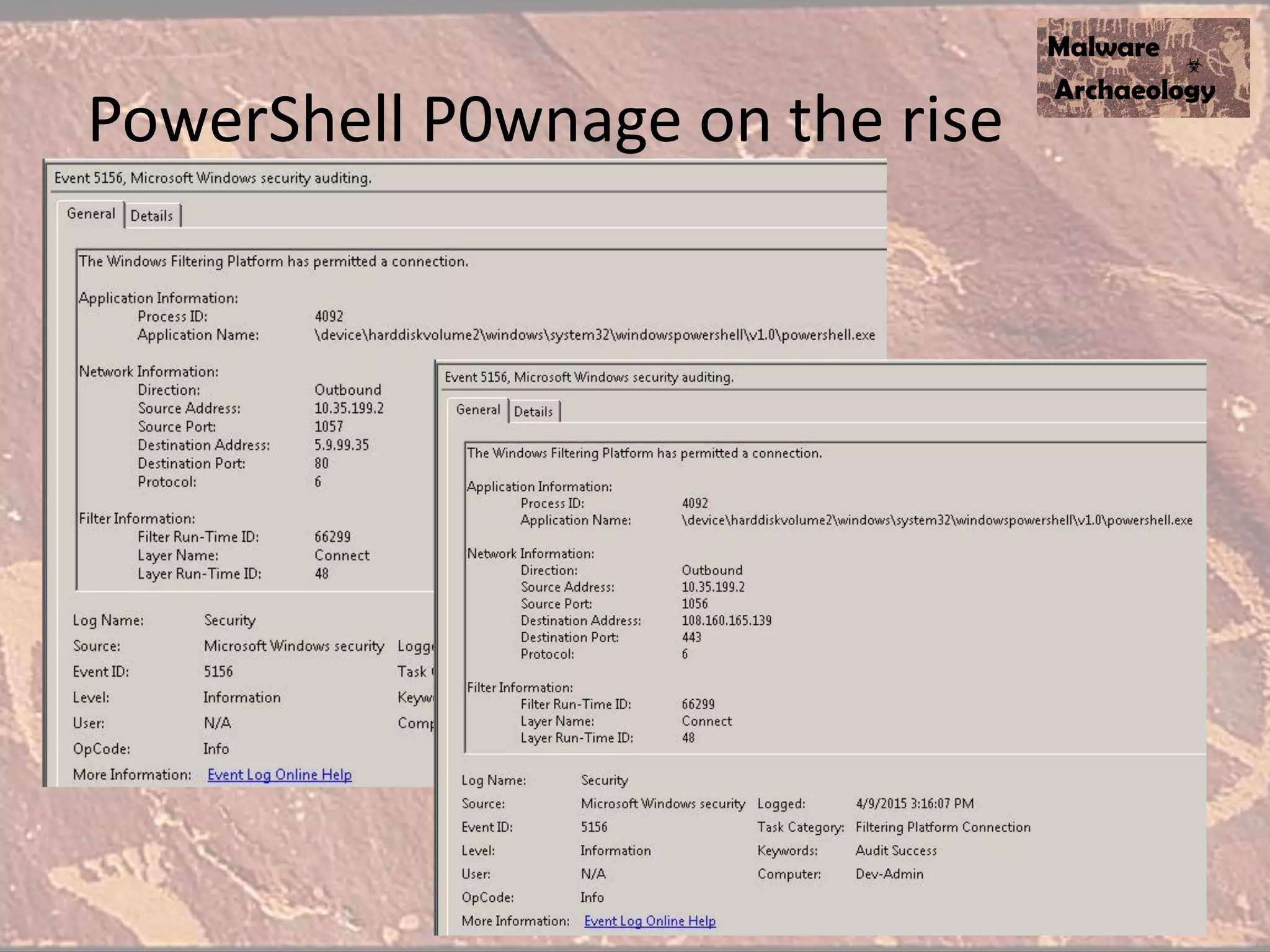
Enable Powershell command line
• It’s nice to know Powershell executed, but we REALLY want to see what was executed
• Again, Windows SUCKS by default, Powershell v2
• Details on setting PowerShell Preference variables
– http://technet.microsoft.com/en-us/library/hh847796.aspx
• Create a Default Profile for all users:
– C:WindowsSystem32WindowsPowershellv1.0
– Profile.ps1
• Add these to your default profile.ps1 file
– $LogCommandHealthEvent = $true
– $LogCommandLifecycleEvent = $true
• Splunk - Inputs.conf
– # Windows platform specific input processor
– [WinEventLog://Windows PowerShell]
– disabled = 0
• Upgrade to ver 3 or ver 4
• Investigating PowerShell Attacks (DefCon & Blackhat 2014)
– Ryan Kazanciyan TECHNICAL DIRECTOR, MANDIANT
– Matt Hastings CONSULTANT, MANDIANT
PowerShell P0wnage on the rise
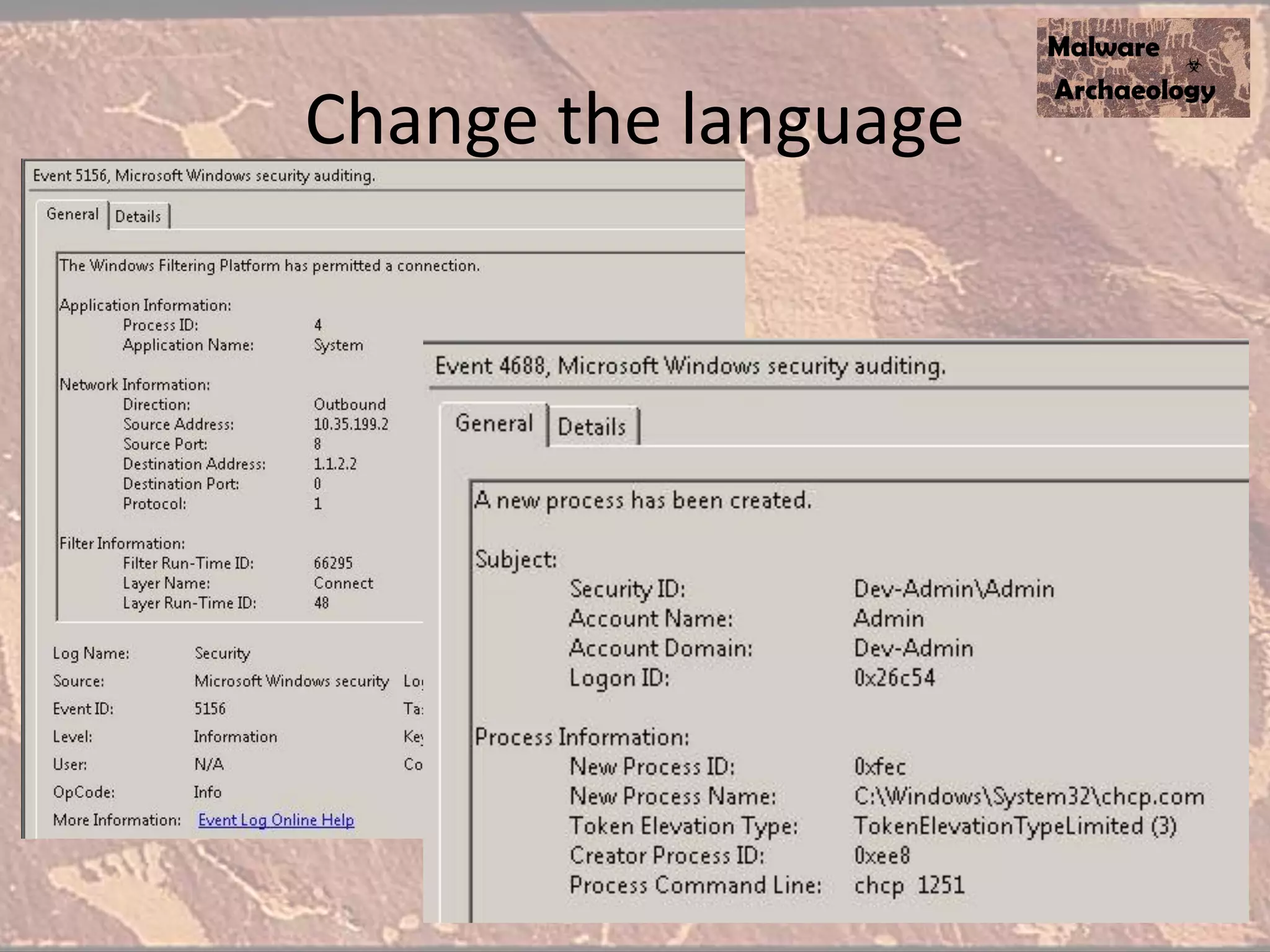
Change the language
Actual
Sophisticated
Malware
APT30
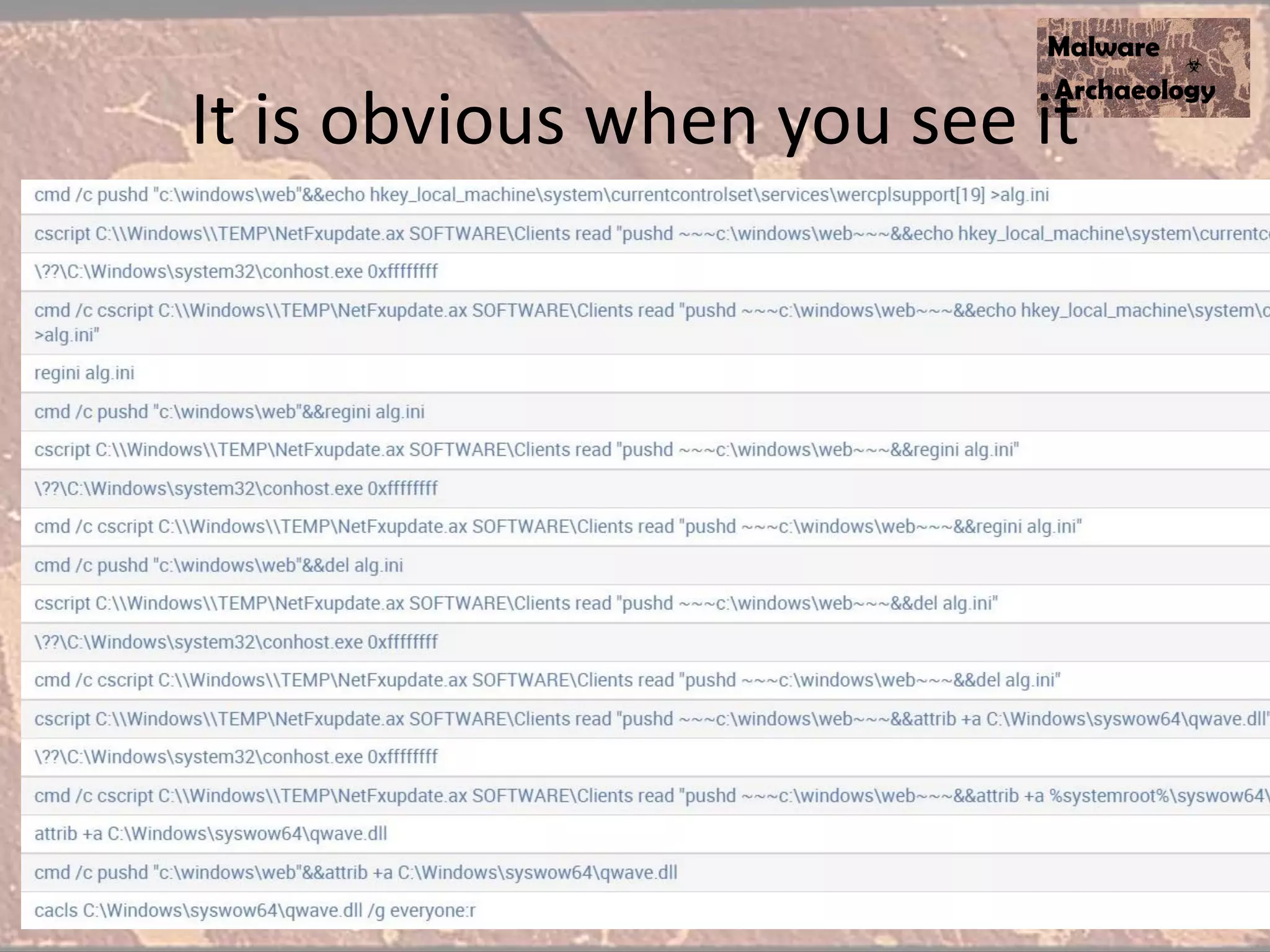
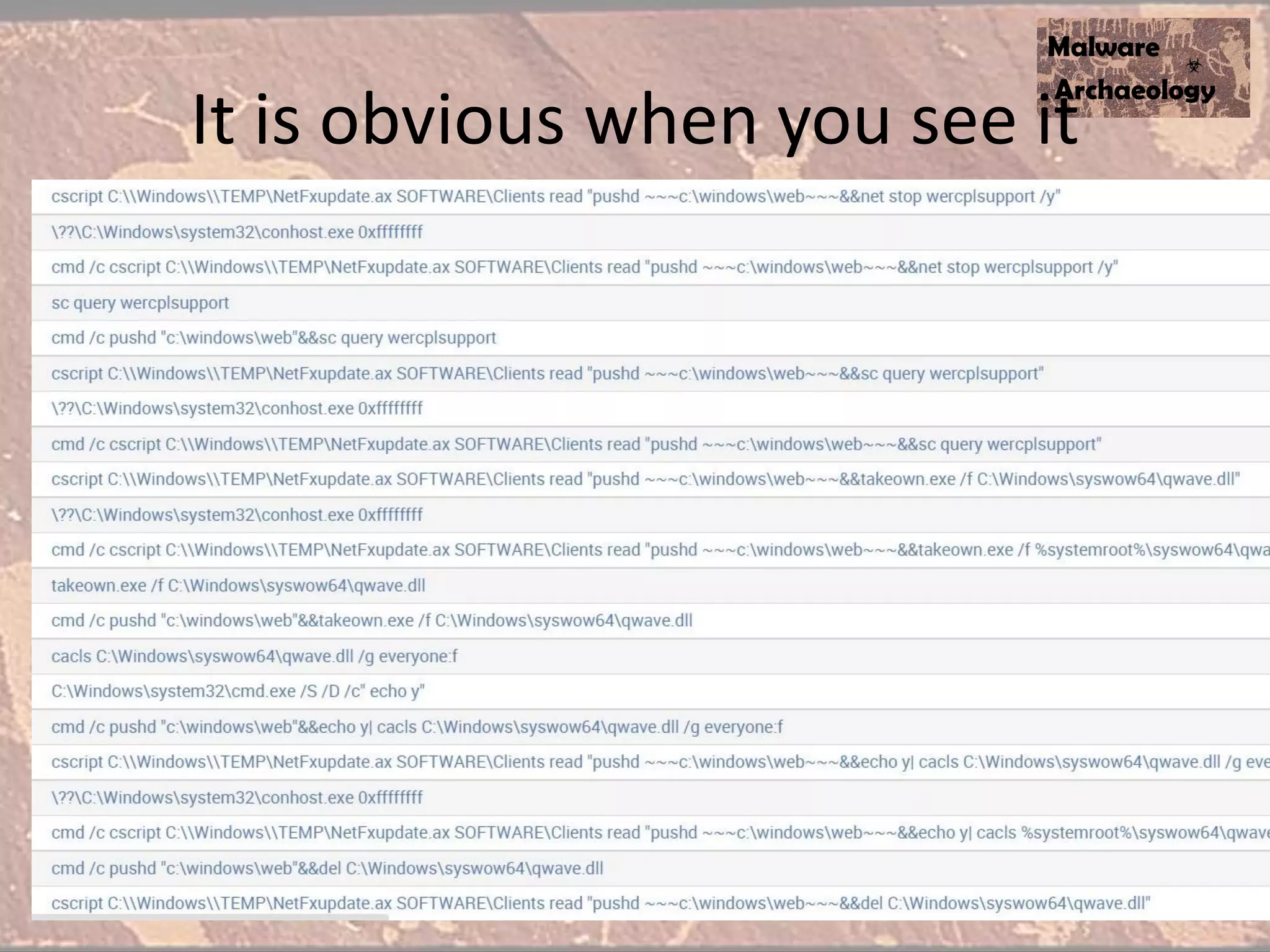
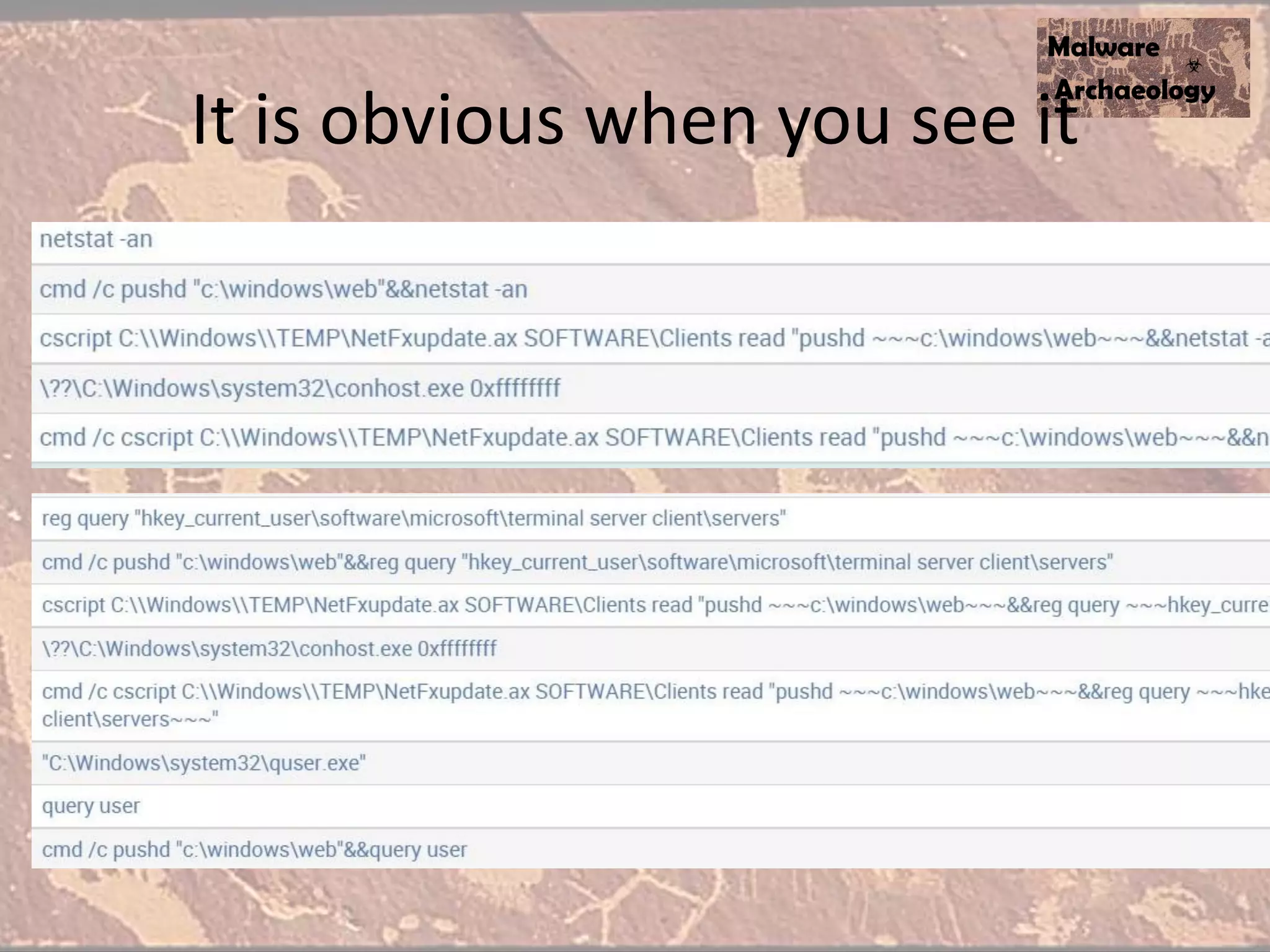
So what did we learn from these?
• You MUST enable Command Line logging
• Monitor commands:
– Cmd.exe Command Shell
– Netstat.exe Network Connections
– Cscript Executes VB/C Script
– Pushd Sets Directory for Popd
– Popd Changes directory back
– WMIC Execute WMI commands
– Quser.exe Queries the current user
– Reg.exe Query and edit the registry
– SC.exe Start and Stop Services
– Regini.exe Add/Edit registry values
– Attrib.exe Change file attributes
– Cacls.exe Change file permissions
– Xcacls.exe Change file permissions
– Takeown.exe Take ownership of a file
– Auditpol.exe Sets Auditing settings (GPO too)
– Netsh Windows Firewall
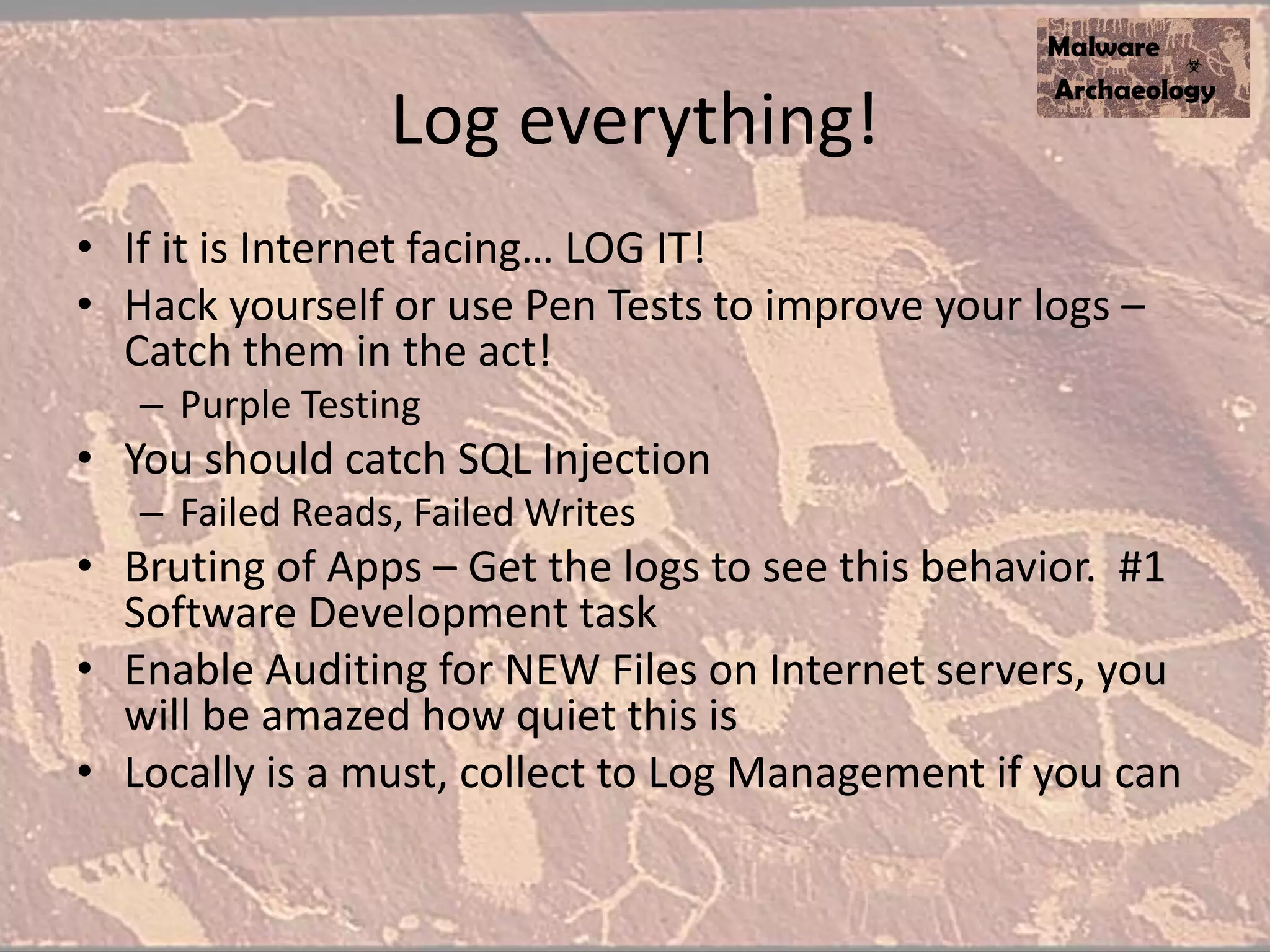
Log everything!
• If it is Internet facing… LOG IT!
• Hack yourself or use Pen Tests to improve your logs –
Catch them in the act!
– Purple Testing
• You should catch SQL Injection
– Failed Reads, Failed Writes
• Bruting of Apps – Get the logs to see this behavior. #1
Software Development task
• Enable Auditing for NEW Files on Internet servers, you
will be amazed how quiet this is
• Locally is a must, collect to Log Management if you can
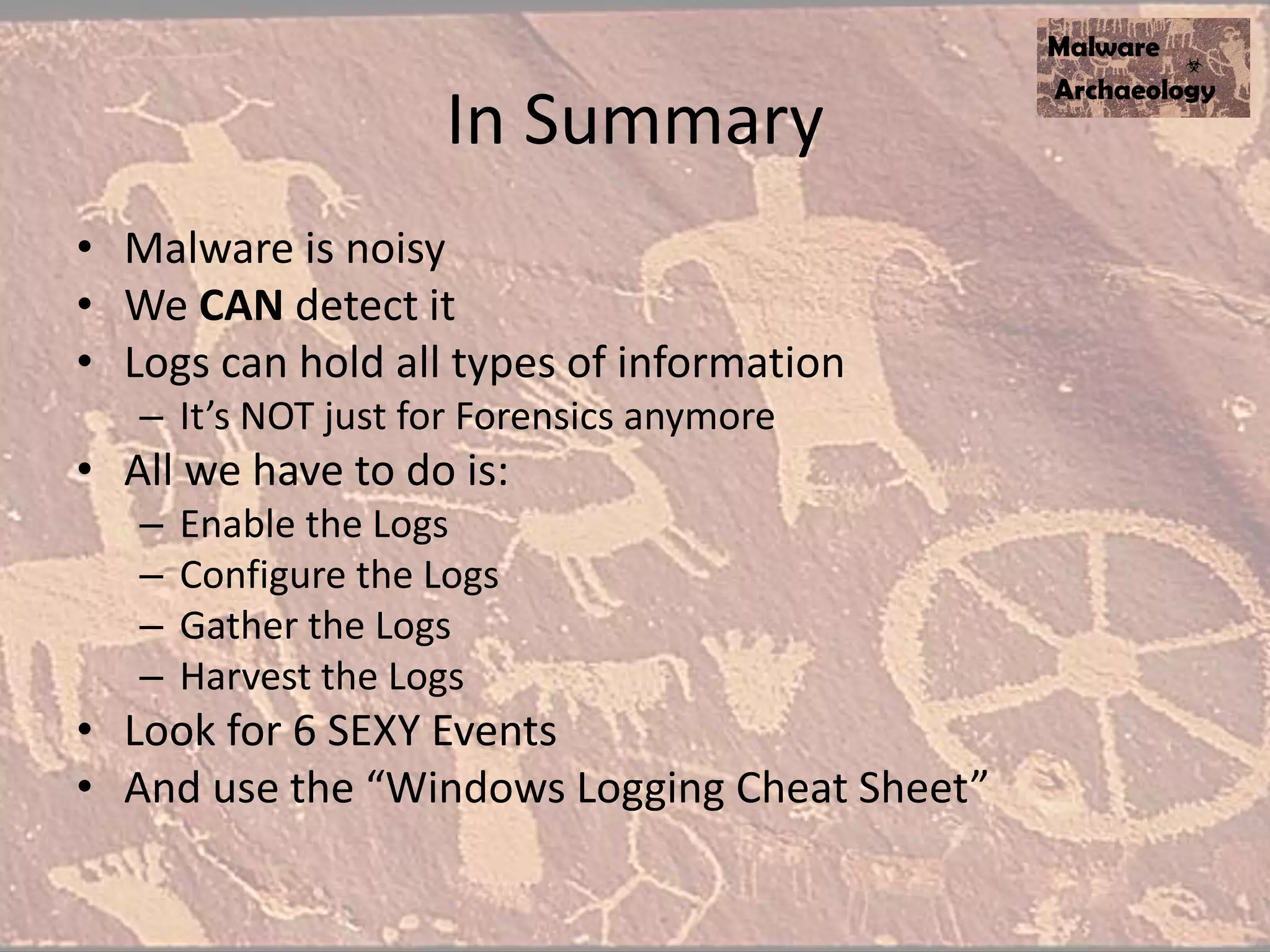
In Summary
• Malware is noisy
• We CAN detect it
• Logs can hold all types of information
– It’s NOT just for Forensics anymore
• All we have to do is:
– Enable the Logs
– Configure the Logs
– Gather the Logs
– Harvest the Logs
• Look for 6 SEXY Events
• And use the “Windows Logging Cheat Sheet”
Resources
• Our Website
– MalwareArchaeology.com
• The Handout – Windows Logging Cheat Sheet
– MalwareArchaeology.com
• Malware Analysis links too
• Blog of Malware indicators
Questions?
• You can find us at:
• @HackerHurricane
• MalwareArchaeologist.com
• HackerHurricane.com
• http://www.slideshare.net/Hackerhurricane/ask-aalware-archaeologist

Ask a Malware Archaeologist

  • 1.
    Ask a MalwareArchaeologist, Blue Team Ninja and Logoholic how we do it better than IR firms Michael Gough – Founder MalwareArchaeology.com
  • 2.
    Who am I •Blue Team Defender Ninja, Malware Archaeologist, Logoholic • I love logs – they tell us Who, What, Where, When and hopefully How • Creator of the “Windows Logging Cheat Sheet” • Creator of the “Malware Management Framework” • @HackerHurricane also my Blog
  • 3.
    Goal • Interaction –Don’t be a Ding Dong and NOT ask a question… you WILL be rewarded • Learn how us Ninja’s do it so you can too • We gave an infected VM to one of the Big IR Firms… They came back “Yup.. It’s clean” #Fail
  • 4.
    • We discoveredthis May 2012 • Met with the Feds ;-) Why listen to me
  • 5.
    Last year • Theyupdated their approach • MUCH more complex • This is NOT your typical P0wnage • This really was “sophisticated malware” • Boy did we catch them in the act • I am sharing so you can learn how!
  • 6.
  • 7.
    Read the malwarereports • Read (daily/weekly/monthly) review of virus descriptions, malware analysis and Advanced Persistent Threat (APT) reports for malware bits that you can look for or monitor for in your environment • Watch HackerHurricane.com for reviews and write ups of various published malware • Read Malware Archaeology for a list of reports
  • 8.
    BackOff – Great ReportingExample US-CERT Alert (TA14-212A)
  • 9.
  • 10.
    Works for Linuxtoo - Mayhem • Jedi Tip • Compare: • /proc to items running against ps • Things in /proc not showing in ‘ps’ output are suspicious
  • 11.
    Malware Management • Youwill see patterns • %AppData% • %Temp% • Windows, WindowsSystem32, WindowsSystem32WBEM • Reg Keys, Domains, IP’s, etc. • Many other indicators • Build a Malware Matrix • Tweak your tools or scripts… or pick 1 or 10 systems and do it manually!
  • 12.
    Create a Matrixof Indicators
  • 13.
  • 14.
    Lab for MalwareResearch • Barebones! • VM is secondary, Malware looks for you analyzing • 2 - SSD’s – Smaller is better – 1 is your Master Image – dd your Master to the Lab drive – Lather, rinse, repeat • Not connected to Corp net
  • 15.
    Lab for MalwareResearch • Load up your Master with all your tools • You harvest Malware and explode it here • No.. Not in a Sandbox ;-/ • Ninja Tip – :Gotchya – Copy *.* /y Captured – Goto Gotchya • Process Monitor running when you explode malware will show you what directories to capture files from (Filter for - WriteFile)
  • 16.
  • 17.
    Why are logsimportant? • Have you ever had an Incident and called a consultancy? • What is one of the first, if not the first thing they do? • It is referenced in every DBIR report… • LOGS! • Details of what happened, where, how and by whom • Command Line logging is the BEST thing since computers were invented! The SINGLE most important take away of this talk !!
  • 18.
    Yes, Logs ARESEXY! • SEXY - because logs tell you what a particular malware did or the malwarian (aka Bad Actor) did on your system(s) • SEXY – Because they are the one way that you can get the details you need to know what happened • SEXY – Because this preso is going to show you how for Windows systems • SEXY – Because if Target, Neiman Marcus, Michael’s, Home Depot… did this… I wouldn’t have a presentation • NOT SEXY – Because most logs are not enabled or configured properly • And because….
  • 19.
    of the SEXYSIX • Process Create 4688 – Of course enable CMD Line logging • File/Registry Auditing 4663 • Service Created 4075 • Service Changed 4070 • User Login Success 4624 • Share accessed 5140 • 90% or more of malware trigger these Event Logs for Windows
  • 20.
  • 21.
    You need thisCheat Sheet
  • 22.
    You could catchCryptoWall
  • 23.
    You can catchMalwarians
  • 24.
  • 25.
    Get the CommandLine! • It’s nice to know cmd.exe executed, but we REALLY want to see what was executed. It would be better if we could see what was executed with svchost.exe! • Again, Windows SUCKS by default, even Windows 8.1 and 2012 R2 – I do think this is the K3wlest NEW Logging feature – Worth the upgrade! • Now available for Win 7 and Server 2008 and later • Set GPO – Must have 2012 DC – Administrative TemplatesSystemAudit Process Creation – "Include command line in process creation events“ – http://technet.microsoft.com/en-us/library/dn535776.aspx • Registry Key – HKLMSoftwareMicrosoftWindowsCurrentVersionPoliciesSystemAudit – ProcessCreationIncludeCmdLine_Enabled DWORD - 1
  • 26.
  • 27.
    Not just CMD.EXE butthe hack details
  • 28.
  • 29.
    Reg Keys hideMalware • The Windows Registry is a database • You can store all kinds of things • Including MALWARE • Focus on Key Size – 20k and up – NirSoft RegScanner • Focus on values – MZ – 4D5A – Encrypted of course
  • 30.
    Enable Powershell commandline • It’s nice to know Powershell executed, but we REALLY want to see what was executed • Again, Windows SUCKS by default, Powershell v2 • Details on setting PowerShell Preference variables – http://technet.microsoft.com/en-us/library/hh847796.aspx • Create a Default Profile for all users: – C:WindowsSystem32WindowsPowershellv1.0 – Profile.ps1 • Add these to your default profile.ps1 file – $LogCommandHealthEvent = $true – $LogCommandLifecycleEvent = $true • Splunk - Inputs.conf – # Windows platform specific input processor – [WinEventLog://Windows PowerShell] – disabled = 0 • Upgrade to ver 3 or ver 4 • Investigating PowerShell Attacks (DefCon & Blackhat 2014) – Ryan Kazanciyan TECHNICAL DIRECTOR, MANDIANT – Matt Hastings CONSULTANT, MANDIANT
  • 31.
  • 32.
  • 33.
  • 34.
  • 35.
  • 36.
    So what didwe learn from these? • You MUST enable Command Line logging • Monitor commands: – Cmd.exe Command Shell – Netstat.exe Network Connections – Cscript Executes VB/C Script – Pushd Sets Directory for Popd – Popd Changes directory back – WMIC Execute WMI commands – Quser.exe Queries the current user – Reg.exe Query and edit the registry – SC.exe Start and Stop Services – Regini.exe Add/Edit registry values – Attrib.exe Change file attributes – Cacls.exe Change file permissions – Xcacls.exe Change file permissions – Takeown.exe Take ownership of a file – Auditpol.exe Sets Auditing settings (GPO too) – Netsh Windows Firewall
  • 37.
    Log everything! • Ifit is Internet facing… LOG IT! • Hack yourself or use Pen Tests to improve your logs – Catch them in the act! – Purple Testing • You should catch SQL Injection – Failed Reads, Failed Writes • Bruting of Apps – Get the logs to see this behavior. #1 Software Development task • Enable Auditing for NEW Files on Internet servers, you will be amazed how quiet this is • Locally is a must, collect to Log Management if you can
  • 38.
    In Summary • Malwareis noisy • We CAN detect it • Logs can hold all types of information – It’s NOT just for Forensics anymore • All we have to do is: – Enable the Logs – Configure the Logs – Gather the Logs – Harvest the Logs • Look for 6 SEXY Events • And use the “Windows Logging Cheat Sheet”
  • 39.
    Resources • Our Website –MalwareArchaeology.com • The Handout – Windows Logging Cheat Sheet – MalwareArchaeology.com • Malware Analysis links too • Blog of Malware indicators
  • 40.
    Questions? • You canfind us at: • @HackerHurricane • MalwareArchaeologist.com • HackerHurricane.com • http://www.slideshare.net/Hackerhurricane/ask-aalware-archaeologist