CompTIA Security+ Guide to
Network Security Fundamentals,
Fifth Edition
Chapter 3
Application and Networking-Based
Attacks
© Cengage Learning 2015
Objectives
• List and explain the different types of server-side
web applications attacks
• Define client-side attacks
• Explain how overflow attacks work
• List different types of networking-based attacks
CompTIA Security+ Guide to Network Security Fundamentals,
Fifth Edition
2
© Cengage Learning 2015
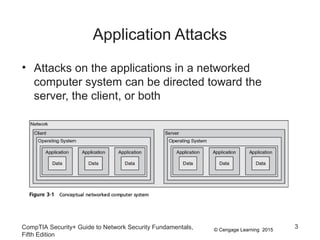
Application Attacks
• Attacks on the applications in a networked
computer system can be directed toward the
server, the client, or both
CompTIA Security+ Guide to Network Security Fundamentals,
Fifth Edition
3
© Cengage Learning 2015
Server-Side Web Application Attacks
• Securing server-side web applications of often
considered more difficult than protecting other
systems
• Traditional network security devices can block
traditional network attacks, but cannot always block
web application attacks
– Many network security devices ignore the content of
HTTP traffic
• Zero-day attack - an attack that exploits previously
unknown vulnerabilities, victims have not time to
prepare for or defend against the attack
CompTIA Security+ Guide to Network Security Fundamentals,
Fifth Edition
4
© Cengage Learning 2015
Server-Side Web Application Attacks
• Many server-side web application attacks target the
input that the applications accept from users
• Such common web application attacks are:
– Cross-site scripting
– SQL injection
– XML injection
– Command injection/directory traversal
CompTIA Security+ Guide to Network Security Fundamentals,
Fifth Edition
5
© Cengage Learning 2015
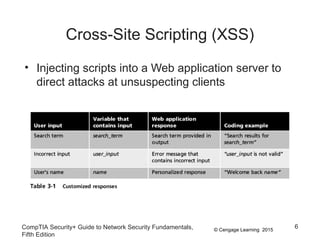
Cross-Site Scripting (XSS)
• Injecting scripts into a Web application server to
direct attacks at unsuspecting clients
CompTIA Security+ Guide to Network Security Fundamentals,
Fifth Edition
6
© Cengage Learning 2015
Cross-Site Scripting (XSS)
• When victim visits injected Web site:
– Malicious instructions are sent to victim’s browser
• Some XSS attacks are designed to steal
information:
– Retained by the browser when visiting specific sites
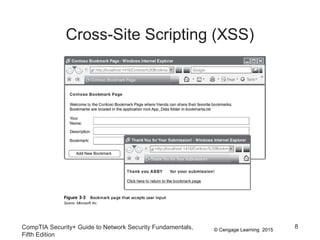
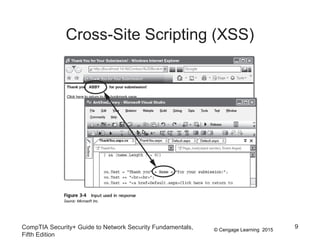
• An XSS attack requires a website meets two
criteria:
– Accepts user input without validating it
– Uses input in a response
CompTIA Security+ Guide to Network Security Fundamentals,
Fifth Edition
7
© Cengage Learning 2015
Cross-Site Scripting (XSS)
CompTIA Security+ Guide to Network Security Fundamentals,
Fifth Edition
8
© Cengage Learning 2015
Cross-Site Scripting (XSS)
CompTIA Security+ Guide to Network Security Fundamentals,
Fifth Edition
9
© Cengage Learning 2015
SQL Injection
• Targets SQL servers by injecting malicious
commands into them
• SQL (Structured Query Language)
– Used to manipulate data stored in relational
database
• Forgotten password example:
– Attacker enters incorrectly formatted e-mail address
– Response lets attacker know whether input is being
validated
CompTIA Security+ Guide to Network Security Fundamentals,
Fifth Edition
10
© Cengage Learning 2015
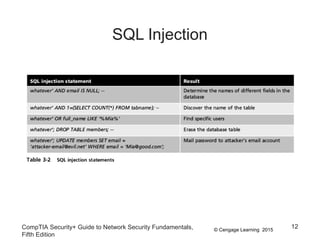
SQL Injection
• Forgotten password example (cont’d.):
– Attacker enters email field in SQL statement
– Statement is processed by the database
– Example statement:
SELECT fieldlist FROM table WHERE field
= ‘whatever’ or ‘a’=‘a’
– Result: All user email addresses will be displayed
CompTIA Security+ Guide to Network Security Fundamentals,
Fifth Edition
11
© Cengage Learning 2015CompTIA Security+ Guide to Network Security Fundamentals,
Fifth Edition
12
SQL Injection
© Cengage Learning 2015
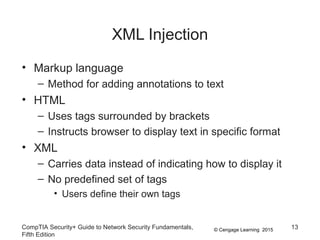
XML Injection
• Markup language
– Method for adding annotations to text
• HTML
– Uses tags surrounded by brackets
– Instructs browser to display text in specific format
• XML
– Carries data instead of indicating how to display it
– No predefined set of tags
• Users define their own tags
CompTIA Security+ Guide to Network Security Fundamentals,
Fifth Edition
13
© Cengage Learning 2015
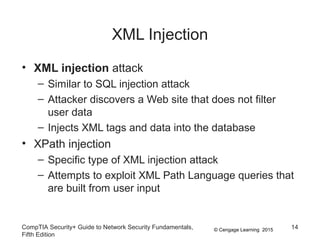
XML Injection
• XML injection attack
– Similar to SQL injection attack
– Attacker discovers a Web site that does not filter
user data
– Injects XML tags and data into the database
• XPath injection
– Specific type of XML injection attack
– Attempts to exploit XML Path Language queries that
are built from user input
CompTIA Security+ Guide to Network Security Fundamentals,
Fifth Edition
14
© Cengage Learning 2015
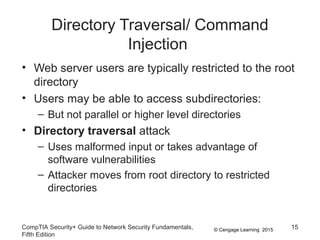
Directory Traversal/ Command
Injection
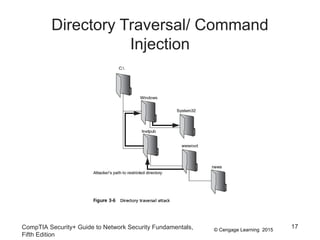
• Web server users are typically restricted to the root
directory
• Users may be able to access subdirectories:
– But not parallel or higher level directories
• Directory traversal attack
– Uses malformed input or takes advantage of
software vulnerabilities
– Attacker moves from root directory to restricted
directories
CompTIA Security+ Guide to Network Security Fundamentals,
Fifth Edition
15
© Cengage Learning 2015
Directory Traversal/ Command
Injection
• Command injection attack
– Attacker enters commands to execute on a server
• A directory traversal attack can be launched
through:
– A vulnerability in the web application program that
accepts user input
– A vulnerability in the web server OS software
– A security misconfiguration on the server
CompTIA Security+ Guide to Network Security Fundamentals,
Fifth Edition
16
© Cengage Learning 2015
Directory Traversal/ Command
Injection
CompTIA Security+ Guide to Network Security Fundamentals,
Fifth Edition
17
© Cengage Learning 2015
Client-Side Application Attacks
• Web application attacks are server-side attacks
• Client-side attacks target vulnerabilities in client
applications that interact with a compromised
server or process malicious data
• The client initiates connection with the server,
which could result in an attack
CompTIA Security+ Guide to Network Security Fundamentals,
Fifth Edition
18
© Cengage Learning 2015
Client-Side Attacks
• Drive-by download
– Client computer is compromised simply by viewing a
Web page
– Attackers inject content into vulnerable Web server
• Gain access to server’s operating system
– Attackers craft a zero pixel Iframe (short for inline
frame) to avoid visual detection
– Embed an HTML document inside main document
– Client’s browser downloads malicious script
– Instructs computer to download malware
CompTIA Security+ Guide to Network Security Fundamentals,
Fifth Edition
19
© Cengage Learning 2015
Client-Side Attacks
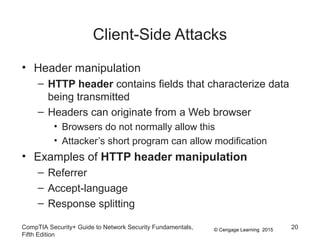
• Header manipulation
– HTTP header contains fields that characterize data
being transmitted
– Headers can originate from a Web browser
• Browsers do not normally allow this
• Attacker’s short program can allow modification
• Examples of HTTP header manipulation
– Referrer
– Accept-language
– Response splitting
CompTIA Security+ Guide to Network Security Fundamentals,
Fifth Edition
20
© Cengage Learning 2015
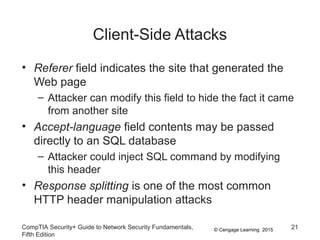
Client-Side Attacks
• Referer field indicates the site that generated the
Web page
– Attacker can modify this field to hide the fact it came
from another site
• Accept-language field contents may be passed
directly to an SQL database
– Attacker could inject SQL command by modifying
this header
• Response splitting is one of the most common
HTTP header manipulation attacks
CompTIA Security+ Guide to Network Security Fundamentals,
Fifth Edition
21
© Cengage Learning 2015
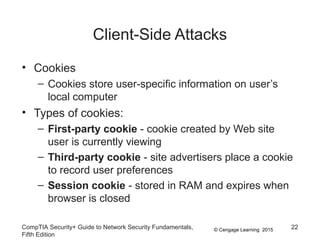
Client-Side Attacks
• Cookies
– Cookies store user-specific information on user’s
local computer
• Types of cookies:
– First-party cookie - cookie created by Web site
user is currently viewing
– Third-party cookie - site advertisers place a cookie
to record user preferences
– Session cookie - stored in RAM and expires when
browser is closed
CompTIA Security+ Guide to Network Security Fundamentals,
Fifth Edition
22
© Cengage Learning 2015
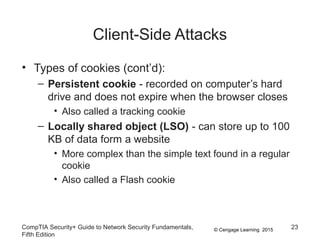
Client-Side Attacks
• Types of cookies (cont’d):
– Persistent cookie - recorded on computer’s hard
drive and does not expire when the browser closes
• Also called a tracking cookie
– Locally shared object (LSO) - can store up to 100
KB of data form a website
• More complex than the simple text found in a regular
cookie
• Also called a Flash cookie
CompTIA Security+ Guide to Network Security Fundamentals,
Fifth Edition
23
© Cengage Learning 2015
Client-Side Attacks
• Cookies pose security and privacy risks
– First-party cookies may be stolen and used to
impersonate the user
– Used to tailor advertising
– Can be exploited by attackers
• Attachments
– Files that are coupled with email messages
– Malicious attachments are commonly used to spread
viruses, Trojans, and other malware
CompTIA Security+ Guide to Network Security Fundamentals,
Fifth Edition
24
© Cengage Learning 2015
Client-Side Attacks
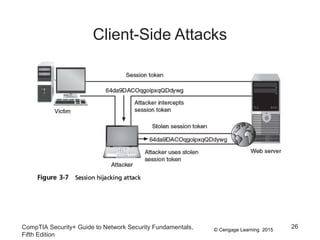
• Session Hijacking
– Attacker attempts to impersonate user by stealing or
guessing session token
– Session token is a random string assigned to an
interaction between user and web application
• An attacker can attempt to obtain the session
token:
– By using XSS or other attacks to steal the session
token cookie from the victim’s computer
– Eavesdropping on the transmission
– Guessing the session token
CompTIA Security+ Guide to Network Security Fundamentals,
Fifth Edition
25
© Cengage Learning 2015
Client-Side Attacks
CompTIA Security+ Guide to Network Security Fundamentals,
Fifth Edition
26
© Cengage Learning 2015
Client-Side Attacks
• Malicious Add-ons
– Plug-in - a third party library that attaches to a web
browser and can be embedded inside a webpage
– Add-ons or extensions - add functionality to the web
browser
• Add-ons can do the following:
– Create additional web browser toolbars
– Change browser menus
– Be aware of other tabs open in the same browser
– Process the content of every webpage that is loaded
CompTIA Security+ Guide to Network Security Fundamentals,
Fifth Edition
27
© Cengage Learning 2015
Client-Side Attacks
• Security risks exist when using add-ons
– Attackers can create malicious add-ons to launch
attacks against the user’s computer
• Malicious add-ons can be written by using
Microsoft’s Active X
– ActiveX is a set of rules for how applications under
the Microsoft Windows OS should share information
• Attackers can take advantage of vulnerabilities in
ActiveX to perform malicious attacks on a computer
CompTIA Security+ Guide to Network Security Fundamentals,
Fifth Edition
28
© Cengage Learning 2015
Impartial Overflow Attacks
• Impartial overflow attacks
– Attacks designed to “overflow” areas of memory with
instructions from the attacker
• “Impartial” means they can target either a server or
a client
• Types of overflow attacks:
– Buffer overflow attacks
– Integer overflow attacks
– Arbitrary/remote code execution attacks
CompTIA Security+ Guide to Network Security Fundamentals,
Fifth Edition
29
© Cengage Learning 2015
Impartial Overflow Attacks
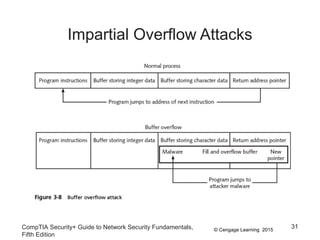
• Buffer overflow attacks
– Occur when a process attempts to store data in
RAM beyond the boundaries of a fixed-length
storage buffer
– Extra data overflows into adjacent memory locations
• An attacker can overflow the buffer with a new
address pointing to the attacker’s malware code
CompTIA Security+ Guide to Network Security Fundamentals,
Fifth Edition
30
© Cengage Learning 2015
Impartial Overflow Attacks
CompTIA Security+ Guide to Network Security Fundamentals,
Fifth Edition
31
© Cengage Learning 2015
Impartial Overflow Attacks
• Integer Overflow Attack
– An integer overflow is the condition that occurs when
the result of an arithmetic operation exceeds the
maximum size of the integer type used to store it
• In an integer overflow attack:
– An attacker changes the value of a variable to
something outside the range that the programmer
had intended by using an integer overflow
CompTIA Security+ Guide to Network Security Fundamentals,
Fifth Edition
32
© Cengage Learning 2015
Impartial Overflow Attacks
• Arbitrary/Remote Code Execution
– A heap spray is often used in an arbitrary/remote
code execution attack
• Inserts data only in parts of memory
• An arbitrary/remote code execution attack allows
an attacker to run programs and execute
commands on a different computer
– Gains control of the victim’s computer to execute
commands
CompTIA Security+ Guide to Network Security Fundamentals,
Fifth Edition
33
© Cengage Learning 2015
Networking-Based Attacks
• Attackers place a high priority on targeting
networks
– Exploiting a single vulnerability may expose
hundreds or thousands of devices to an attacker
• Types of networking-based attacks:
– Denial of service
– Interception
– Poisoning
– Attacks on access rights
CompTIA Security+ Guide to Network Security Fundamentals,
Fifth Edition
34
© Cengage Learning 2015
Denial of Service (DoS)
• Denial of service (DoS)
– A deliberate attempt to prevent authorized users
from accessing a system by overwhelming it with
requests
• Most DoS attacks today are distributed denial of
service (DDoS)
– Using hundreds or thousands of zombie computers
in a botnet to flood a device with requests
CompTIA Security+ Guide to Network Security Fundamentals,
Fifth Edition
35
© Cengage Learning 2015
Denial of Service (DoS)
• Ping flood attack
– The ping utility is used to send large number of
ICMP echo request messages
– In a ping flood attack, multiple computers rapidly
send a large number of ICMP echo requests to a
server
• Server will drop legitimate connections and refuse
new connections
CompTIA Security+ Guide to Network Security Fundamentals,
Fifth Edition
36
© Cengage Learning 2015
Denial of Service (DoS)
• Smurf attack
– Tricks devices into responding to false requests to
an unsuspecting victim
– An attacker broadcasts a ping request to all
computers on the network but changes the address
from which the request came from (called spoofing)
– Appears as if victim’s computer is asking for
response from all computers on the network
– All computers send a response to the victim’s
computer so that it is overwhelmed and crashes or
becomes unavailable to legitimate users
CompTIA Security+ Guide to Network Security Fundamentals,
Fifth Edition
37
© Cengage Learning 2015
Denial of Service (DoS)
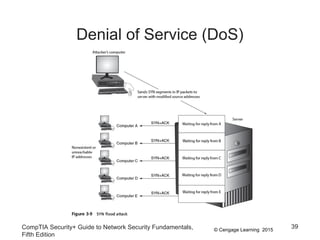
• SYN flood attack
– Takes advantage of procedures for initiating a
session
• In a SYN flood attack against a web server:
– The attacker sends SYN segments in IP packets to
the server
– Attacker modifies the source address of each packet
to computer addresses that do not exist or cannot be
reached
CompTIA Security+ Guide to Network Security Fundamentals,
Fifth Edition
38
© Cengage Learning 2015
Denial of Service (DoS)
CompTIA Security+ Guide to Network Security Fundamentals,
Fifth Edition
39
© Cengage Learning 2015
Interception
• Some attacks are designed to intercept network
communications
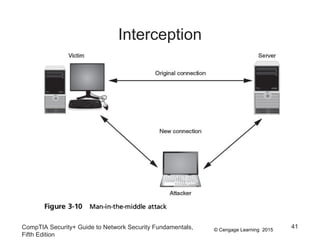
• Man-in-the-Middle attacks
– Interception of legitimate communication and forging
a fictitious response to the sender
– Two computers are sending and receiving data with
a computer between them
– In a passive attack, data is captured and recorded
before sending it on to the original recipient
– In an active attack contents of transmission are
altered before they are sent to the recipient
CompTIA Security+ Guide to Network Security Fundamentals,
Fifth Edition
40
© Cengage Learning 2015
Interception
CompTIA Security+ Guide to Network Security Fundamentals,
Fifth Edition
41
© Cengage Learning 2015
Interception
• Replay attacks
– Attacker makes copy of transmission before sending
it to the original recipient
• Uses copy at a later time
– Example: capturing logon credentials
• More sophisticated replay attacks
– Attacker captures network device’s message to
server and then later sends original, valid message
to server
– Establishes a trust relationship between attacker and
server
CompTIA Security+ Guide to Network Security Fundamentals,
Fifth Edition
42
© Cengage Learning 2015
Poisoning
• Poisoning
– The act of introducing a substance that harms or
destroys
• Two types of attacks inject “poison” into a normal
network process to facilitate an attack:
– ARP poisoning
– DNS poisoning
CompTIA Security+ Guide to Network Security Fundamentals,
Fifth Edition
43
© Cengage Learning 2015
Poisoning
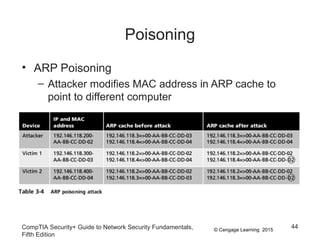
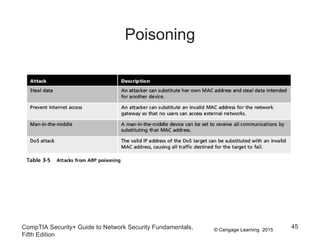
• ARP Poisoning
– Attacker modifies MAC address in ARP cache to
point to different computer
CompTIA Security+ Guide to Network Security Fundamentals,
Fifth Edition
44
© Cengage Learning 2015
Poisoning
CompTIA Security+ Guide to Network Security Fundamentals,
Fifth Edition
45
© Cengage Learning 2015
Poisoning
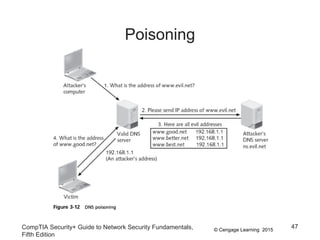
• DNS poisoning
– Domain Name System is the current basis for name
resolution to IP address
– DNS poisoning substitutes DNS addresses to
redirect a computer to another device
• Two locations for DNS poisoning
– Local host table
– External DNS server
CompTIA Security+ Guide to Network Security Fundamentals,
Fifth Edition
46
© Cengage Learning 2015
Poisoning
CompTIA Security+ Guide to Network Security Fundamentals,
Fifth Edition
47
© Cengage Learning 2015
Attacks on Access Rights
• Access rights
– Privileges to access hardware and software
resources that are granted to users
• Two attacks that target access rights:
– Privilege escalation
– Transitive access
CompTIA Security+ Guide to Network Security Fundamentals,
Fifth Edition
48
© Cengage Learning 2015
Attacks on Access Rights
• Privilege escalation
– Exploiting a software vulnerability to gain access to
resources that the user normally would be restricted
from accessing
• Two types of privilege escalation:
– When a lower privilege user accesses functions
restricted to higher privilege users
– When a user with restricted privilege accesses
different restricted functions of a similar user
CompTIA Security+ Guide to Network Security Fundamentals,
Fifth Edition
49
© Cengage Learning 2015
Attacks on Access Rights
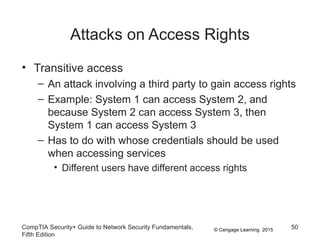
• Transitive access
– An attack involving a third party to gain access rights
– Example: System 1 can access System 2, and
because System 2 can access System 3, then
System 1 can access System 3
– Has to do with whose credentials should be used
when accessing services
• Different users have different access rights
CompTIA Security+ Guide to Network Security Fundamentals,
Fifth Edition
50
© Cengage Learning 2015
Summary
• Web application flaws are exploited through normal
communication channels, making web applications
more difficult to protect
• An XSS attack uses Web sites that accept user
input without validating it
– Uses server to launch attacks on computers that
access it
• Client-side attacks target vulnerabilities in client
applications
– Client interacts with a compromised server
CompTIA Security+ Guide to Network Security Fundamentals,
Fifth Edition
51
© Cengage Learning 2015
Summary
• Session hijacking is an attack in which an attacker
steals a session token and impersonates user
• A buffer overflow attack attempts to compromise a
computer by pushing data into inappropriate
memory locations
• A Denial of Service attack attempts to overwhelm a
system so that it cannot perform normal functions
• In ARP and DNS poisoning, valid addresses are
replaced with fraudulent addresses
• Access rights and privileges may also be exploited
CompTIA Security+ Guide to Network Security Fundamentals,
Fifth Edition
52

Chapter 3 Presentation

  • 1.
    CompTIA Security+ Guideto Network Security Fundamentals, Fifth Edition Chapter 3 Application and Networking-Based Attacks
  • 2.
    © Cengage Learning2015 Objectives • List and explain the different types of server-side web applications attacks • Define client-side attacks • Explain how overflow attacks work • List different types of networking-based attacks CompTIA Security+ Guide to Network Security Fundamentals, Fifth Edition 2
  • 3.
    © Cengage Learning2015 Application Attacks • Attacks on the applications in a networked computer system can be directed toward the server, the client, or both CompTIA Security+ Guide to Network Security Fundamentals, Fifth Edition 3
  • 4.
    © Cengage Learning2015 Server-Side Web Application Attacks • Securing server-side web applications of often considered more difficult than protecting other systems • Traditional network security devices can block traditional network attacks, but cannot always block web application attacks – Many network security devices ignore the content of HTTP traffic • Zero-day attack - an attack that exploits previously unknown vulnerabilities, victims have not time to prepare for or defend against the attack CompTIA Security+ Guide to Network Security Fundamentals, Fifth Edition 4
  • 5.
    © Cengage Learning2015 Server-Side Web Application Attacks • Many server-side web application attacks target the input that the applications accept from users • Such common web application attacks are: – Cross-site scripting – SQL injection – XML injection – Command injection/directory traversal CompTIA Security+ Guide to Network Security Fundamentals, Fifth Edition 5
  • 6.
    © Cengage Learning2015 Cross-Site Scripting (XSS) • Injecting scripts into a Web application server to direct attacks at unsuspecting clients CompTIA Security+ Guide to Network Security Fundamentals, Fifth Edition 6
  • 7.
    © Cengage Learning2015 Cross-Site Scripting (XSS) • When victim visits injected Web site: – Malicious instructions are sent to victim’s browser • Some XSS attacks are designed to steal information: – Retained by the browser when visiting specific sites • An XSS attack requires a website meets two criteria: – Accepts user input without validating it – Uses input in a response CompTIA Security+ Guide to Network Security Fundamentals, Fifth Edition 7
  • 8.
    © Cengage Learning2015 Cross-Site Scripting (XSS) CompTIA Security+ Guide to Network Security Fundamentals, Fifth Edition 8
  • 9.
    © Cengage Learning2015 Cross-Site Scripting (XSS) CompTIA Security+ Guide to Network Security Fundamentals, Fifth Edition 9
  • 10.
    © Cengage Learning2015 SQL Injection • Targets SQL servers by injecting malicious commands into them • SQL (Structured Query Language) – Used to manipulate data stored in relational database • Forgotten password example: – Attacker enters incorrectly formatted e-mail address – Response lets attacker know whether input is being validated CompTIA Security+ Guide to Network Security Fundamentals, Fifth Edition 10
  • 11.
    © Cengage Learning2015 SQL Injection • Forgotten password example (cont’d.): – Attacker enters email field in SQL statement – Statement is processed by the database – Example statement: SELECT fieldlist FROM table WHERE field = ‘whatever’ or ‘a’=‘a’ – Result: All user email addresses will be displayed CompTIA Security+ Guide to Network Security Fundamentals, Fifth Edition 11
  • 12.
    © Cengage Learning2015CompTIA Security+ Guide to Network Security Fundamentals, Fifth Edition 12 SQL Injection
  • 13.
    © Cengage Learning2015 XML Injection • Markup language – Method for adding annotations to text • HTML – Uses tags surrounded by brackets – Instructs browser to display text in specific format • XML – Carries data instead of indicating how to display it – No predefined set of tags • Users define their own tags CompTIA Security+ Guide to Network Security Fundamentals, Fifth Edition 13
  • 14.
    © Cengage Learning2015 XML Injection • XML injection attack – Similar to SQL injection attack – Attacker discovers a Web site that does not filter user data – Injects XML tags and data into the database • XPath injection – Specific type of XML injection attack – Attempts to exploit XML Path Language queries that are built from user input CompTIA Security+ Guide to Network Security Fundamentals, Fifth Edition 14
  • 15.
    © Cengage Learning2015 Directory Traversal/ Command Injection • Web server users are typically restricted to the root directory • Users may be able to access subdirectories: – But not parallel or higher level directories • Directory traversal attack – Uses malformed input or takes advantage of software vulnerabilities – Attacker moves from root directory to restricted directories CompTIA Security+ Guide to Network Security Fundamentals, Fifth Edition 15
  • 16.
    © Cengage Learning2015 Directory Traversal/ Command Injection • Command injection attack – Attacker enters commands to execute on a server • A directory traversal attack can be launched through: – A vulnerability in the web application program that accepts user input – A vulnerability in the web server OS software – A security misconfiguration on the server CompTIA Security+ Guide to Network Security Fundamentals, Fifth Edition 16
  • 17.
    © Cengage Learning2015 Directory Traversal/ Command Injection CompTIA Security+ Guide to Network Security Fundamentals, Fifth Edition 17
  • 18.
    © Cengage Learning2015 Client-Side Application Attacks • Web application attacks are server-side attacks • Client-side attacks target vulnerabilities in client applications that interact with a compromised server or process malicious data • The client initiates connection with the server, which could result in an attack CompTIA Security+ Guide to Network Security Fundamentals, Fifth Edition 18
  • 19.
    © Cengage Learning2015 Client-Side Attacks • Drive-by download – Client computer is compromised simply by viewing a Web page – Attackers inject content into vulnerable Web server • Gain access to server’s operating system – Attackers craft a zero pixel Iframe (short for inline frame) to avoid visual detection – Embed an HTML document inside main document – Client’s browser downloads malicious script – Instructs computer to download malware CompTIA Security+ Guide to Network Security Fundamentals, Fifth Edition 19
  • 20.
    © Cengage Learning2015 Client-Side Attacks • Header manipulation – HTTP header contains fields that characterize data being transmitted – Headers can originate from a Web browser • Browsers do not normally allow this • Attacker’s short program can allow modification • Examples of HTTP header manipulation – Referrer – Accept-language – Response splitting CompTIA Security+ Guide to Network Security Fundamentals, Fifth Edition 20
  • 21.
    © Cengage Learning2015 Client-Side Attacks • Referer field indicates the site that generated the Web page – Attacker can modify this field to hide the fact it came from another site • Accept-language field contents may be passed directly to an SQL database – Attacker could inject SQL command by modifying this header • Response splitting is one of the most common HTTP header manipulation attacks CompTIA Security+ Guide to Network Security Fundamentals, Fifth Edition 21
  • 22.
    © Cengage Learning2015 Client-Side Attacks • Cookies – Cookies store user-specific information on user’s local computer • Types of cookies: – First-party cookie - cookie created by Web site user is currently viewing – Third-party cookie - site advertisers place a cookie to record user preferences – Session cookie - stored in RAM and expires when browser is closed CompTIA Security+ Guide to Network Security Fundamentals, Fifth Edition 22
  • 23.
    © Cengage Learning2015 Client-Side Attacks • Types of cookies (cont’d): – Persistent cookie - recorded on computer’s hard drive and does not expire when the browser closes • Also called a tracking cookie – Locally shared object (LSO) - can store up to 100 KB of data form a website • More complex than the simple text found in a regular cookie • Also called a Flash cookie CompTIA Security+ Guide to Network Security Fundamentals, Fifth Edition 23
  • 24.
    © Cengage Learning2015 Client-Side Attacks • Cookies pose security and privacy risks – First-party cookies may be stolen and used to impersonate the user – Used to tailor advertising – Can be exploited by attackers • Attachments – Files that are coupled with email messages – Malicious attachments are commonly used to spread viruses, Trojans, and other malware CompTIA Security+ Guide to Network Security Fundamentals, Fifth Edition 24
  • 25.
    © Cengage Learning2015 Client-Side Attacks • Session Hijacking – Attacker attempts to impersonate user by stealing or guessing session token – Session token is a random string assigned to an interaction between user and web application • An attacker can attempt to obtain the session token: – By using XSS or other attacks to steal the session token cookie from the victim’s computer – Eavesdropping on the transmission – Guessing the session token CompTIA Security+ Guide to Network Security Fundamentals, Fifth Edition 25
  • 26.
    © Cengage Learning2015 Client-Side Attacks CompTIA Security+ Guide to Network Security Fundamentals, Fifth Edition 26
  • 27.
    © Cengage Learning2015 Client-Side Attacks • Malicious Add-ons – Plug-in - a third party library that attaches to a web browser and can be embedded inside a webpage – Add-ons or extensions - add functionality to the web browser • Add-ons can do the following: – Create additional web browser toolbars – Change browser menus – Be aware of other tabs open in the same browser – Process the content of every webpage that is loaded CompTIA Security+ Guide to Network Security Fundamentals, Fifth Edition 27
  • 28.
    © Cengage Learning2015 Client-Side Attacks • Security risks exist when using add-ons – Attackers can create malicious add-ons to launch attacks against the user’s computer • Malicious add-ons can be written by using Microsoft’s Active X – ActiveX is a set of rules for how applications under the Microsoft Windows OS should share information • Attackers can take advantage of vulnerabilities in ActiveX to perform malicious attacks on a computer CompTIA Security+ Guide to Network Security Fundamentals, Fifth Edition 28
  • 29.
    © Cengage Learning2015 Impartial Overflow Attacks • Impartial overflow attacks – Attacks designed to “overflow” areas of memory with instructions from the attacker • “Impartial” means they can target either a server or a client • Types of overflow attacks: – Buffer overflow attacks – Integer overflow attacks – Arbitrary/remote code execution attacks CompTIA Security+ Guide to Network Security Fundamentals, Fifth Edition 29
  • 30.
    © Cengage Learning2015 Impartial Overflow Attacks • Buffer overflow attacks – Occur when a process attempts to store data in RAM beyond the boundaries of a fixed-length storage buffer – Extra data overflows into adjacent memory locations • An attacker can overflow the buffer with a new address pointing to the attacker’s malware code CompTIA Security+ Guide to Network Security Fundamentals, Fifth Edition 30
  • 31.
    © Cengage Learning2015 Impartial Overflow Attacks CompTIA Security+ Guide to Network Security Fundamentals, Fifth Edition 31
  • 32.
    © Cengage Learning2015 Impartial Overflow Attacks • Integer Overflow Attack – An integer overflow is the condition that occurs when the result of an arithmetic operation exceeds the maximum size of the integer type used to store it • In an integer overflow attack: – An attacker changes the value of a variable to something outside the range that the programmer had intended by using an integer overflow CompTIA Security+ Guide to Network Security Fundamentals, Fifth Edition 32
  • 33.
    © Cengage Learning2015 Impartial Overflow Attacks • Arbitrary/Remote Code Execution – A heap spray is often used in an arbitrary/remote code execution attack • Inserts data only in parts of memory • An arbitrary/remote code execution attack allows an attacker to run programs and execute commands on a different computer – Gains control of the victim’s computer to execute commands CompTIA Security+ Guide to Network Security Fundamentals, Fifth Edition 33
  • 34.
    © Cengage Learning2015 Networking-Based Attacks • Attackers place a high priority on targeting networks – Exploiting a single vulnerability may expose hundreds or thousands of devices to an attacker • Types of networking-based attacks: – Denial of service – Interception – Poisoning – Attacks on access rights CompTIA Security+ Guide to Network Security Fundamentals, Fifth Edition 34
  • 35.
    © Cengage Learning2015 Denial of Service (DoS) • Denial of service (DoS) – A deliberate attempt to prevent authorized users from accessing a system by overwhelming it with requests • Most DoS attacks today are distributed denial of service (DDoS) – Using hundreds or thousands of zombie computers in a botnet to flood a device with requests CompTIA Security+ Guide to Network Security Fundamentals, Fifth Edition 35
  • 36.
    © Cengage Learning2015 Denial of Service (DoS) • Ping flood attack – The ping utility is used to send large number of ICMP echo request messages – In a ping flood attack, multiple computers rapidly send a large number of ICMP echo requests to a server • Server will drop legitimate connections and refuse new connections CompTIA Security+ Guide to Network Security Fundamentals, Fifth Edition 36
  • 37.
    © Cengage Learning2015 Denial of Service (DoS) • Smurf attack – Tricks devices into responding to false requests to an unsuspecting victim – An attacker broadcasts a ping request to all computers on the network but changes the address from which the request came from (called spoofing) – Appears as if victim’s computer is asking for response from all computers on the network – All computers send a response to the victim’s computer so that it is overwhelmed and crashes or becomes unavailable to legitimate users CompTIA Security+ Guide to Network Security Fundamentals, Fifth Edition 37
  • 38.
    © Cengage Learning2015 Denial of Service (DoS) • SYN flood attack – Takes advantage of procedures for initiating a session • In a SYN flood attack against a web server: – The attacker sends SYN segments in IP packets to the server – Attacker modifies the source address of each packet to computer addresses that do not exist or cannot be reached CompTIA Security+ Guide to Network Security Fundamentals, Fifth Edition 38
  • 39.
    © Cengage Learning2015 Denial of Service (DoS) CompTIA Security+ Guide to Network Security Fundamentals, Fifth Edition 39
  • 40.
    © Cengage Learning2015 Interception • Some attacks are designed to intercept network communications • Man-in-the-Middle attacks – Interception of legitimate communication and forging a fictitious response to the sender – Two computers are sending and receiving data with a computer between them – In a passive attack, data is captured and recorded before sending it on to the original recipient – In an active attack contents of transmission are altered before they are sent to the recipient CompTIA Security+ Guide to Network Security Fundamentals, Fifth Edition 40
  • 41.
    © Cengage Learning2015 Interception CompTIA Security+ Guide to Network Security Fundamentals, Fifth Edition 41
  • 42.
    © Cengage Learning2015 Interception • Replay attacks – Attacker makes copy of transmission before sending it to the original recipient • Uses copy at a later time – Example: capturing logon credentials • More sophisticated replay attacks – Attacker captures network device’s message to server and then later sends original, valid message to server – Establishes a trust relationship between attacker and server CompTIA Security+ Guide to Network Security Fundamentals, Fifth Edition 42
  • 43.
    © Cengage Learning2015 Poisoning • Poisoning – The act of introducing a substance that harms or destroys • Two types of attacks inject “poison” into a normal network process to facilitate an attack: – ARP poisoning – DNS poisoning CompTIA Security+ Guide to Network Security Fundamentals, Fifth Edition 43
  • 44.
    © Cengage Learning2015 Poisoning • ARP Poisoning – Attacker modifies MAC address in ARP cache to point to different computer CompTIA Security+ Guide to Network Security Fundamentals, Fifth Edition 44
  • 45.
    © Cengage Learning2015 Poisoning CompTIA Security+ Guide to Network Security Fundamentals, Fifth Edition 45
  • 46.
    © Cengage Learning2015 Poisoning • DNS poisoning – Domain Name System is the current basis for name resolution to IP address – DNS poisoning substitutes DNS addresses to redirect a computer to another device • Two locations for DNS poisoning – Local host table – External DNS server CompTIA Security+ Guide to Network Security Fundamentals, Fifth Edition 46
  • 47.
    © Cengage Learning2015 Poisoning CompTIA Security+ Guide to Network Security Fundamentals, Fifth Edition 47
  • 48.
    © Cengage Learning2015 Attacks on Access Rights • Access rights – Privileges to access hardware and software resources that are granted to users • Two attacks that target access rights: – Privilege escalation – Transitive access CompTIA Security+ Guide to Network Security Fundamentals, Fifth Edition 48
  • 49.
    © Cengage Learning2015 Attacks on Access Rights • Privilege escalation – Exploiting a software vulnerability to gain access to resources that the user normally would be restricted from accessing • Two types of privilege escalation: – When a lower privilege user accesses functions restricted to higher privilege users – When a user with restricted privilege accesses different restricted functions of a similar user CompTIA Security+ Guide to Network Security Fundamentals, Fifth Edition 49
  • 50.
    © Cengage Learning2015 Attacks on Access Rights • Transitive access – An attack involving a third party to gain access rights – Example: System 1 can access System 2, and because System 2 can access System 3, then System 1 can access System 3 – Has to do with whose credentials should be used when accessing services • Different users have different access rights CompTIA Security+ Guide to Network Security Fundamentals, Fifth Edition 50
  • 51.
    © Cengage Learning2015 Summary • Web application flaws are exploited through normal communication channels, making web applications more difficult to protect • An XSS attack uses Web sites that accept user input without validating it – Uses server to launch attacks on computers that access it • Client-side attacks target vulnerabilities in client applications – Client interacts with a compromised server CompTIA Security+ Guide to Network Security Fundamentals, Fifth Edition 51
  • 52.
    © Cengage Learning2015 Summary • Session hijacking is an attack in which an attacker steals a session token and impersonates user • A buffer overflow attack attempts to compromise a computer by pushing data into inappropriate memory locations • A Denial of Service attack attempts to overwhelm a system so that it cannot perform normal functions • In ARP and DNS poisoning, valid addresses are replaced with fraudulent addresses • Access rights and privileges may also be exploited CompTIA Security+ Guide to Network Security Fundamentals, Fifth Edition 52

Editor's Notes

  • #2 CompTIA Security+ Guide to Network Security Fundamentals, Fifth Edition Chapter 3 Application and Networking-Based Attacks
  • #3 Objectives List and explain the different types of server-side web applications attacks Define client-side attacks Explain how overflow attacks work List different types of networking-based attacks
  • #4 Application Attacks Attacks on the applications in a networked computer system can be directed toward the server, the client, or both Figure 3-1 Conceptual networked computer system
  • #5 Server-Side Web Application Attacks Securing server-side web applications of often considered more difficult than protecting other systems Traditional network security devices can block traditional network attacks, but cannot always block web application attacks Many network security devices ignore the content of HTTP traffic Zero-day attack - an attack that exploits previously unknown vulnerabilities, victims have not time to prepare for or defend against the attack
  • #6 Server-Side Web Application Attacks Many server-side web application attacks target the input that the applications accept from users Such common web application attacks are: Cross-site scripting SQL injection XML injection Command injection/directory traversal
  • #7 Cross-Site Scripting (XSS) Injecting scripts into a Web application server to direct attacks at unsuspecting clients Table 3-1 Customized responses
  • #8 Cross-Site Scripting (XSS) When victim visits injected Web site: Malicious instructions are sent to victim’s browser Some XSS attacks are designed to steal information: Retained by the browser when visiting specific sites An XSS attack requires a website meets two criteria: Accepts user input without validating it Uses input in a response
  • #9 Cross-Site Scripting (XSS) Figure 3-3 Bookmark page that accepts user input
  • #10 Cross-Site Scripting (XSS) Figure 3-4 Input used in responses
  • #11 SQL Injection Targets SQL servers by injecting malicious commands into them SQL (Structured Query Language) Used to manipulate data stored in relational database Forgotten password example: Attacker enters incorrectly formatted e-mail address Response lets attacker know whether input is being validated
  • #12 SQL Injection Forgotten password example (cont’d.): Attacker enters email field in SQL statement Statement is processed by the database Example statement: SELECT fieldlist FROM table WHERE field = ‘whatever’ or ‘a’=‘a’ Result: All user email addresses will be displayed
  • #13 SQL Injection Table 3-2 SQL injection statements
  • #14 XML Injection Markup language Method for adding annotations to text HTML Uses tags surrounded by brackets Instructs browser to display text in specific format XML Carries data instead of indicating how to display it No predefined set of tags Users define their own tags
  • #15 XML Injection XML injection attack Similar to SQL injection attack Attacker discovers a Web site that does not filter user data Injects XML tags and data into the database XPath injection Specific type of XML injection attack Attempts to exploit XML Path Language queries that are built from user input
  • #16 Directory Traversal/ Command Injection Web server users are typically restricted to the root directory Users may be able to access subdirectories: But not parallel or higher level directories Directory traversal attack Uses malformed input or takes advantage of software vulnerabilities Attacker moves from root directory to restricted directories
  • #17 Directory Traversal/ Command Injection Command injection attack Attacker enters commands to execute on a server A directory traversal attack can be launched through: A vulnerability in the web application program that accepts user input A vulnerability in the web server OS software A security misconfiguration on the server
  • #18 Directory Traversal/ Command Injection Figure 3-6 Directory traversal attack
  • #19 Client-Side Application Attacks Web application attacks are server-side attacks Client-side attacks target vulnerabilities in client applications that interact with a compromised server or process malicious data The client initiates connection with the server, which could result in an attack
  • #20 Client-Side Attacks Drive-by download Client computer is compromised simply by viewing a Web page Attackers inject content into vulnerable Web server Gain access to server’s operating system Attackers craft a zero pixel Iframe (short for inline frame) to avoid visual detection Embed an HTML document inside main document Client’s browser downloads malicious script Instructs computer to download malware
  • #21 Client-Side Attacks Header manipulation HTTP header contains fields that characterize data being transmitted Headers can originate from a Web browser Browsers do not normally allow this Attacker’s short program can allow modification Examples of HTTP header manipulation Referrer Accept-language Response splitting
  • #22 Client-Side Attacks Referer field indicates the site that generated the Web page Attacker can modify this field to hide the fact it came from another site Accept-language field contents may be passed directly to an SQL database Attacker could inject SQL command by modifying this header Response splitting is one of the most common HTTP header manipulation attacks
  • #23 Client-Side Attacks Cookies Cookies store user-specific information on user’s local computer Types of cookies: First-party cookie - cookie created by Web site user is currently viewing Third-party cookie - site advertisers place a cookie to record user preferences Session cookie - stored in RAM and expires when browser is closed
  • #24 Client-Side Attacks Types of cookies (cont’d): Persistent cookie - recorded on computer’s hard drive and does not expire when the browser closes Also called a tracking cookie Locally shared object (LSO) - can store up to 100 KB of data form a website More complex than the simple text found in a regular cookie Also called a Flash cookie
  • #25 Client-Side Attacks Cookies pose security and privacy risks First-party cookies may be stolen and used to impersonate the user Used to tailor advertising Can be exploited by attackers Attachments Files that are coupled with email messages Malicious attachments are commonly used to spread viruses, Trojans, and other malware
  • #26 Client-Side Attacks Session Hijacking Attacker attempts to impersonate user by stealing or guessing session token Session token is a random string assigned to an interaction between user and web application An attacker can attempt to obtain the session token: By using XSS or other attacks to steal the session token cookie from the victim’s computer Eavesdropping on the transmission Guessing the session token
  • #27 Client-Side Attacks Figure 3-7 Session hijacking attack
  • #28 Client-Side Attacks Malicious Add-ons Plug-in - a third party library that attaches to a web browser and can be embedded inside a webpage Add-ons or extensions - add functionality to the web browser Add-ons can do the following: Create additional web browser toolbars Change browser menus Be aware of other tabs open in the same browser Process the content of every webpage that is loaded
  • #29 Client-Side Attacks Security risks exist when using add-ons Attackers can create malicious add-ons to launch attacks against the user’s computer Malicious add-ons can be written by using Microsoft’s Active X ActiveX is a set of rules for how applications under the Microsoft Windows OS should share information Attackers can take advantage of vulnerabilities in ActiveX to perform malicious attacks on a computer
  • #30 Impartial Overflow Attacks Impartial overflow attacks Attacks designed to “overflow” areas of memory with instructions from the attacker “Impartial” means they can target either a server or a client Types of overflow attacks: Buffer overflow attacks Integer overflow attacks Arbitrary/remote code execution attacks
  • #31 Impartial Overflow Attacks Buffer overflow attacks Occur when a process attempts to store data in RAM beyond the boundaries of a fixed-length storage buffer Extra data overflows into adjacent memory locations An attacker can overflow the buffer with a new address pointing to the attacker’s malware code
  • #32 Impartial Overflow Attacks Figure 3-8 Buffer overflow attack
  • #33 Impartial Overflow Attacks Integer Overflow Attack An integer overflow is the condition that occurs when the result of an arithmetic operation exceeds the maximum size of the integer type used to store it In an integer overflow attack: An attacker changes the value of a variable to something outside the range that the programmer had intended by using an integer overflow
  • #34 Impartial Overflow Attacks Arbitrary/Remote Code Execution A heap spray is often used in an arbitrary/remote code execution attack Inserts data only in parts of memory An arbitrary/remote code execution attack allows an attacker to run programs and execute commands on a different computer Gains control of the victim’s computer to execute commands
  • #35 Networking-Based Attacks Attackers place a high priority on targeting networks Exploiting a single vulnerability may expose hundreds or thousands of devices to an attacker Types of networking-based attacks: Denial of service Interception Poisoning Attacks on access rights
  • #36 Denial of Service (DoS) Denial of service (DoS) A deliberate attempt to prevent authorized users from accessing a system by overwhelming it with requests Most DoS attacks today are distributed denial of service (DDoS) Using hundreds or thousands of zombie computers in a botnet to flood a device with requests
  • #37 Denial of Service (DoS) Ping flood attack The ping utility is used to send large number of ICMP echo request messages In a ping flood attack, multiple computers rapidly send a large number of ICMP echo requests to a server Server will drop legitimate connections and refuse new connections
  • #38 Denial of Service (DoS) Smurf attack Tricks devices into responding to false requests to an unsuspecting victim An attacker broadcasts a ping request to all computers on the network but changes the address from which the request came from (called spoofing) Appears as if victim’s computer is asking for response from all computers on the network All computers send a response to the victim’s computer so that it is overwhelmed and crashes or becomes unavailable to legitimate users
  • #39 Denial of Service (DoS) SYN flood attack Takes advantage of procedures for initiating a session In a SYN flood attack against a web server: The attacker sends SYN segments in IP packets to the server Attacker modifies the source address of each packet to computer addresses that do not exist or cannot be reached
  • #40 Denial of Service (DoS) Figure 3-9 SYN flood attack
  • #41 Interception Some attacks are designed to intercept network communications Man-in-the-Middle attacks Interception of legitimate communication and forging a fictitious response to the sender Two computers are sending and receiving data with a computer between them In a passive attack, data is captured and recorded before sending it on to the original recipient In an active attack contents of transmission are altered before they are sent to the recipient
  • #42 Interception Figure 3-10 Man-in-the-middle
  • #43 Interception Replay attacks Attacker makes copy of transmission before sending it to the original recipient Uses copy at a later time Example: capturing logon credentials More sophisticated replay attacks Attacker captures network device’s message to server and then later sends original, valid message to server Establishes a trust relationship between attacker and server
  • #44 Poisoning Poisoning The act of introducing a substance that harms or destroys Two types of attacks inject “poison” into a normal network process to facilitate an attack: ARP poisoning DNS poisoning
  • #45 Poisoning ARP Poisoning Attacker modifies MAC address in ARP cache to point to different computer Table 3-4 ARP poisoning attack
  • #46 Poisoning Table 3-5 Attacks from ARP poisoning
  • #47 Poisoning DNS poisoning Domain Name System is the current basis for name resolution to IP address DNS poisoning substitutes DNS addresses to redirect a computer to another device Two locations for DNS poisoning Local host table External DNS server
  • #48 Poisoning Figure 3-12 DNS poisoning
  • #49 Attacks on Access Rights Access rights Privileges to access hardware and software resources that are granted to users Two attacks that target access rights: Privilege escalation Transitive access
  • #50 Attacks on Access Rights Privilege escalation Exploiting a software vulnerability to gain access to resources that the user normally would be restricted from accessing Two types of privilege escalation: When a lower privilege user accesses functions restricted to higher privilege users When a user with restricted privilege accesses different restricted functions of a similar user
  • #51 Attacks on Access Rights Transitive access An attack involving a third party to gain access rights Example: System 1 can access System 2, and because System 2 can access System 3, then System 1 can access System 3 Has to do with whose credentials should be used when accessing services Different users have different access rights
  • #52 Summary Web application flaws are exploited through normal communication channels, making web applications more difficult to protect An XSS attack uses Web sites that accept user input without validating it Uses server to launch attacks on computers that access it Client-side attacks target vulnerabilities in client applications Client interacts with a compromised server
  • #53 Summary Session hijacking is an attack in which an attacker steals a session token and impersonates user A buffer overflow attack attempts to compromise a computer by pushing data into inappropriate memory locations A Denial of Service attack attempts to overwhelm a system so that it cannot perform normal functions In ARP and DNS poisoning, valid addresses are replaced with fraudulent addresses Access rights and privileges may also be exploited