System Hardening 
Windows OS Clients and Applications
About me.. 
• This talk really shouldn’t be about me.. Its about you.. 
• This community is about educating each other and making things 
better
What is this talk about? 
• Hardening Microsoft OS’s for Domain and Standalone computers 
• Large Scale EMET deployments 
• How to approach Java problem if you run out of date versions 
• Adobe Acrobat customization according to NSA standards 
• Local Admin accounts and Passwords and what to do about them 
• Cryptography – Some brief thoughts
OS Security references 
• Microsoft Security Compliance Manager - 
http://technet.microsoft.com/en-us/library/cc677002.aspx 
• Center for Internet Security Benchmarks** - 
https://benchmarks.cisecurity.org/downloads/multiform/index.cfm 
• DISA Stigs - http://iase.disa.mil/stigs/os/windows/Pages/index.aspx
CIS Security Benchmarks 
• Recommended technical control rules/values for hardening operating 
systems 
• Distributed free of charge by CIS in .PDF format 
• Where to Begin?? 
• Incident Response and SSLF.. Flip up the guide for your audience!
Microsoft SCM Current Baselines
MS Security Compliance Manager 
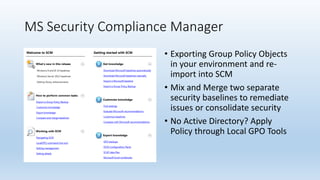
• Exporting Group Policy Objects 
in your environment and re-import 
into SCM 
• Mix and Merge two separate 
security baselines to remediate 
issues or consolidate security 
• No Active Directory? Apply 
Policy through Local GPO Tools
Inventory Your current Security Posture (If 
Any) 
• Security Policies can easily be exported from Group Policy 
Management Console and re-imported into Microsoft Security 
Compliance Manager 
• Two options to mix and merge: Compare with SCM pre-populated 
baselines or build your own based upon CIS PDF’s 
• My preference is to build based upon CIS and take security to the 
maximum hardened limit. (Ex. Earlier Win7 CIS gave Self Limited 
Functionality Profiles SSLF for high security environments)
Warning: You will Break Stuff!
Troubleshooting Hardening issues 
• Easiest method is to have a container set up in Active Directory with 
all group policy inheritance blocked. 
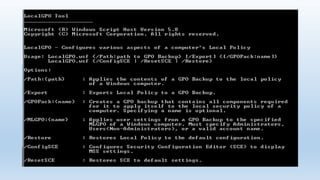
• Apply your OS Hardening Policies through the local GPO tool. This tool 
is available when you install Security Compliance Manager. 
• Installer Can be found in C:Program Files (x86)Microsoft Security 
Compliance ManagerLGPO << After SCM Install
Why troubleshoot CIS with LGPO Tool 
• Instead of having your sever admins randomly shut group policies off 
at the server level you can rapidly respond to testing by locally 
turning off policies 
• It’s a needle in a haystack approach. Most issues you deal with will 
probably be around network security and authentication hardening 
• Works great if you want to applied hardened OS policies in standalone 
high security environments
A few other things 
• The concept of least privilege should always be used (UAC) 
• Getting asked even by IT folks to turn it off (UAC) 
• Limit Admin accounts. Secondary admin accounts are better. Never 
use admin accounts to browse or do daily tasks on your network 
• Autorun should be one of the first things you disable in any org. It’s a 
quick hit with minimal impacts to end users 
• Enforce the firewall from getting turned off. Use Domain firewall 
profiles heavily. While restricting public and home profiles. 
• Be careful with Audit policies. Too much audit information can be a 
bad thing in logs
A few other things continued 
• Debug programs.. No one should have access to do this. PG. 76 
• Limit the amount of remotely accessible registry path’s. (Take note 
Windows 7 remote registry services has to be manually started. ) This 
should be disabled Pg. 133 
• Lan Manager Authentication Level: Enforce NTLMv2 and Refuse LM 
and NTLM << This should be non negotiable IE. Pass the Hash Pg. 137 
• For High security environments don’t process legacy and run once list 
<< Could lead to other issues with certain applications and driver 
applications. Use cautiously. 
• Prevent computers from Joining Homegroups.. BYOD issues PG 169
But Wait….I HAZ Shells
Disable Remote Shell Access 
• Remote Shell Access pg160 
• You need to decide if it’s worth it for you to really have remote shell 
access. 
• Reduce your attack surface… This is what OS hardening is all about
Lets have a talk about Large Scale EMET 
deployments (5,000 Machines and More)
EMET Large Scale deployments 
• Resources 
• Customizing 
• Scaling 
• Group Policy 
• Where does everything fit and in what order?
EMET Resources 
• Kurt Falde Blog (http://blogs.technet.com/b/kfalde/) 
• Security Research and Defense Blogs (http://blogs.technet.com/b/srd/) 
• EMET Social Technet Forum 
(http://social.technet.microsoft.com/Forums/security/en- 
US/home?forum=emet) 
• EMET Pilot Proof of Concept Recommendations 
(http://social.technet.microsoft.com/wiki/contents/articles/23598.emet-pilot- 
proof-of-concept-recommendations.aspx) 
• EMET Know Application Issues Table 
(http://social.technet.microsoft.com/wiki/contents/articles/22931.emet-known- 
application-issues-table.aspx)
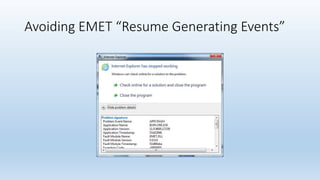
Avoiding EMET “Resume Generating Events”
What to avoid with EMET deployments 
• Do not immediately add popular or recommended XML profiles to 
EMET. Attaching EMET to processes and not vetting them in a 
organization is not a good idea. 
• Do not use Group Policy out of the gate. Instead inject with local 
policies first to vet out problems. 
• Use System Wide DEP settings cautiously. You may uncover 
applications, even though not hooked into EMET, crashing because of 
system wide DEP. Use “Application Opt In” is a safer solution
EMET Customization 
• Base MSI 
• Exporting custom XML and using EMET_Conf to push settings 
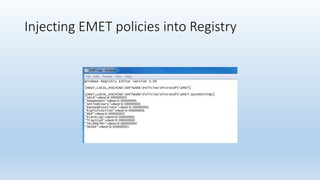
• Registry import to policy key for EMET. Acts as local group policy.
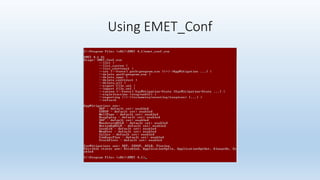
Using EMET_Conf
EMET_Conf (cont.) 
• Use EMET_Conf --delete_all to remove all application mitigation 
settings and certificate trust configurations 
• Built your own settings… Then Export… Export will be in a .xml file 
• Reimport by using EMET_Conf --import.xml 
• If you script emet_conf to push out settings include HelperLib.dll, 
MitigationInterface.dll, PKIPinningSubsystem.dll, SdbHelper.dll
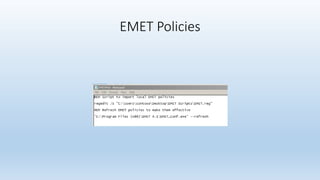
EMET Policies
Injecting EMET policies into Registry
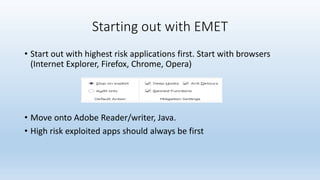
Starting out with EMET 
• Start out with highest risk applications first. Start with browsers 
(Internet Explorer, Firefox, Chrome, Opera) 
• Move onto Adobe Reader/writer, Java. 
• High risk exploited apps should always be first
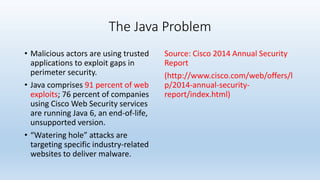
The Java Problem 
• Malicious actors are using trusted 
applications to exploit gaps in 
perimeter security. 
• Java comprises 91 percent of web 
exploits; 76 percent of companies 
using Cisco Web Security services 
are running Java 6, an end-of-life, 
unsupported version. 
• “Watering hole” attacks are 
targeting specific industry-related 
websites to deliver malware. 
Source: Cisco 2014 Annual Security 
Report 
(http://www.cisco.com/web/offers/l 
p/2014-annual-security-report/ 
index.html)
The Java Problem Continued 
• Corporations rely on Out of Date 
versions 
• The “Pigeon Hole” Effect. I can’t 
upgrade Java because you will 
break my critical business app. 
• Virtualizing can be a expensive 
solution 
• But my AV will stop it! << 
Probably not… 
• Oracle EOL Java 6 but paid 
support can extend this.. << too 
expensive 
• Java is a security nightmare and 
a application administrators 
worst enemy
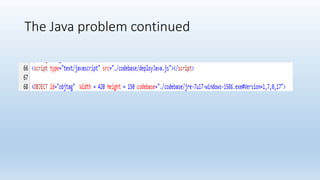
The Java problem continued
Prevent Java from running 
• Hopefully by now everyone has deployed MS014-051. If not you 
should.. Soon. 
• Don’t deploy and assume you are done. Don’t accept Default Policies 
for this. 
• Starting with MS014-051 does out of date java blocking by default but 
allows users to circumvent.
Mitigating the Java Problem with GPO’s 
• Before you do this… lock down trusted sites. Don’t allow users to 
circumvent security by putting stuff in trusted sites without a vetting 
process 
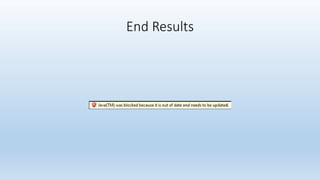
• Don’t allow users to “run this time” If Java is out of Date. Lock it down 
• Allow out of date java to sites that are business critical only.
Java Resources For Mitigation 
• http://blogs.msdn.com/b/ie/archive/2014/08/06/internet-explorer-begins- 
blocking-out-of-date-activex-controls.aspx 
• http://blogs.msdn.com/b/askie/archive/2014/08/12/how-to-manage- 
the-new-quot-blocking-out-of-date-activex-controls-quot-feature- 
in-ie.aspx
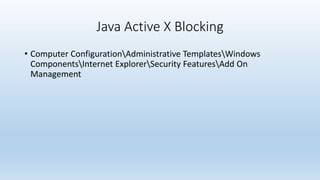
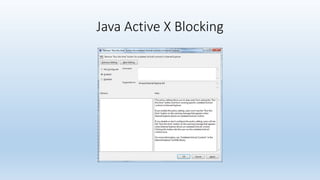
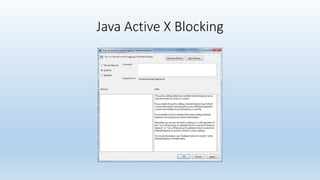
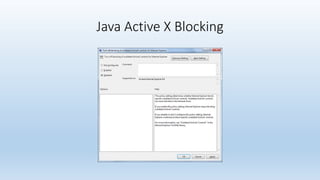
Java Active X Blocking 
• Computer ConfigurationAdministrative TemplatesWindows 
ComponentsInternet ExplorerSecurity FeaturesAdd On 
Management
Java Active X Blocking
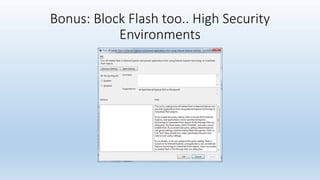
Bonus: Block Flash too.. High Security 
Environments
End Results
Hardening Adobe Reader/Writer 
• Adobe Enterprise Toolkit http://www.adobe.com/devnet-docs/ 
acrobatetk/index.html 
• Application Security Overview http://www.adobe.com/devnet-docs/ 
acrobatetk/tools/AppSec/index.html 
• Adobe Customization Wizard (Use 
this)ftp://ftp.adobe.com/pub/adobe/acrobat/win/11.x/11.0.00/misc/ 
• NSA guidelines for Adobe XI in Enterprise Environments (Use This) 
https://www.nsa.gov/ia/_files/app/Recommendations_for_Configuring 
_Adobe_Acrobat_Reader_XI_in_a_Windows_Environment.pdf
Hardening Adobe Reader/Writer 
• Don’t give people a chance to disable Protected mode, protected 
view, and enhanced security 
• For high security environments disable Javascript. Disable URL links.. 
Don’t allow flash content to be viewed in PDF’s << Very bad 
• Patch often and ASAP 
• Hook in with EMET to enhance exploit mitigation
Adobe Demo
Admin Passwords 
• Disable Admin Passwords 
• If you can’t disable then Randomize it.. Per machine.. 
• Sans SEC 505.. Awesome course… 
• http://cyber-defense.sans.org/blog/2013/08/01/reset-local-administrator- 
password-automatically-with-a-different-password-across- 
the-enterprise
Cryptography 
• Truecrypt << my advice is to please stay away from this. 
• http://istruecryptauditedyet.com/ 
• 2nd part of the audit is very important as it deals with Cryptanalysis 
and RNG’s. If the RNG’s are weak or in a predictable state such as Dual 
Elliptic Curve. Truecrypt users will be in trouble. 
• Developers were never known..
Cryptography 
• If you use bitlocker… Please enforce AES 256. Bitlocker defaults to AES 
128 
• Kill Secrets from memory.. 
• Starting in Windows 8.1 Pro versions come packed with bitlocker 
• 2008 Servers and above have it to 
• Encrypt all your things……There is no reason not to.
Questions???

System hardening - OS and Application

  • 1.
    System Hardening WindowsOS Clients and Applications
  • 2.
    About me.. •This talk really shouldn’t be about me.. Its about you.. • This community is about educating each other and making things better
  • 3.
    What is thistalk about? • Hardening Microsoft OS’s for Domain and Standalone computers • Large Scale EMET deployments • How to approach Java problem if you run out of date versions • Adobe Acrobat customization according to NSA standards • Local Admin accounts and Passwords and what to do about them • Cryptography – Some brief thoughts
  • 4.
    OS Security references • Microsoft Security Compliance Manager - http://technet.microsoft.com/en-us/library/cc677002.aspx • Center for Internet Security Benchmarks** - https://benchmarks.cisecurity.org/downloads/multiform/index.cfm • DISA Stigs - http://iase.disa.mil/stigs/os/windows/Pages/index.aspx
  • 5.
    CIS Security Benchmarks • Recommended technical control rules/values for hardening operating systems • Distributed free of charge by CIS in .PDF format • Where to Begin?? • Incident Response and SSLF.. Flip up the guide for your audience!
  • 6.
  • 7.
    MS Security ComplianceManager • Exporting Group Policy Objects in your environment and re-import into SCM • Mix and Merge two separate security baselines to remediate issues or consolidate security • No Active Directory? Apply Policy through Local GPO Tools
  • 8.
    Inventory Your currentSecurity Posture (If Any) • Security Policies can easily be exported from Group Policy Management Console and re-imported into Microsoft Security Compliance Manager • Two options to mix and merge: Compare with SCM pre-populated baselines or build your own based upon CIS PDF’s • My preference is to build based upon CIS and take security to the maximum hardened limit. (Ex. Earlier Win7 CIS gave Self Limited Functionality Profiles SSLF for high security environments)
  • 9.
    Warning: You willBreak Stuff!
  • 10.
    Troubleshooting Hardening issues • Easiest method is to have a container set up in Active Directory with all group policy inheritance blocked. • Apply your OS Hardening Policies through the local GPO tool. This tool is available when you install Security Compliance Manager. • Installer Can be found in C:Program Files (x86)Microsoft Security Compliance ManagerLGPO << After SCM Install
  • 11.
    Why troubleshoot CISwith LGPO Tool • Instead of having your sever admins randomly shut group policies off at the server level you can rapidly respond to testing by locally turning off policies • It’s a needle in a haystack approach. Most issues you deal with will probably be around network security and authentication hardening • Works great if you want to applied hardened OS policies in standalone high security environments
  • 14.
    A few otherthings • The concept of least privilege should always be used (UAC) • Getting asked even by IT folks to turn it off (UAC) • Limit Admin accounts. Secondary admin accounts are better. Never use admin accounts to browse or do daily tasks on your network • Autorun should be one of the first things you disable in any org. It’s a quick hit with minimal impacts to end users • Enforce the firewall from getting turned off. Use Domain firewall profiles heavily. While restricting public and home profiles. • Be careful with Audit policies. Too much audit information can be a bad thing in logs
  • 15.
    A few otherthings continued • Debug programs.. No one should have access to do this. PG. 76 • Limit the amount of remotely accessible registry path’s. (Take note Windows 7 remote registry services has to be manually started. ) This should be disabled Pg. 133 • Lan Manager Authentication Level: Enforce NTLMv2 and Refuse LM and NTLM << This should be non negotiable IE. Pass the Hash Pg. 137 • For High security environments don’t process legacy and run once list << Could lead to other issues with certain applications and driver applications. Use cautiously. • Prevent computers from Joining Homegroups.. BYOD issues PG 169
  • 16.
  • 17.
    Disable Remote ShellAccess • Remote Shell Access pg160 • You need to decide if it’s worth it for you to really have remote shell access. • Reduce your attack surface… This is what OS hardening is all about
  • 18.
    Lets have atalk about Large Scale EMET deployments (5,000 Machines and More)
  • 19.
    EMET Large Scaledeployments • Resources • Customizing • Scaling • Group Policy • Where does everything fit and in what order?
  • 20.
    EMET Resources •Kurt Falde Blog (http://blogs.technet.com/b/kfalde/) • Security Research and Defense Blogs (http://blogs.technet.com/b/srd/) • EMET Social Technet Forum (http://social.technet.microsoft.com/Forums/security/en- US/home?forum=emet) • EMET Pilot Proof of Concept Recommendations (http://social.technet.microsoft.com/wiki/contents/articles/23598.emet-pilot- proof-of-concept-recommendations.aspx) • EMET Know Application Issues Table (http://social.technet.microsoft.com/wiki/contents/articles/22931.emet-known- application-issues-table.aspx)
  • 21.
    Avoiding EMET “ResumeGenerating Events”
  • 22.
    What to avoidwith EMET deployments • Do not immediately add popular or recommended XML profiles to EMET. Attaching EMET to processes and not vetting them in a organization is not a good idea. • Do not use Group Policy out of the gate. Instead inject with local policies first to vet out problems. • Use System Wide DEP settings cautiously. You may uncover applications, even though not hooked into EMET, crashing because of system wide DEP. Use “Application Opt In” is a safer solution
  • 23.
    EMET Customization •Base MSI • Exporting custom XML and using EMET_Conf to push settings • Registry import to policy key for EMET. Acts as local group policy.
  • 24.
  • 25.
    EMET_Conf (cont.) •Use EMET_Conf --delete_all to remove all application mitigation settings and certificate trust configurations • Built your own settings… Then Export… Export will be in a .xml file • Reimport by using EMET_Conf --import.xml • If you script emet_conf to push out settings include HelperLib.dll, MitigationInterface.dll, PKIPinningSubsystem.dll, SdbHelper.dll
  • 26.
  • 27.
  • 28.
    Starting out withEMET • Start out with highest risk applications first. Start with browsers (Internet Explorer, Firefox, Chrome, Opera) • Move onto Adobe Reader/writer, Java. • High risk exploited apps should always be first
  • 29.
    The Java Problem • Malicious actors are using trusted applications to exploit gaps in perimeter security. • Java comprises 91 percent of web exploits; 76 percent of companies using Cisco Web Security services are running Java 6, an end-of-life, unsupported version. • “Watering hole” attacks are targeting specific industry-related websites to deliver malware. Source: Cisco 2014 Annual Security Report (http://www.cisco.com/web/offers/l p/2014-annual-security-report/ index.html)
  • 30.
    The Java ProblemContinued • Corporations rely on Out of Date versions • The “Pigeon Hole” Effect. I can’t upgrade Java because you will break my critical business app. • Virtualizing can be a expensive solution • But my AV will stop it! << Probably not… • Oracle EOL Java 6 but paid support can extend this.. << too expensive • Java is a security nightmare and a application administrators worst enemy
  • 31.
  • 32.
    Prevent Java fromrunning • Hopefully by now everyone has deployed MS014-051. If not you should.. Soon. • Don’t deploy and assume you are done. Don’t accept Default Policies for this. • Starting with MS014-051 does out of date java blocking by default but allows users to circumvent.
  • 33.
    Mitigating the JavaProblem with GPO’s • Before you do this… lock down trusted sites. Don’t allow users to circumvent security by putting stuff in trusted sites without a vetting process • Don’t allow users to “run this time” If Java is out of Date. Lock it down • Allow out of date java to sites that are business critical only.
  • 34.
    Java Resources ForMitigation • http://blogs.msdn.com/b/ie/archive/2014/08/06/internet-explorer-begins- blocking-out-of-date-activex-controls.aspx • http://blogs.msdn.com/b/askie/archive/2014/08/12/how-to-manage- the-new-quot-blocking-out-of-date-activex-controls-quot-feature- in-ie.aspx
  • 35.
    Java Active XBlocking • Computer ConfigurationAdministrative TemplatesWindows ComponentsInternet ExplorerSecurity FeaturesAdd On Management
  • 36.
    Java Active XBlocking
  • 37.
    Java Active XBlocking
  • 38.
    Java Active XBlocking
  • 39.
    Java Active XBlocking
  • 40.
    Bonus: Block Flashtoo.. High Security Environments
  • 41.
  • 42.
    Hardening Adobe Reader/Writer • Adobe Enterprise Toolkit http://www.adobe.com/devnet-docs/ acrobatetk/index.html • Application Security Overview http://www.adobe.com/devnet-docs/ acrobatetk/tools/AppSec/index.html • Adobe Customization Wizard (Use this)ftp://ftp.adobe.com/pub/adobe/acrobat/win/11.x/11.0.00/misc/ • NSA guidelines for Adobe XI in Enterprise Environments (Use This) https://www.nsa.gov/ia/_files/app/Recommendations_for_Configuring _Adobe_Acrobat_Reader_XI_in_a_Windows_Environment.pdf
  • 43.
    Hardening Adobe Reader/Writer • Don’t give people a chance to disable Protected mode, protected view, and enhanced security • For high security environments disable Javascript. Disable URL links.. Don’t allow flash content to be viewed in PDF’s << Very bad • Patch often and ASAP • Hook in with EMET to enhance exploit mitigation
  • 44.
  • 45.
    Admin Passwords •Disable Admin Passwords • If you can’t disable then Randomize it.. Per machine.. • Sans SEC 505.. Awesome course… • http://cyber-defense.sans.org/blog/2013/08/01/reset-local-administrator- password-automatically-with-a-different-password-across- the-enterprise
  • 46.
    Cryptography • Truecrypt<< my advice is to please stay away from this. • http://istruecryptauditedyet.com/ • 2nd part of the audit is very important as it deals with Cryptanalysis and RNG’s. If the RNG’s are weak or in a predictable state such as Dual Elliptic Curve. Truecrypt users will be in trouble. • Developers were never known..
  • 47.
    Cryptography • Ifyou use bitlocker… Please enforce AES 256. Bitlocker defaults to AES 128 • Kill Secrets from memory.. • Starting in Windows 8.1 Pro versions come packed with bitlocker • 2008 Servers and above have it to • Encrypt all your things……There is no reason not to.
  • 48.