COMPUTER NETWORK (503)
UNIT – I BASIC CONCEPTS:
Presented By : Lucky Berwal
UNIT IST
Basic Concepts:
 Components of data communication, distributed processing,
 standards and organizations.
 Line configuration,
 topology,
 Transmission mode, and categories of networks.
OSI and TCP/IP Models:
 Layers and their functions,
 comparison of models.
Digital Transmission:
 Interfaces and Modems:
 DTE-DCE Interface,
 Modems, Cable modems.
INTRODUCTION TO COMPUTER NETWORK
A Network is a set of devices(nodes) connected by
media, A node can be a computer, printer or any other
devices capable of sending and/or receiving data
generated by other nodes on the network.
Definition of computer network:-
A COMPUTER NETWORK is a group of computer
systems and other computing hardware devices that
are linked together through communication channels
to facilitate communication and resources sharing
among a wide range of users. Networks are
commonly categorized based on their characteristics.
LAYERED ARCHITECTURE:-
Computer Network are generally organized as a series
of layers or levels, each one built upon the one below,
Every layer needs a mechanism for identify sender and
receiver.
Node: It can be any network device(router, printer,
camera).
Host: It represents computer stations(interface).
Hub: Network device used to increase the reach ability.
DEFINITION
 Computer Network, two or more computers that are
connected with one another for the purpose of
communicating data electronically. Besides physically
connecting computer and communication devices,
a network system serves the important function of
establishing a cohesive architecture that allows a
variety of equipment types to transfer information in
a near-seamless fashion.
DATA COMMUNICATION
 Data Communication is defined as exchange of data
between two devices via some form of transmission
media such as a cable, wire or it can be air or vacuum
also. For occurrence of data communication,
communicating devices must be a part of communication
system made up of a combination of hardware or
software devices and programs.
CRITERIA FOR A DATA COMMUNICATION NETWORK
 Performance: Performance is the defined as the rate of
transferring error free data. It is measured by the
Response Time. Response Time is the elasped time
between the end of an inquiry and the beginning of a
response.
 Consistency: Consistency is the predictability of
response time and accuracy of data.
 Reliability: Reliability is the measure of how often a
network is useable. MTBF (Mean Time between
Failures) is a measure of the average time a component is
expected to operate between failures. Normally provided
by the manufacturer. A network failure can be: hardware,
data carrying medium and Network Operating System.
CRITERIA FOR A DATA COMMUNICATION NETWORK
 Recovery: Recovery is the Network's ability to return
to a prescribed level of operation after a network
failure. This level is where the amount of lost data is
nonexistent or at a minimum. Recovery is based on
having Back-up Files.
 Security: Security is the protection of Hardware,
Software and Data from unauthorized access.
Restricted physical access to computers, password
protection, limiting user privileges and data
encryption are common security methods. Anti-Virus
monitoring programs to defend against computer
viruses are a security measure.
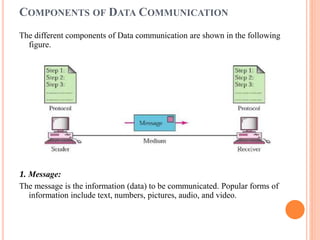
COMPONENTS OF DATA COMMUNICATION
The different components of Data communication are shown in the following
figure.
1. Message:
The message is the information (data) to be communicated. Popular forms of
information include text, numbers, pictures, audio, and video.
2. Sender:
The sender is the device that sends the data message. It can be a
computer, workstation, telephone handset, video camera, and so on.
3. Receiver:
The receiver is the device that receives the message. It can be a
computer, workstation, telephone handset, television, and so on.
4. Transmission medium:
The transmission medium is the physical path by which a message
travels from sender to receiver. Some examples of transmission
media include twisted-pair wire, coaxial cable, fiber-optic cable, and
radio waves.
5. Protocol:
A protocol is a set of rules that govern data communications. It
represents an agreement between the communicating devices.
Without a protocol, two devices may be connected but not
communicating, just as a person speaking French cannot be
understood by a person who speaks only Japanese.
TRANSMISSION MODE/
TYPES OF DATA COMMUNICATION:
A given transmission on a communications channel between two
machines can occur in several different ways.
The transmission is characterized by:
 the direction of the exchanges
 the transmission mode: the number of bits sent
simultaneously
 synchronization between the transmitter and receiver.
Types of Transmission mode
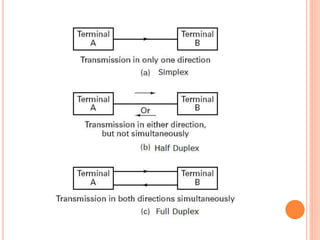
1. Simplex
2. Half Duplex
3. Full Duplex
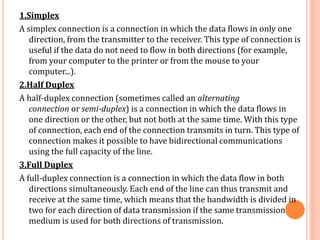
1.Simplex
A simplex connection is a connection in which the data flows in only one
direction, from the transmitter to the receiver. This type of connection is
useful if the data do not need to flow in both directions (for example,
from your computer to the printer or from the mouse to your
computer...).
2.Half Duplex
A half-duplex connection (sometimes called an alternating
connection or semi-duplex) is a connection in which the data flows in
one direction or the other, but not both at the same time. With this type
of connection, each end of the connection transmits in turn. This type of
connection makes it possible to have bidirectional communications
using the full capacity of the line.
3.Full Duplex
A full-duplex connection is a connection in which the data flow in both
directions simultaneously. Each end of the line can thus transmit and
receive at the same time, which means that the bandwidth is divided in
two for each direction of data transmission if the same transmission
medium is used for both directions of transmission.
TYPE OF COMPUTER NETWORK/ CATEGORIES OF COMPUTER
NETWORK
Data Communication and Computer Network Generally, networks
are distinguished based on their geographical span. A network
can be as small as distance between your mobile phone and its
Bluetooth headphone and as large as the internet itself, covering
the whole geographical world.
 Personal Area Network
 Local Area Network
 Metropolitan Area Network
 Wide Area Network
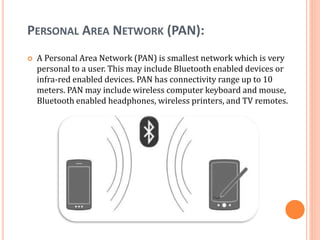
PERSONAL AREA NETWORK (PAN):
 A Personal Area Network (PAN) is smallest network which is very
personal to a user. This may include Bluetooth enabled devices or
infra-red enabled devices. PAN has connectivity range up to 10
meters. PAN may include wireless computer keyboard and mouse,
Bluetooth enabled headphones, wireless printers, and TV remotes.
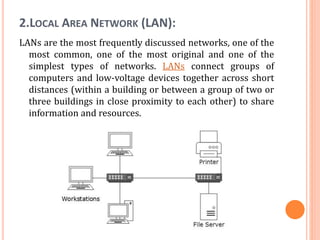
2.LOCAL AREA NETWORK (LAN):
LANs are the most frequently discussed networks, one of the
most common, one of the most original and one of the
simplest types of networks. LANs connect groups of
computers and low-voltage devices together across short
distances (within a building or between a group of two or
three buildings in close proximity to each other) to share
information and resources.
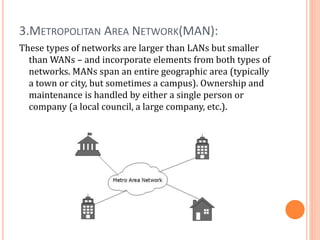
3.METROPOLITAN AREA NETWORK(MAN):
These types of networks are larger than LANs but smaller
than WANs – and incorporate elements from both types of
networks. MANs span an entire geographic area (typically
a town or city, but sometimes a campus). Ownership and
maintenance is handled by either a single person or
company (a local council, a large company, etc.).
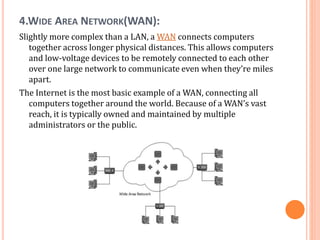
4.WIDE AREA NETWORK(WAN):
Slightly more complex than a LAN, a WAN connects computers
together across longer physical distances. This allows computers
and low-voltage devices to be remotely connected to each other
over one large network to communicate even when they’re miles
apart.
The Internet is the most basic example of a WAN, connecting all
computers together around the world. Because of a WAN’s vast
reach, it is typically owned and maintained by multiple
administrators or the public.
DATA PROCESSING
 Collection, manipulation, and processing collected
data for the required use is known as data processing.
It is a technique normally performed by a computer;
the process includes retrieving, transforming, or
classification of information.
METHODS OF DATA PROCESSING
Let us now discuss the different methods of data
processing.
 Single user programming
 Multiple programming
 Real-time processing
 On-line processing
 Time sharing processing
 Centralized processing
 Distributed processing
CENTRALIZED, DECENTRALIZED AND DISTRIBUTED
PROCESSING
 Centralized Processing: In centralized processing, one or more
terminals are connected to a single processor. Note that terminal is the
combination of mouse, keyboard, and screen. In-library there is one
processor attached to different terminals and library users can search
any book from the terminal (mouse, keyboard, and screen). In
centralized processing all the terminals are controlled by a single
processor (CPU) and any command can be fulfilled by a single processor
and this type of network is called centralized network.
 Decentralized Processing: In decentralized processing, there are
different CPU connected on the network and each processor can do its
job independent of each other. For example, in a Net cafe, all computers
can perform their own tasks. This type of network is
called decentralized network.
 Distributed processing: Another type of processing also exists named
distributed processing. In this type of processing different CPU are
connected to the network and are controlled by single CPU. For example
in air reservation system there exists different terminals and processing
is done from many locations and all the computers are controlled by the
single main processor. This type of network is called distributed
network.
DISTRIBUTED PROCESSING
 Distributed processing is a setup in which multiple
individual central processing units (CPU) work on the same
programs, functions or systems to provide more capability
for a computer or other device.
 distributed processing refers to local-area networks
(LANs) designed so that a single program can run
simultaneously at various sites.
 Another form of distributed processing involves distributed
databases. This is databases in which
the data is stored across two or more computer systems.
The database system keeps track of where the data is so
that the distributed nature of the database is not apparent
to users.
LINE CONFIGURATION
Line configuration refers to the way two or more communication devices
attached to a link .
Line configuration is also referred to as connection. A Link is the physical
communication pathway that transfers data from one device to another.
For communication to occur, two devices must be connected in
same way to the same link at the same time.
There are two possible line configurations.
1. Point-to-Point.
2. Multipoint.
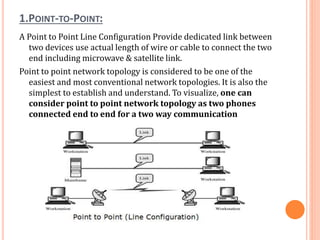
1.POINT-TO-POINT:
A Point to Point Line Configuration Provide dedicated link between
two devices use actual length of wire or cable to connect the two
end including microwave & satellite link.
Point to point network topology is considered to be one of the
easiest and most conventional network topologies. It is also the
simplest to establish and understand. To visualize, one can
consider point to point network topology as two phones
connected end to end for a two way communication
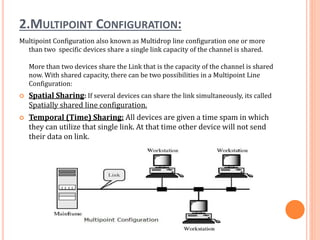
2.MULTIPOINT CONFIGURATION:
Multipoint Configuration also known as Multidrop line configuration one or more
than two specific devices share a single link capacity of the channel is shared.
More than two devices share the Link that is the capacity of the channel is shared
now. With shared capacity, there can be two possibilities in a Multipoint Line
Configuration:
 Spatial Sharing: If several devices can share the link simultaneously, its called
Spatially shared line configuration.
 Temporal (Time) Sharing: All devices are given a time spam in which
they can utilize that single link. At that time other device will not send
their data on link.
TOPOLOGIES
Network topologies refers to the way in which a
network is laid out physically. The topology of
network is the geometric representation of the
relationship for all the links and linking devices
(usually called nodes) to one another.
Type of topologies:
1) Bus Topology
2) Star Topology
3) Ring Topology
4) Mesh Topology
5) Tree Topology
6) Hybrid Topology
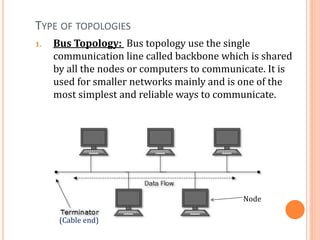
TYPE OF TOPOLOGIES
1. Bus Topology: Bus topology use the single
communication line called backbone which is shared
by all the nodes or computers to communicate. It is
used for smaller networks mainly and is one of the
most simplest and reliable ways to communicate.
(Cable end)
Node
1. BUS TOPOLOGY:
 Advantages:
 Suitable for smaller networks.
 Easy to implement.
 Even if one node breaks down, network does not get
hampered.
 Disadvantages:
 Cable fail then whole network will be fail.
 Within a given cable length, limited number of nodes can
be added.
 Data transfer rate gets slow down if more nodes are
added.
 Only one data packet can be transferred at a particular
moment.
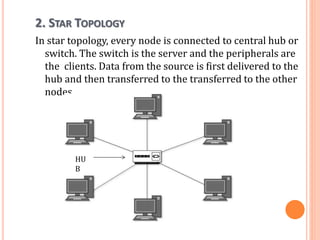
2. STAR TOPOLOGY
In star topology, every node is connected to central hub or
switch. The switch is the server and the peripherals are
the clients. Data from the source is first delivered to the
hub and then transferred to the transferred to the other
nodes.
HU
B
2. STAR TOPOLOGY
Advantages:
 Easy to install and implement.
 Give better performance as message does not pass
through various nodes unlike bus topology.
 Faulty nodes can be easily removed without affecting
the other nodes in the loop.
Disadvantages:
 If the central hub fails then the whole network is
break.
 Data transfer rate depends on capacity of the central
hub.
 Cost of installation is high.
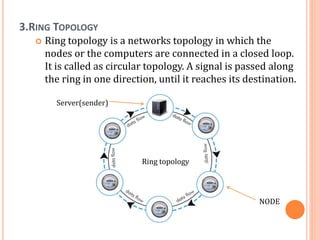
3.RING TOPOLOGY
 Ring topology is a networks topology in which the
nodes or the computers are connected in a closed loop.
It is called as circular topology. A signal is passed along
the ring in one direction, until it reaches its destination.
Ring topology
NODE
Server(sender)
3.RING TOPOLOGY
 Advantages:
 Ring topology is easy to install.
 Transmitting network is not affected by high traffic.
 A signal travels around the circle in a clockwise
direction.
 Disadvantages:
 If one node is break then the whole network gets
down.
 It becomes difficult to add/remove nodes.
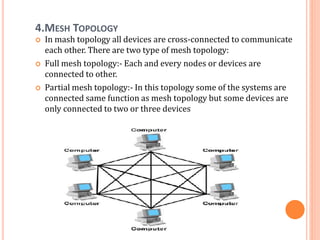
4.MESH TOPOLOGY
 In mash topology all devices are cross-connected to communicate
each other. There are two type of mesh topology:
 Full mesh topology:- Each and every nodes or devices are
connected to other.
 Partial mesh topology:- In this topology some of the systems are
connected same function as mesh topology but some devices are
only connected to two or three devices
4.MESH TOPOLOGY
 Advantages:
 When one node fails, others continue to work without
disruption.
 We can send data from one node to many nodes
 Each connection can carry its own data load.
 Disadvantages:
 It is quite expensive since a bulk wiring is required.
 Installation and configuration can be a very difficult
task.
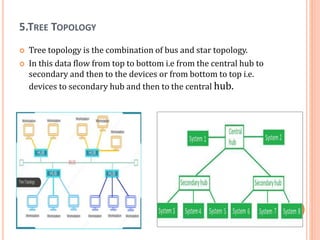
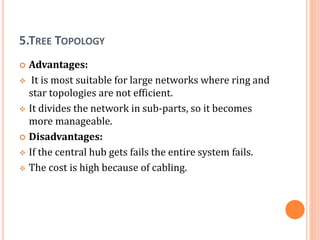
5.TREE TOPOLOGY
 Tree topology is the combination of bus and star topology.
 In this data flow from top to bottom i.e from the central hub to
secondary and then to the devices or from bottom to top i.e.
devices to secondary hub and then to the central hub.
5.TREE TOPOLOGY
 Advantages:
 It is most suitable for large networks where ring and
star topologies are not efficient.
 It divides the network in sub-parts, so it becomes
more manageable.
 Disadvantages:
 If the central hub gets fails the entire system fails.
 The cost is high because of cabling.
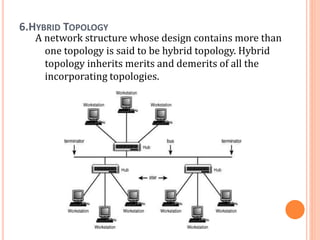
6.HYBRID TOPOLOGY
A network structure whose design contains more than
one topology is said to be hybrid topology. Hybrid
topology inherits merits and demerits of all the
incorporating topologies.
6.HYBRID TOPOLOGY
 Advantages:
 Hybrid network can be designed according to the
requirements of the organization.
 Special care can be given to nodes where traffic is
high as well as where chances of fault are high.
Disadvantages:
 One of the biggest drawback of hybrid topology is its
design. Its not easy to design this type of architecture
and its a tough job for designers.
 As hybrid architecture are usually larger in scale, they
require a lot of cables, cooling systems.
STANDARDS AND ORGANIZATIONS
 A standards and organization, sometimes referred to
as a standards body, is an organization with authority
to endorse official standards for given applications.
EXAMPLES OF STANDARDS ORGANIZATIONS INCLUDE:
 ANSI (American National Standards Institute) is the
primary organization for fostering the development of
technology standards in the United States.
 The IEEE (Institute of Electrical and Electronics
Engineers) fosters the development of standards that
often become national and international standards.
 The BSI (British Standards Institution) is a service
organization that produces standards across a wide
variety of industry sectors.
 The IETF (Internet Engineering Task Force) is the body
that defines standard Internet operating protocols such
as TCP/IP.
 OASIS (Organization for the Advancement of Structured
Information Standards) exists to promote product-
independent standards for information formats such
as XML and HTML.
INTERNETWORK
 An internetwork is defined as two or more computer
network LANs or WAN or computer network
segments are connected using devices, and they are
configured by a local addressing scheme. This process
is known as internetworking.
 An interconnection between public, private,
commercial, industrial, or government computer
networks can also be defined as internetworking.
 An internetworking uses the internet protocol.
 The reference model used for internetworking
is Open System Interconnection (OSI).
TYPES OF INTERNETWORK:
 Internet:
 Internet is a worldwide, publicly accessible computer
network of interconnected computer networks (internetwork)
that transmit data using the standard Internet Protocol (IP).
Largest Internetwork in the world is Internet.
 The terms World Wide Web (WWW) and Internet are not the
same. The Internet is a collection of interconnected computer
networks, linked by copper wires, fiber-optic cables, wireless
connections, etc.
 The World Wide Web is one of the services accessible via the
Internet, along with various others including email, file
sharing, remote administration, video streaming, online
gaming etc. World Wide Web (WWW) is a collection of
interconnected documents and other resources, linked
together by hyperlinks and URLs
TYPES OF INTERNETWORK:
 Extranet: An extranet is a communication network based on the
internet protocol such as Transmission Control
protocol and internet protocol. It is used for information
sharing. The access to the extranet is restricted to only those
users who have login credentials. An extranet is the lowest level
of internetworking. It can be categorized as MAN, WAN or other
computer networks. An extranet cannot have a single LAN, at
least it must have one connection to the external network.
 Intranet: An intranet is a private network based on the internet
protocol such as Transmission Control protocol and internet
protocol. An intranet belongs to an organization which is only
accessible by the organization's employee or members. The
main aim of the intranet is to share the information and resources
among the organization employees. An intranet provides the
facility to work in groups and for teleconferences.
COMPUTER NETWORK MODEL
OSI and TCP/IP Models
HISTORY OF OSI MODEL
Here are essential landmarks from the history of OSI
model:
 In the late 1970s, the ISO conducted a program to
develop general standards and methods of networking.
 In 1973, an Experimental Packet Switched System in the
UK identified the requirement for defining the higher-
level protocols.
 In the year 1983, OSI model was initially intended to be
a detailed specification of actual interfaces.
 In 1984, the OSI architecture was formally adopted by
ISO as an international standard
OSI MODEL
 Open System Interconnect is an open standard for all
communication systems. OSI model is established by
International Standard Organization (ISO).
 An open system is a model that allow any two different
systems(devices) to communication regardless of their
underlying architecture.
 The purpose of the OSI model is to open communication
between different systems without requiring changes to the
logic of the underlying hardware and software.
 It is a model of understanding and designing a network
architecture which is flexible.
ORGANIZATION OF THE LAYERS
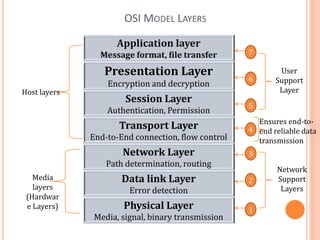
The 7 layers can be grouped into 3 subgroups
 Network Support Layers :Layers 1,2,3 - Physical, Data link
and Network are the network support layers. They deal with
the physical aspects of moving data from one device to
another such as electrical specifications, physical addressing,
transport timing and reliability.
 Transport Layer: Layer 4, transport layer, ensures end-to-
end reliable data transmission on a single link.
 User Support Layers: Layers 5,6,7 – Session, presentation
and application are the user support layers.
They allow interoperability among unrelated software systems.
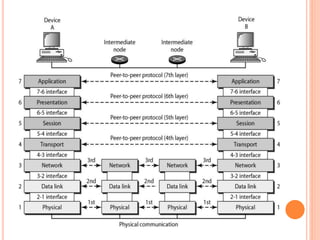
OSI MODEL LAYERS AND THEIR FUNCTIONS
 Application Layer: This layer is responsible for providing interface to
the application user. This layer encompasses protocols which directly
interact with the user.
 Presentation Layer: This layer defines how data in the native format
of remote host should be presented in the native format of host.
 Session Layer: This layer maintains sessions between remote hosts.
For example, once user/password authentication is done, the remote
host maintains this session for a while and does not ask for
authentication again in that time span.
 Transport Layer: This layer is responsible for end-to-end delivery
between hosts.
 Network Layer: This layer is responsible for address assignment and
uniquely addressing hosts in a network.
 Data Link Layer: This layer is responsible for reading and writing data
from and onto the line. Link errors are detected at this layer.
 Physical Layer: This layer defines the hardware, cabling, wiring,
power output, pulse rate etc.
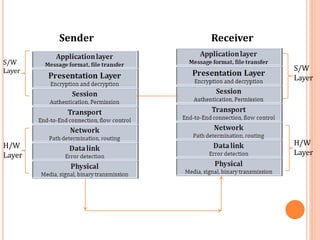
NOTE: For sender application layer is first and for
receiver physical layer is first.
OSI MODEL LAYERS
Application layer
Message format, file transfer
Presentation Layer
Encryption and decryption
Session Layer
Authentication, Permission
Transport Layer
End-to-End connection, flow control
Network Layer
Path determination, routing
Data link Layer
Error detection
Physical Layer
Media, signal, binary transmission
Host layers
Media
layers
(Hardwar
e Layers) 1
7
6
5
4
3
2
Network
Support
Layers
User
Support
Layer
Ensures end-to-
end reliable data
transmission
Sender Receiver
S/W
Layer S/W
Layer
H/W
Layer
H/W
Layer
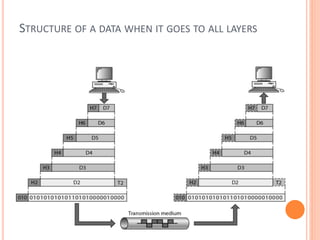
STRUCTURE OF A DATA WHEN IT GOES TO ALL LAYERS
OSI Model Layers and their
functions
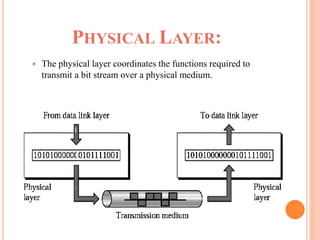
PHYSICAL LAYER:
 The physical layer coordinates the functions required to
transmit a bit stream over a physical medium.
THE OTHER RESPONSIBILITIES OF PHYSICAL LAYER
 Physical characteristics of interfaces and media - The
physical layer defines the characteristics of the interface
between the devices and the transmission medium.
 Representation of bits - To transmit the stream of bits, it must
be encoded to signals. The physical layer defines the type of
encoding.
 Data Rate or Transmission rate - The number of bits sent each
second – is also defined by the physical layer.
 Synchronization of bits - The sender and receiver must be
synchronized at the bit level. Their clocks must be synchronized.
 Line Configuration - In a point-to-point configuration, two
devices are connected together through a dedicated link. In a
multipoint configuration, a link is shared between several
devices.
 Physical Topology - The physical topology defines how devices
are connected to make a network. Devices can be connected
using a mesh, bus, star or ring topology.
 Transmission Mode - The physical layer also defines the
direction of transmission between two devices: simplex, half-
duplex or full-duplex.
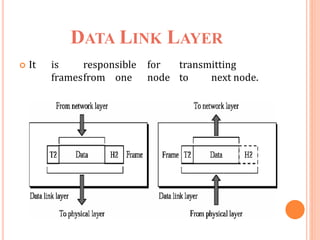
DATA LINK LAYER
 It is responsible for transmitting
framesfrom one node to next node.
THE OTHER RESPONSIBILITIES OF THIS LAYER ARE
 Framing - Divides the stream of bits received into data
units called frames.
 Physical addressing – If frames are to be distributed
to different systems on the n/w , data link layer adds a
header to the frame to define the sender and receiver.
 Flow control- If the rate at which the data are
absorbed by the receiver is less than the rate produced
in the sender ,the Data link layer imposes a flow ctrl
mechanism.
 Error control- Used for detecting and retransmitting
damaged or lost frames and to prevent duplication of
frames. This is achieved through a trailer added at the
end of the frame.
 Access control -Used to determine which device has control
over the link at any given time.
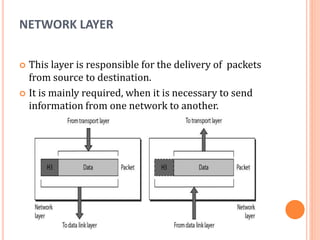
NETWORK LAYER
 This layer is responsible for the delivery of packets
from source to destination.
 It is mainly required, when it is necessary to send
information from one network to another.
THE OTHER RESPONSIBILITIES OF THIS LAYER ARE
 Hope to hope transmission
 Logical addressing - If a packet passes the n/w
boundary, we need another addressing system for
source and destination called logical address.
 Routing – The devices which connects various
networks called routers are responsible for
delivering packets to final destination.
 Fragmentation
 Congestion control
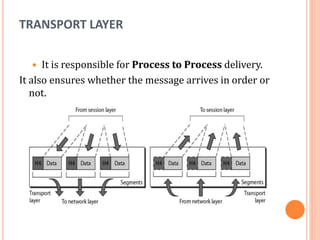
TRANSPORT LAYER
 It is responsible for Process to Process delivery.
It also ensures whether the message arrives in order or
not.
THE OTHER RESPONSIBILITIES OF THIS LAYER ARE
 Port addressing - The header in this must therefore
include a address called port address. This layer gets
the entire message to the correct process on that
computer.
 Segmentation and reassembly - The message is
divided into segments and each segment is assigned a
sequence number. These numbers are arranged
correctly on the arrival side by this layer.
 Connection control - This can either be
connectionless or connection-oriented. The
connectionless treats each segment as a individual
packet and delivers to the destination. The connection-
oriented makes connection on the destination side
before the delivery. After the delivery the termination
will be terminated.
 Flow and error control - Similar to data link layer, but
process to process take place.
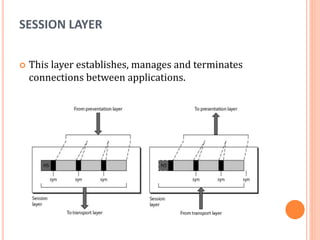
SESSION LAYER
 This layer establishes, manages and terminates
connections between applications.
THE OTHER RESPONSIBILITIES OF THIS LAYER ARE
 Dialog control - This session allows two systems
to enter into a dialog either in half duplex or full
duplex.
 Synchronization-This allows to add checkpoints
into a stream of data.
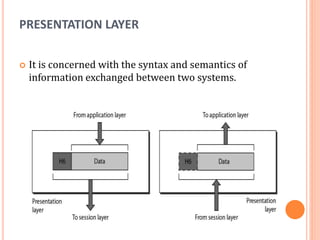
PRESENTATION LAYER
 It is concerned with the syntax and semantics of
information exchanged between two systems.
THE OTHER RESPONSIBILITIES OF THIS LAYER ARE
 Translation – Different computers use different
encoding system, this layer is responsible for
interoperability between these different encoding
methods. It will change the message into some
common format.
 Encryption and decryption-It means that sender
transforms the original information to another
form and sends the resulting message over the
n/w. and vice versa.
 Compression and expansion-Compression
reduces the number of bits contained in the
information particularly in text, audio and video.
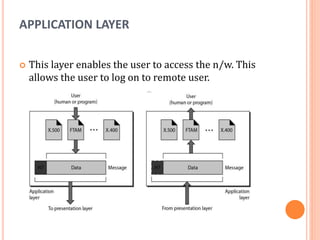
APPLICATION LAYER
 This layer enables the user to access the n/w. This
allows the user to log on to remote user.
THE OTHER RESPONSIBILITIES OF THIS LAYER ARE
 FTAM(file transfer, access ,mgmt) - Allows user
to access files in a remote host.
 Mail services - Provides email forwarding and
storage.
 Directory services - Provides database sources to
access information about various sources and
objects.
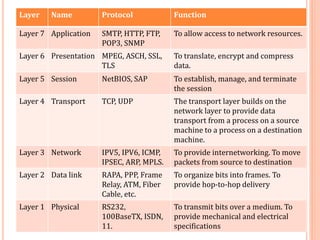
Layer Name Protocol Function
Layer 7 Application SMTP, HTTP, FTP,
POP3, SNMP
To allow access to network resources.
Layer 6 Presentation MPEG, ASCH, SSL,
TLS
To translate, encrypt and compress
data.
Layer 5 Session NetBIOS, SAP To establish, manage, and terminate
the session
Layer 4 Transport TCP, UDP The transport layer builds on the
network layer to provide data
transport from a process on a source
machine to a process on a destination
machine.
Layer 3 Network IPV5, IPV6, ICMP,
IPSEC, ARP, MPLS.
To provide internetworking. To move
packets from source to destination
Layer 2 Data link RAPA, PPP, Frame
Relay, ATM, Fiber
Cable, etc.
To organize bits into frames. To
provide hop-to-hop delivery
Layer 1 Physical RS232,
100BaseTX, ISDN,
11.
To transmit bits over a medium. To
provide mechanical and electrical
specifications
TCP/IP MODEL
 Internet uses TCP/IP protocol suite, also known as
Internet suite.
 This defines Internet Model which contains four
layered architecture.
 OSI Model is general communication model but
Internet Model is what the internet uses for all its
communication.
 The internet is independent of its underlying network
architecture so is its Model.
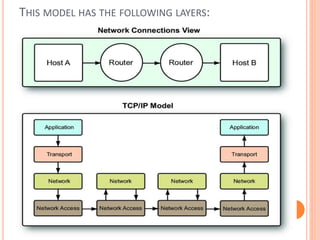
THIS MODEL HAS THE FOLLOWING LAYERS:
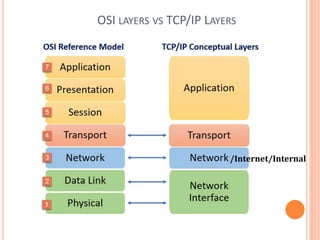
OSI LAYERS VS TCP/IP LAYERS
/Internet/Internal
TCP/IP MODEL LAYERS AND FUNCTIONS
 Application Layer: This layer defines the protocol which
enables user to interact with the network. For example,
FTP, HTTP etc.
 Transport Layer: This layer defines how data should flow
between hosts. Major protocol at this layer is Transmission
Control Protocol (TCP). This layer ensures data delivered
between hosts is in-order and is responsible for end- to-
end delivery.
 Internet Layer: Internet Protocol (IP) works on this layer.
This layer facilitates host addressing and recognition. This
layer defines routing.
 Link Layer: This layer provides mechanism of sending and
receiving actual data. Unlike its OSI Model counterpart,
this layer is independent of underlying network
architecture and hardware.
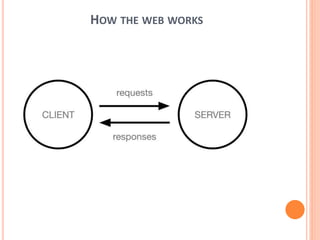
HOW THE WEB WORKS
WHEN YOU TYPE A WEB ADDRESS INTO YOUR BROWSER
 The browser goes to the DNS(Domain Name Servers)
server, and finds the real address of the server that the
website lives on (you find the address of the shop).
 The browser sends an HTTP request message to the
server, asking it to send a copy of the website to the client
(you go to the shop and order your goods). This message,
and all other data sent between the client and the server, is
sent across your internet connection using TCP/IP.
 If the server approves the client's request, which means
"Of course you can look at that website! Here it is", and
then starts sending the website's files to the browser as a
series of small chunks called data packets (the shop
gives you your goods, and you bring them back to your
house).
 The browser assembles the small chunks into a complete
web page and displays it to you (the goods arrive at your
door — new shiny stuff, awesome!).
DNS(DOMAIN NAME SERVER)
 This is called an IP address, and it represents a
unique location on the web. However, it's not very
easy to remember, is it? That's why Domain Name
Servers were invented. These are special servers that
match up a web address you type into your browser
(like "mozilla.org") to the website's real (IP) address.
 Websites can be reached directly via their IP
addresses. You can find the IP address of a website by
typing its domain into a tool like
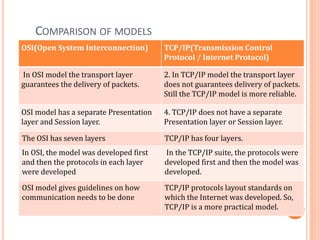
COMPARISON OF MODELS
OSI(Open System Interconnection) TCP/IP(Transmission Control
Protocol / Internet Protocol)
In OSI model the transport layer
guarantees the delivery of packets.
2. In TCP/IP model the transport layer
does not guarantees delivery of packets.
Still the TCP/IP model is more reliable.
OSI model has a separate Presentation
layer and Session layer.
4. TCP/IP does not have a separate
Presentation layer or Session layer.
The OSI has seven layers TCP/IP has four layers.
In OSI, the model was developed first
and then the protocols in each layer
were developed
In the TCP/IP suite, the protocols were
developed first and then the model was
developed.
OSI model gives guidelines on how
communication needs to be done
TCP/IP protocols layout standards on
which the Internet was developed. So,
TCP/IP is a more practical model.
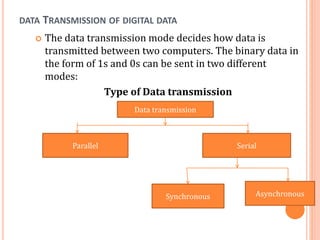
DATA TRANSMISSION OF DIGITAL DATA
 The data transmission mode decides how data is
transmitted between two computers. The binary data in
the form of 1s and 0s can be sent in two different
modes:
Type of Data transmission
Data transmission
Asynchronous
Synchronous
Serial
Parallel
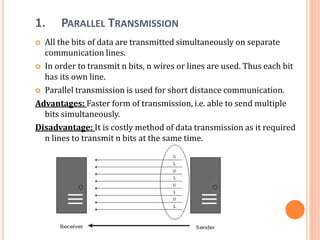
1. PARALLEL TRANSMISSION
 All the bits of data are transmitted simultaneously on separate
communication lines.
 In order to transmit n bits, n wires or lines are used. Thus each bit
has its own line.
 Parallel transmission is used for short distance communication.
Advantages: Faster form of transmission, i.e. able to send multiple
bits simultaneously.
Disadvantage: It is costly method of data transmission as it required
n lines to transmit n bits at the same time.
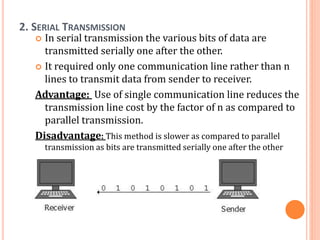
2. SERIAL TRANSMISSION
 In serial transmission the various bits of data are
transmitted serially one after the other.
 It required only one communication line rather than n
lines to transmit data from sender to receiver.
Advantage: Use of single communication line reduces the
transmission line cost by the factor of n as compared to
parallel transmission.
Disadvantage: This method is slower as compared to parallel
transmission as bits are transmitted serially one after the other
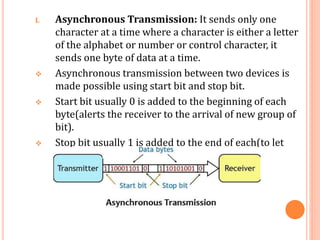
I. Asynchronous Transmission: It sends only one
character at a time where a character is either a letter
of the alphabet or number or control character, it
sends one byte of data at a time.
 Asynchronous transmission between two devices is
made possible using start bit and stop bit.
 Start bit usually 0 is added to the beginning of each
byte(alerts the receiver to the arrival of new group of
bit).
 Stop bit usually 1 is added to the end of each(to let
the receiver know that byte is finished).
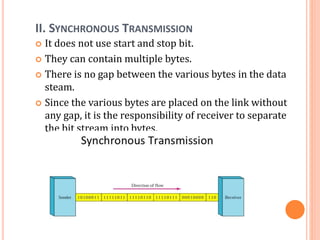
II. SYNCHRONOUS TRANSMISSION
 It does not use start and stop bit.
 They can contain multiple bytes.
 There is no gap between the various bytes in the data
steam.
 Since the various bytes are placed on the link without
any gap, it is the responsibility of receiver to separate
the bit stream into bytes.
MODEM
 A modem is a hardware device that allows the computer to
connect to the internet over the existing telephone line.
 A modem is not integrated with the motherboard rather
than it is installed on the PCI slot found on the
motherboard.
 It stands for Modulator/Demodulator. It converts the
digital data into an analog signal over the telephone lines.
Based on the differences in speed and transmission rate, a
modem can be classified in the following categories:
 Standard PC modem or Dial-up modem
 Cellular Modem
 Cable modem
Cellular Modem
 A device that adds 3G or 4G (LTE) cellular connectivity to
laptops, desktop computers and various tablets. Typically
available as an external USB module, for desktop computers, the
modem may also be available on a PCI or PCI Express (PCIe) card
that plugs into an empty slot on the motherboard. For older
laptops, modems may be available for ExpressCard or PC
Card/CardBus slots.
Known By Many Names
A cellular modem via USB is a "USB modem." On a card, it can be
an "air card," "data card" or "broadband card." Generic terms are
"broadband adapter," "broadband modem," "cellular adapter,"
"3G or 4G modem."
Alternatives: Smartphones and Routers
While a cellular modem plugs directly into the computer,
smartphones and stand-alone broadband routers convert
cellular signals into a Wi-Fi hotspot to connect to nearby devices.
See cellular hotspot and mobile broadband router.
CABLE MODEMS
 A cable modem router is a device that not only acts as an access
point for cable Internet access, but also doubles as a network
router. The network router built into the cable modem allows
more than one computer to share Internet access by directing
traffic to two or more computers in a single location, such as a
home or office building.
 A cable modem is a hardware device that allows your computer
to communicate with an Internet service provider over a
landline connection. It converts an analog signal to a digital
signal for the purpose of granting access to broadband Internet.
 There are two basic types of cable modem routers: wired and
wireless. A wired model will require all computers that need
Internet access to be physically connected to the device
via Ethernet cabling. A wireless model can communicate to all
computers using radio waves, negating the need for cables.
DTE-DCE INTERFACE
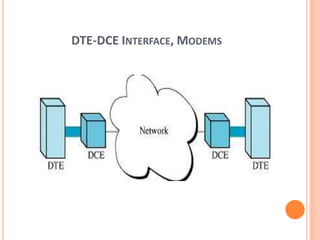
DTE(Data Terminal Equipment):
 It is an end equipment that convert user information
into signals or reconvert the received signals.
 DTE is the device where communication lines end.
DCE (Data Circuit Terminal):
 It is the equipment that sits between DTE & data
transmission.
 DCE is usually a modem/ Routers.
 Provide path for communication.
DTE-DCE INTERFACE, MODEMS

Computer Network unit-1 complete Notes.pptx

  • 1.
    COMPUTER NETWORK (503) UNIT– I BASIC CONCEPTS: Presented By : Lucky Berwal
  • 2.
    UNIT IST Basic Concepts: Components of data communication, distributed processing,  standards and organizations.  Line configuration,  topology,  Transmission mode, and categories of networks. OSI and TCP/IP Models:  Layers and their functions,  comparison of models. Digital Transmission:  Interfaces and Modems:  DTE-DCE Interface,  Modems, Cable modems.
  • 3.
    INTRODUCTION TO COMPUTERNETWORK A Network is a set of devices(nodes) connected by media, A node can be a computer, printer or any other devices capable of sending and/or receiving data generated by other nodes on the network. Definition of computer network:- A COMPUTER NETWORK is a group of computer systems and other computing hardware devices that are linked together through communication channels to facilitate communication and resources sharing among a wide range of users. Networks are commonly categorized based on their characteristics.
  • 4.
    LAYERED ARCHITECTURE:- Computer Networkare generally organized as a series of layers or levels, each one built upon the one below, Every layer needs a mechanism for identify sender and receiver. Node: It can be any network device(router, printer, camera). Host: It represents computer stations(interface). Hub: Network device used to increase the reach ability.
  • 5.
    DEFINITION  Computer Network,two or more computers that are connected with one another for the purpose of communicating data electronically. Besides physically connecting computer and communication devices, a network system serves the important function of establishing a cohesive architecture that allows a variety of equipment types to transfer information in a near-seamless fashion.
  • 6.
    DATA COMMUNICATION  DataCommunication is defined as exchange of data between two devices via some form of transmission media such as a cable, wire or it can be air or vacuum also. For occurrence of data communication, communicating devices must be a part of communication system made up of a combination of hardware or software devices and programs.
  • 7.
    CRITERIA FOR ADATA COMMUNICATION NETWORK  Performance: Performance is the defined as the rate of transferring error free data. It is measured by the Response Time. Response Time is the elasped time between the end of an inquiry and the beginning of a response.  Consistency: Consistency is the predictability of response time and accuracy of data.  Reliability: Reliability is the measure of how often a network is useable. MTBF (Mean Time between Failures) is a measure of the average time a component is expected to operate between failures. Normally provided by the manufacturer. A network failure can be: hardware, data carrying medium and Network Operating System.
  • 8.
    CRITERIA FOR ADATA COMMUNICATION NETWORK  Recovery: Recovery is the Network's ability to return to a prescribed level of operation after a network failure. This level is where the amount of lost data is nonexistent or at a minimum. Recovery is based on having Back-up Files.  Security: Security is the protection of Hardware, Software and Data from unauthorized access. Restricted physical access to computers, password protection, limiting user privileges and data encryption are common security methods. Anti-Virus monitoring programs to defend against computer viruses are a security measure.
  • 9.
    COMPONENTS OF DATACOMMUNICATION The different components of Data communication are shown in the following figure. 1. Message: The message is the information (data) to be communicated. Popular forms of information include text, numbers, pictures, audio, and video.
  • 10.
    2. Sender: The senderis the device that sends the data message. It can be a computer, workstation, telephone handset, video camera, and so on. 3. Receiver: The receiver is the device that receives the message. It can be a computer, workstation, telephone handset, television, and so on. 4. Transmission medium: The transmission medium is the physical path by which a message travels from sender to receiver. Some examples of transmission media include twisted-pair wire, coaxial cable, fiber-optic cable, and radio waves. 5. Protocol: A protocol is a set of rules that govern data communications. It represents an agreement between the communicating devices. Without a protocol, two devices may be connected but not communicating, just as a person speaking French cannot be understood by a person who speaks only Japanese.
  • 11.
    TRANSMISSION MODE/ TYPES OFDATA COMMUNICATION: A given transmission on a communications channel between two machines can occur in several different ways. The transmission is characterized by:  the direction of the exchanges  the transmission mode: the number of bits sent simultaneously  synchronization between the transmitter and receiver. Types of Transmission mode 1. Simplex 2. Half Duplex 3. Full Duplex
  • 12.
    1.Simplex A simplex connectionis a connection in which the data flows in only one direction, from the transmitter to the receiver. This type of connection is useful if the data do not need to flow in both directions (for example, from your computer to the printer or from the mouse to your computer...). 2.Half Duplex A half-duplex connection (sometimes called an alternating connection or semi-duplex) is a connection in which the data flows in one direction or the other, but not both at the same time. With this type of connection, each end of the connection transmits in turn. This type of connection makes it possible to have bidirectional communications using the full capacity of the line. 3.Full Duplex A full-duplex connection is a connection in which the data flow in both directions simultaneously. Each end of the line can thus transmit and receive at the same time, which means that the bandwidth is divided in two for each direction of data transmission if the same transmission medium is used for both directions of transmission.
  • 14.
    TYPE OF COMPUTERNETWORK/ CATEGORIES OF COMPUTER NETWORK Data Communication and Computer Network Generally, networks are distinguished based on their geographical span. A network can be as small as distance between your mobile phone and its Bluetooth headphone and as large as the internet itself, covering the whole geographical world.  Personal Area Network  Local Area Network  Metropolitan Area Network  Wide Area Network
  • 15.
    PERSONAL AREA NETWORK(PAN):  A Personal Area Network (PAN) is smallest network which is very personal to a user. This may include Bluetooth enabled devices or infra-red enabled devices. PAN has connectivity range up to 10 meters. PAN may include wireless computer keyboard and mouse, Bluetooth enabled headphones, wireless printers, and TV remotes.
  • 16.
    2.LOCAL AREA NETWORK(LAN): LANs are the most frequently discussed networks, one of the most common, one of the most original and one of the simplest types of networks. LANs connect groups of computers and low-voltage devices together across short distances (within a building or between a group of two or three buildings in close proximity to each other) to share information and resources.
  • 17.
    3.METROPOLITAN AREA NETWORK(MAN): Thesetypes of networks are larger than LANs but smaller than WANs – and incorporate elements from both types of networks. MANs span an entire geographic area (typically a town or city, but sometimes a campus). Ownership and maintenance is handled by either a single person or company (a local council, a large company, etc.).
  • 18.
    4.WIDE AREA NETWORK(WAN): Slightlymore complex than a LAN, a WAN connects computers together across longer physical distances. This allows computers and low-voltage devices to be remotely connected to each other over one large network to communicate even when they’re miles apart. The Internet is the most basic example of a WAN, connecting all computers together around the world. Because of a WAN’s vast reach, it is typically owned and maintained by multiple administrators or the public.
  • 19.
    DATA PROCESSING  Collection,manipulation, and processing collected data for the required use is known as data processing. It is a technique normally performed by a computer; the process includes retrieving, transforming, or classification of information.
  • 20.
    METHODS OF DATAPROCESSING Let us now discuss the different methods of data processing.  Single user programming  Multiple programming  Real-time processing  On-line processing  Time sharing processing  Centralized processing  Distributed processing
  • 21.
    CENTRALIZED, DECENTRALIZED ANDDISTRIBUTED PROCESSING  Centralized Processing: In centralized processing, one or more terminals are connected to a single processor. Note that terminal is the combination of mouse, keyboard, and screen. In-library there is one processor attached to different terminals and library users can search any book from the terminal (mouse, keyboard, and screen). In centralized processing all the terminals are controlled by a single processor (CPU) and any command can be fulfilled by a single processor and this type of network is called centralized network.  Decentralized Processing: In decentralized processing, there are different CPU connected on the network and each processor can do its job independent of each other. For example, in a Net cafe, all computers can perform their own tasks. This type of network is called decentralized network.  Distributed processing: Another type of processing also exists named distributed processing. In this type of processing different CPU are connected to the network and are controlled by single CPU. For example in air reservation system there exists different terminals and processing is done from many locations and all the computers are controlled by the single main processor. This type of network is called distributed network.
  • 22.
    DISTRIBUTED PROCESSING  Distributedprocessing is a setup in which multiple individual central processing units (CPU) work on the same programs, functions or systems to provide more capability for a computer or other device.  distributed processing refers to local-area networks (LANs) designed so that a single program can run simultaneously at various sites.  Another form of distributed processing involves distributed databases. This is databases in which the data is stored across two or more computer systems. The database system keeps track of where the data is so that the distributed nature of the database is not apparent to users.
  • 23.
    LINE CONFIGURATION Line configurationrefers to the way two or more communication devices attached to a link . Line configuration is also referred to as connection. A Link is the physical communication pathway that transfers data from one device to another. For communication to occur, two devices must be connected in same way to the same link at the same time. There are two possible line configurations. 1. Point-to-Point. 2. Multipoint.
  • 24.
    1.POINT-TO-POINT: A Point toPoint Line Configuration Provide dedicated link between two devices use actual length of wire or cable to connect the two end including microwave & satellite link. Point to point network topology is considered to be one of the easiest and most conventional network topologies. It is also the simplest to establish and understand. To visualize, one can consider point to point network topology as two phones connected end to end for a two way communication
  • 25.
    2.MULTIPOINT CONFIGURATION: Multipoint Configurationalso known as Multidrop line configuration one or more than two specific devices share a single link capacity of the channel is shared. More than two devices share the Link that is the capacity of the channel is shared now. With shared capacity, there can be two possibilities in a Multipoint Line Configuration:  Spatial Sharing: If several devices can share the link simultaneously, its called Spatially shared line configuration.  Temporal (Time) Sharing: All devices are given a time spam in which they can utilize that single link. At that time other device will not send their data on link.
  • 26.
    TOPOLOGIES Network topologies refersto the way in which a network is laid out physically. The topology of network is the geometric representation of the relationship for all the links and linking devices (usually called nodes) to one another. Type of topologies: 1) Bus Topology 2) Star Topology 3) Ring Topology 4) Mesh Topology 5) Tree Topology 6) Hybrid Topology
  • 27.
    TYPE OF TOPOLOGIES 1.Bus Topology: Bus topology use the single communication line called backbone which is shared by all the nodes or computers to communicate. It is used for smaller networks mainly and is one of the most simplest and reliable ways to communicate. (Cable end) Node
  • 28.
    1. BUS TOPOLOGY: Advantages:  Suitable for smaller networks.  Easy to implement.  Even if one node breaks down, network does not get hampered.  Disadvantages:  Cable fail then whole network will be fail.  Within a given cable length, limited number of nodes can be added.  Data transfer rate gets slow down if more nodes are added.  Only one data packet can be transferred at a particular moment.
  • 29.
    2. STAR TOPOLOGY Instar topology, every node is connected to central hub or switch. The switch is the server and the peripherals are the clients. Data from the source is first delivered to the hub and then transferred to the transferred to the other nodes. HU B
  • 30.
    2. STAR TOPOLOGY Advantages: Easy to install and implement.  Give better performance as message does not pass through various nodes unlike bus topology.  Faulty nodes can be easily removed without affecting the other nodes in the loop. Disadvantages:  If the central hub fails then the whole network is break.  Data transfer rate depends on capacity of the central hub.  Cost of installation is high.
  • 31.
    3.RING TOPOLOGY  Ringtopology is a networks topology in which the nodes or the computers are connected in a closed loop. It is called as circular topology. A signal is passed along the ring in one direction, until it reaches its destination. Ring topology NODE Server(sender)
  • 32.
    3.RING TOPOLOGY  Advantages: Ring topology is easy to install.  Transmitting network is not affected by high traffic.  A signal travels around the circle in a clockwise direction.  Disadvantages:  If one node is break then the whole network gets down.  It becomes difficult to add/remove nodes.
  • 33.
    4.MESH TOPOLOGY  Inmash topology all devices are cross-connected to communicate each other. There are two type of mesh topology:  Full mesh topology:- Each and every nodes or devices are connected to other.  Partial mesh topology:- In this topology some of the systems are connected same function as mesh topology but some devices are only connected to two or three devices
  • 34.
    4.MESH TOPOLOGY  Advantages: When one node fails, others continue to work without disruption.  We can send data from one node to many nodes  Each connection can carry its own data load.  Disadvantages:  It is quite expensive since a bulk wiring is required.  Installation and configuration can be a very difficult task.
  • 35.
    5.TREE TOPOLOGY  Treetopology is the combination of bus and star topology.  In this data flow from top to bottom i.e from the central hub to secondary and then to the devices or from bottom to top i.e. devices to secondary hub and then to the central hub.
  • 36.
    5.TREE TOPOLOGY  Advantages: It is most suitable for large networks where ring and star topologies are not efficient.  It divides the network in sub-parts, so it becomes more manageable.  Disadvantages:  If the central hub gets fails the entire system fails.  The cost is high because of cabling.
  • 37.
    6.HYBRID TOPOLOGY A networkstructure whose design contains more than one topology is said to be hybrid topology. Hybrid topology inherits merits and demerits of all the incorporating topologies.
  • 38.
    6.HYBRID TOPOLOGY  Advantages: Hybrid network can be designed according to the requirements of the organization.  Special care can be given to nodes where traffic is high as well as where chances of fault are high. Disadvantages:  One of the biggest drawback of hybrid topology is its design. Its not easy to design this type of architecture and its a tough job for designers.  As hybrid architecture are usually larger in scale, they require a lot of cables, cooling systems.
  • 39.
    STANDARDS AND ORGANIZATIONS A standards and organization, sometimes referred to as a standards body, is an organization with authority to endorse official standards for given applications.
  • 40.
    EXAMPLES OF STANDARDSORGANIZATIONS INCLUDE:  ANSI (American National Standards Institute) is the primary organization for fostering the development of technology standards in the United States.  The IEEE (Institute of Electrical and Electronics Engineers) fosters the development of standards that often become national and international standards.  The BSI (British Standards Institution) is a service organization that produces standards across a wide variety of industry sectors.  The IETF (Internet Engineering Task Force) is the body that defines standard Internet operating protocols such as TCP/IP.  OASIS (Organization for the Advancement of Structured Information Standards) exists to promote product- independent standards for information formats such as XML and HTML.
  • 41.
    INTERNETWORK  An internetworkis defined as two or more computer network LANs or WAN or computer network segments are connected using devices, and they are configured by a local addressing scheme. This process is known as internetworking.  An interconnection between public, private, commercial, industrial, or government computer networks can also be defined as internetworking.  An internetworking uses the internet protocol.  The reference model used for internetworking is Open System Interconnection (OSI).
  • 42.
    TYPES OF INTERNETWORK: Internet:  Internet is a worldwide, publicly accessible computer network of interconnected computer networks (internetwork) that transmit data using the standard Internet Protocol (IP). Largest Internetwork in the world is Internet.  The terms World Wide Web (WWW) and Internet are not the same. The Internet is a collection of interconnected computer networks, linked by copper wires, fiber-optic cables, wireless connections, etc.  The World Wide Web is one of the services accessible via the Internet, along with various others including email, file sharing, remote administration, video streaming, online gaming etc. World Wide Web (WWW) is a collection of interconnected documents and other resources, linked together by hyperlinks and URLs
  • 43.
    TYPES OF INTERNETWORK: Extranet: An extranet is a communication network based on the internet protocol such as Transmission Control protocol and internet protocol. It is used for information sharing. The access to the extranet is restricted to only those users who have login credentials. An extranet is the lowest level of internetworking. It can be categorized as MAN, WAN or other computer networks. An extranet cannot have a single LAN, at least it must have one connection to the external network.  Intranet: An intranet is a private network based on the internet protocol such as Transmission Control protocol and internet protocol. An intranet belongs to an organization which is only accessible by the organization's employee or members. The main aim of the intranet is to share the information and resources among the organization employees. An intranet provides the facility to work in groups and for teleconferences.
  • 44.
    COMPUTER NETWORK MODEL OSIand TCP/IP Models
  • 45.
    HISTORY OF OSIMODEL Here are essential landmarks from the history of OSI model:  In the late 1970s, the ISO conducted a program to develop general standards and methods of networking.  In 1973, an Experimental Packet Switched System in the UK identified the requirement for defining the higher- level protocols.  In the year 1983, OSI model was initially intended to be a detailed specification of actual interfaces.  In 1984, the OSI architecture was formally adopted by ISO as an international standard
  • 46.
    OSI MODEL  OpenSystem Interconnect is an open standard for all communication systems. OSI model is established by International Standard Organization (ISO).  An open system is a model that allow any two different systems(devices) to communication regardless of their underlying architecture.  The purpose of the OSI model is to open communication between different systems without requiring changes to the logic of the underlying hardware and software.  It is a model of understanding and designing a network architecture which is flexible.
  • 47.
    ORGANIZATION OF THELAYERS The 7 layers can be grouped into 3 subgroups  Network Support Layers :Layers 1,2,3 - Physical, Data link and Network are the network support layers. They deal with the physical aspects of moving data from one device to another such as electrical specifications, physical addressing, transport timing and reliability.  Transport Layer: Layer 4, transport layer, ensures end-to- end reliable data transmission on a single link.  User Support Layers: Layers 5,6,7 – Session, presentation and application are the user support layers. They allow interoperability among unrelated software systems.
  • 48.
    OSI MODEL LAYERSAND THEIR FUNCTIONS  Application Layer: This layer is responsible for providing interface to the application user. This layer encompasses protocols which directly interact with the user.  Presentation Layer: This layer defines how data in the native format of remote host should be presented in the native format of host.  Session Layer: This layer maintains sessions between remote hosts. For example, once user/password authentication is done, the remote host maintains this session for a while and does not ask for authentication again in that time span.  Transport Layer: This layer is responsible for end-to-end delivery between hosts.  Network Layer: This layer is responsible for address assignment and uniquely addressing hosts in a network.  Data Link Layer: This layer is responsible for reading and writing data from and onto the line. Link errors are detected at this layer.  Physical Layer: This layer defines the hardware, cabling, wiring, power output, pulse rate etc. NOTE: For sender application layer is first and for receiver physical layer is first.
  • 49.
    OSI MODEL LAYERS Applicationlayer Message format, file transfer Presentation Layer Encryption and decryption Session Layer Authentication, Permission Transport Layer End-to-End connection, flow control Network Layer Path determination, routing Data link Layer Error detection Physical Layer Media, signal, binary transmission Host layers Media layers (Hardwar e Layers) 1 7 6 5 4 3 2 Network Support Layers User Support Layer Ensures end-to- end reliable data transmission
  • 50.
  • 51.
    STRUCTURE OF ADATA WHEN IT GOES TO ALL LAYERS
  • 52.
    OSI Model Layersand their functions
  • 53.
    PHYSICAL LAYER:  Thephysical layer coordinates the functions required to transmit a bit stream over a physical medium.
  • 54.
    THE OTHER RESPONSIBILITIESOF PHYSICAL LAYER  Physical characteristics of interfaces and media - The physical layer defines the characteristics of the interface between the devices and the transmission medium.  Representation of bits - To transmit the stream of bits, it must be encoded to signals. The physical layer defines the type of encoding.  Data Rate or Transmission rate - The number of bits sent each second – is also defined by the physical layer.  Synchronization of bits - The sender and receiver must be synchronized at the bit level. Their clocks must be synchronized.  Line Configuration - In a point-to-point configuration, two devices are connected together through a dedicated link. In a multipoint configuration, a link is shared between several devices.  Physical Topology - The physical topology defines how devices are connected to make a network. Devices can be connected using a mesh, bus, star or ring topology.  Transmission Mode - The physical layer also defines the direction of transmission between two devices: simplex, half- duplex or full-duplex.
  • 55.
    DATA LINK LAYER It is responsible for transmitting framesfrom one node to next node.
  • 56.
    THE OTHER RESPONSIBILITIESOF THIS LAYER ARE  Framing - Divides the stream of bits received into data units called frames.  Physical addressing – If frames are to be distributed to different systems on the n/w , data link layer adds a header to the frame to define the sender and receiver.  Flow control- If the rate at which the data are absorbed by the receiver is less than the rate produced in the sender ,the Data link layer imposes a flow ctrl mechanism.  Error control- Used for detecting and retransmitting damaged or lost frames and to prevent duplication of frames. This is achieved through a trailer added at the end of the frame.  Access control -Used to determine which device has control over the link at any given time.
  • 57.
    NETWORK LAYER  Thislayer is responsible for the delivery of packets from source to destination.  It is mainly required, when it is necessary to send information from one network to another.
  • 58.
    THE OTHER RESPONSIBILITIESOF THIS LAYER ARE  Hope to hope transmission  Logical addressing - If a packet passes the n/w boundary, we need another addressing system for source and destination called logical address.  Routing – The devices which connects various networks called routers are responsible for delivering packets to final destination.  Fragmentation  Congestion control
  • 59.
    TRANSPORT LAYER  Itis responsible for Process to Process delivery. It also ensures whether the message arrives in order or not.
  • 60.
    THE OTHER RESPONSIBILITIESOF THIS LAYER ARE  Port addressing - The header in this must therefore include a address called port address. This layer gets the entire message to the correct process on that computer.  Segmentation and reassembly - The message is divided into segments and each segment is assigned a sequence number. These numbers are arranged correctly on the arrival side by this layer.  Connection control - This can either be connectionless or connection-oriented. The connectionless treats each segment as a individual packet and delivers to the destination. The connection- oriented makes connection on the destination side before the delivery. After the delivery the termination will be terminated.  Flow and error control - Similar to data link layer, but process to process take place.
  • 61.
    SESSION LAYER  Thislayer establishes, manages and terminates connections between applications.
  • 62.
    THE OTHER RESPONSIBILITIESOF THIS LAYER ARE  Dialog control - This session allows two systems to enter into a dialog either in half duplex or full duplex.  Synchronization-This allows to add checkpoints into a stream of data.
  • 63.
    PRESENTATION LAYER  Itis concerned with the syntax and semantics of information exchanged between two systems.
  • 64.
    THE OTHER RESPONSIBILITIESOF THIS LAYER ARE  Translation – Different computers use different encoding system, this layer is responsible for interoperability between these different encoding methods. It will change the message into some common format.  Encryption and decryption-It means that sender transforms the original information to another form and sends the resulting message over the n/w. and vice versa.  Compression and expansion-Compression reduces the number of bits contained in the information particularly in text, audio and video.
  • 65.
    APPLICATION LAYER  Thislayer enables the user to access the n/w. This allows the user to log on to remote user.
  • 66.
    THE OTHER RESPONSIBILITIESOF THIS LAYER ARE  FTAM(file transfer, access ,mgmt) - Allows user to access files in a remote host.  Mail services - Provides email forwarding and storage.  Directory services - Provides database sources to access information about various sources and objects.
  • 68.
    Layer Name ProtocolFunction Layer 7 Application SMTP, HTTP, FTP, POP3, SNMP To allow access to network resources. Layer 6 Presentation MPEG, ASCH, SSL, TLS To translate, encrypt and compress data. Layer 5 Session NetBIOS, SAP To establish, manage, and terminate the session Layer 4 Transport TCP, UDP The transport layer builds on the network layer to provide data transport from a process on a source machine to a process on a destination machine. Layer 3 Network IPV5, IPV6, ICMP, IPSEC, ARP, MPLS. To provide internetworking. To move packets from source to destination Layer 2 Data link RAPA, PPP, Frame Relay, ATM, Fiber Cable, etc. To organize bits into frames. To provide hop-to-hop delivery Layer 1 Physical RS232, 100BaseTX, ISDN, 11. To transmit bits over a medium. To provide mechanical and electrical specifications
  • 69.
    TCP/IP MODEL  Internetuses TCP/IP protocol suite, also known as Internet suite.  This defines Internet Model which contains four layered architecture.  OSI Model is general communication model but Internet Model is what the internet uses for all its communication.  The internet is independent of its underlying network architecture so is its Model.
  • 70.
    THIS MODEL HASTHE FOLLOWING LAYERS:
  • 71.
    OSI LAYERS VSTCP/IP LAYERS /Internet/Internal
  • 72.
    TCP/IP MODEL LAYERSAND FUNCTIONS  Application Layer: This layer defines the protocol which enables user to interact with the network. For example, FTP, HTTP etc.  Transport Layer: This layer defines how data should flow between hosts. Major protocol at this layer is Transmission Control Protocol (TCP). This layer ensures data delivered between hosts is in-order and is responsible for end- to- end delivery.  Internet Layer: Internet Protocol (IP) works on this layer. This layer facilitates host addressing and recognition. This layer defines routing.  Link Layer: This layer provides mechanism of sending and receiving actual data. Unlike its OSI Model counterpart, this layer is independent of underlying network architecture and hardware.
  • 73.
  • 74.
    WHEN YOU TYPEA WEB ADDRESS INTO YOUR BROWSER  The browser goes to the DNS(Domain Name Servers) server, and finds the real address of the server that the website lives on (you find the address of the shop).  The browser sends an HTTP request message to the server, asking it to send a copy of the website to the client (you go to the shop and order your goods). This message, and all other data sent between the client and the server, is sent across your internet connection using TCP/IP.  If the server approves the client's request, which means "Of course you can look at that website! Here it is", and then starts sending the website's files to the browser as a series of small chunks called data packets (the shop gives you your goods, and you bring them back to your house).  The browser assembles the small chunks into a complete web page and displays it to you (the goods arrive at your door — new shiny stuff, awesome!).
  • 75.
    DNS(DOMAIN NAME SERVER) This is called an IP address, and it represents a unique location on the web. However, it's not very easy to remember, is it? That's why Domain Name Servers were invented. These are special servers that match up a web address you type into your browser (like "mozilla.org") to the website's real (IP) address.  Websites can be reached directly via their IP addresses. You can find the IP address of a website by typing its domain into a tool like
  • 76.
    COMPARISON OF MODELS OSI(OpenSystem Interconnection) TCP/IP(Transmission Control Protocol / Internet Protocol) In OSI model the transport layer guarantees the delivery of packets. 2. In TCP/IP model the transport layer does not guarantees delivery of packets. Still the TCP/IP model is more reliable. OSI model has a separate Presentation layer and Session layer. 4. TCP/IP does not have a separate Presentation layer or Session layer. The OSI has seven layers TCP/IP has four layers. In OSI, the model was developed first and then the protocols in each layer were developed In the TCP/IP suite, the protocols were developed first and then the model was developed. OSI model gives guidelines on how communication needs to be done TCP/IP protocols layout standards on which the Internet was developed. So, TCP/IP is a more practical model.
  • 77.
    DATA TRANSMISSION OFDIGITAL DATA  The data transmission mode decides how data is transmitted between two computers. The binary data in the form of 1s and 0s can be sent in two different modes: Type of Data transmission Data transmission Asynchronous Synchronous Serial Parallel
  • 78.
    1. PARALLEL TRANSMISSION All the bits of data are transmitted simultaneously on separate communication lines.  In order to transmit n bits, n wires or lines are used. Thus each bit has its own line.  Parallel transmission is used for short distance communication. Advantages: Faster form of transmission, i.e. able to send multiple bits simultaneously. Disadvantage: It is costly method of data transmission as it required n lines to transmit n bits at the same time.
  • 79.
    2. SERIAL TRANSMISSION In serial transmission the various bits of data are transmitted serially one after the other.  It required only one communication line rather than n lines to transmit data from sender to receiver. Advantage: Use of single communication line reduces the transmission line cost by the factor of n as compared to parallel transmission. Disadvantage: This method is slower as compared to parallel transmission as bits are transmitted serially one after the other
  • 80.
    I. Asynchronous Transmission:It sends only one character at a time where a character is either a letter of the alphabet or number or control character, it sends one byte of data at a time.  Asynchronous transmission between two devices is made possible using start bit and stop bit.  Start bit usually 0 is added to the beginning of each byte(alerts the receiver to the arrival of new group of bit).  Stop bit usually 1 is added to the end of each(to let the receiver know that byte is finished).
  • 81.
    II. SYNCHRONOUS TRANSMISSION It does not use start and stop bit.  They can contain multiple bytes.  There is no gap between the various bytes in the data steam.  Since the various bytes are placed on the link without any gap, it is the responsibility of receiver to separate the bit stream into bytes.
  • 82.
    MODEM  A modemis a hardware device that allows the computer to connect to the internet over the existing telephone line.  A modem is not integrated with the motherboard rather than it is installed on the PCI slot found on the motherboard.  It stands for Modulator/Demodulator. It converts the digital data into an analog signal over the telephone lines. Based on the differences in speed and transmission rate, a modem can be classified in the following categories:  Standard PC modem or Dial-up modem  Cellular Modem  Cable modem
  • 83.
    Cellular Modem  Adevice that adds 3G or 4G (LTE) cellular connectivity to laptops, desktop computers and various tablets. Typically available as an external USB module, for desktop computers, the modem may also be available on a PCI or PCI Express (PCIe) card that plugs into an empty slot on the motherboard. For older laptops, modems may be available for ExpressCard or PC Card/CardBus slots. Known By Many Names A cellular modem via USB is a "USB modem." On a card, it can be an "air card," "data card" or "broadband card." Generic terms are "broadband adapter," "broadband modem," "cellular adapter," "3G or 4G modem." Alternatives: Smartphones and Routers While a cellular modem plugs directly into the computer, smartphones and stand-alone broadband routers convert cellular signals into a Wi-Fi hotspot to connect to nearby devices. See cellular hotspot and mobile broadband router.
  • 84.
    CABLE MODEMS  Acable modem router is a device that not only acts as an access point for cable Internet access, but also doubles as a network router. The network router built into the cable modem allows more than one computer to share Internet access by directing traffic to two or more computers in a single location, such as a home or office building.  A cable modem is a hardware device that allows your computer to communicate with an Internet service provider over a landline connection. It converts an analog signal to a digital signal for the purpose of granting access to broadband Internet.  There are two basic types of cable modem routers: wired and wireless. A wired model will require all computers that need Internet access to be physically connected to the device via Ethernet cabling. A wireless model can communicate to all computers using radio waves, negating the need for cables.
  • 85.
    DTE-DCE INTERFACE DTE(Data TerminalEquipment):  It is an end equipment that convert user information into signals or reconvert the received signals.  DTE is the device where communication lines end. DCE (Data Circuit Terminal):  It is the equipment that sits between DTE & data transmission.  DCE is usually a modem/ Routers.  Provide path for communication.
  • 86.