Virtual Trunk Protocol
Trunking
• A trunk is a physical and logical connection between two
switches across which network traffic travels.
• In a switched network, a trunk is a point-to-point link that
supports several VLANs.
• The purpose of a trunk is to conserve ports when a link
between two devices that implement VLANs is created.
Trunking
• Trunking bundles multiple virtual links over one physical
link.
• This allows the traffic of several VLANs to travel over a
single cable between the switches.
Trunking
• Trunking protocols were developed to effectively manage
the transfer of frames from different VLANs on a single
physical line.
• Frame tagging has been adopted as the standard trunking
mechanism by the IEEE.
Trunking
• The unique physical link between the two switches is able
to carry traffic for any VLAN.
• Each frame sent on the link is tagged so that it carries the
VLAN ID to identify which VLAN it belongs to.
• The two most common tagging schemes for Ethernet
segments are ISL and 802.1Q:
– ISL – A Cisco proprietary protocol
– 802.1Q – An IEEE standard that is the focus of this section
Trunking
• Frame tagging functions at Layer 2 and does not require
much network resources or administrative overhead.
• It is important to understand that a trunk
link does not belong to a specific VLAN.
• A trunk link is a conduit for VLANs
between switches.
Trunking
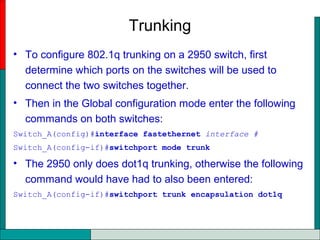
• To configure 802.1q trunking on a 2950 switch, first
determine which ports on the switches will be used to
connect the two switches together.
• Then in the Global configuration mode enter the following
commands on both switches:
Switch_A(config)#interface fastethernet interface #
Switch_A(config-if)#switchport mode trunk
• The 2950 only does dot1q trunking, otherwise the following
command would have had to also been entered:
Switch_A(config-if)#switchport trunk encapsulation dot1q
Trunking
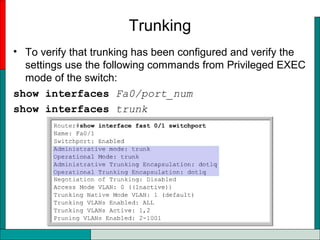
• To verify that trunking has been configured and verify the
settings use the following commands from Privileged EXEC
mode of the switch:
show interfaces Fa0/port_num
show interfaces trunk
Virtual Trunking Protocol (VTP)
• The role of VTP is to maintain VLAN configuration
consistency across a common network administration
domain.
• VTP is a messaging protocol that uses Layer 2 trunk
frames to add, delete, and rename VLANs on a single
domain.
• VTP also allows for centralized changes that are
communicated to all other switches in the network.
• VTP messages are encapsulated in either ISL or IEEE
802.1Q protocol frames, and passed across trunk links to
other devices.
Virtual Trunking Protocol (VTP)
• A VTP domain is made up of one or more interconnected
devices that share the same VTP domain name.
• When transmitting VTP messages to other switches in the
network, the VTP message is encapsulated in a trunking
protocol frame such as ISL or IEEE 802.1Q.
• VTP switches operate in one of three modes:
– Server
– Client
– Transparent
VTP Servers
• VTP servers can create, modify, and delete VLAN and
VLAN configuration parameters for the entire domain.
• VTP servers save VLAN configuration information in the
switch NVRAM.
• VTP servers send VTP messages out to all trunk ports.
VTP Client
• VTP clients cannot create, modify, or delete VLAN
information.
• The only role of VTP clients is to process VLAN changes
and send VTP messages out all trunk ports.
VTP Transparent Mode
• Switches in VTP transparent mode forward VTP
advertisements but ignore information contained in the
message.
• A transparent switch will not modify its database when
updates are received, or send out an update that indicates
a change in its VLAN status.
• Except for forwarding VTP advertisements, VTP is disabled
on a transparent switch.
• Switches in VTP transparent mode can create and
remember VLANs, but only of local significance.
• VLANs created in the transparent mode will not be sent to
other switches.
VTP Transparent Mode
• With VTP, each switch advertises on its trunk ports its
management domain, configuration revision number, the
VLANs that it knows about, and certain parameters for
each known VLAN.
• These advertisement frames are sent to a multicast
address so that all neighbor devices can receive the
frames.
• A new VLAN must be created and configured on one
device (VTP server) only in the management domain.
• All the other devices (VTP clients) in the same
management domain automatically learn the information.
VTP Advertisements
• Each advertisement starts as configuration revision number
0.
• As changes are made, the configuration revision number is
increased incrementally by one, or n + 1.
• Only the advertisement with the highest revision number is
maintained.
VTP Configuration
Switch# configure terminal
Switch(config)# vtp mode [ server | client | transparent ]
Switch(config)# vtp domain domain-name
Switch(config)# vtp password
Switch(config)# vtp pruning
Switch(config)# exit
Switch(config)# vtp domain ICND
Changing VTP domain name to ICND
Switch(config)# vtp mode transparent
Setting device to VTP TRANSPARENT mode.
Switch(config)# exit
Switch#show vtp status
VTP Version : 2
Configuration Revision : 0
Maximum VLANs supported locally : 64
Number of existing VLANs : 17
VTP Operating Mode : Transparent
VTP Domain Name : ICND
VTP Pruning Mode : Disabled
VTP V2 Mode : Disabled
VTP Traps Generation : Disabled
MD5 digest : 0x7D 0x6E 0x5E 0x3D 0xAF 0xA0 0x2F
0xAA
Configuration last modified by 10.1.1.4 at 3-3-93 20:08:05
Switch#
Inter-VLAN Routing
• If a VLAN spans across multiple devices a trunk is used to
interconnect the devices.
• A trunk carries traffic for multiple VLANs.
– a trunk can connect a switch to another switch
– a switch to the inter-VLAN router
– a switch to a server with a special NIC installed that supports
trunking.
• Remember that when a host on
one VLAN wants to communicate
with a host on another, a router
must be involved.
Inter-VLAN Routing
• In a traditional situation, a network with four VLANs would
require four physical connections between the switch and
the external router.
• The router only supports one VLAN per interface.
• This does not scale very well.
Inter-VLAN Routing
• Networks with many VLANs must use VLAN trunking to
assign multiple VLANs to a single router interface.
• The router can support many logical interfaces on individual
physical links through the use of subinterfaces.
• The primary advantage of using a trunk link is a reduction
in the number of router and switch ports used.
Inter-VLAN Routing
• A subinterface is a logical interface within a physical
interface.
• Each subinterface supports one VLAN, and is assigned one
IP address.
• In order to route between VLANs with subinterfaces, a
subinterface must be created for each VLAN.
Inter-VLAN Routing
• To define subinterfaces on a physical interface, perform the
following tasks:
– Identify the interface.
– Define the VLAN encapsulation.
– Assign an IP address to the interface.
• To identify the interface, use the interface command in
global configuration mode.
Router(config)#interface fastethernet port-number
subinterface-number
Router_A(config-if)#interface fastethernet 0/0.1
Inter-VLAN Routing
• The router must be able to talk to the switch using a
standardized trunking protocol (encapsulation).
• To define the VLAN encapsulation, enter the
encapsulation command in interface configuration mode.
Router(config-if)#encapsulation dot1q vlan-number
• The vlan-number identifies the VLAN for which the
subinterface will carry traffic.
Inter-VLAN Routing
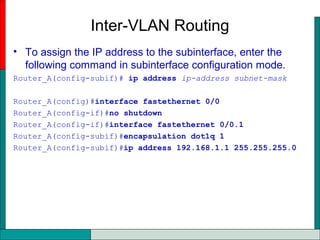
• To assign the IP address to the subinterface, enter the
following command in subinterface configuration mode.
Router_A(config-subif)# ip address ip-address subnet-mask
Router_A(config)#interface fastethernet 0/0
Router_A(config-if)#no shutdown
Router_A(config-if)#interface fastethernet 0/0.1
Router_A(config-subif)#encapsulation dot1q 1
Router_A(config-subif)#ip address 192.168.1.1 255.255.255.0

Day 14.2 inter vlan

  • 1.
  • 2.
    Trunking • A trunkis a physical and logical connection between two switches across which network traffic travels. • In a switched network, a trunk is a point-to-point link that supports several VLANs. • The purpose of a trunk is to conserve ports when a link between two devices that implement VLANs is created.
  • 3.
    Trunking • Trunking bundlesmultiple virtual links over one physical link. • This allows the traffic of several VLANs to travel over a single cable between the switches.
  • 4.
    Trunking • Trunking protocolswere developed to effectively manage the transfer of frames from different VLANs on a single physical line. • Frame tagging has been adopted as the standard trunking mechanism by the IEEE.
  • 5.
    Trunking • The uniquephysical link between the two switches is able to carry traffic for any VLAN. • Each frame sent on the link is tagged so that it carries the VLAN ID to identify which VLAN it belongs to. • The two most common tagging schemes for Ethernet segments are ISL and 802.1Q: – ISL – A Cisco proprietary protocol – 802.1Q – An IEEE standard that is the focus of this section
  • 6.
    Trunking • Frame taggingfunctions at Layer 2 and does not require much network resources or administrative overhead. • It is important to understand that a trunk link does not belong to a specific VLAN. • A trunk link is a conduit for VLANs between switches.
  • 7.
    Trunking • To configure802.1q trunking on a 2950 switch, first determine which ports on the switches will be used to connect the two switches together. • Then in the Global configuration mode enter the following commands on both switches: Switch_A(config)#interface fastethernet interface # Switch_A(config-if)#switchport mode trunk • The 2950 only does dot1q trunking, otherwise the following command would have had to also been entered: Switch_A(config-if)#switchport trunk encapsulation dot1q
  • 8.
    Trunking • To verifythat trunking has been configured and verify the settings use the following commands from Privileged EXEC mode of the switch: show interfaces Fa0/port_num show interfaces trunk
  • 9.
    Virtual Trunking Protocol(VTP) • The role of VTP is to maintain VLAN configuration consistency across a common network administration domain. • VTP is a messaging protocol that uses Layer 2 trunk frames to add, delete, and rename VLANs on a single domain. • VTP also allows for centralized changes that are communicated to all other switches in the network. • VTP messages are encapsulated in either ISL or IEEE 802.1Q protocol frames, and passed across trunk links to other devices.
  • 10.
    Virtual Trunking Protocol(VTP) • A VTP domain is made up of one or more interconnected devices that share the same VTP domain name. • When transmitting VTP messages to other switches in the network, the VTP message is encapsulated in a trunking protocol frame such as ISL or IEEE 802.1Q. • VTP switches operate in one of three modes: – Server – Client – Transparent
  • 11.
    VTP Servers • VTPservers can create, modify, and delete VLAN and VLAN configuration parameters for the entire domain. • VTP servers save VLAN configuration information in the switch NVRAM. • VTP servers send VTP messages out to all trunk ports.
  • 12.
    VTP Client • VTPclients cannot create, modify, or delete VLAN information. • The only role of VTP clients is to process VLAN changes and send VTP messages out all trunk ports.
  • 13.
    VTP Transparent Mode •Switches in VTP transparent mode forward VTP advertisements but ignore information contained in the message. • A transparent switch will not modify its database when updates are received, or send out an update that indicates a change in its VLAN status. • Except for forwarding VTP advertisements, VTP is disabled on a transparent switch. • Switches in VTP transparent mode can create and remember VLANs, but only of local significance. • VLANs created in the transparent mode will not be sent to other switches.
  • 14.
    VTP Transparent Mode •With VTP, each switch advertises on its trunk ports its management domain, configuration revision number, the VLANs that it knows about, and certain parameters for each known VLAN. • These advertisement frames are sent to a multicast address so that all neighbor devices can receive the frames. • A new VLAN must be created and configured on one device (VTP server) only in the management domain. • All the other devices (VTP clients) in the same management domain automatically learn the information.
  • 15.
    VTP Advertisements • Eachadvertisement starts as configuration revision number 0. • As changes are made, the configuration revision number is increased incrementally by one, or n + 1. • Only the advertisement with the highest revision number is maintained.
  • 16.
    VTP Configuration Switch# configureterminal Switch(config)# vtp mode [ server | client | transparent ] Switch(config)# vtp domain domain-name Switch(config)# vtp password Switch(config)# vtp pruning Switch(config)# exit Switch(config)# vtp domain ICND Changing VTP domain name to ICND Switch(config)# vtp mode transparent Setting device to VTP TRANSPARENT mode. Switch(config)# exit Switch#show vtp status VTP Version : 2 Configuration Revision : 0 Maximum VLANs supported locally : 64 Number of existing VLANs : 17 VTP Operating Mode : Transparent VTP Domain Name : ICND VTP Pruning Mode : Disabled VTP V2 Mode : Disabled VTP Traps Generation : Disabled MD5 digest : 0x7D 0x6E 0x5E 0x3D 0xAF 0xA0 0x2F 0xAA Configuration last modified by 10.1.1.4 at 3-3-93 20:08:05 Switch#
  • 17.
    Inter-VLAN Routing • Ifa VLAN spans across multiple devices a trunk is used to interconnect the devices. • A trunk carries traffic for multiple VLANs. – a trunk can connect a switch to another switch – a switch to the inter-VLAN router – a switch to a server with a special NIC installed that supports trunking. • Remember that when a host on one VLAN wants to communicate with a host on another, a router must be involved.
  • 18.
    Inter-VLAN Routing • Ina traditional situation, a network with four VLANs would require four physical connections between the switch and the external router. • The router only supports one VLAN per interface. • This does not scale very well.
  • 19.
    Inter-VLAN Routing • Networkswith many VLANs must use VLAN trunking to assign multiple VLANs to a single router interface. • The router can support many logical interfaces on individual physical links through the use of subinterfaces. • The primary advantage of using a trunk link is a reduction in the number of router and switch ports used.
  • 20.
    Inter-VLAN Routing • Asubinterface is a logical interface within a physical interface. • Each subinterface supports one VLAN, and is assigned one IP address. • In order to route between VLANs with subinterfaces, a subinterface must be created for each VLAN.
  • 21.
    Inter-VLAN Routing • Todefine subinterfaces on a physical interface, perform the following tasks: – Identify the interface. – Define the VLAN encapsulation. – Assign an IP address to the interface. • To identify the interface, use the interface command in global configuration mode. Router(config)#interface fastethernet port-number subinterface-number Router_A(config-if)#interface fastethernet 0/0.1
  • 22.
    Inter-VLAN Routing • Therouter must be able to talk to the switch using a standardized trunking protocol (encapsulation). • To define the VLAN encapsulation, enter the encapsulation command in interface configuration mode. Router(config-if)#encapsulation dot1q vlan-number • The vlan-number identifies the VLAN for which the subinterface will carry traffic.
  • 23.
    Inter-VLAN Routing • Toassign the IP address to the subinterface, enter the following command in subinterface configuration mode. Router_A(config-subif)# ip address ip-address subnet-mask Router_A(config)#interface fastethernet 0/0 Router_A(config-if)#no shutdown Router_A(config-if)#interface fastethernet 0/0.1 Router_A(config-subif)#encapsulation dot1q 1 Router_A(config-subif)#ip address 192.168.1.1 255.255.255.0