Frogger VLAN
Hopping
1
Agenda
● Basics of VLAN
● Need of VLAN
● Basicks of TRUNK port
● CDP Packets
● DTP
● Mitigation
● Demo & Prerequisites
2
VLAN
● VLANs is a Layer 2 network protocol. A VLAN is a group of devices on one or more LANs that are
configured to communicate as if they were attached to the same wire, when in fact they are located
on a number of different LAN segments. Because VLANs are based on logical instead of physical
connections, they are extremely flexible.
● Traffic cannot pass directly to another VLAN (between broadcast domains) within the switch or
between two switches. To interconnect two different VLANs, you must use routers or Layer 3
switches.
3
Need of VLAN
● The network needs to configure a port into the suitable VLAN in order to achieve change, add or
move.
● In the VLAN a group of users with the demand of high security can be included so that the external
users out the VLAN cannot interact with them.
● When it comes to logical classification of users in terms of function, we can consider VLAN as
independent from their geographic or physical locations.
● Even the security of network can be enhanced by VLAN.
4
5
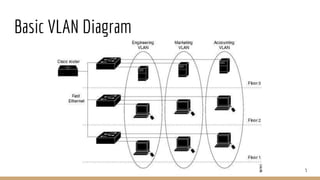
Basic VLAN Diagram
VLAN Trunk
● Trunks are used to carry traffic that belongs to multiple VLANs between devices over the same link. A
device can determine which VLAN the traffic belongs to by its VLAN identifier. The VLAN identifier is
a tag that is encapsulated with the data. ISL and 802.1Q are two types of encapsulation that are used
to carry data from multiple VLANs over trunk links.
● ISL: It is a Cisco proprietary protocol for the interconnection of multiple switches and maintenance of
VLAN information as traffic goes between switches and can support up to 1000 VLANs.
● 802.1Q(Dot1Q): It is the IEEE standard for tagging frames on a trunk and supports up to 4096
VLANs.
6
CDP
● Cisco Discovery Protocol (CDP) is a proprietary Data Link Layer protocol developed by Cisco Systems.
It is used to share information about other directly connected Cisco equipment, such as the operating
system version and IP address.
● CDP announcements are sent at every 60 seconds on interfaces.
7
DTP
● The Dynamic Trunking Protocol (DTP) is a proprietary networking protocol developed by Cisco
Systems for the purpose of negotiating trunking on a link between two VLAN-aware switches, and
for negotiating the type of trunking encapsulation to be used. It works on Layer 2 of the OSI model.
● DTP Attack...
● We can craft bogus DTP frames in order to negotiate a trunk port mode from the switch. This
trunking connection would allow us to inject traffic into whatever VLAN’s are allowed on the port.
Worst case scenario, this will include ALL VLAN’s by default. The attacker can also gain access to
VIEW any traffic traversing any VLAN’s the port can now view!!!
8
Modes of Switch Port
● Access -- Puts the LAN port into permanent non-trunking mode and negotiates to convert the link
into a non-trunk link. The LAN port becomes a non-trunk port even if the neighboring LAN port does
not agree to the change. (PC, Server, Printer, etc…)
● Trunk -- Puts the LAN port into permanent trunking mode and negotiates to convert the link into a
trunk link. The LAN port becomes a trunk port even if the neighboring port does not agree to the
change. (Switch to Switch)
● Dynamic Auto -- Makes the LAN port willing to convert the link to a trunk link. The LAN port becomes
a trunk port if the neighboring LAN port is set to trunk or dynamic desirable mode.
9
● Dynamic Desirable (Default Mode) -- Makes the LAN port actively attempt to convert the link to a
trunk link. The LAN port becomes a trunk port if the neighboring LAN port is set to trunk, dynamic
desirable, or dynamic auto mode.
● Nonegotiate -- Puts the LAN port into permanent trunking mode but prevents the port from
generating DTP frames. You must configure the neighboring port manually as a trunk port to
establish a trunk link.
10
Demo
11
Reference
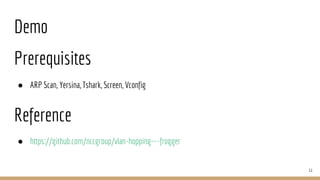
● https://github.com/nccgroup/vlan-hopping---frogger
Prerequisites
● ARP Scan, Yersina, Tshark, Screen, Vconfig
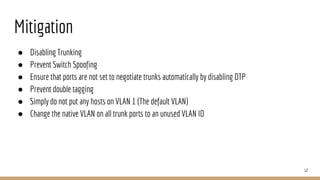
Mitigation
● Disabling Trunking
● Prevent Switch Spoofing
● Ensure that ports are not set to negotiate trunks automatically by disabling DTP
● Prevent double tagging
● Simply do not put any hosts on VLAN 1 (The default VLAN)
● Change the native VLAN on all trunk ports to an unused VLAN ID
12

Frogger vlan hopping

  • 1.
  • 2.
    Agenda ● Basics ofVLAN ● Need of VLAN ● Basicks of TRUNK port ● CDP Packets ● DTP ● Mitigation ● Demo & Prerequisites 2
  • 3.
    VLAN ● VLANs isa Layer 2 network protocol. A VLAN is a group of devices on one or more LANs that are configured to communicate as if they were attached to the same wire, when in fact they are located on a number of different LAN segments. Because VLANs are based on logical instead of physical connections, they are extremely flexible. ● Traffic cannot pass directly to another VLAN (between broadcast domains) within the switch or between two switches. To interconnect two different VLANs, you must use routers or Layer 3 switches. 3
  • 4.
    Need of VLAN ●The network needs to configure a port into the suitable VLAN in order to achieve change, add or move. ● In the VLAN a group of users with the demand of high security can be included so that the external users out the VLAN cannot interact with them. ● When it comes to logical classification of users in terms of function, we can consider VLAN as independent from their geographic or physical locations. ● Even the security of network can be enhanced by VLAN. 4
  • 5.
  • 6.
    VLAN Trunk ● Trunksare used to carry traffic that belongs to multiple VLANs between devices over the same link. A device can determine which VLAN the traffic belongs to by its VLAN identifier. The VLAN identifier is a tag that is encapsulated with the data. ISL and 802.1Q are two types of encapsulation that are used to carry data from multiple VLANs over trunk links. ● ISL: It is a Cisco proprietary protocol for the interconnection of multiple switches and maintenance of VLAN information as traffic goes between switches and can support up to 1000 VLANs. ● 802.1Q(Dot1Q): It is the IEEE standard for tagging frames on a trunk and supports up to 4096 VLANs. 6
  • 7.
    CDP ● Cisco DiscoveryProtocol (CDP) is a proprietary Data Link Layer protocol developed by Cisco Systems. It is used to share information about other directly connected Cisco equipment, such as the operating system version and IP address. ● CDP announcements are sent at every 60 seconds on interfaces. 7
  • 8.
    DTP ● The DynamicTrunking Protocol (DTP) is a proprietary networking protocol developed by Cisco Systems for the purpose of negotiating trunking on a link between two VLAN-aware switches, and for negotiating the type of trunking encapsulation to be used. It works on Layer 2 of the OSI model. ● DTP Attack... ● We can craft bogus DTP frames in order to negotiate a trunk port mode from the switch. This trunking connection would allow us to inject traffic into whatever VLAN’s are allowed on the port. Worst case scenario, this will include ALL VLAN’s by default. The attacker can also gain access to VIEW any traffic traversing any VLAN’s the port can now view!!! 8
  • 9.
    Modes of SwitchPort ● Access -- Puts the LAN port into permanent non-trunking mode and negotiates to convert the link into a non-trunk link. The LAN port becomes a non-trunk port even if the neighboring LAN port does not agree to the change. (PC, Server, Printer, etc…) ● Trunk -- Puts the LAN port into permanent trunking mode and negotiates to convert the link into a trunk link. The LAN port becomes a trunk port even if the neighboring port does not agree to the change. (Switch to Switch) ● Dynamic Auto -- Makes the LAN port willing to convert the link to a trunk link. The LAN port becomes a trunk port if the neighboring LAN port is set to trunk or dynamic desirable mode. 9
  • 10.
    ● Dynamic Desirable(Default Mode) -- Makes the LAN port actively attempt to convert the link to a trunk link. The LAN port becomes a trunk port if the neighboring LAN port is set to trunk, dynamic desirable, or dynamic auto mode. ● Nonegotiate -- Puts the LAN port into permanent trunking mode but prevents the port from generating DTP frames. You must configure the neighboring port manually as a trunk port to establish a trunk link. 10
  • 11.
  • 12.
    Mitigation ● Disabling Trunking ●Prevent Switch Spoofing ● Ensure that ports are not set to negotiate trunks automatically by disabling DTP ● Prevent double tagging ● Simply do not put any hosts on VLAN 1 (The default VLAN) ● Change the native VLAN on all trunk ports to an unused VLAN ID 12

Editor's Notes

  • #7 In ISL, the original frame is encapsulated and an additional header is added before the frame is carried over a trunk link. At the receiving end, the header is removed and the frame is forwarded to the assigned VLAN.
  • #13 Switch spoofing is a type of VLAN hopping attack that takes advantage of an incorrectly configured trunk port. The native VLAN is the only VLAN which is not tagged in a trunk, in other words, native VLAN frames are transmitted unchanged.