DataFinder:  A Python Application for Scientific Data Management EuroPython 2008 (July 9th 2008, Vilnius) Andreas Schreiber < Andreas.Schreiber@dlr.de> German Aerospace Center (DLR), Cologne http://www.dlr.de/sc
The DLR German Aerospace Research Center  Space Agency of the Federal Republic of Germany
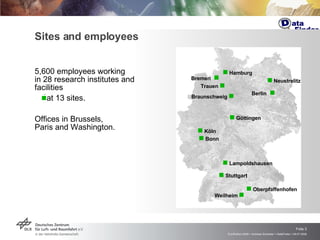
5,600  employees working  in 28 research institutes and  facilities  at 13  sites .  Offices in Brussels,  Paris and Washington. Sites and employees    Köln    Lampoldshausen    Stuttgart    Oberpfaffenhofen Braunschweig       Göttingen Berlin -      Bonn Trauen      Hamburg    Neustrelitz Weilheim    Bremen -  
Short Overview DataFinder is a software for efficient management of scientific and technical data Focus on huge data sets Development of the DataFinder by DLR Primary functionality Structuring of data through assignment of meta information and self-defined data models Flexible usage of heterogeneous storage resources Integration in the working environment
Introduction DataFinder founded by DLR National Grid project AeroGrid
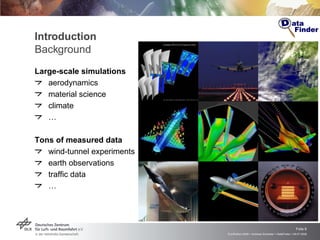
Introduction Background Large-scale simulations   aerodynamics material science climate … Tons of measured data wind-tunnel experiments earth observations traffic data …
Introduction Data Management Problem Typical organizational situations No central data management policy Every employee organizes his/her data individually Researchers spend about 30% of their time searching for data Problem with data left behind by temporary staff Increase of data size and regulations Rapidly growing volume of simulation and experimental data Legal requirements for long-term availability of data (up to 50 years!) Situation similar at many organizations All ~30 DLR institutes Other research labs and agencies Industry
DataFinder History Search for solution for scientific data management Definition of “standard problem” (helicopter simulation) Test case for evaluation of software Evaluation of commercial product data management (PDM) systems PDM systems could manage data but with  huge amount of costs PDM systems have many  unneeded functionalities PDM systems have  self-defined  or  unreadable scripting languages  for extension and customization (Tcl etc.) Development of DataFinder Lightweight data management client and existing server solution Just enough functionality for our problems (no paid but unused features!)
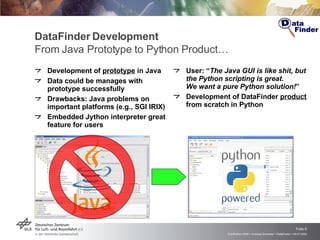
DataFinder Development From Java Prototype to Python Product… Development of  prototype  in Java Data could be manages with prototype successfully Drawbacks: Java problems on important platforms (e.g., SGI IRIX) Embedded Jython interpreter great feature for users   User: “ The Java GUI is like shit, but the Python scripting is great.  We want a pure Python solution! ”  Development of DataFinder  product  from scratch in Python
Python for Scientists and Engineers Reasons for Python in Research and Industry Observations :  Scientists and engineers don’t want to write software but just solve their problems  If they have to write code, it must be as easy as possible Why Python is perfect?  Very easy to learn and easy to use (  = steep learning curve ) Allows rapid development (  = short development time ) Inherent great maintainability   “ Python has the cleanest, most-scientist- or engineer friendly syntax and semantics.”   (Paul F. Dubois. Ten good practices in scientific programming. Comp. In Sci. Eng., Jan/Feb 1999, pp.7-11) “ I want to design  planes,  not software!”
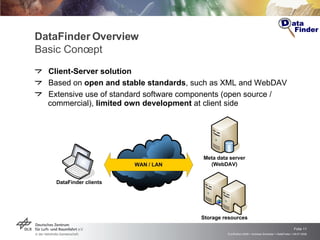
DataFinder Overview Basic Concept Client-Server solution Based on  open and stable standards , such as XML and WebDAV Extensive use of standard software components (open source / commercial),  limited own development  at client side
WebDAV Web-based Distributed Authoring & Versioning Extension of HTTP Allows to manage files on remote servers collaboratively  WebDAV supports Resources (“files”) Collections (“directories”) Properties (“meta data”, in XML format) Locking WebDAV extensions Versioning (DeltaV) Access control (ACP) Search (DASL)
DataFinder Overview Client and Server Client User client Administrator client Implementation: Python with Qt Server WebDAV server  for meta data and data structure   Data Store  concept Abstracts access to managed data Flexible usage of heterogeneous storage resources Implementation: Various  existing server solutions  (third-party)
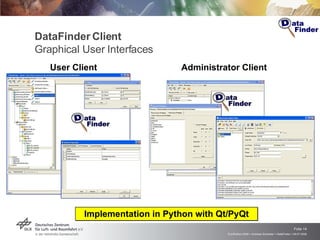
DataFinder Client Graphical User Interfaces User Client Administrator Client Implementation in Python with Qt/PyQt
DataFinder Server Supported WebDAV servers Commercial Server Solution   Tamino XML database (Software AG) Open Source Server Solutions   Apache HTTP Web server and module mod_dav Default storage: file system (mod_dav_fs)  Module Catacomb (mod_dav_repos) + Relational database ( http://catacomb.tigris.org )
WebDAV / Meta Data Server (1) Tamino WebDAV Server Commercial  Server Solution (Software AG) WebDAV Server Tamino XML database backend Advantages Implements many WebDAV extensions (DASL, DeltaV, ACLs) Fast XML processing Good, but not free   Used in DLR for use with DataFinder One installation sufficient for many institutes
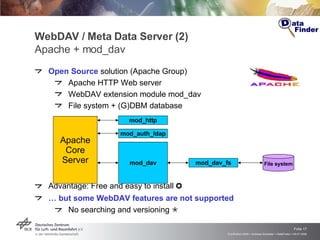
WebDAV / Meta Data Server (2) Apache + mod_dav Open Source  solution (Apache Group) Apache HTTP Web server WebDAV extension module mod_dav  File system + (G)DBM database Advantage: Free and easy to install   …  but some WebDAV features are not supported No searching and versioning   Apache Core Server mod_http mod_auth_ldap mod_dav mod_dav_fs File system
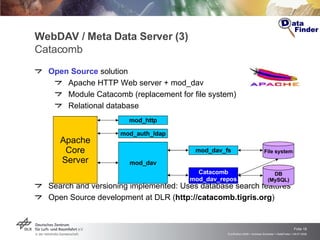
WebDAV / Meta Data Server (3) Catacomb Open Source  solution  Apache HTTP Web server + mod_dav  Module Catacomb (replacement for file system) Relational database Search and versioning implemented: Uses database search features Open Source development at DLR ( http://catacomb.tigris.org ) Apache Core Server mod_http mod_auth_ldap mod_dav mod_dav_fs File system DB (MySQL) Catacomb mod_dav_repos
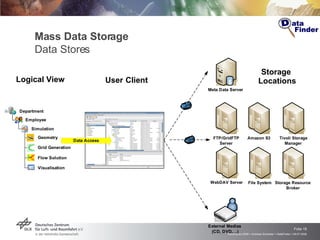
Mass Data Storage Data Stores Logical   View User   Client Storage  Locations
DataFinder  Technical Aspects Access privilege management Authentication using WebDAV and LDAP Authorization for users and groups based on WebDAV (ACP) Client available on many platforms  Linux, Windows, … Restricted by availability of Python 2.5 and Qt 3 + PyQt Extensible through Python scripts  Python application programming interface (API) Accessing data and meta data
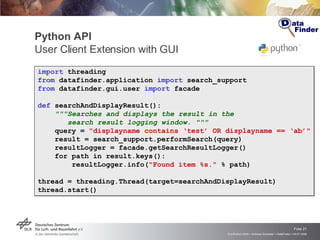
Python API  User Client Extension with GUI import   threading from  datafinder.application  import  search_support from  datafinder.gui.user  import  facade def  searchAndDisplayResult(): &quot;&quot;&quot;Searches and displays the result in the  search result logging window. &quot;&quot;&quot; query =  &quot;displayname contains ‘test’ OR displayname == ‘ab’&quot; result = search_support.performSearch(query) resultLogger = facade.getSearchResultLogger() for path in result.keys(): resultLogger.info( &quot;Found item %s.&quot;  % path)  thread = threading.Thread(target=searchAndDisplayResult) thread.start()
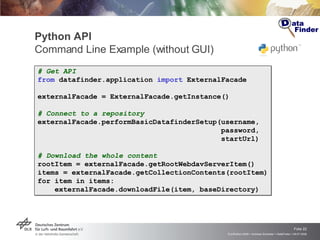
Python API  Command Line Example (without GUI) # Get API from  datafinder.application  import  ExternalFacade externalFacade = ExternalFacade.getInstance() # Connect to a repository externalFacade.performBasicDatafinderSetup(username,    password,    startUrl) # Download the whole content rootItem = externalFacade.getRootWebdavServerItem() items = externalFacade.getCollectionContents(rootItem) for item in items: externalFacade.downloadFile(item, baseDirectory)
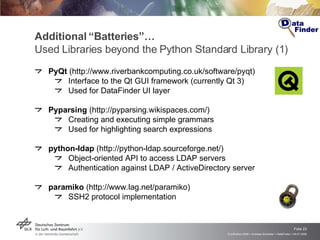
Additional “Batteries”… Used Libraries beyond the Python Standard Library (1) PyQt  (http://www.riverbankcomputing.co.uk/software/pyqt) Interface to the Qt GUI framework (currently Qt 3) Used for DataFinder UI layer Pyparsing  (http://pyparsing.wikispaces.com/) Creating and executing simple grammars Used for highlighting search expressions python-ldap  (http://python-ldap.sourceforge.net/) Object-oriented API to access LDAP servers Authentication against LDAP / ActiveDirectory server paramiko  (http://www.lag.net/paramiko) SSH2 protocol implementation
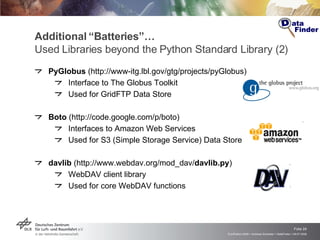
Additional “Batteries”… Used Libraries beyond the Python Standard Library (2) PyGlobus  (http://www-itg.lbl.gov/gtg/projects/pyGlobus) Interface to The Globus Toolkit  Used for GridFTP Data Store Boto  (http://code.google.com/p/boto) Interfaces to Amazon Web Services Used for S3 (Simple Storage Service) Data Store davlib  (http://www.webdav.org/mod_dav/ davlib.py ) WebDAV client library Used for core WebDAV functions
WebDAV Client Library Support for DAV Extensions Provides an object-oriented interface for accessing WebDAV server  Extracted from DataFinder source WebDAV client-side library supports Core WebDAV specification  Access Control Protocol Basic Versioning (experimental) DAV Searching and Locating Secure HTTP connections Implementation based on davlib and standard httplib Apache License Version 2 Project Site:  http://sourceforge.net/projects/pythonwebdavlib
Working with DataFinder…
Configuration and Customization Preparing DataFinder for certain “use cases” Requirements Analysis Analyze data, working environment, and users workflows Configuration Define and configure data model Configure distributed storage resources (Data Stores) Customization Write functional extensions with Python scripts
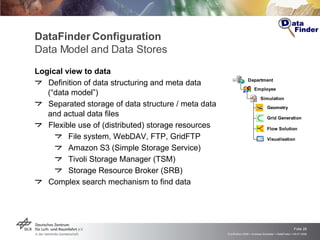
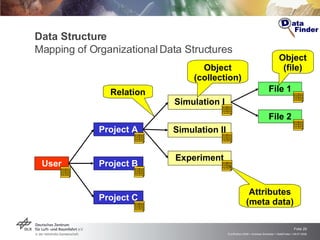
DataFinder Configuration Data Model and Data Stores Logical view to data Definition of data structuring and meta data (“data model”) Separated storage of data structure / meta data  and actual data files Flexible use of (distributed) storage resources File system, WebDAV, FTP, GridFTP Amazon S3 (Simple Storage Service) Tivoli Storage Manager (TSM) Storage Resource Broker (SRB) Complex search mechanism to find data
Data Structure Mapping of Organizational Data Structures User Object (collection) Object (file) Relation Attributes (meta data) Project A Project B Project C File 1 File 2 Simulation I Experiment Simulation II Project Mega Code Ultra User Eddie Key Value Project Mega Code Ultra User Eddie Key Value Project Mega Code Ultra User Eddie Key Value Project Mega Code Ultra User Eddie Key Value Project Mega Code Ultra User Eddie Key Value Project Mega Code Ultra User Eddie Key Value Project Mega Code Ultra User Eddie Key Value Project Mega Code Ultra User Eddie Key Value Project Mega Code Ultra User Eddie Key Value
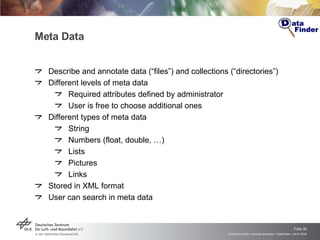
Meta Data Describe and annotate data (“files”) and collections (“directories”) Different levels of meta data Required attributes defined by administrator User is free to choose additional ones Different types of meta data String Numbers (float, double, …) Lists Pictures Links Stored in XML format User can search in meta data
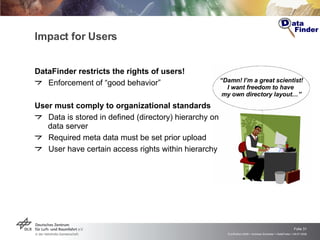
Impact for Users DataFinder restricts the rights of users! Enforcement of “good behavior” User must comply to organizational standards Data is stored in defined (directory) hierarchy on data server Required meta data must be set prior upload User have certain access rights within hierarchy “ Damn! I’m a great scientist! I want freedom to have  my own directory layout…”
Customization   Python-Scripting for Extension and Automation Integration of DataFinder with environment User, infrastructure, software, … Extension of DataFinder by Python scripts Actions for resources (i.e., files, directories) User interface extensions Typical automations and customizations  Data migration and data import Start of external application (with downloaded data files) Extraction of meta data from result files Automation of recurring tasks (“workflows”)
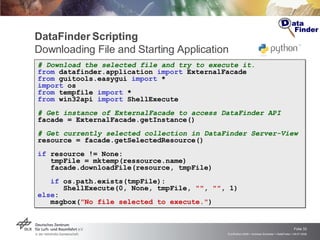
DataFinder Scripting  Downloading File and Starting Application # Download the selected file and try to execute it. from  datafinder.application  import  ExternalFacade from  guitools.easygui  import  * import  os from  tempfile  import  * from  win32api  import  ShellExecute # Get instance of ExternalFacade to access DataFinder API facade = ExternalFacade.getInstance() # Get currently selected collection in DataFinder Server-View  resource = facade.getSelectedResource() if  resource != None: tmpFile = mktemp(ressource.name) facade.downloadFile(resource, tmpFile) if  os.path.exists(tmpFile): ShellExecute(0, None, tmpFile,  &quot;&quot; ,  &quot;&quot; , 1) else : msgbox( &quot;No file selected to execute.&quot; )
Examples…
Example 1: Turbine Simulation
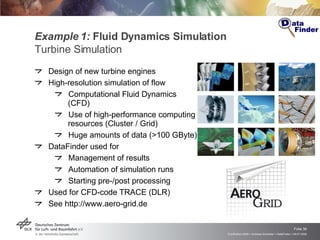
Example 1:  Fluid Dynamics Simulation Turbine Simulation Design of new turbine engines High-resolution simulation of flow Computational Fluid Dynamics (CFD) Use of high-performance computing resources (Cluster / Grid) Huge amounts of data (>100 GByte) DataFinder used for  Management of results Automation of simulation runs Starting pre-/post processing Used for CFD-code TRACE (DLR) See http://www.aero-grid.de
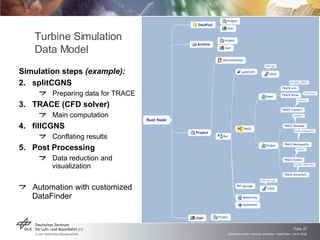
Simulation steps  (example): splitCGNS Preparing data for TRACE TRACE (CFD solver) Main computation fillCGNS Conflating results Post Processing Data reduction and visualization Automation with customized DataFinder Turbine Simulation Data Model
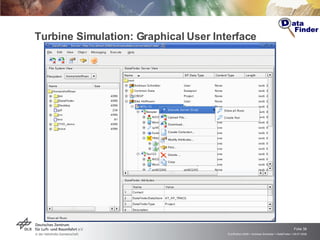
Turbine Simulation: Graphical User Interface
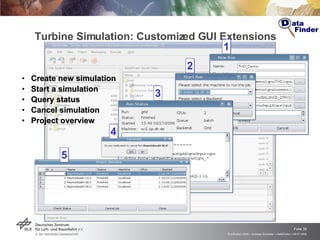
Turbine Simulation: Customized GUI Extensions Create new simulation Start a simulation  Query status Cancel simulation Project overview 1 2 3 4 5
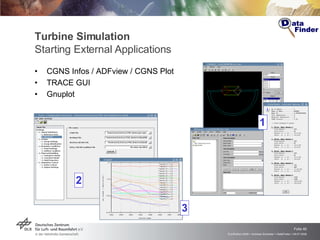
Turbine Simulation  Starting External Applications CGNS Infos / ADFview / CGNS Plot TRACE GUI Gnuplot 1 2 3
Example 2: Automobile Supplier
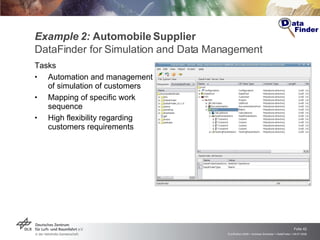
Example 2:  Automobile Supplier DataFinder for Simulation and Data Management  Tasks Automation and management of simulation of customers Mapping of specific work sequence  High flexibility regarding customers requirements
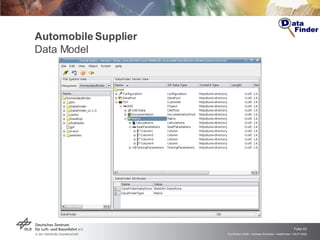
Automobile Supplier Data Model
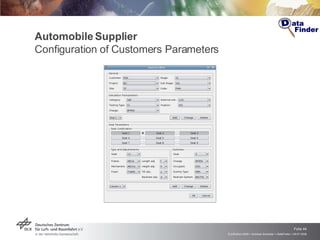
Automobile Supplier Configuration of Customers Parameters
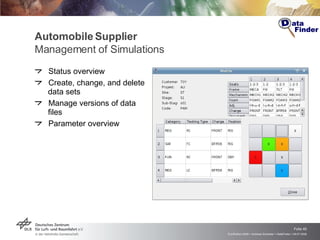
Automobile Supplier Management of Simulations Status overview Create, change, and delete data sets Manage versions of data files Parameter overview
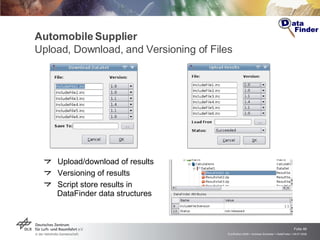
Automobile Supplier Upload, Download, and Versioning of Files Upload/download of results Versioning of results Script store results in  DataFinder data structures
Example 3: Air Traffic Management
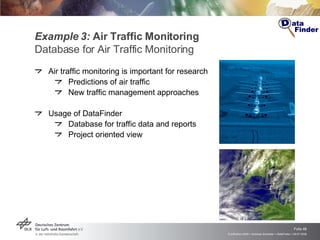
Example 3:  Air Traffic Monitoring   Database for Air Traffic Monitoring Air traffic monitoring is important for research Predictions of air traffic New traffic management approaches Usage of DataFinder Database for traffic data and reports Project oriented view
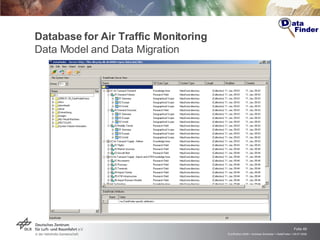
Database for Air Traffic Monitoring Data Model and Data Migration
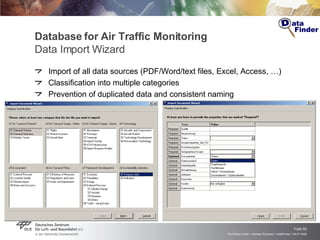
Database for Air Traffic Monitoring Data Import Wizard Import of all data sources (PDF/Word/text files, Excel, Access, …) Classification into multiple categories Prevention of duplicated data and consistent naming
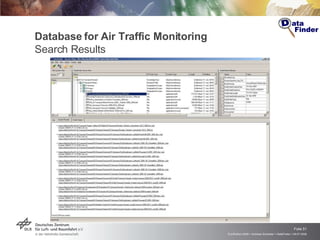
Database for Air Traffic Monitoring Search Results
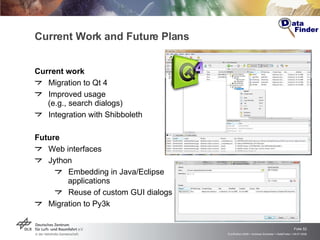
Current Work and Future Plans  Current work Migration to Qt 4 Improved usage  (e.g., search dialogs) Integration with Shibboleth Future Web interfaces  Jython Embedding in Java/Eclipse applications Reuse of custom GUI dialogs Migration to Py3k
Am Ende… Hinweise pyCologne:   Python User Group Köln Monatliche Treffen von  Python-Interessierten aus  dem  Großraum   Köln http://www.pycologne.de Interesse an spannenden Tätigkeiten in Luft- und Raumfahrt? Feste Mitarbeit Diplomarbeiten, Praktika https://wiki.sistec.dlr.de/StellenAusschreibungen
Links DataFinder Web site http://www.dlr.de/datafinder Python WebDAV library http://sourceforge.net/projects/pythonwebdavlib Catacomb http://catacomb.tigris.org AeroGrid Project http://www.aero-grid.de
 
Questions?

DataFinder: A Python Application for Scientific Data Management

  • 1.
    DataFinder: APython Application for Scientific Data Management EuroPython 2008 (July 9th 2008, Vilnius) Andreas Schreiber < Andreas.Schreiber@dlr.de> German Aerospace Center (DLR), Cologne http://www.dlr.de/sc
  • 2.
    The DLR GermanAerospace Research Center Space Agency of the Federal Republic of Germany
  • 3.
    5,600 employeesworking in 28 research institutes and facilities  at 13 sites . Offices in Brussels, Paris and Washington. Sites and employees  Köln  Lampoldshausen  Stuttgart  Oberpfaffenhofen Braunschweig   Göttingen Berlin -   Bonn Trauen   Hamburg  Neustrelitz Weilheim  Bremen - 
  • 4.
    Short Overview DataFinderis a software for efficient management of scientific and technical data Focus on huge data sets Development of the DataFinder by DLR Primary functionality Structuring of data through assignment of meta information and self-defined data models Flexible usage of heterogeneous storage resources Integration in the working environment
  • 5.
    Introduction DataFinder foundedby DLR National Grid project AeroGrid
  • 6.
    Introduction Background Large-scalesimulations aerodynamics material science climate … Tons of measured data wind-tunnel experiments earth observations traffic data …
  • 7.
    Introduction Data ManagementProblem Typical organizational situations No central data management policy Every employee organizes his/her data individually Researchers spend about 30% of their time searching for data Problem with data left behind by temporary staff Increase of data size and regulations Rapidly growing volume of simulation and experimental data Legal requirements for long-term availability of data (up to 50 years!) Situation similar at many organizations All ~30 DLR institutes Other research labs and agencies Industry
  • 8.
    DataFinder History Searchfor solution for scientific data management Definition of “standard problem” (helicopter simulation) Test case for evaluation of software Evaluation of commercial product data management (PDM) systems PDM systems could manage data but with huge amount of costs PDM systems have many unneeded functionalities PDM systems have self-defined or unreadable scripting languages for extension and customization (Tcl etc.) Development of DataFinder Lightweight data management client and existing server solution Just enough functionality for our problems (no paid but unused features!)
  • 9.
    DataFinder Development FromJava Prototype to Python Product… Development of prototype in Java Data could be manages with prototype successfully Drawbacks: Java problems on important platforms (e.g., SGI IRIX) Embedded Jython interpreter great feature for users User: “ The Java GUI is like shit, but the Python scripting is great. We want a pure Python solution! ” Development of DataFinder product from scratch in Python
  • 10.
    Python for Scientistsand Engineers Reasons for Python in Research and Industry Observations : Scientists and engineers don’t want to write software but just solve their problems If they have to write code, it must be as easy as possible Why Python is perfect? Very easy to learn and easy to use ( = steep learning curve ) Allows rapid development ( = short development time ) Inherent great maintainability “ Python has the cleanest, most-scientist- or engineer friendly syntax and semantics.” (Paul F. Dubois. Ten good practices in scientific programming. Comp. In Sci. Eng., Jan/Feb 1999, pp.7-11) “ I want to design planes, not software!”
  • 11.
    DataFinder Overview BasicConcept Client-Server solution Based on open and stable standards , such as XML and WebDAV Extensive use of standard software components (open source / commercial), limited own development at client side
  • 12.
    WebDAV Web-based DistributedAuthoring & Versioning Extension of HTTP Allows to manage files on remote servers collaboratively WebDAV supports Resources (“files”) Collections (“directories”) Properties (“meta data”, in XML format) Locking WebDAV extensions Versioning (DeltaV) Access control (ACP) Search (DASL)
  • 13.
    DataFinder Overview Clientand Server Client User client Administrator client Implementation: Python with Qt Server WebDAV server for meta data and data structure Data Store concept Abstracts access to managed data Flexible usage of heterogeneous storage resources Implementation: Various existing server solutions (third-party)
  • 14.
    DataFinder Client GraphicalUser Interfaces User Client Administrator Client Implementation in Python with Qt/PyQt
  • 15.
    DataFinder Server SupportedWebDAV servers Commercial Server Solution Tamino XML database (Software AG) Open Source Server Solutions Apache HTTP Web server and module mod_dav Default storage: file system (mod_dav_fs) Module Catacomb (mod_dav_repos) + Relational database ( http://catacomb.tigris.org )
  • 16.
    WebDAV / MetaData Server (1) Tamino WebDAV Server Commercial Server Solution (Software AG) WebDAV Server Tamino XML database backend Advantages Implements many WebDAV extensions (DASL, DeltaV, ACLs) Fast XML processing Good, but not free  Used in DLR for use with DataFinder One installation sufficient for many institutes
  • 17.
    WebDAV / MetaData Server (2) Apache + mod_dav Open Source solution (Apache Group) Apache HTTP Web server WebDAV extension module mod_dav File system + (G)DBM database Advantage: Free and easy to install  … but some WebDAV features are not supported No searching and versioning  Apache Core Server mod_http mod_auth_ldap mod_dav mod_dav_fs File system
  • 18.
    WebDAV / MetaData Server (3) Catacomb Open Source solution Apache HTTP Web server + mod_dav Module Catacomb (replacement for file system) Relational database Search and versioning implemented: Uses database search features Open Source development at DLR ( http://catacomb.tigris.org ) Apache Core Server mod_http mod_auth_ldap mod_dav mod_dav_fs File system DB (MySQL) Catacomb mod_dav_repos
  • 19.
    Mass Data StorageData Stores Logical View User Client Storage Locations
  • 20.
    DataFinder TechnicalAspects Access privilege management Authentication using WebDAV and LDAP Authorization for users and groups based on WebDAV (ACP) Client available on many platforms Linux, Windows, … Restricted by availability of Python 2.5 and Qt 3 + PyQt Extensible through Python scripts Python application programming interface (API) Accessing data and meta data
  • 21.
    Python API User Client Extension with GUI import threading from datafinder.application import search_support from datafinder.gui.user import facade def searchAndDisplayResult(): &quot;&quot;&quot;Searches and displays the result in the search result logging window. &quot;&quot;&quot; query = &quot;displayname contains ‘test’ OR displayname == ‘ab’&quot; result = search_support.performSearch(query) resultLogger = facade.getSearchResultLogger() for path in result.keys(): resultLogger.info( &quot;Found item %s.&quot; % path) thread = threading.Thread(target=searchAndDisplayResult) thread.start()
  • 22.
    Python API Command Line Example (without GUI) # Get API from datafinder.application import ExternalFacade externalFacade = ExternalFacade.getInstance() # Connect to a repository externalFacade.performBasicDatafinderSetup(username, password, startUrl) # Download the whole content rootItem = externalFacade.getRootWebdavServerItem() items = externalFacade.getCollectionContents(rootItem) for item in items: externalFacade.downloadFile(item, baseDirectory)
  • 23.
    Additional “Batteries”… UsedLibraries beyond the Python Standard Library (1) PyQt (http://www.riverbankcomputing.co.uk/software/pyqt) Interface to the Qt GUI framework (currently Qt 3) Used for DataFinder UI layer Pyparsing (http://pyparsing.wikispaces.com/) Creating and executing simple grammars Used for highlighting search expressions python-ldap (http://python-ldap.sourceforge.net/) Object-oriented API to access LDAP servers Authentication against LDAP / ActiveDirectory server paramiko (http://www.lag.net/paramiko) SSH2 protocol implementation
  • 24.
    Additional “Batteries”… UsedLibraries beyond the Python Standard Library (2) PyGlobus (http://www-itg.lbl.gov/gtg/projects/pyGlobus) Interface to The Globus Toolkit Used for GridFTP Data Store Boto (http://code.google.com/p/boto) Interfaces to Amazon Web Services Used for S3 (Simple Storage Service) Data Store davlib (http://www.webdav.org/mod_dav/ davlib.py ) WebDAV client library Used for core WebDAV functions
  • 25.
    WebDAV Client LibrarySupport for DAV Extensions Provides an object-oriented interface for accessing WebDAV server Extracted from DataFinder source WebDAV client-side library supports Core WebDAV specification Access Control Protocol Basic Versioning (experimental) DAV Searching and Locating Secure HTTP connections Implementation based on davlib and standard httplib Apache License Version 2 Project Site: http://sourceforge.net/projects/pythonwebdavlib
  • 26.
  • 27.
    Configuration and CustomizationPreparing DataFinder for certain “use cases” Requirements Analysis Analyze data, working environment, and users workflows Configuration Define and configure data model Configure distributed storage resources (Data Stores) Customization Write functional extensions with Python scripts
  • 28.
    DataFinder Configuration DataModel and Data Stores Logical view to data Definition of data structuring and meta data (“data model”) Separated storage of data structure / meta data and actual data files Flexible use of (distributed) storage resources File system, WebDAV, FTP, GridFTP Amazon S3 (Simple Storage Service) Tivoli Storage Manager (TSM) Storage Resource Broker (SRB) Complex search mechanism to find data
  • 29.
    Data Structure Mappingof Organizational Data Structures User Object (collection) Object (file) Relation Attributes (meta data) Project A Project B Project C File 1 File 2 Simulation I Experiment Simulation II Project Mega Code Ultra User Eddie Key Value Project Mega Code Ultra User Eddie Key Value Project Mega Code Ultra User Eddie Key Value Project Mega Code Ultra User Eddie Key Value Project Mega Code Ultra User Eddie Key Value Project Mega Code Ultra User Eddie Key Value Project Mega Code Ultra User Eddie Key Value Project Mega Code Ultra User Eddie Key Value Project Mega Code Ultra User Eddie Key Value
  • 30.
    Meta Data Describeand annotate data (“files”) and collections (“directories”) Different levels of meta data Required attributes defined by administrator User is free to choose additional ones Different types of meta data String Numbers (float, double, …) Lists Pictures Links Stored in XML format User can search in meta data
  • 31.
    Impact for UsersDataFinder restricts the rights of users! Enforcement of “good behavior” User must comply to organizational standards Data is stored in defined (directory) hierarchy on data server Required meta data must be set prior upload User have certain access rights within hierarchy “ Damn! I’m a great scientist! I want freedom to have my own directory layout…”
  • 32.
    Customization Python-Scripting for Extension and Automation Integration of DataFinder with environment User, infrastructure, software, … Extension of DataFinder by Python scripts Actions for resources (i.e., files, directories) User interface extensions Typical automations and customizations Data migration and data import Start of external application (with downloaded data files) Extraction of meta data from result files Automation of recurring tasks (“workflows”)
  • 33.
    DataFinder Scripting Downloading File and Starting Application # Download the selected file and try to execute it. from datafinder.application import ExternalFacade from guitools.easygui import * import os from tempfile import * from win32api import ShellExecute # Get instance of ExternalFacade to access DataFinder API facade = ExternalFacade.getInstance() # Get currently selected collection in DataFinder Server-View resource = facade.getSelectedResource() if resource != None: tmpFile = mktemp(ressource.name) facade.downloadFile(resource, tmpFile) if os.path.exists(tmpFile): ShellExecute(0, None, tmpFile, &quot;&quot; , &quot;&quot; , 1) else : msgbox( &quot;No file selected to execute.&quot; )
  • 34.
  • 35.
  • 36.
    Example 1: Fluid Dynamics Simulation Turbine Simulation Design of new turbine engines High-resolution simulation of flow Computational Fluid Dynamics (CFD) Use of high-performance computing resources (Cluster / Grid) Huge amounts of data (>100 GByte) DataFinder used for Management of results Automation of simulation runs Starting pre-/post processing Used for CFD-code TRACE (DLR) See http://www.aero-grid.de
  • 37.
    Simulation steps (example): splitCGNS Preparing data for TRACE TRACE (CFD solver) Main computation fillCGNS Conflating results Post Processing Data reduction and visualization Automation with customized DataFinder Turbine Simulation Data Model
  • 38.
  • 39.
    Turbine Simulation: CustomizedGUI Extensions Create new simulation Start a simulation Query status Cancel simulation Project overview 1 2 3 4 5
  • 40.
    Turbine Simulation Starting External Applications CGNS Infos / ADFview / CGNS Plot TRACE GUI Gnuplot 1 2 3
  • 41.
  • 42.
    Example 2: Automobile Supplier DataFinder for Simulation and Data Management Tasks Automation and management of simulation of customers Mapping of specific work sequence High flexibility regarding customers requirements
  • 43.
  • 44.
    Automobile Supplier Configurationof Customers Parameters
  • 45.
    Automobile Supplier Managementof Simulations Status overview Create, change, and delete data sets Manage versions of data files Parameter overview
  • 46.
    Automobile Supplier Upload,Download, and Versioning of Files Upload/download of results Versioning of results Script store results in DataFinder data structures
  • 47.
    Example 3: AirTraffic Management
  • 48.
    Example 3: Air Traffic Monitoring Database for Air Traffic Monitoring Air traffic monitoring is important for research Predictions of air traffic New traffic management approaches Usage of DataFinder Database for traffic data and reports Project oriented view
  • 49.
    Database for AirTraffic Monitoring Data Model and Data Migration
  • 50.
    Database for AirTraffic Monitoring Data Import Wizard Import of all data sources (PDF/Word/text files, Excel, Access, …) Classification into multiple categories Prevention of duplicated data and consistent naming
  • 51.
    Database for AirTraffic Monitoring Search Results
  • 52.
    Current Work andFuture Plans Current work Migration to Qt 4 Improved usage (e.g., search dialogs) Integration with Shibboleth Future Web interfaces Jython Embedding in Java/Eclipse applications Reuse of custom GUI dialogs Migration to Py3k
  • 53.
    Am Ende… HinweisepyCologne: Python User Group Köln Monatliche Treffen von Python-Interessierten aus dem Großraum Köln http://www.pycologne.de Interesse an spannenden Tätigkeiten in Luft- und Raumfahrt? Feste Mitarbeit Diplomarbeiten, Praktika https://wiki.sistec.dlr.de/StellenAusschreibungen
  • 54.
    Links DataFinder Website http://www.dlr.de/datafinder Python WebDAV library http://sourceforge.net/projects/pythonwebdavlib Catacomb http://catacomb.tigris.org AeroGrid Project http://www.aero-grid.de
  • 55.
  • 56.