DataFinder: Concepts and Usage German Aerospace Center (DLR), Cologne/Berlin/Braunschweig http://www.dlr.de/sc
Outline Introduction Configuration and customization  Requirements Analysis Installation Configuration Customization Data Migration
DataFinder Introduction Background:   Data Management Problem Absent organizational structures No central data management policy Every employee organizes his/her data individually    Researchers spend about 30% of their time searching for data    Problem with data left behind by temporary staff Increase of data because of growing size and regulations  Rapidly growing volume of simulation and experimental data Legal requirements for long-term availability of data (up to 50 years!) Situation is similar for every DLR institute, many research labs and agencies and even for the industry
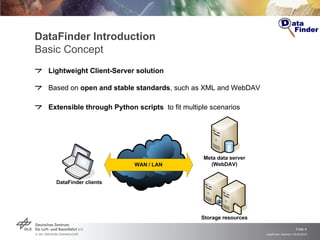
DataFinder Introduction Basic Concept Lightweight Client-Server solution Based on  open and stable standards , such as XML and WebDAV Extensible through Python scripts  to fit multiple scenarios
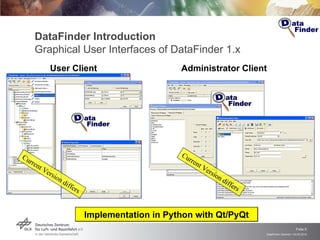
DataFinder Introduction Graphical User Interfaces of DataFinder 1.x User Client Administrator Client Implementation in Python with Qt/PyQt Current Version differs Current Version differs
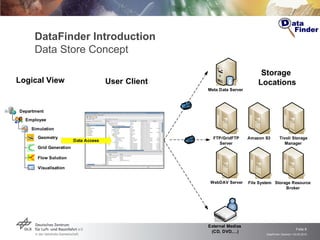
DataFinder Introduction Data Store Concept  Logical   View User   Client Storage  Locations
DataFinder Configuration and Customization
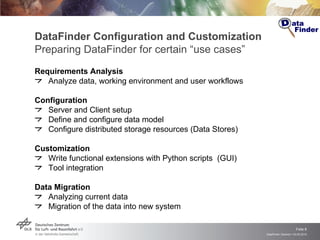
DataFinder Configuration and Customization Preparing DataFinder for certain “use cases” Requirements Analysis Analyze data, working environment and user workflows Configuration Server and Client setup Define and configure data model Configure distributed storage resources (Data Stores) Customization Write functional extensions with Python scripts  (GUI) Tool integration Data Migration Analyzing current data  Migration of the data into new system
Meta data server Apache and Catacomb (based on the WebDAV Protocol) Apache and mod_dav (xampp) Data server Apache and Catacomb (based on the WebDAV Protocol) Apache and mod_dav (xampp) Administrator and user client Source and precompiled Versions (for WinXP and SUSE64) available DataFinder Configuration and Customization Installation
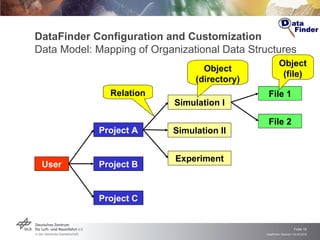
DataFinder Configuration and Customization Data Model: Mapping of Organizational Data Structures User Object (directory) Object (file) Relation Project A Project B Project C File 1 File 2 Simulation I Experiment Simulation II
DataFinder Configuration and Customization Exkurs: Meta Data Describe and annotate data (“files”) and collections (“directories”) Different levels of meta data Required meta data defined by administrator User is free to choose additional ones Different types of meta data String Numbers (float, double, …) Lists Dates User can search in meta data
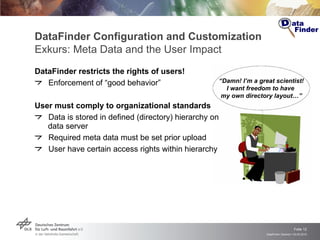
DataFinder Configuration and Customization Exkurs: Meta Data and the User Impact DataFinder restricts the rights of users! Enforcement of “good behavior” User must comply to organizational standards Data is stored in defined (directory) hierarchy on data server Required meta data must be set prior upload User have certain access rights within hierarchy “ Damn! I’m a great scientist! I want freedom to have  my own directory layout…”
DataFinder Configuration and Customization Customization: Python-Scripting for Extension and Automation Integration of DataFinder with environment User, infrastructure, software, … Extension of DataFinder by Python scripts Actions for resources (i.e., files, directories) User interface extensions Typical automations and customizations  Data migration and data import Start of external application (with downloaded data files) Extraction of meta data from result files Automation of recurring tasks (“workflows”)
DataFinder Configuration and Customization Example: Downloading File and Starting Application # Creating a file “/text.txt” using data store “Data Store”. from  datafinder.gui.user  import  script_api  as  gui_api from  datafinder.script_api.repository  import  setWorkingRepository from  datafinder.script_api.item.item_support  import  createLeaf # Get representation of the current managed repository mr = gui_api.managedRepositoryDescription()  # Get currently selected collection in DataFinder Server-View  if   not  mr  is   None : setWorkingRepository(mr) def  _createLeaf(): properties = dict() properties["____dataformat____"] = "TEXT" properties["____datastorename____"] = "Data Store" … createLeaf("/test.txt", properties) script_api.performWithProgressDialog(_createLeaf)
DataFinder Demo Example Live Demo DataFinder Server structure  Admin client: showing XML file of meta model and in client Admin client: setting up a DataStore for development files  Admin client: loading a script extension User client: loading a script extension User client: making a structure User client: upload of a Experimental file into the store User client: double-click on the file opening it User client: script extension: creating a file
Availability DataFinder core available as Open Source Current stable release: DataFinder 2.0 Simplified BSD License Open Source platforms Launchpad Sourceforge  Freshmeat Windows XP and SLED64 bit precompiled  Become a DataFinder fan on Facebook!
Links DataFinder Web site http://www.dlr.de/datafinder DataFinder Open Source  http://sourceforge.net/projects/datafinder http://launchpad.net/datafinder DataFinder Wiki http://wiki.sistec.dlr.de/DataFinderOpenSource Catacomb – recommended Server http://catacomb.tigris.org

DataFinder concepts and example: General (20100503)

  • 1.
    DataFinder: Concepts andUsage German Aerospace Center (DLR), Cologne/Berlin/Braunschweig http://www.dlr.de/sc
  • 2.
    Outline Introduction Configurationand customization Requirements Analysis Installation Configuration Customization Data Migration
  • 3.
    DataFinder Introduction Background: Data Management Problem Absent organizational structures No central data management policy Every employee organizes his/her data individually  Researchers spend about 30% of their time searching for data  Problem with data left behind by temporary staff Increase of data because of growing size and regulations Rapidly growing volume of simulation and experimental data Legal requirements for long-term availability of data (up to 50 years!) Situation is similar for every DLR institute, many research labs and agencies and even for the industry
  • 4.
    DataFinder Introduction BasicConcept Lightweight Client-Server solution Based on open and stable standards , such as XML and WebDAV Extensible through Python scripts to fit multiple scenarios
  • 5.
    DataFinder Introduction GraphicalUser Interfaces of DataFinder 1.x User Client Administrator Client Implementation in Python with Qt/PyQt Current Version differs Current Version differs
  • 6.
    DataFinder Introduction DataStore Concept Logical View User Client Storage Locations
  • 7.
  • 8.
    DataFinder Configuration andCustomization Preparing DataFinder for certain “use cases” Requirements Analysis Analyze data, working environment and user workflows Configuration Server and Client setup Define and configure data model Configure distributed storage resources (Data Stores) Customization Write functional extensions with Python scripts (GUI) Tool integration Data Migration Analyzing current data Migration of the data into new system
  • 9.
    Meta data serverApache and Catacomb (based on the WebDAV Protocol) Apache and mod_dav (xampp) Data server Apache and Catacomb (based on the WebDAV Protocol) Apache and mod_dav (xampp) Administrator and user client Source and precompiled Versions (for WinXP and SUSE64) available DataFinder Configuration and Customization Installation
  • 10.
    DataFinder Configuration andCustomization Data Model: Mapping of Organizational Data Structures User Object (directory) Object (file) Relation Project A Project B Project C File 1 File 2 Simulation I Experiment Simulation II
  • 11.
    DataFinder Configuration andCustomization Exkurs: Meta Data Describe and annotate data (“files”) and collections (“directories”) Different levels of meta data Required meta data defined by administrator User is free to choose additional ones Different types of meta data String Numbers (float, double, …) Lists Dates User can search in meta data
  • 12.
    DataFinder Configuration andCustomization Exkurs: Meta Data and the User Impact DataFinder restricts the rights of users! Enforcement of “good behavior” User must comply to organizational standards Data is stored in defined (directory) hierarchy on data server Required meta data must be set prior upload User have certain access rights within hierarchy “ Damn! I’m a great scientist! I want freedom to have my own directory layout…”
  • 13.
    DataFinder Configuration andCustomization Customization: Python-Scripting for Extension and Automation Integration of DataFinder with environment User, infrastructure, software, … Extension of DataFinder by Python scripts Actions for resources (i.e., files, directories) User interface extensions Typical automations and customizations Data migration and data import Start of external application (with downloaded data files) Extraction of meta data from result files Automation of recurring tasks (“workflows”)
  • 14.
    DataFinder Configuration andCustomization Example: Downloading File and Starting Application # Creating a file “/text.txt” using data store “Data Store”. from datafinder.gui.user import script_api as gui_api from datafinder.script_api.repository import setWorkingRepository from datafinder.script_api.item.item_support import createLeaf # Get representation of the current managed repository mr = gui_api.managedRepositoryDescription() # Get currently selected collection in DataFinder Server-View if not mr is None : setWorkingRepository(mr) def _createLeaf(): properties = dict() properties["____dataformat____"] = "TEXT" properties["____datastorename____"] = "Data Store" … createLeaf("/test.txt", properties) script_api.performWithProgressDialog(_createLeaf)
  • 15.
    DataFinder Demo ExampleLive Demo DataFinder Server structure Admin client: showing XML file of meta model and in client Admin client: setting up a DataStore for development files Admin client: loading a script extension User client: loading a script extension User client: making a structure User client: upload of a Experimental file into the store User client: double-click on the file opening it User client: script extension: creating a file
  • 16.
    Availability DataFinder coreavailable as Open Source Current stable release: DataFinder 2.0 Simplified BSD License Open Source platforms Launchpad Sourceforge Freshmeat Windows XP and SLED64 bit precompiled Become a DataFinder fan on Facebook!
  • 17.
    Links DataFinder Website http://www.dlr.de/datafinder DataFinder Open Source http://sourceforge.net/projects/datafinder http://launchpad.net/datafinder DataFinder Wiki http://wiki.sistec.dlr.de/DataFinderOpenSource Catacomb – recommended Server http://catacomb.tigris.org

Editor's Notes