Bubbles
Virtual Data Objects
June 2013Stefan Urbanek
data brewery
Contents
■ Data Objects
■ Operations
■ Context
■ Stores
■ Pipeline
Brewery 1 Issues
■ based on streaming data by records
buffering in python lists as python objects
■ stream networks were using threads
hard to debug, performance penalty (GIL)
■ no use of native data operations
■ difficult to extend
About
Python framework for data
processing and quality probing
v3.3
Objective
focus on the process,
not data technology
Data
■ keep data in their original form
■ use native operations if possible
■ performance provided by technology
■ have other options
for categorical data
* you can do numerical too, but there are
plenty of other, better tools for that
*
Data Objects
data object represents structured data
Data do not have to be in its final form,
neither they have to exist. Promise of
providing data in the future is just fine.
Data are virtual.
virtual data object
fields
virtual data
SQL statement
iterator
id
product
category
amount
unit price
representations
Data Object
■ is defined by fields
■ has one or more representations
■ might be consumable
one-time use objects such as streamed data
SQL statement
iterator
Fields
■ define structure of data object
■ storage metadata
generalized storage type, concrete storage type
■ usage metadata
purpose – analytical point of view, missing values, ...
100
Atari 1040ST
computer
10
400.0
1985
no
integer
string
string
integer
float
integer
string
typeless
nominal
nominal
discrete
measure
ordinal
flag
id
product
category
amount
unit price
year
shipped
Field List
storage type
name
analytical type
(purpose)
sample metadata
SQL statement
iterator
SELECT *
FROM products
WHERE price < 100
engine.execute(statement)
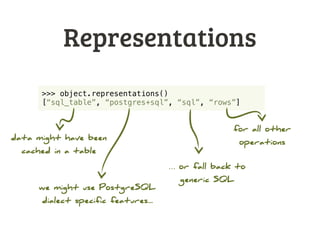
Representations
SQL statement that can
be composed
actual rows fetched
from database
Representations
■ represent actual data in some way
SQL statement, CSV file, API query, iterator, ...
■ decided on runtime
list might be dynamic, based on metadata, availability, …
■ used for data object operations
filtering, composition, transformation, …
Representations
SQL statement
iterator
natural, most efficient
for operations
default, all-purpose,
might be very expensive
Representations
>>> object.representations()
[“sql_table”, “postgres+sql”, “sql”, “rows”]
data might have been
cached in a table
we might use PostgreSQL
dialect specific features...
… or fall back to
generic SQL
for all other
operations
Data Object Role
■ source: provides data
various source representations such as rows()
■ target: consumes data
append(row), append_from(object), ...
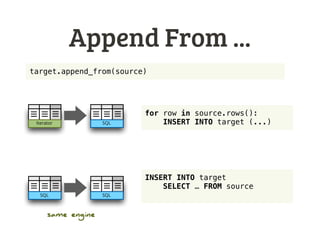
target.append_from(source)
for row in source.rows():
print(row)
implementation might
depend on source
Append From ...
Iterator SQL
target.append_from(source)
for row in source.rows():
INSERT INTO target (...)
SQLSQL
INSERT INTO target
SELECT … FROM source
same engine
Operations
Operation
✽… ? ...
… ? ...… ? ...
… ? ...
does something useful with data object and
produces another data object
or something else, also useful
Signature
@operation(“sql”)
def sample(context, object, limit):
...
signature
accepted representation
SQL
✽ … ? ...
iterator
SQL
@operation
@operation(“sql”)
def sample(context, object, limit):
...
@operation(“sql”, “sql”)
def new_rows(context, target, source):
...
@operation(“sql”, “rows”, name=“new_rows”)
def new_rows_iter(context, target, source):
...
unary
binary
binary with same name but different signature:
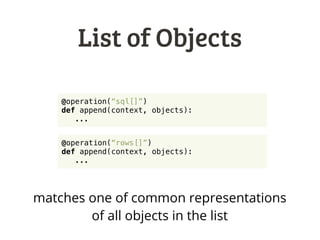
List of Objects
@operation(“sql[]”)
def append(context, objects):
...
@operation(“rows[]”)
def append(context, objects):
...
matches one of common representations
of all objects in the list
Any / Default
@operation(“*”)
def do_something(context, object):
...
default operation – if no signature matches
Context
Context
SQL iterator
iterator
SQL iterator
✽
✂
⧗
✽
⧗
Mongo
✽
collection of operations
Operation Call
context = Context()
context.operation(“sample”)(source, 10)
sample sample
iterator ⇢SQL ⇢
iterator
SQL
callable reference
runtime dispatch
sample
SQL ⇢
Simplified Call
context.operation(“sample”)(source, 10)
context.o.sample(source, 10)
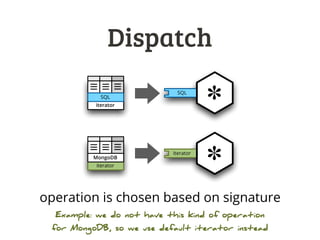
Dispatch
SQL
✽iterator
SQL
iterator
✽iterator
MongoDB
operation is chosen based on signature
Example: we do not have this kind of operation
for MongoDB, so we use default iterator instead
Dispatch
dynamic dispatch of operations based on
representations of argument objects
Priority
SQL
✽iterator
SQL
iterator
✽SQL
iterator
order of representations matters
might be decided during runtime
same representations,
different order
Incapable?

SQL
SQL
join details
A
A

SQL
SQL
join details
A
B
SQL
join details
SQL

same connection different connection
use
this fails
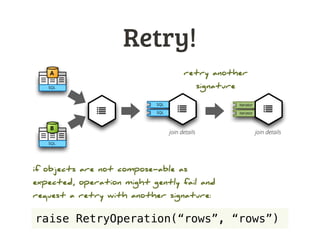
Retry!

SQL
SQL
A
B
iterator
iteratorSQL
join details join details

SQL

retry another
signature
raise RetryOperation(“rows”, “rows”)
if objects are not compose-able as
expected, operation might gently fail and
request a retry with another signature:
Retry when...
■ not able to compose objects
because of different connections or other reasons
■ not able to use representation
as expected
■ any other reason
Modules
*just an example
collection of operations
SQL Iterator MongoDB
SQL iterator
iterator
SQL iterator
✽
✂
⧗
✽
⧗
Mongo
✽
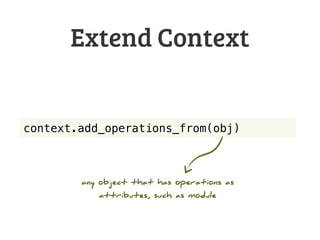
Extend Context
context.add_operations_from(obj)
any object that has operations as
attributes, such as module
Stores
Object Store
■ contains objects
tables, files, collections, ...
■ objects are named
get_object(name)
■ might create objects
create(name, replace, ...)
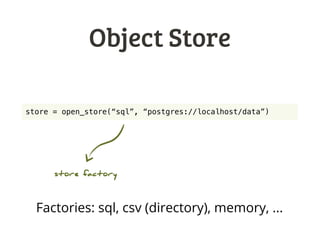
Object Store
store = open_store(“sql”, “postgres://localhost/data”)
store factory
Factories: sql, csv (directory), memory, ...
Stores and Objects
source = open_store(“sql”, “postgres://localhost/data”)
target = open_store(“csv”, “./data/”)
source_obj = source.get_object(“products”)
target_obj = target.create(“products”,
fields=source_obj.fields)
for row in source_obj.rows():
target_obj.append(row)
target_obj.flush()
copy data from SQL table to CSV
Pipeline
Pipeline
SQLSQL SQL SQL
Iterator
sequence of operations on “trunk”
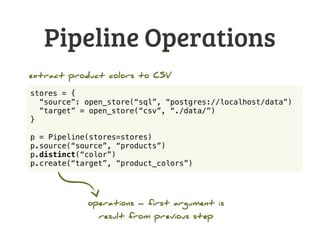
Pipeline Operations
stores = {
“source”: open_store(“sql”, “postgres://localhost/data”)
”target” = open_store(“csv”, “./data/”)
}
p = Pipeline(stores=stores)
p.source(“source”, “products”)
p.distinct(“color”)
p.create(“target”, “product_colors”)
operations – first argument is
result from previous step
extract product colors to CSV
Pipeline
p.source(store, object_name, ...)
store.get_object(...)
p.create(store, object_name, ...)
store.create(...)
store.append_from(...)
Operation Library
Filtering
■ row filters
filter_by_value, filter_by_set, filter_by_range
■ field_filter(ctx, obj, keep=[], drop=[], rename={})
keep, drop, rename fields
■ sample(ctx, obj, value, mode)
first N, every Nth, random, …
Uniqueness
■ distinct(ctx, obj, key)
distinct values for key
■ distinct_rows(ctx, obj, key)
distinct whole rows (first occurence of a row) for key
■ count_duplicates(ctx, obj, key)
count number of duplicates for key
Master-detail
■ join_detail(ctx, master, detail, master_key, detail_key)
Joins detail table, such as a dimension, on a specified key. Detail key
field will be dropped from the result.
Note: other join-based operations will be implemented
later, as they need some usability decisions to be made
Dimension Loading
■ added_keys(ctx, dim, source, dim_key, source_key)
which keys in the source are new?
■ added_rows(ctx, dim, source, dim_key, source_key)
which rows in the source are new?
■ changed_rows(ctx, target, source, dim_key, source_key,
fields, version_field)
which rows in the source have changed?
more to come…
Conclusion
To Do
■ consolidate representations API
■ define basic set of operations
■ temporaries and garbage collection
■ sequence objects for surrogate keys
Version 0.2
■ processing graph
connected nodes, like in Brewery
■ more basic backends
at least Mongo
■ bubbles command line tool
already in progress
Future
■ separate operation dispatcher
will allow custom dispatch policies
Contact:
@Stiivi
stefan.urbanek@gmail.com
databrewery.org

Bubbles – Virtual Data Objects