GEOGRAPHICAL
INFORMATION
SYSTEMS
Prepared by- HARDI SUKHADIYA
What is GIS ?
• Information system designed to work with data
referenced by spatial/ geographical coordinates.
• Definition:
“It is defined as an information system that is used to input, store,
retrieve, manipulate, analyse, and output geographically referenced data
or geospatial data, in order to support decision making for planning and
management of land use, natural resources, environment, transportation,
urban facilities, and other administrative records.”
Key components of GIS
HARDWARE
• Run on the whole spectrum of computer system
ranging from portable personal computer(PCs) to
multi- user super computers.
• Input devices ( Digitizers, Scanners, GPS receivers )
• Storage devices (Magnetic tapes & disks, CD ROMs, CPU )
• Output devices (Display devices, Printers, Plotter )
SOFTWARE
• Provides the functions and tools that are necessary to store,
analyse, and display geographic information.
• ArcGIS
• ArcView
• ArcSDE
• MapInfo
• Geomatica
• TNTmips
• Autodesk Map
• WIN GIS
• AutoCAD
• Geomedia
PROCEDURE
• The map creation can either be automated raster to vector
creator or it can be manually victories using the scanned
images.
• To complete task – procedures are performed using – hardware
and software
DATA
• Geospatial data and attribute data in GIS.
• Geographical data in – form of - hard copy map , digital map
,aerial photos , satellite images , statistical tables , other
documents - used for GIS operations
PEOPLE
• GIS users range from technical specialists who design and
maintain.
• Experts with knowledge area required to apply GIS properly
• Different types of users are using GIS at different level.
Functions of GIS
• Data Processing and manipulation
• Data Analysis
• Data Displays
• Database management
Data Processing and Manipulation
 Data validation and editing ( checking, correction )
 Structure conversion ( vectors to raster )
 Integration ( overlaying, edge matching )
 Geometric conversion ( scale and projection changes )
 Generalization and classification(reclassification , coordination)
 Map enhancement adding ( adding titles, scales , symbols )
 Buffer generation ( defining corridors )
 Data searching and retrieval ( user defined searches )
DATAANALYSIS
 Spatial analysis ( connectivity, intervisibility, digital terrain)
 Statistical analysis ( histogram, Frequency analysis)
Length measurement ( area, volume )
DATADISPLAY
 Geographical display ( maps and graphs )
 Textual display ( tables and reports )
DATABASE MANAGEMENT
 Support and monitoring of multiuses of access to the database.
 Coping with system
 Communication linkages with other systems
 Editing and updating the database
 Organizing the database for efficient storage and retrieval
 Maintenance of database security and integrating
Advantages of GIS
• Allows us to view, understand, and visualize data in
many ways that reveal relationships, patterns, and
trends in the form of maps, globes, reports, and charts.
• Helps you answer questions and solve problems by
looking at your data in a way that is quickly
understood and easily shared.
• Give the accurate Data.
• Better Predictions and Analysis.
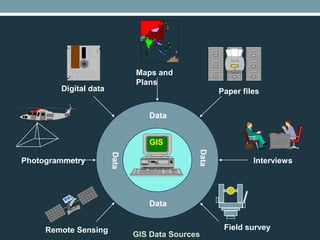
Digital data
Maps and
Plans
Paper files
Photogrammetry
Remote Sensing Field survey
Interviews
GIS Data Sources
Data
Data
GIS
Application of GIS
• Agriculture
• Archaeology
• Architecture
• Business
• Electric/ gas utilities
• Forestry
• Hydrology
• Land-use planning
• Mapping
• Risk management
• Transportation
• Water/wastewater industry
• Environmental Science
• Engineering
• Military Science
• Natural Resource
• Geology
• Law Enforcement
• Public Health
• History
• Sociology
• Urban/Regional Planning
THANK YOU

GEOGRAPHICAL INFORMATION SYSTEMS

  • 1.
  • 2.
    What is GIS? • Information system designed to work with data referenced by spatial/ geographical coordinates. • Definition: “It is defined as an information system that is used to input, store, retrieve, manipulate, analyse, and output geographically referenced data or geospatial data, in order to support decision making for planning and management of land use, natural resources, environment, transportation, urban facilities, and other administrative records.”
  • 3.
  • 4.
    HARDWARE • Run onthe whole spectrum of computer system ranging from portable personal computer(PCs) to multi- user super computers. • Input devices ( Digitizers, Scanners, GPS receivers ) • Storage devices (Magnetic tapes & disks, CD ROMs, CPU ) • Output devices (Display devices, Printers, Plotter )
  • 5.
    SOFTWARE • Provides thefunctions and tools that are necessary to store, analyse, and display geographic information. • ArcGIS • ArcView • ArcSDE • MapInfo • Geomatica • TNTmips • Autodesk Map • WIN GIS • AutoCAD • Geomedia
  • 6.
    PROCEDURE • The mapcreation can either be automated raster to vector creator or it can be manually victories using the scanned images. • To complete task – procedures are performed using – hardware and software DATA • Geospatial data and attribute data in GIS. • Geographical data in – form of - hard copy map , digital map ,aerial photos , satellite images , statistical tables , other documents - used for GIS operations
  • 7.
    PEOPLE • GIS usersrange from technical specialists who design and maintain. • Experts with knowledge area required to apply GIS properly • Different types of users are using GIS at different level.
  • 8.
    Functions of GIS •Data Processing and manipulation • Data Analysis • Data Displays • Database management
  • 9.
    Data Processing andManipulation  Data validation and editing ( checking, correction )  Structure conversion ( vectors to raster )  Integration ( overlaying, edge matching )  Geometric conversion ( scale and projection changes )  Generalization and classification(reclassification , coordination)  Map enhancement adding ( adding titles, scales , symbols )  Buffer generation ( defining corridors )  Data searching and retrieval ( user defined searches )
  • 10.
    DATAANALYSIS  Spatial analysis( connectivity, intervisibility, digital terrain)  Statistical analysis ( histogram, Frequency analysis) Length measurement ( area, volume )
  • 11.
    DATADISPLAY  Geographical display( maps and graphs )  Textual display ( tables and reports )
  • 12.
    DATABASE MANAGEMENT  Supportand monitoring of multiuses of access to the database.  Coping with system  Communication linkages with other systems  Editing and updating the database  Organizing the database for efficient storage and retrieval  Maintenance of database security and integrating
  • 13.
    Advantages of GIS •Allows us to view, understand, and visualize data in many ways that reveal relationships, patterns, and trends in the form of maps, globes, reports, and charts. • Helps you answer questions and solve problems by looking at your data in a way that is quickly understood and easily shared. • Give the accurate Data. • Better Predictions and Analysis.
  • 14.
    Digital data Maps and Plans Paperfiles Photogrammetry Remote Sensing Field survey Interviews GIS Data Sources Data Data GIS
  • 15.
    Application of GIS •Agriculture • Archaeology • Architecture • Business • Electric/ gas utilities • Forestry • Hydrology • Land-use planning • Mapping • Risk management • Transportation • Water/wastewater industry • Environmental Science • Engineering • Military Science • Natural Resource • Geology • Law Enforcement • Public Health • History • Sociology • Urban/Regional Planning
  • 16.