C
Computer Codes
Computer Codes Slide 1/30
In this chapter you will learn about:
 Computer data
 Computer codes: representation of data in binary
 Most commonly used computer codes
 Collating sequence
Learning Objectives
Computer Codes Slide2/30
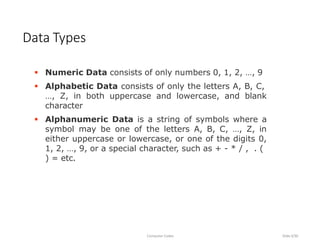
 Numeric Data consists of only numbers 0, 1, 2, …, 9
 Alphabetic Data consists of only the letters A, B, C,
…, Z, in both uppercase and lowercase, and blank
character
 Alphanumeric Data is a string of symbols where a
symbol may be one of the letters A, B, C, …, Z, in
either uppercase or lowercase, or one of the digits 0,
1, 2, …, 9, or a special character, such as + - * / , . (
) = etc.
Data Types
Computer Codes Slide3/30
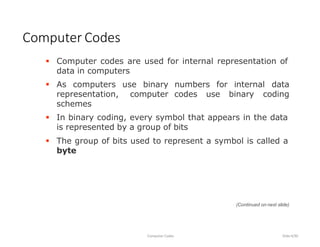
 Computer codes are used for internal representation of
data in computers
Computer Codes
Computer Codes Slide4/30
 As computers use binary
representation, computer
schemes
numbers for internal data
codes use binary coding
 In binary coding, every symbol that appears in the data
is represented by a group of bits
 The group of bits used to represent a symbol is called a
byte
(Continued on next slide)
 As most modern coding schemes use 8 bits to represent
a symbol, the term byte is often used to mean a group
of 8 bits
 Commonly used computer codes are BCD, EBCDIC, and
ASCII
Computer Codes
Computer Codes Slide5/30
(Continued from previous slide..)
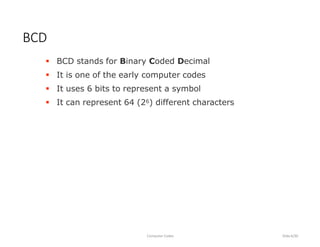
 BCD stands for Binary Coded Decimal
 It is one of the early computer codes
 It uses 6 bits to represent a symbol
 It can represent 64 (26) different characters
BCD
Computer Codes Slide6/30
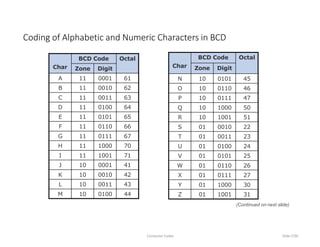
Char
BCD Code Octal
Zone Digit
A 11 0001 61
B 11 0010 62
C 11 0011 63
D 11 0100 64
E 11 0101 65
F 11 0110 66
G 11 0111 67
H 11 1000 70
I 11 1001 71
J 10 0001 41
K 10 0010 42
L 10 0011 43
M 10 0100 44
Coding of Alphabetic and Numeric Characters in BCD
Computer Codes Slide7/30
Char
BCD Code Octal
Zone Digit
N 10 0101 45
O 10 0110 46
P 10 0111 47
Q 10 1000 50
R 10 1001 51
S 01 0010 22
T 01 0011 23
U 01 0100 24
V 01 0101 25
W 01 0110 26
X 01 0111 27
Y 01 1000 30
Z 01 1001 31
(Continued on next slide)
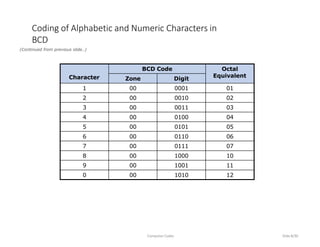
Character
BCD Code Octal
Equivalent
Zone Digit
1 00 0001 01
2 00 0010 02
3 00 0011 03
4 00 0100 04
5 00 0101 05
6 00 0110 06
7 00 0111 07
8 00 1000 10
9 00 1001 11
0 00 1010 12
Coding of Alphabetic and Numeric Characters in
BCD
(Continued from previous slide..)
Computer Codes Slide8/30
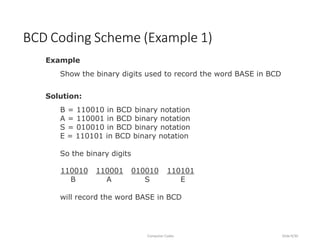
Example
Show the binary digits used to record the word BASE in BCD
Solution:
B = 110010 in BCD binary notation
A = 110001 in BCD binary notation
S = 010010 in BCD binary notation
E = 110101 in BCD binary notation
So the binary digits
BCD Coding Scheme (Example 1)
Computer Codes Slide9/30
110010 110001 010010 110101
B A S E
will record the word BASE in BCD
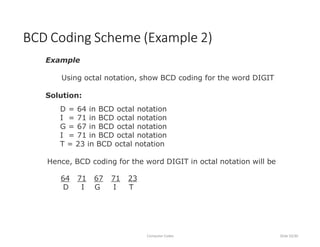
Example
Using octal notation, show BCD coding for the word DIGIT
Solution:
D = 64 in BCD octal notation
I = 71 in BCD octal notation
G = 67 in BCD octal notation
I = 71 in BCD octal notation
T = 23 in BCD octal notation
Hence, BCD coding for the word DIGIT in octal notation will be
BCD Coding Scheme (Example 2)
Computer Codes Slide10/30
64 71 67 71 23
D I G I T
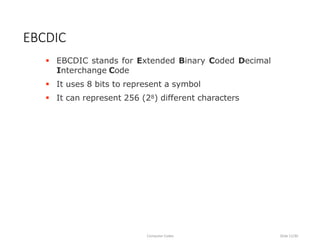
 EBCDIC stands for Extended Binary Coded Decimal
Interchange Code
 It uses 8 bits to represent a symbol
 It can represent 256 (28) different characters
EBCDIC
Computer Codes Slide11/30
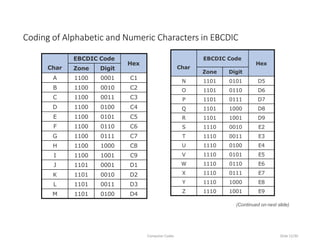
Char
EBCDIC Code
Hex
Zone Digit
A 1100 0001 C1
B 1100 0010 C2
C 1100 0011 C3
D 1100 0100 C4
E 1100 0101 C5
F 1100 0110 C6
G 1100 0111 C7
H 1100 1000 C8
I 1100 1001 C9
J 1101 0001 D1
K 1101 0010 D2
L 1101 0011 D3
M 1101 0100 D4
Coding of Alphabetic and Numeric Characters in EBCDIC
Computer Codes Slide12/30
Char
EBCDIC Code
Hex
Zone Digit
N 1101 0101 D5
O 1101 0110 D6
P 1101 0111 D7
Q 1101 1000 D8
R 1101 1001 D9
S 1110 0010 E2
T 1110 0011 E3
U 1110 0100 E4
V 1110 0101 E5
W 1110 0110 E6
X 1110 0111 E7
Y 1110 1000 E8
Z 1110 1001 E9
(Continued on next slide)
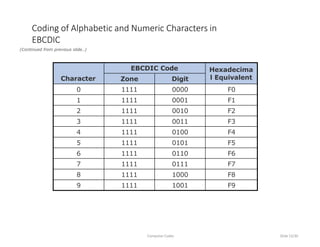
Character
EBCDIC Code Hexadecima
l Equivalent
Zone Digit
0 1111 0000 F0
1 1111 0001 F1
2 1111 0010 F2
3 1111 0011 F3
4 1111 0100 F4
5 1111 0101 F5
6 1111 0110 F6
7 1111 0111 F7
8 1111 1000 F8
9 1111 1001 F9
Coding of Alphabetic and Numeric Characters in
EBCDIC
(Continued from previous slide..)
Computer Codes Slide13/30
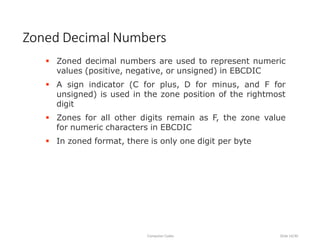
 Zoned decimal numbers are used to represent numeric
values (positive, negative, or unsigned) in EBCDIC
 A sign indicator (C for plus, D for minus, and F for
unsigned) is used in the zone position of the rightmost
digit
 Zones for all other digits remain as F, the zone value
for numeric characters in EBCDIC
 In zoned format, there is only one digit per byte
Zoned Decimal Numbers
Computer Codes Slide14/30
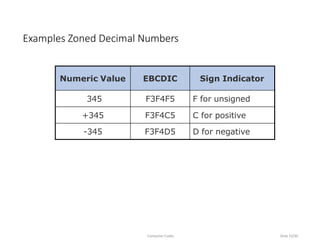
Numeric Value EBCDIC Sign Indicator
345 F3F4F5 F for unsigned
+345 F3F4C5 C for positive
-345 F3F4D5 D for negative
Examples Zoned Decimal Numbers
Computer Codes Slide15/30
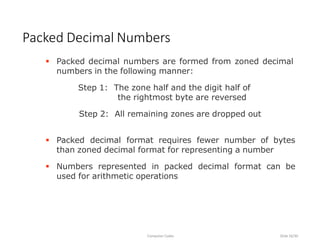
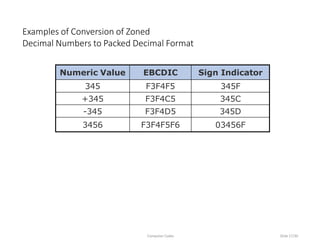
 Packed decimal numbers are formed from zoned decimal
numbers in the following manner:
Step 1: The zone half and the digit half of
the rightmost byte are reversed
Step 2: All remaining zones are dropped out
 Packed decimal format requires fewer number of bytes
than zoned decimal format for representing a number
 Numbers represented in packed decimal format can be
used for arithmetic operations
Packed Decimal Numbers
Computer Codes Slide16/30
Numeric Value EBCDIC Sign Indicator
345 F3F4F5 345F
+345 F3F4C5 345C
-345 F3F4D5 345D
3456 F3F4F5F6 03456F
Examples of Conversion of Zoned
Decimal Numbers to Packed Decimal Format
Computer Codes Slide17/30
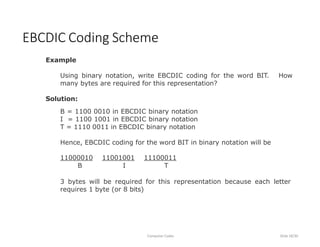
Example
Using binary notation, write EBCDIC coding for the word BIT. How
many bytes are required for this representation?
Solution:
B = 1100 0010 in EBCDIC binary notation
I = 1100 1001 in EBCDIC binary notation
T = 1110 0011 in EBCDIC binary notation
Hence, EBCDIC coding for the word BIT in binary notation will be
EBCDIC Coding Scheme
Computer Codes Slide18/30
11000010 11001001 11100011
B I T
3 bytes will be required for this representation because each letter
requires 1 byte (or 8 bits)
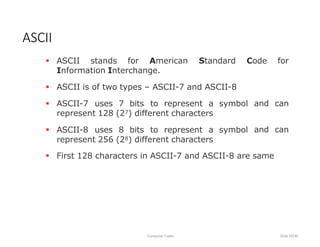
 ASCII stands for American Standard Code for
Information Interchange.
ASCII
Computer Codes Slide19/30
 ASCII is of two types – ASCII-7 and ASCII-8
 ASCII-7 uses 7 bits to represent a symbol
represent 128 (27) different characters
 ASCII-8 uses 8 bits to represent a symbol
represent 256 (28) different characters
and can
and can
 First 128 characters in ASCII-7 and ASCII-8 are same
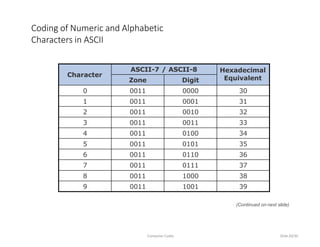
Character
ASCII-7 / ASCII-8 Hexadecimal
Equivalent
Zone Digit
0 0011 0000 30
1 0011 0001 31
2 0011 0010 32
3 0011 0011 33
4 0011 0100 34
5 0011 0101 35
6 0011 0110 36
7 0011 0111 37
8 0011 1000 38
9 0011 1001 39
Coding of Numeric and Alphabetic
Characters in ASCII
Computer Codes Slide20/30
(Continued on next slide)
Character
ASCII-7 / ASCII-8 Hexadecimal
Equivalent
Zone Digit
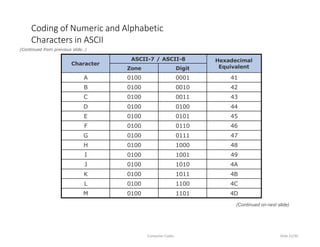
A 0100 0001 41
B 0100 0010 42
C 0100 0011 43
D 0100 0100 44
E 0100 0101 45
F 0100 0110 46
G 0100 0111 47
H 0100 1000 48
I 0100 1001 49
J 0100 1010 4A
K 0100 1011 4B
L 0100 1100 4C
M 0100 1101 4D
Coding of Numeric and Alphabetic
Characters in ASCII
(Continued from previous slide..)
Computer Codes Slide21/30
(Continued on next slide)
Character
ASCII-7 / ASCII-8 Hexadecimal
Equivalent
Zone Digit
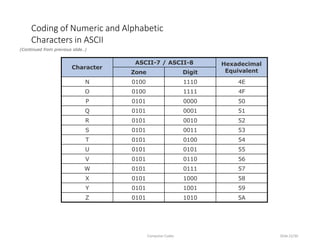
N 0100 1110 4E
O 0100 1111 4F
P 0101 0000 50
Q 0101 0001 51
R 0101 0010 52
S 0101 0011 53
T 0101 0100 54
U 0101 0101 55
V 0101 0110 56
W 0101 0111 57
X 0101 1000 58
Y 0101 1001 59
Z 0101 1010 5A
Coding of Numeric and Alphabetic
Characters in ASCII
(Continued from previous slide..)
Computer Codes Slide22/30
Example
ASCII-7 Coding Scheme
Computer Codes Slide23/30
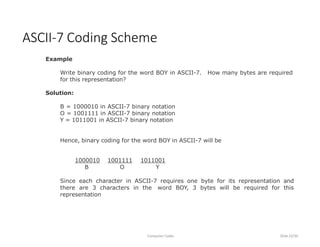
Write binary coding for the word BOY in ASCII-7.
for this representation?
How many bytes are required
Solution:
B = 1000010 in ASCII-7 binary notation
O = 1001111 in ASCII-7 binary notation
Y = 1011001 in ASCII-7 binary notation
Hence, binary coding for the word BOY in ASCII-7 will be
1000010 1001111 1011001
B O Y
Since each character in ASCII-7 requires one byte for its representation and
there are 3 characters in the word BOY, 3 bytes will be required for this
representation
Example
ASCII-8 Coding Scheme
Computer Codes Slide24/30
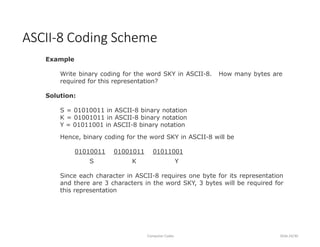
Write binary coding for the word SKY in ASCII-8.
required for this representation?
How many bytes are
Solution:
S = 01010011 in ASCII-8 binary notation
K = 01001011 in ASCII-8 binary notation
Y = 01011001 in ASCII-8 binary notation
Hence, binary coding for the word SKY in ASCII-8 will be
01010011 01001011 01011001
S K Y
Since each character in ASCII-8 requires one byte for its representation
and there are 3 characters in the word SKY, 3 bytes will be required for
this representation
 Why Unicode:
 No single encoding system supports all languages
 Different encoding systems conflict
 Unicode features:
 Provides a consistent way of encoding multilingual
plain text
 Defines codes for characters used in all major
languages of the world
 Defines codes for special characters, mathematical
symbols, technical symbols, and diacritics
Unicode
Computer Codes Slide25/30
 Unicode features (continued):
 Capacity to encode as many as a million characters
 Assigns each character a unique numeric value and
name
 Reserves a part of the code space for private use
 Affords simplicity and consistency of ASCII, even
corresponding characters have same code
 Specifies an algorithm for the presentation of text
with bi-directional behavior
 Encoding Forms
 UTF-8, UTF-16, UTF-32
Unicode
Computer Codes Slide26/30
 Collating sequence defines the assigned ordering
among the characters used by a computer
 Collating sequence may vary, depending on the
type of computer code used by a particular
computer
 In most computers, collating sequences follow the
following rules:
1. Letters are considered in alphabetic order
(A < B < C … < Z)
2. Digits are considered in numeric order
(0 < 1 < 2 … < 9)
Collating Sequence
Computer Codes Slide27/30
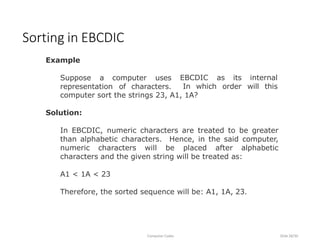
Example
Suppose a computer uses
representation of characters.
Sorting in EBCDIC
Computer Codes Slide28/30
EBCDIC as its
In which order
internal
will this
computer sort the strings 23, A1, 1A?
Solution:
In EBCDIC, numeric characters are treated to be greater
than alphabetic characters. Hence, in the said computer,
numeric characters will be placed after alphabetic
characters and the given string will be treated as:
A1 < 1A < 23
Therefore, the sorted sequence will be: A1, 1A, 23.
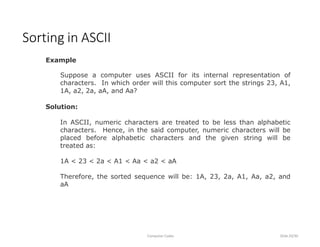
Example
Suppose a computer uses ASCII for its internal representation of
characters. In which order will this computer sort the strings 23, A1,
1A, a2, 2a, aA, and Aa?
Solution:
In ASCII, numeric characters are treated to be less than alphabetic
characters. Hence, in the said computer, numeric characters will be
placed before alphabetic characters and the given string will be
treated as:
1A < 23 < 2a < A1 < Aa < a2 < aA
Therefore, the sorted sequence will be: 1A, 23, 2a, A1, Aa, a2, and
aA
Sorting in ASCII
Computer Codes Slide29/30
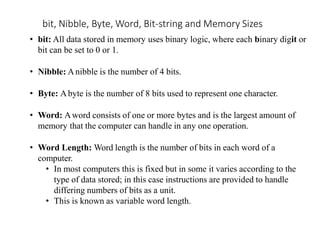
bit, Nibble, Byte, Word, Bit-string and Memory Sizes
• bit: All data stored in memory uses binary logic, where each binary digit or
bit can be set to 0 or 1.
• Nibble: Anibble is the number of 4 bits.
• Byte: Abyte is the number of 8 bits used to represent one character.
• Word: Aword consists of one or more bytes and is the largest amount of
memory that the computer can handle in any one operation.
• Word Length: Word length is the number of bits in each word of a
computer.
• In most computers this is fixed but in some it varies according to the
type of data stored; in this case instructions are provided to handle
differing numbers of bits as a unit.
• This is known as variable word length.
bit, Nibble, Byte, Word, Bit-string and Memory Sizes
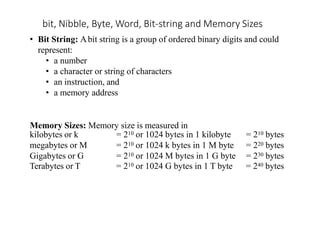
• Bit String: Abit string is a group of ordered binary digits and could
represent:
• a number
• a character or string of characters
• an instruction, and
• a memory address
Memory Sizes: Memory size is measured in
kilobytes or k = 210 or 1024 bytes in 1 kilobyte = 210 bytes
megabytes or M = 210 or 1024 k bytes in 1 M byte = 220 bytes
Gigabytes or G = 210 or 1024 M bytes in 1 G byte = 230 bytes
Terabytes or T = 210 or 1024 G bytes in 1 T byte = 240 bytes
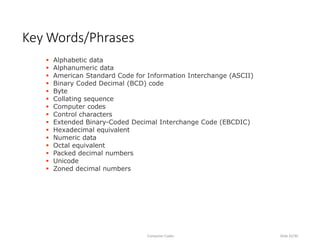
 Alphabetic data
 Alphanumeric data
 American Standard Code for Information Interchange (ASCII)
 Binary Coded Decimal (BCD) code
 Byte
 Collating sequence
 Computer codes
 Control characters
 Extended Binary-Coded Decimal Interchange Code (EBCDIC)
 Hexadecimal equivalent
 Numeric data
 Octal equivalent
 Packed decimal numbers
 Unicode
 Zoned decimal numbers
Key Words/Phrases
Computer Codes Slide32/30

computercodes, BCD, EBCDIC,ASCII,UNICODE

  • 1.
  • 2.
    In this chapteryou will learn about:  Computer data  Computer codes: representation of data in binary  Most commonly used computer codes  Collating sequence Learning Objectives Computer Codes Slide2/30
  • 3.
     Numeric Dataconsists of only numbers 0, 1, 2, …, 9  Alphabetic Data consists of only the letters A, B, C, …, Z, in both uppercase and lowercase, and blank character  Alphanumeric Data is a string of symbols where a symbol may be one of the letters A, B, C, …, Z, in either uppercase or lowercase, or one of the digits 0, 1, 2, …, 9, or a special character, such as + - * / , . ( ) = etc. Data Types Computer Codes Slide3/30
  • 4.
     Computer codesare used for internal representation of data in computers Computer Codes Computer Codes Slide4/30  As computers use binary representation, computer schemes numbers for internal data codes use binary coding  In binary coding, every symbol that appears in the data is represented by a group of bits  The group of bits used to represent a symbol is called a byte (Continued on next slide)
  • 5.
     As mostmodern coding schemes use 8 bits to represent a symbol, the term byte is often used to mean a group of 8 bits  Commonly used computer codes are BCD, EBCDIC, and ASCII Computer Codes Computer Codes Slide5/30 (Continued from previous slide..)
  • 6.
     BCD standsfor Binary Coded Decimal  It is one of the early computer codes  It uses 6 bits to represent a symbol  It can represent 64 (26) different characters BCD Computer Codes Slide6/30
  • 7.
    Char BCD Code Octal ZoneDigit A 11 0001 61 B 11 0010 62 C 11 0011 63 D 11 0100 64 E 11 0101 65 F 11 0110 66 G 11 0111 67 H 11 1000 70 I 11 1001 71 J 10 0001 41 K 10 0010 42 L 10 0011 43 M 10 0100 44 Coding of Alphabetic and Numeric Characters in BCD Computer Codes Slide7/30 Char BCD Code Octal Zone Digit N 10 0101 45 O 10 0110 46 P 10 0111 47 Q 10 1000 50 R 10 1001 51 S 01 0010 22 T 01 0011 23 U 01 0100 24 V 01 0101 25 W 01 0110 26 X 01 0111 27 Y 01 1000 30 Z 01 1001 31 (Continued on next slide)
  • 8.
    Character BCD Code Octal Equivalent ZoneDigit 1 00 0001 01 2 00 0010 02 3 00 0011 03 4 00 0100 04 5 00 0101 05 6 00 0110 06 7 00 0111 07 8 00 1000 10 9 00 1001 11 0 00 1010 12 Coding of Alphabetic and Numeric Characters in BCD (Continued from previous slide..) Computer Codes Slide8/30
  • 9.
    Example Show the binarydigits used to record the word BASE in BCD Solution: B = 110010 in BCD binary notation A = 110001 in BCD binary notation S = 010010 in BCD binary notation E = 110101 in BCD binary notation So the binary digits BCD Coding Scheme (Example 1) Computer Codes Slide9/30 110010 110001 010010 110101 B A S E will record the word BASE in BCD
  • 10.
    Example Using octal notation,show BCD coding for the word DIGIT Solution: D = 64 in BCD octal notation I = 71 in BCD octal notation G = 67 in BCD octal notation I = 71 in BCD octal notation T = 23 in BCD octal notation Hence, BCD coding for the word DIGIT in octal notation will be BCD Coding Scheme (Example 2) Computer Codes Slide10/30 64 71 67 71 23 D I G I T
  • 11.
     EBCDIC standsfor Extended Binary Coded Decimal Interchange Code  It uses 8 bits to represent a symbol  It can represent 256 (28) different characters EBCDIC Computer Codes Slide11/30
  • 12.
    Char EBCDIC Code Hex Zone Digit A1100 0001 C1 B 1100 0010 C2 C 1100 0011 C3 D 1100 0100 C4 E 1100 0101 C5 F 1100 0110 C6 G 1100 0111 C7 H 1100 1000 C8 I 1100 1001 C9 J 1101 0001 D1 K 1101 0010 D2 L 1101 0011 D3 M 1101 0100 D4 Coding of Alphabetic and Numeric Characters in EBCDIC Computer Codes Slide12/30 Char EBCDIC Code Hex Zone Digit N 1101 0101 D5 O 1101 0110 D6 P 1101 0111 D7 Q 1101 1000 D8 R 1101 1001 D9 S 1110 0010 E2 T 1110 0011 E3 U 1110 0100 E4 V 1110 0101 E5 W 1110 0110 E6 X 1110 0111 E7 Y 1110 1000 E8 Z 1110 1001 E9 (Continued on next slide)
  • 13.
    Character EBCDIC Code Hexadecima lEquivalent Zone Digit 0 1111 0000 F0 1 1111 0001 F1 2 1111 0010 F2 3 1111 0011 F3 4 1111 0100 F4 5 1111 0101 F5 6 1111 0110 F6 7 1111 0111 F7 8 1111 1000 F8 9 1111 1001 F9 Coding of Alphabetic and Numeric Characters in EBCDIC (Continued from previous slide..) Computer Codes Slide13/30
  • 14.
     Zoned decimalnumbers are used to represent numeric values (positive, negative, or unsigned) in EBCDIC  A sign indicator (C for plus, D for minus, and F for unsigned) is used in the zone position of the rightmost digit  Zones for all other digits remain as F, the zone value for numeric characters in EBCDIC  In zoned format, there is only one digit per byte Zoned Decimal Numbers Computer Codes Slide14/30
  • 15.
    Numeric Value EBCDICSign Indicator 345 F3F4F5 F for unsigned +345 F3F4C5 C for positive -345 F3F4D5 D for negative Examples Zoned Decimal Numbers Computer Codes Slide15/30
  • 16.
     Packed decimalnumbers are formed from zoned decimal numbers in the following manner: Step 1: The zone half and the digit half of the rightmost byte are reversed Step 2: All remaining zones are dropped out  Packed decimal format requires fewer number of bytes than zoned decimal format for representing a number  Numbers represented in packed decimal format can be used for arithmetic operations Packed Decimal Numbers Computer Codes Slide16/30
  • 17.
    Numeric Value EBCDICSign Indicator 345 F3F4F5 345F +345 F3F4C5 345C -345 F3F4D5 345D 3456 F3F4F5F6 03456F Examples of Conversion of Zoned Decimal Numbers to Packed Decimal Format Computer Codes Slide17/30
  • 18.
    Example Using binary notation,write EBCDIC coding for the word BIT. How many bytes are required for this representation? Solution: B = 1100 0010 in EBCDIC binary notation I = 1100 1001 in EBCDIC binary notation T = 1110 0011 in EBCDIC binary notation Hence, EBCDIC coding for the word BIT in binary notation will be EBCDIC Coding Scheme Computer Codes Slide18/30 11000010 11001001 11100011 B I T 3 bytes will be required for this representation because each letter requires 1 byte (or 8 bits)
  • 19.
     ASCII standsfor American Standard Code for Information Interchange. ASCII Computer Codes Slide19/30  ASCII is of two types – ASCII-7 and ASCII-8  ASCII-7 uses 7 bits to represent a symbol represent 128 (27) different characters  ASCII-8 uses 8 bits to represent a symbol represent 256 (28) different characters and can and can  First 128 characters in ASCII-7 and ASCII-8 are same
  • 20.
    Character ASCII-7 / ASCII-8Hexadecimal Equivalent Zone Digit 0 0011 0000 30 1 0011 0001 31 2 0011 0010 32 3 0011 0011 33 4 0011 0100 34 5 0011 0101 35 6 0011 0110 36 7 0011 0111 37 8 0011 1000 38 9 0011 1001 39 Coding of Numeric and Alphabetic Characters in ASCII Computer Codes Slide20/30 (Continued on next slide)
  • 21.
    Character ASCII-7 / ASCII-8Hexadecimal Equivalent Zone Digit A 0100 0001 41 B 0100 0010 42 C 0100 0011 43 D 0100 0100 44 E 0100 0101 45 F 0100 0110 46 G 0100 0111 47 H 0100 1000 48 I 0100 1001 49 J 0100 1010 4A K 0100 1011 4B L 0100 1100 4C M 0100 1101 4D Coding of Numeric and Alphabetic Characters in ASCII (Continued from previous slide..) Computer Codes Slide21/30 (Continued on next slide)
  • 22.
    Character ASCII-7 / ASCII-8Hexadecimal Equivalent Zone Digit N 0100 1110 4E O 0100 1111 4F P 0101 0000 50 Q 0101 0001 51 R 0101 0010 52 S 0101 0011 53 T 0101 0100 54 U 0101 0101 55 V 0101 0110 56 W 0101 0111 57 X 0101 1000 58 Y 0101 1001 59 Z 0101 1010 5A Coding of Numeric and Alphabetic Characters in ASCII (Continued from previous slide..) Computer Codes Slide22/30
  • 23.
    Example ASCII-7 Coding Scheme ComputerCodes Slide23/30 Write binary coding for the word BOY in ASCII-7. for this representation? How many bytes are required Solution: B = 1000010 in ASCII-7 binary notation O = 1001111 in ASCII-7 binary notation Y = 1011001 in ASCII-7 binary notation Hence, binary coding for the word BOY in ASCII-7 will be 1000010 1001111 1011001 B O Y Since each character in ASCII-7 requires one byte for its representation and there are 3 characters in the word BOY, 3 bytes will be required for this representation
  • 24.
    Example ASCII-8 Coding Scheme ComputerCodes Slide24/30 Write binary coding for the word SKY in ASCII-8. required for this representation? How many bytes are Solution: S = 01010011 in ASCII-8 binary notation K = 01001011 in ASCII-8 binary notation Y = 01011001 in ASCII-8 binary notation Hence, binary coding for the word SKY in ASCII-8 will be 01010011 01001011 01011001 S K Y Since each character in ASCII-8 requires one byte for its representation and there are 3 characters in the word SKY, 3 bytes will be required for this representation
  • 25.
     Why Unicode: No single encoding system supports all languages  Different encoding systems conflict  Unicode features:  Provides a consistent way of encoding multilingual plain text  Defines codes for characters used in all major languages of the world  Defines codes for special characters, mathematical symbols, technical symbols, and diacritics Unicode Computer Codes Slide25/30
  • 26.
     Unicode features(continued):  Capacity to encode as many as a million characters  Assigns each character a unique numeric value and name  Reserves a part of the code space for private use  Affords simplicity and consistency of ASCII, even corresponding characters have same code  Specifies an algorithm for the presentation of text with bi-directional behavior  Encoding Forms  UTF-8, UTF-16, UTF-32 Unicode Computer Codes Slide26/30
  • 27.
     Collating sequencedefines the assigned ordering among the characters used by a computer  Collating sequence may vary, depending on the type of computer code used by a particular computer  In most computers, collating sequences follow the following rules: 1. Letters are considered in alphabetic order (A < B < C … < Z) 2. Digits are considered in numeric order (0 < 1 < 2 … < 9) Collating Sequence Computer Codes Slide27/30
  • 28.
    Example Suppose a computeruses representation of characters. Sorting in EBCDIC Computer Codes Slide28/30 EBCDIC as its In which order internal will this computer sort the strings 23, A1, 1A? Solution: In EBCDIC, numeric characters are treated to be greater than alphabetic characters. Hence, in the said computer, numeric characters will be placed after alphabetic characters and the given string will be treated as: A1 < 1A < 23 Therefore, the sorted sequence will be: A1, 1A, 23.
  • 29.
    Example Suppose a computeruses ASCII for its internal representation of characters. In which order will this computer sort the strings 23, A1, 1A, a2, 2a, aA, and Aa? Solution: In ASCII, numeric characters are treated to be less than alphabetic characters. Hence, in the said computer, numeric characters will be placed before alphabetic characters and the given string will be treated as: 1A < 23 < 2a < A1 < Aa < a2 < aA Therefore, the sorted sequence will be: 1A, 23, 2a, A1, Aa, a2, and aA Sorting in ASCII Computer Codes Slide29/30
  • 30.
    bit, Nibble, Byte,Word, Bit-string and Memory Sizes • bit: All data stored in memory uses binary logic, where each binary digit or bit can be set to 0 or 1. • Nibble: Anibble is the number of 4 bits. • Byte: Abyte is the number of 8 bits used to represent one character. • Word: Aword consists of one or more bytes and is the largest amount of memory that the computer can handle in any one operation. • Word Length: Word length is the number of bits in each word of a computer. • In most computers this is fixed but in some it varies according to the type of data stored; in this case instructions are provided to handle differing numbers of bits as a unit. • This is known as variable word length.
  • 31.
    bit, Nibble, Byte,Word, Bit-string and Memory Sizes • Bit String: Abit string is a group of ordered binary digits and could represent: • a number • a character or string of characters • an instruction, and • a memory address Memory Sizes: Memory size is measured in kilobytes or k = 210 or 1024 bytes in 1 kilobyte = 210 bytes megabytes or M = 210 or 1024 k bytes in 1 M byte = 220 bytes Gigabytes or G = 210 or 1024 M bytes in 1 G byte = 230 bytes Terabytes or T = 210 or 1024 G bytes in 1 T byte = 240 bytes
  • 32.
     Alphabetic data Alphanumeric data  American Standard Code for Information Interchange (ASCII)  Binary Coded Decimal (BCD) code  Byte  Collating sequence  Computer codes  Control characters  Extended Binary-Coded Decimal Interchange Code (EBCDIC)  Hexadecimal equivalent  Numeric data  Octal equivalent  Packed decimal numbers  Unicode  Zoned decimal numbers Key Words/Phrases Computer Codes Slide32/30