1
4
Everyone thinks of changing the
world,
But NO one thinks of changing
himself…..
2.3 Information Coding Schemes
2
Topic 2
 Identify the coding system used in data processing:
• ASCII
• EBCDIC
• Unicode
 Differentiate the coding system.
3
4
 How computers represent data?
 Data & instructions can be represented
electronically by using bits and bytes
 Data representation refers to the form in which
data is stored, processed, and transmitted in
computers.
 Digital data is text, numbers, graphics, sound,
and video that has been converted into bit
patterns of 0s and 1s called binary numbers.
Data Representation-Review
Representing Numbers
5
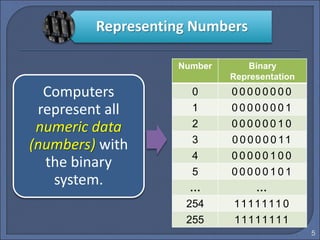
Computers
represent all
numeric data
(numbers) with
the binary
system.
Number Binary
Representation
0 0 0 0 0 0 0 0 0
1 0 0 0 0 0 0 0 1
2 0 0 0 0 0 0 1 0
3 0 0 0 0 0 0 11
4 0 0 0 0 0 1 0 0
5 0 0 0 0 0 1 0 1
… …
254 1111111 0
255 11111111
Representing Text
(Character Set)
6
How can a
computer
represents non-
numeric
characters
(character
data )?
(such as what you
are reading now)
Answer:
Information
Coding
Schemes
What is Coding System?
7
A coding system is the
patterns of 0s and 1s
combinations used to
represent characters.
Coding
Systems
 ASCII
[American Standard Code for Information Interchange]
 EBCDIC
[Extended Binary Coded Decimal Interchange Code]
 Unicode
[Uniform code capable of representing all world’s
languages]
Coding Systems
9
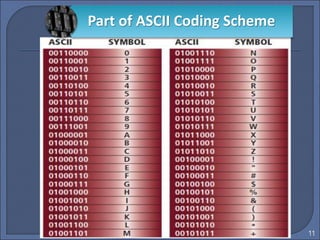
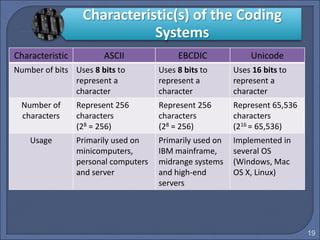
 ASCII (pronounced “ask-ee”) is most widely used
coding scheme to represent data.
 ASCII uses 8 bits that represents a total of 256 (28 =
256) different characters.
 It is used in minicomputers, personal computers and
computers that make information available on the
Internet.
ASCII
11
Part of ASCII Coding Scheme
12
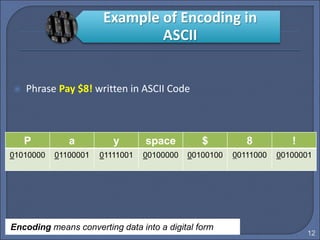
 Phrase Pay $8! written in ASCII Code
P a y space $ 8 !
01010000 01100001 01111001 00100000 00100100 00111000 00100001
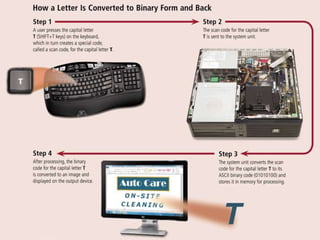
Encoding means converting data into a digital form
Example of Encoding in
ASCII
EBCDIC
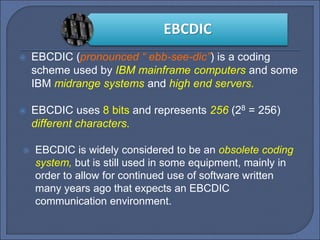
 EBCDIC (pronounced “ ebb-see-dic”) is a coding
scheme used by IBM mainframe computers and some
IBM midrange systems and high end servers.
 EBCDIC uses 8 bits and represents 256 (28 = 256)
different characters.
 EBCDIC is widely considered to be an obsolete coding
system, but is still used in some equipment, mainly in
order to allow for continued use of software written
many years ago that expects an EBCDIC
communication environment.
15
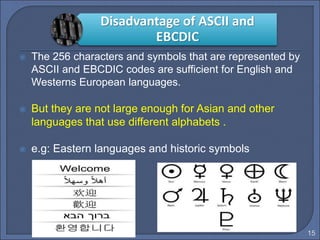
 The 256 characters and symbols that are represented by
ASCII and EBCDIC codes are sufficient for English and
Westerns European languages.
 But they are not large enough for Asian and other
languages that use different alphabets .
 e.g: Eastern languages and historic symbols
Disadvantage of ASCII and
EBCDIC
UNICODE
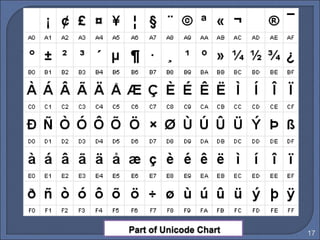
 Today, computers make international communication
and business transactions possible, with a new coding
system named Unicode.
 Unicode uses 16 bits and represent 65, 536 (216 =
65,536) different characters, and can symbolize all the
world’s written languages.
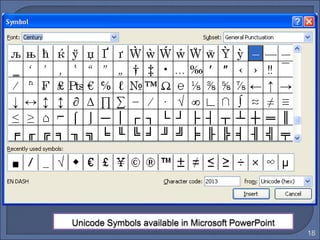
 Unicode is implemented in several operating systems
including Windows, Mac OS, and Linux.
17
18
19
Characteristic ASCII EBCDIC Unicode
Number of bits Uses 8 bits to
represent a
character
Uses 8 bits to
represent a
character
Uses 16 bits to
represent a
character
Number of
characters
Represent 256
characters
(28 = 256)
Represent 256
characters
(28 = 256)
Represent 65,536
characters
(216 = 65,536)
Usage Primarily used on
minicomputers,
personal computers
and server
Primarily used on
IBM mainframe,
midrange systems
and high-end
servers
Implemented in
several OS
(Windows, Mac
OS X, Linux)
Characteristic(s) of the Coding
Systems
20
Advantages of ASCII & Unicode
 Advantage of using ASCII :
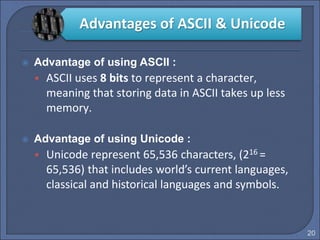
• ASCII uses 8 bits to represent a character,
meaning that storing data in ASCII takes up less
memory.
 Advantage of using Unicode :
• Unicode represent 65,536 characters, (216 =
65,536) that includes world’s current languages,
classical and historical languages and symbols.
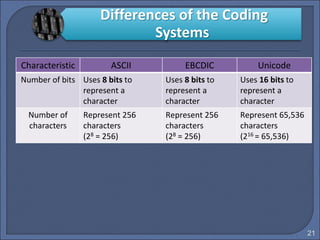
Characteristic ASCII EBCDIC Unicode
Number of bits Uses 8 bits to
represent a
character
Uses 8 bits to
represent a
character
Uses 16 bits to
represent a
character
Number of
characters
Represent 256
characters
(28 = 256)
Represent 256
characters
(28 = 256)
Represent 65,536
characters
(216 = 65,536)
21
Differences of the Coding
Systems
22
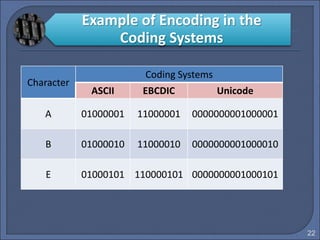
Character
Coding Systems
ASCII EBCDIC Unicode
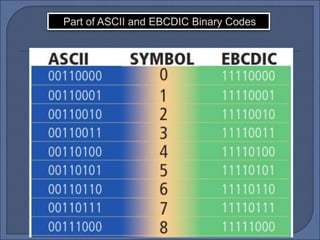
A 01000001 11000001 0000000001000001
B 01000010 11000010 0000000001000010
E 01000101 110000101 0000000001000101
Example of Encoding in the
Coding Systems
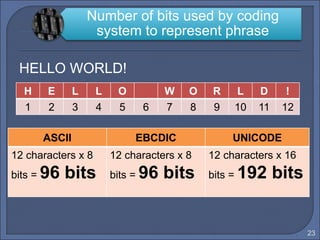
HELLO WORLD!
23
Number of bits used by coding
system to represent phrase
H E L L O W O R L D !
1 2 3 4 5 6 7 8 9 10 11 12
ASCII EBCDIC UNICODE
12 characters x 8
bits = 96 bits
12 characters x 8
bits = 96 bits
12 characters x 16
bits = 192 bits
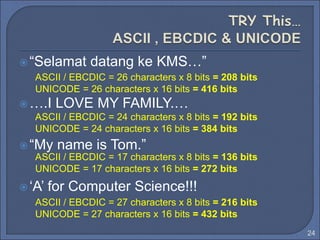
“Selamat datang ke KMS…”
….I LOVE MY FAMILY.…
“My name is Tom.”
‘A’ for Computer Science!!!
24
ASCII / EBCDIC = 26 characters x 8 bits = 208 bits
UNICODE = 26 characters x 16 bits = 416 bits
ASCII / EBCDIC = 24 characters x 8 bits = 192 bits
UNICODE = 24 characters x 16 bits = 384 bits
ASCII / EBCDIC = 17 characters x 8 bits = 136 bits
UNICODE = 17 characters x 16 bits = 272 bits
ASCII / EBCDIC = 27 characters x 8 bits = 216 bits
UNICODE = 27 characters x 16 bits = 432 bits
25
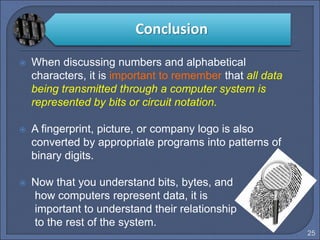
 When discussing numbers and alphabetical
characters, it is important to remember that all data
being transmitted through a computer system is
represented by bits or circuit notation.
 A fingerprint, picture, or company logo is also
converted by appropriate programs into patterns of
binary digits.
 Now that you understand bits, bytes, and
how computers represent data, it is
important to understand their relationship
to the rest of the system.
Conclusion
26
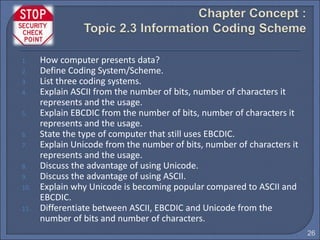
1. How computer presents data?
2. Define Coding System/Scheme.
3. List three coding systems.
4. Explain ASCII from the number of bits, number of characters it
represents and the usage.
5. Explain EBCDIC from the number of bits, number of characters it
represents and the usage.
6. State the type of computer that still uses EBCDIC.
7. Explain Unicode from the number of bits, number of characters it
represents and the usage.
8. Discuss the advantage of using Unicode.
9. Discuss the advantage of using ASCII.
10. Explain why Unicode is becoming popular compared to ASCII and
EBCDIC.
11. Differentiate between ASCII, EBCDIC and Unicode from the
number of bits and number of characters.
27
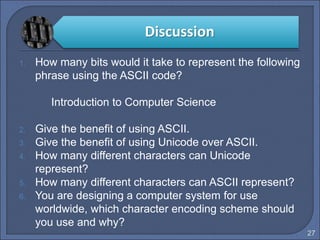
1. How many bits would it take to represent the following
phrase using the ASCII code?
Introduction to Computer Science
2. Give the benefit of using ASCII.
3. Give the benefit of using Unicode over ASCII.
4. How many different characters can Unicode
represent?
5. How many different characters can ASCII represent?
6. You are designing a computer system for use
worldwide, which character encoding scheme should
you use and why?
Discussion
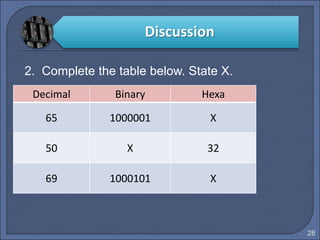
2. Complete the table below. State X.
28
Decimal Binary Hexa
65 1000001 X
50 X 32
69 1000101 X
Discussion
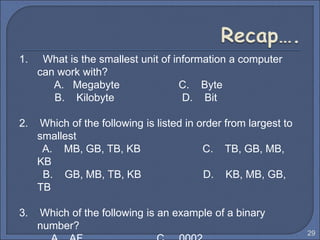
1. What is the smallest unit of information a computer
can work with?
A. Megabyte C. Byte
B. Kilobyte D. Bit
2. Which of the following is listed in order from largest to
smallest
A. MB, GB, TB, KB C. TB, GB, MB,
KB
B. GB, MB, TB, KB D. KB, MB, GB,
TB
3. Which of the following is an example of a binary
number?
29
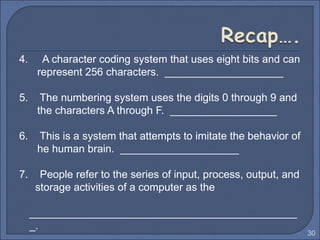
4. A character coding system that uses eight bits and can
represent 256 characters. ____________________
5. The numbering system uses the digits 0 through 9 and
the characters A through F. __________________
6. This is a system that attempts to imitate the behavior of
he human brain. ____________________
7. People refer to the series of input, process, output, and
storage activities of a computer as the
_____________________________________________
_.
30
8. ________ is any data and instructions entered into the
memory of a computer.
9. Which of the following types of computers typically has
the most expensive price range?
A. Mainframe B. Smart phone
C. Personal computer D. Mobile computer
10. Computers process data into
____________________.
31
11. Which of the following types of computers typically has
the lowest number of simultaneously connected users?
A. Game console B. Embedded computer
C. Supercomputer D. Tablet PC
12. Industries use ____________________ to shorten a
product’s time to market, reduce product
development costs, and stay ahead of the
competition.
13. Two types of ____________________ are desktop
computers and notebook computers.
32

Topic 2.3 (1)

  • 1.
    1 4 Everyone thinks ofchanging the world, But NO one thinks of changing himself…..
  • 2.
    2.3 Information CodingSchemes 2 Topic 2
  • 3.
     Identify thecoding system used in data processing: • ASCII • EBCDIC • Unicode  Differentiate the coding system. 3
  • 4.
    4  How computersrepresent data?  Data & instructions can be represented electronically by using bits and bytes  Data representation refers to the form in which data is stored, processed, and transmitted in computers.  Digital data is text, numbers, graphics, sound, and video that has been converted into bit patterns of 0s and 1s called binary numbers. Data Representation-Review
  • 5.
    Representing Numbers 5 Computers represent all numericdata (numbers) with the binary system. Number Binary Representation 0 0 0 0 0 0 0 0 0 1 0 0 0 0 0 0 0 1 2 0 0 0 0 0 0 1 0 3 0 0 0 0 0 0 11 4 0 0 0 0 0 1 0 0 5 0 0 0 0 0 1 0 1 … … 254 1111111 0 255 11111111
  • 6.
    Representing Text (Character Set) 6 Howcan a computer represents non- numeric characters (character data )? (such as what you are reading now) Answer: Information Coding Schemes
  • 7.
    What is CodingSystem? 7 A coding system is the patterns of 0s and 1s combinations used to represent characters. Coding Systems
  • 8.
     ASCII [American StandardCode for Information Interchange]  EBCDIC [Extended Binary Coded Decimal Interchange Code]  Unicode [Uniform code capable of representing all world’s languages] Coding Systems
  • 9.
  • 10.
     ASCII (pronounced“ask-ee”) is most widely used coding scheme to represent data.  ASCII uses 8 bits that represents a total of 256 (28 = 256) different characters.  It is used in minicomputers, personal computers and computers that make information available on the Internet. ASCII
  • 11.
    11 Part of ASCIICoding Scheme
  • 12.
    12  Phrase Pay$8! written in ASCII Code P a y space $ 8 ! 01010000 01100001 01111001 00100000 00100100 00111000 00100001 Encoding means converting data into a digital form Example of Encoding in ASCII
  • 13.
    EBCDIC  EBCDIC (pronounced“ ebb-see-dic”) is a coding scheme used by IBM mainframe computers and some IBM midrange systems and high end servers.  EBCDIC uses 8 bits and represents 256 (28 = 256) different characters.  EBCDIC is widely considered to be an obsolete coding system, but is still used in some equipment, mainly in order to allow for continued use of software written many years ago that expects an EBCDIC communication environment.
  • 15.
    15  The 256characters and symbols that are represented by ASCII and EBCDIC codes are sufficient for English and Westerns European languages.  But they are not large enough for Asian and other languages that use different alphabets .  e.g: Eastern languages and historic symbols Disadvantage of ASCII and EBCDIC
  • 16.
    UNICODE  Today, computersmake international communication and business transactions possible, with a new coding system named Unicode.  Unicode uses 16 bits and represent 65, 536 (216 = 65,536) different characters, and can symbolize all the world’s written languages.  Unicode is implemented in several operating systems including Windows, Mac OS, and Linux.
  • 17.
  • 18.
  • 19.
    19 Characteristic ASCII EBCDICUnicode Number of bits Uses 8 bits to represent a character Uses 8 bits to represent a character Uses 16 bits to represent a character Number of characters Represent 256 characters (28 = 256) Represent 256 characters (28 = 256) Represent 65,536 characters (216 = 65,536) Usage Primarily used on minicomputers, personal computers and server Primarily used on IBM mainframe, midrange systems and high-end servers Implemented in several OS (Windows, Mac OS X, Linux) Characteristic(s) of the Coding Systems
  • 20.
    20 Advantages of ASCII& Unicode  Advantage of using ASCII : • ASCII uses 8 bits to represent a character, meaning that storing data in ASCII takes up less memory.  Advantage of using Unicode : • Unicode represent 65,536 characters, (216 = 65,536) that includes world’s current languages, classical and historical languages and symbols.
  • 21.
    Characteristic ASCII EBCDICUnicode Number of bits Uses 8 bits to represent a character Uses 8 bits to represent a character Uses 16 bits to represent a character Number of characters Represent 256 characters (28 = 256) Represent 256 characters (28 = 256) Represent 65,536 characters (216 = 65,536) 21 Differences of the Coding Systems
  • 22.
    22 Character Coding Systems ASCII EBCDICUnicode A 01000001 11000001 0000000001000001 B 01000010 11000010 0000000001000010 E 01000101 110000101 0000000001000101 Example of Encoding in the Coding Systems
  • 23.
    HELLO WORLD! 23 Number ofbits used by coding system to represent phrase H E L L O W O R L D ! 1 2 3 4 5 6 7 8 9 10 11 12 ASCII EBCDIC UNICODE 12 characters x 8 bits = 96 bits 12 characters x 8 bits = 96 bits 12 characters x 16 bits = 192 bits
  • 24.
    “Selamat datang keKMS…” ….I LOVE MY FAMILY.… “My name is Tom.” ‘A’ for Computer Science!!! 24 ASCII / EBCDIC = 26 characters x 8 bits = 208 bits UNICODE = 26 characters x 16 bits = 416 bits ASCII / EBCDIC = 24 characters x 8 bits = 192 bits UNICODE = 24 characters x 16 bits = 384 bits ASCII / EBCDIC = 17 characters x 8 bits = 136 bits UNICODE = 17 characters x 16 bits = 272 bits ASCII / EBCDIC = 27 characters x 8 bits = 216 bits UNICODE = 27 characters x 16 bits = 432 bits
  • 25.
    25  When discussingnumbers and alphabetical characters, it is important to remember that all data being transmitted through a computer system is represented by bits or circuit notation.  A fingerprint, picture, or company logo is also converted by appropriate programs into patterns of binary digits.  Now that you understand bits, bytes, and how computers represent data, it is important to understand their relationship to the rest of the system. Conclusion
  • 26.
    26 1. How computerpresents data? 2. Define Coding System/Scheme. 3. List three coding systems. 4. Explain ASCII from the number of bits, number of characters it represents and the usage. 5. Explain EBCDIC from the number of bits, number of characters it represents and the usage. 6. State the type of computer that still uses EBCDIC. 7. Explain Unicode from the number of bits, number of characters it represents and the usage. 8. Discuss the advantage of using Unicode. 9. Discuss the advantage of using ASCII. 10. Explain why Unicode is becoming popular compared to ASCII and EBCDIC. 11. Differentiate between ASCII, EBCDIC and Unicode from the number of bits and number of characters.
  • 27.
    27 1. How manybits would it take to represent the following phrase using the ASCII code? Introduction to Computer Science 2. Give the benefit of using ASCII. 3. Give the benefit of using Unicode over ASCII. 4. How many different characters can Unicode represent? 5. How many different characters can ASCII represent? 6. You are designing a computer system for use worldwide, which character encoding scheme should you use and why? Discussion
  • 28.
    2. Complete thetable below. State X. 28 Decimal Binary Hexa 65 1000001 X 50 X 32 69 1000101 X Discussion
  • 29.
    1. What isthe smallest unit of information a computer can work with? A. Megabyte C. Byte B. Kilobyte D. Bit 2. Which of the following is listed in order from largest to smallest A. MB, GB, TB, KB C. TB, GB, MB, KB B. GB, MB, TB, KB D. KB, MB, GB, TB 3. Which of the following is an example of a binary number? 29
  • 30.
    4. A charactercoding system that uses eight bits and can represent 256 characters. ____________________ 5. The numbering system uses the digits 0 through 9 and the characters A through F. __________________ 6. This is a system that attempts to imitate the behavior of he human brain. ____________________ 7. People refer to the series of input, process, output, and storage activities of a computer as the _____________________________________________ _. 30
  • 31.
    8. ________ isany data and instructions entered into the memory of a computer. 9. Which of the following types of computers typically has the most expensive price range? A. Mainframe B. Smart phone C. Personal computer D. Mobile computer 10. Computers process data into ____________________. 31
  • 32.
    11. Which ofthe following types of computers typically has the lowest number of simultaneously connected users? A. Game console B. Embedded computer C. Supercomputer D. Tablet PC 12. Industries use ____________________ to shorten a product’s time to market, reduce product development costs, and stay ahead of the competition. 13. Two types of ____________________ are desktop computers and notebook computers. 32