DATA COMMUNICATION
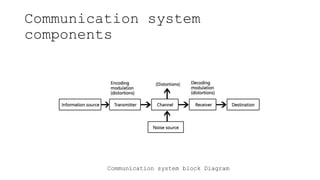
Communication system
components
Communication system block Diagram
Transmission Modes in Computer
Networks
Transmission mode means transferring data
between two devices. It is also known as a
communication mode. Buses and networks are
designed to allow communication to occur between
individual devices that are interconnected.
There are three modes :
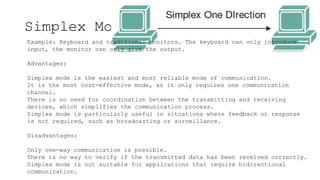
Simplex Mode
Example: Keyboard and traditional monitors. The keyboard can only introduce
input, the monitor can only give the output.
Advantages:
Simplex mode is the easiest and most reliable mode of communication.
It is the most cost-effective mode, as it only requires one communication
channel.
There is no need for coordination between the transmitting and receiving
devices, which simplifies the communication process.
Simplex mode is particularly useful in situations where feedback or response
is not required, such as broadcasting or surveillance.
Disadvantages:
Only one-way communication is possible.
There is no way to verify if the transmitted data has been received correctly.
Simplex mode is not suitable for applications that require bidirectional
communication.
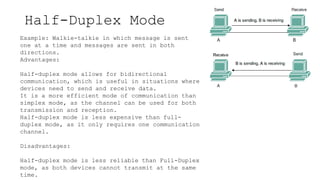
Half-Duplex Mode
Example: Walkie-talkie in which message is sent
one at a time and messages are sent in both
directions.
Advantages:
Half-duplex mode allows for bidirectional
communication, which is useful in situations where
devices need to send and receive data.
It is a more efficient mode of communication than
simplex mode, as the channel can be used for both
transmission and reception.
Half-duplex mode is less expensive than full-
duplex mode, as it only requires one communication
channel.
Disadvantages:
Half-duplex mode is less reliable than Full-Duplex
mode, as both devices cannot transmit at the same
time.
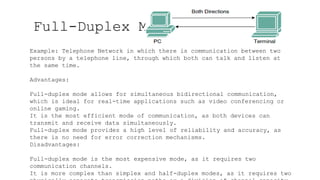
Full-Duplex Mode
Example: Telephone Network in which there is communication between two
persons by a telephone line, through which both can talk and listen at
the same time.
Advantages:
Full-duplex mode allows for simultaneous bidirectional communication,
which is ideal for real-time applications such as video conferencing or
online gaming.
It is the most efficient mode of communication, as both devices can
transmit and receive data simultaneously.
Full-duplex mode provides a high level of reliability and accuracy, as
there is no need for error correction mechanisms.
Disadvantages:
Full-duplex mode is the most expensive mode, as it requires two
communication channels.
It is more complex than simplex and half-duplex modes, as it requires two
Data Transmission Speed
 Bandwidth: Range of frequencies available for data
transmission. It refers to data transmission rate. Higherthe
bandwidth, the more data it can transmit
 Baud: Unit of measurement of data transfer rate.Measured
in bits per second (bps)
 Narrowband: Sub-voice grade channels in range from45 to 300
baud. Mainly used for telegraph lines and low-speed terminals
 Voiceband: Voice grade channels with speed up to 9600
baud. Mainly used for ordinary telephone voicecommunication
and slow I/O devices
 Broadband: High speed channels with speed up to 1million
baud or more. Mainly used for high-speed computer-to-
computer communication or for simultaneous transmission of
data
Data Transmission media
 Twisted-pair wire (UTP cable)
 Coaxial cable
 Microwave system
 Communications satellite
 Optical fibers
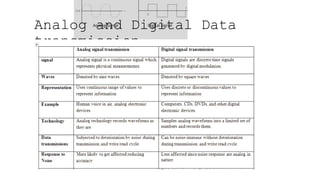
Analog and Digital Data
transmission
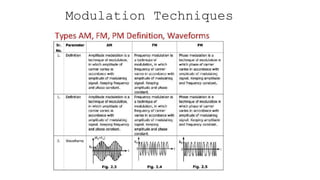
Modulation Techniques
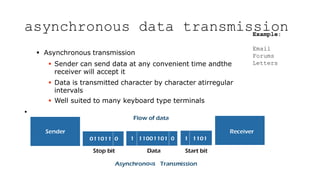
asynchronous data transmission
 Asynchronous transmission
 Sender can send data at any convenient time andthe
receiver will accept it
 Data is transmitted character by character atirregular
intervals
 Well suited to many keyboard type terminals
•
Example:
Email
Forums
Letters
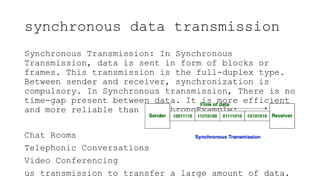
synchronous data transmission
Synchronous Transmission: In Synchronous
Transmission, data is sent in form of blocks or
frames. This transmission is the full-duplex type.
Between sender and receiver, synchronization is
compulsory. In Synchronous transmission, There is no
time-gap present between data. It is more efficient
and more reliable than asynchronoExample:
Chat Rooms
Telephonic Conversations
Video Conferencing
us transmission to transfer a large amount of data.
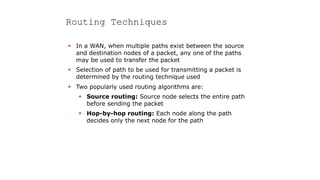
Routing Techniques
 In a WAN, when multiple paths exist between the source
and destination nodes of a packet, any one of the paths
may be used to transfer the packet
 Selection of path to be used for transmitting a packet is
determined by the routing technique used
 Two popularly used routing algorithms are:
 Source routing: Source node selects the entire path
before sending the packet
 Hop-by-hop routing: Each node along the path
decides only the next node for the path
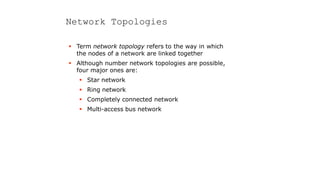
Network Topologies
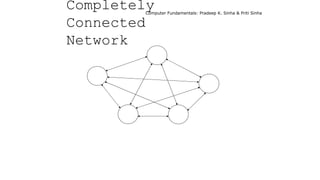
 Term network topology refers to the way in which
the nodes of a network are linked together
 Although number network topologies are possible,
four major ones are:
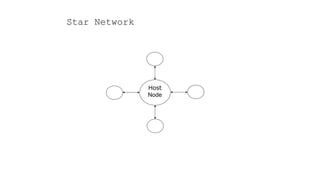
 Star network
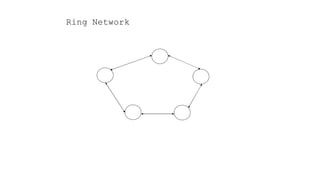
 Ring network
 Completely connected network
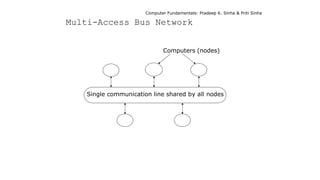
 Multi-access bus network
Host
Node
Star Network
Ring Network
Computer Fundamentals: Pradeep K. Sinha & Priti Sinha
Completely
Connected
Network
Computer Fundamentals: Pradeep K. Sinha & Priti Sinha
Computers (nodes)
Single communication line shared by all nodes
Multi-Access Bus Network
Computer Fundamentals: Pradeep K. Sinha & Priti Sinha
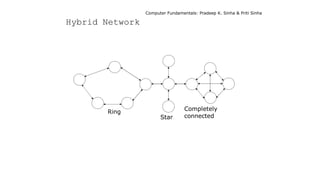
Ring
Star
Completely
connected
Hybrid Network
Computer Fundamentals: Pradeep K. Sinha & Priti Sinha
Network Types
 Networks are broadly classified into two types: Local
Area Network (LAN) and Wide Area Network (WAN)
 Local Area Network (LAN) as compared to WAN:
 Limited to a small geographic coverage
 Has much higher data transmission rate
 Experiences fewer data transmission errors
 Has lower data communication cost
 Typically owned by a single organization
 Networks that share some of the characteristics of both
LANs and WANs are referred to as Metropolitan Area
Network (MAN)
Computer Fundamentals: Pradeep K. Sinha & Priti Sinha
Communication Protocols
 Protocol is a set of formal operating rules, procedures,
or conventions that govern a given process
 Communication protocol describes rules that govern
transmission of data over communication networks
 Roles of communication protocol:
 Data sequencing
 Data routing
 Data formatting
 Flow control
 Error control
(Continued on next slide)
Computer Fundamentals: Pradeep K. Sinha & Priti Sinha
Communication Protocols
(Continued from previous slide)
 Precedence and order of transmission
 Connection establishment and termination
 Data security
 Log information.
 Communication protocols are normally split up into a
series of modules logically composed of a succession of
layers.
 Terms protocol suite, protocol family, or protocol stack
are used to refer to the collection of protocols (of all
layers) of a network system
Computer Fundamentals: Pradeep K. Sinha & Priti Sinha
Network Interface Card (NIC)
 Hardware device that allows a computer to be
connected to a network, both functionally and
physically
 Printed circuit board installed on to one of the
expansion slots of computer
 Provides a port on the back to which network cable is
attached
Computer Fundamentals: Pradeep K. Sinha & Priti Sinha
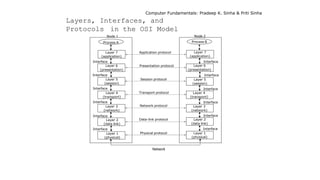
The OSI Model
 The Open System Interconnection (OSI) model is
framework for defining standards for linking
heterogeneous computers in a packet switched
network
 Standardized OSI protocol makes it possible for any
two heterogeneous computer systems, located
anywhere in the world, to easily communicate with
each other
 Separate set of protocols is defined for each layer in its
seven-layer architecture. Each layer has an
independent function
Computer Fundamentals: Pradeep K. Sinha & Priti Sinha
Network
Layer 7
(application)
Layer 6
(presentation)
Layer 5
(session)
Layer 4
(transport)
Layer 3
(network)
Layer 2
(data link)
Layer 1
(physical)
Application protocol
Presentation protocol
Session protocol
Transport protocol
Network protocol
Data-link protocol
Physical protocol
Layer 7
(application)
Layer 6
(presentation)
Layer 5
(session)
Layer 4
(transport)
Layer 3
(network)
Layer 2
(data link)
Layer 1
(physical)
Process A Process B
Node 1 Node 2
Interface
Interface
Interface
Interface
Interface
Interface Interface
Interface
Interface
Interface
Interface
Interface
Layers, Interfaces, and
Protocols in the OSI Model
Computer Fundamentals: Pradeep K. Sinha & Priti Sinha
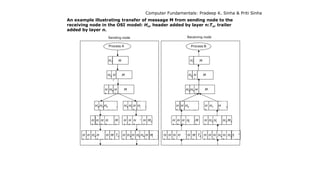
An example illustrating transfer of message M from sending node to the
receiving node in the OSI model: Hn, header added by layer n:Tn, trailer
added by layer n.
7
H7 M
H6 H M
H
5
H6 H
7
M
Sending node
H4 H5 H6 H
7
M1 5 7
H4 H H
6
H M2
H
2
H
3
H4 H
5
H
6
H
7
M
1
T2 5 2
H
2
H3 H
4
H H6 H
7
M T2
H
3
H
4
H
5
H
6
H
7
M2
H
3
H
4
H
5
H
6
H
7
M
1
Process A
H7 M
H6 H
7
M
H5 H6 H
7
M
Receiving node
H
4
H
5
H6 H7 M
1
H
4
H5 H6 H
7
M2
H
2
H
3
H
4
H5 H
6
H
7
M
1
T2 2
H
2
H
3
H
4
H5 H
6
H7 M T
2
5
H
3
H4 H H
6
H7 M2
6
H
3
H
4
H
5
H H7 M
1
Process B
Computer Fundamentals: Pradeep K. Sinha & Priti Sinha
Internetworking
 Interconnecting two or more networks to form a single
network is called internetworking, and the resulting
network is called an internetwork
 Goal of internetworking is to hide details of different
physical networks, so that resulting internetwork
functions as a single coordinated unit
 Tools such as bridges, routers, brouters, and gateways
are used for internetworking
 The Internet is the best example of an internetwork
Computer Fundamentals: Pradeep K. Sinha & Priti Sinha
Bridges
 Operate at bottom two layers of the OSI model
 Connect networks that use the same communication
protocols above data-link layer but may use different
protocols at physical and data-link layers
Computer Fundamentals: Pradeep K. Sinha & Priti Sinha
Routers
 Operates at network layer of the OSI model
 Used to interconnect those networks that use the same
high-level protocols above network layer
 Smarter than bridges as they not only copy data from
one network segment to another, but also choose the
best route for the data by using routing table
Computer Fundamentals: Pradeep K. Sinha & Priti Sinha
Gateways
 Operates at the top three layers of the OSI model
(session, presentation and application)
 Used for interconnecting dissimilar networks that use
different communication protocols
 Since gateways interconnect dissimilar networks,
protocol conversion is the major job performed by
them
Computer Fundamentals: Pradeep K. Sinha & Priti Sinha
Wireless Computing Systems
 Wireless computing system uses wireless communication
technologies for interconnecting computer systems
 Enhances functionality of computing equipment by freeing
communication from location constraints of wired
computing systems
 Wireless computing systems are of two types:
 Fixed wireless systems: Support little or no
mobility of the computing equipment associated with
the wireless network
 Mobile wireless systems: Support mobility of the
computing equipment to access resources associated
with the wireless network
Computer Fundamentals: Pradeep K. Sinha & Priti Sinha
 2G and 3G
 Wireless LAN
 WiMAX
 Wireless Local Loop (WLL)
 Radio-router
 Multihop Wireless Network
 Wireless Application Protocol (WAP)
Wireless Technologies
DATA COMMUNICATION and impact in real life

DATA COMMUNICATION and impact in real life

  • 1.
  • 2.
  • 3.
    Transmission Modes inComputer Networks Transmission mode means transferring data between two devices. It is also known as a communication mode. Buses and networks are designed to allow communication to occur between individual devices that are interconnected. There are three modes :
  • 4.
    Simplex Mode Example: Keyboardand traditional monitors. The keyboard can only introduce input, the monitor can only give the output. Advantages: Simplex mode is the easiest and most reliable mode of communication. It is the most cost-effective mode, as it only requires one communication channel. There is no need for coordination between the transmitting and receiving devices, which simplifies the communication process. Simplex mode is particularly useful in situations where feedback or response is not required, such as broadcasting or surveillance. Disadvantages: Only one-way communication is possible. There is no way to verify if the transmitted data has been received correctly. Simplex mode is not suitable for applications that require bidirectional communication.
  • 5.
    Half-Duplex Mode Example: Walkie-talkiein which message is sent one at a time and messages are sent in both directions. Advantages: Half-duplex mode allows for bidirectional communication, which is useful in situations where devices need to send and receive data. It is a more efficient mode of communication than simplex mode, as the channel can be used for both transmission and reception. Half-duplex mode is less expensive than full- duplex mode, as it only requires one communication channel. Disadvantages: Half-duplex mode is less reliable than Full-Duplex mode, as both devices cannot transmit at the same time.
  • 6.
    Full-Duplex Mode Example: TelephoneNetwork in which there is communication between two persons by a telephone line, through which both can talk and listen at the same time. Advantages: Full-duplex mode allows for simultaneous bidirectional communication, which is ideal for real-time applications such as video conferencing or online gaming. It is the most efficient mode of communication, as both devices can transmit and receive data simultaneously. Full-duplex mode provides a high level of reliability and accuracy, as there is no need for error correction mechanisms. Disadvantages: Full-duplex mode is the most expensive mode, as it requires two communication channels. It is more complex than simplex and half-duplex modes, as it requires two
  • 7.
    Data Transmission Speed Bandwidth: Range of frequencies available for data transmission. It refers to data transmission rate. Higherthe bandwidth, the more data it can transmit  Baud: Unit of measurement of data transfer rate.Measured in bits per second (bps)  Narrowband: Sub-voice grade channels in range from45 to 300 baud. Mainly used for telegraph lines and low-speed terminals  Voiceband: Voice grade channels with speed up to 9600 baud. Mainly used for ordinary telephone voicecommunication and slow I/O devices  Broadband: High speed channels with speed up to 1million baud or more. Mainly used for high-speed computer-to- computer communication or for simultaneous transmission of data
  • 8.
    Data Transmission media Twisted-pair wire (UTP cable)  Coaxial cable  Microwave system  Communications satellite  Optical fibers
  • 9.
    Analog and DigitalData transmission
  • 10.
  • 11.
    asynchronous data transmission Asynchronous transmission  Sender can send data at any convenient time andthe receiver will accept it  Data is transmitted character by character atirregular intervals  Well suited to many keyboard type terminals • Example: Email Forums Letters
  • 12.
    synchronous data transmission SynchronousTransmission: In Synchronous Transmission, data is sent in form of blocks or frames. This transmission is the full-duplex type. Between sender and receiver, synchronization is compulsory. In Synchronous transmission, There is no time-gap present between data. It is more efficient and more reliable than asynchronoExample: Chat Rooms Telephonic Conversations Video Conferencing us transmission to transfer a large amount of data.
  • 13.
    Routing Techniques  Ina WAN, when multiple paths exist between the source and destination nodes of a packet, any one of the paths may be used to transfer the packet  Selection of path to be used for transmitting a packet is determined by the routing technique used  Two popularly used routing algorithms are:  Source routing: Source node selects the entire path before sending the packet  Hop-by-hop routing: Each node along the path decides only the next node for the path
  • 14.
    Network Topologies  Termnetwork topology refers to the way in which the nodes of a network are linked together  Although number network topologies are possible, four major ones are:  Star network  Ring network  Completely connected network  Multi-access bus network
  • 15.
  • 16.
  • 17.
    Computer Fundamentals: PradeepK. Sinha & Priti Sinha Completely Connected Network
  • 18.
    Computer Fundamentals: PradeepK. Sinha & Priti Sinha Computers (nodes) Single communication line shared by all nodes Multi-Access Bus Network
  • 19.
    Computer Fundamentals: PradeepK. Sinha & Priti Sinha Ring Star Completely connected Hybrid Network
  • 20.
    Computer Fundamentals: PradeepK. Sinha & Priti Sinha Network Types  Networks are broadly classified into two types: Local Area Network (LAN) and Wide Area Network (WAN)  Local Area Network (LAN) as compared to WAN:  Limited to a small geographic coverage  Has much higher data transmission rate  Experiences fewer data transmission errors  Has lower data communication cost  Typically owned by a single organization  Networks that share some of the characteristics of both LANs and WANs are referred to as Metropolitan Area Network (MAN)
  • 21.
    Computer Fundamentals: PradeepK. Sinha & Priti Sinha Communication Protocols  Protocol is a set of formal operating rules, procedures, or conventions that govern a given process  Communication protocol describes rules that govern transmission of data over communication networks  Roles of communication protocol:  Data sequencing  Data routing  Data formatting  Flow control  Error control (Continued on next slide)
  • 22.
    Computer Fundamentals: PradeepK. Sinha & Priti Sinha Communication Protocols (Continued from previous slide)  Precedence and order of transmission  Connection establishment and termination  Data security  Log information.  Communication protocols are normally split up into a series of modules logically composed of a succession of layers.  Terms protocol suite, protocol family, or protocol stack are used to refer to the collection of protocols (of all layers) of a network system
  • 23.
    Computer Fundamentals: PradeepK. Sinha & Priti Sinha Network Interface Card (NIC)  Hardware device that allows a computer to be connected to a network, both functionally and physically  Printed circuit board installed on to one of the expansion slots of computer  Provides a port on the back to which network cable is attached
  • 24.
    Computer Fundamentals: PradeepK. Sinha & Priti Sinha The OSI Model  The Open System Interconnection (OSI) model is framework for defining standards for linking heterogeneous computers in a packet switched network  Standardized OSI protocol makes it possible for any two heterogeneous computer systems, located anywhere in the world, to easily communicate with each other  Separate set of protocols is defined for each layer in its seven-layer architecture. Each layer has an independent function
  • 25.
    Computer Fundamentals: PradeepK. Sinha & Priti Sinha Network Layer 7 (application) Layer 6 (presentation) Layer 5 (session) Layer 4 (transport) Layer 3 (network) Layer 2 (data link) Layer 1 (physical) Application protocol Presentation protocol Session protocol Transport protocol Network protocol Data-link protocol Physical protocol Layer 7 (application) Layer 6 (presentation) Layer 5 (session) Layer 4 (transport) Layer 3 (network) Layer 2 (data link) Layer 1 (physical) Process A Process B Node 1 Node 2 Interface Interface Interface Interface Interface Interface Interface Interface Interface Interface Interface Interface Layers, Interfaces, and Protocols in the OSI Model
  • 26.
    Computer Fundamentals: PradeepK. Sinha & Priti Sinha An example illustrating transfer of message M from sending node to the receiving node in the OSI model: Hn, header added by layer n:Tn, trailer added by layer n. 7 H7 M H6 H M H 5 H6 H 7 M Sending node H4 H5 H6 H 7 M1 5 7 H4 H H 6 H M2 H 2 H 3 H4 H 5 H 6 H 7 M 1 T2 5 2 H 2 H3 H 4 H H6 H 7 M T2 H 3 H 4 H 5 H 6 H 7 M2 H 3 H 4 H 5 H 6 H 7 M 1 Process A H7 M H6 H 7 M H5 H6 H 7 M Receiving node H 4 H 5 H6 H7 M 1 H 4 H5 H6 H 7 M2 H 2 H 3 H 4 H5 H 6 H 7 M 1 T2 2 H 2 H 3 H 4 H5 H 6 H7 M T 2 5 H 3 H4 H H 6 H7 M2 6 H 3 H 4 H 5 H H7 M 1 Process B
  • 27.
    Computer Fundamentals: PradeepK. Sinha & Priti Sinha Internetworking  Interconnecting two or more networks to form a single network is called internetworking, and the resulting network is called an internetwork  Goal of internetworking is to hide details of different physical networks, so that resulting internetwork functions as a single coordinated unit  Tools such as bridges, routers, brouters, and gateways are used for internetworking  The Internet is the best example of an internetwork
  • 28.
    Computer Fundamentals: PradeepK. Sinha & Priti Sinha Bridges  Operate at bottom two layers of the OSI model  Connect networks that use the same communication protocols above data-link layer but may use different protocols at physical and data-link layers
  • 29.
    Computer Fundamentals: PradeepK. Sinha & Priti Sinha Routers  Operates at network layer of the OSI model  Used to interconnect those networks that use the same high-level protocols above network layer  Smarter than bridges as they not only copy data from one network segment to another, but also choose the best route for the data by using routing table
  • 30.
    Computer Fundamentals: PradeepK. Sinha & Priti Sinha Gateways  Operates at the top three layers of the OSI model (session, presentation and application)  Used for interconnecting dissimilar networks that use different communication protocols  Since gateways interconnect dissimilar networks, protocol conversion is the major job performed by them
  • 31.
    Computer Fundamentals: PradeepK. Sinha & Priti Sinha Wireless Computing Systems  Wireless computing system uses wireless communication technologies for interconnecting computer systems  Enhances functionality of computing equipment by freeing communication from location constraints of wired computing systems  Wireless computing systems are of two types:  Fixed wireless systems: Support little or no mobility of the computing equipment associated with the wireless network  Mobile wireless systems: Support mobility of the computing equipment to access resources associated with the wireless network
  • 32.
    Computer Fundamentals: PradeepK. Sinha & Priti Sinha  2G and 3G  Wireless LAN  WiMAX  Wireless Local Loop (WLL)  Radio-router  Multihop Wireless Network  Wireless Application Protocol (WAP) Wireless Technologies