Panoramas
CSCI 455: Computer Vision
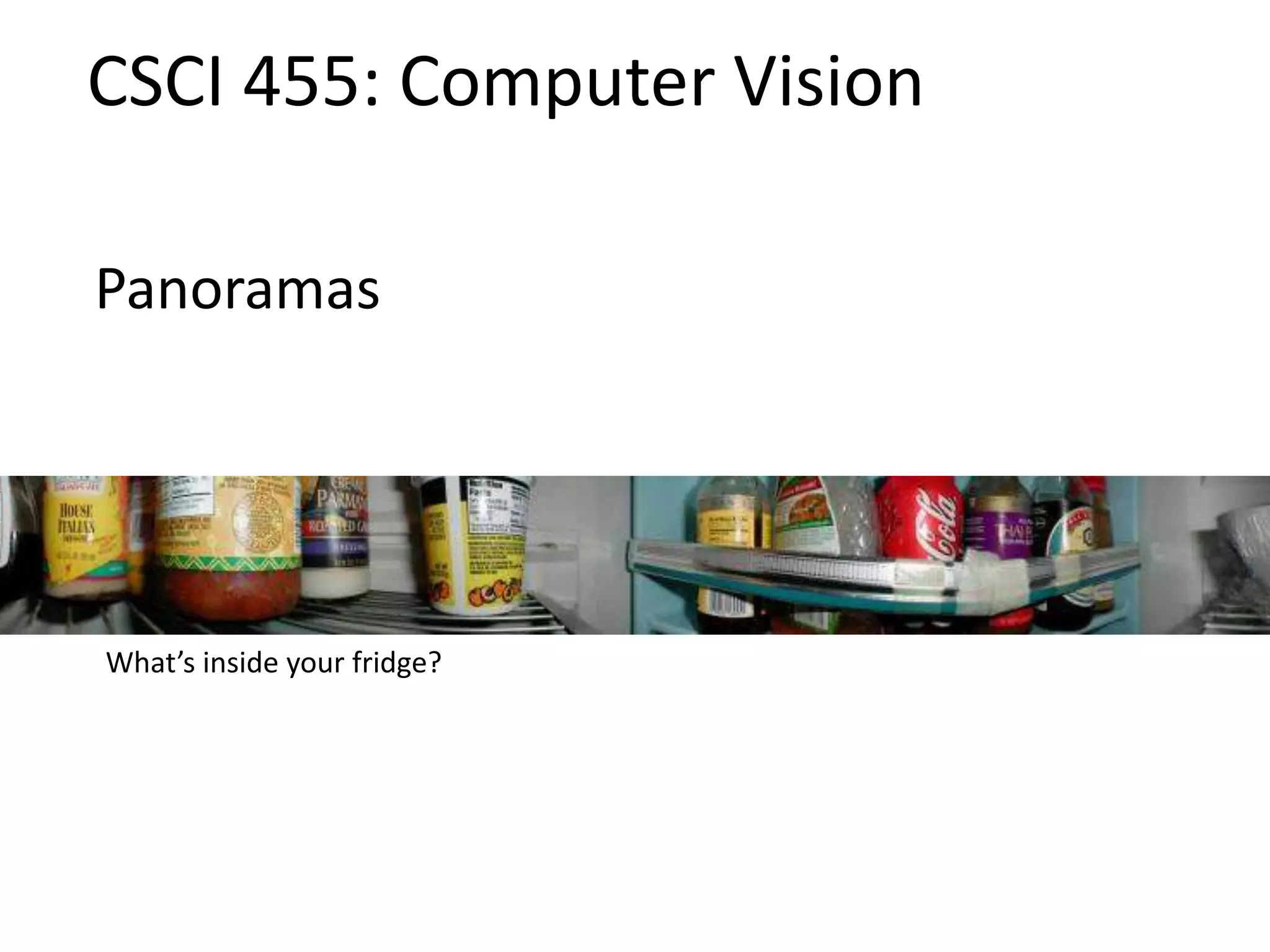
What’s inside your fridge?
Announcements
• Project 3 (Autostitch) is out, due next
Thursday, March 28 by 11:59pm
– Artifact due Friday, March 29 by 11:59pm
– Project to be done in pairs
• Take-home midterm
– To be distributed at the end of class
– Due at the beginning of class in one week,
Wednesday, March 20
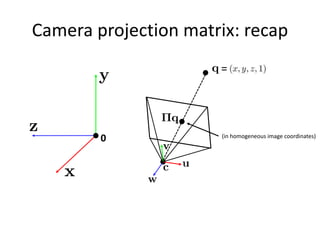
Camera projection matrix: recap
0
=
(in homogeneous image coordinates)
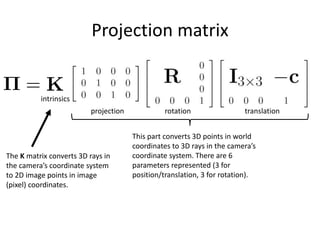
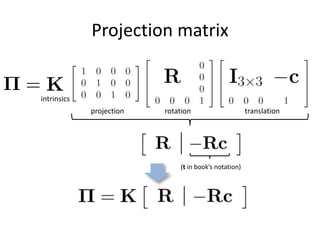
Projection matrix
translationrotationprojection
intrinsics
This part converts 3D points in world
coordinates to 3D rays in the camera’s
coordinate system. There are 6
parameters represented (3 for
position/translation, 3 for rotation).
The K matrix converts 3D rays in
the camera’s coordinate system
to 2D image points in image
(pixel) coordinates.
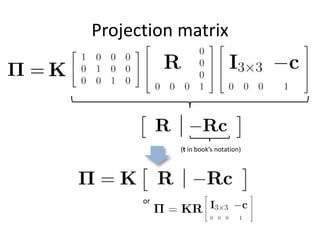
Projection matrix
(t in book’s notation)
translationrotationprojection
intrinsics
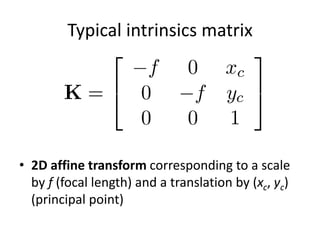
Typical intrinsics matrix
• 2D affine transform corresponding to a scale
by f (focal length) and a translation by (xc, yc)
(principal point)
Projection matrix
(t in book’s notation)
or
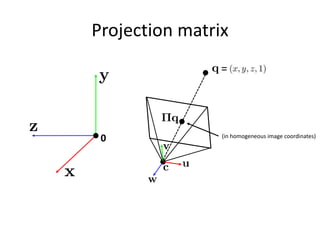
Projection matrix
0
=
(in homogeneous image coordinates)
Questions?
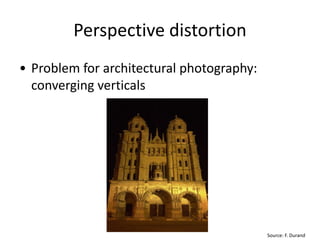
Perspective distortion
• Problem for architectural photography:
converging verticals
Source: F. Durand
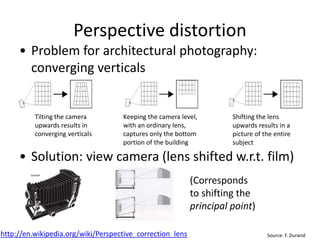
Perspective distortion
• Problem for architectural photography:
converging verticals
• Solution: view camera (lens shifted w.r.t. film)
Source: F. Durand
Tilting the camera
upwards results in
converging verticals
Keeping the camera level,
with an ordinary lens,
captures only the bottom
portion of the building
Shifting the lens
upwards results in a
picture of the entire
subject
http://en.wikipedia.org/wiki/Perspective_correction_lens
(Corresponds
to shifting the
principal point)
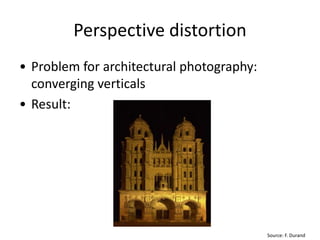
Perspective distortion
• Problem for architectural photography:
converging verticals
• Result:
Source: F. Durand
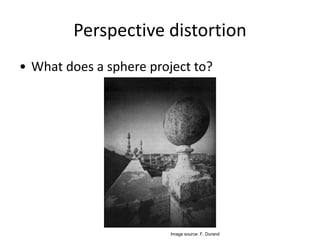
Perspective distortion
• What does a sphere project to?
Image source: F. Durand
Perspective distortion
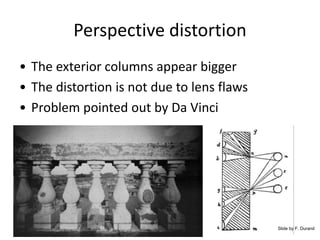
• The exterior columns appear bigger
• The distortion is not due to lens flaws
• Problem pointed out by Da Vinci
Slide by F. Durand
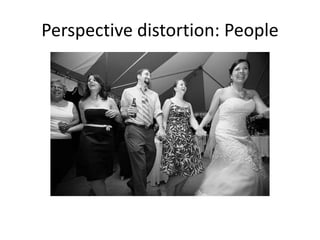
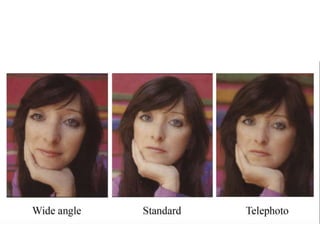
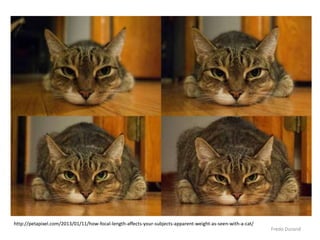
Perspective distortion: People
Fredo Durand
http://petapixel.com/2013/01/11/how-focal-length-affects-your-subjects-apparent-weight-as-seen-with-a-cat/
Lens distortion
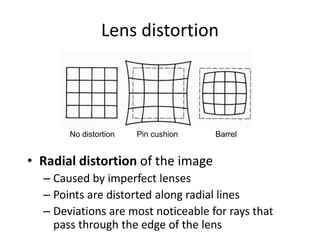
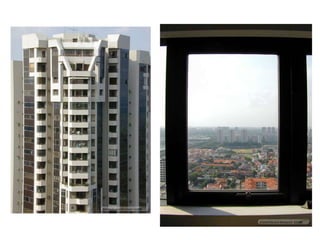
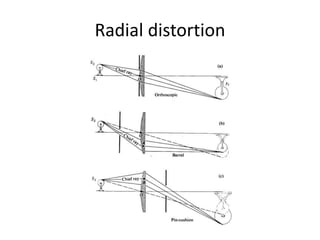
• Radial distortion of the image
– Caused by imperfect lenses
– Points are distorted along radial lines
– Deviations are most noticeable for rays that
pass through the edge of the lens
No distortion Pin cushion Barrel
Radial distortion
Radial distortion
[Image credit: J. Bouguet http://www.vision.caltech.edu/bouguetj/calib_doc/htmls/example.html]
• Arrows show motion
of projected points
relative to an ideal
(distortion-free lens)
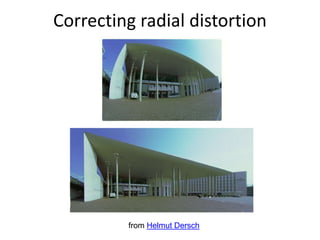
Correcting radial distortion
from Helmut Dersch
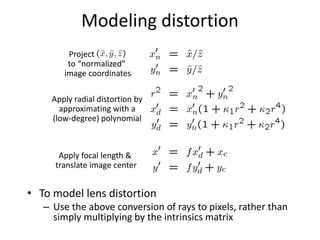
Modeling distortion
• To model lens distortion
– Use the above conversion of rays to pixels, rather than
simply multiplying by the intrinsics matrix
Apply radial distortion by
approximating with a
(low-degree) polynomial
Apply focal length &
translate image center
Project
to “normalized”
image coordinates
Other types of projection
• Lots of intriguing variants…
• (I’ll just mention a few fun ones)
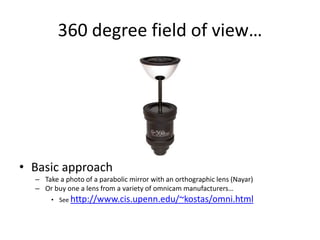
360 degree field of view…
• Basic approach
– Take a photo of a parabolic mirror with an orthographic lens (Nayar)
– Or buy one a lens from a variety of omnicam manufacturers…
• See http://www.cis.upenn.edu/~kostas/omni.html
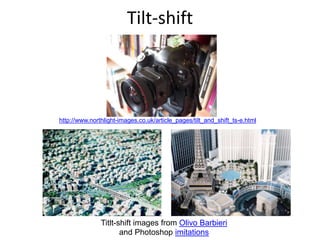
Tilt-shift
Titlt-shift images from Olivo Barbieri
and Photoshop imitations
http://www.northlight-images.co.uk/article_pages/tilt_and_shift_ts-e.html
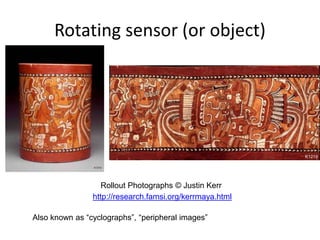
Rollout Photographs © Justin Kerr
http://research.famsi.org/kerrmaya.html
Rotating sensor (or object)
Also known as “cyclographs”, “peripheral images”
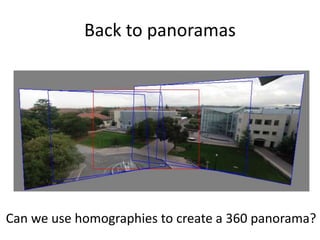
Back to panoramas
Can we use homographies to create a 360 panorama?
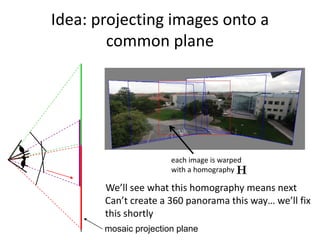
Idea: projecting images onto a
common plane
mosaic projection plane
each image is warped
with a homography
We’ll see what this homography means next
Can’t create a 360 panorama this way… we’ll fix
this shortly
Creating a panorama
• Basic Procedure
– Take a sequence of images from the same position
• Rotate the camera about its optical center
– Compute transformation between second image
and first
– Transform the second image to overlap with the
first
– Blend the two together to create a mosaic
– If there are more images, repeat
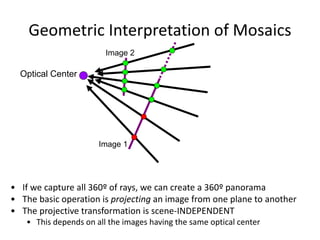
Geometric Interpretation of Mosaics
• If we capture all 360º of rays, we can create a 360º panorama
• The basic operation is projecting an image from one plane to another
• The projective transformation is scene-INDEPENDENT
• This depends on all the images having the same optical center
Image 1
Image 2
Optical Center
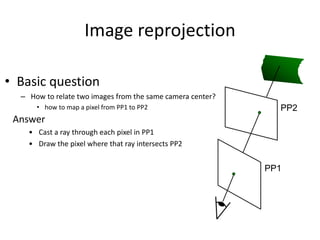
Image reprojection
• Basic question
– How to relate two images from the same camera center?
• how to map a pixel from PP1 to PP2 PP2
PP1
Answer
• Cast a ray through each pixel in PP1
• Draw the pixel where that ray intersects PP2
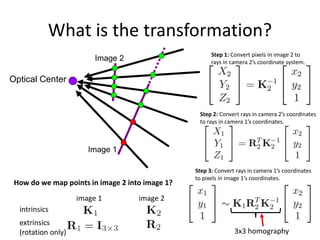
What is the transformation?
Image 1
Image 2
Optical Center
How do we map points in image 2 into image 1?
image 1 image 2
3x3 homography
Step 1: Convert pixels in image 2 to
rays in camera 2’s coordinate system.
Step 2: Convert rays in camera 2’s coordinates
to rays in camera 1’s coordinates.
Step 3: Convert rays in camera 1’s coordinates
to pixels in image 1’s coordinates.
intrinsics
extrinsics
(rotation only)
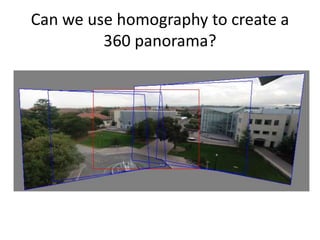
Can we use homography to create a
360 panorama?
Panoramas
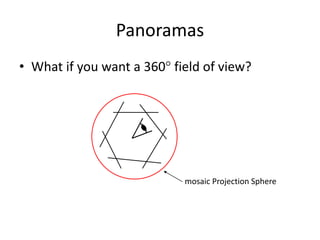
• What if you want a 360 field of view?
mosaic Projection Sphere
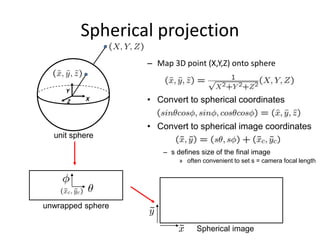
– Map 3D point (X,Y,Z) onto sphere
Spherical projection
X
Y
Z
unit sphere
unwrapped sphere
• Convert to spherical coordinates
Spherical image
• Convert to spherical image coordinates
– s defines size of the final image
» often convenient to set s = camera focal length
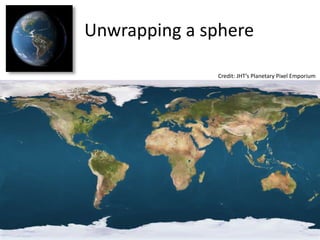
Unwrapping a sphere
Credit: JHT’s Planetary Pixel Emporium
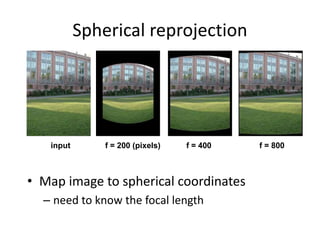
f = 200 (pixels)
Spherical reprojection
• Map image to spherical coordinates
– need to know the focal length
input f = 800f = 400
Aligning spherical images
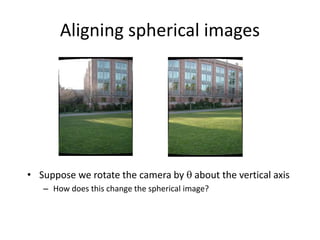
• Suppose we rotate the camera by  about the vertical axis
– How does this change the spherical image?
Aligning spherical images
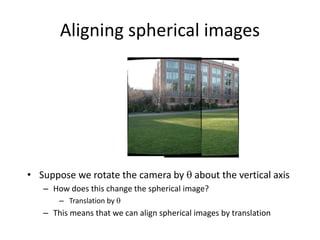
• Suppose we rotate the camera by  about the vertical axis
– How does this change the spherical image?
– Translation by 
– This means that we can align spherical images by translation
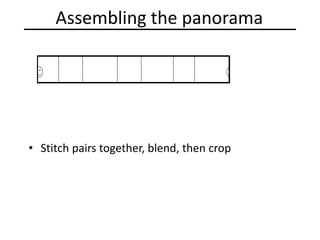
Assembling the panorama
• Stitch pairs together, blend, then crop
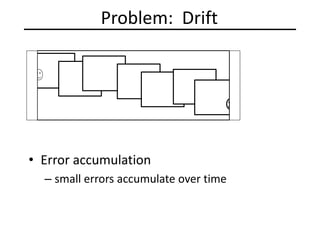
Problem: Drift
• Error accumulation
– small errors accumulate over time
Problem: Drift
• Solution
– add another copy of first image at the end
– this gives a constraint: yn = y1
– there are a bunch of ways to solve this problem
• add displacement of (y1 – yn)/(n -1) to each image after the first
• apply an affine warp: y’ = y + ax [you will implement this for P3]
• run a big optimization problem, incorporating this constraint
– best solution, but more complicated
– known as “bundle adjustment”
(x1,y1)
copy of first image
(xn,yn)
Project 3
• Take pictures on a tripod (or handheld)
• Warp to spherical coordinates (optional if using homographies to
align images)
• Extract features
• Align neighboring pairs using RANSAC
• Write out list of neighboring translations
• Correct for drift
• Read in warped images and blend them
• Crop the result and import into a viewer
• Roughly based on Autostitch
– By Matthew Brown and David Lowe
– http://www.cs.ubc.ca/~mbrown/autostitch/autostitch.html
+
+
+
+
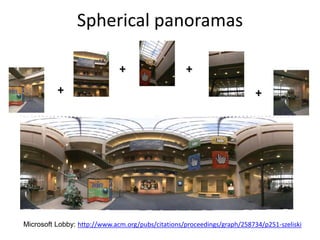
Microsoft Lobby: http://www.acm.org/pubs/citations/proceedings/graph/258734/p251-szeliski
Spherical panoramas
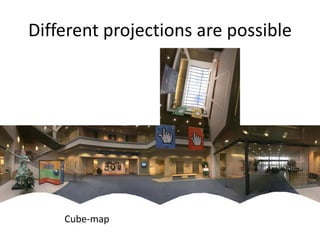
Different projections are possible
Cube-map
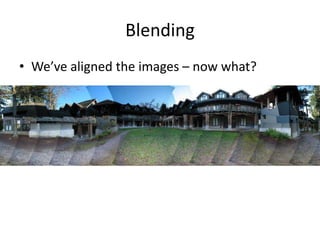
Blending
• We’ve aligned the images – now what?
Blending
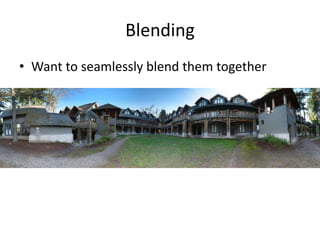
• Want to seamlessly blend them together
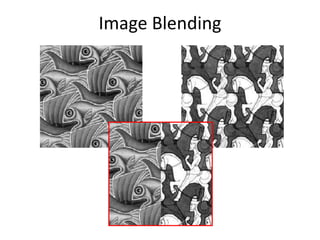
Image Blending
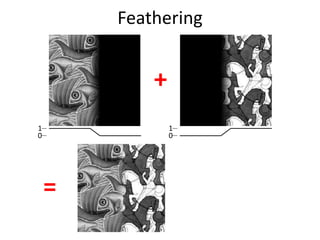
Feathering
0
1
0
1
+
=
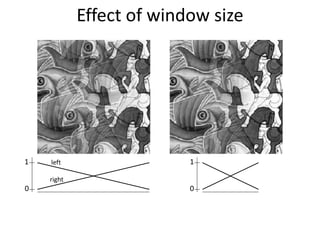
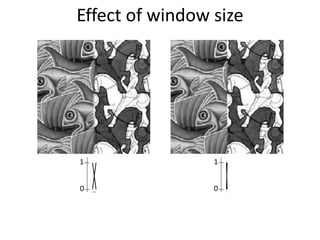
Effect of window size
0
1 left
right
0
1
0
1
0
1
Effect of window size
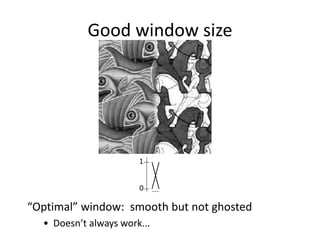
Good window size
0
1
“Optimal” window: smooth but not ghosted
• Doesn’t always work...
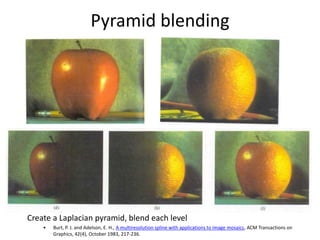
Pyramid blending
Create a Laplacian pyramid, blend each level
• Burt, P. J. and Adelson, E. H., A multiresolution spline with applications to image mosaics, ACM Transactions on
Graphics, 42(4), October 1983, 217-236.
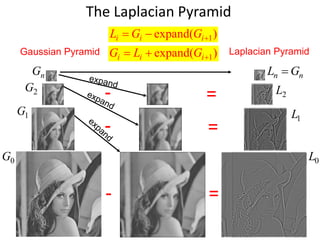
Gaussian Pyramid Laplacian Pyramid
The Laplacian Pyramid
0G
1G
2G
nG
- =
0L
- =
1L
- = 2L
nn GL 
)expand( 1 iii GGL
)expand( 1 iii GLG
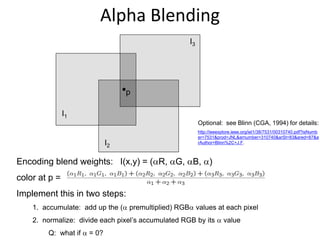
Encoding blend weights: I(x,y) = (R, G, B, )
color at p =
Implement this in two steps:
1. accumulate: add up the ( premultiplied) RGB values at each pixel
2. normalize: divide each pixel’s accumulated RGB by its  value
Q: what if  = 0?
Alpha Blending
Optional: see Blinn (CGA, 1994) for details:
http://ieeexplore.ieee.org/iel1/38/7531/00310740.pdf?isNumb
er=7531&prod=JNL&arnumber=310740&arSt=83&ared=87&a
rAuthor=Blinn%2C+J.F.
I1
I2
I3
p
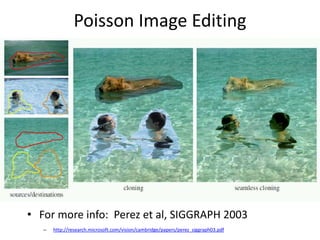
Poisson Image Editing
• For more info: Perez et al, SIGGRAPH 2003
– http://research.microsoft.com/vision/cambridge/papers/perez_siggraph03.pdf
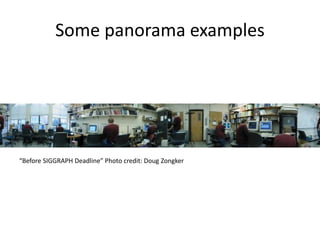
Some panorama examples
“Before SIGGRAPH Deadline” Photo credit: Doug Zongker
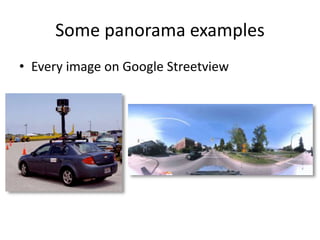
Some panorama examples
• Every image on Google Streetview
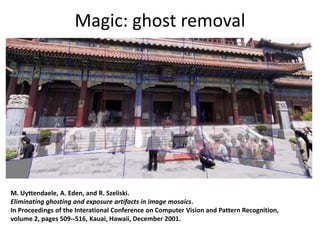
Magic: ghost removal
M. Uyttendaele, A. Eden, and R. Szeliski.
Eliminating ghosting and exposure artifacts in image mosaics.
In Proceedings of the Interational Conference on Computer Vision and Pattern Recognition,
volume 2, pages 509--516, Kauai, Hawaii, December 2001.
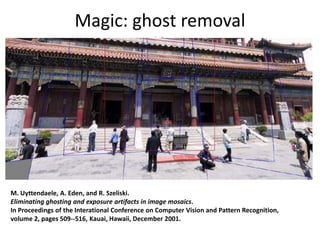
Magic: ghost removal
M. Uyttendaele, A. Eden, and R. Szeliski.
Eliminating ghosting and exposure artifacts in image mosaics.
In Proceedings of the Interational Conference on Computer Vision and Pattern Recognition,
volume 2, pages 509--516, Kauai, Hawaii, December 2001.
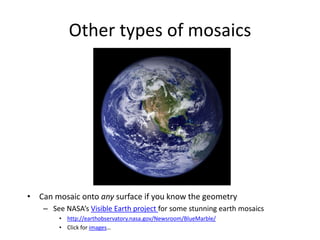
Other types of mosaics
• Can mosaic onto any surface if you know the geometry
– See NASA’s Visible Earth project for some stunning earth mosaics
• http://earthobservatory.nasa.gov/Newsroom/BlueMarble/
• Click for images…
• http://earthobservatory.nasa.gov/NaturalHaza
rds/view.php?id=87675&src=twitter-nh
Questions?

Computer Vision panoramas

  • 1.
    Panoramas CSCI 455: ComputerVision What’s inside your fridge?
  • 2.
    Announcements • Project 3(Autostitch) is out, due next Thursday, March 28 by 11:59pm – Artifact due Friday, March 29 by 11:59pm – Project to be done in pairs • Take-home midterm – To be distributed at the end of class – Due at the beginning of class in one week, Wednesday, March 20
  • 3.
    Camera projection matrix:recap 0 = (in homogeneous image coordinates)
  • 4.
    Projection matrix translationrotationprojection intrinsics This partconverts 3D points in world coordinates to 3D rays in the camera’s coordinate system. There are 6 parameters represented (3 for position/translation, 3 for rotation). The K matrix converts 3D rays in the camera’s coordinate system to 2D image points in image (pixel) coordinates.
  • 5.
    Projection matrix (t inbook’s notation) translationrotationprojection intrinsics
  • 6.
    Typical intrinsics matrix •2D affine transform corresponding to a scale by f (focal length) and a translation by (xc, yc) (principal point)
  • 7.
    Projection matrix (t inbook’s notation) or
  • 8.
  • 9.
  • 10.
    Perspective distortion • Problemfor architectural photography: converging verticals Source: F. Durand
  • 11.
    Perspective distortion • Problemfor architectural photography: converging verticals • Solution: view camera (lens shifted w.r.t. film) Source: F. Durand Tilting the camera upwards results in converging verticals Keeping the camera level, with an ordinary lens, captures only the bottom portion of the building Shifting the lens upwards results in a picture of the entire subject http://en.wikipedia.org/wiki/Perspective_correction_lens (Corresponds to shifting the principal point)
  • 12.
    Perspective distortion • Problemfor architectural photography: converging verticals • Result: Source: F. Durand
  • 13.
    Perspective distortion • Whatdoes a sphere project to? Image source: F. Durand
  • 14.
    Perspective distortion • Theexterior columns appear bigger • The distortion is not due to lens flaws • Problem pointed out by Da Vinci Slide by F. Durand
  • 15.
  • 17.
  • 18.
    Lens distortion • Radialdistortion of the image – Caused by imperfect lenses – Points are distorted along radial lines – Deviations are most noticeable for rays that pass through the edge of the lens No distortion Pin cushion Barrel
  • 20.
  • 21.
    Radial distortion [Image credit:J. Bouguet http://www.vision.caltech.edu/bouguetj/calib_doc/htmls/example.html] • Arrows show motion of projected points relative to an ideal (distortion-free lens)
  • 22.
  • 23.
    Modeling distortion • Tomodel lens distortion – Use the above conversion of rays to pixels, rather than simply multiplying by the intrinsics matrix Apply radial distortion by approximating with a (low-degree) polynomial Apply focal length & translate image center Project to “normalized” image coordinates
  • 24.
    Other types ofprojection • Lots of intriguing variants… • (I’ll just mention a few fun ones)
  • 25.
    360 degree fieldof view… • Basic approach – Take a photo of a parabolic mirror with an orthographic lens (Nayar) – Or buy one a lens from a variety of omnicam manufacturers… • See http://www.cis.upenn.edu/~kostas/omni.html
  • 26.
    Tilt-shift Titlt-shift images fromOlivo Barbieri and Photoshop imitations http://www.northlight-images.co.uk/article_pages/tilt_and_shift_ts-e.html
  • 27.
    Rollout Photographs ©Justin Kerr http://research.famsi.org/kerrmaya.html Rotating sensor (or object) Also known as “cyclographs”, “peripheral images”
  • 28.
    Back to panoramas Canwe use homographies to create a 360 panorama?
  • 29.
    Idea: projecting imagesonto a common plane mosaic projection plane each image is warped with a homography We’ll see what this homography means next Can’t create a 360 panorama this way… we’ll fix this shortly
  • 30.
    Creating a panorama •Basic Procedure – Take a sequence of images from the same position • Rotate the camera about its optical center – Compute transformation between second image and first – Transform the second image to overlap with the first – Blend the two together to create a mosaic – If there are more images, repeat
  • 31.
    Geometric Interpretation ofMosaics • If we capture all 360º of rays, we can create a 360º panorama • The basic operation is projecting an image from one plane to another • The projective transformation is scene-INDEPENDENT • This depends on all the images having the same optical center Image 1 Image 2 Optical Center
  • 32.
    Image reprojection • Basicquestion – How to relate two images from the same camera center? • how to map a pixel from PP1 to PP2 PP2 PP1 Answer • Cast a ray through each pixel in PP1 • Draw the pixel where that ray intersects PP2
  • 33.
    What is thetransformation? Image 1 Image 2 Optical Center How do we map points in image 2 into image 1? image 1 image 2 3x3 homography Step 1: Convert pixels in image 2 to rays in camera 2’s coordinate system. Step 2: Convert rays in camera 2’s coordinates to rays in camera 1’s coordinates. Step 3: Convert rays in camera 1’s coordinates to pixels in image 1’s coordinates. intrinsics extrinsics (rotation only)
  • 34.
    Can we usehomography to create a 360 panorama?
  • 35.
    Panoramas • What ifyou want a 360 field of view? mosaic Projection Sphere
  • 36.
    – Map 3Dpoint (X,Y,Z) onto sphere Spherical projection X Y Z unit sphere unwrapped sphere • Convert to spherical coordinates Spherical image • Convert to spherical image coordinates – s defines size of the final image » often convenient to set s = camera focal length
  • 37.
    Unwrapping a sphere Credit:JHT’s Planetary Pixel Emporium
  • 38.
    f = 200(pixels) Spherical reprojection • Map image to spherical coordinates – need to know the focal length input f = 800f = 400
  • 39.
    Aligning spherical images •Suppose we rotate the camera by  about the vertical axis – How does this change the spherical image?
  • 40.
    Aligning spherical images •Suppose we rotate the camera by  about the vertical axis – How does this change the spherical image? – Translation by  – This means that we can align spherical images by translation
  • 41.
    Assembling the panorama •Stitch pairs together, blend, then crop
  • 42.
    Problem: Drift • Erroraccumulation – small errors accumulate over time
  • 43.
    Problem: Drift • Solution –add another copy of first image at the end – this gives a constraint: yn = y1 – there are a bunch of ways to solve this problem • add displacement of (y1 – yn)/(n -1) to each image after the first • apply an affine warp: y’ = y + ax [you will implement this for P3] • run a big optimization problem, incorporating this constraint – best solution, but more complicated – known as “bundle adjustment” (x1,y1) copy of first image (xn,yn)
  • 44.
    Project 3 • Takepictures on a tripod (or handheld) • Warp to spherical coordinates (optional if using homographies to align images) • Extract features • Align neighboring pairs using RANSAC • Write out list of neighboring translations • Correct for drift • Read in warped images and blend them • Crop the result and import into a viewer • Roughly based on Autostitch – By Matthew Brown and David Lowe – http://www.cs.ubc.ca/~mbrown/autostitch/autostitch.html
  • 45.
  • 46.
    Different projections arepossible Cube-map
  • 47.
    Blending • We’ve alignedthe images – now what?
  • 48.
    Blending • Want toseamlessly blend them together
  • 49.
  • 50.
  • 51.
    Effect of windowsize 0 1 left right 0 1
  • 52.
  • 53.
    Good window size 0 1 “Optimal”window: smooth but not ghosted • Doesn’t always work...
  • 54.
    Pyramid blending Create aLaplacian pyramid, blend each level • Burt, P. J. and Adelson, E. H., A multiresolution spline with applications to image mosaics, ACM Transactions on Graphics, 42(4), October 1983, 217-236.
  • 55.
    Gaussian Pyramid LaplacianPyramid The Laplacian Pyramid 0G 1G 2G nG - = 0L - = 1L - = 2L nn GL  )expand( 1 iii GGL )expand( 1 iii GLG
  • 56.
    Encoding blend weights:I(x,y) = (R, G, B, ) color at p = Implement this in two steps: 1. accumulate: add up the ( premultiplied) RGB values at each pixel 2. normalize: divide each pixel’s accumulated RGB by its  value Q: what if  = 0? Alpha Blending Optional: see Blinn (CGA, 1994) for details: http://ieeexplore.ieee.org/iel1/38/7531/00310740.pdf?isNumb er=7531&prod=JNL&arnumber=310740&arSt=83&ared=87&a rAuthor=Blinn%2C+J.F. I1 I2 I3 p
  • 57.
    Poisson Image Editing •For more info: Perez et al, SIGGRAPH 2003 – http://research.microsoft.com/vision/cambridge/papers/perez_siggraph03.pdf
  • 58.
    Some panorama examples “BeforeSIGGRAPH Deadline” Photo credit: Doug Zongker
  • 59.
    Some panorama examples •Every image on Google Streetview
  • 60.
    Magic: ghost removal M.Uyttendaele, A. Eden, and R. Szeliski. Eliminating ghosting and exposure artifacts in image mosaics. In Proceedings of the Interational Conference on Computer Vision and Pattern Recognition, volume 2, pages 509--516, Kauai, Hawaii, December 2001.
  • 61.
    Magic: ghost removal M.Uyttendaele, A. Eden, and R. Szeliski. Eliminating ghosting and exposure artifacts in image mosaics. In Proceedings of the Interational Conference on Computer Vision and Pattern Recognition, volume 2, pages 509--516, Kauai, Hawaii, December 2001.
  • 62.
    Other types ofmosaics • Can mosaic onto any surface if you know the geometry – See NASA’s Visible Earth project for some stunning earth mosaics • http://earthobservatory.nasa.gov/Newsroom/BlueMarble/ • Click for images…
  • 63.
  • 64.