Computer Forensics
First Responder Training
August 28-30, 2012

Timothy M. Opsitnick, Esq.
Senior Partner and General Counsel
JurInnov Ltd.

Eric A. Vanderburg, MBA, CISSP
Director, Information Systems and Security
Computer Forensic and Investigation Services

John G. Liptak, ACE, EnCE

Senior Consultant
Computer Forensic and Investigation Services

© 2009 Property of JurInnov Ltd. All Rights Reserved
© 2012 Property of JurInnov Ltd. All Rights Reserved
Who Are We?
JurInnov works with organizations that want to
more effectively manage matters involving
“Electronically Stored Information” (ESI).
–
–
–
–

Electronic Discovery
Computer Forensics
Document and Case Management
Computer & Network Security

2
© 2012 Property of JurInnov Ltd. All Rights Reserved
Presentation Overview
• Understanding Computing Environments
• Collecting Electronically Stored
Information
• Forensic Analysis Demonstration
• Types of Cases When Forensics Are Useful

3
© 2012 Property of JurInnov Ltd. All Rights Reserved
What is Computer Forensics?
Computer Forensics is a scientific, systematic
inspection of the computer system and its contents
utilizing specialized techniques and tools for
recovery, authentication, and analysis of electronic
data. It is customarily used when a case involves issues
relating to reconstruction of computer usage, examination
of residual data, authentication of data by technical
analysis or explanation of technical features of data and
computer usage. Computer Forensics requires specialized
expertise that goes beyond normal data collection and
preservation techniques available to end-users or system
support personnel.
4
© 2012 Property of JurInnov Ltd. All Rights Reserved
Sources of “ESI”
• Desktops

• E-Mail

• Laptops

• Archives

• CDs/DVDs

• Cell Phones/PDAs

• Network Attached
Storage Devices (NAS)

• Thumb Drives

• Storage Area Networks
(SAN)

• Memory Cards

• Servers

• Cameras

• Databases

• Printers

• Backup Tapes

• GPS Devices

• External Storage Devices

© 2012 Property of JurInnov Ltd. All Rights Reserved
2009
5
Why Computer Forensics?
• Reasons to use Computer Forensics
– Internal Company Investigations
• Alleged criminal activity
• Civil or Regulatory Preservation
– Receivership, Bankruptcy
– EEO issues
– Improper use of company assets
– Recovery of Accidentally or Intentionally Deleted Data
• Deleted is not necessarily deleted
• Recovery from Improper shutdowns

6
© 2012 Property of JurInnov Ltd. All Rights Reserved
How Does a Computer Operate?
• Hardware
– Processor
– Memory (RAM)
– Hard Drive
– CD/DVD Drive
– Motherboard
– Mouse/Keyboard
• Software
– Operating System
– Applications
7
© 2012 Property of JurInnov Ltd. All Rights Reserved
How Does a Computer Operate?

• How is data stored on a hard drive?
• How is data “deleted” by the operating system?

8
© 2012 Property of JurInnov Ltd. All Rights Reserved
9
© 2012 Property of JurInnov Ltd. All Rights Reserved
10
© 2012 Property of JurInnov Ltd. All Rights Reserved
Collecting “ESI”
• Windows Copy

• Ghost Copy/Images
• Forensic Images

11
© 2012 Property of JurInnov Ltd. All Rights Reserved
Collecting “ESI”
• Forensic Harvesting - Logical v Physical
– Logical copy (Active Files)
• Data that is visible via the O.S.
– Physical
• Logical + File Slack + Unallocated Space +
system areas (MBR, Partition table, FAT/MFT)

12
© 2012 Property of JurInnov Ltd. All Rights Reserved
First Response
•

First Steps Taken
– Identify users/custodians, electronic devices and
begin Chain of Custody
– Photograph and document full environment and
condition/state of devices
– Determine next steps depending on device(s) and
situation

13
© 2012 Property of JurInnov Ltd. All Rights Reserved
Acquisition (Data Harvest)
•

Equipment and Tools
–
–
–
–
–
–
–
–
–

Write Blockers
Camera
Forensically wiped hard drives
Screw Drivers
Anti-static bags
Power Strips and extension cords
Blank CDs and DVDs / USB Flash Drives
SD Card / Micro Card Reader
Fans for cooling drives during imaging
14

© 2012 Property of JurInnov Ltd. All Rights Reserved
Acquisition (Data Harvest)
•

Software Tools
–
–
–
–
–
–

EnCase (Guidance Software)
Forensic Tool Kit (AccessData)
Mobile Phone Examiner (AccessData)
Device Seizure (Paraben)
Raptor (Forward Discovery)
Internet Evidence Finder (Magnet Forensics)

• Hardware Tools
–
–

Write Blockers (Tableau)
CellDEK (Logicube)
15

© 2012 Property of JurInnov Ltd. All Rights Reserved
Types of Data Acquisitions
• Image Types
–
–
–
–

EnCase Image (.E01)
Logical EnCase Image (.L01)
DD Image (.001)
Custom Content Image (.AD1)

• ESI Locations
– Hard Drives
– Servers
• Email
• Network Shares

– Cell Phone/PDA
– External Media
16
© 2012 Property of JurInnov Ltd. All Rights Reserved
Computer Imaging
• Photograph, document and begin Chain of Custody
• Acquire live RAM (if possible/necessary)
• Shut down computer
– Pull plug (Windows/Mac)
– Properly shut down (Server/Linux/Unix)

• Determine imaging method and format
– Write Blocker
– Boot Disk
• USB / eSata / FireWire
• Crossover Cable

17
© 2012 Property of JurInnov Ltd. All Rights Reserved
Computer Imaging
• Imaging Process
– Set segment size, type of image, name and compression
– Create forensic image utilizing selected method
– Verify Image Hash Value

• Check BIOS clock and document date/time
– Make note of any differences from actual date/time

• Re-Install hard drive if removed and verify that the
computer boots to the OS
• Create “Work” drive of collected images
– Connect Backup drive to a write blocker to ensure no
changes to the original data occurs

18
© 2012 Property of JurInnov Ltd. All Rights Reserved
Device Imaging

19
© 2012 Property of JurInnov Ltd. All Rights Reserved
Creating a “Work” drive

20
© 2012 Property of JurInnov Ltd. All Rights Reserved
Image Verification
•
•
•
•
•
•
•
•
•
•
•
•
•

Presentation Suspect
Description:
Physical Size:
Starting Extent:
Name: Presentation
Actual Date:
Target Date:
File Path:
Case Number:
Evidence Number:
Examiner Name:
Drive Type:
File Integrity:

Images
Physical Disk, 39102336 Sectors, 18.6GB
512
1S0
Suspect Images
03/24/09 03:17:21PM
03/24/09 03:17:21PM
E:Presentation image.E01
Presentation Drive
Presentation Suspect Images
Stephen W. St.Pierre
Fixed
Completely Verified, 0 Errors

•
•

Acquisition Hash:
Verify Hash:

•
•
•
•
•

GUID: 04d345276275524c8a111824be6eb170
EnCase Version:
5.05j
System Version:
Windows 2003 Server
Total Size:
20,020,396,032 bytes (18.6GB)
Total Sectors:
39,102,336

5cfa3830c3af83741da4f9adcfb896e1

21
© 2012 Property of JurInnov Ltd. All Rights Reserved
Work Images
• Creating Work copy of original Backup Image
– Evidence Mover Log:
03/25/09 16:20:14 - Source file: F:EvidencePresentation image.E01
Destination file: G:EvidencePresentation image.E01.
Attempt# 1
Hash :9348B9FECFE8023FA3095FB710AFD678
03/25/09 16:20:37 - Source file: F:EvidencePresentation image.E02
Destination file: G:EvidencePresentation image.E02.
Attempt# 1
Hash :363293E77BB1C974FD82DE7EC3CE1842
03/25/09 16:20:59 - Source file: F:EvidencePresentation image.E03
Destination file: G:EvidencePresentation image.E03.
Attempt# 1
Hash :3AA6885A045E8F5D20899113A4848917

22
© 2012 Property of JurInnov Ltd. All Rights Reserved
USB Thumb Drive Acquisition
• Photograph, document and begin Chain of Custody
• Determine imaging method and format
– Hardware write blocker
– Software Registry Write Block

• Imaging Process
– Create forensic image utilizing selected method
– Verify image(s) hash value

23
© 2012 Property of JurInnov Ltd. All Rights Reserved
Network Data Collection
• Photograph and document
• Coordinate with IT to determine location of desired
shares/folders
• Obtain proper credentials to access target data
• Attach forensically wiped hard drive to server or
workstation with local network access
• Run FTK Imager Lite from attached hard drive
• Create Custom Content Image (.AD1) of target
shares/folders
• Verify image MD5 hash value

24
© 2012 Property of JurInnov Ltd. All Rights Reserved
Network Data AD1 Image
Add To Custom
Content Image (AD1)

Add Contents of a
Folder
25
© 2012 Property of JurInnov Ltd. All Rights Reserved
Network Data AD1 Image
Create Custom Content
Image

Verify Hash Value of AD1

26
© 2012 Property of JurInnov Ltd. All Rights Reserved
Microsoft Exchange Collection
•
•
•
•
•

Photograph and document
Stop Microsoft Exchange services
Attach forensically wiped hard drive to Exchange server
Run FTK Imager Lite from attached hard drive
Create Custom Content Image (.AD1) of Exchange .EDB
files
• Verify image MD5 hash values
• Restart all Microsoft Exchange services

27
© 2012 Property of JurInnov Ltd. All Rights Reserved
Microsoft Exchange Cont.
• Select Mailbox Collection
– Exchange 2003
• ExMerge

– Exchange 2007 & 2010
• Command Line/Power Shell

28
© 2012 Property of JurInnov Ltd. All Rights Reserved
Registry Overview
• Windows Registry – central database of the
configuration data for the OS and applications.
• Gold Mine of forensic evidence
• Registry Keys
–
–
–
–

Software
System
SAM (Security Account Manager)
NTUSER.dat

29
© 2012 Property of JurInnov Ltd. All Rights Reserved
Software Key
•
•
•
•
•

What Operating System Installed?
Date/Time OS Installed
Product ID For Installed OS
Installed software
Programs That Run Automatically at Startup (Place
to Hide Virus)
• User Profiles

30
© 2012 Property of JurInnov Ltd. All Rights Reserved
System Key
•
•
•
•
•

Mounted Devices
Computer Name
USB Plugged-In Devices (USBSTOR)
Last System SHUT DOWN Time
Time Zone

31
© 2012 Property of JurInnov Ltd. All Rights Reserved
SAM & NTUSER.DAT Keys
• SAM
– Domain Accounts

• NTUSER.DAT
–
–
–
–

Network Assigned Drive Letters
Last Clean Shutdown Date/Time
Recent Documents
Program settings

32
© 2012 Property of JurInnov Ltd. All Rights Reserved
Forensic Analysis
• Registry Analysis
–
–
–
–
–
–
–
–
–
–

OS Install date/time
Installed Software
Startup programs
Time Zone settings
Last Shutdown time
User information / Accounts
Recently opened files
Connected USB Devices
Mounted Drives
Recently used programs
33

© 2012 Property of JurInnov Ltd. All Rights Reserved
Registry – OS Install Date

34
© 2012 Property of JurInnov Ltd. All Rights Reserved
Registry – Installed Software

35
© 2012 Property of JurInnov Ltd. All Rights Reserved
Registry – Startup Programs

36
© 2012 Property of JurInnov Ltd. All Rights Reserved
Registry – Time Zone Settings

37
© 2012 Property of JurInnov Ltd. All Rights Reserved
Registry – Last Shutdown Time

38
© 2012 Property of JurInnov Ltd. All Rights Reserved
Registry – User Info/Accounts

39
© 2012 Property of JurInnov Ltd. All Rights Reserved
Registry – User Info/Accounts

40
© 2012 Property of JurInnov Ltd. All Rights Reserved
Registry – Recently Opened

41
© 2012 Property of JurInnov Ltd. All Rights Reserved
Registry – USB Devices

42
© 2012 Property of JurInnov Ltd. All Rights Reserved
Registry – Mounted Drives

43
© 2012 Property of JurInnov Ltd. All Rights Reserved
Registry – Recent Programs

44
© 2012 Property of JurInnov Ltd. All Rights Reserved
Forensic Analysis
• USB / External HDD Analysis
–
–
–
–
–
–
–
–

Serial Number
Volume Serial Number
Model
First Connected
Last Connected
Friendly Name
User who connected drive
.LNK Files

45
© 2012 Property of JurInnov Ltd. All Rights Reserved
USB/External HDD Analysis

46
© 2012 Property of JurInnov Ltd. All Rights Reserved
Forensic Analysis
• Internet History
– Default internet browser
– Sites visited and frequency
– Date and time of last visit

• Recent Folder
– Recently accessed files/programs

• My Documents / User Folder(s)
– Usually where most user created data is located

47
© 2012 Property of JurInnov Ltd. All Rights Reserved
Internet History Analysis

48
© 2012 Property of JurInnov Ltd. All Rights Reserved
Internet History Analysis

49
© 2012 Property of JurInnov Ltd. All Rights Reserved
Forensic Analysis
• Deletion
– Recycle Bin
• Examine INFO2 records if file was sent to the recycle bin
– Contains the date & time the file was sent to the recycle bin
– Shows where the file resided before being sent to the recycle
bin

– Data Carving
– Evidence of wiping or wiping software
• Hex Editor sometimes helps to see wiping pattern if one
exists
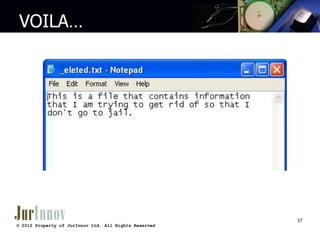
– Example recovery of deleted document…..

50
© 2012 Property of JurInnov Ltd. All Rights Reserved
“deleted.txt” exists on a disk

51
© 2012 Property of JurInnov Ltd. All Rights Reserved
The file has been deleted

52
© 2012 Property of JurInnov Ltd. All Rights Reserved
The directory listing…
Note the sigma character

53
© 2012 Property of JurInnov Ltd. All Rights Reserved
Is the data really gone???

© 2009 Property of JurInnov Ltd. All Rights Reserved
54
Sigma changed to Underscore

© 2009 Property of JurInnov Ltd. All Rights Reserved
55
Hey … it’s back!

56
© 2012 Property of JurInnov Ltd. All Rights Reserved
VOILA…

57
© 2012 Property of JurInnov Ltd. All Rights Reserved
Deleted & Overwritten File

© 2012 Property of JurInnov Ltd. All Rights Reserved
2009
Recycle Bin Info Record Finder
•

These files were recovered by searching for recycle bin header signatures in unallocated and slack space. These
records represent files that were contained in the recycle bin before it was emptied.

•
•

Info records for file:
Demo caseRevised demo imagesCRECYCLERS-1-5-21-1229272821-1592454029-839522115-1003INFO2

•
•
•
•
•
•

Index
:2
Deleted : 11/06/07 03:30:54PM
FileSize : 20480 bytes (20 KB)
FilePath : C:Documents and SettingsDemoMy DocumentsABC Sports Agency - DeletedRec
ycle Bin - ABC Balance Sheet.xls
Offset : 820

•
•
•
•
•
•

Index
:2
Deleted : 11/06/07 10:30:54AM
FileSize : 20480 bytes (20 KB)
FilePath : C:Documents and SettingsDemoMy DocumentsABC Sports Agency - DeletedRec
ycle Bin - ABC Balance Sheet.xls
Offset : 1080

© 2009 Property of JurInnov Ltd. All Rights Reserved
Forensic Analysis
• File Signature Analysis
• File Hash Analysis

• Analysis Examples …

60
© 2012 Property of JurInnov Ltd. All Rights Reserved
Signature Analysis

© 2012 Property of JurInnov Ltd. All Rights Reserved
2009
Signature Analysis

© 2012 Property of JurInnov Ltd. All Rights Reserved
2009
Signature Analysis

© 2012 Property of JurInnov Ltd. All Rights Reserved
2009
Hash Analysis

© 2012 Property of JurInnov Ltd. All Rights Reserved
2009
Forensic Analysis
• Key Term Searching
– Index full contents of the image for searching
– Tips for this method

• File Filtering
–
–
–
–
–

Date ranges
File type(s)
Duplicates
Known Files (KFF)
Even combinations of multiple filters

65
© 2012 Property of JurInnov Ltd. All Rights Reserved
Forensic Analysis
• Email Activity
• Printing Activity
– Look for printing spool/shadow files
• Can possibly contain the data that was sent to a printer

• Network Activity
• Network connections
• Wireless access points
• Shared network folders/files

66
© 2012 Property of JurInnov Ltd. All Rights Reserved
Forensic Analysis
• Hiberfil.sys Analysis
– Data is written to “hiberfil.sys” file when a machine is put
in hibernation mode on the Windows OS
• Usually recent data

– May contain passwords, login information, temporary data,
whole or partial documents

• RAM Analysis
– Can only be acquired on a live system
• Analyst will change data on the system

– May contain passwords, login information, temporary data,
whole or partial documents, currently running processes

67
© 2012 Property of JurInnov Ltd. All Rights Reserved
Forensic Analysis
• Unallocated Space
– Partial documents
– Overwritten files

• Drive Free Space
• File Slack

68
© 2012 Property of JurInnov Ltd. All Rights Reserved
Mobile Device Acquisition
•
•
•
•

Photograph, document and begin Chain of Custody
Obtain password if enabled
Obtain charger and maintain power to the device
Cut off network communications
– Faraday bag or Airplane Mode

• Determine acquisition/data extraction method
– Device
• CellDek
• Device Seizure
• MPE+

– SIM Card – CellDek, Device Seizure or MPE+
– Media/SD Card - EnCase
69
© 2012 Property of JurInnov Ltd. All Rights Reserved
Mobile Device Analysis
• Not to be considered an “Image”
– Extraction of artifacts from device’s databases

• Some Items That Can Be Acquired
–
–
–
–

SMS/MMS
Email
Contacts
Calendar

• Searching
– Able to search within the device’s extracted data for key
terms.
– Bookmark items that are relevant to the case
70
© 2012 Property of JurInnov Ltd. All Rights Reserved
Mobile Device Analysis
• Reporting
– Tools include report generators
• HTML
• CSV / XLS
• PDF

– Include ALL items or only Bookmarked items
• Helps to limit amount of irrelevant data in the reports

71
© 2012 Property of JurInnov Ltd. All Rights Reserved
Evidence/Analysis Reporting
• Native File Exports
– Provide files in native format on CD, DVD or External HDD
– Allows client to view the files as the custodian did
– Keeps metadata intact

• Metadata Report
– Excel spreadsheet containing all the metadata of the
native file export
– Easy way to look through and sort the files in one place

72
© 2012 Property of JurInnov Ltd. All Rights Reserved
Evidence/Analysis Reporting
• Detailed Forensic Report
– Report done throughout and after every case
– Details all work done by forensic analysts from beginning
to end

• HTML Based Reports
– FTK, Device Seizure, CellDEK, Internet Evidence Finder
– Simple report in web format for easy viewing

• Final Expert Report
– Completed & signed version of the detailed forensic report

• Expert Testimony
– Analysts will provide expert testimony in court if required.
73
© 2012 Property of JurInnov Ltd. All Rights Reserved
For assistance or additional information
• Phone:
• Web:
• Email:

216-664-1100
www.jurinnov.com
tim.opsitnick@jurinnov.com
eric.vanderburg@jurinnov.com
john.liptak@jurinnov.com
JurInnov Ltd.
The Idea Center
1375 Euclid Avenue, Suite 400
Cleveland, Ohio 44115
74

© 2012 Property of JurInnov Ltd. All Rights Reserved

Computer Forensics: First Responder Training - Eric Vanderburg - JurInnov

  • 1.
    Computer Forensics First ResponderTraining August 28-30, 2012 Timothy M. Opsitnick, Esq. Senior Partner and General Counsel JurInnov Ltd. Eric A. Vanderburg, MBA, CISSP Director, Information Systems and Security Computer Forensic and Investigation Services John G. Liptak, ACE, EnCE Senior Consultant Computer Forensic and Investigation Services © 2009 Property of JurInnov Ltd. All Rights Reserved © 2012 Property of JurInnov Ltd. All Rights Reserved
  • 2.
    Who Are We? JurInnovworks with organizations that want to more effectively manage matters involving “Electronically Stored Information” (ESI). – – – – Electronic Discovery Computer Forensics Document and Case Management Computer & Network Security 2 © 2012 Property of JurInnov Ltd. All Rights Reserved
  • 3.
    Presentation Overview • UnderstandingComputing Environments • Collecting Electronically Stored Information • Forensic Analysis Demonstration • Types of Cases When Forensics Are Useful 3 © 2012 Property of JurInnov Ltd. All Rights Reserved
  • 4.
    What is ComputerForensics? Computer Forensics is a scientific, systematic inspection of the computer system and its contents utilizing specialized techniques and tools for recovery, authentication, and analysis of electronic data. It is customarily used when a case involves issues relating to reconstruction of computer usage, examination of residual data, authentication of data by technical analysis or explanation of technical features of data and computer usage. Computer Forensics requires specialized expertise that goes beyond normal data collection and preservation techniques available to end-users or system support personnel. 4 © 2012 Property of JurInnov Ltd. All Rights Reserved
  • 5.
    Sources of “ESI” •Desktops • E-Mail • Laptops • Archives • CDs/DVDs • Cell Phones/PDAs • Network Attached Storage Devices (NAS) • Thumb Drives • Storage Area Networks (SAN) • Memory Cards • Servers • Cameras • Databases • Printers • Backup Tapes • GPS Devices • External Storage Devices © 2012 Property of JurInnov Ltd. All Rights Reserved 2009 5
  • 6.
    Why Computer Forensics? •Reasons to use Computer Forensics – Internal Company Investigations • Alleged criminal activity • Civil or Regulatory Preservation – Receivership, Bankruptcy – EEO issues – Improper use of company assets – Recovery of Accidentally or Intentionally Deleted Data • Deleted is not necessarily deleted • Recovery from Improper shutdowns 6 © 2012 Property of JurInnov Ltd. All Rights Reserved
  • 7.
    How Does aComputer Operate? • Hardware – Processor – Memory (RAM) – Hard Drive – CD/DVD Drive – Motherboard – Mouse/Keyboard • Software – Operating System – Applications 7 © 2012 Property of JurInnov Ltd. All Rights Reserved
  • 8.
    How Does aComputer Operate? • How is data stored on a hard drive? • How is data “deleted” by the operating system? 8 © 2012 Property of JurInnov Ltd. All Rights Reserved
  • 9.
    9 © 2012 Propertyof JurInnov Ltd. All Rights Reserved
  • 10.
    10 © 2012 Propertyof JurInnov Ltd. All Rights Reserved
  • 11.
    Collecting “ESI” • WindowsCopy • Ghost Copy/Images • Forensic Images 11 © 2012 Property of JurInnov Ltd. All Rights Reserved
  • 12.
    Collecting “ESI” • ForensicHarvesting - Logical v Physical – Logical copy (Active Files) • Data that is visible via the O.S. – Physical • Logical + File Slack + Unallocated Space + system areas (MBR, Partition table, FAT/MFT) 12 © 2012 Property of JurInnov Ltd. All Rights Reserved
  • 13.
    First Response • First StepsTaken – Identify users/custodians, electronic devices and begin Chain of Custody – Photograph and document full environment and condition/state of devices – Determine next steps depending on device(s) and situation 13 © 2012 Property of JurInnov Ltd. All Rights Reserved
  • 14.
    Acquisition (Data Harvest) • Equipmentand Tools – – – – – – – – – Write Blockers Camera Forensically wiped hard drives Screw Drivers Anti-static bags Power Strips and extension cords Blank CDs and DVDs / USB Flash Drives SD Card / Micro Card Reader Fans for cooling drives during imaging 14 © 2012 Property of JurInnov Ltd. All Rights Reserved
  • 15.
    Acquisition (Data Harvest) • SoftwareTools – – – – – – EnCase (Guidance Software) Forensic Tool Kit (AccessData) Mobile Phone Examiner (AccessData) Device Seizure (Paraben) Raptor (Forward Discovery) Internet Evidence Finder (Magnet Forensics) • Hardware Tools – – Write Blockers (Tableau) CellDEK (Logicube) 15 © 2012 Property of JurInnov Ltd. All Rights Reserved
  • 16.
    Types of DataAcquisitions • Image Types – – – – EnCase Image (.E01) Logical EnCase Image (.L01) DD Image (.001) Custom Content Image (.AD1) • ESI Locations – Hard Drives – Servers • Email • Network Shares – Cell Phone/PDA – External Media 16 © 2012 Property of JurInnov Ltd. All Rights Reserved
  • 17.
    Computer Imaging • Photograph,document and begin Chain of Custody • Acquire live RAM (if possible/necessary) • Shut down computer – Pull plug (Windows/Mac) – Properly shut down (Server/Linux/Unix) • Determine imaging method and format – Write Blocker – Boot Disk • USB / eSata / FireWire • Crossover Cable 17 © 2012 Property of JurInnov Ltd. All Rights Reserved
  • 18.
    Computer Imaging • ImagingProcess – Set segment size, type of image, name and compression – Create forensic image utilizing selected method – Verify Image Hash Value • Check BIOS clock and document date/time – Make note of any differences from actual date/time • Re-Install hard drive if removed and verify that the computer boots to the OS • Create “Work” drive of collected images – Connect Backup drive to a write blocker to ensure no changes to the original data occurs 18 © 2012 Property of JurInnov Ltd. All Rights Reserved
  • 19.
    Device Imaging 19 © 2012Property of JurInnov Ltd. All Rights Reserved
  • 20.
    Creating a “Work”drive 20 © 2012 Property of JurInnov Ltd. All Rights Reserved
  • 21.
    Image Verification • • • • • • • • • • • • • Presentation Suspect Description: PhysicalSize: Starting Extent: Name: Presentation Actual Date: Target Date: File Path: Case Number: Evidence Number: Examiner Name: Drive Type: File Integrity: Images Physical Disk, 39102336 Sectors, 18.6GB 512 1S0 Suspect Images 03/24/09 03:17:21PM 03/24/09 03:17:21PM E:Presentation image.E01 Presentation Drive Presentation Suspect Images Stephen W. St.Pierre Fixed Completely Verified, 0 Errors • • Acquisition Hash: Verify Hash: • • • • • GUID: 04d345276275524c8a111824be6eb170 EnCase Version: 5.05j System Version: Windows 2003 Server Total Size: 20,020,396,032 bytes (18.6GB) Total Sectors: 39,102,336 5cfa3830c3af83741da4f9adcfb896e1 5cfa3830c3af83741da4f9adcfb896e1 21 © 2012 Property of JurInnov Ltd. All Rights Reserved
  • 22.
    Work Images • CreatingWork copy of original Backup Image – Evidence Mover Log: 03/25/09 16:20:14 - Source file: F:EvidencePresentation image.E01 Destination file: G:EvidencePresentation image.E01. Attempt# 1 Hash :9348B9FECFE8023FA3095FB710AFD678 03/25/09 16:20:37 - Source file: F:EvidencePresentation image.E02 Destination file: G:EvidencePresentation image.E02. Attempt# 1 Hash :363293E77BB1C974FD82DE7EC3CE1842 03/25/09 16:20:59 - Source file: F:EvidencePresentation image.E03 Destination file: G:EvidencePresentation image.E03. Attempt# 1 Hash :3AA6885A045E8F5D20899113A4848917 22 © 2012 Property of JurInnov Ltd. All Rights Reserved
  • 23.
    USB Thumb DriveAcquisition • Photograph, document and begin Chain of Custody • Determine imaging method and format – Hardware write blocker – Software Registry Write Block • Imaging Process – Create forensic image utilizing selected method – Verify image(s) hash value 23 © 2012 Property of JurInnov Ltd. All Rights Reserved
  • 24.
    Network Data Collection •Photograph and document • Coordinate with IT to determine location of desired shares/folders • Obtain proper credentials to access target data • Attach forensically wiped hard drive to server or workstation with local network access • Run FTK Imager Lite from attached hard drive • Create Custom Content Image (.AD1) of target shares/folders • Verify image MD5 hash value 24 © 2012 Property of JurInnov Ltd. All Rights Reserved
  • 25.
    Network Data AD1Image Add To Custom Content Image (AD1) Add Contents of a Folder 25 © 2012 Property of JurInnov Ltd. All Rights Reserved
  • 26.
    Network Data AD1Image Create Custom Content Image Verify Hash Value of AD1 26 © 2012 Property of JurInnov Ltd. All Rights Reserved
  • 27.
    Microsoft Exchange Collection • • • • • Photographand document Stop Microsoft Exchange services Attach forensically wiped hard drive to Exchange server Run FTK Imager Lite from attached hard drive Create Custom Content Image (.AD1) of Exchange .EDB files • Verify image MD5 hash values • Restart all Microsoft Exchange services 27 © 2012 Property of JurInnov Ltd. All Rights Reserved
  • 28.
    Microsoft Exchange Cont. •Select Mailbox Collection – Exchange 2003 • ExMerge – Exchange 2007 & 2010 • Command Line/Power Shell 28 © 2012 Property of JurInnov Ltd. All Rights Reserved
  • 29.
    Registry Overview • WindowsRegistry – central database of the configuration data for the OS and applications. • Gold Mine of forensic evidence • Registry Keys – – – – Software System SAM (Security Account Manager) NTUSER.dat 29 © 2012 Property of JurInnov Ltd. All Rights Reserved
  • 30.
    Software Key • • • • • What OperatingSystem Installed? Date/Time OS Installed Product ID For Installed OS Installed software Programs That Run Automatically at Startup (Place to Hide Virus) • User Profiles 30 © 2012 Property of JurInnov Ltd. All Rights Reserved
  • 31.
    System Key • • • • • Mounted Devices ComputerName USB Plugged-In Devices (USBSTOR) Last System SHUT DOWN Time Time Zone 31 © 2012 Property of JurInnov Ltd. All Rights Reserved
  • 32.
    SAM & NTUSER.DATKeys • SAM – Domain Accounts • NTUSER.DAT – – – – Network Assigned Drive Letters Last Clean Shutdown Date/Time Recent Documents Program settings 32 © 2012 Property of JurInnov Ltd. All Rights Reserved
  • 33.
    Forensic Analysis • RegistryAnalysis – – – – – – – – – – OS Install date/time Installed Software Startup programs Time Zone settings Last Shutdown time User information / Accounts Recently opened files Connected USB Devices Mounted Drives Recently used programs 33 © 2012 Property of JurInnov Ltd. All Rights Reserved
  • 34.
    Registry – OSInstall Date 34 © 2012 Property of JurInnov Ltd. All Rights Reserved
  • 35.
    Registry – InstalledSoftware 35 © 2012 Property of JurInnov Ltd. All Rights Reserved
  • 36.
    Registry – StartupPrograms 36 © 2012 Property of JurInnov Ltd. All Rights Reserved
  • 37.
    Registry – TimeZone Settings 37 © 2012 Property of JurInnov Ltd. All Rights Reserved
  • 38.
    Registry – LastShutdown Time 38 © 2012 Property of JurInnov Ltd. All Rights Reserved
  • 39.
    Registry – UserInfo/Accounts 39 © 2012 Property of JurInnov Ltd. All Rights Reserved
  • 40.
    Registry – UserInfo/Accounts 40 © 2012 Property of JurInnov Ltd. All Rights Reserved
  • 41.
    Registry – RecentlyOpened 41 © 2012 Property of JurInnov Ltd. All Rights Reserved
  • 42.
    Registry – USBDevices 42 © 2012 Property of JurInnov Ltd. All Rights Reserved
  • 43.
    Registry – MountedDrives 43 © 2012 Property of JurInnov Ltd. All Rights Reserved
  • 44.
    Registry – RecentPrograms 44 © 2012 Property of JurInnov Ltd. All Rights Reserved
  • 45.
    Forensic Analysis • USB/ External HDD Analysis – – – – – – – – Serial Number Volume Serial Number Model First Connected Last Connected Friendly Name User who connected drive .LNK Files 45 © 2012 Property of JurInnov Ltd. All Rights Reserved
  • 46.
    USB/External HDD Analysis 46 ©2012 Property of JurInnov Ltd. All Rights Reserved
  • 47.
    Forensic Analysis • InternetHistory – Default internet browser – Sites visited and frequency – Date and time of last visit • Recent Folder – Recently accessed files/programs • My Documents / User Folder(s) – Usually where most user created data is located 47 © 2012 Property of JurInnov Ltd. All Rights Reserved
  • 48.
    Internet History Analysis 48 ©2012 Property of JurInnov Ltd. All Rights Reserved
  • 49.
    Internet History Analysis 49 ©2012 Property of JurInnov Ltd. All Rights Reserved
  • 50.
    Forensic Analysis • Deletion –Recycle Bin • Examine INFO2 records if file was sent to the recycle bin – Contains the date & time the file was sent to the recycle bin – Shows where the file resided before being sent to the recycle bin – Data Carving – Evidence of wiping or wiping software • Hex Editor sometimes helps to see wiping pattern if one exists – Example recovery of deleted document….. 50 © 2012 Property of JurInnov Ltd. All Rights Reserved
  • 51.
    “deleted.txt” exists ona disk 51 © 2012 Property of JurInnov Ltd. All Rights Reserved
  • 52.
    The file hasbeen deleted 52 © 2012 Property of JurInnov Ltd. All Rights Reserved
  • 53.
    The directory listing… Notethe sigma character 53 © 2012 Property of JurInnov Ltd. All Rights Reserved
  • 54.
    Is the datareally gone??? © 2009 Property of JurInnov Ltd. All Rights Reserved 54
  • 55.
    Sigma changed toUnderscore © 2009 Property of JurInnov Ltd. All Rights Reserved 55
  • 56.
    Hey … it’sback! 56 © 2012 Property of JurInnov Ltd. All Rights Reserved
  • 57.
    VOILA… 57 © 2012 Propertyof JurInnov Ltd. All Rights Reserved
  • 58.
    Deleted & OverwrittenFile © 2012 Property of JurInnov Ltd. All Rights Reserved 2009
  • 59.
    Recycle Bin InfoRecord Finder • These files were recovered by searching for recycle bin header signatures in unallocated and slack space. These records represent files that were contained in the recycle bin before it was emptied. • • Info records for file: Demo caseRevised demo imagesCRECYCLERS-1-5-21-1229272821-1592454029-839522115-1003INFO2 • • • • • • Index :2 Deleted : 11/06/07 03:30:54PM FileSize : 20480 bytes (20 KB) FilePath : C:Documents and SettingsDemoMy DocumentsABC Sports Agency - DeletedRec ycle Bin - ABC Balance Sheet.xls Offset : 820 • • • • • • Index :2 Deleted : 11/06/07 10:30:54AM FileSize : 20480 bytes (20 KB) FilePath : C:Documents and SettingsDemoMy DocumentsABC Sports Agency - DeletedRec ycle Bin - ABC Balance Sheet.xls Offset : 1080 © 2009 Property of JurInnov Ltd. All Rights Reserved
  • 60.
    Forensic Analysis • FileSignature Analysis • File Hash Analysis • Analysis Examples … 60 © 2012 Property of JurInnov Ltd. All Rights Reserved
  • 61.
    Signature Analysis © 2012Property of JurInnov Ltd. All Rights Reserved 2009
  • 62.
    Signature Analysis © 2012Property of JurInnov Ltd. All Rights Reserved 2009
  • 63.
    Signature Analysis © 2012Property of JurInnov Ltd. All Rights Reserved 2009
  • 64.
    Hash Analysis © 2012Property of JurInnov Ltd. All Rights Reserved 2009
  • 65.
    Forensic Analysis • KeyTerm Searching – Index full contents of the image for searching – Tips for this method • File Filtering – – – – – Date ranges File type(s) Duplicates Known Files (KFF) Even combinations of multiple filters 65 © 2012 Property of JurInnov Ltd. All Rights Reserved
  • 66.
    Forensic Analysis • EmailActivity • Printing Activity – Look for printing spool/shadow files • Can possibly contain the data that was sent to a printer • Network Activity • Network connections • Wireless access points • Shared network folders/files 66 © 2012 Property of JurInnov Ltd. All Rights Reserved
  • 67.
    Forensic Analysis • Hiberfil.sysAnalysis – Data is written to “hiberfil.sys” file when a machine is put in hibernation mode on the Windows OS • Usually recent data – May contain passwords, login information, temporary data, whole or partial documents • RAM Analysis – Can only be acquired on a live system • Analyst will change data on the system – May contain passwords, login information, temporary data, whole or partial documents, currently running processes 67 © 2012 Property of JurInnov Ltd. All Rights Reserved
  • 68.
    Forensic Analysis • UnallocatedSpace – Partial documents – Overwritten files • Drive Free Space • File Slack 68 © 2012 Property of JurInnov Ltd. All Rights Reserved
  • 69.
    Mobile Device Acquisition • • • • Photograph,document and begin Chain of Custody Obtain password if enabled Obtain charger and maintain power to the device Cut off network communications – Faraday bag or Airplane Mode • Determine acquisition/data extraction method – Device • CellDek • Device Seizure • MPE+ – SIM Card – CellDek, Device Seizure or MPE+ – Media/SD Card - EnCase 69 © 2012 Property of JurInnov Ltd. All Rights Reserved
  • 70.
    Mobile Device Analysis •Not to be considered an “Image” – Extraction of artifacts from device’s databases • Some Items That Can Be Acquired – – – – SMS/MMS Email Contacts Calendar • Searching – Able to search within the device’s extracted data for key terms. – Bookmark items that are relevant to the case 70 © 2012 Property of JurInnov Ltd. All Rights Reserved
  • 71.
    Mobile Device Analysis •Reporting – Tools include report generators • HTML • CSV / XLS • PDF – Include ALL items or only Bookmarked items • Helps to limit amount of irrelevant data in the reports 71 © 2012 Property of JurInnov Ltd. All Rights Reserved
  • 72.
    Evidence/Analysis Reporting • NativeFile Exports – Provide files in native format on CD, DVD or External HDD – Allows client to view the files as the custodian did – Keeps metadata intact • Metadata Report – Excel spreadsheet containing all the metadata of the native file export – Easy way to look through and sort the files in one place 72 © 2012 Property of JurInnov Ltd. All Rights Reserved
  • 73.
    Evidence/Analysis Reporting • DetailedForensic Report – Report done throughout and after every case – Details all work done by forensic analysts from beginning to end • HTML Based Reports – FTK, Device Seizure, CellDEK, Internet Evidence Finder – Simple report in web format for easy viewing • Final Expert Report – Completed & signed version of the detailed forensic report • Expert Testimony – Analysts will provide expert testimony in court if required. 73 © 2012 Property of JurInnov Ltd. All Rights Reserved
  • 74.
    For assistance oradditional information • Phone: • Web: • Email: 216-664-1100 www.jurinnov.com tim.opsitnick@jurinnov.com eric.vanderburg@jurinnov.com john.liptak@jurinnov.com JurInnov Ltd. The Idea Center 1375 Euclid Avenue, Suite 400 Cleveland, Ohio 44115 74 © 2012 Property of JurInnov Ltd. All Rights Reserved

Editor's Notes

  • #10 Sector is the smallest addressable container on a drive. Sector = 512 bytes.Cluster is a series of sectors. Cluster size is determined by the operating system and is related to the total size of the drive partition.On a floppy diskette 1 sector = 1 cluster.