1
Session
Communication Diagram
Checklist
 Explain Communication Diagram
 Example of Communication Diagram
2
Communication
Diagram
Communication diagrams are used to denote interaction between objects. They follow the
same rule as to what sequence diagram does. Communication diagram helps us to shows
interactions in a modular level. In my opinion it’s better to use sequence diagram (whose syntax
is known by everyone) rather than using communication diagrams (which is not so popular).
However communication diagrams are the best when it comes to represent links between
objects. There are no special syntax for constructing communication diagram but there are
couple things to remember when using communication diagram.
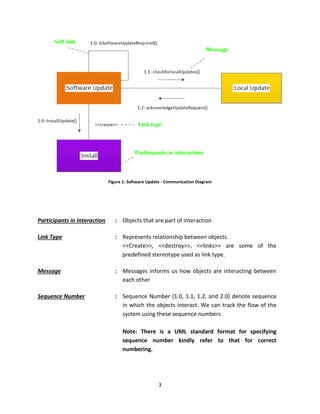
I have constructed a communication diagram for a software update process. There are three
objects – Software Update, Local Update and Install. Software update object gets triggered
when there is a need for update. Software update then checks for any local update is available.
If local updates are available Install object instance is created and update is installed.
3
Figure 1: Software Update - Communication Diagram
Participants in Interaction : Objects that are part of interaction
Link Type : Represents relationship between objects.
<<Create>>, <<destroy>>, <<links>> are some of the
predefined stereotype used as link type.
Message : Messages informs us how objects are interacting between
each other
Sequence Number : Sequence Number (1.0, 1.1, 1.2, and 2.0) denote sequence
in which the objects interact. We can track the flow of the
system using these sequence numbers
Note: There is a UML standard format for specifying
sequence number kindly refer to that for correct
numbering.
4
Review
 Communication diagram are used to represent links between objects
 They help us to understand how objects interact with each other in a
System

Communication Diagram

  • 1.
    1 Session Communication Diagram Checklist  ExplainCommunication Diagram  Example of Communication Diagram
  • 2.
    2 Communication Diagram Communication diagrams areused to denote interaction between objects. They follow the same rule as to what sequence diagram does. Communication diagram helps us to shows interactions in a modular level. In my opinion it’s better to use sequence diagram (whose syntax is known by everyone) rather than using communication diagrams (which is not so popular). However communication diagrams are the best when it comes to represent links between objects. There are no special syntax for constructing communication diagram but there are couple things to remember when using communication diagram. I have constructed a communication diagram for a software update process. There are three objects – Software Update, Local Update and Install. Software update object gets triggered when there is a need for update. Software update then checks for any local update is available. If local updates are available Install object instance is created and update is installed.
  • 3.
    3 Figure 1: SoftwareUpdate - Communication Diagram Participants in Interaction : Objects that are part of interaction Link Type : Represents relationship between objects. <<Create>>, <<destroy>>, <<links>> are some of the predefined stereotype used as link type. Message : Messages informs us how objects are interacting between each other Sequence Number : Sequence Number (1.0, 1.1, 1.2, and 2.0) denote sequence in which the objects interact. We can track the flow of the system using these sequence numbers Note: There is a UML standard format for specifying sequence number kindly refer to that for correct numbering.
  • 4.
    4 Review  Communication diagramare used to represent links between objects  They help us to understand how objects interact with each other in a System