1
Session
Object Diagram
Checklist
 Introduction to Object diagram
 Explain Object diagram notations
 Construct Object diagram for Case
Study
2
Object Diagram
Object Diagram is snapshots of objects in the system at a particular point of time. Since objects
are also known as instances it is also known as instance diagram. Object diagram are useful to
test the correctness of class diagram.
Elements of an Object Diagram
There are only two elements in an object diagram – objects and links.
Objects
Objects are represented with compartments same as classes. Objects have only two
compartments name compartment and attributes compartment. Operator compartment is not
present in object diagrams because when there are more instances for an object you will be
seeing same operators for each instance. Syntax for Object name is as follows
All the parts of Objects are optional, Object name can also be “:Order” – this is known as
anonymous object. Each object should have value for its attributes.
Figure 1: Object Notation
Object name: class name
3
Link
Objects are connected with links (a line) that has names and no multiplicity. All links are one to
one and roles can be attached to links. In the below example OrderId_5 is an instance of Order
class and has produced two products [anonymous object & Vendor_Id_112]. Customer and
Vendor are role names that are denoted on the links.
Figure 2: Link Notation
Testing Order processing system with Object diagram
Let us consider our last constructed class diagram and test the object of Order.
Figure 3: Object Diagram - Order Processing System v0.1
4
There are certain errors with our order object. They are as follows
1. It seems order number and bill numbers are duplicating each other. It is sufficient to
have one of them.
2. I have specified the type of orderDetails as String
but it would be better to create an object for it,
since we would need multiple details like Product
Name, Weight, Unit Price, Any discount applicable
for the product.
3. I have mentioned type of lineItem as ArrayList but
in the interface add operator’s attribute is
LineItem which is incorrect
Based on the above object diagram we were able to detect some of the flaws. I have
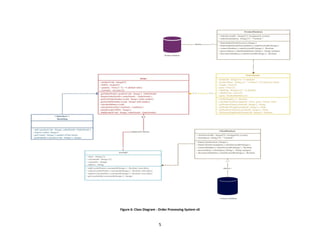
redesigned the class diagram. The update Order Processing System class diagram is shown
in Figure 5. Updated Object diagram is present below.
Figure 5: Object Diagram v0.2
Figure 4: Interface with Error
5
Figure 6: Class Diagram - Order Processing System v0
6
Review
 Object diagram represent snapshots of object at a particular
time
 Object diagram is also known as instance diagram
 Elements of object diagram – Objects and links
 We have deducted flaws for our class diagram and corrected
them

Object diagram

  • 1.
    1 Session Object Diagram Checklist  Introductionto Object diagram  Explain Object diagram notations  Construct Object diagram for Case Study
  • 2.
    2 Object Diagram Object Diagramis snapshots of objects in the system at a particular point of time. Since objects are also known as instances it is also known as instance diagram. Object diagram are useful to test the correctness of class diagram. Elements of an Object Diagram There are only two elements in an object diagram – objects and links. Objects Objects are represented with compartments same as classes. Objects have only two compartments name compartment and attributes compartment. Operator compartment is not present in object diagrams because when there are more instances for an object you will be seeing same operators for each instance. Syntax for Object name is as follows All the parts of Objects are optional, Object name can also be “:Order” – this is known as anonymous object. Each object should have value for its attributes. Figure 1: Object Notation Object name: class name
  • 3.
    3 Link Objects are connectedwith links (a line) that has names and no multiplicity. All links are one to one and roles can be attached to links. In the below example OrderId_5 is an instance of Order class and has produced two products [anonymous object & Vendor_Id_112]. Customer and Vendor are role names that are denoted on the links. Figure 2: Link Notation Testing Order processing system with Object diagram Let us consider our last constructed class diagram and test the object of Order. Figure 3: Object Diagram - Order Processing System v0.1
  • 4.
    4 There are certainerrors with our order object. They are as follows 1. It seems order number and bill numbers are duplicating each other. It is sufficient to have one of them. 2. I have specified the type of orderDetails as String but it would be better to create an object for it, since we would need multiple details like Product Name, Weight, Unit Price, Any discount applicable for the product. 3. I have mentioned type of lineItem as ArrayList but in the interface add operator’s attribute is LineItem which is incorrect Based on the above object diagram we were able to detect some of the flaws. I have redesigned the class diagram. The update Order Processing System class diagram is shown in Figure 5. Updated Object diagram is present below. Figure 5: Object Diagram v0.2 Figure 4: Interface with Error
  • 5.
    5 Figure 6: ClassDiagram - Order Processing System v0
  • 6.
    6 Review  Object diagramrepresent snapshots of object at a particular time  Object diagram is also known as instance diagram  Elements of object diagram – Objects and links  We have deducted flaws for our class diagram and corrected them