Interaction Diagrams
 show how objects interact with one another
 UML supports two types of interaction
diagrams
 Sequence diagrams
 Collaboration diagrams
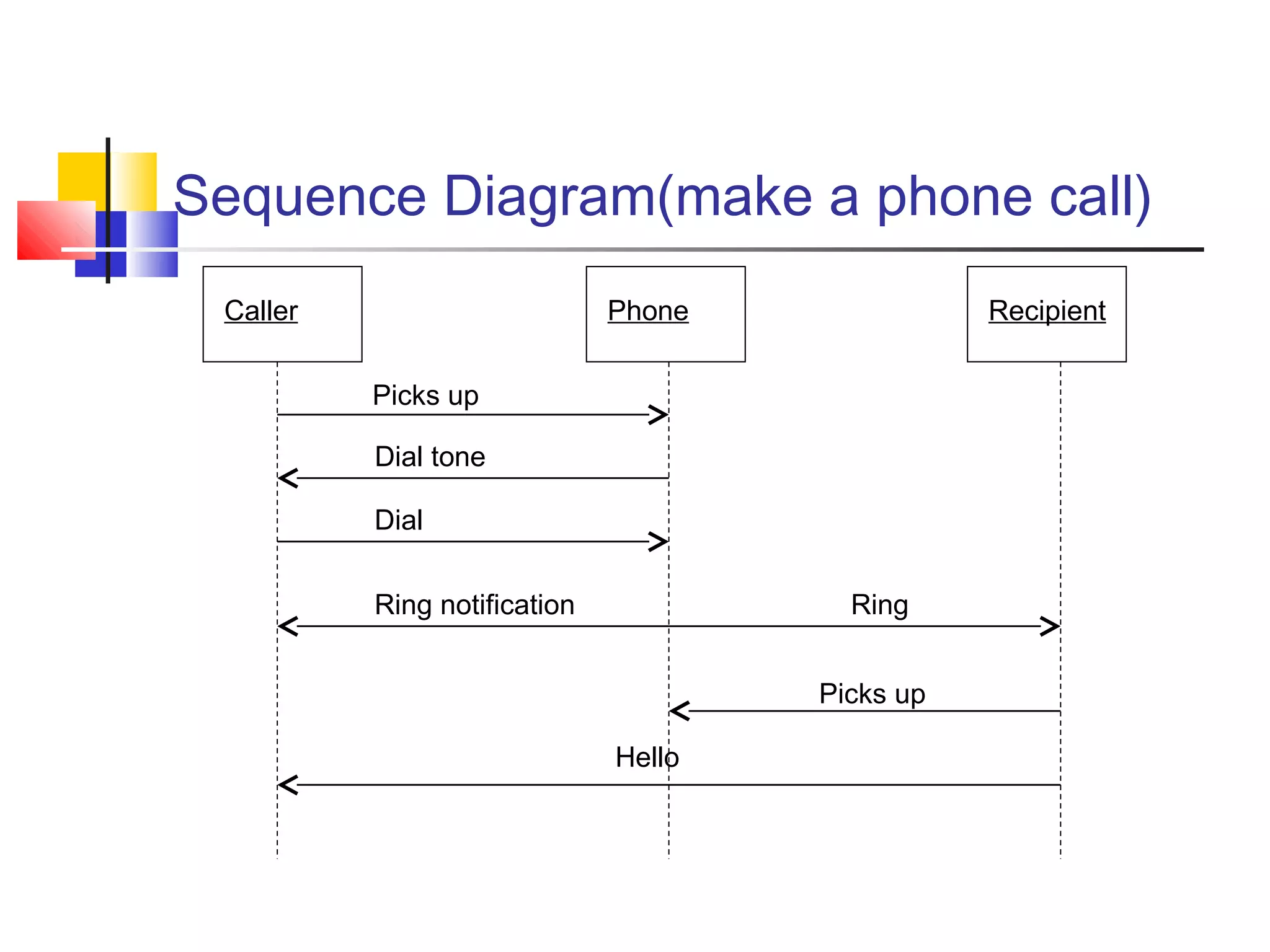
Sequence Diagram(make a phone call)
Caller Phone Recipient
Picks up
Dial tone
Dial
Ring notification Ring
Picks up
Hello
Sequence Diagram:Object interaction
Self-CallSelf-Call: A message that an
Object sends to itself.
Condition: indicates when a
message is sent. The message is
sent only if the condition is true.
Iteration
Condition
A B
Synchronous
Asynchronous
Transmission
delayed
Self-Call
[condition] remove()
*[for each] remove()
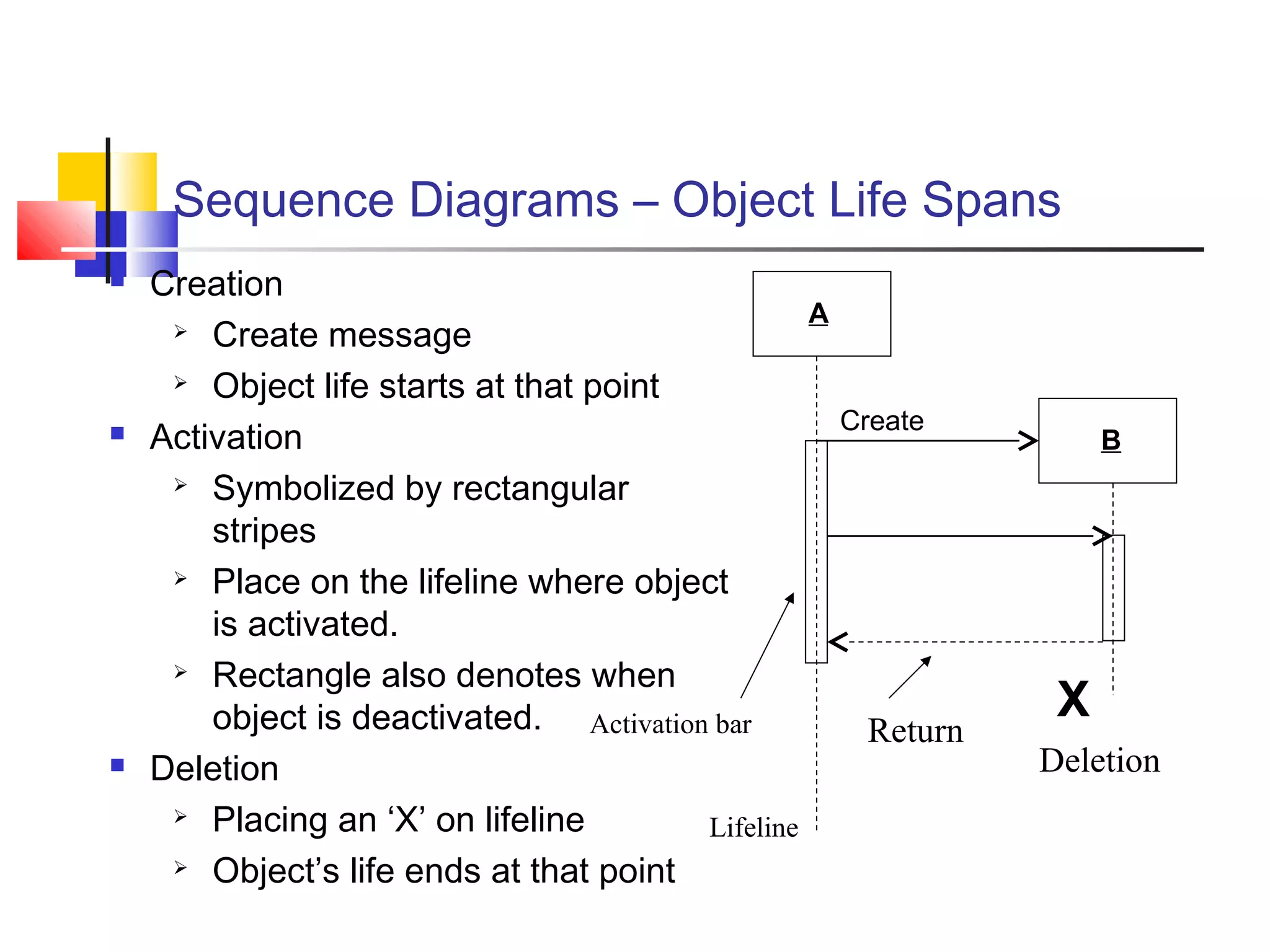
Sequence Diagrams – Object Life Spans
 Creation
 Create message
 Object life starts at that point
 Activation
 Symbolized by rectangular
stripes
 Place on the lifeline where object
is activated.
 Rectangle also denotes when
object is deactivated.
 Deletion
 Placing an ‘X’ on lifeline
 Object’s life ends at that point
Activation bar
A
B
Create
X
Deletion
Return
Lifeline
Sequence Diagram
User Catalog Reservations
1: look up ()
2: title data ()
3: [not available] reserve title ()
4 : title returned ()
5: hold title ()
5 : title available ()
6 : borrow title ()
6 : remove reservation ()
•Sequence diagrams demonstrate the
behavior of objects in a use case by
describing the objects and the
messages they pass.
•The horizontal dimension shows the
objects participating in the interaction.
•The vertical arrangement of
messages indicates their order.
•The labels may contain the seq. # to
indicate concurrency.
Message
Interaction Diagrams: Collaboration diagrams
User
Catalog
Reservations
start
1: look up
2: title data
3 : [not available] reserve title
4 : title returned
5 : hold title
6 : borrow title
6: remove reservation
5: title available
Collaboration diagrams are equivalent to sequence diagrams. All the features of sequence diagrams are
equally applicable to collaboration diagrams
Use a sequence diagram when the transfer of information is the focus of attention
Use a collaboration diagram when concentrating on the classes
What UML Modeling tools we use today?
 List of UML tools http://en.wikipedia.org/wiki/List_of_UML_tools
 ArgoUML: http://argouml.tigris.org/
 Rational Rose (www.rational.com) by IBM
 UML Studio 7.1 ( http://www.pragsoft.com/) by Pragsoft Corporation:
Capable of handling very large models (tens of thousands of classes).
Educational License US$ 125.00; Freeware version.
 TogetherSoft Control Center; TogetherSoft Solo
(http://www.borland.com/together/index.html) by Borland
Conclusion
 UML is a standardized specification language
for object modeling
 Several UML diagrams:
 use-case diagram: a number of use cases (use case models the interaction
between actors and software)
 Class diagram: a model of classes showing the static relationships among them
including association and generalization.
 Sequence diagram: shows the way objects interact with one another as
messages are passed between them. Dynamic model
 State diagram: shows states, events that cause transitions between states.
Another dynamic model reflecting the behavior of objects and how they react to
specific event
 There are several UML tools available

Fundamentals of Software Engineering

  • 1.
    Interaction Diagrams  showhow objects interact with one another  UML supports two types of interaction diagrams  Sequence diagrams  Collaboration diagrams
  • 2.
    Sequence Diagram(make aphone call) Caller Phone Recipient Picks up Dial tone Dial Ring notification Ring Picks up Hello
  • 3.
    Sequence Diagram:Object interaction Self-CallSelf-Call:A message that an Object sends to itself. Condition: indicates when a message is sent. The message is sent only if the condition is true. Iteration Condition A B Synchronous Asynchronous Transmission delayed Self-Call [condition] remove() *[for each] remove()
  • 4.
    Sequence Diagrams –Object Life Spans  Creation  Create message  Object life starts at that point  Activation  Symbolized by rectangular stripes  Place on the lifeline where object is activated.  Rectangle also denotes when object is deactivated.  Deletion  Placing an ‘X’ on lifeline  Object’s life ends at that point Activation bar A B Create X Deletion Return Lifeline
  • 5.
    Sequence Diagram User CatalogReservations 1: look up () 2: title data () 3: [not available] reserve title () 4 : title returned () 5: hold title () 5 : title available () 6 : borrow title () 6 : remove reservation () •Sequence diagrams demonstrate the behavior of objects in a use case by describing the objects and the messages they pass. •The horizontal dimension shows the objects participating in the interaction. •The vertical arrangement of messages indicates their order. •The labels may contain the seq. # to indicate concurrency. Message
  • 6.
    Interaction Diagrams: Collaborationdiagrams User Catalog Reservations start 1: look up 2: title data 3 : [not available] reserve title 4 : title returned 5 : hold title 6 : borrow title 6: remove reservation 5: title available Collaboration diagrams are equivalent to sequence diagrams. All the features of sequence diagrams are equally applicable to collaboration diagrams Use a sequence diagram when the transfer of information is the focus of attention Use a collaboration diagram when concentrating on the classes
  • 7.
    What UML Modelingtools we use today?  List of UML tools http://en.wikipedia.org/wiki/List_of_UML_tools  ArgoUML: http://argouml.tigris.org/  Rational Rose (www.rational.com) by IBM  UML Studio 7.1 ( http://www.pragsoft.com/) by Pragsoft Corporation: Capable of handling very large models (tens of thousands of classes). Educational License US$ 125.00; Freeware version.  TogetherSoft Control Center; TogetherSoft Solo (http://www.borland.com/together/index.html) by Borland
  • 8.
    Conclusion  UML isa standardized specification language for object modeling  Several UML diagrams:  use-case diagram: a number of use cases (use case models the interaction between actors and software)  Class diagram: a model of classes showing the static relationships among them including association and generalization.  Sequence diagram: shows the way objects interact with one another as messages are passed between them. Dynamic model  State diagram: shows states, events that cause transitions between states. Another dynamic model reflecting the behavior of objects and how they react to specific event  There are several UML tools available