1
Session
Package Diagram
Checklist
 Introduction to Package diagram
 Explain Package diagram notations
 Construct Package diagram for our
Case Study
2
Package Diagram
Package diagrams are used to structure high level systems. Packages are used for organizing
large system which contains diagrams, documents and other key deliverables. Packages are
used as constructs, they can hold class diagrams or other forms of UML diagrams that we have
seen so far. Packages can be used as a part of other diagrams also.
Package diagram follows hierarchal structure of nested packages. Atomic module for nested
package are usually class diagrams. There are few constraints while using package diagrams,
they are as follows.
 Package name should not be the same for a system, however classes inside different
packages could have the same name. For Example, Package::Product &
Shipping::Product are allowed.
 Users should not use package name delivered by the programming language. For
Example, Java provides Date as a package. So, programmers should construct package
with name Date.
 Packages can include whole diagrams, name of components alone or no components at
all.
 Fully qualified name of a package has the following syntax
Name owing the package :: Name of the package
Java :: util :: Date
3
There are only two elements for a package diagram - packages and dependencies.
Elements of a Package Diagram
Package Notation
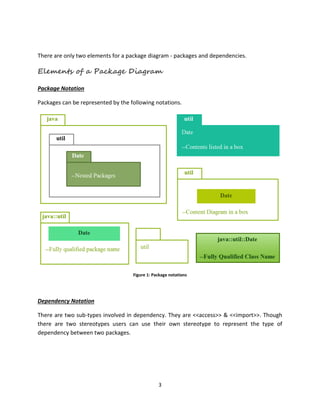
Packages can be represented by the following notations.
Figure 1: Package notations
Dependency Notation
There are two sub-types involved in dependency. They are <<access>> & <<import>>. Though
there are two stereotypes users can use their own stereotype to represent the type of
dependency between two packages.
4
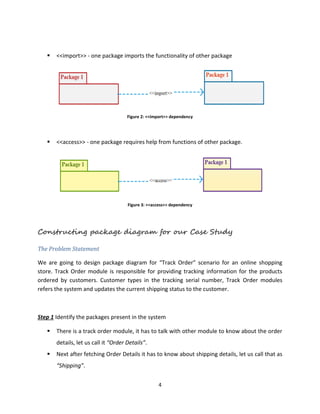
 <<import>> - one package imports the functionality of other package
Figure 2: <<import>> dependency
 <<access>> - one package requires help from functions of other package.
Figure 3: <<access>> dependency
Constructing package diagram for our Case Study
The Problem Statement
We are going to design package diagram for “Track Order” scenario for an online shopping
store. Track Order module is responsible for providing tracking information for the products
ordered by customers. Customer types in the tracking serial number, Track Order modules
refers the system and updates the current shipping status to the customer.
Step 1 Identify the packages present in the system
 There is a track order module, it has to talk with other module to know about the order
details, let us call it “Order Details”.
 Next after fetching Order Details it has to know about shipping details, let us call that as
“Shipping”.
5
 Finally if knows the status of the order it has to update the information to the user, let
us call this module as “UI Framework”.
Figure 4: Identifying the packages
Step 2 Identify the dependencies
 Track order should get order details from
“Order Details” and “Order Details” has to
know the tracking info given by the customer.
Two modules are accessing each other which
suffices <<access>> dual dependency
 To know shipping information, “Shipping” can
import “Track Order” to make its life easier.
Figure 6: Step 2b - Identifying dependencies
Figure 5: Step 2a - Identifying dependency
6
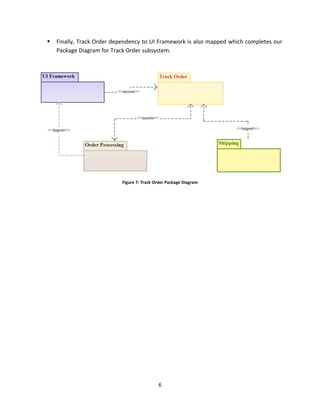
 Finally, Track Order dependency to UI Framework is also mapped which completes our
Package Diagram for Track Order subsystem.
Figure 7: Track Order Package Diagram
7
Review
 Package diagram is used to show high level view of a system
 Package diagram can be used in any UML diagram and can hold
UML diagrams
 Elements of Package diagram – Package notation and dependency

Package Diagram

  • 1.
    1 Session Package Diagram Checklist  Introductionto Package diagram  Explain Package diagram notations  Construct Package diagram for our Case Study
  • 2.
    2 Package Diagram Package diagramsare used to structure high level systems. Packages are used for organizing large system which contains diagrams, documents and other key deliverables. Packages are used as constructs, they can hold class diagrams or other forms of UML diagrams that we have seen so far. Packages can be used as a part of other diagrams also. Package diagram follows hierarchal structure of nested packages. Atomic module for nested package are usually class diagrams. There are few constraints while using package diagrams, they are as follows.  Package name should not be the same for a system, however classes inside different packages could have the same name. For Example, Package::Product & Shipping::Product are allowed.  Users should not use package name delivered by the programming language. For Example, Java provides Date as a package. So, programmers should construct package with name Date.  Packages can include whole diagrams, name of components alone or no components at all.  Fully qualified name of a package has the following syntax Name owing the package :: Name of the package Java :: util :: Date
  • 3.
    3 There are onlytwo elements for a package diagram - packages and dependencies. Elements of a Package Diagram Package Notation Packages can be represented by the following notations. Figure 1: Package notations Dependency Notation There are two sub-types involved in dependency. They are <<access>> & <<import>>. Though there are two stereotypes users can use their own stereotype to represent the type of dependency between two packages.
  • 4.
    4  <<import>> -one package imports the functionality of other package Figure 2: <<import>> dependency  <<access>> - one package requires help from functions of other package. Figure 3: <<access>> dependency Constructing package diagram for our Case Study The Problem Statement We are going to design package diagram for “Track Order” scenario for an online shopping store. Track Order module is responsible for providing tracking information for the products ordered by customers. Customer types in the tracking serial number, Track Order modules refers the system and updates the current shipping status to the customer. Step 1 Identify the packages present in the system  There is a track order module, it has to talk with other module to know about the order details, let us call it “Order Details”.  Next after fetching Order Details it has to know about shipping details, let us call that as “Shipping”.
  • 5.
    5  Finally ifknows the status of the order it has to update the information to the user, let us call this module as “UI Framework”. Figure 4: Identifying the packages Step 2 Identify the dependencies  Track order should get order details from “Order Details” and “Order Details” has to know the tracking info given by the customer. Two modules are accessing each other which suffices <<access>> dual dependency  To know shipping information, “Shipping” can import “Track Order” to make its life easier. Figure 6: Step 2b - Identifying dependencies Figure 5: Step 2a - Identifying dependency
  • 6.
    6  Finally, TrackOrder dependency to UI Framework is also mapped which completes our Package Diagram for Track Order subsystem. Figure 7: Track Order Package Diagram
  • 7.
    7 Review  Package diagramis used to show high level view of a system  Package diagram can be used in any UML diagram and can hold UML diagrams  Elements of Package diagram – Package notation and dependency