• New (Yammer, Lync) 
• Different 
• Rich 
• Engaging 
• Potential for 
innovation 
• Familiar 
• Simple 
• Easy 
• Safe 
2.5% 
Innovators 
Early 
Adopters 
13.5% 
Early Majority 
34% 
Late Majority 
34% 
Laggards 
13.5%
What is Office 365?
Apps and sites from 
Microsoft to help teachers 
and students share and 
learn together in a safe 
and fun way.
What’s included? 
Software & Apps for PC/Mac, tablets and mobiles 
Web services for browsers or apps 
Yammer
Key benefits 
1. Create multiple learning spaces for powerful 
collaboration between classes & schools 
2. Provide immediate feedback 
using real time interactivity 
3. Co-create and collaborate 
using Office 
4. Work across all devices to drive 
efficiency and ease of access 
5. Store up to 1TB and lower costs 
6. Quickly and efficiently assign and track 
documents
Benefit 1 
Create multiple learning spaces for powerful 
collaboration between classes & schools
Benefit 1 
Collaborative learning spaces 
Uses SharePoint. 
• Easy templates for creating 
school intranets. 
• Create communities for 
teachers and interest groups. 
• Create blogs. 
• Share files and media. 
• Add announcements 
and events. 
• Can be expanded to 
handle school 
administration processes. 
• Can allow external 
access (parents).
Benefit 1 
Create a class collaboration site 
Make it work for you!
What is Mosaic? 
Designed by educators for educators, Mosaic 
empowers teachers by helping them build 
collaborative and engaging, interactive online 
spaces which support accelerated learning 
outcomes. 
For students, Mosaic brings education into their 
modern, touch-friendly world and allows them 
to connect with each other and the classroom 
anywhere, on any device, at any time. 
Free to download from the Office Store, Mosaic 
is powered by UI design tool, LiveTiles, and has 
been created to help schools utilise Office 365 
more effectively. 
Benefit 1 
Create a class collaboration site 
with Mosaic!
Safe social for learning 
Uses Yammer. 
• Move from learning as a solo sport to 
learning as collaborative team sport 
• Use familiar social metaphors for learning. 
• Share, like, comment and follow anything. 
• Limit conversations to your class 
or teaching team. 
• Monitor all interactions. 
Benefit 1 
Collaborate with safe social 
learning
Benefit 2 
Provide immediate feedback 
using real time interactivity
Provide real-time 
multimedia feedback 
Uses Lync, OneNote, SharePoint 
1. Provides rich real-time feedback to students. 
2. Enables real-time communication. 
3. Gives time back to teachers. 
4. Enables 1:1 learning. 
Benefit 2
Benefit 2 
Real-time 
interactive learning 
from anywhere 
Voice and video calls, desktop sharing 
• Collaborative whiteboards and 
a pen for co-creation. 
• Record lessons for flipped learning. 
• Sharing screens with schools from 
everywhere – local, rural, global. 
• Create virtual polls.
Benefit 3 
Co-create and collaborate 
using Office
Co-create and 
collaborate 
Using Office 
• Create a new document. 
• Edit rich documents 
without loss of formatting. 
• Share them for real time 
co-authoring. 
Benefit 3
Benefit 3 
Creating shared 
OneNote Notebooks 
Any teacher can do it: 
OneNote Setup Tool 
for Teachers 
1. Add the app to your class page. 
2. Launch it from the left-hand menu. 
3. Name Notebook. 
4. Name Section Groups. 
5. Add students. 
6. Design student notebooks. 
7. Preview. 
8. DONE!
Benefit 4 
Work across all devices to drive 
efficiency and ease of access
Benefit 4 
• Firefox 
• Safari 
• Internet Explorer 
• Chrome 
+ + 
• iPad 
• Windows Phone 
• Windows Tablet 
• iPhone 
• Android 
• Mac 
• PC 
In your browser or on a device…
Benefit 4 
…access to your files is easy
Benefit 4 
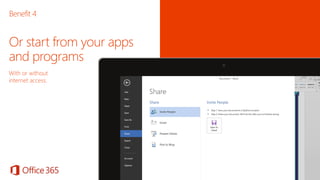
Or start from your apps 
and programs 
With or without 
internet access.
Benefit 5 
Store up to 1TB and 
lower costs
File storage 
and sharing 
Uses OneDrive for Business and SharePoint 
• Provides safe storage (1TB of free space) for 
documents, media and files. 
• Accessible on all devices. 
• Keeps folder up to date. 
• Permits easy ad hoc sharing for students 
and teachers. 
• Online and offline access to all of your files. 
• Real-time co-authoring using Office Online 
(Word, PowerPoint, Excel, OneNote). 
Benefit 5
Benefit 6 
Quickly and efficiently assign and 
track documents
What is Teacher 
Dashboard for O365? 
• Instantly deliver files and documents to 
students in real-time using effortless class 
management tools. 
• Simple multi-class management allows 
teachers to quickly and efficiently assign and 
track documents. 
• Share files from the dashboard, with a 
‘complete’ folder instantly created when 
sharing documents. 
• Teachers get a real-time view of all of their 
students’ OneDrive organised through 
custom groups. 
Benefit 6
Deploying Office 365
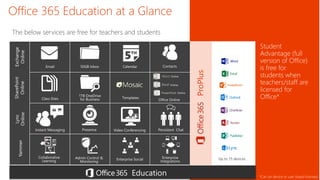
Office 365 Education at a Glance 
Templates 
Education 
ProPlus 
The below services are free for teachers and students 
Email 50GB Inbox Calendar Contacts 
Online 
Online 
Online 
Instant Messaging Presence Video Conferencing Persistent Chat 
Exchange 
Online 
SharePoint 
Online 
Lync 
Online 
Yammer 
Student 
Advantage (full 
version of Office) 
is free for 
students when 
teachers/staff are 
licensed for 
Office* 
Up to 15 devices 
*Can be device or user based licensed 
Admin Control & Enterprise Social 
Monitoring 
Collaborative 
Learning 
Enterprise 
Integrations 
1TB OneDrive 
Class Sites for Business Office Online
Collaboration Using Office 365 Education

Collaboration Using Office 365 Education

  • 2.
    • New (Yammer,Lync) • Different • Rich • Engaging • Potential for innovation • Familiar • Simple • Easy • Safe 2.5% Innovators Early Adopters 13.5% Early Majority 34% Late Majority 34% Laggards 13.5%
  • 3.
  • 4.
    Apps and sitesfrom Microsoft to help teachers and students share and learn together in a safe and fun way.
  • 5.
    What’s included? Software& Apps for PC/Mac, tablets and mobiles Web services for browsers or apps Yammer
  • 6.
    Key benefits 1.Create multiple learning spaces for powerful collaboration between classes & schools 2. Provide immediate feedback using real time interactivity 3. Co-create and collaborate using Office 4. Work across all devices to drive efficiency and ease of access 5. Store up to 1TB and lower costs 6. Quickly and efficiently assign and track documents
  • 7.
    Benefit 1 Createmultiple learning spaces for powerful collaboration between classes & schools
  • 8.
    Benefit 1 Collaborativelearning spaces Uses SharePoint. • Easy templates for creating school intranets. • Create communities for teachers and interest groups. • Create blogs. • Share files and media. • Add announcements and events. • Can be expanded to handle school administration processes. • Can allow external access (parents).
  • 9.
    Benefit 1 Createa class collaboration site Make it work for you!
  • 10.
    What is Mosaic? Designed by educators for educators, Mosaic empowers teachers by helping them build collaborative and engaging, interactive online spaces which support accelerated learning outcomes. For students, Mosaic brings education into their modern, touch-friendly world and allows them to connect with each other and the classroom anywhere, on any device, at any time. Free to download from the Office Store, Mosaic is powered by UI design tool, LiveTiles, and has been created to help schools utilise Office 365 more effectively. Benefit 1 Create a class collaboration site with Mosaic!
  • 11.
    Safe social forlearning Uses Yammer. • Move from learning as a solo sport to learning as collaborative team sport • Use familiar social metaphors for learning. • Share, like, comment and follow anything. • Limit conversations to your class or teaching team. • Monitor all interactions. Benefit 1 Collaborate with safe social learning
  • 12.
    Benefit 2 Provideimmediate feedback using real time interactivity
  • 13.
    Provide real-time multimediafeedback Uses Lync, OneNote, SharePoint 1. Provides rich real-time feedback to students. 2. Enables real-time communication. 3. Gives time back to teachers. 4. Enables 1:1 learning. Benefit 2
  • 14.
    Benefit 2 Real-time interactive learning from anywhere Voice and video calls, desktop sharing • Collaborative whiteboards and a pen for co-creation. • Record lessons for flipped learning. • Sharing screens with schools from everywhere – local, rural, global. • Create virtual polls.
  • 15.
    Benefit 3 Co-createand collaborate using Office
  • 16.
    Co-create and collaborate Using Office • Create a new document. • Edit rich documents without loss of formatting. • Share them for real time co-authoring. Benefit 3
  • 17.
    Benefit 3 Creatingshared OneNote Notebooks Any teacher can do it: OneNote Setup Tool for Teachers 1. Add the app to your class page. 2. Launch it from the left-hand menu. 3. Name Notebook. 4. Name Section Groups. 5. Add students. 6. Design student notebooks. 7. Preview. 8. DONE!
  • 18.
    Benefit 4 Workacross all devices to drive efficiency and ease of access
  • 19.
    Benefit 4 •Firefox • Safari • Internet Explorer • Chrome + + • iPad • Windows Phone • Windows Tablet • iPhone • Android • Mac • PC In your browser or on a device…
  • 20.
    Benefit 4 …accessto your files is easy
  • 21.
    Benefit 4 Orstart from your apps and programs With or without internet access.
  • 22.
    Benefit 5 Storeup to 1TB and lower costs
  • 23.
    File storage andsharing Uses OneDrive for Business and SharePoint • Provides safe storage (1TB of free space) for documents, media and files. • Accessible on all devices. • Keeps folder up to date. • Permits easy ad hoc sharing for students and teachers. • Online and offline access to all of your files. • Real-time co-authoring using Office Online (Word, PowerPoint, Excel, OneNote). Benefit 5
  • 24.
    Benefit 6 Quicklyand efficiently assign and track documents
  • 25.
    What is Teacher Dashboard for O365? • Instantly deliver files and documents to students in real-time using effortless class management tools. • Simple multi-class management allows teachers to quickly and efficiently assign and track documents. • Share files from the dashboard, with a ‘complete’ folder instantly created when sharing documents. • Teachers get a real-time view of all of their students’ OneDrive organised through custom groups. Benefit 6
  • 26.
  • 27.
    Office 365 Educationat a Glance Templates Education ProPlus The below services are free for teachers and students Email 50GB Inbox Calendar Contacts Online Online Online Instant Messaging Presence Video Conferencing Persistent Chat Exchange Online SharePoint Online Lync Online Yammer Student Advantage (full version of Office) is free for students when teachers/staff are licensed for Office* Up to 15 devices *Can be device or user based licensed Admin Control & Enterprise Social Monitoring Collaborative Learning Enterprise Integrations 1TB OneDrive Class Sites for Business Office Online

Editor's Notes

  • #3 One of the benefits of O365 is it allows teachers at both ends of technology adoption to get value out of it. Eg – innovators can use the newer services etc Lync, Yammer Those that are Challenge of every system is broad adoption Diffusion of innovation Works at both end of the spectrum
  • #5 Notes – You can share OneNote workbooks through a class collaboration site Teachers can provide rich feedback to students directly into their work, including annotations, video, audio and drawing. Students and teachers can work on shared notebooks either online or offline. Students and teachers can communicate in real time using Lync, and work together. Use the “walled garden” analogy – you share benefits of a cloud service but it’s your dedicated instance – you can personalise it; as secure as you want it to be. You have more control than other services – look and feel, who sees what, what you can audit. But you have the benefit of a low cost cloud service.
  • #6 https://office.live.com/start/default.aspx
  • #8 Benefit Four
  • #11 Mosaic was designed in consultation with key educators in the Australian school system. It has been designed by educators, for educators and enabled by Microsoft & nSynergy. In simple terms Mosaic, from nSynergy, is a SharePoint template that is intuitive and user friendly – using drag and drop to create sites.  It makes beautiful classrooms in the cloud that are relevant and engaging.  A teacher, student or school will be able to use it out of the box or configure as their own.  It will be packaged as an app and downloadable from the Office store in late July at no cost (yes, it’s FREE!) for K-12 worldwide (English only).  At GA will we have Classroom in the Cloud available.  School portal, student and parent templates will follow.  Screenshots attached.  Go to the Mosaic website for more info.
  • #13 Benefit Two
  • #16 Benefit Two
  • #17 NOTES Many teachers create resources in Word etc and often upload into collaborative tools such as Google docs and they lose the formatting of the document. With O365, the formatting for any document is retained, no matter how complex This can translate to unlimited number of people editing in Word, Excel and OneNote and up to 25 in PPT (because of the graphic intensive nature of PPT)
  • #19 Benefit Two
  • #20 the beauty of O365 is that you can work on PC or Mac and a range of up to 15 devices – ipad, phone etc. If you want to use a browser Any device anywhere gives you a quality rich experience – dedicated apps for all these different platforms. Not all browser based – we have applications, apps, that can be run on your device or on the web. If you want a simple, browser based solution – you can do this via the web only with O365. but that’s not all – when you want to do productive document creation, offline access, - we have dedicated apps and applications that does this in a deeper way.
  • #21 What you can see here is the same piece of paper in one note with full functionality on the left hand
  • #22 …or start from within your apps and programs. No need to be online to continue working or edit your work. Is this implying collaboration Benefits and of apps and software – rich editing, full fidelity, being able to work offline
  • #23 Benefit Six
  • #25 Benefit Two
  • #27 This will be partner slide