By Linda Foulkes
What do I love about
?
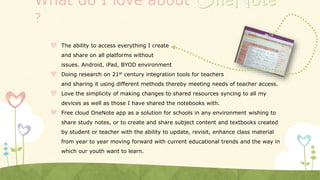
 The ability to access everything I create
and share on all platforms without
issues. Android, iPad, BYOD environment
 Doing research on 21st century integration tools for teachers
and sharing it using different methods thereby meeting needs of teacher access.
 Love the simplicity of making changes to shared resources syncing to all my
devices as well as those I have shared the notebooks with.
 Free cloud OneNote app as a solution for schools in any environment wishing to
share study notes, or to create and share subject content and textbooks created
by student or teacher with the ability to update, revisit, enhance class material
from year to year moving forward with current educational trends and the way in
which our youth want to learn.
What do I love about
?
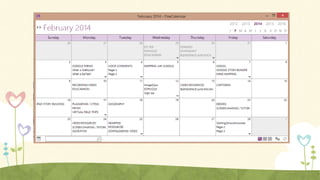
 The Add-in
presents a calendar view of dates and pages
you have last created or modified.
Wonderful to use to inspire teachers as one can
load an image electronically as it shows what’s new as well as the type of tool
one is providing as a resource through OneNote!
 Download OneCalendar as a separate tool [either on desktop or taskbar]
OR
 Download the full Add-in
to have access to the calendar directly in OneNote
What do I love about
?
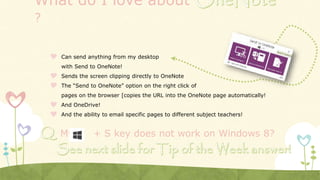
 Can send anything from my desktop
with Send to OneNote!
 Sends the screen clipping directly to OneNote
 The “Send to OneNote” option on the right click of
pages on the browser [copies the URL into the OneNote page automatically!
 And OneDrive!
 And the ability to email specific pages to different subject teachers!
My + S key does not work on Windows 8?
What do I love about
?
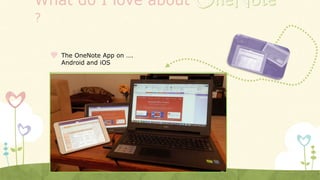
 The OneNote App on ….
Android and iOS
How I collaborate & use
to learning?
 Share my BYOD for Teachers OneNote resource notebook at conferences as well
as with teachers at schools in the Western Cape.
 To show teachers how easy it is to mark classwork with inking capability and
collaborate with students giving them feedback, or using the tool for pre-recorded
lessons should a student miss a lesson or require a tutorial.
 Inspire teachers and students making sure my delivery has real value and explore
with them – support them. Little bits of learning for a busy teacher!
 Host TeachMeets@Elkanah
 Create a greater awareness using social media to post and tweet ways to use
Microsoft Office and OneNote in and out of the classroom.
SHARE MOTIVATE
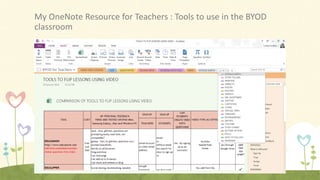
My OneNote Resource for Teachers : Tools to use in the BYOD
classroom
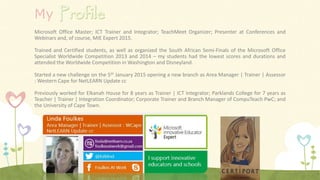
My
Microsoft Office Master; ICT Trainer and Integrator; TeachMeet Organizer; Presenter at Conferences and
Webinars and, of course, MIE Expert 2015.
Trained and Certified students, as well as organized the South African Semi-Finals of the Microsoft Office
Specialist Worldwide Competition 2013 and 2014 – my students had the lowest scores and durations and
attended the Worldwide Competition in Washington and Disneyland.
Started a new challenge on the 5th January 2015 opening a new branch as Area Manager | Trainer | Assessor
: Western Cape for NetLEARN Update cc
Previously worked for Elkanah House for 8 years as Trainer | ICT Integrator; Parklands College for 7 years as
Teacher | Trainer | Integration Coordinator; Corporate Trainer and Branch Manager of CompuTeach PwC; and
the University of Cape Town.

OneNoteSway - as Presentation

  • 1.
  • 2.
    What do Ilove about ?  The ability to access everything I create and share on all platforms without issues. Android, iPad, BYOD environment  Doing research on 21st century integration tools for teachers and sharing it using different methods thereby meeting needs of teacher access.  Love the simplicity of making changes to shared resources syncing to all my devices as well as those I have shared the notebooks with.  Free cloud OneNote app as a solution for schools in any environment wishing to share study notes, or to create and share subject content and textbooks created by student or teacher with the ability to update, revisit, enhance class material from year to year moving forward with current educational trends and the way in which our youth want to learn.
  • 3.
    What do Ilove about ?  The Add-in presents a calendar view of dates and pages you have last created or modified. Wonderful to use to inspire teachers as one can load an image electronically as it shows what’s new as well as the type of tool one is providing as a resource through OneNote!  Download OneCalendar as a separate tool [either on desktop or taskbar] OR  Download the full Add-in to have access to the calendar directly in OneNote
  • 5.
    What do Ilove about ?  Can send anything from my desktop with Send to OneNote!  Sends the screen clipping directly to OneNote  The “Send to OneNote” option on the right click of pages on the browser [copies the URL into the OneNote page automatically!  And OneDrive!  And the ability to email specific pages to different subject teachers! My + S key does not work on Windows 8?
  • 7.
    What do Ilove about ?  The OneNote App on …. Android and iOS
  • 8.
    How I collaborate& use to learning?  Share my BYOD for Teachers OneNote resource notebook at conferences as well as with teachers at schools in the Western Cape.  To show teachers how easy it is to mark classwork with inking capability and collaborate with students giving them feedback, or using the tool for pre-recorded lessons should a student miss a lesson or require a tutorial.  Inspire teachers and students making sure my delivery has real value and explore with them – support them. Little bits of learning for a busy teacher!  Host TeachMeets@Elkanah  Create a greater awareness using social media to post and tweet ways to use Microsoft Office and OneNote in and out of the classroom. SHARE MOTIVATE
  • 9.
    My OneNote Resourcefor Teachers : Tools to use in the BYOD classroom
  • 10.
    My Microsoft Office Master;ICT Trainer and Integrator; TeachMeet Organizer; Presenter at Conferences and Webinars and, of course, MIE Expert 2015. Trained and Certified students, as well as organized the South African Semi-Finals of the Microsoft Office Specialist Worldwide Competition 2013 and 2014 – my students had the lowest scores and durations and attended the Worldwide Competition in Washington and Disneyland. Started a new challenge on the 5th January 2015 opening a new branch as Area Manager | Trainer | Assessor : Western Cape for NetLEARN Update cc Previously worked for Elkanah House for 8 years as Trainer | ICT Integrator; Parklands College for 7 years as Teacher | Trainer | Integration Coordinator; Corporate Trainer and Branch Manager of CompuTeach PwC; and the University of Cape Town.