Introduction to Office 365 Ogranized By Palestinian SharePoint User Group [PSUG]By Saed Shela
2 June, 2011Title2About Palestinian SharePoint User GroupPSUG was started on May 2nd 2010 with the help, time and collaboration of many people for the sheer purpose of furthering their colleague's interest in the SharePoint Platform. We encourage all walks to come and spend time with the group. Everyone from developers to project managers could benefit from the varied educational sessions PSUG holds on a monthly basis. The intent of the PSUG is to allow members to share ideas, ask questions, hear presentations from experts and interact with other members, be they end-users, system administrations, site administrators, developers or web designers.www.palsug.cominfo@palsug.com
Sponsors Experts Training Center : ETC is a recognized leader in providing integrated training solutions in Information Technology, business management, Financial analysis and management and journalism in PalestineSteadyPoint : SteadyPoint delivers set of superior software products and services , we are specialized in Collaboration , Document Management , BI , and Business Process solutions for small , medium and enterprise firms.
Saed ShelaFounder / CTO  @ SteadyPointPresident of PSUG MCPD & MCITP SharePoint 2010 sshela@steadypoint.net@saedshela
Agenda Office 365 ValueWhy Office 365?Subscription FeaturesImplementationSupport and Helpdesk
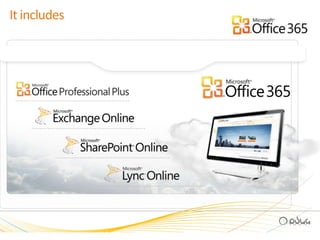
It includes
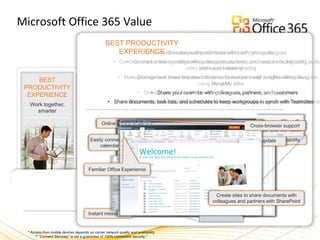
Microsoft Office 365 ValueBEST PRODUCTIVITY EXPERIENCESimultaneously edit documents with your colleagues
Conduct online meetings with colleagues, partners, and customers, including audio, video and screen sharing
Manage and share important documents and personal  insights with colleagues using My sites
Share your calendar with colleagues, partners, and customers
Share documents, task lists, and schedules to keep workgroups in synch with Teamsites
Simultaneously edit documents with your colleagues
Conduct online meetings with colleagues, partners, and customers, including audio, video and screen sharing
Manage and share important documents and personal  insights with colleagues using My sites
Share your calendar with colleagues, partners, and customers
Share documents, task lists, and schedules to keep workgroups in synch with Teamsites
Simultaneously edit documents with your colleagues
Conduct online meetings with colleagues, partners, and customers, including audio, video and screen sharing
Manage and share important documents and personal  insights with colleagues using My sites
Share your calendar with colleagues, partners, and customers
Share documents, task lists, and schedules to keep workgroups in synch with Teamsites
Simultaneously edit documents with your colleagues
Conduct online meetings with colleagues, partners, and customers, including audio, video and screen sharing
Manage and share important documents and personal  insights with colleagues using My sites
Share your calendar with colleagues, partners, and customers
Share documents, task lists, and schedules to keep workgroups in synch with Teamsites
Simultaneously edit documents with your colleagues
Conduct online meetings with colleagues, partners, and customers, including audio, video and screen sharing
Manage and share important documents and personal  insights with colleagues using My sites

Office 365 presentation

  • 1.
    Introduction to Office365 Ogranized By Palestinian SharePoint User Group [PSUG]By Saed Shela
  • 2.
    2 June, 2011Title2AboutPalestinian SharePoint User GroupPSUG was started on May 2nd 2010 with the help, time and collaboration of many people for the sheer purpose of furthering their colleague's interest in the SharePoint Platform. We encourage all walks to come and spend time with the group. Everyone from developers to project managers could benefit from the varied educational sessions PSUG holds on a monthly basis. The intent of the PSUG is to allow members to share ideas, ask questions, hear presentations from experts and interact with other members, be they end-users, system administrations, site administrators, developers or web designers.www.palsug.cominfo@palsug.com
  • 3.
    Sponsors Experts TrainingCenter : ETC is a recognized leader in providing integrated training solutions in Information Technology, business management, Financial analysis and management and journalism in PalestineSteadyPoint : SteadyPoint delivers set of superior software products and services , we are specialized in Collaboration , Document Management , BI , and Business Process solutions for small , medium and enterprise firms.
  • 4.
    Saed ShelaFounder /CTO @ SteadyPointPresident of PSUG MCPD & MCITP SharePoint 2010 sshela@steadypoint.net@saedshela
  • 5.
    Agenda Office 365ValueWhy Office 365?Subscription FeaturesImplementationSupport and Helpdesk
  • 7.
  • 8.
    Microsoft Office 365ValueBEST PRODUCTIVITY EXPERIENCESimultaneously edit documents with your colleagues
  • 9.
    Conduct online meetingswith colleagues, partners, and customers, including audio, video and screen sharing
  • 10.
    Manage and shareimportant documents and personal insights with colleagues using My sites
  • 11.
    Share your calendarwith colleagues, partners, and customers
  • 12.
    Share documents, tasklists, and schedules to keep workgroups in synch with Teamsites
  • 13.
    Simultaneously edit documentswith your colleagues
  • 14.
    Conduct online meetingswith colleagues, partners, and customers, including audio, video and screen sharing
  • 15.
    Manage and shareimportant documents and personal insights with colleagues using My sites
  • 16.
    Share your calendarwith colleagues, partners, and customers
  • 17.
    Share documents, tasklists, and schedules to keep workgroups in synch with Teamsites
  • 18.
    Simultaneously edit documentswith your colleagues
  • 19.
    Conduct online meetingswith colleagues, partners, and customers, including audio, video and screen sharing
  • 20.
    Manage and shareimportant documents and personal insights with colleagues using My sites
  • 21.
    Share your calendarwith colleagues, partners, and customers
  • 22.
    Share documents, tasklists, and schedules to keep workgroups in synch with Teamsites
  • 23.
    Simultaneously edit documentswith your colleagues
  • 24.
    Conduct online meetingswith colleagues, partners, and customers, including audio, video and screen sharing
  • 25.
    Manage and shareimportant documents and personal insights with colleagues using My sites
  • 26.
    Share your calendarwith colleagues, partners, and customers
  • 27.
    Share documents, tasklists, and schedules to keep workgroups in synch with Teamsites
  • 28.
    Simultaneously edit documentswith your colleagues
  • 29.
    Conduct online meetingswith colleagues, partners, and customers, including audio, video and screen sharing
  • 30.
    Manage and shareimportant documents and personal insights with colleagues using My sites